Mori
Shared memory layer for AI coding agents with dream pipeline distillation, session grounding, and multi-instance coherence.
Documentation

Mori (森) — a governed shared-memory layer for AI coding agents.
Mori gives an agent provenance-scoped memory: the decisions and patterns a human chose to keep, surfaced to every session — and only where they apply. It's the institutional memory your agents pull from, self-hosted and agent-neutral, so the knowledge outlives whichever model you're using this year.
What it doesn't do — and I tested this at length — is control what an agent does. No memory layer can. Across a multi-model, multi-harness stress test (5,000+ runs, a dozen models), the most capable coding model broke the build every time; the same model did the right thing, then the wrong thing, on identical input; and an agent handed a tool that flagged its own change as build-breaking read the warning and shipped the break anyway. Capability doesn't fix this, and neither does better retrieval. What holds is enforcement at a boundary the agent can't reach — and that's a separate piece of work.
📄 The research behind this — the Promotion-Boundary Governance Framework: what can and can't actually be enforced on an AI coding agent, every null, every retraction. Read the whitepaper →
Why use mori?
You're right to be sceptical of "memory systems" — most are a vector DB with a retrieval prompt bolted on. So I ran the experiments, published the nulls, and lead with the result that held up.
The failure mode mori fixes is cross-contamination. Curation decides what to keep;
provenance decides where it's valid — and across a team's many repos that's the line
between a shared brain and a liability. A memory that's true in one repo, surfaced while you
work another, makes the agent confidently reach for an API that doesn't exist here —
retrieval interference. I reproduced it and the fix: with out-of-scope memory in the brief,
agents chased phantom APIs in 20/20 runs; with provenance-safe scoping (MORI_BRIEF_SCOPE,
on by default), 0/20 — across two independent frontier-class models (Fisher p ≈ 0). The
memory was deliberately seeded from a prior repo, so it's a stress test of what canon-drift
does over months, not a natural-incidence rate — but the mechanism is clean and
model-independent. Ungated memory isn't shared memory — it's cross-contamination.
The other failure mode is obedience — and it's where mori is going, not where it is today. Provenance fixes what an agent knows; it doesn't fix what an agent does. In a pre-registered cross-repo benchmark, I gave frontier agents a tool to see downstream impact and a plain-language warning that a change would break a build — and they broke it anyway, 15/15, across four models and three harnesses. Information without enforcement is fatal — you cannot govern an enterprise in token-space. That result is the thesis behind mori's next layer: governed playbooks — a deterministic, pre-compute gate that checks a repo's lockfiles against human-approved patterns and refuses an unsafe migration before it runs, independent of prompt wording or model obedience. (Scope: pre-registered npm-dependency migrations; the gate is built and benchmarked, not yet a shipped product surface — I lead with what I proved, not what I hope. The full argument is the whitepaper.)
Multi-Instance Visibility
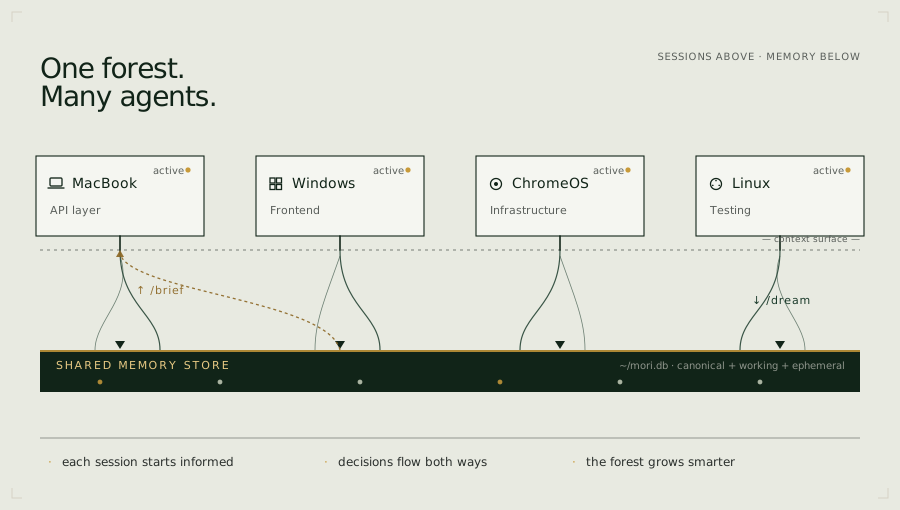
If you run AI coding agents across multiple machines, profiles, or in a team — one focused on the API layer, another on the frontend, a third on infrastructure — you already know the problem: each instance is brilliant in isolation, but none of them know what the others decided.
Instance B doesn't know that Instance A just changed the auth contract. Instance C doesn't know that Instance B's deployment assumptions shifted. They find out the hard way, mid-task, when something breaks.
Mori gives every instance the same shared picture. Every coding agent instance sends
its session events to the shared Mori server; the dream pipeline distils those events from
all instances into a unified memory store, and /brief surfaces them at the start of
any session. Be clear about what that buys, though: a shared picture is visibility, not
coherence you can bank on. Surfacing what Instance A decided does not make Instance B act
on it — a coding agent can read another instance's change and proceed against it anyway (I
measured exactly that, 15/15). So this is real value for a cooperative team — everyone
opens a session knowing what the others changed — but it is awareness, not enforcement.
Making one instance actually honour another's decision is the enforcement problem, and where
it can be solved at all it's solved at the promotion boundary on the committed artifact —
not by what any session was shown.
Quickstart
1. Deploy your server
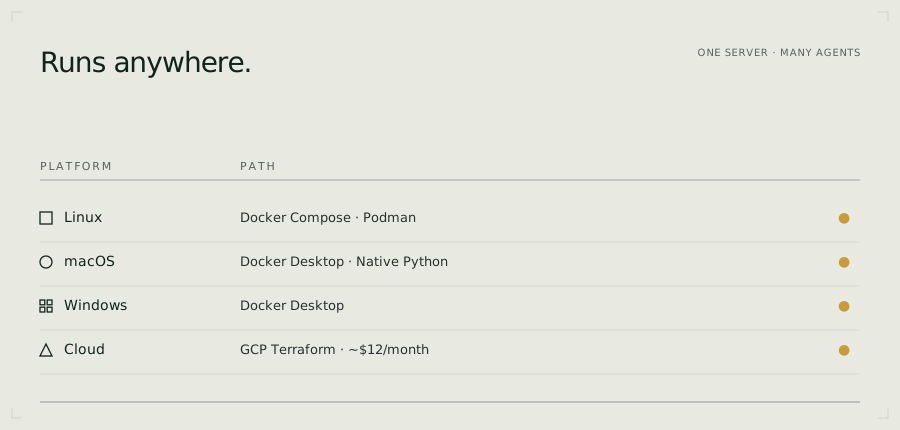
Every Mori instance is yours — deployed into your own account, never shared. Pick a path:
Cloud — deploy into your own account:
| Platform | Persistence | ~Cost | |
|---|---|---|---|
 | Railway + free Postgres (Neon / Supabase) | ✅ free Postgres | ~$5/mo + $0 Postgres |
 | Render (persistent disk in config) | ✅ SQLite on disk | ~$7/mo |
 | Cloud Run + free Postgres (Neon / Supabase) | ✅ free Postgres | Pay-per-use |
 | GitHub Codespaces — evaluate Mori with no local setup | ⚠️ ephemeral | free tier |
Fly.io (CLI): free persistent volume + SQLite, ~$3–5/mo — see one-click-deploy.md.
Persistence note: SQLite needs a persistent disk or volume; stateless platforms (Railway, Cloud Run, Render free tier) lose data on restart without Postgres. The deploy script and guide walk through connecting a free Neon or Supabase database — the recommended $0 durable path. Codespaces are ephemeral by design — use them to evaluate Mori, then deploy to a persistent host when you're ready.
Full guide: docs/getting-started/one-click-deploy.md
 macOS (Homebrew):
brew tap fjwood69/mori
brew install mori
mori-setup   # wizard: API key, LLM provider, start service
Or run locally with Docker Compose:
git clone https://github.com/fjwood69/mori.git
cd mori
cp deploy/homelab/.env.example deploy/homelab/.env
# Edit .env: set MORI_API_KEY to your provider key (Novita, DeepInfra, OpenAI, …)
# and MORI_BASE_URL to the provider's OpenAI-compatible endpoint.
docker compose -f deploy/homelab/docker-compose.yml up -d
2. Verify
curl http://localhost:8968/health
# {"status":"ok","service":"mori-advisor"}
3. Connect your agent
Claude Code — install as a plugin (recommended). Inside Claude Code, run:
/plugin marketplace add fjwood69/mori
/plugin install mori@mori
You'll be prompted for your Mori server URL and API key on enable (the key is stored
in your OS keychain, not in settings.json). Then /reload-plugins or restart.
The same plugin package (plugins/mori/) also targets OpenCode, Codex,
Cursor, and Google Antigravity — MCP connection and skills work across all five;
client-specific hooks land per platform. See the platform guides.
Or use the legacy installer scripts (bespoke; superseded by the plugin):
./scripts/legacy/install-mori-claude.sh   # Claude Code
./scripts/install-mori-cursor.sh          # Cursor
powershell -File scripts/legacy/install-mori-claude.ps1   # Windows
Platform guides
| Platform | Install | Full guide |
|---|---|---|
| Claude Code | Plugin: /plugin marketplace add fjwood69/mori → /plugin install mori@mori (or ./scripts/legacy/install-mori-claude.sh) | docs/getting-started/claude-code.md |
| OpenCode | ./scripts/install-mori-opencode.sh (or .\scripts\install-mori-opencode.ps1 on Windows) | docs/getting-started/opencode.md |
| Codex | Plugin package plugins/mori/ → codex plugin install mori | docs/getting-started/codex.md |
| Cursor | Plugin package plugins/mori/ (or ./scripts/install-mori-cursor.sh) | docs/getting-started/cursor.md |
| Google Antigravity IDE | Plugin package plugins/mori/ (or ./scripts/install-mori-antigravity.sh) | docs/getting-started/antigravity.md |
| Cline | ./scripts/install-mori-cline.sh | docs/getting-started/cline.md |
Capabilities
| Capability | What it does | Slash command |
|---|---|---|
| Dream pipeline | Auto-distils session events into structured memories | /dream |
| Session grounding | Loads shared context at session start — not per-query RAG; lightweight delta re-grounding after context compaction | /brief, /brief --post-compact |
| Memory search | Ranked full-text search and browse across the shared store (SQLite FTS5 / Postgres tsvector) | /pensieve |
| Web dashboard | Built-in memory browser served at the mori root URL — search, browse, unfurl | — |
| Universal ingestion | Feed PDFs, images, git, transcripts into the memory store | /ingest |
| Strategic review | LLM guidance with focus areas and auto-injected standards | /consult |
| Requirements tracking | Lightweight project checklist surfaced via /brief | /req |
| Governance | Capability-scoped API keys (read/write/dreamer roles), versioning, trusted dreamers, rollback, attribution; a universal in-transaction write-audit + tier-capability & anatomy enforcement at the store.write chokepoint (flag-gated, audit-mode by default) | — |
| Curation queue | Ingestion's canonical/standard proposals await trusted-dreamer sign-off in a review UI (/review, with source/diff/approve-reject) before becoming canonical — memory that's curated, not just accumulated | — |
| One-click deploy | Stand up your own server on Render / Railway / Fly / Cloud Run (or free managed Postgres + any stateless host) | — |
| NATS messaging | Real-time cross-device awareness | /nats |
| Inter-agent messaging | Send tasks, questions, and decisions across the device network | /msg |
| Skill deployment | Push slash commands to all devices in one step | /update |
Full reference: docs/reference/slash-commands.md
Pairs well with
Mori is your team's earned memory — not a docs cache. It remembers what your agents decided and learned across sessions and devices. It complements tools that supply live external knowledge:
- Context7 — up-to-date, version-specific library and framework documentation injected into the prompt. Where Mori remembers "we chose X, and why", Context7 supplies "here is X's current API." Different layer, complementary purpose.
- Your platform's own docs — for fast-moving tool and harness behaviour (hook schemas, config formats), consult the current official docs rather than training-data recall. See the Read the current manual, not your memory practice in agent-working-practices.
How it works
Dream pipeline — the proposal half of the gate
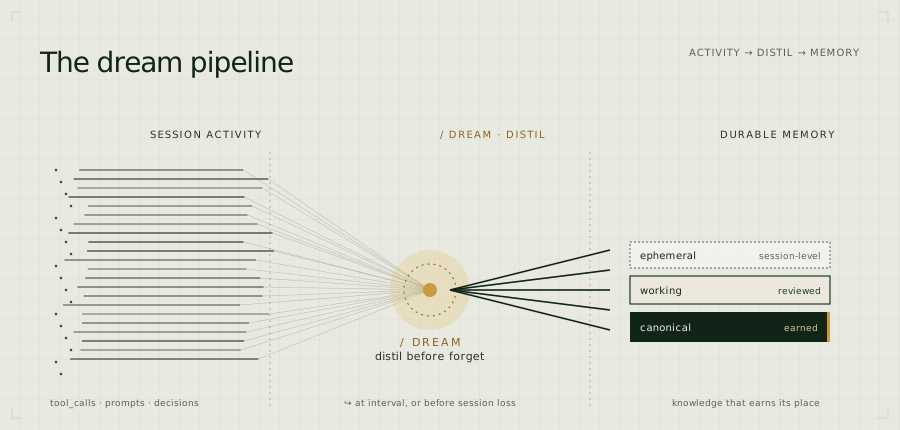
The dream pipeline is the proposal mechanism, not the product. It runs at high recall: it turns session activity into candidate memories and deliberately over-produces — recall over precision — because nothing it emits reaches canon without a human promoting it (see Governance below). That division of labour — machine proposes, human disposes — is the gate the benchmark measures.
Session events are captured via agent lifecycle hooks (Claude Code, Cursor, Antigravity) and distilled into structured memories by a configurable LLM.
Hook fires  →  POST /api/events/raw  →  events table (SQLite/Postgres)
                                             ↓
PreCompact  →  POST /api/precompact  →  dream_run() reads since watermark
                                             ↓
                                      LLM distills events → structured memories
                                             ↓
                                      memories written to store (with attribution)
                                             ↓
                                      watermark advanced
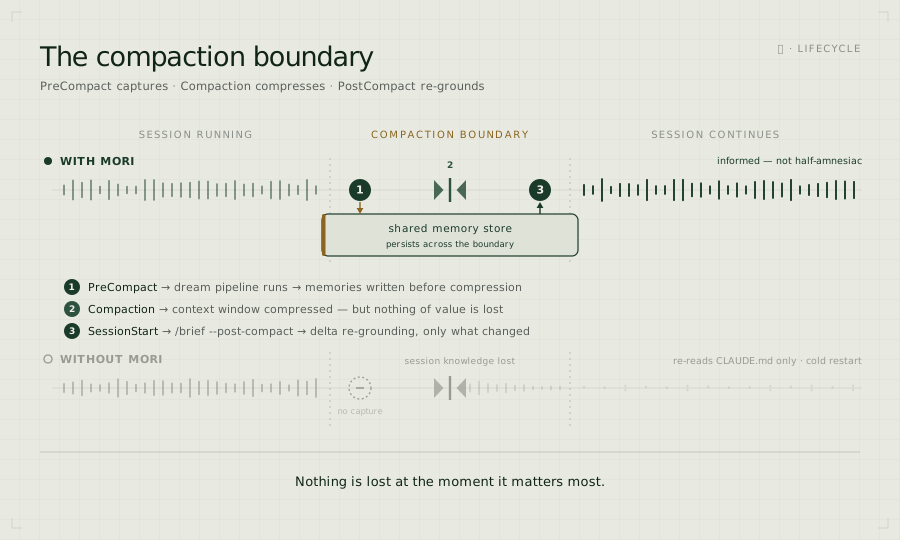
The PreCompact hook triggers an immediate synchronous dream before context
compression — so nothing is lost at the moment it matters most.
Its counterpart works after compression: a SessionStart hook fires when the
session resumes post-compaction (source: "compact") and runs /brief --post-compact
— a lightweight delta that surfaces only what changed in the shared store since
your last brief (new, superseded, and evicted memories), skipping the full base
reload and the freshness scan. PreCompact preserves what this session learned;
SessionStart re-grounds it on what every other instance changed while it was busy.
What it captures: PostToolUse, PostToolUseFailure, PreCompact,
UserPromptSubmit, Stop — tool calls, prompts, errors, stop reasons,
session ID, hostname, working directory, transcript path, and (on Stop)
the assistant's own reasoning — the plans, analysis, and decisions behind
each turn.
Governance — the gate
Proposals don't become canon on their own. Both the dream pipeline (your sessions)
and the autonomous-agent intake path (other agents) write to a review queue, not
to canon. A trusted dreamer — a human — reviews candidates and promotes the
load-bearing ones; every promotion is versioned and write_audit-logged. Agents
read canon; they never silently write it.
Underneath, every write — the dreamer's included — passes one audited authorization
chokepoint: a structured provenance lands a write_audit row in the same transaction as the
write, and tier-capability + anatomy enforcement gate who may write what (both ship
audit-mode by default, so the policy is measured before it bites).
To keep that review cheap, mori rolls up near-duplicate candidates so the reviewer disposes of a convention once instead of many times. The proposal side runs at high recall; the gate is what makes high recall affordable instead of exhausting. This is the line the benchmark measures — and the commercial seam too: standards and policy packs enter through the same gate (signed in, versioned, audited), not by trusting the filesystem.
Memory store
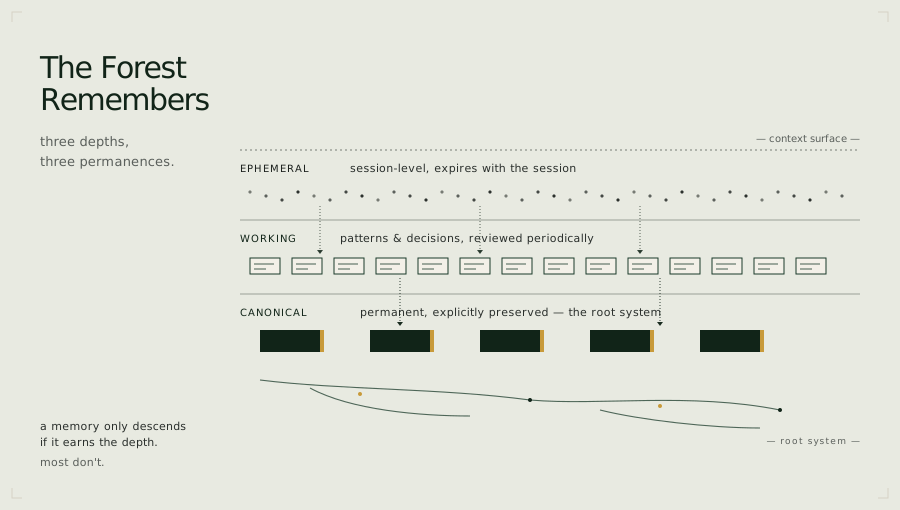
Memories live in the store — SQLite (memories.db) for solo/sync deployments,
Postgres for team/async — with three tiers:
SQLite vs Postgres is a trust boundary, not just a backend toggle. SQLite is the one-human, one-writer mode — the zero-config default for a single user on one machine, where you are the only thing that writes. Postgres is the team mode — many machines, many agents, concurrent writers — and it's mandatory for anything beyond solo: SQLite's file-level locking serialises writes and cannot sustain it. Capabilities that exist because multiple writers do (the autonomous-agent intake / governance pipeline) are Postgres-only by design. The curation queue still runs on SQLite in degraded single-writer form — one human gating their own agents — so the gate is never unavailable; it just doesn't need concurrency until a team does. Choose Postgres for production/team use.
| Tier | Scope | Lifecycle |
|---|---|---|
| Ephemeral | Session summaries | Auto-expire unless explicitly saved |
| Working | Patterns, decisions, project context | Flagged after 30 days without retrieval |
| Canonical | Explicitly promoted by a trusted dreamer | Indefinite, freshness-checked via /brief |
Versioning, diff, rollback, attribution, and governance built in. See docs/reference/configuration.md.
Universal ingestion
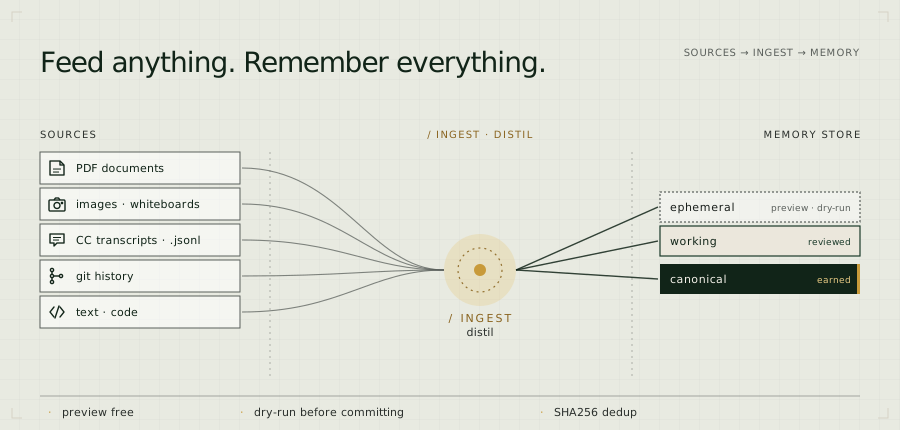
New team members start cold. /ingest bootstraps the memory store from
existing source material — applying the same distillation pipeline that
powers the dream phase.
# Preview (zero cost, no LLM):
/ingest --source ~/my-project --preview

# Dry-run to validate extraction quality:
/ingest --source ~/my-project --dry-run --focus decisions

# Commit:
/ingest --source ~/my-project --focus all --tier working
Supported: PDF, images/whiteboards (Kimi K2.6 vision), CC transcripts
(.jsonl), git history (--since 30d), text and code.
Works with remote servers: /ingest reads files on the client device and
sends content over the wire — no shared filesystem needed. Works whether
mori-advisor is running locally or on GCE.
Cost guard: --max-cost (default $5.00) aborts before spending. Preview
is always free. SHA256 dedup prevents re-ingesting the same content.
Strategic consultation (/consult)
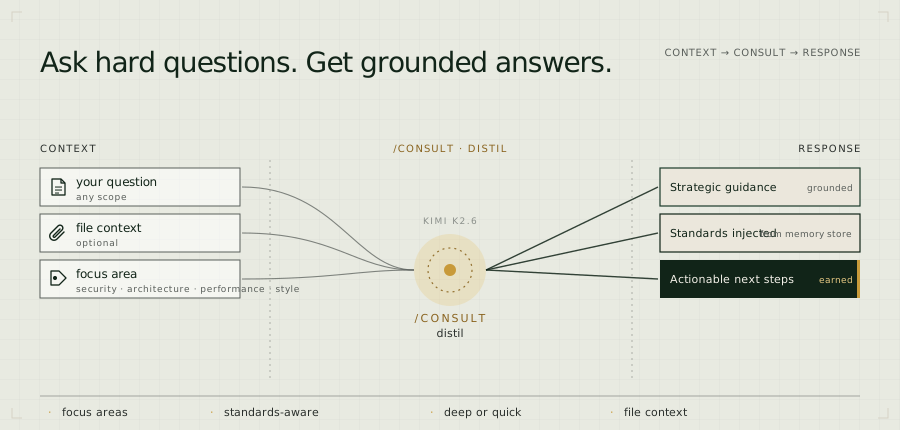
Ask a question mid-session and get strategic guidance grounded in your actual project context — not generic advice. When a focus area is specified, relevant team standards are automatically pulled from the memory store and injected alongside your question. The advisor checks against your own baseline, not a textbook.
# Architecture review with file context:
/consult "should we move auth to a separate service?" --focus architecture

# Security review against your team's own baseline:
/consult "review this handler" --focus security --file src/auth.py

# Chain tool output directly into the advisor:
/consult "review this" --focus security --file src/auth.py --file snyk-report.json
Works with remote servers: --file reads files on the client device and injects content into the advisor prompt — no shared filesystem required. Works whether mori-advisor runs locally or on GCE.
Focus areas: general, architecture, security, performance, style
Depth levels: quick (fast scan), balanced (default), deep (thorough)
Standards-aware: set MORI_STANDARDS_DIR to a directory of .md files
and Mori imports them as protected memories. /consult --focus security
injects your security baseline into the advisor call, so /consult reviews
against your rules, not a textbook. (That's the advisor — a single, scoped
review request — reading your standards; it is not a claim that your coding
agent obeys them mid-task. Surfaced standards inform; they don't bind.)
Inter-agent messaging (/msg)
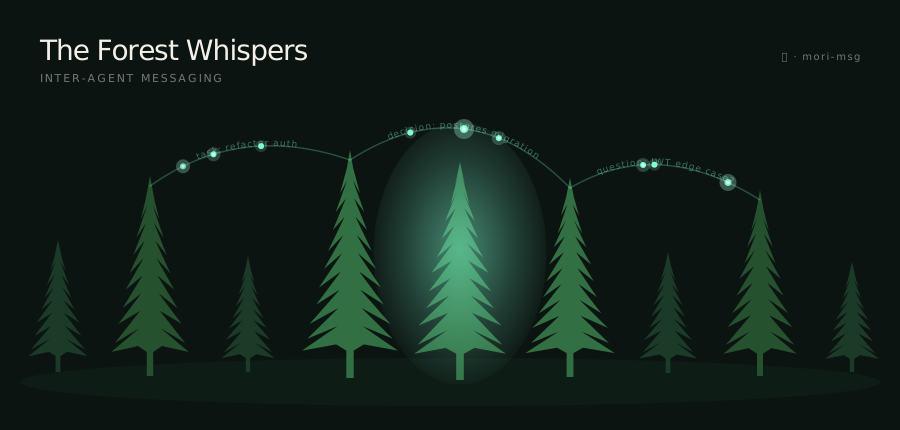
Delegate tasks, ask questions, and share decisions across your Claude Code
instances — without a shared session. Messages are typed, reply-threaded, and
picked up at the next /brief. The mori-msg daemon receives messages
server-side: decision messages are written directly to the memory store
without any human session on the receiving end.
# From your laptop, delegate a task to a workstation:
/msg send workstation task "Refactor auth middleware — extract rate limiting into its own module"

# The workstation picks it up at next /brief and acks:
/msg ack a3f9c2b1 "on it"

# Back on your laptop, check the reply:
/msg inbox

# The workstation marks it done when finished:
/msg done a3f9c2b1
Message types: task, decision, question, reply, ack, done, broadcast
Requires the mori-msg daemon running alongside mori-advisor (included in
the default pod stack). See docs/reference/msg.md for full reference.
Web dashboard
Not everyone who needs the shared memory runs a Claude Code session. Mori serves a built-in memory browser at its own root URL — just open the server in a browser:
http://<your-mori-host>:8968/
Enter any valid API key (the same MORI_API_KEYS your clients use) and you can search,
browse, and click any card to unfurl its full body and provenance (origin clients, tier,
retrieval count, freshness). The page is served same-origin, so it talks to the very
mori instance it loaded from — no base URL to configure, no separate server to run. It's a
single dependency-free file (vanilla JS, no build step, no CDN), backed by a small read
REST API:
| Route | Returns |
|---|---|
GET /api/memories?query=&type=&tag=&client=&since=&limit= | Ranked full-text (or recency) list — lean shape, no body |
GET /api/memories/{name} | One memory in full — body + provenance (lazy-loaded on unfurl) |
GET /api/events?session_id=&client=&since=&limit= | Session event log, newest first |
The dashboard and its routes are read-only and API-key gated (X-Api-Key); write
actions (delete, trusted-dreamer review) are deferred until the read surface is validated.
The page is also available standalone (dashboard/index.html) if you'd rather host it
elsewhere and point it at a mori instance — set MORI_CORS_ORIGINS for that cross-origin
case (it's unnecessary for the built-in same-origin serving).
Architecture
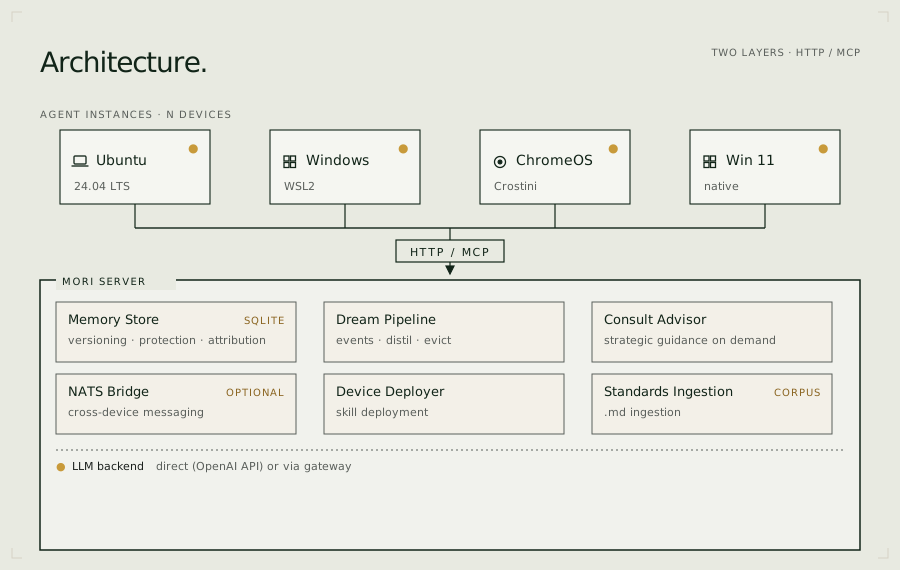
Configuration
Configuration reference → docs/reference/configuration.md Recommended models → docs/reference/models.md For teams → docs/for-teams.md Team configuration reference → docs/reference/team-configuration.md
Key environment variables:
| Variable | Default | Description |
|---|---|---|
MORI_PROVIDER_MODE | bifrost | direct or bifrost |
MORI_API_KEY | — | Provider key (required in direct mode) |
MORI_BASE_URL | — | OpenAI-compatible base URL |
MORI_MODEL | moonshotai/kimi-k2.6 | Advisor + consult model |
MORI_DREAM_MODEL | falls back to MORI_MODEL | Dream + ingest distillation model |
MORI_FAST_MODEL | deepseek/deepseek-v4-flash | Contradiction scan + freshness checks |
MORI_API_KEYS | — | Named client API keys: name:secret,name:secret,... — see Authentication |
MORI_BRIEF_SCOPE | safe | safe = provenance-routed brief (cross-project origin-bound canon withheld; explicit scope:global only); all = legacy, no scoping |
MORI_TRUSTED_DREAMERS | — | Comma-separated trusted hostnames |
MORI_DREAM_INTERVAL | 60 | Dream cron interval (minutes) |
MORI_STANDARDS_DIR | — | Path to team standards .md files |
MORI_MSG_HEADLESS_ENABLED | false | Spawn headless Claude for incoming tasks |
MORI_MSG_HEADLESS_TRUSTED | — | Comma-separated hostnames allowed to trigger headless CC |
Authentication: Set MORI_API_KEYS to give each client a named key. Without it the server starts in open mode (fine for private Tailscale networks; always set keys for shared or internet-accessible deployments). Generate secrets with python3 -c "import secrets; print(secrets.token_hex(32))". Full details: docs/reference/configuration.md → Authentication.
Building
git clone https://github.com/fjwood69/mori.git
cd mori
podman build -t localhost/mori-advisor:latest .
# Or: docker build -t mori-advisor:latest .
License

AGPL-3.0 — see LICENSE. Commercial licences available — see COMMERCIAL.md. Contributions require a one-time CLA — see CONTRIBUTING.md.
