Mobilebox
Cloud Android phones for AI agents: read the screen, tap, type, install APKs, park and resume.
Hosted MCP Server
npx add-mcp 'https://mobilebox.dev/mcp'Installs into Claude Code, Codex, Cursor and more
Documentation

Cloud Android phones your agent drives over MCP or REST.
It reads the screen as numbered elements, then taps, types and installs apps.
Website · Docs · Quickstart · MCP registry





Phone screens are unedited API screenshots from one recorded run; steps and times are its MCP calls, from the home screen on. Playback shortened.

Ready time: create to ready, three runs on 2026-11-04 (RUNS.md).
Works with
 Claude Code
 Codex
 Cursor
 any MCP client
- Listed in the official MCP registry as
dev.mobilebox/mobilebox, tool definitions rated A on Glama. - Checked on every deploy: an end-to-end run on production that uses only the public docs (create, install, tap, type, park, resume, delete over REST and MCP).
Quickstart
1. Get a key. Sign up with GitHub ($2 of credit, 200 phone-minutes) and create an agent key in the dashboard.
export MOBILESANDBOX_API_KEY=... # keep it in your shell or secret manager, never in a prompt
2. Add Mobilebox to your agent.
claude mcp add --transport http mobilebox https://mobilebox.dev/mcp \
  --header "Authorization: Bearer $MOBILESANDBOX_API_KEY"
Codex, Cursor, a shared .mcp.json, other clients
Codex, ~/.codex/config.toml:
[mcp_servers.mobilebox]
url = "https://mobilebox.dev/mcp"
bearer_token_env_var = "MOBILESANDBOX_API_KEY"
Cursor, .cursor/mcp.json:
{ "mcpServers": { "mobilebox": { "url": "https://mobilebox.dev/mcp", "headers": { "Authorization": "Bearer ${env:MOBILESANDBOX_API_KEY}" } } } }
Claude Code, shared through a committed .mcp.json without the key in it. Keep "type": "http", or Claude Code treats the entry as a stdio server:
{ "mcpServers": { "mobilebox": { "type": "http", "url": "https://mobilebox.dev/mcp", "headers": { "Authorization": "Bearer ${MOBILESANDBOX_API_KEY}" } } } }
Other clients: any MCP client with Streamable HTTP and a custom header. Hand-written clients also send Accept: application/json, text/event-stream. The registry entry is server.json.
3. Give it a task.
Use Mobilebox. Create a phone, open Settings and tell me which Android version it runs. Delete the phone at the end, even if a step fails.
Next: let your agent test the APK you just built, or run the same check in CI. No MCP client? curl/walkthrough.sh does the whole loop over REST (OpenAPI, reference).
Watch your agent
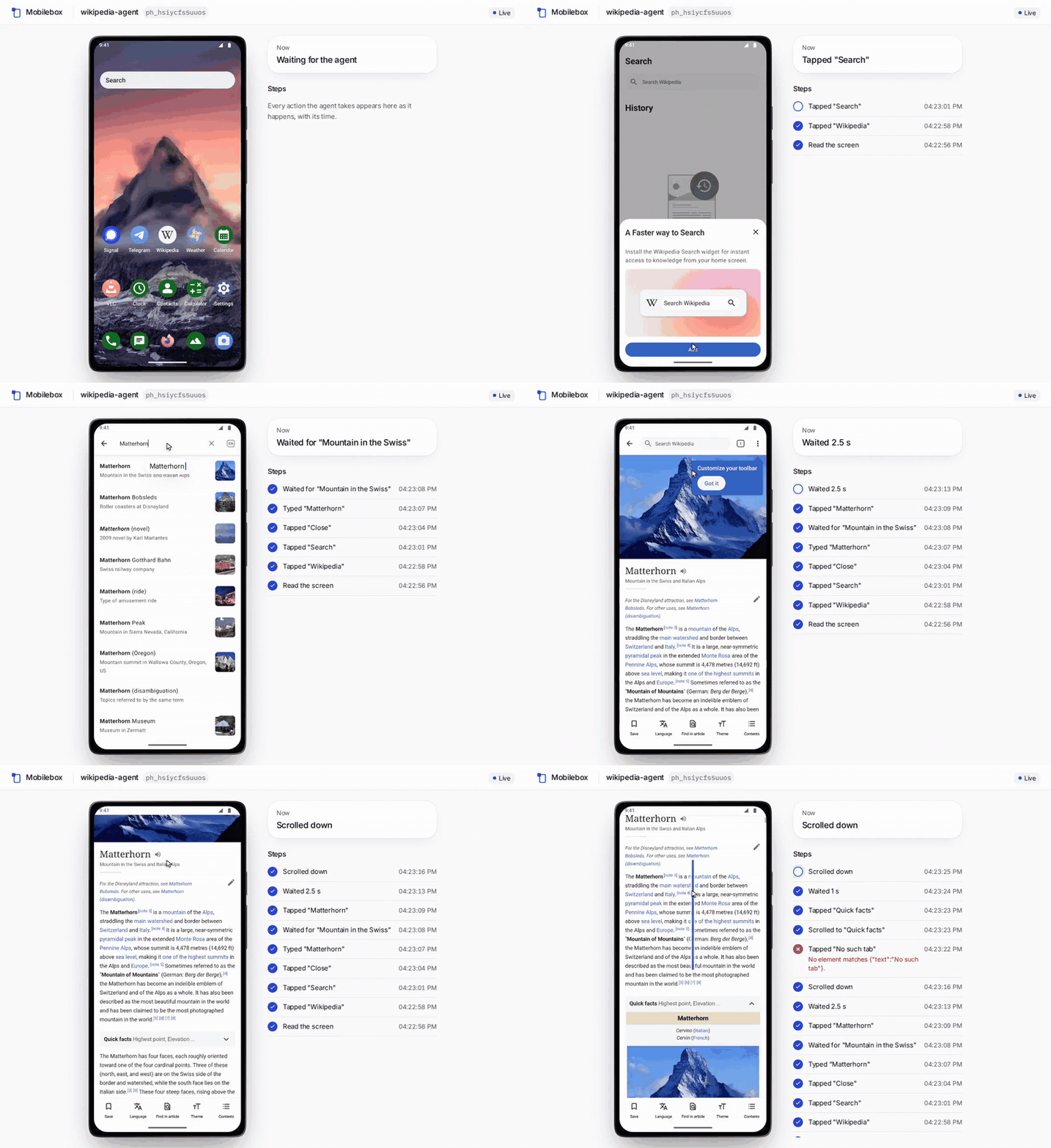
A real agent on a Mobilebox phone, recorded in the live view at real speed. One step fails, and the log says why.
Open a live view of any running phone and see every step as it happens: a cursor that moves to each target, a ripple for every tap, a trail for every swipe, the text as it is typed (dots in password fields), and a caption with its time for each step. Nothing depends on sound, and screen readers announce each caption.
npx mobilebox watch <phone_id> # with MOBILESANDBOX_API_KEY set: opens the view in its own window
Over MCP, ask your agent to show you the phone: watch_phone returns the link (REST: POST /v1/phones/{id}/view). The dashboard has a Watch button on every running phone. The view is read-only and watching is free. Try it with watch/watch.sh; details in the API reference.
Tools
Phones, apps and the screen over MCP; REST adds binary APK upload, account balance and billed sessions. Without a key, /mcp answers initialize, tools/list and ping; every tools/call needs the key.
All tools and actions (generated from the live tools/list; CI fails when it drifts)
| Tool | What it does | Arguments (? = optional) |
|---|---|---|
list_phones | List this project's phones and their status. | – |
create_phone | Create a phone, wait until it is ready and return its first screen. | platform?, device?, name?, idle_timeout?, max_duration?, country?, idempotency_key? |
start_phone | Resume a parked phone. | phone_id |
park_phone | Park a phone: shuts it down and stops billing. | phone_id |
delete_phone | Delete a phone and everything on it. | phone_id |
set_device | Set where the phone is: timezone (IANA), locale (BCP-47), GPS location, and proxy (socks5://user:pass@host:port; all traffic leaves through it, null = direct). | phone_id, timezone?, locale?, location?, proxy? |
install_app | Install or update an app from a public download URL: an APK (arm64-v8a or universal) or a split bundle (.apks/.xapk; the splits this phone needs are picked). | phone_id, url, grant_permissions? |
list_apps | Apps the user installed on this phone. | phone_id |
uninstall_app | Uninstall an app and delete its data. | phone_id, package |
observe | Read the current screen as a numbered element list. | phone_id |
act | Run 1–20 actions in order, stop at the first failure, return results and the new screen. | phone_id, actions |
screenshot | PNG of the screen, for content the element list cannot show (images, maps, games). | phone_id |
watch_phone | A link to watch the phone live, for the user: its screen with each of your actions drawn on it (cursor, taps, swipes, typed text) and a caption per step. | phone_id |
Actions for act: tap, long_press, swipe, scroll, scroll_to, type, key, back, home, open_app, close_app, wait, wait_for. Targets: {"text":"OK"} (best default), {"ref":3}, {"id":"com.app:id/login"}, {"desc":"Navigate up"}, {"x":540,"y":1200}. REST only: POST /v1/phones/{id}/apps (APK upload), GET /v1/account, GET /v1/phones/{id}/sessions. Full vocabulary: API reference.
Examples
Each creates a phone, checks one outcome and deletes the phone, also when the check fails. All ran against production: on 2026-11-04, and the live view example on 2026-11-05 (RUNS.md).
| Example | Shows | Needs |
|---|---|---|
| curl/walkthrough.sh | create, observe, act, screenshot, delete | bash, curl, jq |
| watch/watch.sh | open the live view, then act while you watch | bash, curl, jq; Node for npx mobilebox |
| python/mobilebox.py | minimal client + Settings check | Python 3.9+, stdlib |
| typescript/mobilebox.ts | minimal client + Settings check | Node 24 |
| claude-code/ | Claude Code tests the APK you just built | an arm64 or universal APK |
| github-actions/ | APK smoke test in a workflow | a repo secret with your key |
| integrations/ | OpenAI Agents SDK, LangGraph, CrewAI, browser-use, Mastra, Vercel AI SDK, Claude Agent SDK | the framework and a model key |
Pricing and limits
$0.01 per ready phone-minute, billed per second with a one-minute minimum per session. Boot time and parked phones are free. Up to 3 running and 10 kept phones per workspace. Pricing.
All limits
- 3 running and 10 kept phones per workspace (called project in the API), shared by all its keys; parked phones count toward the 10.
- Up to 20 actions per
actcall, 256 KB of JSON per request, waits up to 55 s per call, APK uploads up to 300 MiB. - Phones park after 5 idle minutes (
idle_timeout, 60–3,600 s) and after 15 minutes of running (max_duration, up to 3 hours). - Apps with strict root or integrity checks (e.g. Play Integrity) may not run.
- Not available yet: Google Play, SMS, iOS, public ADB or shell, logcat. Real-device and iOS: early access via hello@mobilebox.dev.
Security
Each phone is an isolated Android sandbox on Mobilebox servers in Germany, reachable only through the API. Keys are per workspace, stored hashed and never logged. Mobilebox runs no model: screen content goes only to your agent.
Security model
- Your key is a bearer token for one workspace. Every key in a workspace can see and control all of its phones and spend its balance. For a hard boundary between two agents or customers, use separate workspaces, not separate keys.
- Agent keys only control phones. They cannot sign into the dashboard or create other keys. Revoke or rotate keys in the dashboard.
- The phone is a sandbox, not your machine. Each phone is a cloud Android 14 phone on Mobilebox servers in Nuremberg, Germany. There is no public ADB or shell. Phones can reach the internet (or the SOCKS5 proxy you set) but not each other or Mobilebox's internal network.
- Screen content goes to your agent, and from there to its model provider. Don't put data on a phone that you aren't allowed to send to your agent's model.
- We don't look into phones except to fix a fault you report or when the law requires it. Park keeps apps, data and logins; delete removes them. Deleting a phone does not log out sessions on third-party servers.
- Details: privacy policy, key security. Found a vulnerability? See SECURITY.md.
For agents
AGENTS.md is the operating guide: the loop, targets, error recovery and cleanup. Live versions: skill.md, llms.txt.
Questions: hello@mobilebox.dev, or open an issue. MIT for this repository; the hosted service is covered by its terms.