Familiar
officialAn AI co-pilot for Foundry VTT: run combat, set the scene, and voice NPCs by talking to your assistant. 193 tools across 24 domains, works with content you already own.
What can you do with Familiar MCP?
- Run combat encounters — Ask the AI to roll initiative, resolve monster turns, and enforce D&D 5e rules via
combattools. - Generate scenes and art — Create battlemaps, tokens, walls, lighting, and weather from text prompts using
sceneandcanvastools. - Manage NPC voices — Have the AI speak NPC lines with distinct voices, control playback, and adjust audio via
voiceandaudiotools. - Search campaign knowledge — Find half-remembered names or phrases across journals, characters, and scenes with
searchtools. - Manage characters and items — Inspect, create, update, or clone actors, inventory, spells, and effects using
actoranditemtools. - Run auto-pilot turns — Let the AI play every enemy turn in an encounter with safety caps and optional confirmation.
Documentation
Install Familiar in Foundry
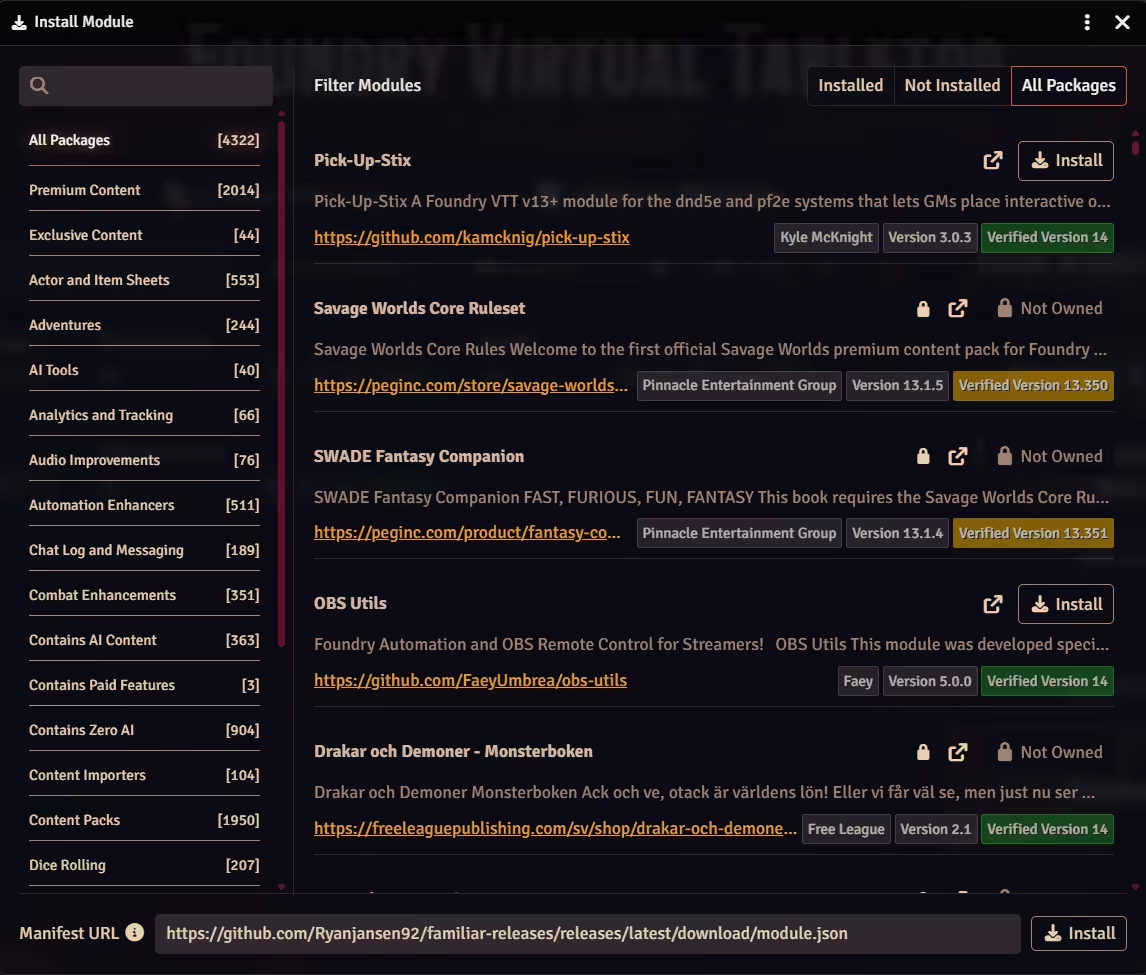
Familiar is in the official Foundry package directory. Search for it, install it from The Forge's Bazaar, or paste the manifest URL. All three install the current release; the first and last use Foundry's own Install Module dialog.
Recommended
Foundry's package browser
- In Foundry, open Configuration then Add-on Modules.
- Click Install Module.
- Search "Familiar", then click Install.
- Enable Familiar in your world, then paste your licence key and click Activate.
Hosted on forge-vtt.com? Install from the Bazaar instead of the Foundry dialog.
- On The Forge, open the Bazaar, then Modules.
- Search "Familiar", then click Install.
- Enable Familiar in your world, then paste your licence key and click Activate.
Alternative
Manifest URL
If you would rather paste it in, the manifest URL installs the same release from the same dialog.
- Paste the URL into the Manifest URL field at the bottom of the same dialog.
- Click Install.
- Enable Familiar in your world, then paste your licence key and click Activate.
https://github.com/Ryanjansen92/familiar-releases/releases/latest/download/module.json
Compatibility
Foundry VTT
v13, v14
Game System
D&D 5e (2024 rules): full support, rules engine included. Every other system: everything except refereeing combat, with your characters read as your own system stores them. See what it does on your game system
See the Install Module dialog
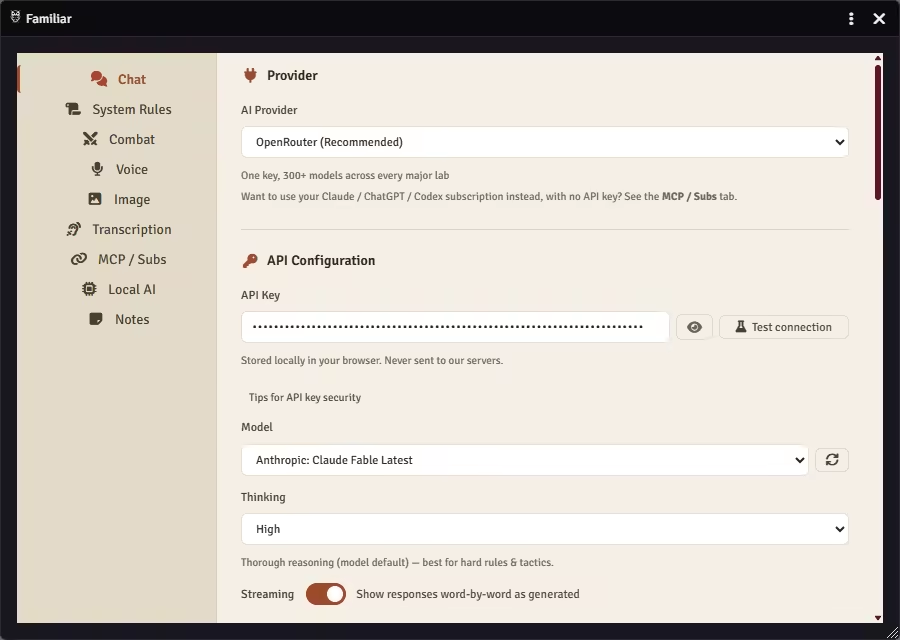
Connect the AI you already use.
Paste an API key, point Familiar at the Claude, ChatGPT, Gemini, or Grok subscription you already pay for, or run a model on your own machine. Every path reaches the same 220 tools; the difference is where the model runs and who you pay.
Built-in chat
Paste an API key and start talking to your game.
No server, no terminal, no config files. Live transcription, voice dictation, auto-pilot for NPC turns (D&D 5e), slash commands, and drag-and-drop attachments only work here. A Thinking control lets you set how hard the model reasons, dialled up for hard fights, down for quick lookups.
Chat
- OpenRouter
- Anthropic
- OpenAI
- Google (Gemini)
- Groq
- Mistral
- Together AI
- DeepSeek
- xAI
- Cohere
- Perplexity
- Fireworks AI
- Cerebras
- SambaNova
- NanoGPT
- Local / custom server
OpenRouter unlocks 300+ models on a single key. Local / custom server points the built-in chat at any OpenAI-compatible server you run, from its own Local AI settings tab.
Voice
- ElevenLabs
- Cartesia
- OpenAI TTS
- OpenRouter TTS
- NanoGPT TTS
- Custom TTS
Image
- OpenAI (GPT Image)
- fal.ai
- Leonardo AI
- OpenRouter
- NanoGPT
Transcription
- Gladia
- Deepgram
- AssemblyAI
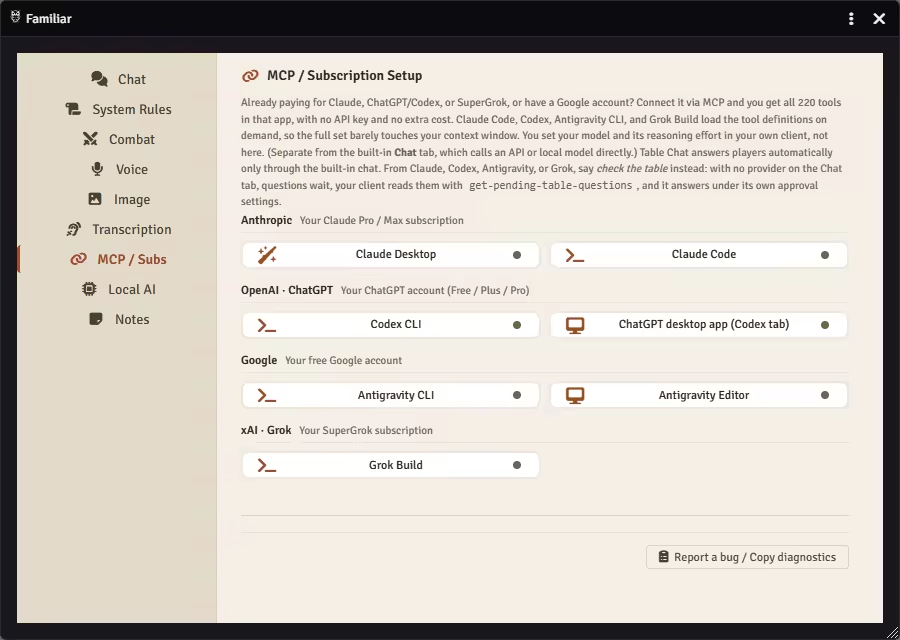
Use your subscription
Already paying for Claude or SuperGrok, on any ChatGPT plan including Free, or have a Google account? Put it to work.
Connect through the Model Context Protocol and the plan you already have drives the same table from your own client at no extra token cost: the monsters' turns when you ask, every attack and spell checked against the 5e rules. The module ships with an MCP Setup Wizard: pick your client's card and it hands you the exact text, a config block to paste or a single command, secret already in it. Every card also carries a Copy help prompt for any AI chat you already have, the free web ones included: it explains, you type. Best for long, multi-step chains. Your model and its reasoning effort are set in your own client, not here.
MCP clients
-
Claude Desktop
-
Claude Code
-
Codex CLI
-
ChatGPT desktop app (Codex tab)
-
Antigravity CLI
-
Antigravity Editor
-
Grok Build CLI
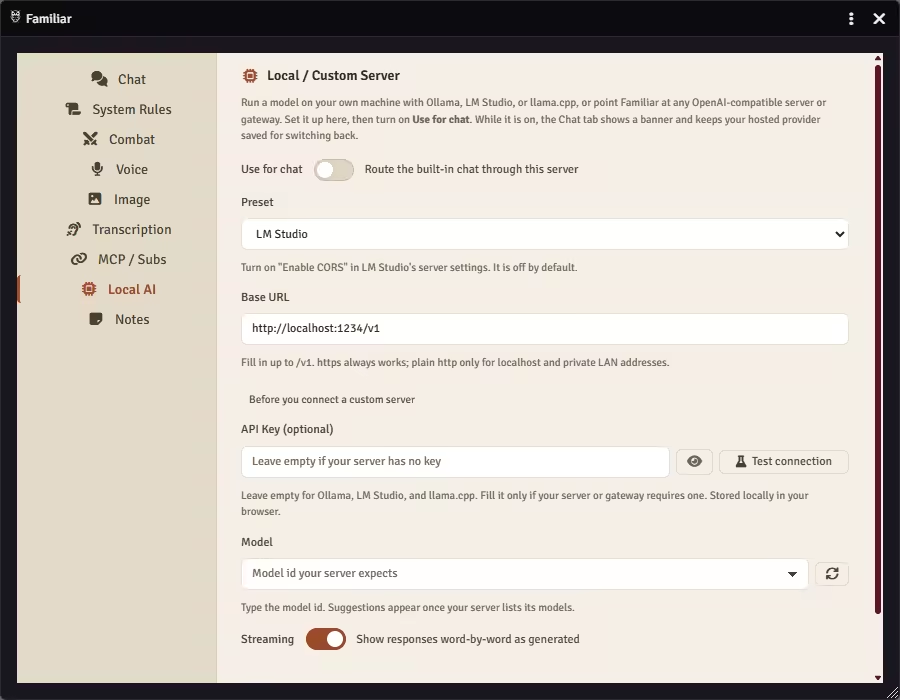
Run it local
Your own machine, no per-token bill.
The same built-in chat, pointed at a server you run. Pick a preset, check the URL it fills in, and flip Use for chat on. Your hosted provider stays saved for switching back.
Runners
- Ollama
- LM Studio
- llama.cpp
- LiteLLM
- Any OpenAI-compatible server
The rest of your setup
Two more pieces, and neither one is a model. One is where your prep lives, the other is where Foundry itself does.
- Prep stays where you write it. Install Obsidian's community Local REST API plugin, point the Notes tab at your vault or at only the folders you name, and Familiar reads and searches those notes mid-session. It never writes back. Read the Obsidian guide
- The Forge, another host, or a box under your desk. Familiar calls your AI from the browser, so whatever runs on your own computer stays reachable and the host never sits in the path. Hosted play does set a few conditions on the MCP side. What hosted play needs
Your keys, your cost.
Most paid AI modules for Foundry route through their own servers and ration you by the message. Run out mid-session? Too bad. Familiar never proxies or marks up anything: your API keys go straight from your browser to the provider, and with MCP your subscription handles it. No middleman, no per-turn meter.
Combat & AI
The AI plays the monsters; a rules engine decides what is allowed. In a live fight it cannot invent a die roll, write damage into a sheet, drop a condition from nowhere, or move past a creature's speed. The rules it cannot fake live in code, not in its prompt.
- Every action checked against the 5e rules before it lands
- A refused move is refused out loud, and the AI adapts
- Foundry's own dice roll every attack, save, and damage
- Initiative, turns, rounds: advance the encounter or correct the tracker
- Multiattack, legendary actions, reactions, opportunity attacks
- Undo the last action when a call goes wrong
Roll initiative for all the goblins, have them attack the nearest player, and play battle music.
How the engine enforces the rules
NPC Voices
Familiar speaks the scene it just wrote, the narration in your narrator's voice and each NPC's lines in its own, the moment the text lands. It does that out of the box, and nothing plays or bills until the Voice tab holds a key. It remembers who sounds like whom, so the innkeeper always sounds like the innkeeper.
- Ask for any line in a character's voice, or a whole scene with a voice per speaker
- Casts a voice for an NPC nobody cast, from the provider catalogue, and says which
- Wait for my go holds a finished clip until you press Play
- The music dips under a voice and comes back when it ends, on your machine and each player's
- ElevenLabs, Cartesia, OpenAI TTS, or your own endpoint; a fixed voice per character
- Set Speak aloud to On request and it speaks only when you ask
Dim the lights, start rain and thunder, and have the innkeeper whisper a warning about the road ahead, in his voice.
Scenes, Canvas & Art
Build the whole scene by asking: tokens, walls and doors, lighting, weather, fog of war, trigger regions. Then generate the art to fill it, from a battlemap background to a portrait of the stranger who just walked in. Familiar places it, you direct it.
- Create scenes and spawn tokens from any compendium
- Draw walls, doors, and trigger regions
- Set lighting, darkness, and weather effects
- Fog of war, ambient sound, and camera control
- Generate a battlemap background from a text prompt
- Generate character portraits and item art inline
Generate a foggy graveyard battlemap, give me three options, and use the second one as the background.
Audio & Atmosphere
Play, stop, and manage playlists and individual tracks with volume and fade control. The music follows the scene: Familiar crossfades to a mood your own playlists already hold, and never fetches music of its own. Sound effects come from your own SFX playlist first, and a generated one bills your voice or image key. Cue battle music, or silence everything without touching Foundry's sidebar.
- Play, stop, and queue playlists
- Individual track control with volume and fade
- Mood switching: name Tavern or Combat and it crossfades to that playlist, then binds it to the scene
- Cue battle music on combat start
- A generated sound effect lands in the chat as an AI Sound card, with a Save button that keeps it as a track
- Silence everything without touching the sidebar
Cue the tavern playlist, drop the lights, and let the bard play a soft lute track underneath.
Knowledge & Memory
Search the campaign for a half-remembered name or phrase. Familiar ranks the matches, best first. A persistent memory bank stores important campaign facts that carry over between sessions, with full journal management for session notes and handouts.
- Full-text search across journals, characters, scenes, items, transcripts
- Persistent memory bank across sessions
- Summarise sessions when you say you're done
- Full journal and handout management
- Map pin creation and editing
- Post to the table chat, whisper one player, or read the log back
We're done for tonight. Summarise what happened this session and save it.
Characters & Items
Inspect, create, update, and clone actors, inventory, spells, features, and active effects. Import from compendiums, apply custom buffs, and manage player ownership.
- Inspect, create, update, and clone actors
- Manage inventory, spells, and features
- Apply and toggle active effects (buffs and debuffs)
- Import from any compendium pack
- Configure player ownership and permissions
- Roll on tables for random encounters and loot
Find a CR 3 werewolf in the compendium, drop it into the scene as a boss, and give it resistance to non-silvered weapons.
Auto-Pilot
Click "Run NPC" and walk away. On D&D 5e (2024) Familiar plays every enemy turn for you, with safety caps and optional turn-by-turn confirmation.
- One click runs every NPC turn in the encounter
- Safety caps prevent runaway loops
- Turn-by-turn confirmation when you want it
- Works alongside the standard combat tracker
- Battlefield snapshots inform tactical decisions
- Stops on the round or the turn you name
Run all the NPC turns this round. Stop after the dragon goes.
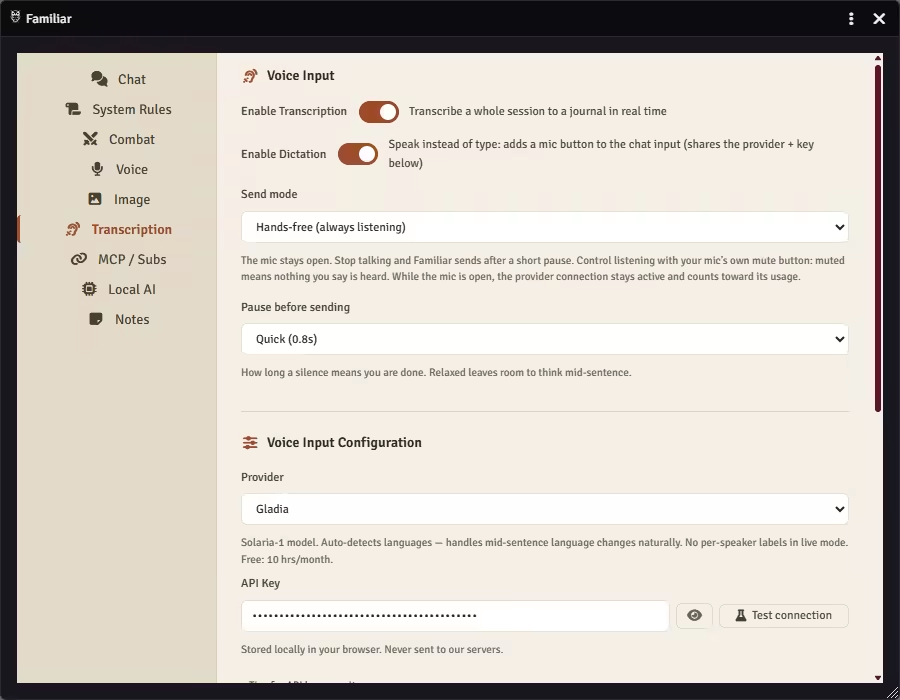
Live Transcription
Speak instead of type. Familiar transcribes your session in real time across three providers, colour-codes per speaker, and saves the transcript to a Foundry journal entry you can edit and search later.
- Speak instead of type in the middle of a scene
- Real-time transcription across three providers
- Per-speaker colour coding
- Saves directly to a Foundry journal entry
- Edit and search the transcript afterwards
- Gladia, Deepgram, AssemblyAI
Start transcribing the session. Save it to a journal called 'Session 12' when we're done.
Multi-Session Chat
Pin, archive, and switch between named campaign threads. Each thread persists as a Foundry journal entry with a full audit log, so you can return to any conversation later, even months apart.
- Pin, archive, and rename campaign threads
- Each thread persists as a Foundry journal entry
- Full audit log of every tool call
- Switch between threads without losing context
- Search across past conversations
- Re-open a paused side quest in seconds
Open the 'Stormpoint Castle' thread and pick up where we left off last week.
Built around the content you already have.
Familiar doesn't replace your modules, maps, or campaigns. It reads them, runs them, and stays out of your way.
-
Premade campaigns
Open Ember, Dragon of Icespire Peak, or any published adventure. Familiar reads the journal entries, NPCs, and encounters that came with it, and runs them at the table without inventing contradictions. -
Battlemaps you already use
Drop a Czepeku or Patreon map. Familiar fetches the tokens, lights, walls, and ambient sound you set up, and runs combat on top of someone else's craft. -
Compendia and your own homebrew
Your custom NPCs, your house rules, your D&D Beyond imports. Familiar reads what's already in your world instead of making things up.
Familiar doesn't ship its own adventures, maps, or compendia. The content is yours, whatever system your campaign was written for. Your AI tells the story you bring, it doesn't invent one, and Familiar runs the dungeon master's side of the table on top of it.
Play solo, duet, or with a full group.
However many show up, you get to play. The fewer humans at the table, the more of the world Familiar runs, the dice, the monsters, every NPC, and on D&D 5e the rules. You take a seat at the game you usually run for everyone else.
-
Solo
Just you You play your character. Familiar runs everything around it: every NPC in its own voice, every monster's turn, the scene, with 2024 D&D 5e rules enforced. Campaign memory carries the world from one session to the next. -
Duet
You and one other Neither of you has to be the DM. Familiar runs a D&D 5e (2024) world for both of you, the cast, the encounters, the rulings, so you stay players and the story still moves. -
Small table
You and a few The supporting cast and the monsters' turns run for you, with the lighting, the music, and the rulings. Nobody steps out of the game to keep it moving. Your players are in it too: with a voice key set, an NPC's line plays on their speakers as well as yours, and any of them can put a question to Familiar in the ordinary Foundry chat, or to an NPC by name while Any NPC is on. -
Full group
You DM for four or more The tactical load comes off the GM. You run the encounter and tell the story; on D&D 5e (2024) Familiar handles initiative, the monster turns, and the bookkeeping. A line it speaks lands in the chat as an AI Voice card, so a player who missed the warning reads it back instead of asking you to repeat it. You run the scene, not the spreadsheet.
It runs the DM's side around you; it never invents the story. Whoever is at the table, the campaign you brought is the spine, and the dice and the maths are always right on D&D 5e (2024). No "you rolled a 47."
One message in. Familiar runs the Foundry actions out.
No new app to learn, and no commands to memorise. Familiar works from its own chat inside Foundry, or from an MCP client you already use.
-
You talk
Type in Familiar's chat inside Foundry, or connect an MCP client like Claude, Codex, or Antigravity. Your AI reads the scene and picks which of the 220 tools to call. -
Over a secure socket
Tool calls reach your world over an authenticated WebSocket. Your API key goes straight from your browser to your provider. Familiar never proxies or stores it. -
Familiar runs it
The module runs the same Foundry operations you would do by hand: place tokens, set lights, cue music, pull a creature from your compendium. It reads and changes its own settings the same way, so you can ask which voice model you are on or move sound effects to on request. Turning anything up, more spend or more reach to your players, stays the GM's call; a player's turn can only turn it down. You stay in character.
Built-in chat needs nothing extra. MCP adds a small local server you start with one command.
A co-pilot for the game master who'd rather run the story than the spreadsheet.
I'm Ryan. Dad of two young kids, married to my favourite person, with the free time you'd expect.
My wife and I play D&D together, just the two of us, 1-on-1 campaigns. It's our thing. But solo DMing is a lot. You're the storyteller, every NPC, the rules engine, the sound guy, and the atmosphere all at once. Mid-monologue as a mysterious stranger, I'd have to break character to roll initiative, look up a spell range, adjust the lighting, and find that one tavern ambience track I swore I bookmarked. By the time I got back to the scene, the moment was gone.
I wanted something that could handle the mechanical side of the table so I could stay in the story. Not a replacement DM, a co-pilot. Something I could say "roll initiative for the goblins, dim the torches, and start combat music" to, and it would handle it. While I kept talking.
So I started building. First it was a handful of tools to move tokens and roll dice. Then I added combat tracking. Then scene management. Then "what if it could also generate NPC portraits on the fly?" and "what if it could voice the tavern keeper?" That's how you end up with 220 tools across 25 domains and 30 AI providers.
I took my time with this. I ran Familiar at my own table, session after session, before opening it up. I didn't want to ship another AI that turns your campaign into nonsense the moment it forgets last week.
I priced it the way I would want to buy it. One price, every tool on from day one, and the AI bill goes to your own provider account, not through me. If your Claude, ChatGPT, Gemini, or SuperGrok plan reaches Foundry over MCP, it covers the AI side too. I have nothing else to sell you.
It started as a personal itch-scratcher for a dad who wanted to run better D&D games for his wife. It turns out a lot of GMs have the same itch.
Ryan, working on Familiar
In their own words.
Lines from people running Familiar at their own tables, quoted from the Discord.
-
“Such amazing work to begin with, and so responsive to feedback and bug fixes. I don't think I've ever had a dev for such impressive software troubleshoot with me directly, let alone as quickly as you have.” aakavFoundry in Docker on a headless Linux server, Claude Code August 2026
-
“With how busy life has gotten, I didn't think I'd ever be able to play D&D again. Familiar has allowed me to be a player again. It manages the game faithfully and immersively (with voice!).” Armchair EvokerFamiliar on the DM side, voice on August 2026
-
“I had it run combat for the NPC party member with great success. It recognised that as a tank it should be charging in and putting itself in between the weaker members.” Cotexian Lesteralruns an ally NPC in combat, API key via OpenRouter July 2026
-
“I have been trying out Familiar with one of the adventures in the Call of Cthulhu starter pack and it works really well. I don't have to read the adventure before I play it, and so it keeps surprises alive.” Spryplays solo, Call of Cthulhu August 2026
-
“Fantastic tool. Using it mostly for the MCP and assisting with PF2e campaign prep and management. I'm less interested in using it as an auto-pilot DM and more for being able to read and create data from Foundry in between sessions.” KappusPathfinder 2e prep over MCP August 2026
-
“Getting it set up with Codex took like 5 minutes. 10/10 would subscribe again.” HadhafangCodex over MCP September 2026
-
“Familiar let me step into an 'assistant-DM' role instead of a full DM one. I can guide and support the session without giving up my own character. We're running Phandelver and Below, and having Familiar handle narration, NPCs, and scene-setting means nobody has to carry the game alone anymore.” D3AD MANS PAR7YPhandelver and Below with a group, ElevenLabs voices, tests beta builds on the Discord September 2026
Honest answers.
The questions players and GMs actually ask, answered straight. Anything else, ask in the Discord.
-
What is Familiar?
Familiar is an AI co-pilot for Foundry VTT, the virtual tabletop you run your D&D game in. You connect the AI you already use, such as Claude or ChatGPT, over the Model Context Protocol or an API key, and it runs the dungeon-master side of a published D&D 5e adventure you import: the rules, the dice, the monsters, and the NPC voices. You stay the player and keep the story; Familiar handles the table. -
Is there an AI DM module for Foundry VTT?
Yes. Familiar is an AI DM module for Foundry VTT: connect the AI you already use and take a seat as a player, while it runs the whole DM side of a published D&D 5e adventure you import, combat, dice, and NPC voices included. Bring Claude, ChatGPT, Gemini, or Grok over MCP, or any of 30 providers by API key. You install it from the Foundry package browser or a manifest URL, and the first 14 days are free. Read the setup guide -
Does the AI actually follow the D&D rules in combat?
The rules it could cheat on, it cannot: dealing damage, dropping a condition, moving past a creature's speed, and faking a die roll all live in code the model does not control, and Foundry's own dice roll every result. The judgement calls, a flanking house rule or a narrative exception, stay yours, and any override the AI makes is written to the chat log. Where a rule is not modelled yet, Familiar flags it and leaves the ruling to you. Read the combat guide -
How do I connect Claude or ChatGPT to Foundry VTT?
Two ways, and you bring your own AI for both. Use the Claude, ChatGPT, Gemini, or SuperGrok subscription you already pay for over the Model Context Protocol, and Familiar runs as an MCP server those clients connect to. Or paste an API key into the built-in chat. The same tools work either way; the difference is where the model runs and who you pay. Read the connect guide Claude in Foundry: Desktop or Code ChatGPT in Foundry via Codex Gemini in Foundry via Antigravity Grok in Foundry via Grok Build -
Does Familiar work on The Forge or other hosted Foundry?
Yes, both paths. The built-in chat runs anywhere Foundry does, because the module calls your AI provider straight from the browser. MCP holds up too, and that link never leaves your desk: the server and the browser sit on the same machine, so your host never sees it. Run the setup wizard from the hosted game and it writes your game's URL into FAMILIAR_WS_ALLOWED_ORIGINS. There's nothing to hand-edit. Hosted play does put a few conditions on the MCP side, browser choice first among them. Troubleshoot the MCP connection -
Does Familiar collect my data?
No telemetry, no analytics, no profile of your table. Familiar runs inside your Foundry world, and your campaign leaves your machine only when you message the AI provider you chose. Table Chat starts switched on, so a player's @familiar message reaches that provider too, on your key, until you switch it off on the Chat tab. Two requests do leave on their own: a model-list refresh when a world loads, and a licence check that reaches Polar once a week. Neither one takes your campaign with it. Point the Local AI tab at a model on your own machine and even the provider traffic stops. Read the local models guide -
Can the AI break my world?
Document updates are sanitised, so the AI can't change ownership, permissions, or internal IDs. Destructive operations require confirmation, and the WebSocket connection is authenticated with a shared secret. Keep backups anyway: good practice with or without AI. -
Does it work with game systems other than D&D 5e?
Yes, with one boundary: the rules engine that referees combat is D&D 5e (2024) only. Everywhere else Familiar names your game system in its first reply and reads your world's own compendium instead of quoting D&D at you. The story, the NPCs, the scenes, the audio, and the campaign memory run there too. See what runs on your system -
Which AI models work best?
Any current flagship from Anthropic, OpenAI, or Google handles tool-use best; see the "Choosing an AI model" guide for the named tiers. Bring whichever key or subscription you already pay for. Reasoning headroom is what carries a hard combat or a tangled scene: the built-in chat has a Thinking control you can turn up when a moment earns it, and over MCP that dial lives in your own client. -
Can an AI help me run D&D solo?
Yes, that's a main reason it exists. Most people who own Foundry are the GM, the one who never gets to play. Familiar runs the rules, the monsters, and the NPCs, and remembers your campaign across sessions, so you can take a seat at your own table, solo or one on one. It's how Familiar started: 1-on-1 D&D with my wife. -
Do I need my own campaign to start?
No. Buy a Foundry-ready adventure (official D&D modules run about $20 to $30, with the maps and lighting already built), drop in a battlemap or two, enable Familiar, and you're playing. Familiar reads the adventure's journals so it knows the story you're about to discover, and pulls monsters and items from your compendia as you go. -
Does the AI play a character on my side?
Yes. Familiar runs the DM's side (the rules, the monsters, every NPC), and it takes an ally's turn beside you too: a friendly NPC runs on auto-pilot like any monster, and you can hand it a full party character to play. In my own weekly campaign, Familiar has played two of the three heroes for months. -
Can my players talk to Familiar?
Yes, out of the box. Table Chat starts switched on, and Familiar posts a one-line how-to in the Foundry chat when the world loads. A message starting with @familiar gets its answer in the same chat. Any NPC no player owns answers in character to its own @name as well, and that Any NPC switch is the one to turn off for a session where a name alone would give the plot away, because Familiar cannot keep a secret it can read. Pin an NPC on its sheet to keep it answering with the switch off, or to hand over a character a player owns. Everything runs in your browser, on your key, and you see every question and every answer. A player's own character follows the approval mode you set; anything wider waits for you, including anything that bills your image or voice provider. The one exception is the answer itself: with a voice provider set, it is spoken on your key without asking, Familiar in your narrator voice and each NPC in its own, and the Table chat switch on the Voice tab turns that off. With no provider on the Chat tab, which is how most MCP setups run, questions wait in a table inbox until your Claude, Codex, Antigravity or Grok session checks the table. Name one player as the Solo Player and that seat plays by your own rules instead. Read the solo play guide -
Does the AI remember my campaign between sessions?
Yes, in three layers. Your chat threads save as Foundry journals and reopen where you left them. In the built-in chat a bank of campaign facts is injected into every conversation, so what was true last week is still true tonight. A running plot summary carries the story itself. Open the journal called "[Familiar] Campaign Memory" in Foundry to read everything it has stored, and edit or delete anything that came out wrong. Read the memory guide -
How much does Familiar cost?
$6 a month or $48 a year, and that is the whole price of Familiar. One plan, no tiers: every tool is on from the first day of the free two weeks, and updates land in the same subscription. Nothing is metered on our side, no credit balance, no per-message fee, no cap on how often you play. The AI itself is billed by your own provider at list price: a typical session runs $0.50 to $3 in API tokens, and each image is billed on its own (the battlemap page keeps a dated price list). Or nothing at all: point Familiar at a Claude, ChatGPT, Gemini, or SuperGrok plan that speaks MCP, or at a model on your own machine, and no tokens are billed. Compare the two routes and what each costs -
How do I cancel my subscription?
In the customer portal at familiarvtt.com/account. Polar handles the billing as merchant of record, so cancelling happens there: sign in with the email address you paid with, and the same portal switches you between monthly and yearly, updates your card, and hands you your invoices. Cancelling takes effect at the end of the period you already paid for. If the portal does not recognise your email, ask in the Discord or mail support@familiarvtt.com. Open your subscription page -
Can an AI run my game as the Dungeon Master?
Yes, with one honest qualifier. AIs are poor at inventing a story, so Familiar doesn't ask them to. You bring a published adventure with its maps and NPCs, your AI reads it and runs it, and a human can take over anytime. Connect your own AI and it runs the whole DM side with a memory of your campaign across sessions.
Things I'm working toward.
No promises on timelines. Roughly in priority order.
Better solo and duet play.
For the GM who runs the table for everyone else and wants to play for once. Familiar already runs the DM's side; these sharpen it for a table of one or two.
- Companion mode: point at an ally once and let the AI run its turns hands-free
- Encounter scaling: balance a fight for a solo or duet party
- Solo without a second window: today you play from a player login with your GM window open in the background, the Foundry app or a browser window of its own. Next is dropping that second window, so a solo seat is one login and one tab.
Talk to the modules you already use.
Let Familiar drive the rest of your Foundry stack: loot, effects, and more of the visual layer. The animations already work: install Sequencer with JB2A and your attacks and spells play their effects, and Dice So Nice throws Familiar's dice across the screen like any other roll.
- Token Magic FX: shader effects on tokens and tiles
- Item Piles: loot drops and merchants
- DFreds Convenient Effects: status effects and buffs
Deeper reads for the system you play.
Story, NPCs, scenes, audio, and memory already run on any Foundry system, and characters read through a generic adapter. Planned here is the native read: your system's own sheet fields, named the way your system names them.
- D&D 5e (2024), full sheet and rules engineShipped
- Any other system, generic sheet readShipped
- Pathfinder 2e, native sheetPlanned
Plug-and-play campaigns.
Import a published adventure and Familiar already knows the story, NPCs, maps, and encounters. Ember went first.
Ember is Foundry's official 500-hour sandbox campaign. More published adventures to follow.
Sharpening what already ships.
- Combat AI: morale and group coordination; retreat and positioning already ship
- Image: consistent character portraits across sessions, plus style presets
- MCP: status messages to external clients, beyond the tool progress they already get
Got an idea? The Discord is the best place to push something up the list.