IureTranscribe
Local transcription with whisper.cpp: transcribes audio and video files and lists meeting recordings, so the client's model can write summaries and minutes without the audio leaving the computer.
Documentation

IureTranscribe
Transcribe meetings, calls and recordings on your own computer with Whisper, and get the summary and minutes, without your audio leaving the machine.




Download for Linux · Windows · macOS
Why IureTranscribe
- Your audio stays on your computer. Transcription runs locally with whisper.cpp; no account and no internet connection are needed to transcribe. The installer already includes a model.
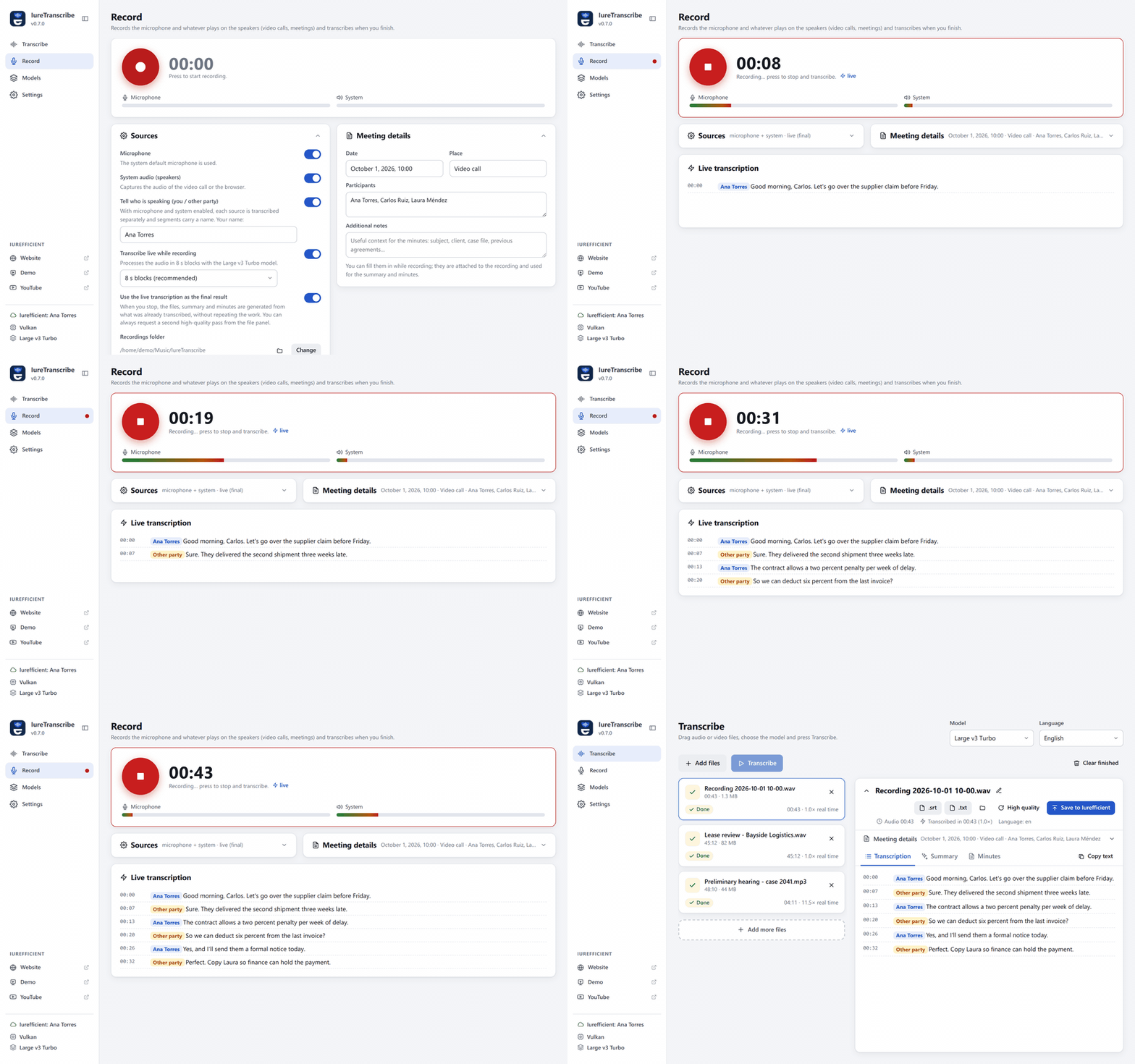
- Records the meeting for you. Microphone and system audio (video calls, meetings in the browser) with a live transcript that says who spoke: you or the other party.
- Summary and minutes in Markdown, written by OpenRouter with your own key, by your Iurefficient instance, or by the AI assistant you already use (Claude, Copilot) through MCP, with no key at all.
- Fast on whatever machine you have: CUDA, Vulkan or Metal when there is a GPU, and a CPU variant that runs anywhere.
- A graphical replacement for the
transcribecommand-line script. Free and open source (Apache 2.0).
Screenshots
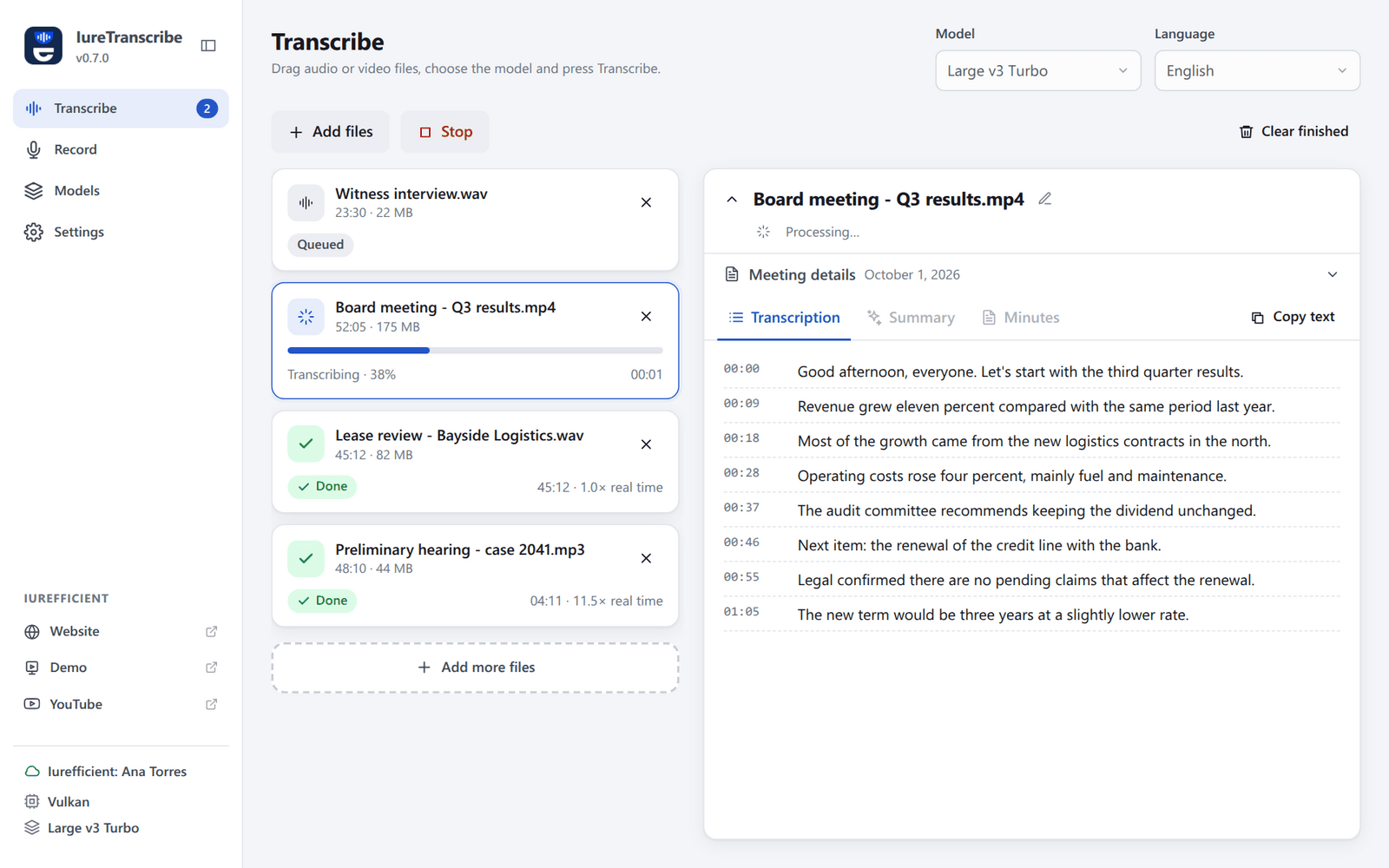 | 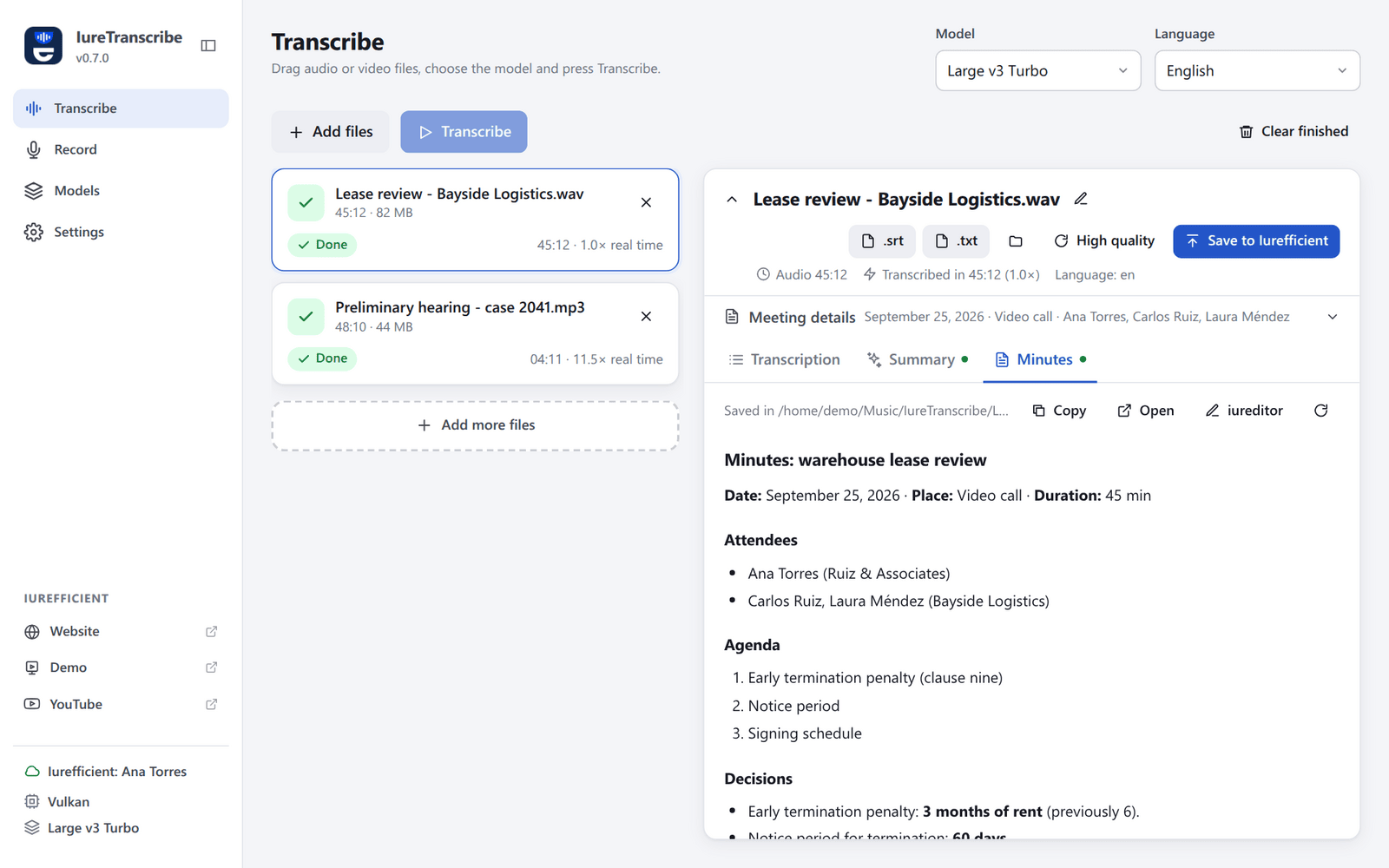 |
| File queue: progress and segments in real time. | Minutes generated from the transcript and the meeting details. |
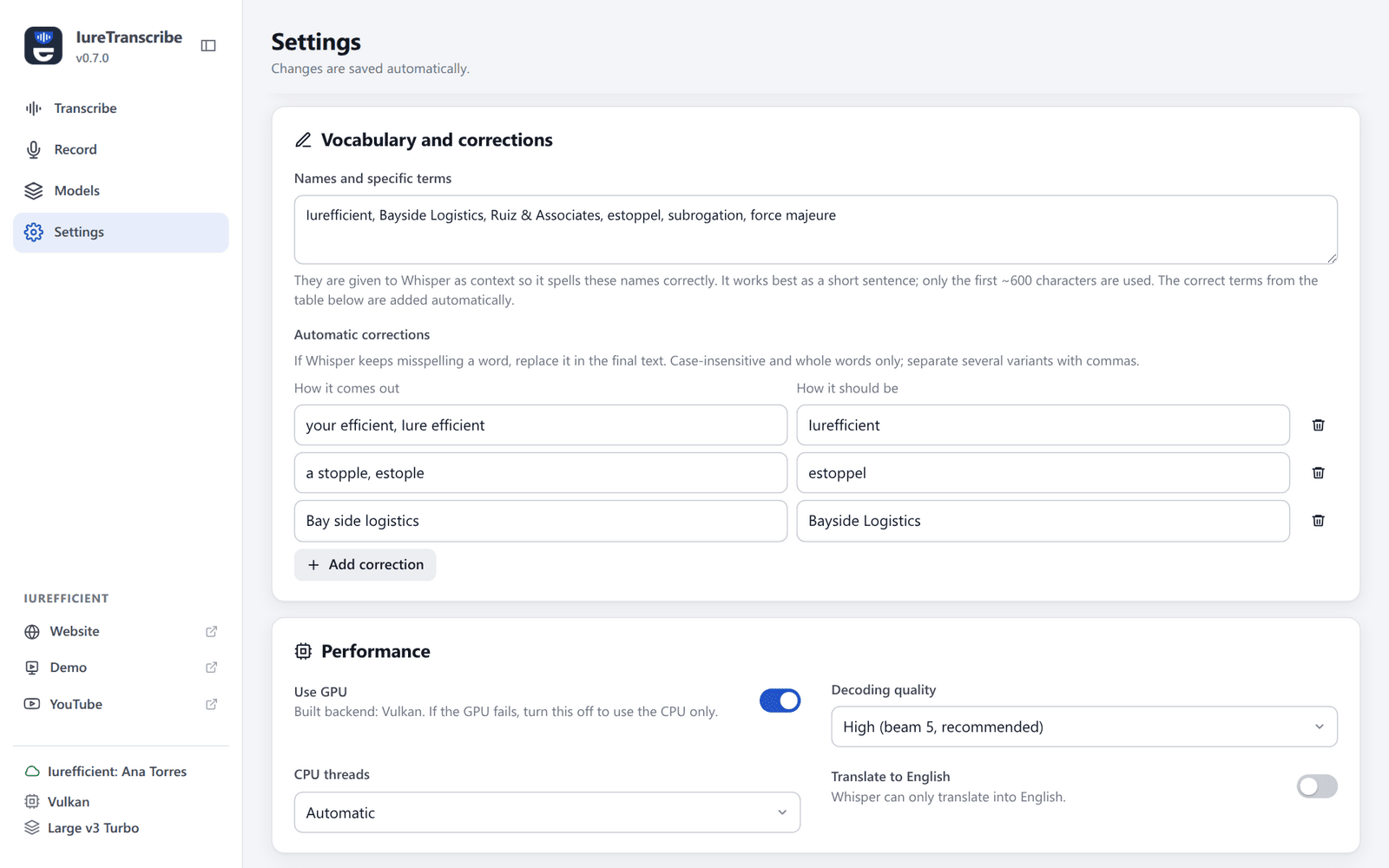 | 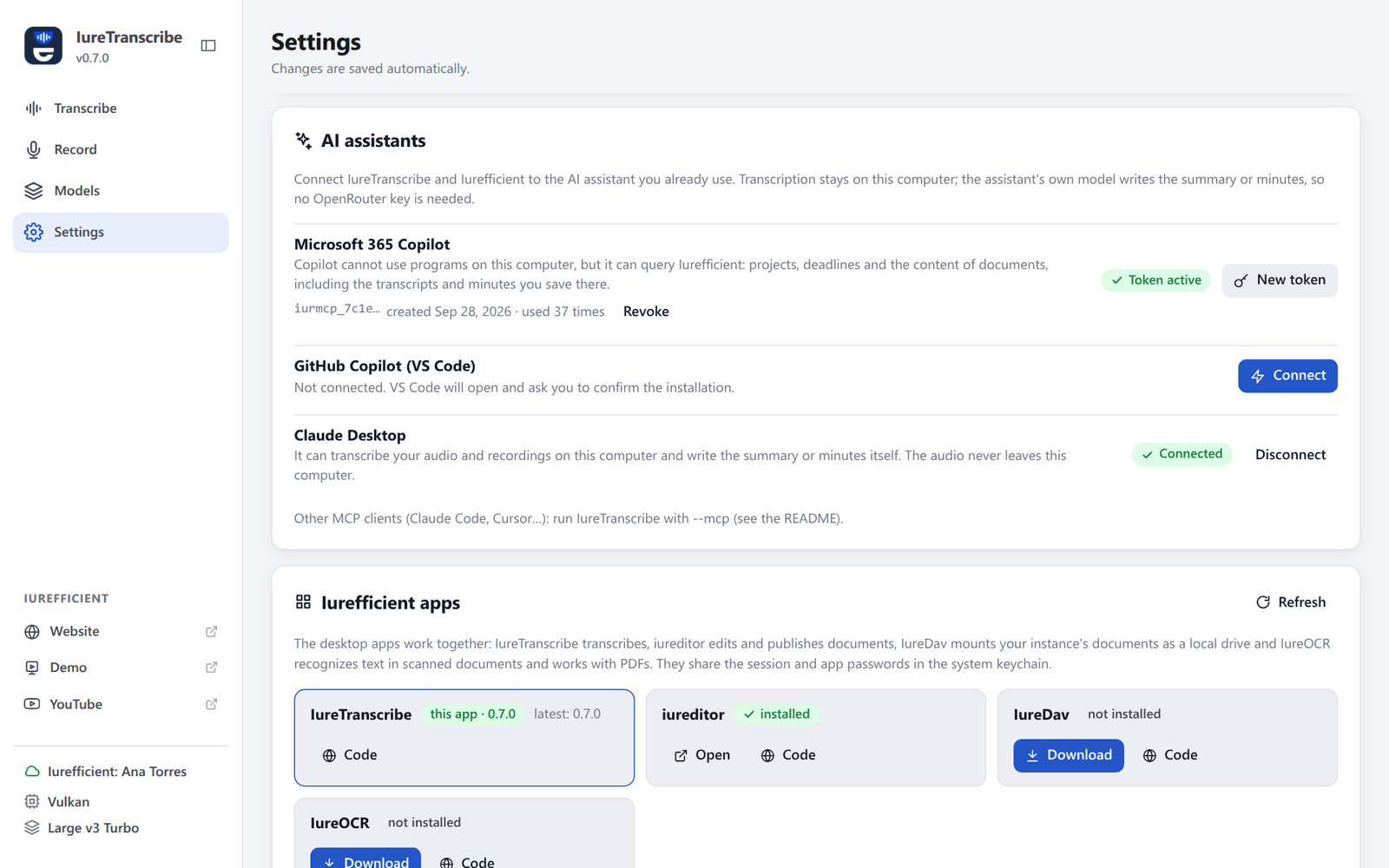 |
| Custom vocabulary and automatic corrections. | Connect Claude Desktop, Copilot in VS Code or Microsoft 365 Copilot. |
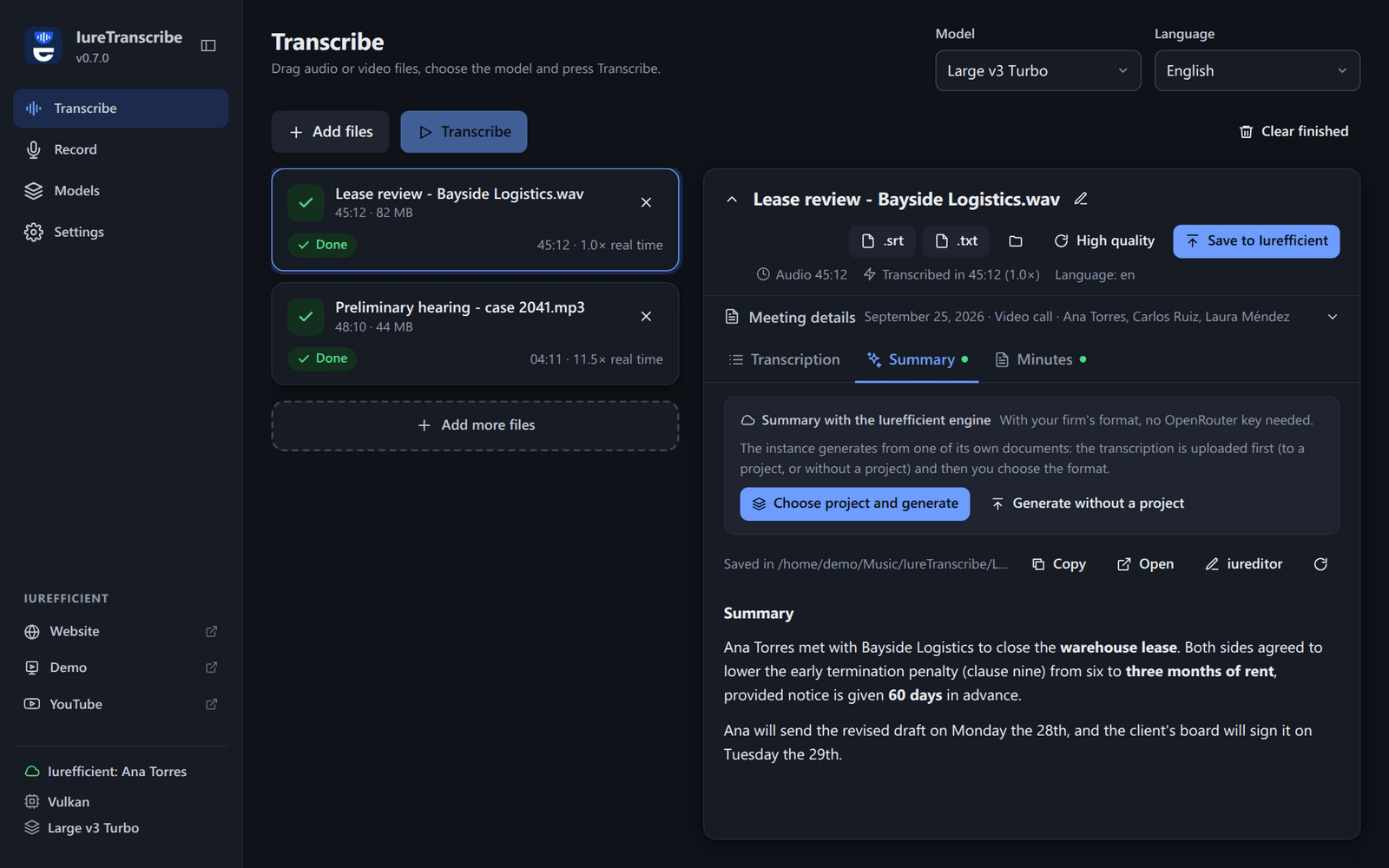
Dark theme.
Features
- 100% local transcription with whisper.cpp. The installer includes the Base model so it works right away; the other GGML models (Large v3 Turbo recommended) are downloaded from within the app.
- File queue with drag and drop, live progress and real-time segments.
- Output as SRT, VTT, TXT and JSON, next to the original file or in a fixed folder.
- Custom vocabulary (names and terms given to Whisper as context) and automatic corrections for words Whisper keeps misspelling.
- Summary and minutes in Markdown (OpenRouter, with editable instructions), with meeting details (participants, date, place, notes) that can be entered at any time.
- Built-in recording of the microphone and the system audio with live transcription and, when both sources are enabled, who spoke: each source is transcribed separately and the segments carry your name or “Other party”.
- With the minutes generated by Iurefficient, commitments → tasks: the app reads the commitments the instance detects, lets you fix the assignee and date, and creates them as project tasks.
- GPU acceleration depending on the variant: CUDA (NVIDIA, Linux/Windows), Vulkan (AMD, Intel or NVIDIA, Linux/Windows) or Metal (Apple Silicon). The CPU variant works on any computer.
- Decodes MP3, WAV, M4A/AAC, MP4, MOV, MKV, FLAC and OGG with no dependencies; if
ffmpegis installed, also Opus, WebM and other formats. - English and Spanish interface: English by default, Spanish when the operating system is in Spanish; it can be chosen in Settings → Language. The interface language is independent of the language of the audio being transcribed, and the summary and minutes are written in the language of the transcription.
Download and install
Get the files from the latest release.
Each file name carries the variant, e.g. IureTranscribe_0.7.0_1-windows-x64.exe.
| Platform | File | Notes |
|---|---|---|
| Windows | …windows-x64.exe (installer) or …windows-x64.msi | CPU, any computer |
| Windows | …windows-x64-vulkan.exe | GPU via Vulkan (AMD, Intel, NVIDIA) |
| Windows | …windows-x64-cuda.exe | NVIDIA with CUDA 12 runtime included |
| macOS | …macos-arm64.dmg | Apple Silicon, with Metal (macOS 12 or later) |
| macOS | …macos-x64.dmg | Intel Macs, CPU |
| Linux | …linux-x64.AppImage, .deb or .rpm | CPU, any computer; the AppImage updates itself |
| Linux | …linux-x64-vulkan.AppImage, .deb or .rpm | GPU via Vulkan |
| Linux | …linux-x64-cuda.deb | NVIDIA, .deb only |
The .sig, .app.tar.gz and latest.json files are for the in-app updater; you don't need
to download them.
If you don't know which graphics card the computer has, install the variant without GPU
(linux-x64 or windows-x64): it works on any machine. For a lightweight installer with GPU,
use the Vulkan variant.
| Variant | GPU | Approximate size (v0.7.0) |
|---|---|---|
linux-x64, windows-x64 | none (CPU) | 130–220 MB |
linux-x64-vulkan, windows-x64-vulkan | AMD, Intel, NVIDIA (Vulkan) | 140–225 MB |
linux-x64-cuda, windows-x64-cuda | NVIDIA (CUDA 12) | 710–870 MB (includes cuBLAS) |
macos-arm64 | Apple Silicon (Metal) | 140 MB |
macos-x64 | none (CPU) | 140 MB |
Most of the size of every installer is the bundled Base model (about 140 MB). The CUDA
variants include the CUDA 12 runtime (cudart, cublas, cublasLt) inside the installer,
so they only need the NVIDIA driver; cublasLt is what takes up almost all the extra size and
cannot be left out. On Linux CUDA is distributed only as .deb (the AppImage cannot bundle
those libraries).
The CUDA and Vulkan variants check the GPU the first time they are about to transcribe, in a
separate process (--gpu-probe), because a driver that does not work makes ggml abort the
process instead of returning an error. If the GPU fails, they continue with the CPU and say so
in the sidebar with a link to the version without GPU; if not even CPU mode starts, the
transcription stops with that same notice instead of closing the application without a trace.
The installers are not code-signed, so the system warns the first time:
- Windows: SmartScreen may show “Windows protected your PC” / unknown publisher. Click More info → Run anyway.
- macOS: the app is not notarized. Right-click the app → Open, or go to System
Settings → Privacy & Security → Open Anyway. If macOS says the app “is damaged”, run
xattr -dr com.apple.quarantine /Applications/IureTranscribe.app. - Linux: make the AppImage executable (
chmod +x IureTranscribe_*.AppImage) or install the.deb/.rpmwith your package manager.
See Code signing policy for how the files are built.
Connecting to Iurefficient
In Settings → Iurefficient account you enter the instance domain, the email and an app
password (iurdav_…, the same one IureDav uses; each user generates it in their profile and
it requires an administrator to have WebDAV enabled). With the account connected, every
transcribed file has a Save to Iurefficient button: you choose the client and project
folder (or General) and the transcription (SRT/TXT/…), the summary, the minutes and,
optionally, the original audio or video are uploaded. A file with the same name is saved as a
new version, not as a duplicate, just like in the web application. Instances do not accept
.srt/.vtt by default: in that case they are uploaded as .txt (e.g. meeting.srt.txt).
In addition, when signed in (your regular Iurefficient password, with two-step verification if you have it; the session is stored in the keychain and lasts 30 days) the same button offers two more destinations:
- Project: search for the project or case, upload the files as documents of the case file and, if you want, log the meeting hours as billable time. Afterwards, in the Minutes tab, “Minutes with the Iurefficient engine” lists your firm's formats (blueprints) and generates the document on the instance, with the attendees and details you entered, without needing an OpenRouter key.
- CRM: attaches the files to an opportunity or lead and logs a meeting activity with the duration and the summary.
The connector is the shared iurefficient-connect
crate, shared with iureditor, IureDav and IureOCR; credentials live in the system keychain
(the same WebDAV password entry that IureDav uses), not in the settings file.
Use from Claude, Copilot and other agents (MCP)
IureTranscribe --mcp starts an MCP server over stdio,
with no window. Claude Desktop, Claude Code, Copilot in VS Code or any MCP client can
transcribe with this computer's Whisper, and the client's own model writes the summary or
minutes: no OpenRouter key is needed. The audio never leaves the computer; only the text
the agent chooses to read does.
| Tool | What it does |
|---|---|
transcribe_file | Transcribes an audio or video file, writes the files (SRT/TXT… as set in Settings) next to it and returns the text; with timestamps, each line with its time |
transcription_status | For long files, transcribe_file returns a jobId after ~50 s and the job keeps running: this tool waits and returns the text; it also reads the rest with offset |
read_transcript | Reads an existing transcript or minutes, in parts |
audio_info | Duration, size and existing transcripts of a file |
list_recordings | The latest recordings made with the app, with duration and whether they are transcribed |
transcription_setup | Model, language, formats and downloaded models |
It uses the model, language, custom vocabulary and corrections from Settings. The model must
be downloaded (Models section). The log goes to iuretranscribe-mcp.log.
In Settings → AI assistants the app detects which assistants are installed and connects each one:
- Microsoft 365 Copilot cannot use programs on the computer, but it can use the instance's
MCP server. While signed in, Create access for Copilot generates an
iurmcp_…token (one year) and shows the URL and the steps for Copilot Studio (X-MCP-Tokenheader). To let Copilot read a meeting, save its transcript or minutes to Iurefficient. Tokens are revoked from the same row. - GitHub Copilot in VS Code: Connect opens the
vscode:mcp/install?…link; VS Code asks for confirmation and saves the server. - Claude Desktop: Connect adds the entry to
claude_desktop_config.jsonwithout touching anything else (a.bak-iuretranscribecopy is kept). Then quit and reopen Claude Desktop.
Other clients: claude mcp add iuretranscribe -- /path/to/IureTranscribe --mcp in Claude
Code, or the output of IureTranscribe --mcp-config in their configuration.
Recording
| Platform | Microphone | System audio (speakers) |
|---|---|---|
| Linux | PipeWire (pw-record) or PulseAudio (parec) | Monitor of the default output |
| Windows | WASAPI (cpal) | WASAPI loopback of the default output |
| macOS | CoreAudio (cpal) | Requires a virtual device (e.g. BlackHole) chosen as the microphone |
Recordings are saved as 16 kHz mono WAV in Music/IureTranscribe (configurable) and, if so
configured, are added to the queue and transcribed automatically.
Part of the Iurefficient suite
| App | What it does |
|---|---|
| IureTranscribe | Local Whisper transcription, live recording with who-spoke, summaries and minutes. |
| iureditor | WYSIWYG Markdown editor with Mermaid, LaTeX and PDF/DOCX export. |
| IureDav | Mount a WebDAV server (or Iurefficient) as a drive. |
| IureOCR | Local OCR that turns scans into searchable PDFs. |
| iureTI | IT asset discovery probe for the Iurefficient inventory. |
Contributing
Issues and pull requests are welcome. Good first contributions:
- Bug reports with the log file attached (its path is shown in Settings and under “Where it stores things” in Technical details).
- Translations: the interface strings live in
src/lib/i18n.svelte.ts; a new UI language is a new dictionary there. - Documentation: corrections and clearer instructions in this README.
To build the app, see “Development” under Technical details.
Technical details
Stack
| Layer | Technology |
|---|---|
| Desktop shell | Tauri 2 (Rust + system WebView) |
| Transcription engine | whisper.cpp via whisper-rs |
| Audio decoding | symphonia + own resampling, with ffmpeg fallback |
| Interface | Svelte 5 + Vite, TypeScript |
| Summary/minutes | OpenRouter (OpenAI-compatible API) via reqwest |
Development
Requirements: Node 22+, stable Rust, CMake, a C++ compiler and libclang (used by bindgen
to generate the whisper.cpp bindings). On Linux also the
Tauri prerequisites.
# Ubuntu / Debian
sudo apt install build-essential cmake libclang-dev libwebkit2gtk-4.1-dev librsvg2-dev patchelf libssl-dev
# Without sudo: pip install --user libclang  and  export LIBCLANG_PATH=$(python3 -c 'import clang.native,os;print(os.path.dirname(clang.native.__file__))')
# macOS: xcode-select --install && brew install cmake llvm
# Windows: Visual Studio Build Tools (C++), CMake and LLVM (winget install LLVM.LLVM)
npm install
npm run tauri dev                      # CPU
npm run tauri dev -- --features cuda   # NVIDIA (requires CUDA Toolkit / nvcc)
npm run tauri dev -- --features metal  # macOS Apple Silicon / Intel with Metal
npm run tauri dev -- --features vulkan # AMD / Intel / NVIDIA via Vulkan (requires Vulkan SDK)
Installers:
npm run tauri build -- --features cuda # .deb/.rpm/.AppImage, .msi/.exe or .dmg depending on the system
The GPU features are compile-time: the resulting binary shows the backend in the sidebar and in Settings. If the GPU fails at runtime, turn off “Use GPU” in Settings to fall back to the CPU.
The screenshots and the GIF in this README are generated from the real interface with
scripts/readme-media/.
CI
.github/workflows/build.yml builds on every push and, when a vX.Y.Z tag is created,
publishes a release with installers for Linux (CPU, CUDA and Vulkan), Windows (CPU, CUDA and
Vulkan) and macOS (Apple Silicon with Metal and Intel). The artifacts of each push (without a
tag) are kept in the repository's Actions tab.
Updates
On startup, the app checks the GitHub releases. If the installation allows it (AppImage on
Linux, Windows, macOS) it offers to download and install the new version from within the app,
with signed artifacts (latest.json per platform and variant); with .deb/.rpm it only
notifies and links to the download. It can be turned off in Settings → Appearance → “Notify
about new versions”.
Where it stores things
| What | Linux | Windows | macOS |
|---|---|---|---|
| Models | ~/.local/share/com.iurefficient.iuretranscribe/models | %APPDATA%\com.iurefficient.iuretranscribe\models | ~/Library/Application Support/com.iurefficient.iuretranscribe/models |
| Settings | ~/.config/com.iurefficient.iuretranscribe/settings.json | %APPDATA%\com.iurefficient.iuretranscribe\settings.json | ~/Library/Application Support/com.iurefficient.iuretranscribe/settings.json |
| Log | ~/.local/share/com.iurefficient.iuretranscribe/logs/iuretranscribe.log | %APPDATA%\com.iurefficient.iuretranscribe\logs\iuretranscribe.log | ~/Library/Application Support/com.iurefficient.iuretranscribe/logs/iuretranscribe.log |
The log is reset on every start and the previous one is kept as iuretranscribe.prev.log. If
the app closes unexpectedly, the last thing it wrote is there; the exact path is shown in
Settings. With the variable RUST_LOG=debug more detail is written.
On Linux, the first time it imports OPENROUTER_API_KEY and OPENROUTER_MODEL from
~/.config/transcribe/config if they exist (the original script's file).
Code signing policy
The Windows and macOS installers are not code-signed at the moment: Windows SmartScreen may show an unknown-publisher warning, and macOS asks for confirmation the first time because the app is not notarized (see Download and install for the steps).
- Every installer is built from this repository by GitHub Actions
(
.github/workflows/build.yml) and published only on the releases page. Download it from there. - What is signed: the update packages (
.AppImage, Windows-setup.exeand macOS.app.tar.gz) carry a Tauri updater signature (.sig, listed inlatest.json). The app verifies it against the public key built into it before installing an update, so an update that was not produced by this workflow is rejected. - Maintainer: Eduardo Llaguno (@ellaguno).
Privacy policy
This program will not transfer any information to other networked systems unless specifically requested by the user or the person installing or operating it.
Transcription runs entirely on the user's computer with whisper.cpp; audio never leaves the machine. Specifically, IureTranscribe connects only to:
huggingface.co, when the user asks to download a Whisper model in the Models section;- the Iurefficient instance that the user configures, and only when the user signs in, saves a transcript there or asks that instance to write a summary or minutes;
- OpenRouter, only if the user enters their own API key and asks for a summary or minutes with it; the transcript text is sent for that request only;
- GitHub (
api.github.com,github.com), to check whether a newer release exists: once at start-up, which can be turned off in Settings (“Notify about new versions”), and when Settings → Iurefficient apps shows the latest version of each app. Updates are downloaded from the releases page only when the user accepts them.
It collects no telemetry and no usage statistics. Credentials are stored in the operating system keychain, never in configuration files.
License
Apache License 2.0 — see LICENSE.