DIVID Planner
A connector for Claude that builds a one-year plan for your savings and tests it against 1,000+ market scenarios. Works with Claude: claude.ai, the Claude mobile app and Claude Code. Sign-in from other MCP clients isn't supported. For people in the US, 18+. Free during launch. Not financial advice.
Hosted MCP Server
npx add-mcp 'https://mcp.divid.ai/mcp'Installs into Claude Code, Codex, Cursor and more
Documentation
Set up DIVID Planner in Claude
- In claude.ai, open Customize → Connectors and choose Add custom connector.
- Name it DIVID Planner, paste https://mcp.divid.ai/mcp, then click Add and Connect.
- Sign in to DIVID with Google or email, tick the box and click Allow. Then start a new chat and say: “Help me make a plan for my savings.”
Setup takes a few minutes in claude.ai or the Claude mobile app. Free during launch.
What you need
A Claude account and a few minutes. You create a free DIVID account with Google or an email while you connect, or sign in to the one you have.
- A Claude account. You set it up once, in claude.ai or the Claude mobile app, and then it's in your other Claude apps too.
- You live in the US and you're 18 or older. Amounts are in US dollars.
You add DIVID Planner to Claude by hand as a custom connector with the address below. It then shows as Custom in your list of connectors.
Connector address
https://mcp.divid.ai/mcp
Add it in claude.ai
Add it once in claude.ai. After that it's in every new chat and in the Claude app on your phone.
- In claude.ai, open Customize → Connectors and choose Add custom connector. Name it DIVID Planner, paste the connector address above, then click Add and Connect.
- Sign in to DIVID with Google or email, read and tick the box, then click Allow.
- Back in Claude, start a new chat and say: “Help me make a plan for my savings.”
Add DIVID Planner on your phone
Add it in the Claude app on your phone. After that it's in your other Claude apps too.
- In the Claude app, open Settings → Connectors and choose Add custom connector.
- Name it DIVID Planner, paste the connector address and add it. Sign in to DIVID with Google or email, read and tick the box, then tap Allow.
https://mcp.divid.ai/mcp - Back in Claude, start a new chat and say: “Help me make a plan for my savings.”
Near a computer? Add it in claude.ai instead. It shows up in the Claude app on your phone too.
Use it in Claude Code
Add the connector with one command. Claude Code opens the DIVID sign-in page in your browser the first time.
- Run this command in your terminal:
claude mcp add --transport http divid-planner https://mcp.divid.ai/mcp - Start Claude Code and type
/mcp. Choosedivid-planner, then Authenticate. Your browser opens the DIVID sign-in page. - Sign in, read and tick the box, then click Allow. The page says you'll go back to localhost on this computer: that's Claude Code. Then ask: “Help me make a plan for my savings.”
The command adds DIVID Planner to the project you're in. To have it in every project, add --scope user:
claude mcp add --transport http --scope user divid-planner https://mcp.divid.ai/mcp
Its tools are named mcp__divid-planner__ plus the tool name, for example mcp__divid-planner__run_plan. Use that prefix in permission rules.
Add it for your organization
On a Claude Team or Enterprise plan, an owner adds DIVID Planner once for everyone: in Admin settings → Connectors, choose Add custom connector, name it DIVID Planner and use the connector address above.
Each member then clicks Connect and signs in with their own DIVID account, so everyone's plans stay their own.
Signing in to DIVID
When you connect, Claude opens the DIVID sign-in page at auth.divid.ai. You sign in or create a free account, check what you allow, and click Allow. DIVID never sees your Claude password.
- Choose Continue with Google, or use an email and a password of at least 12 characters. A new email account gets a 6-digit code to confirm the address.
- Check the account at the top: “Signed in as …”. If it's the wrong one, choose Not you? Sign out.
- Check where you'll go back to. The page says claude.ai, or localhost on this computer for Claude Code. Only continue with localhost if you started this from Claude Code on this computer.
- What you allow: create, view and change your DIVID plans. It can't move money or trade.
- The first time, you tick one box. It confirms that DIVID Planner is a planning tool that uses AI and a simulation model and isn't financial advice, that you make your own decisions, that you're 18 or older, and that you agree to the Terms, Privacy Policy and Risk Warning.
- Click Allow. If you click Cancel, nothing is connected.
Make your first plan
Start a new chat and ask in your own words. Claude asks once for anything it still needs: your pay, spending, goal or savings. A review card then shows what it understood and the US defaults it filled in. Check it, change what you need, then tap Build my plan. Building usually takes 10 to 30 seconds.
Things to ask
- “Help me make a plan for my savings for the next 12 months.”
- “I have $42,000 in savings and want $8,000 for a car down payment by next summer. Is that realistic without touching our emergency fund?”
- “What happens to my plan if we spend 20% less on extras?”
- “Compare two options for my plan side by side: spending $200 less a month, or adding $300 a month to my pay.”
- “How bad could a very bad year be for my plan, in dollars?”
- “Explain my plan in plain words so I can walk my partner through it.”
- Type your answers or tap them in the cards. Rough numbers are fine: Claude confirms the monthly amount with you.
- Chances are shown in words, from Very low to Very high. Ask Claude if you want the number.
- Want every question instead of the quick plan? Say “use the full questionnaire”.
- Stopped halfway? Your answers are saved. Next time, say “continue my plan”.
How the plan is built
DIVID Planner builds 1,000+ market scenarios from real price history, month by month for the length of your plan, together with your pay, your bills and surprise costs. Your cushion stays in savings and is never invested. The model looks for the split of the rest that gives your goals the best chances without going past the drop you said you could sit through. It shows how likely each goal is, a typical year and a very bad year (1 in 100). It's an estimate from past prices, not a forecast.
Examples
What DIVID Planner shows in Claude for each of these messages. Each one is a separate example, so the numbers don't carry over from one to the next.
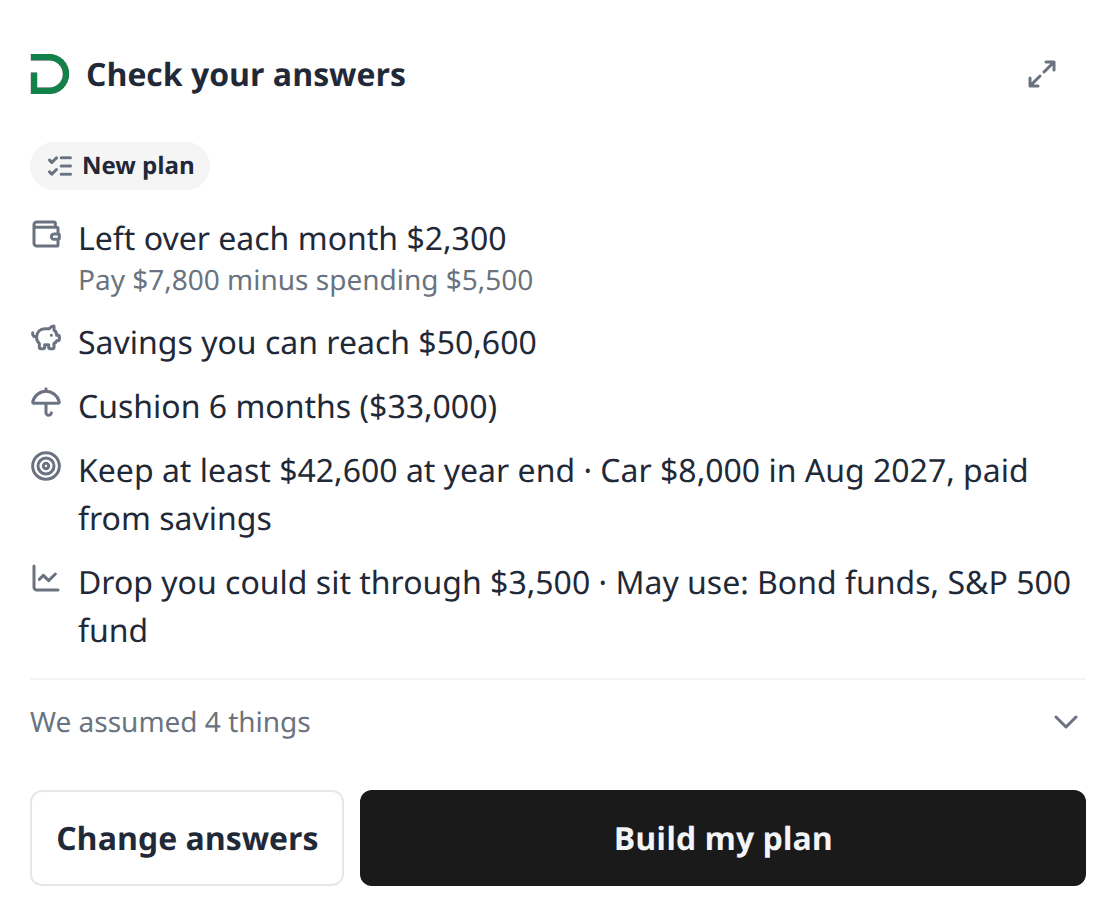
Message: “ I have $50,600 in savings and want $8,000 for a car down payment next August. We take home $7,800 a month and spend about $5,500. Is that realistic? ”
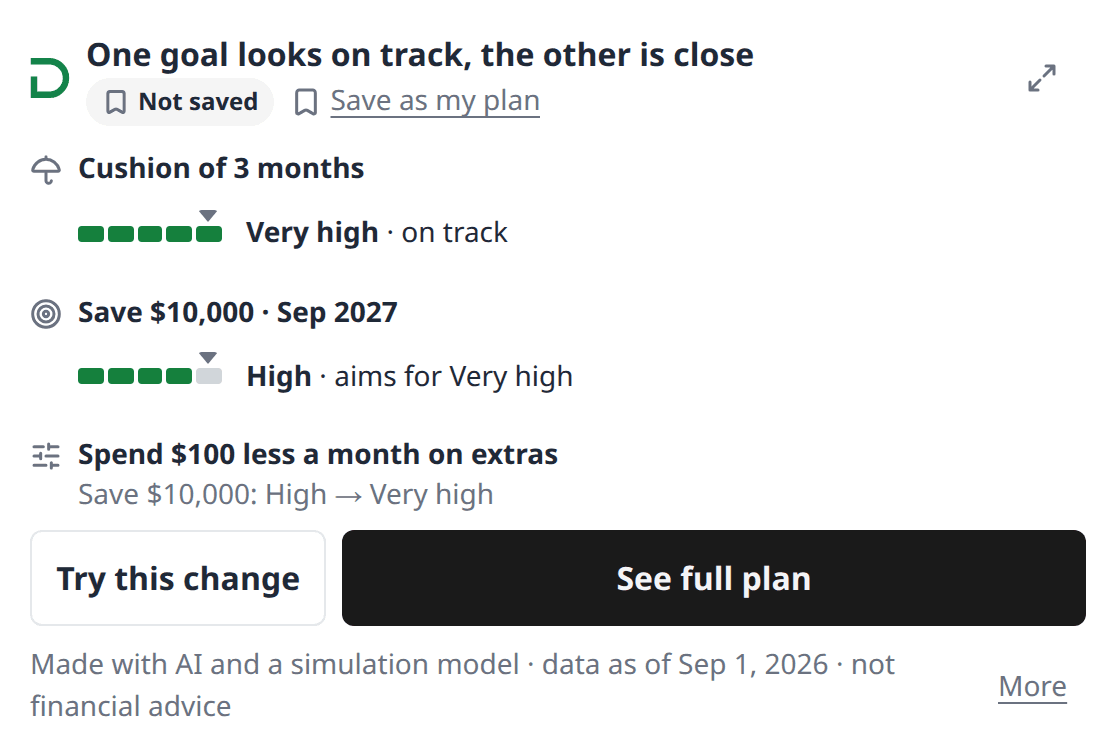
Message: “ Build my plan to keep a 3-month cushion and save $10,000 by next September. ”
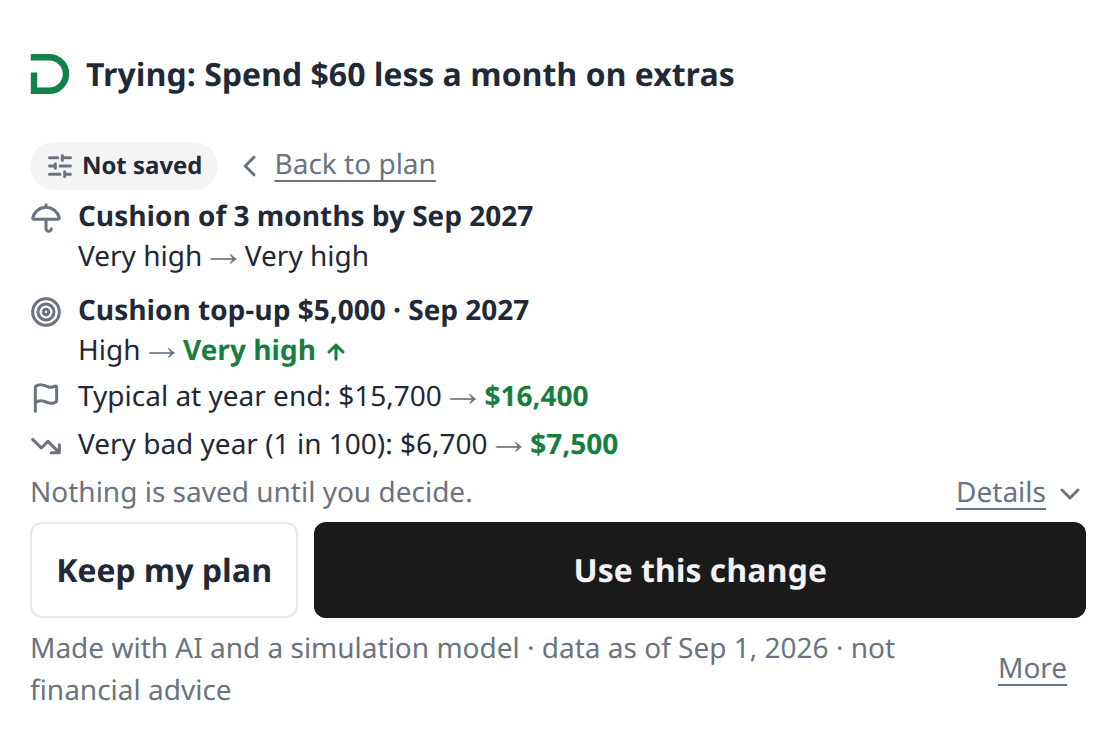
Message: “ What happens to my plan if we spend 20% less on extras? ”
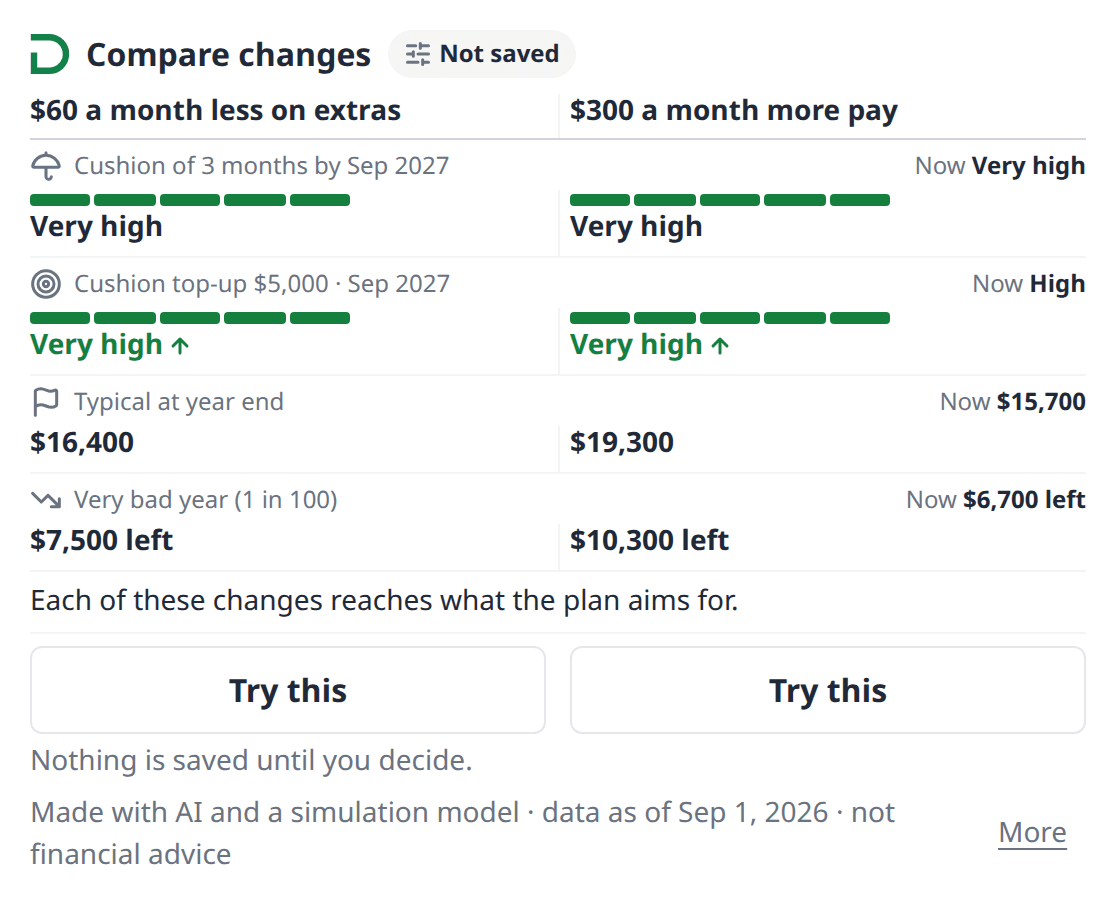
Message: “ Compare two options for my plan side by side: spending 20% less on extras, or adding $300 a month to my pay. ”
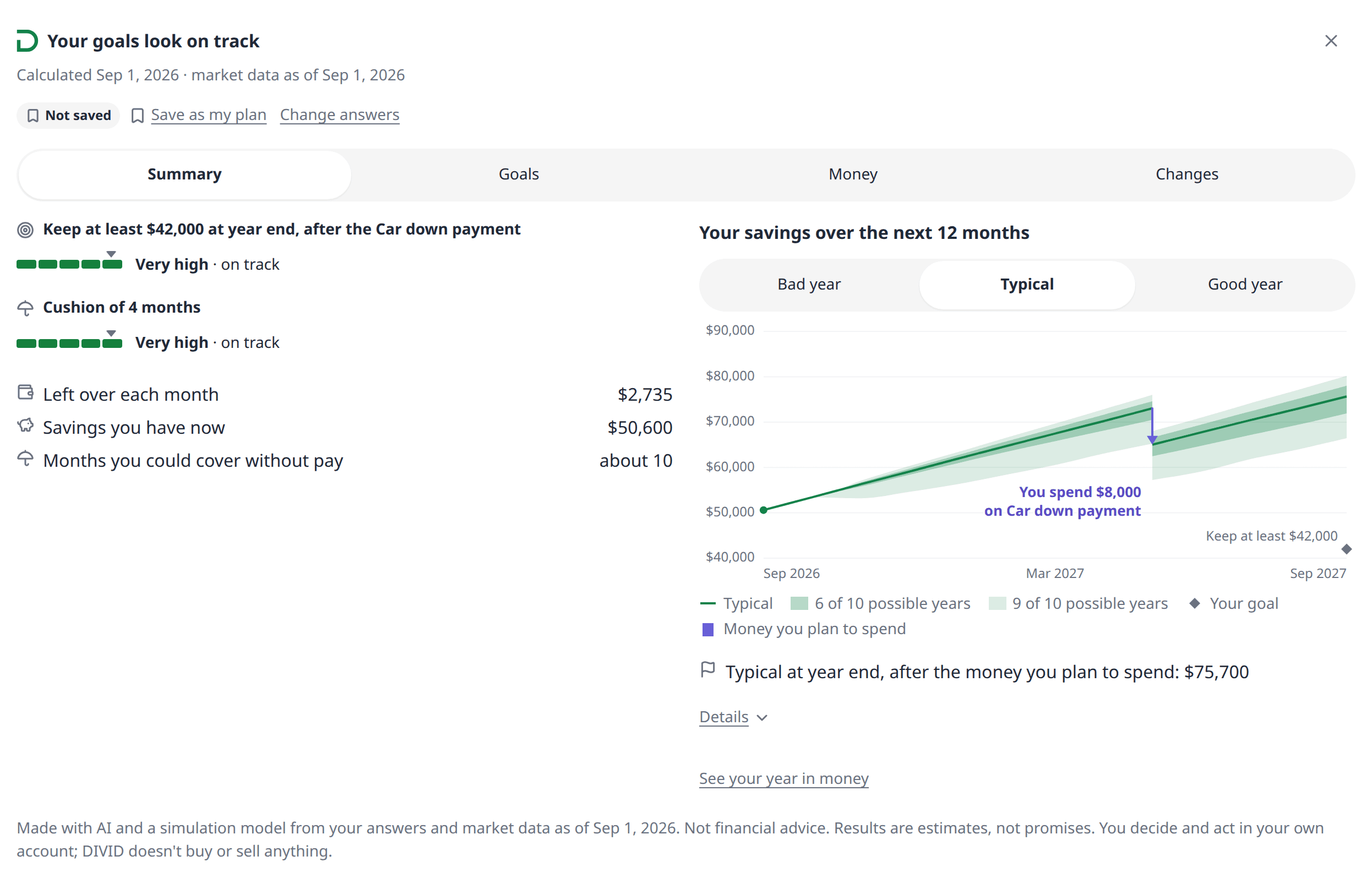
Message: “ Show me my full plan and how our savings could move over the next 12 months. ”
What it can do
It reads market data and your own plans, and it saves your planning answers and plans to your DIVID account. It never places trades, moves money or connects to bank or brokerage accounts.
Its tools in plain words
- Planner homeReadsShows your unfinished plan, your saved plans and the date of the market data.
- Start a planChangesStarts a new plan draft: the quick plan or the full questionnaire.
- Show a question stepReadsShows the questions of one topic and your answers so far.
- Save answersChangesSaves your answers for one topic.
- Add the saved changeChangesAdds the change saved with a plan to that plan's answers and shows them for review. The saved plan stays as it is.
- Find a stock or fundReadsLooks up a US stock or fund by name or ticker.
- Build the planChangesTests a finished draft in 1,000+ market scenarios.
- Check plan progressReadsChecks a plan that is still being built.
- Read plan detailsReadsReads a finished plan, part by part.
- Show the planReadsOpens the plan card in the chat.
- Load chart dataReadsLoads the numbers the plan card draws its charts from.
- Try a changeReadsTests a change without changing your plan.
- Compare changesReadsShows two or three changes side by side in one card, without changing your plan.
- Save the planChangesSaves the plan to your DIVID account as a new version.
- Open the report on divid.aiReadsGives you the link to a read-only report of a saved plan.
- How the planner worksReadsAnswers questions about the method and its limits.
What it doesn't do
- It doesn't give personalised investment advice or tell you to buy, sell or hold anything.
- It doesn't place trades, move money, or connect to your bank or brokerage accounts.
- It doesn't point you to brokers or products, and DIVID earns nothing from any fund or company shown.
- It doesn't watch your investments or send buy or sell alerts.
- It doesn't know your full tax situation, your retirement accounts (401(k), IRA) or anything you didn't tell it.
- Debts aren't part of the plan yet.
- It's built for US residents and US dollars.
Usage limits
Each account has a few limits so DIVID Planner stays quick for everyone. When you reach one, Claude tells you when you can go on, and your answers stay saved.
Plans built
20 an hour
Changes tried
60 an hour
Plans and changes together
200 a day
Plans being built at the same time
1, with up to 3 waiting
Unfinished plans
5
Saved plans
50
Save a plan and open it on divid.ai
Say “save it”, or tap Save as my plan on a plan card. To see it on the website, tap Open on divid.ai or ask Claude for the link. It opens a read-only report of the plan at auth.divid.ai. Only you can see it, after you sign in with the same DIVID account.
- Each save is a new version. Nothing is overwritten.
- The plan page opens only when you choose to open it.
- Plans can't be shared with other people yet.
Your data: disconnect or delete
Disconnecting DIVID Planner in Claude stops access but doesn't delete your DIVID data. To remove your data, delete a plan or your whole DIVID account.
What DIVID gets
Only what Claude sends to DIVID Planner's tools: your planning answers, your plan requests and the names you give your plans. DIVID doesn't get your Claude conversation, Claude's memory or your files. Your answers and plans are kept in your DIVID account.
Disconnect
In Claude, open Customize → Connectors, choose DIVID Planner and disconnect it, or use Connected apps on your DIVID account. Claude then can't reach your plans; they stay in your DIVID account.
Delete a plan
Write to welcome@divid.ai from your account's email and name the plan.
Delete your account and all your plans
Choose Delete my account and plans on your DIVID account, or write to welcome@divid.ai. Your account and plans are removed within 30 days.
Get a copy of your data
Write to welcome@divid.ai from your account's email. We reply within 30 days.
How long we keep it: saved plans until you delete them, unfinished plans for 90 days after the last change, and calculations that aren't in a saved plan for 30 days. Deleted data leaves our backups within 8 weeks.
Privacy questions: welcome@divid.ai · Privacy policy for DIVID Planner
If something goes wrong
Sign-in loops back to the DIVID page
Allow pop-ups and cookies for claude.ai and auth.divid.ai, then try Connect again.
Allow stays grey on the DIVID page
Tick the box above it first. It appears the first time you connect, and again if our terms change.
“Couldn't connect” or “Connector not responding”
Wait a minute and try again. If you added it by hand, check that the address is exactly https://mcp.divid.ai/mcp. If it keeps happening, disconnect DIVID Planner and connect it again. Your plans stay in your DIVID account.
Claude asks you to confirm on DIVID first
Open the link Claude gives you, tick the box on the DIVID page and click Continue. Then go back to Claude and say “done”.
Claude doesn't use DIVID Planner
Check that DIVID Planner shows as connected in Customize → Connectors and is turned on for the chat. Then ask again and name it: “Use DIVID Planner to make a plan for my savings.”
Cards don't show, only text
Some Claude apps show text only. Your plan is the same; open it on divid.ai to see the charts.
The plan is taking a while
Most plans take 10 to 30 seconds. If Claude says the plan is still being built, say “check again”.
“DIVID is busy” or “You've reached a limit”
Try again after the time Claude gives you. Your answers are saved. The limits are listed under What it can do.
“Market data is being updated”
Try again in a minute. Every plan shows the date of the market data it used.
“Something went wrong on DIVID's side”
Nothing you entered is lost. Write to welcome@divid.ai with the ref code from the message, and we'll look into it.
You're signed in to the wrong DIVID account
Disconnect DIVID Planner in Claude and connect again. On the DIVID page, choose Not you? Sign out, then sign in with the right account.
Get help
Write to welcome@divid.ai from the email you use for DIVID. Tell us which Claude app you use, what you tried and the exact message you saw, including any ref code.
DIVID Planner is a self-directed planning and simulation tool, not a financial adviser. It doesn't give personalised investment advice, place trades or move money. Plans are model estimates based on your inputs and historical market data, and results aren't guaranteed. Built for US residents; amounts in USD; 18+. Free during launch. Privacy: https://divid.ai/privacy-policy · Terms: https://divid.ai/terms-and-conditions
1,000+ market scenarios built from real price history, not a forecast.