DialNexa
Voice AI agents on steroids
Documentation
DialNexa MCP Server Overview
Connect an AI client to the DialNexa MCP server with Streamable HTTP, OAuth 2.1, or workspace API key authentication.
The DialNexa MCP server lets an MCP-compatible AI client inspect and manage DialNexa resources through named tools. Connect to https://api.dialnexa.com/v1/mcp with OAuth 2.1 or a DialNexa API key, then let the client discover the available tools through the Model Context Protocol.
Who should use the DialNexa MCP server
Use the MCP server when an AI client should choose and call DialNexa operations during a conversation. Use the REST API when your application code needs deterministic request and response handling without an AI client deciding which operation to run.
| Choose | Best for |
|---|---|
| MCP tools | AI assistants, coding agents, and MCP hosts that discover and call tools dynamically. |
| REST API | Backend services, scheduled jobs, product integrations, and explicit application workflows. |
Both interfaces use many of the same resource IDs. MCP clients can use an interactive DialNexa sign-in or a workspace API key, while REST API integrations use API keys.
DialNexa MCP Server Endpoint And Authentication
The server implements MCP Streamable HTTP at:
https://api.dialnexa.com/v1/mcp
OAuth 2.1 is the recommended connection method for interactive MCP clients. It uses authorization-code flow with PKCE and lets the user choose the workspace during consent. API key authentication remains available for clients that support custom request headers.
OAuth 2.1 Sign-In
Add the remote MCP URL without an Authorization header when your client supports MCP OAuth discovery. The connection follows this sequence:
- The client contacts the MCP endpoint and receives the protected-resource metadata location in the
WWW-Authenticateheader. - The client discovers the DialNexa authorization server and opens a browser.
- Sign in to DialNexa if needed.
- Review the requested permissions. If your account has multiple workspaces, select the workspace this client should use.
- Click Allow to finish, or Deny to reject the connection.
The consent screen can request these scopes:
| Scope | What it allows |
|---|---|
mcp:read | Read DialNexa workspace data through MCP tools. |
mcp:write | Run state-changing MCP tools after any tool-specific confirmation requirements are satisfied. |
offline_access | Let a compatible client refresh access without asking you to sign in for every request. |
<img src="https://mintcdn.com/dialnexa/KQqTe49OFCMnH_9c/images/documentation/screenshots/mcp-oauth-consent.png?fit=max&auto=format&n=KQqTe49OFCMnH_9c&q=85&s=2df55d326baa2fe195fb4d86536328d8" alt="DialNexa MCP OAuth consent screen showing Claude, read and write permissions, offline access, and Deny and Allow buttons." style={{ width: '100%', maxWidth: '700px', margin: '8px 0 24px', border: '1px solid #e5e7eb', borderRadius: '6px' }} width="1072" height="934" data-path="images/documentation/screenshots/mcp-oauth-consent.png" />
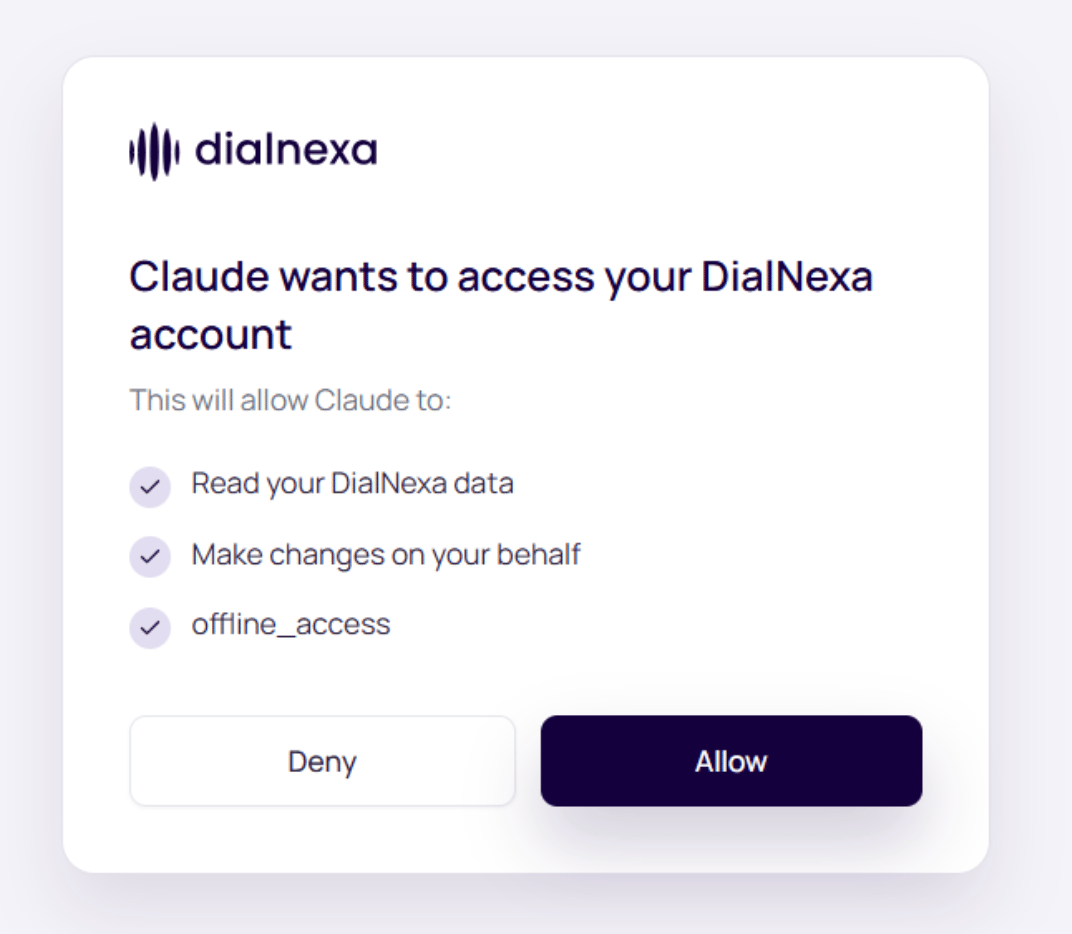
OAuth access is limited to the workspaces and permissions approved by the user. If the credential has access to multiple workspaces, call List My Organizations, choose the intended workspace, and pass its organization_id with subsequent tool calls. This cannot grant access to a workspace outside the credential's permissions.
API Key Authentication
Send a workspace API key as a Bearer token on every request:
Authorization: Bearer YOUR_API_KEY
The server resolves the workspace from the API key. Tool arguments cannot select a different workspace. A missing, revoked, or malformed key returns 401 Unauthorized before a tool runs.
See API key authentication for key creation and storage guidance.
DialNexa MCP tool reference
Each tool has its own reference page with the exact server description, input schema, safety level, JSON-RPC request shape, retry guidance, and related tools.
Create, inspect, configure, and remove voice agents. Find call records and place confirmed outbound calls. Inspect campaigns, review leads, and control batch calls. Build workflow graphs and manage workflow execution. Inspect and manage knowledge base containers. Search, purchase, inspect, and configure phone numbers. Resolve language, voice, model, and transcriber IDs. Find reusable agent templates and inspect their configuration. Inspect billing plans, phone-number pricing, and SIP rates. Inspect workspace webhook configuration without exposing secrets. Inspect the current workspace and its agent folders. Read call, agent, onboarding, and weekly dashboard metrics. Inspect, connect, validate, and disconnect integrations. Read AI-generated prompt improvements for an agent.Upload Files Through MCP
MCP supports knowledge-base text and document uploads, batch recipient files, and workflow lead files. Use host attachments or a short-lived upload slot instead of copying large files into the conversation. See the MCP file upload workflow for supported formats, limits, and finalization steps.
Multilingual Agents And Document Processing
create_agent and update_agent accept up to three secondary_language_ids and an optional language_default_message. Choose a voice available to the connected workspace, and verify the saved draft before publishing. See the complete create-agent schema.
Knowledge-base text and document uploads can return processing while indexing runs in the background. Check get_knowledge_base_documents and wait for ready before expecting the agent to retrieve the content. A failed document can disappear from the normal list. See document processing and recovery.
Protocol behavior
- Transport: The server uses stateless MCP Streamable HTTP. Each request is authenticated independently with OAuth or an API key.
- Discovery: Use the standard MCP
tools/listmethod after client initialization. - Invocation: Use
tools/callwith the exact snake_case tool name and anargumentsobject. - Results: A successful tool returns one text content block. The text contains the JSON-encoded result.
- Tool failures: A tool-level failure sets
isError: trueand returns a readable explanation in the text block. - IDs: Pass prefixed IDs exactly as returned, such as
agent_...,call_...,batch_..., andworkflow_....
Safety and confirmation
Reference pages classify every tool as read only, state changing, destructive, or billable. Tools that place calls, spend money, or permanently delete selected resources require explicit user approval as described by that tool. Never add confirm: true before the user approves the exact action.
After an uncertain timeout on a state-changing tool, read the affected resource before retrying. This prevents duplicate calls, purchases, or resources.