Unofficial Telegram MCP
Local Telegram MTProto MCP for Codex: read-only by default, optional text writes with exact chat allowlists, and English/Russian setup for Windows, Linux and macOS. Review Telegram API/AI terms before using real data.
Documentation
Unofficial Telegram MCP
English · Русский




Setup · Read tools · Optional writes · Contribute · Security model
A local Model Context Protocol server with support for Codex and other compatible MCP clients. Its tools find Telegram dialogs, search messages, read history and unread messages, and summarize a chosen period through MTProto.
Before using real Telegram data: read the platform-use and licensing guide and Telegram API Terms. Technical compatibility does not establish permission for AI processing; platform-use questions remain unresolved for this utility. For an account-free trial, use the fictional demo below.
Read-only by default. Optionally enable sending text, editing your own messages and deleting your own messages in explicitly allowed chats. No background monitoring or desktop notification sender.
An independent community project, not affiliated with Telegram or OpenAI. Uses your personal Telegram account, not a BotFather token.
Contents
- Features
- 1. Install: Windows, Linux, macOS
- 2. Get Telegram API credentials
- 3. Configure the local server
- 4. Sign in locally
- 5. Connect to Codex
- 6. Read Telegram
- 7. Enable writes
- Configuration reference
- Privacy and sessions
- Notifications
- Troubleshooting
- Updates and development
- Contribute and support
- Planned privacy layer
- Advanced use and license
Features
| Feature | Behavior |
|---|---|
| Seven read tools | Dialogs, history, one message, search, unread, latest and time ranges |
| Three optional write tools | Send plain text, edit your own message, delete your own messages |
| Access control | Separate read/write allowlists; denylist wins |
| Local authorization | Phone, code and optional 2FA password entered in your terminal |
| Local session | Windows DPAPI encryption; owner-only files on Linux/macOS |
| Account-free demo | Three fictional chats and 12 messages; no Telegram connection |
| Standard MCP | Local stdio and authenticated Streamable HTTP |
Returns message text/captions and attachment metadata; does not download media, join channels, access secret chats or provide arbitrary Telegram API calls. Reading does not mark messages as read. Write mode adds only the three documented operations.
1. Install: Windows, Linux, macOS
You need an existing Telegram account, Internet access, Git, uv and Python 3.11 or newer. The commands install Python 3.11 through uv and create an isolated .venv; activation is unnecessary.
Choose one OS below. Run commands in its terminal, one line at a time, without copying Markdown backticks. Install commands download tools from their publishers; see uv's official installation guide for alternatives.
Windows — PowerShell
- Open Windows Terminal → PowerShell or Windows PowerShell from Start. If needed, install Git and uv:
winget install --id Git.Git -e --source winget
winget install --id astral-sh.uv -e --source winget
If WinGet is unavailable, use the Git for Windows installer and the official uv installer:
powershell -ExecutionPolicy ByPass -c "irm https://astral.sh/uv/install.ps1 | iex"
- Close and reopen PowerShell to refresh PATH, then run:
git --version
uv --version
New-Item -ItemType Directory -Force -Path "$env:USERPROFILE\Projects" | Out-Null
Set-Location "$env:USERPROFILE\Projects"
git clone https://github.com/daniil-novel/telegram-mcp.git
Set-Location .\telegram-mcp
uv python install 3.11
uv sync --frozen --python 3.11
if (-not (Test-Path -LiteralPath .env)) { Copy-Item -LiteralPath .env.example -Destination .env }
notepad .env
You are in %USERPROFILE%\Projects\telegram-mcp. Keep the terminal open. Copy .env.example only for a new installation; do not overwrite an existing .env.
Linux — Terminal
- Open a terminal. On Debian/Ubuntu, install Git and curl if needed:
sudo apt-get update
sudo apt-get install -y git curl
On Fedora use sudo dnf install git curl instead; other distributions: use your package manager (Git installation guide). Install uv if needed:
curl -LsSf https://astral.sh/uv/install.sh | sh
- Close and reopen the terminal, then run:
git --version
uv --version
mkdir -p "$HOME/Projects"
cd "$HOME/Projects"
git clone https://github.com/daniil-novel/telegram-mcp.git
cd telegram-mcp
uv python install 3.11
uv sync --frozen --python 3.11
if [ ! -e .env ]; then cp .env.example .env; fi
nano .env
In nano: Ctrl+O → Enter to save, Ctrl+X to exit. Use your preferred editor if nano is unavailable. You are in ~/Projects/telegram-mcp. Create .env only once; keep existing settings during updates.
macOS — Terminal
- Open Applications → Utilities → Terminal. If Git is unavailable, install Apple's Command Line Tools and finish the on-screen installer:
xcode-select --install
Install uv if needed:
curl -LsSf https://astral.sh/uv/install.sh | sh
If you already use Homebrew, brew install uv is another option.
- Close and reopen Terminal, then run:
git --version
uv --version
mkdir -p "$HOME/Projects"
cd "$HOME/Projects"
git clone https://github.com/daniil-novel/telegram-mcp.git
cd telegram-mcp
uv python install 3.11
uv sync --frozen --python 3.11
if [ ! -e .env ]; then cp .env.example .env; fi
nano .env
In nano: Ctrl+O → Enter to save, Ctrl+X to exit. You are in ~/Projects/telegram-mcp. Create .env only once; keep existing settings during updates.
Try the demo before connecting your account
From the repository directory:
uv run --frozen telegram-mcp serve --demo
This is a stdio server, so it waits for an MCP client; it is not an interactive Telegram terminal. Ctrl+C stops it. In the Codex config from step 5, append --demo after serve to use fictional tools. Demo does not load your session or connect to Telegram. Remove --demo for your real account. Its dates are fixed examples, not current messages.
2. Get Telegram API credentials
Do this in your browser, not PowerShell or the AI conversation. See Telegram's official application setup guide.
- Open my.telegram.org and verify the hostname.
- Enter your own Telegram phone number in international format, with
+and country code. - Select Next, open your official Telegram app and enter the website login code. Follow Telegram's actual delivery instructions.
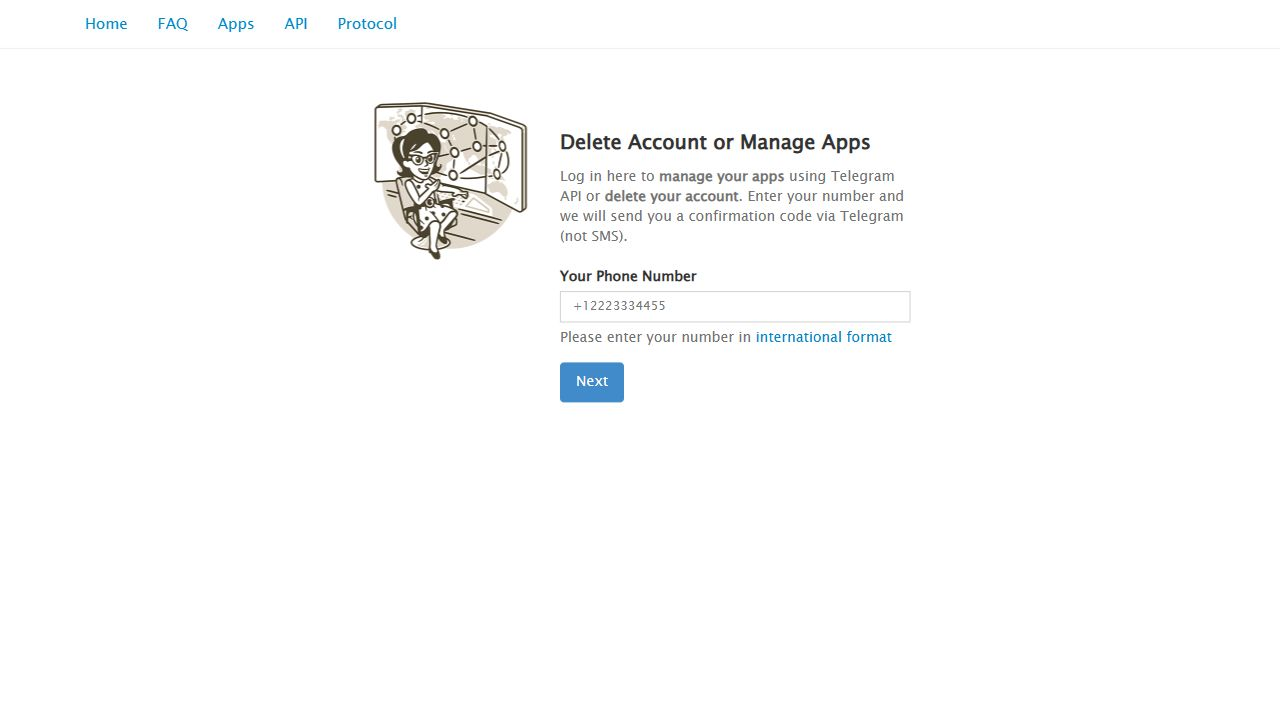
Website login screen, with no personal phone number or login code.
- Open API development tools. If an application already exists, use its
api_idandapi_hash; Telegram currently permits one API ID per phone number. - If you see Create new application, fill the form. Example details:
| Website field | What to enter |
|---|---|
| App title | Unofficial Telegram MCP, or your descriptive title. Telegram's terms require “Unofficial” before “Telegram” in third-party app titles. |
| Short name | For example mytgmcplocal; use Latin letters/digits and follow the website's length and validation rules. |
| URL | Your real public application page if requested. This project's source page is https://github.com/daniil-novel/telegram-mcp. It is not an OAuth callback. Leave blank if the current form allows it. |
| Platform | Desktop if offered for a local client; otherwise Other with a description. This does not restrict the repository to one OS. |
| Description | For example Personal local Telegram client via MTProto. Describe your intended use truthfully. |
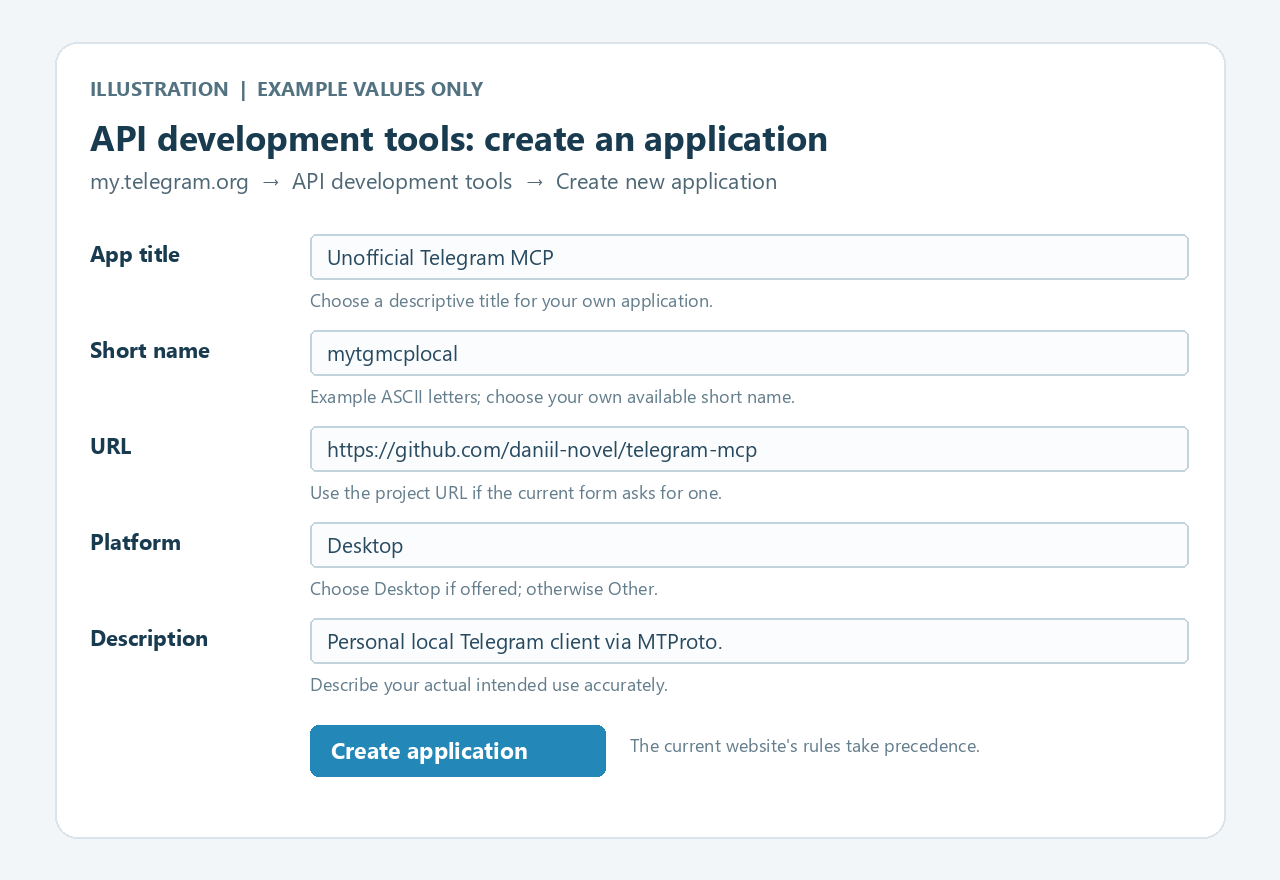
Illustrative guide to the authenticated form. Example values; the current website may differ.
- Select Create application. Copy App api_id and App api_hash into your local
.envin step 3.
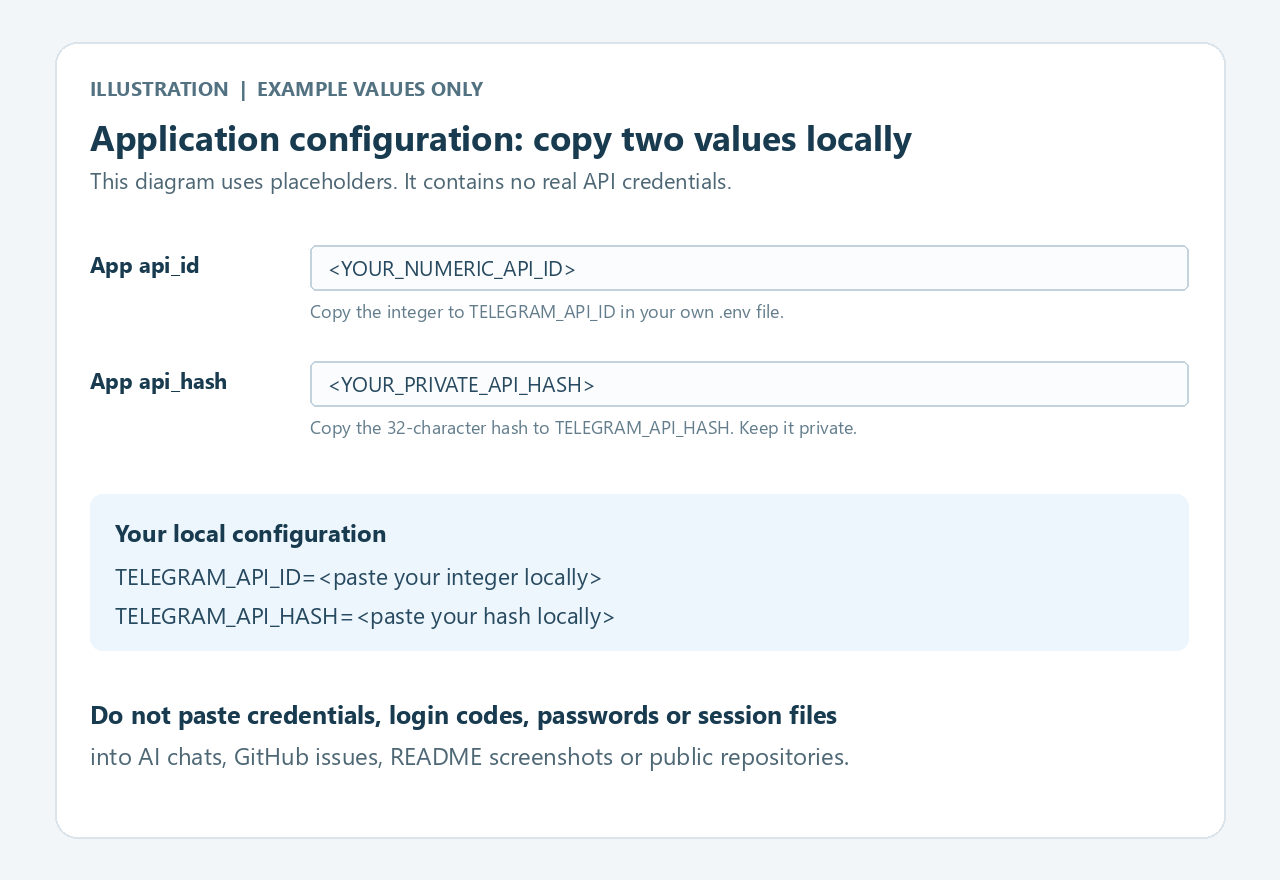
Illustrative guide with placeholders, not real credentials. Do not use someone else's API values.
api_id is numeric; api_hash is 32 hexadecimal characters. These are not your phone number, login code, 2FA password, bot token or OpenAI key. Each user gets their own credentials; none are distributed here.
If creation fails, check the current form's requirements and try again later. This project cannot bypass Telegram's account restrictions.
3. Configure the local server
Edit .env in the repository root, beside pyproject.toml. Use the Notepad/nano window opened in step 1. Replace both placeholders with your own values, without < or >:
TELEGRAM_API_ID=<YOUR_NUMERIC_API_ID>
TELEGRAM_API_HASH=<YOUR_32_CHARACTER_API_HASH>
TELEGRAM_SESSION_DIR=
TELEGRAM_ALLOWED_CHAT_IDS=*
TELEGRAM_DENIED_CHAT_IDS=
TELEGRAM_WRITE_ENABLED=false
TELEGRAM_WRITE_ALLOWED_CHAT_IDS=
Save as .env, not .env.txt. Keep the HTTP settings from .env.example unchanged for stdio. An empty session directory uses the OS default.
TELEGRAM_ALLOWED_CHAT_IDS=* allows reading all cloud dialogs accessible to your account. After list_dialogs, you can replace it with exact numeric IDs. An empty read allowlist denies every chat. Writes remain disabled until step 7.
From the same terminal in the repository, restrict .env permissions:
uv run --frozen telegram-mcp protect-env
Never paste API hash, phone, login code, 2FA password, .env or session files into chat, issues or screenshots. .env is ignored by Git; this does not protect manual uploads.
4. Sign in locally
Run this yourself in an interactive PowerShell/Terminal, still in the repository:
uv run --frozen telegram-mcp auth
- Telegram phone (+country code, hidden): enter your number and press Enter.
- Telegram login code (hidden): enter the new code sent by Telegram and press Enter. This login is separate from
my.telegram.org. - If requested, Telegram 2FA password (hidden): enter your Telegram password and press Enter.
- Wait for Authorized. Session stored locally; no messages were read or changed.
Hidden input shows no characters or asterisks while typing. This is expected. The protected session lets later starts work without another code. Codes and 2FA passwords are not saved. Authorization is a separate local command; there is no MCP login tool.
Inspect/revoke access in Telegram → Settings → Devices. The session uses the project device name. Once terminated, the server cannot sign itself in again.
5. Connect to Codex
Recommended: local stdio. Codex starts the server; no public endpoint or HTTP token is needed.
Open the Codex user configuration, usually %USERPROFILE%\.codex\config.toml on Windows or ~/.codex/config.toml on Linux/macOS. Create it if needed. Append one table, preserving existing settings. Replace all example paths with your own absolute paths. TOML single quotes keep Windows backslashes literal.
Windows config
[mcp_servers.telegram]
command = 'C:\Users\YOUR_USERNAME\Projects\telegram-mcp\.venv\Scripts\python.exe'
args = ['-m', 'telegram_readonly_mcp', '--env-file', 'C:\Users\YOUR_USERNAME\Projects\telegram-mcp\.env', 'serve']
startup_timeout_sec = 60
tool_timeout_sec = 60
Linux config
[mcp_servers.telegram]
command = '/home/YOUR_USERNAME/Projects/telegram-mcp/.venv/bin/python'
args = ['-m', 'telegram_readonly_mcp', '--env-file', '/home/YOUR_USERNAME/Projects/telegram-mcp/.env', 'serve']
startup_timeout_sec = 60
tool_timeout_sec = 60
macOS config
[mcp_servers.telegram]
command = '/Users/YOUR_USERNAME/Projects/telegram-mcp/.venv/bin/python'
args = ['-m', 'telegram_readonly_mcp', '--env-file', '/Users/YOUR_USERNAME/Projects/telegram-mcp/.env', 'serve']
startup_timeout_sec = 60
tool_timeout_sec = 60
The compatibility module telegram_readonly_mcp stays unchanged, including in write mode. Do not rename it in args. Configuration examples are also available.
Restart/reload the MCP connection, or restart Codex and open a new chat if its tool list is cached. In Codex CLI, codex mcp list lists configured servers and /mcp shows connections. See official Codex MCP documentation. A trusted project's .codex/config.toml may be used for project-scoped setup.
The explicit Python path avoids reliance on uv being on the desktop app's PATH. --env-file is explicit because Codex may start the process from another directory.
Existing plugin users: use either the project's plugin or this standalone entry. Disable duplicates. A plugin may bundle its own runtime; updating a clone alone does not update the installed plugin.
First request:
Use Telegram MCP to list my dialogs. Show titles and numeric chat IDs. Do not send, edit or delete anything.
You should see allowed real dialogs. If source=demo, remove --demo from the config.
6. Read Telegram
Describe the task in natural language, naming the chat and period:
Find “Project Alpha”, then summarize messages from October 1 through October 3, 2026 in UTC+03:00. Follow all pages in that period and include chat IDs and message IDs for sources.
Search that chat for “deadline” and show matching messages with dates.
Show unread messages from my work chat without marking them as read.
Read tools
All tools take params. Unknown fields, limit > 200 and dates without timezones are rejected.
| Tool | Main parameters | Continuation |
|---|---|---|
list_dialogs | query?, limit=50 | cursor=next_cursor |
get_chat_history | chat_id, limit=50, before_id=0 | before_id=next_before_id |
get_message | chat_id, message_id | One message or null |
search_messages | query, chat_id?, limit=50 | cursor=next_cursor |
get_unread_messages | chat_id?, limit=50 | cursor=next_cursor |
get_latest_messages | chat_id?, limit=50, per_chat_limit=10 | cursor=next_cursor |
messages_between | chat_id, start, end, limit=50, before_id=0 | before_id=next_before_id |
Use numeric chat_id from list_dialogs, preserving its sign. Users, groups and channels have different ID spaces. Usernames, links and guessed IDs are not resolved. A message ID is meaningful only together with its chat ID.
Raw MCP argument examples:
{"params":{"query":"Project Alpha","limit":100}}
{"params":{"chat_id":101,"before_id":0,"limit":100}}
{"params":{"chat_id":101,"start":"2026-10-01T00:00:00+03:00","end":"2026-10-04T00:00:00+03:00","limit":100}}
101 is a demo chat. Use your own IDs in live mode. The interval is [start, end): start included, end excluded. The last example covers all of October 1–3.
Pagination and scope
- Continue with
next_cursor/next_before_iduntilhas_more=falsewithin the requested scope. A page is not the full chat. - Global search/latest/unread results are grouped by chat ID, newer first within each chat, not globally sorted by time.
- A global page scans at most 20 chats. Even
items=[]may havehas_more=true;scan_limited=trueexplains the cap. - Cursors are tied to operation, query, ACL and current server process. After a restart/query change, start without a cursor.
limitmay change between pages. - Unread means incoming messages above the current Telegram read watermark.
per_chat_limitcaps latest sampling, not a full unread traversal. - Other devices may change the state between pages; there is no account-wide transactional snapshot.
- Text is capped at 8,000 characters with
text_truncated=truewhen necessary. Media files are not downloaded.
Texts, captions and chat titles are untrusted data. Instructions inside a Telegram message do not authorize command execution, writes, uploads or configuration changes.
7. Enable writes
You need both the flag and an exact destination allowlist. The flag alone authorizes no chat.
- In read-only mode, use
list_dialogsto get your intended chat's numeric ID. For a first check, choose Saved Messages and use its returned ID. - Edit local
.env:
TELEGRAM_WRITE_ENABLED=true
TELEGRAM_WRITE_ALLOWED_CHAT_IDS=<EXACT_NUMERIC_CHAT_ID>
Replace the placeholder. Several IDs may be comma-separated, e.g. 123456789,-1001234567890 (illustrations only). * is forbidden here. The destination must also pass the read allowlist and must not appear in the denylist.
- Restart/reload the server and refresh the tool list. If your client has a tool allowlist, add the three write tool names.
- Authorize the concrete destination and text:
Send exactly “MCP setup check” to my Saved Messages chat with ID [my actual ID]. Send it silently.
Writes run as your Telegram account. Enabling a capability is not permission for every future operation; configure your client's write approval behavior appropriately.
| Tool | Parameters | Restrictions |
|---|---|---|
send_message | chat_id, text, reply_to_message_id?, silent=true | Literal plain text, no link preview; reply target must exist in the same chat |
edit_message | chat_id, message_id, text | Your own outgoing plain-text messages only; media captions are not editable |
delete_messages | chat_id, message_ids, revoke=true | Your own outgoing messages only; 1–100 IDs |
{"params":{"chat_id":101,"text":"MCP setup check","silent":true}}
{"params":{"chat_id":101,"message_id":13,"text":"Updated text"}}
{"params":{"chat_id":101,"message_ids":[13],"revoke":true}}
Send/edit text is up to 4,096 UTF-16 code units; Markdown/HTML is not parsed. Results normally include a message/IDs; an unusual accepted Telegram response may return accepted=true with message=null. Inspect targeted history to verify it; do not resend merely to obtain an ID. Telegram applies its own permissions/editing windows. revoke=true requests deletion for participants where supported and can be irreversible; false requests your-side deletion where available. Channels and megagroups require revoke=true; this server rejects revoke=false for those destinations.
Do not automatically repeat a write after a timeout or uncertain response. It may already have succeeded. Inspect the destination/history before deciding to retry.
To disable writes, set TELEGRAM_WRITE_ENABLED=false and restart. Write tools disappear and the RPC guard rejects writes. Joining/leaving, reactions, forwarding, media uploads, profile changes, read receipts and arbitrary RPCs remain unavailable.
Configuration reference
.env is loaded from the process's current directory unless --env-file is before the subcommand. No upward search. Process environment variables override .env. Restart to apply changes.
uv run --frozen telegram-mcp --env-file /absolute/path/to/.env protect-env
uv run --frozen telegram-mcp --env-file /absolute/path/to/.env auth
uv run --frozen telegram-mcp --env-file /absolute/path/to/.env serve
On Windows use a quoted Windows path.
| Variable | Default | Purpose |
|---|---|---|
TELEGRAM_API_ID | Empty | Your numeric API ID; required for live/auth |
TELEGRAM_API_HASH | Empty | Your 32-character API hash; required for live/auth |
TELEGRAM_SESSION_DIR | OS-specific | External session folder; blank uses default |
TELEGRAM_ALLOWED_CHAT_IDS | * | Read all accessible dialogs, exact comma-separated IDs, or empty for none |
TELEGRAM_DENIED_CHAT_IDS | Empty | Exact IDs denied for both reading and writing; deny wins |
TELEGRAM_WRITE_ENABLED | false | Enables write tools/capability |
TELEGRAM_WRITE_ALLOWED_CHAT_IDS | Empty | Exact permitted write destinations; empty denies all; no wildcard |
MCP_HTTP_TOKEN | Empty | HTTP only: separate random ASCII token, ≥32 characters, no whitespace |
MCP_ALLOWED_HOSTS | 127.0.0.1:8765,localhost:8765 | HTTP allowed hosts, no wildcard |
MCP_ALLOWED_ORIGINS | http://127.0.0.1:8765,http://localhost:8765 | HTTP allowed origins, no wildcard |
Privacy and sessions
The server runs locally and contacts Telegram for requested operations. It contains no OpenAI API client and does not directly upload messages to a model. MCP responses are visible to the connected client and its model. Limit chats and scope to material you are authorized to share.
Storage paths are preserved from the previous version:
| OS | Default session | Protection |
|---|---|---|
| Windows | %LOCALAPPDATA%\TelegramReadOnlyMCP\session.dpapi | Current-user DPAPI encryption and restricted ACL |
| Linux/macOS | $XDG_DATA_HOME/telegram-readonly-mcp/session.secret, default ~/.local/share/telegram-readonly-mcp/session.secret | File 0600, folder 0700, owner checks; not encrypted at rest |
Auth and server must run under the same OS user. Custom storage must be outside the repository; symlinks/junctions are rejected. No message/contact database is created. Session files grant account access; do not commit or transfer them.
Telegram has no read-only user-session scope. This code restricts tools, checks ACLs and guards exact MTProto RPC classes, including nested requests. Unknown operations fail closed. Tool annotations are hints; code enforces the restriction. Auth is separate and cannot send/edit/delete messages.
ACL filters MCP output and targeted history requests. Telegram's dialog listing may put denied-chat metadata/last messages in backend memory; they are excluded from output. Use a separate account for stricter metadata isolation.
Review Telegram API Terms and Content Licensing and AI Scraping Terms. The API terms broadly restrict platform-data use for AI development, enhancement or deployment. Technical MCP compatibility is not a claim that Telegram authorizes a particular AI use. MIT licenses this code, not Telegram content or exceptions to platform terms.
Read the security model and its limits: repository rules, Bandit, dependency/secret scans and CodeQL. SECURITY.md covers private vulnerability reporting and revocation. Checks reduce known risks; permitted content remains visible to the client/model, and prompt injection is not fully solved.
Notifications
This server does not subscribe to background message updates, start monitoring, register push devices or emit desktop toast notifications. Reads do not send read receipts. Optional sends use Telegram's silent=true by default: it suppresses notification sound where supported, not necessarily recipient banners.
A toast labeled ChatGPT is not enough to identify which integration produced it. This Python server has no desktop-notification function; the owning client, a browser tab or another integration may produce the toast.
If you use Telegram Web, open the actual Telegram Web site in the same browser that hosts it, then use the icon to the left of the address → Site settings / Permissions → Notifications → Block. This blocks that site's notifications only. See the official Chrome and Edge permission instructions. For an in-app browser, use its per-site permission controls if provided; otherwise close the Telegram Web tab and identify the notification source before changing broader settings. If a scheduled Telegram monitor is responsible, disable that specific monitor in its owning client. A server-code change cannot revoke an independent browser's notification permission.
Troubleshooting
| Problem | Check |
|---|---|
git/uv not recognized | Reopen the terminal after installation; run version commands. |
| Missing credentials | Exact .env name and location; own values without placeholders; correct absolute --env-file. |
| Auth seems to ignore typing | Hidden input shows nothing. Type and press Enter. |
| “Use an interactive terminal” | Run auth yourself in PowerShell/Terminal, outside an MCP tool. |
| Telegram rejects auth/form | Check credentials/new code and actual form validation locally; wait if rate-limited. |
| Missing/expired session | Same OS user/session path; rerun local auth after revocation. |
| Storage permission error | Normal external local folder, no symlinks/junctions; use protect-env, not public permissions. |
| Duplicate connections | Configure one standalone/plugin entry; stop stale instances. |
| No write tools | Flag true, server restart, client tool-list refresh; check client tool allowlist/old plugin. |
| Write denied | Exact signed ID, write allowlist and read allow/deny rules. Empty write list permits none. |
| Edit/delete rejected | Your outgoing messages only; correct chat/message IDs and Telegram permissions. |
Empty page, has_more=true | Continue with returned cursor; page may scan nonmatching chats. |
| FloodWait/rate limit | Wait the reported seconds; narrow repeated searches to selected chats/dates. |
| Write timeout/connection loss | Outcome may be unknown. Read destination before any retry. |
| HTTP 401 | Matching server/client bearer token; stdio needs neither. |
| HTTP Host/Origin error | Explicit host/origin matching actual loopback port; no wildcards. |
| Codex cannot start process | Absolute .venv Python and .env paths; uv sync --frozen after update. |
| ChatGPT toast contains Telegram text | Identify the producing browser/integration; block Telegram Web's site notification permission in its own browser or disable the specific monitor. See Notifications; the screenshot alone does not prove the source. |
For help, open a GitHub issue with OS, Python/uv versions, command and redacted error. Exclude secrets and private chat contents.
Updates and development
In the repository:
git pull --ff-only
uv sync --frozen
Restart the connection. Preserve .env and external sessions. Do not overwrite .env with the example. Legacy CLI telegram-readonly-mcp and module telegram_readonly_mcp are retained.
Account-free development checks:
uv sync --frozen --extra dev
uv run --frozen --extra dev python -m pytest -q
uv run --frozen --extra dev ruff check .
uv run --frozen --extra dev ruff format --check .
uv build
Tests use synthetic/fake responses; passing tests does not establish live testing of every Telegram account/OS/Docker environment. Recorded evidence/limits: VALIDATION.md. Contributions: CONTRIBUTING.md. Changes: CHANGELOG.md.
Contribute and support
Bug reports, documentation fixes and focused improvements are welcome in English or Russian. Fork → feature branch → pull request to main; see CONTRIBUTING.md for exact commands and account-free checks. A public fork gives you no write access to this repository. Report vulnerabilities through SECURITY.md, using synthetic examples.
If this project is useful to you, give it a ⭐ star on GitHub. It helps other people discover the tool.
Planned privacy layer
Planned, not implemented. Research checked on 2026-10-06. This release returns permitted Telegram data without automatic anonymization. No privacy flags exist yet. This research used public documentation, with no model downloads, inference or private chats.
Replace identifying information locally before an MCP response reaches a cloud model. Pseudonyms retain meaning; encryption protects stored files. Encrypted message text cannot support ordinary semantic analysis. Context can still identify people after pseudonymization; measure disclosure risk using guidance such as NIST SP 800-188.
An optional Telegram transport proxy changes network routing; it does not remove personal data from MCP responses.
Proposed local pipeline
Our recommendation: start with a read-only pilot; add write-safe alias resolution only after acceptance tests pass. These are proposed requirements.
| Stage | Proposed behavior |
|---|---|
| Isolate secrets | Exclude application credentials, sessions, login codes and 2FA from all models. Target AEAD-encrypted files with OS-keystore keys across platforms; plaintext remains necessary in process memory. |
| Scan content | Remove detected/suspected message secrets using deterministic rules before NER/judging. Arbitrary pasted passwords can remain undetected. |
| Minimize and detect | Cover text, captions, titles, names, usernames, links, IDs and reply/forward metadata. Omit unnecessary fields. Use overlapping bounded chunks and strictly validate spans. |
| Replace locally | Readable task-scoped labels linked to random, unguessable local handles; encrypted, expiring mapping. Keep original IDs local. Global hashes permit cross-task correlation. |
| Optional judge | Offline, no tools/network; advisory only, cannot override blocks. Required-stage timeout, OOM, malformed output or unsupported input blocks export. |
| Gate responses | Cover every read tool, page and error. No raw previews or sensitive content in logs/diagnostics. |
Later, restore aliases in a local viewer and, after exact approval, immediately before the Telegram operation: human write approval must bind exact restored text, destination and action while preserving ACLs. Never expose restored plaintext through MCP results, previews, _meta, logs or errors.
Coverage ends at this server's new outputs. Previously cloud-sent data, private client prompts/history and other connectors require separate controls.
Models to evaluate
Recommended Russian + English pilot: deterministic rules plus Horizon, optionally a local Qwen judge. Selection is bounded to reviewed candidates.
| Role | Candidate and upstream facts | Why evaluate it |
|---|---|---|
| Local detector | Horizon-Labs/pii-redactor-small: 141M parameters, Apache-2.0, multilingual | Smallest reviewed candidate with published RU/EN evidence; detects spans. |
| Optional local judge | Qwen/Qwen3.5-0.8B: 0.8B language-model parameters, Apache-2.0; card claims 201 languages/dialects, documents text-only serving | Intended for prototyping/research; reliable PII judging remains unproven. |
| Detector comparison | openai/privacy-filter: Apache-2.0, 1.5B total / 50M active parameters, multilingual evaluations | Dedicated span detector with much larger resident weights. |
Horizon reports 0.75 character-level redaction recall on an external Russian dataset: insufficient alone. Published scores use different datasets/definitions and cannot establish a universal ranking. Telegram-specific recall and resource requirements remain unmeasured.
Future dependencies include Transformers/PyTorch or ONNX and a local judge engine. Require reviewed, pinned revisions and SHA-256 weight hashes, offline inference, and no automatic cloud fallback, including on model errors.
OpenRouter: supplementary research only
Sensitive Info uses regex/Presidio but proceeds on NLP timeout; OpenRouter already receives the input. Custom Classifiers run after completion. Neither provides our local pre-egress boundary. ZDR limits retention; providers still process plaintext.
The live catalog listed google/gemma-3-4b-it at the cutoff; Qwen3-0.6B/1.7B were absent despite marketing pages. Evaluate Gemma only on synthetic/already sanitized examples. A cloud judge must never receive raw chats to decide their export safety.
Acceptance gates before implementation ships
- Measure RU/EN sensitive-span recall, residual identification risk and summary utility on synthetic Telegram fixtures, including inflection, mixed scripts, secrets and contextual clues.
- Verify all fields/seven tools, pages, Unicode offsets and expiry. Require zero observed critical leak markers in synthetic egress/log/error tests; structurally isolate application secrets.
- Test injection, timeout, OOM, malformed outputs and denied networking; preserve ACLs and human authorization, with every processing failure blocking export.
- Measure CPU/RAM and quantization effects; review dependencies, model hashes and encrypted-map lifecycle. Publish limitations: pseudonymization cannot guarantee anonymity.
Advanced use and license
See advanced HTTP/Docker/browser guidance. Start with local stdio.
MIT license, copyright 2026 daniil-novel. Retain copyright and permission notices in copies or substantial portions. Visible author credit is welcome as a courtesy; MIT does not require it or make an entire incorporating application MIT-licensed. Practical attribution and platform boundaries: licensing guide. Dependencies retain their own licenses: third-party notices.
Telegram names/marks and website artwork retain their owners' rights. The official Telegram logo is not this application's logo.