AiDex
Persistent code index using Tree-sitter for fast, precise code search. Replaces grep with ~50 token responses instead of 2000+.
Documentation
AiDex



The persistent brain for AI coding agents.
AiDex is an MCP server that gives AI coding assistants a memory, semantic search, and live telemetry — local-first, model-agnostic. Works with any MCP-compatible AI assistant: Claude Code, Claude Desktop, Cursor, Windsurf, Gemini CLI, VS Code Copilot, and more.
Three Pillars
🧠 Memory — Tasks, notes, and session-notes survive every chat. Auto-logged history, scheduled tasks, cross-session continuity. Your AI knows tomorrow what mattered today.
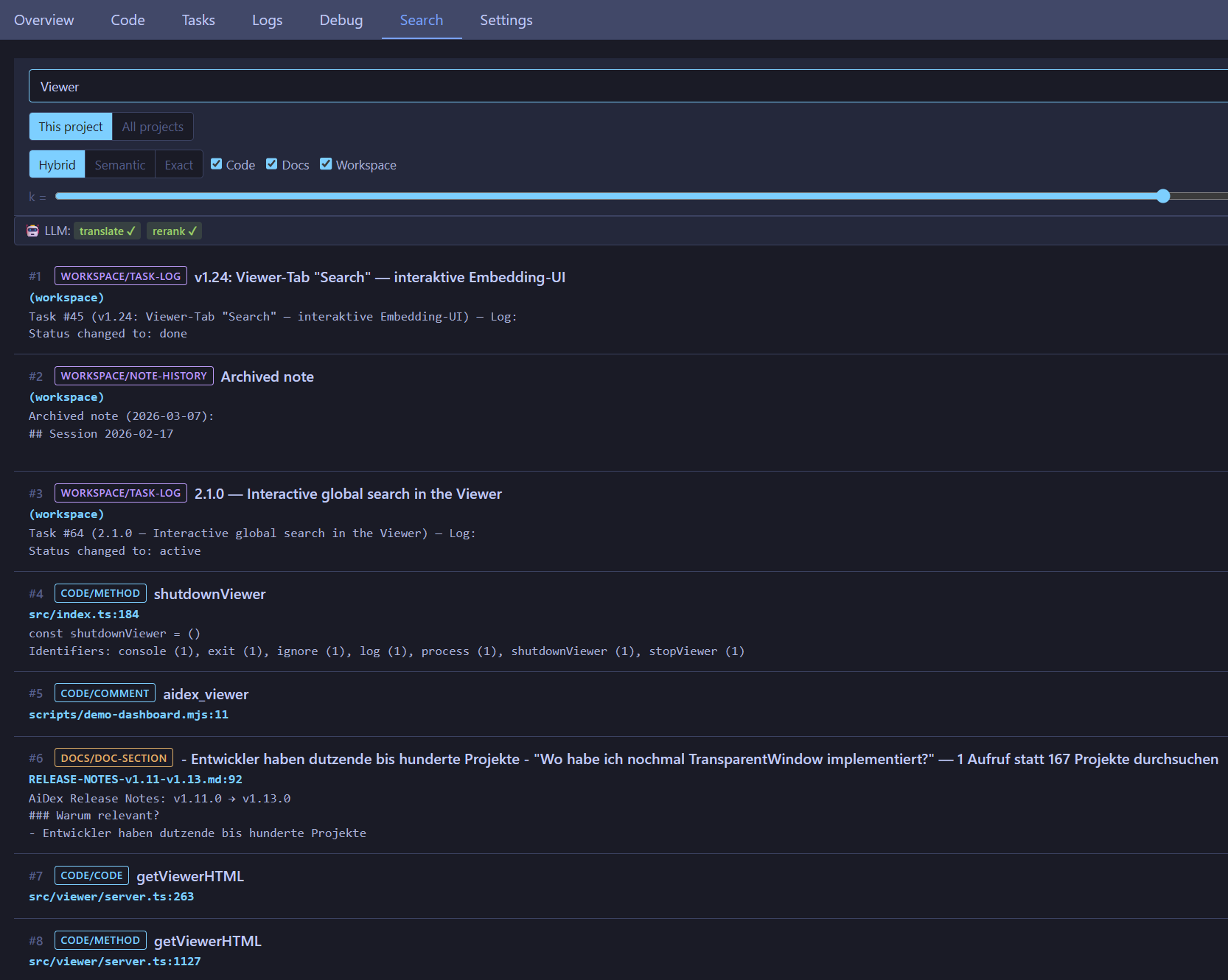
🔍 Search — Three modes: exact (identifier), semantic (concept), hybrid (RRF fusion of both). Embeds code, docs, and workspace items into one ranking. Cross-project — every repo in one query. Optional LLM layer translates non-English queries and reranks results.
🌐 Telemetry — LogHub receives live logs from any app via HTTP (no SDK). The AI watches what your code actually does, not just what it says. Live-streamed in the Viewer.
And yes — it's still 50× more token-efficient than grep.
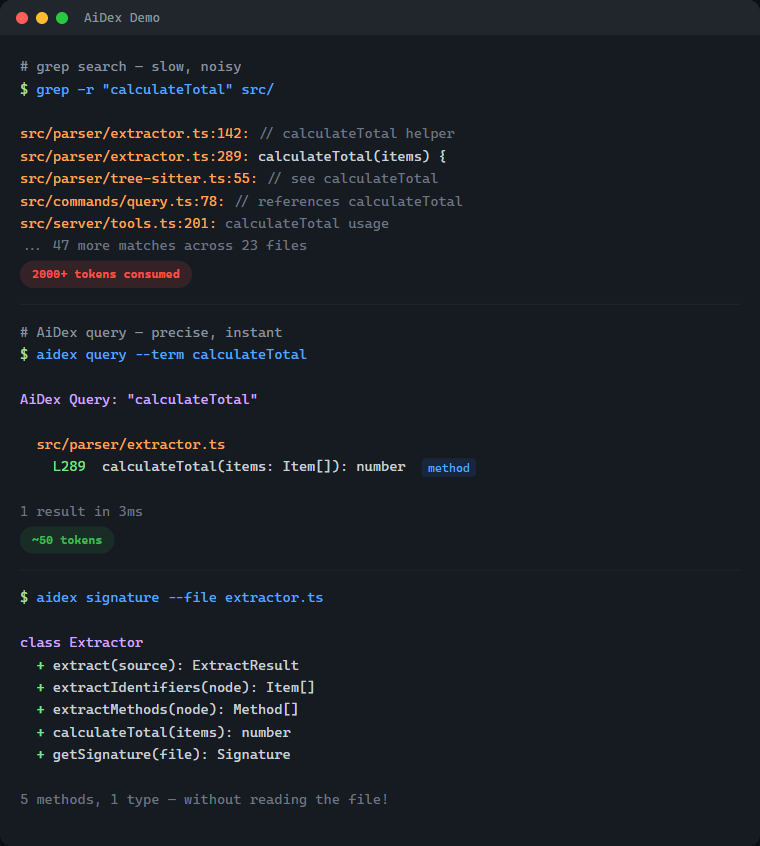
| Without AiDex | With AiDex | |
|---|---|---|
Find PlayerHealth | Grep → 200 hits in 40 files → reads 5 files → 2,000+ tokens | 1 query → 3 exact locations → ~50 tokens |
| Get file structure | Reads entire 500-line file → 1,500 tokens | Signatures → classes + methods → ~80 tokens |
| What changed today? | git diff + grep + context → 3,000+ tokens | Time-filtered query → ~50 tokens |
What's Inside — 33 Tools in One Server
| Category | Tools | What it does |
|---|---|---|
| Semantic Search 🆕 | search, settings | Hybrid / semantic / exact retrieval over code, docs & workspace. Settings tab to configure embeddings + LLM layer |
| Index & Identifier Search | init, query, update, remove, status | Index your project, search identifiers by name (exact/contains/starts_with), time-based filtering |
| Signatures | signature, signatures | Get classes + methods of any file without reading it — single file or glob pattern |
| Project Overview | summary, tree, describe, files | Entry points, language breakdown, file tree with stats, file listing by type |
| Cross-Project | link, unlink, links, scan | Link dependencies, discover indexed projects |
| Global Search | global_init, global_query, global_signatures, global_status, global_refresh | Search identifiers across ALL your projects — "Have I ever written X?" |
| Guidelines | global_guideline | Persistent AI instructions & coding conventions — shared across all projects |
| Sessions | session, note | Track sessions, detect external changes, leave notes for next session (with searchable history) |
| Task Backlog | task, tasks | Built-in task management with priorities, tags, auto-logged history, and scheduled/recurring tasks |
| Log Hub | log | Universal log receiver — any program sends logs via HTTP, queryable by the AI, live in Viewer |
| Screenshots | screenshot, windows | Cross-platform screen capture with LLM optimization — scale + color reduction saves up to 95% tokens |
| Viewer | viewer | Interactive browser UI with file tree, signatures, tasks, logs, search, and live reload |
14 languages — C#, TypeScript, JavaScript, Rust, Python, C, C++, Java, Go, PHP, Ruby, HCL/Terraform, Kotlin, Swift — plus Astro frontmatter
Quick Examples — see it in action
# Find where "PlayerHealth" is defined — 1 call, ~50 tokens
aidex_query({ term: "PlayerHealth" })
→ Engine.cs:45, Player.cs:23, UI.cs:156

# All methods in a file — without reading the whole file
aidex_signature({ file: "src/Engine.cs" })
→ class GameEngine { Update(), Render(), LoadScene(), ... }

# What changed in the last 2 hours?
aidex_query({ term: "render", modified_since: "2h" })

# Search across ALL your projects at once
aidex_global_query({ term: "TransparentWindow", mode: "contains" })
→ Found in: LibWebAppGpu (3 hits), DebugViewer (1 hit)

# Leave a note for your next session
aidex_note({ path: ".", note: "Test the parser fix after restart" })

# Create a task while working
aidex_task({ path: ".", action: "create", title: "Fix edge case in parser", priority: 1, tags: "bug" })
Table of Contents
- What's Inside
- Semantic Search & LLM Layer 🆕
- The Problem
- The Solution
- Why Not Just Grep?
- How It Works
- Features
- Supported Languages
- Quick Start
- Available Tools
- Time-based Filtering
- Project Structure
- Session Notes
- Task Backlog
- Global Search
- AI Guidelines
- Log Hub
- Debug Dashboard
- Screenshots — LLM-Optimized
- Interactive Viewer
- CLI Usage
- Performance
- Technology
- Contributing
- License
Semantic Search & LLM Layer
v2.0 added semantic search via locally-run embeddings — your AI can find a function even when it doesn't know the exact identifier.
Three modes — pick the right tool for the question
| Mode | What it does | When to use |
|---|---|---|
exact | Identifier match (same as aidex_query) | You know the name. PlayerHealth → 3 hits |
semantic | Vector KNN over embedded code+docs+workspace | You know the concept. "how do we cache the model" → finds getQueryEmbedder |
hybrid (default) | RRF fusion of both | Mixed queries. Robust by default |
What gets embedded
- Code — every method and type, three-tier chunking (signature + doc-comment + weighted identifier bag)
- Docs — Markdown sections (README, CHANGELOG, docs/, plan files), split at heading boundaries
- Workspace — tasks, task logs, session notes, archived note history
One ranking, all kinds. A query like "how to write logs from external programs" surfaces the README's ## Log Hub section first, then the log method in commands/log.ts, then any related task.
Setup
// Enable embeddings on a project (one-time, ~30s for AiDex itself, cached afterwards)
aidex_init({ path: ".", embeddings: true })

// Search
aidex_search({ query: "how do we batch requests to the LLM", path: "." })
aidex_search({ query: "retry with backoff", scope: "all" })  // across every embedded project
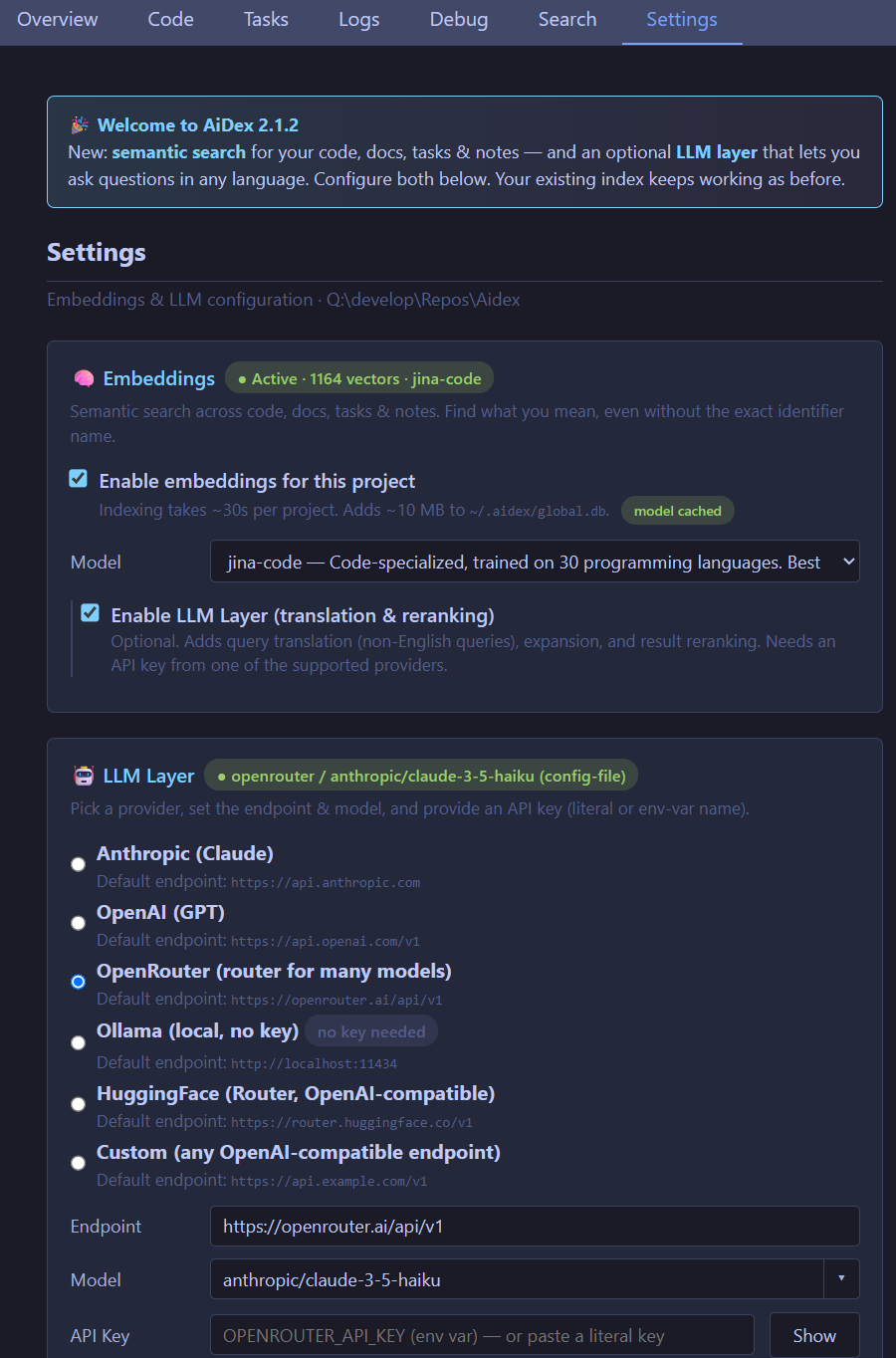
Or use the Settings tab in the Viewer (aidex_settings({ path: ".", open: true })) — toggles for embeddings, LLM provider, model, and the privacy switch.
Optional LLM layer
When an Anthropic / OpenAI / OpenRouter / Ollama / HuggingFace API key is configured, AiDex can:
- Translate non-English queries → "wie speichere ich Logs lokal" finds the right code
- Expand vague queries into 2-4 concrete subqueries (RRF-merged)
- Rerank top-N retrieval candidates
Privacy switch llm_send_code defaults to off — only your literal query and metadata (paths, names, anchors) are sent. Code bodies stay local. Per-project, easy to verify in Settings.
Local-first: works fully offline with pure embeddings. The LLM layer is opt-in, never required.
The Problem
Every time your AI assistant searches for code, it:
- Greps through thousands of files → hundreds of results flood the context
- Reads file after file to understand the structure → more context consumed
- Forgets everything when the session ends → repeat from scratch
A single "Where is X defined?" question can eat 2,000+ tokens. Do that 10 times and you've burned half your context on navigation alone.
The Solution
Index once, query forever:
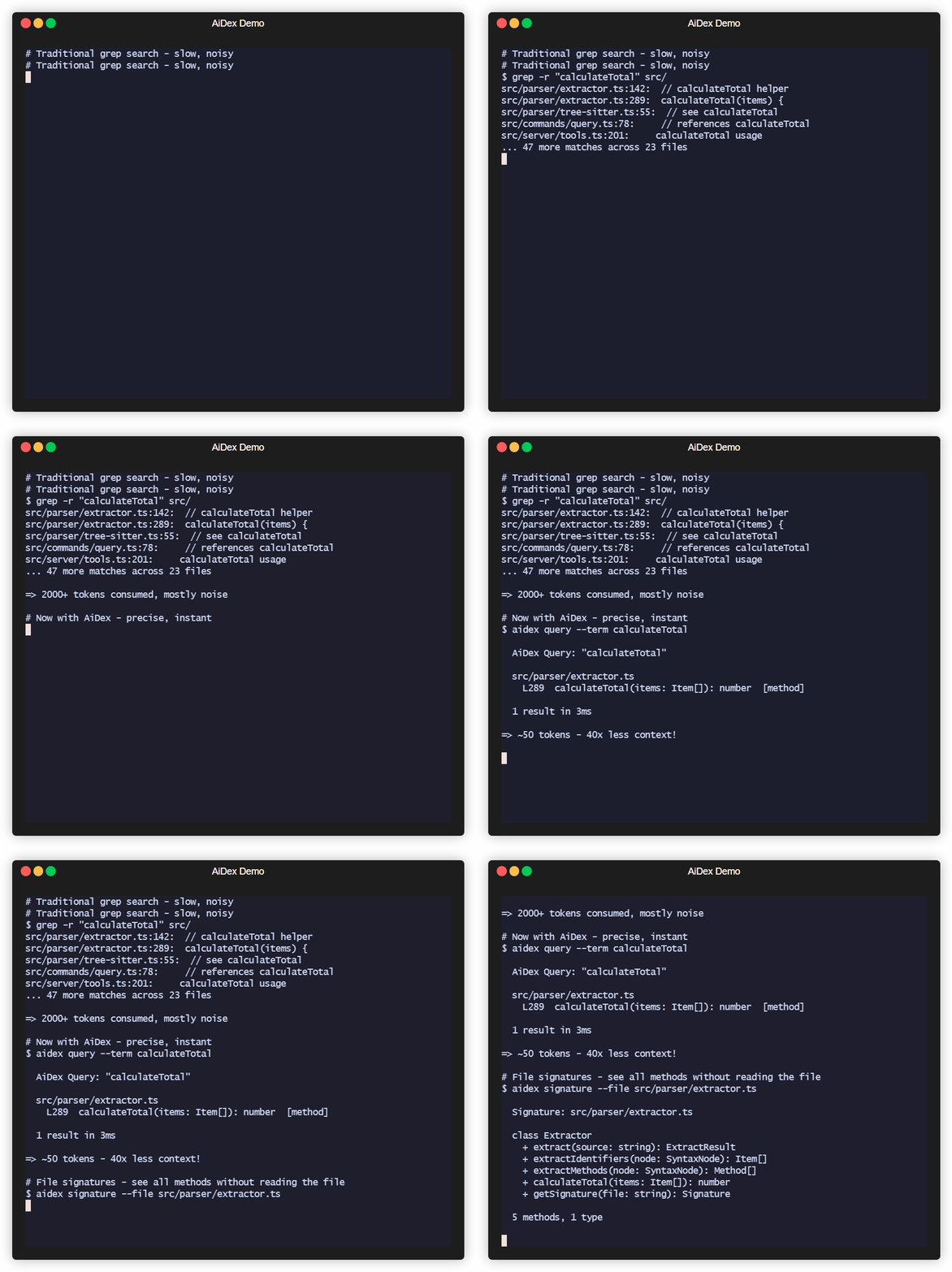
# Before: grep flooding your context
AI: grep "PlayerHealth" → 200 hits in 40 files
AI: read File1.cs, File2.cs, File3.cs...
→ 2000+ tokens consumed, 5+ tool calls

# After: precise results, minimal context
AI: aidex_query({ term: "PlayerHealth" })
→ Engine.cs:45, Player.cs:23, UI.cs:156
→ ~50 tokens, 1 tool call
Result: 50-80% less context used for code navigation.
Why Not Just Grep?
| Grep/Ripgrep | AiDex | |
|---|---|---|
| Context usage | 2000+ tokens per search | ~50 tokens |
| Results | All text matches | Only identifiers |
| Precision | log matches catalog, logarithm | log finds only log |
| Persistence | Starts fresh every time | Index survives sessions |
| Structure | Flat text search | Knows methods, classes, types |
The real cost of grep: Every grep result includes surrounding context. Search for User in a large project and you'll get hundreds of hits - comments, strings, partial matches. Your AI reads through all of them, burning context tokens on noise.
AiDex indexes identifiers: It uses Tree-sitter to actually parse your code. When you search for User, you get the class definition, the method parameters, the variable declarations - not every comment that mentions "user".
How It Works
-
Index your project once (~1 second per 1000 files)
aidex_init({ path: "/path/to/project" }) -
AI searches the index instead of grepping
aidex_query({ term: "Calculate", mode: "starts_with" }) → All functions starting with "Calculate" + exact line numbers aidex_query({ term: "Player", modified_since: "2h" }) → Only matches changed in the last 2 hours -
Get file overviews without reading entire files
aidex_signature({ file: "src/Engine.cs" })
→ All classes, methods, and their signatures
The index lives in .aidex/index.db (SQLite) - fast, portable, no external dependencies.
Features
- Tree-sitter Parsing: Real code parsing, not regex — indexes identifiers, ignores keywords and noise
- ~50 Tokens per Search: vs 2000+ with grep — your AI keeps its context for actual work
- Persistent Index: Survives between sessions — no re-scanning, no re-reading
- Incremental Updates: Re-index single files after changes, not the whole project
- Time-based Filtering: Find what changed in the last hour, day, or week
- Auto-Cleanup: Excluded files (e.g., build outputs) are automatically removed from index
- Zero Dependencies: SQLite with WAL mode — single file, fast, portable
Supported Languages
| Language | Extensions |
|---|---|
| C# | .cs |
| TypeScript | .ts, .tsx |
| JavaScript | .js, .jsx, .mjs, .cjs |
| Rust | .rs |
| Python | .py, .pyw |
| C | .c, .h |
| C++ | .cpp, .cc, .cxx, .hpp, .hxx |
| Java | .java |
| Go | .go |
| PHP | .php |
| Ruby | .rb, .rake |
| HCL/Terraform | .tf, .tfvars, .hcl |
| Kotlin | .kt, .kts |
| Swift | .swift |
| Astro | .astro (TypeScript frontmatter) |
Quick Start
Prerequisites
- Node.js ≥ 20 (check with
node --version)- macOS:
brew install nodeornvm install 20 && nvm use 20 - Linux: use your package manager or nvm
- Windows: nodejs.org
- If you use
nvm, the repo ships a.nvmrc—nvm usepicks the right version automatically.
- macOS:
1. Install
npm install -g aidex-mcp
That's it. Setup runs automatically after install — it detects your installed AI clients (Claude Code, Claude Desktop, Cursor, Windsurf, Gemini CLI, VS Code Copilot) and registers AiDex as an MCP server. It also adds usage instructions to your AI's config (~/.claude/CLAUDE.md, ~/.gemini/GEMINI.md).
To re-run setup manually: aidex setup | To unregister: aidex unsetup | To skip auto-setup: AIDEX_NO_SETUP=1 npm install -g aidex-mcp
2. Or register manually with your AI assistant
For Claude Code (~/.claude/settings.json or ~/.claude.json):
{
  "mcpServers": {
    "aidex": {
      "type": "stdio",
      "command": "aidex",
      "env": {}
    }
  }
}
For Claude Desktop (%APPDATA%/Claude/claude_desktop_config.json on Windows):
{
  "mcpServers": {
    "aidex": {
      "command": "aidex"
    }
  }
}
Note: Both
aidexandaidex-mcpwork as command names.
Important: The server name in your config determines the MCP tool prefix. Use
"aidex"as shown above — this gives you tool names likeaidex_query,aidex_signature, etc. Using a different name (e.g.,"codegraph") would change the prefix accordingly.
For Gemini CLI (~/.gemini/settings.json):
{
  "mcpServers": {
    "aidex": {
      "command": "aidex"
    }
  }
}
For VS Code Copilot (run MCP: Open User Configuration in Command Palette):
{
  "servers": {
    "aidex": {
      "type": "stdio",
      "command": "aidex"
    }
  }
}
For other MCP clients: See your client's documentation for MCP server configuration.
3. Make your AI actually use it
Add to your AI's instructions (e.g., ~/.claude/CLAUDE.md for Claude Code, or the equivalent for your AI client). This tells the AI when and how to use AiDex instead of grepping:
## AiDex - Persistent Code Index (MCP Server)

AiDex provides fast, precise code search through a pre-built index.
**Always prefer AiDex over Grep/Glob for code searches.**

### REQUIRED: Before using Grep/Glob/Read for code searches
Do I want to search code? ├── .aidex/ exists → STOP! Use AiDex instead ├── .aidex/ missing → run aidex_init (don't ask), THEN use AiDex └── Config/Logs/Text → Grep/Read is fine
**NEVER do this when .aidex/ exists:**
- ❌ `Grep pattern="functionName"` → ✅ `aidex_query term="functionName"`
- ❌ `Grep pattern="class.*Name"` → ✅ `aidex_query term="Name" mode="contains"`
- ❌ `Read file.cs` to see methods → ✅ `aidex_signature file="file.cs"`
- ❌ `Glob pattern="**/*.cs"` + Read → ✅ `aidex_signatures pattern="**/*.cs"`

### Session-Start Rule (REQUIRED — every session, no exceptions)

1. Call `aidex_session({ path: "<project>" })` — detects external changes, auto-reindexes
2. If `.aidex/` does NOT exist → run `aidex_init` automatically (don't ask)
3. If a session note exists → **show it to the user** before continuing
4. **Before ending a session:** always leave a note about what to do next

### Question → Right Tool

| Question | Tool |
|----------|------|
| "Where is X defined?" | `aidex_query term="X"` |
| "Find anything containing X" | `aidex_query term="X" mode="contains"` |
| "All functions starting with X" | `aidex_query term="X" mode="starts_with"` |
| "What methods does file Y have?" | `aidex_signature file="Y"` |
| "Explore all files in src/" | `aidex_signatures pattern="src/**"` |
| "Project overview" | `aidex_summary` + `aidex_tree` |
| "What changed recently?" | `aidex_query term="X" modified_since="2h"` |
| "What files changed today?" | `aidex_files path="." modified_since="8h"` |
| "Have I ever written X?" | `aidex_global_query term="X" mode="contains"` |
| "Which project has class Y?" | `aidex_global_signatures term="Y" kind="class"` |
| "All indexed projects?" | `aidex_global_status` |

### Search Modes

- **`exact`** (default): Finds only the exact identifier — `log` won't match `catalog`
- **`contains`**: Finds identifiers containing the term — `render` matches `preRenderSetup`
- **`starts_with`**: Finds identifiers starting with the term — `Update` matches `UpdatePlayer`, `UpdateUI`

### All Tools (30)

| Category | Tools | Purpose |
|----------|-------|---------|
| Search & Index | `aidex_init`, `aidex_query`, `aidex_update`, `aidex_remove`, `aidex_status` | Index project, search identifiers (exact/contains/starts_with), time filter |
| Signatures | `aidex_signature`, `aidex_signatures` | Get classes + methods without reading files |
| Overview | `aidex_summary`, `aidex_tree`, `aidex_describe`, `aidex_files` | Entry points, file tree, file listing by type |
| Cross-Project | `aidex_link`, `aidex_unlink`, `aidex_links`, `aidex_scan` | Link dependencies, discover projects |
| Global Search | `aidex_global_init`, `aidex_global_query`, `aidex_global_signatures`, `aidex_global_status`, `aidex_global_refresh` | Search across ALL projects |
| Guidelines | `aidex_global_guideline` | Persistent AI instructions & conventions (key-value, global) |
| Sessions | `aidex_session`, `aidex_note` | Track sessions, leave notes (with searchable history) |
| Tasks | `aidex_task`, `aidex_tasks` | Built-in backlog with priorities, tags, summaries, auto-logged history, scheduled/recurring tasks |
| Log Hub | `aidex_log` | Universal log receiver — any program sends logs via HTTP, AI queries them, live in Viewer |
| Screenshots | `aidex_screenshot`, `aidex_windows` | Screen capture with LLM optimization (scale + color reduction, no index needed) |
| Viewer | `aidex_viewer` | Interactive browser UI with file tree, signatures, tasks, and live logs |

**14 languages:** C#, TypeScript, JavaScript, Rust, Python, C, C++, Java, Go, PHP, Ruby, HCL/Terraform, Kotlin, Swift — plus Astro frontmatter

### Session Notes

Leave notes for the next session — they persist in the database:
aidex_note({ path: ".", note: "Test the fix after restart" }) # Write aidex_note({ path: ".", note: "Also check edge cases", append: true }) # Append aidex_note({ path: "." }) # Read aidex_note({ path: ".", search: "parser" }) # Search history aidex_note({ path: ".", clear: true }) # Clear
- **Before ending a session:** automatically leave a note about next steps
- **User says "remember for next session: ..."** → write it immediately

### Task Backlog

Track TODOs, bugs, and features right next to your code index:
aidex_task({ path: ".", action: "create", title: "Fix bug", priority: 1, tags: "bug" }) aidex_task({ path: ".", action: "update", id: 1, status: "done" }) aidex_task({ path: ".", action: "log", id: 1, note: "Root cause found" }) aidex_tasks({ path: ".", status: "active" })
Scheduled & recurring tasks
aidex_task({ path: ".", action: "create", title: "Check PR status", due: "3d", interval: "3d", task_action: "gh pr list" })
Priority: 1=high, 2=medium, 3=low | Status: `backlog → active → done | cancelled`

### Global Search (across all projects)
aidex_global_init({ path: "/path/to/all/repos" }) # Scan & register aidex_global_init({ path: "...", index_unindexed: true }) # + auto-index small projects aidex_global_query({ term: "TransparentWindow", mode: "contains" }) # Search everywhere aidex_global_signatures({ term: "Render", kind: "method" }) # Find methods everywhere aidex_global_status({ sort: "recent" }) # List all projects
### Screenshots
aidex_screenshot() # Full screen aidex_screenshot({ mode: "active_window" }) # Active window aidex_screenshot({ mode: "window", window_title: "VS Code" }) # Specific window aidex_screenshot({ scale: 0.5, colors: 2 }) # B&W, half size (ideal for LLM) aidex_screenshot({ colors: 16 }) # 16 colors (UI readable) aidex_windows({ filter: "chrome" }) # Find window titles
No index needed. Returns file path → use `Read` to view immediately.

**LLM optimization strategy:** Always start with aggressive settings, then retry if unreadable:
1. First try: `scale: 0.5, colors: 2` (B&W, half size — smallest possible)
2. If unreadable: retry with `colors: 16` (adds shading for UI elements)
3. If still unclear: `scale: 0.75` or omit `colors` for full quality
4. **Remember** what works for each window/app during the session — don't retry every time.
4. Index your project
Ask your AI: "Index this project with AiDex"
Or manually in the AI chat:
aidex_init({ path: "/path/to/your/project" })
Available Tools
| Tool | Description |
|---|---|
aidex_init | Index a project (creates .aidex/) |
aidex_query | Search by term (exact/contains/starts_with) |
aidex_signature | Get one file's classes + methods |
aidex_signatures | Get signatures for multiple files (glob) |
aidex_update | Re-index a single changed file |
aidex_remove | Remove a deleted file from index |
aidex_summary | Project overview |
aidex_tree | File tree with statistics |
aidex_describe | Add documentation to summary |
aidex_link | Link another indexed project |
aidex_unlink | Remove linked project |
aidex_links | List linked projects |
aidex_status | Index statistics |
aidex_scan | Find indexed projects in directory tree |
aidex_files | List project files by type (code/config/doc/asset) |
aidex_note | Read/write session notes (persists between sessions) |
aidex_session | Start session, detect external changes, auto-reindex |
aidex_viewer | Open interactive project tree in browser |
aidex_task | Create, read, update, delete tasks with priority and tags |
aidex_tasks | List and filter tasks by status, priority, or tag |
aidex_screenshot | Take a screenshot (fullscreen, window, region) with optional scale + color reduction |
aidex_windows | List open windows for screenshot targeting |
aidex_global_init | Scan directory tree, register all indexed projects in global DB |
aidex_global_status | List all registered projects with stats |
aidex_global_query | Search terms across ALL registered projects |
aidex_global_signatures | Search methods/types by name across all projects |
aidex_global_refresh | Update stats and remove stale projects from global DB |
aidex_global_guideline | Store/retrieve AI guidelines and coding conventions (key-value, global) |
aidex_log | Universal log receiver — start HTTP server, query logs, live stream in Viewer |
Time-based Filtering
Track what changed recently with modified_since and modified_before:
aidex_query({ term: "render", modified_since: "2h" })   # Last 2 hours
aidex_query({ term: "User", modified_since: "1d" })     # Last day
aidex_query({ term: "API", modified_since: "1w" })      # Last week
Supported formats:
- Relative:
30m(minutes),2h(hours),1d(days),1w(weeks) - ISO date:
2026-01-27or2026-01-27T14:30:00
Perfect for questions like "What did I change in the last hour?"
Project Structure
AiDex indexes ALL files in your project (not just code), letting you query the structure:
aidex_files({ path: ".", type: "config" })  # All config files
aidex_files({ path: ".", type: "test" })    # All test files
aidex_files({ path: ".", pattern: "**/*.md" })  # All markdown files
aidex_files({ path: ".", modified_since: "30m" })  # Changed this session
File types: code, config, doc, asset, test, other, dir
Use modified_since to find files changed in this session - perfect for "What did I edit?"
Session Notes
Leave reminders for the next session - no more losing context between chats:
aidex_note({ path: ".", note: "Test the glob fix after restart" })  # Write
aidex_note({ path: ".", note: "Also check edge cases", append: true })  # Append
aidex_note({ path: "." })                                              # Read
aidex_note({ path: ".", clear: true })                                 # Clear
Note History (v1.10): Old notes are automatically archived when overwritten or cleared. Browse and search past notes:
aidex_note({ path: ".", history: true })                    # Browse archived notes (shows summaries)
aidex_note({ path: ".", search: "parser" })                 # Search note history (searches summaries too)
aidex_note({ path: ".", history: true, limit: 5 })          # Last 5 archived notes
Note Summaries (v1.15): Provide a summary when writing/clearing a note — the archived note gets this one-sentence description. History then shows summaries instead of truncated text:
aidex_note({ path: ".", note: "New focus", summary: "Previous session: finished parser refactoring" })
Use cases:
- Before ending a session: "Remember to test X next time"
- AI auto-reminder: Save what to verify after a restart
- Handover notes: Context for the next session without editing config files
- Search past sessions: "What did we do about the parser?"
Notes are stored in the SQLite database (.aidex/index.db) and persist indefinitely.
Task Backlog
Keep your project tasks right next to your code index - no Jira, no Trello, no context switching:
aidex_task({ path: ".", action: "create", title: "Fix parser bug", priority: 1, tags: "bug", summary: "Parser crashes on nested generics in C#" })
aidex_task({ path: ".", action: "update", id: 1, status: "done" })
aidex_task({ path: ".", action: "log", id: 1, note: "Root cause: unbounded buffer" })
aidex_tasks({ path: ".", status: "active" })
Scheduled & Recurring Tasks
Tasks can have due dates and repeat intervals. Overdue tasks are reported at every session start across ALL projects:
# One-shot: remind in 3 days
aidex_task({ path: ".", action: "create", title: "Review PR", due: "3d", task_action: "Check if PR was submitted" })

# Recurring: check every week
aidex_task({ path: ".", action: "create", title: "Check dependencies", due: "1w", interval: "1w", task_action: "npm outdated" })

# Auto-execute: runs the action automatically when due
aidex_task({ path: ".", action: "create", title: "Refresh stats", due: "1d", interval: "1d", auto_go: true })
Due formats: Relative ("30m", "2h", "3d", "1w") or ISO date ("2026-04-10")
At every aidex_session call, the Task Scheduler checks ~/.aidex/global.db for due tasks across all projects — even if you're working on a different project. Recurring tasks automatically advance their due date after each trigger.
Features:
- Summaries: One-sentence table-of-contents per task — scan the backlog without reading full details
- Priorities: 🔴 high, 🟡 medium, ⚪ low
- Statuses:
backlog → active → done | cancelled - Tags: Categorize tasks (
bug,feature,docs, etc.) - History log: Every status change is auto-logged, plus manual notes
- Scheduling: Due dates, recurring intervals, actions, auto-execute across all projects
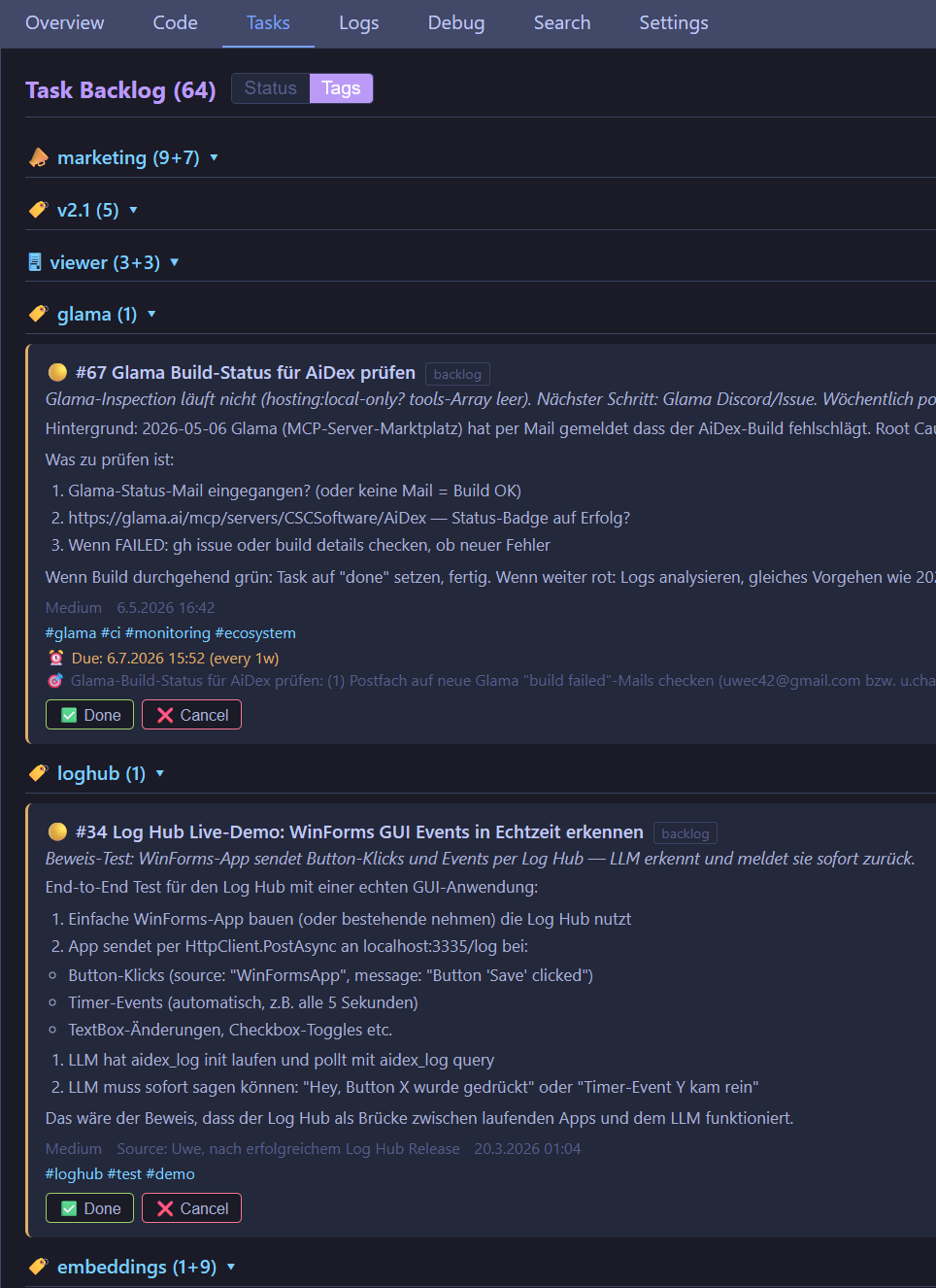
- Viewer integration: Tasks tab in the browser viewer with live updates
- Persistent: Tasks survive between sessions, stored in
.aidex/index.db
Your AI assistant can create tasks while working ("found a bug in the parser, add it to the backlog"), track progress, and pick up where you left off next session.
Global Search
Search across ALL your indexed projects at once. Perfect for "Have I ever written a transparent window?" or "Where did I use that algorithm?"
Setup
aidex_global_init({ path: "Q:/develop" })                              # Scan & register
aidex_global_init({ path: "Q:/develop", exclude: ["llama.cpp"] })      # Skip external repos
aidex_global_init({ path: "Q:/develop", index_unindexed: true })       # Auto-index all found projects
aidex_global_init({ path: "Q:/develop", index_unindexed: true, show_progress: true })  # With browser progress UI
This scans your project directory, registers all AiDex-indexed projects in a global database (~/.aidex/global.db), and reports any unindexed projects it finds by detecting project markers (.csproj, package.json, Cargo.toml, etc.).
With index_unindexed: true, it also auto-indexes all discovered projects with ≤500 code files. Larger projects are listed separately for user decision. Add show_progress: true to open a live progress UI in your browser (http://localhost:3334).
Search
aidex_global_query({ term: "TransparentWindow" })                      # Exact match
aidex_global_query({ term: "transparent", mode: "contains" })          # Fuzzy search
aidex_global_signatures({ term: "Render", kind: "method" })            # Find methods
aidex_global_signatures({ term: "Player", kind: "class" })             # Find classes
How it works
- Uses SQLite
ATTACH DATABASEto query project databases directly — no data copying - Results are cached in memory (5-minute TTL) for fast repeated queries
- Projects are batched (8 at a time) to respect SQLite's attachment limit
- Each project keeps its own
.aidex/index.dbas the single source of truth - Auto-deduplication: Parent projects that contain sub-projects are automatically skipped (e.g.,
MyApp/is removed whenMyApp/Frontend/andMyApp/Backend/exist as separate indexed projects)
Management
aidex_global_status()                                                  # List all projects
aidex_global_status({ sort: "recent" })                                # Most recently indexed first
aidex_global_refresh()                                                 # Update stats, remove stale
AI Guidelines
Store persistent coding conventions, review checklists, and AI instructions in a single place — shared across all projects.
aidex_global_guideline({ action: "set", key: "review", value: "Always check: error handling, null safety, no hardcoded strings" })
aidex_global_guideline({ action: "set", key: "style", value: "Use PascalCase for classes, camelCase for methods, 4-space indent" })
aidex_global_guideline({ action: "get", key: "review" })               # Retrieve a guideline
aidex_global_guideline({ action: "list" })                             # Show all guidelines
aidex_global_guideline({ action: "list", filter: "code" })             # Filter by name
aidex_global_guideline({ action: "delete", key: "old-rule" })          # Remove a guideline
Use cases:
- Code review checklist: Tell your AI exactly what to look for every time
- Coding conventions: Store team style rules once, reference them in any project
- Release checklist: Step-by-step process for shipping
- Project-agnostic instructions: No more pasting the same context into every session
Guidelines are stored in ~/.aidex/global.db — available across all your projects without aidex_init. Ask your AI: "Load the review guideline and apply it to this file."
Log Hub — Universal Logging
Turn any program into a log source for your AI assistant. Your app sends logs via HTTP POST, the AI queries them via MCP, and you see them live in the Viewer — zero dependencies, zero setup in your code.
How it works
Your Program ──HTTP POST──→ AiDex Log Hub (port 3335) ──→ Ring Buffer
                                        │                      │
                                        │ WebSocket             │ MCP query
                                        ↓                      ↓
                                   Viewer (Logs tab)      AI Assistant
                                   (you see live)       (queries & analyzes)
Quick start
- AI starts the Log Hub:
aidex_log({ action: "init" }) - AI opens the Viewer:
aidex_viewer({ path: "." })— Logs tab shows live stream - Add one line to your program:
// C#
await new HttpClient().PostAsJsonAsync("http://localhost:3335/log",
    new { level = "info", source = "MyApp", message = "Player spawned", data = new { x = 10, y = 20 } });
# Python
requests.post("http://localhost:3335/log", json={"level": "info", "source": "MyApp", "message": "Done"})
// JavaScript
fetch("http://localhost:3335/log", {
    method: "POST", headers: {"Content-Type": "application/json"},
    body: JSON.stringify({level: "info", source: "MyApp", message: "Started"})
});
# PowerShell
Invoke-RestMethod -Uri http://localhost:3335/log -Method POST -ContentType "application/json" -Body '{"level":"info","source":"Script","message":"Done"}'
HTTP API
| Endpoint | Method | Body | Description |
|---|---|---|---|
/log | POST | { level, source, message, data? } | Single log entry |
/logs | POST | [{ ... }, ...] | Batch (multiple at once) |
/health | GET | — | Status + buffer usage |
Fields: level (debug/info/warn/error), source (app name), message (text, required), data (optional JSON), timestamp (optional, ms)
Features
- Ring Buffer: Fixed-size in-memory FIFO (default 10,000 entries) — oldest entries overwritten
- Zero-cost: No server, no buffer, no resources until
initis called - Persistence: Optional SQLite storage with 7-day auto-cleanup (
persist: true) - Consume pattern:
querywithconsume: trueremoves returned entries — ideal for polling - Viewer integration: Logs tab with WebSocket live-stream, level/source/text filters, auto-scroll
- Fire & forget: Just POST and go — if the server isn't running, the POST silently fails
Control API — let the AI drive your app
Logs and dashboard widgets flow app → AI. The Control API is the return channel: AI → app. It turns the Log Hub into a tiny, zero-dependency command bus — so an AI assistant can drive any running program without you writing a server.
The AI sets a command; your app polls for it, runs it, and posts the result back:
AI ──control_set {id,cmd}──→  Hub  ←──GET /control──  Your App (polls ~1s)
AI ←──control_get──── result ─ Hub  ←──POST /control── runs it, posts result + ack
control_set { id, value }— the AI (or a Viewer slider/switch) sets a control slot.GET /control— your app reads all current control values.POST /control— your app writes back results / acknowledgements.POST /control/press { id }— registers one press of abuttoncontrol. The hub owns the counter, so presses from several open dashboards add up instead of overwriting each other.control_get— the AI reads what the app reported.POST /control/subscribe(optional) — push instead of polling, see below.
Push instead of poll. If your app runs its own HTTP server, it can subscribe once with { "port": 8080 } (the hub calls back the sender's address, path defaults to /control) or a full { "url": "http://192.168.1.50:8080/control" }, optionally limited to { "ids": [...] }. From then on every change is POSTed to that URL right away, as the same flat { id: value } map GET /control returns. No idle requests, no latency until the next poll. The hub never blocks on your app (1.5 s timeout, one request in flight, changes in between are merged so the latest value always arrives last), only calls private-network IP addresses, and drops the subscription after 3 failed deliveries — re-subscribing is idempotent, do it whenever you like. POST /control/unsubscribe { url } removes it. Push is an addition, not a replacement: keep a slow poll (~30 s) as a safety net; button counters make a missed push harmless.
A
buttonvalue is a press counter, not a flag — your app polls at its own pace, so compare against the last count you saw rather than testing for "pressed". Any backwards jump means the hub restarted or the panel was cleared: adopt the value, don't read it as a million presses.
Two slots by convention give you full request/response: a *_cmd slot the AI writes, a *_result slot the app writes, and an *_ack counter so each command runs exactly once (bump the command id every time; the app skips any id it has already handled).
That's the whole protocol. A client needs nothing but an HTTP library you already have.
Real example — an AI controlling Autodesk Fusion 360
A ~30-line Fusion 360 add-in (urllib only, no SDK) polls GET /control, executes the command on Fusion's main thread, and posts the result back. With nothing else, an AI assistant drove Fusion to parametrically design a complete 3D enclosure — sketches, extrusions, screw-boss domes with heat-set inserts, USB-C cut-outs, reset/button holes — verifying every step by reading back the actual face geometry.
The pattern is universal: anything that can POST and GET — Blender, a CNC controller, a game, a home-automation hub — becomes AI-steerable with a few lines and no bespoke server. Two safety rules carry over from that build:
- Single-thread GUI APIs: the poll loop must never touch the app API directly. Fire an event and run the command on the main thread (the official Fusion pattern; the same holds for any non-thread-safe UI/COM API).
- Idempotency: track the last handled
idand ack it — polling means you'll see the same command repeatedly, so skip what you've already done.
Debug Dashboard
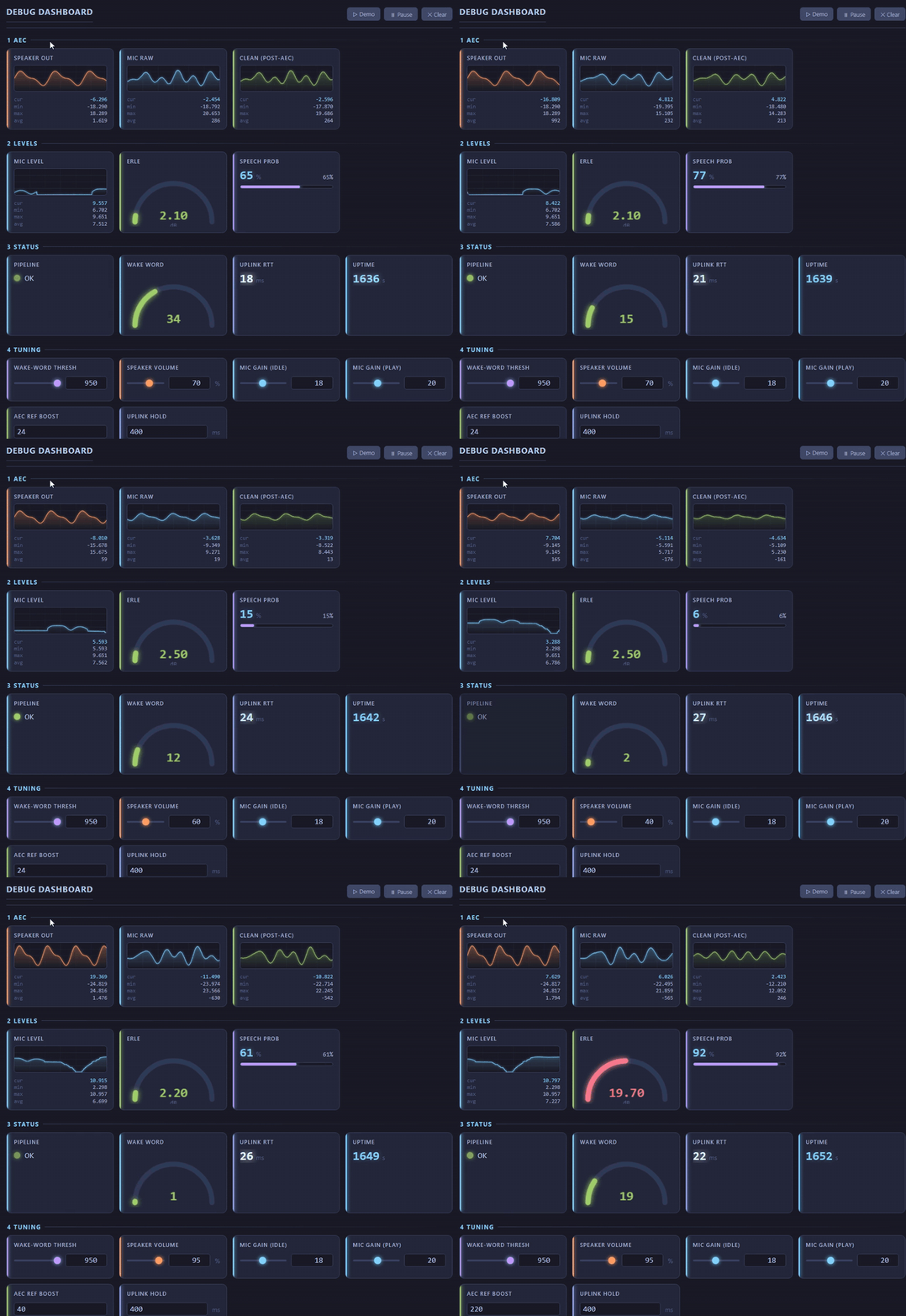
The scrolling log stream is great for what happened when — but useless for fast, repeating values (audio levels, buffer fill, FPS, sensor readings). The Debug Dashboard is the opposite: a fixed-slot panel where each value has a permanent spot and overwrites in place instead of scrolling away. Live in the Viewer's Live tab, styled like a hardware monitor (MSI Afterburner / HWiNFO).
It rides on the same Log Hub server — no extra setup. Your program sends widget updates via HTTP POST; sending the same id again updates that widget.
Widget types
| Type | Looks like | Use for |
|---|---|---|
label | big value + unit | FPS, state text, counters |
progress | bar with warn/crit colouring | buffer fill, percentages |
gauge | radial tachometer (or status LED for strings) | temperature, load, ok/warn/error |
plot | real-time line graph with grid + min/max/avg | audio signal, latency, any time series |
Send a widget
# A single widget — id is the fixed slot, type is required on first send
curl -X POST http://localhost:3335/panel -H "Content-Type: application/json" \
  -d '{"id":"mic","type":"plot","value":0.73,"group":"Audio","label":"Mic Level","unit":"dB"}'

# A gauge with threshold zones (green < warn < yellow < crit < red)
curl -X POST http://localhost:3335/panel -H "Content-Type: application/json" \
  -d '{"id":"gpu_temp","type":"gauge","value":67,"min":0,"max":100,"warn":75,"crit":90,"group":"Hardware"}'
Fields: id (required), type (label/progress/gauge/plot/slider/number/toggle/button, required on first send), value (number, status string, or number array for a full plot frame), group, label, unit, min, max, warn, crit, color, order.
Endpoints: POST /panel (one), POST /panels (batch), POST /panel/clear ({id} for one, empty for all).
Lifecycle
- The server keeps the last state per
id, so a freshly-opened or reloaded Viewer shows the whole dashboard immediately. - Cards with no update for ~3 s grey out as "stale".
- Clear is a full reset: it empties the store. A source only reappears if it sends widgets with their
typeagain (plain value-only updates to a cleared id are ignored). - Backpressure-guarded — a slow browser can't make the server's send-queue grow without bound.
Try it — the built-in demo
A ready-to-run showcase animates all widget types (audio waveform, GPU gauges drifting through their zones, a signal generator cycling sine → sawtooth → triangle → square, latency spikes):
# 1. Start the Log Hub + Viewer from your AI assistant:
#      aidex_log({ action: "init" })
#      aidex_viewer({ path: "." })       → click the Live tab
# 2. Run the demo (from the AiDex repo root):
node scripts/demo-dashboard.mjs           # endless loop, Ctrl+C to stop (clears on exit)
Or use the ▷ Demo button on the Live tab — it copies the run command to your clipboard; paste it into a terminal. (The browser can't spawn a process itself.) It sits in the toolbar even while the dashboard is still empty, since it's how you get your first widgets. scripts/demo-dashboard.ps1 is a one-command launcher that checks the Log Hub first.
Running it twice starts two instances that fight over the same widgets (visible flicker) — stop the old one (Ctrl+C) before starting another.
Screenshots — LLM-Optimized
Take screenshots and reduce them up to 95% for LLM context. A typical screenshot goes from ~100 KB to ~5 KB — that's thousands of tokens saved per image.
Why this matters
| Raw Screenshot | Optimized (scale=0.5, colors=2) | |
|---|---|---|
| File size | ~100-500 KB | ~5-15 KB |
| Tokens consumed | ~5,000-25,000 | ~250-750 |
| Text readable? | Yes | Yes |
| Colors | 16M (24-bit) | 2 (black & white) |
Most screenshots in AI context are for reading text — error messages, logs, UI labels. You don't need 16 million colors for that.
Usage
aidex_screenshot()                                             # Full screen (full quality)
aidex_screenshot({ mode: "active_window" })                    # Active window
aidex_screenshot({ mode: "window", window_title: "VS Code" }) # Specific window
aidex_screenshot({ scale: 0.5, colors: 2 })                   # B&W, half size (best for text)
aidex_screenshot({ scale: 0.5, colors: 16 })                  # 16 colors (UI readable)
aidex_screenshot({ colors: 256 })                              # 256 colors (good quality)
aidex_screenshot({ mode: "region" })                           # Interactive selection
aidex_screenshot({ mode: "rect", x: 100, y: 200, width: 800, height: 600 })  # Coordinates
aidex_windows({ filter: "chrome" })                            # Find window titles
Optimization parameters
| Parameter | Values | Description |
|---|---|---|
scale | 0.1 - 1.0 | Scale factor (0.5 = half resolution). Most HiDPI screens are 2-3x anyway. |
colors | 2, 4, 16, 256 | Color reduction. 2 = black & white, ideal for text screenshots. |
Recommended strategy for AI assistants
The tool description tells LLMs to optimize automatically:
- Start aggressive:
scale: 0.5, colors: 2(smallest possible) - If unreadable: retry with
colors: 16(adds shading for UI elements) - If still unclear: try
scale: 0.75or full color - Remember: cache what works per window/app for the rest of the session
This way the AI learns the right settings per app without wasting tokens on oversized images.
Features
- 5 capture modes: Fullscreen, active window, specific window (by title), interactive region selection, coordinate-based rectangle
- Cross-platform: Windows (PowerShell + System.Drawing), macOS (sips + ImageMagick), Linux (ImageMagick)
- Multi-monitor: Select which monitor to capture
- Delay: Wait N seconds before capturing (e.g., to open a menu first)
- Size reporting: Shows original → optimized size and percentage saved
- Auto-path: Default saves to temp directory with fixed filename
- No index required: Works standalone, no
.aidex/needed
Interactive Viewer
Explore your indexed project visually in the browser:
aidex_viewer({ path: "." })
Opens http://localhost:3333 with:
- Interactive file tree - Click to expand directories
- File signatures - Click any file to see its types and methods
- Live reload - Changes detected automatically while you code
- Git status icons - See which files are modified, staged, or untracked
- Search tab - Semantic / exact / hybrid search across code, docs, tasks & notes, with the optional LLM layer (translate + rerank)
- Live tab - Live Debug Dashboard: fixed-slot widgets (plots, gauges, progress) plus interactive sliders, switches and buttons that drive a running program back through the
/controlchannel - Logs tab - Live log stream from Log Hub with filters (level, source, text search)
- Tasks tab - View and manage your task backlog
- Settings tab - Configure embeddings & the LLM provider (privacy switch defaults to off)
Debug Dashboard — live, two-way
The Live tab is a live dashboard with fixed slots: send the same id again and the value updates in place instead of scrolling away. Interactive slider/number/toggle/button widgets flow back to the source (HTTP /control, or aidex_log control_set so the AI can tune a running program too). A button carries a press counter, not a flag, so a source polling at its own pace never misses a click. Full guide: docs/loghub-panel-dashboard.md.
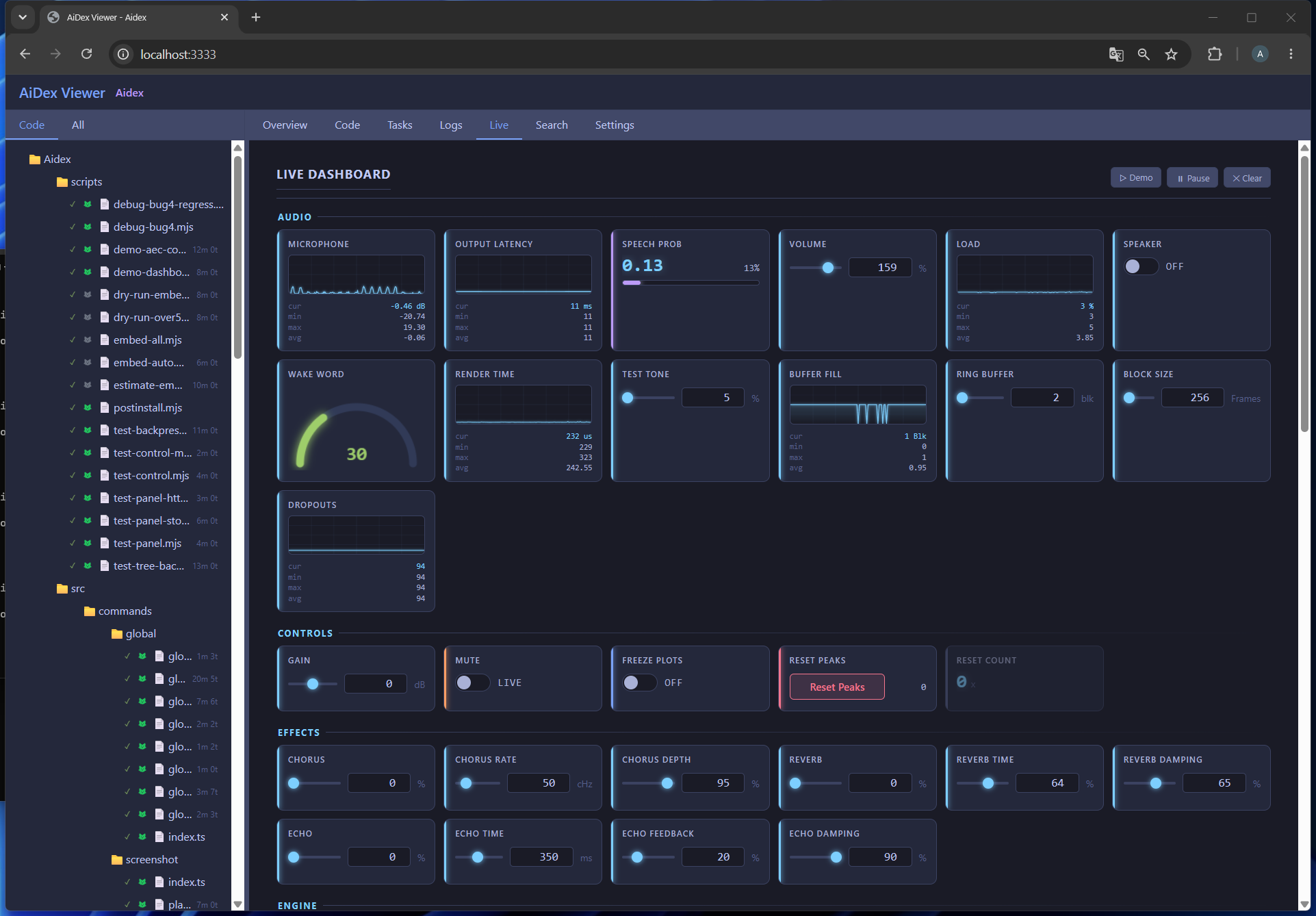
The Controls group holds one of each interactive type: a slider, two toggles, and a button with its press counter beside it. Scrolled further down, several sources share the same dashboard — the hub knows nothing about what any value means, so a synth firmware and a demo script coexist without either being aware of the other:
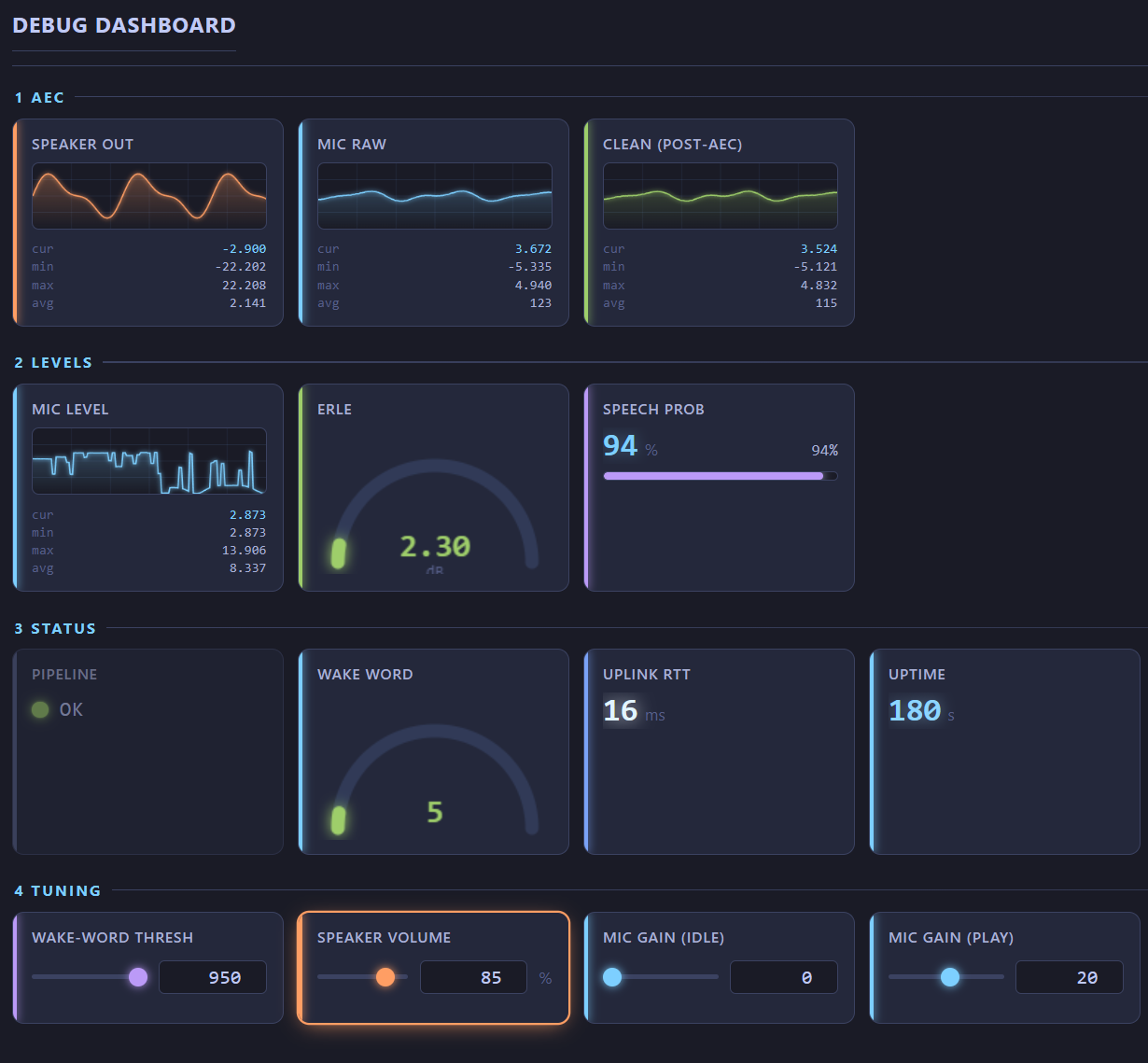
The sliders react in real time — watch the GIF:
The rest of the Viewer
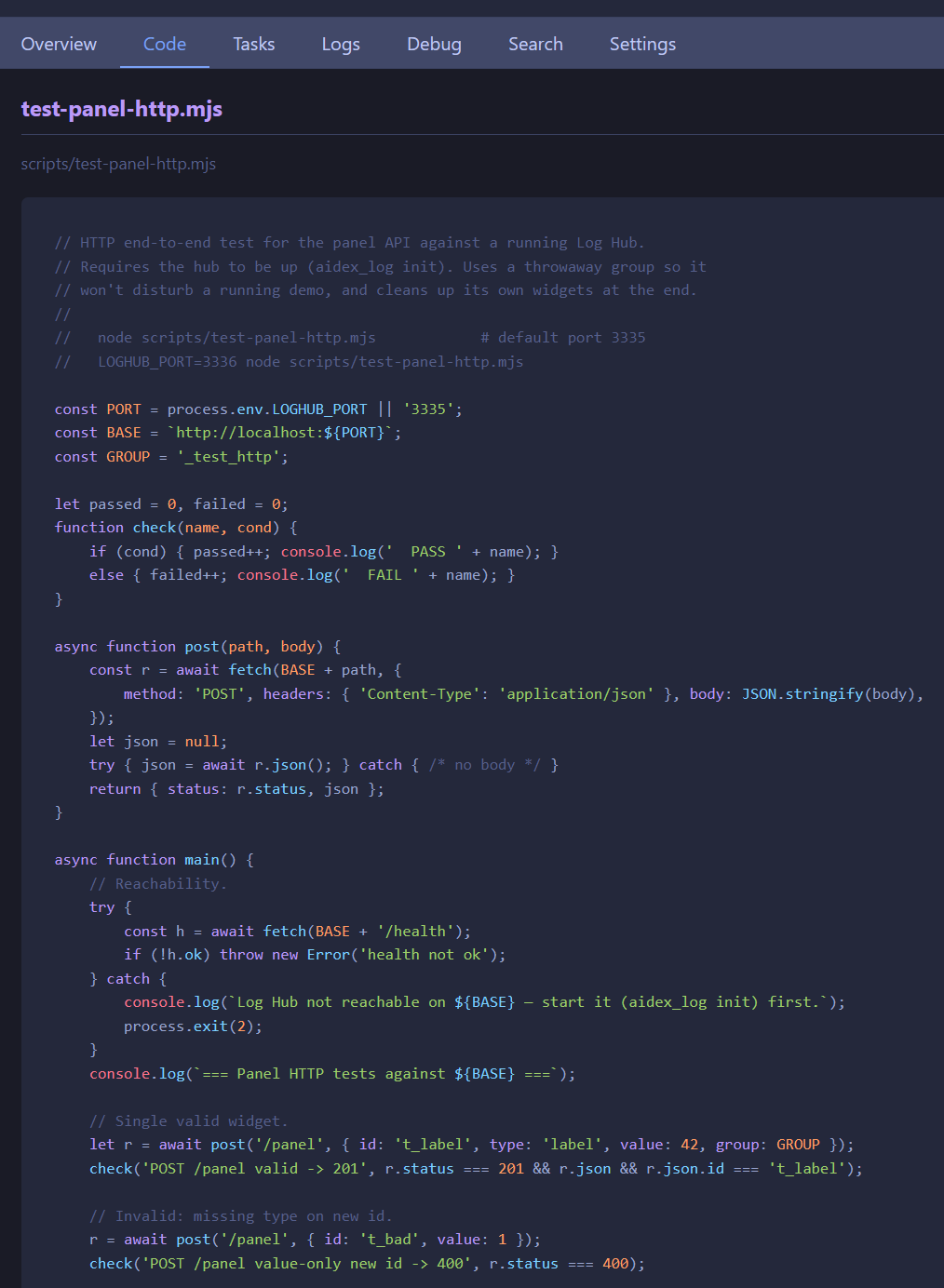
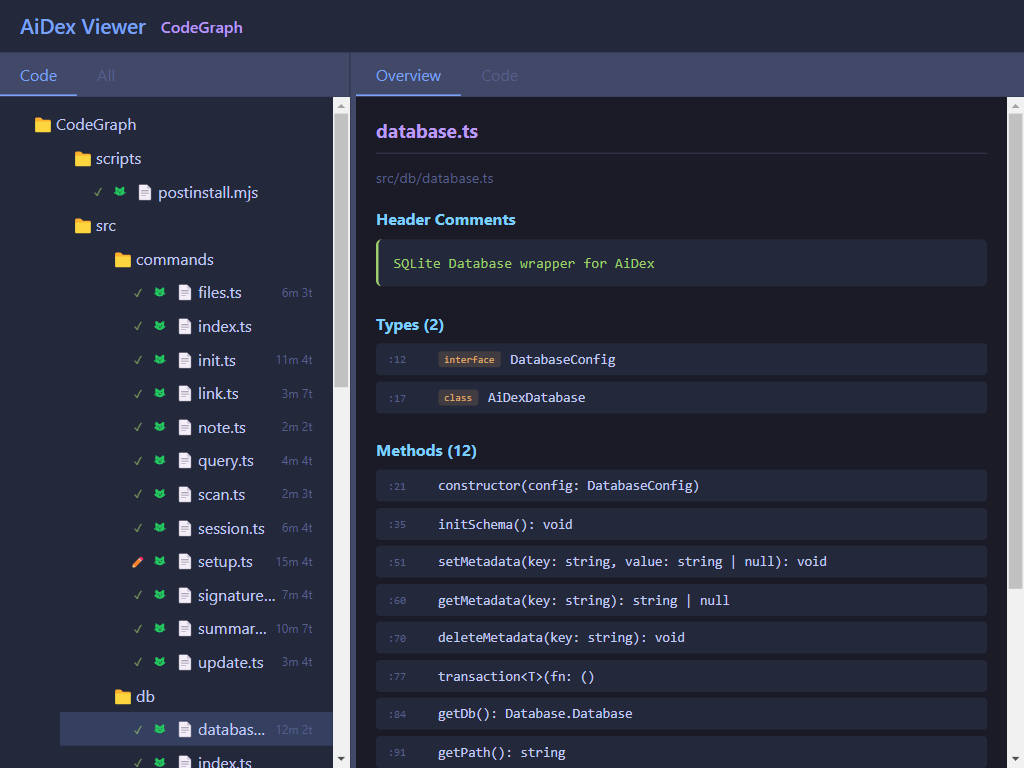
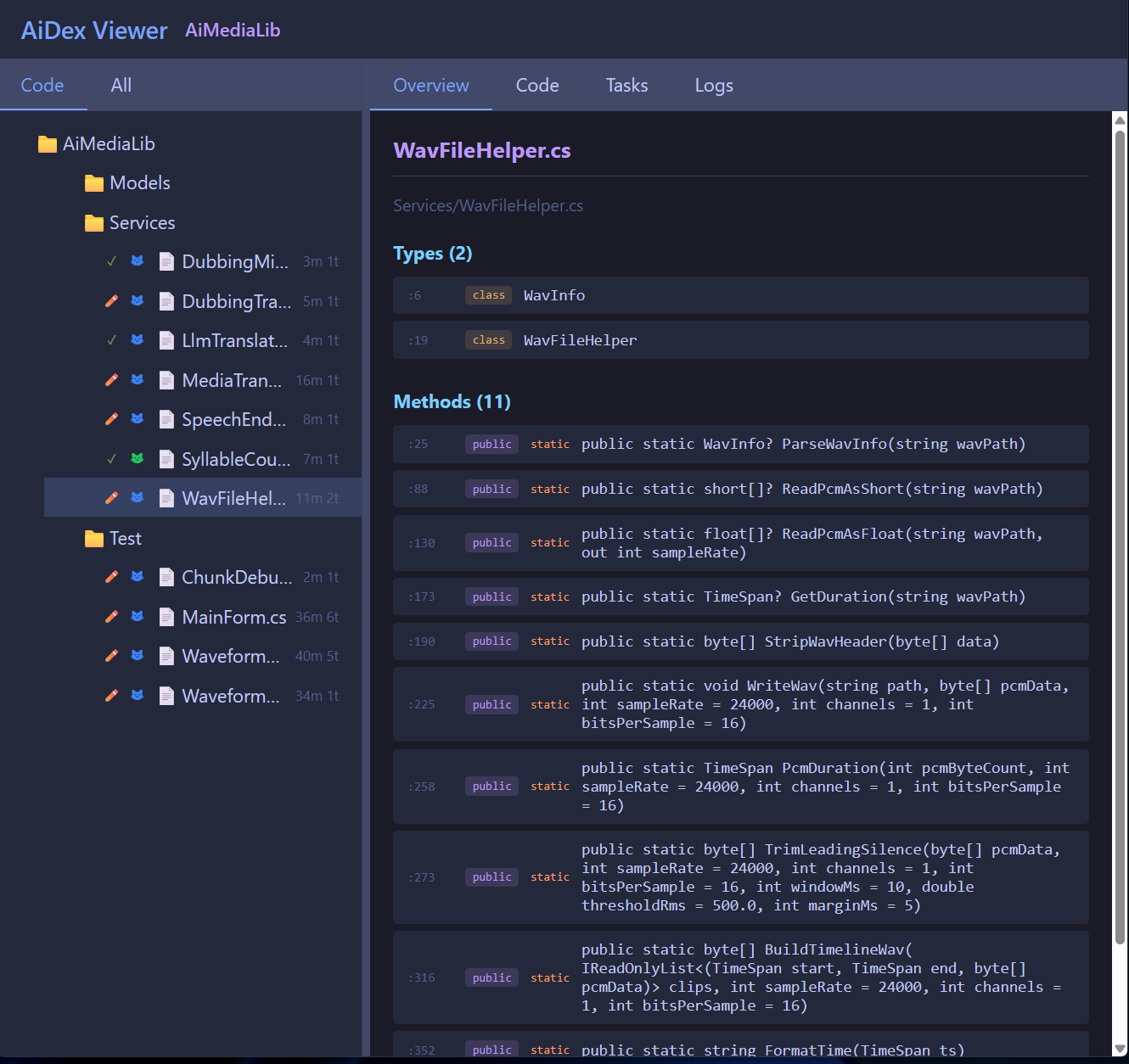
Close with aidex_viewer({ path: ".", action: "close" })
CLI Usage
aidex scan Q:/develop       # Find all indexed projects
aidex init ./myproject      # Index a project from command line
aidex-mcpworks as an alias foraidex.
Performance
| Project | Files | Items | Index Time | Query Time |
|---|---|---|---|---|
| Small (AiDex) | 19 | 1,200 | <1s | 1-5ms |
| Medium (RemoteDebug) | 10 | 1,900 | <1s | 1-5ms |
| Large (LibPyramid3D) | 18 | 3,000 | <1s | 1-5ms |
| XL (MeloTTS) | 56 | 4,100 | ~2s | 1-10ms |
Technology
- Parser: Tree-sitter - Real parsing, not regex
- Database: SQLite with WAL mode - Fast, single file, zero config
- Protocol: MCP - Works with any compatible AI
Project Structure
.aidex/                  ← Created in YOUR project
├── index.db             ← SQLite database
└── summary.md           ← Optional documentation

AiDex/                   ← This repository
├── src/
│   ├── commands/        ← Tool implementations
│   ├── db/              ← SQLite wrapper
│   ├── parser/          ← Tree-sitter integration
│   └── server/          ← MCP protocol handler
└── build/               ← Compiled output
Community
GitHub Discussions — Ask questions, share your setup, suggest ideas.
| Category | For |
|---|---|
| Q&A | Setup help, usage questions |
| Ideas | Feature suggestions |
| Show & Tell | Share your workflow |
| Announcements | Release news (maintainer only) |
Contributing
See CONTRIBUTING.md for full details. Quick summary:
- Bug? → Open an issue
- Idea? → Start a Discussion
- New language? → Add a keyword file in
src/parser/languages/and open a PR
License
MIT License - see LICENSE
Authors
Uwe Chalas & Claude