GitPrism
GitPrism is a fast, token-efficient, stateless pipeline that converts public GitHub repositories into LLM-ready Markdown.
Documentation
GitPrism
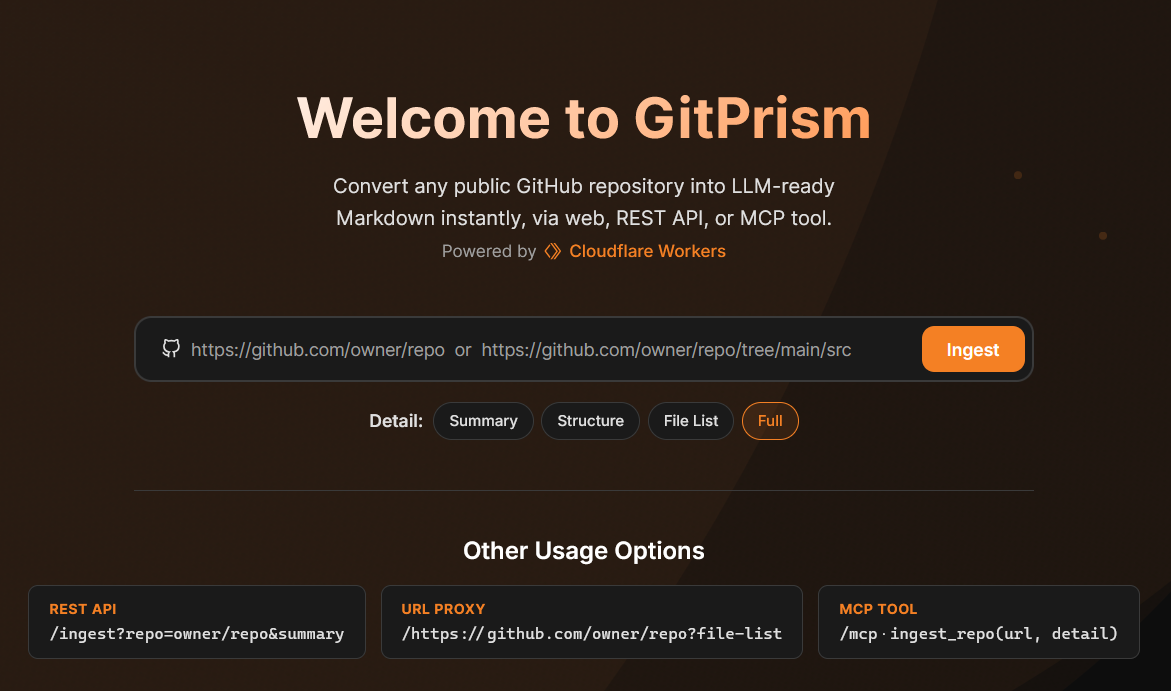
A fast, token-efficient, stateless pipeline that converts public GitHub repositories into LLM-ready Markdown. Deployed as a single Cloudflare Worker serving humans, AI agents, and MCP clients from one shared core engine.
                    ┌─────────────────────────────────────────────┐
                    │          Single Cloudflare Worker            │
                    │               (gitprism)                    │
                    │                                             │
   Humans ────────► │  /              → Astro Static UI           │
                    │                   (Workers Static Assets)   │
                    │                                             │
   AI Agents ─────► │  /ingest?...    → REST API                  │
                    │  /<github-url>  → URL Proxy (shorthand)     │
                    │                                             │
   MCP Clients ───► │  /mcp           → Stateless MCP Server      │
                    │                   (createMcpHandler)        │
                    │                                             │
                    │         ┌───────────────────┐               │
                    │         │   Core Engine      │               │
                    │         │  URL Parser        │               │
                    │         │  Zipball Fetch     │               │
                    │         │  fflate Decomp     │               │
                    │         │  Filter/Ignore     │               │
                    │         │  MD Formatter      │               │
                    │         └───────────────────┘               │
                    └─────────────────────────────────────────────┘
                                       │
                                       ▼
                              GitHub Zipball API
                          (authenticated via secret)
Authentication
GitPrism supports optional GitHub personal access tokens to bypass shared rate limits and use your personal GitHub API quota.
Default Rate Limits
- Without authentication: 30 requests per minute per IP address
- With server token: Shared across all users (5,000 req/hr for the Worker's IP)
- With user token: Your personal GitHub quota (5,000 requests per hour)
Using Your Own Token
REST API:
curl -H "X-GitHub-Token: ghp_xxxx" https://gitprism.cloudemo.org/ingest?repo=owner/repo
Web UI:
Click the ⚙️ settings icon in the search bar to open the token settings panel. Your token is stored in localStorage and never sent to any server other than GitHub via this Worker.
MCP Tool:
{
  "url": "https://github.com/owner/repo",
  "detail": "full",
  "github_token": "ghp_xxxx"
}
Token Requirements
- Scope: Contents: Read-only
- Repository access: Public repositories only
- Create token: https://github.com/settings/tokens?type=beta
Response Headers
The X-Token-Source header indicates which token was used:
user— Your personal token (viaX-GitHub-Tokenheader)server— The Worker's shared tokennone— No token available
Usage
Web UI
Visit https://gitprism.cloudemo.org/ and paste any GitHub URL. Use the settings panel (⚙️) to configure your GitHub token.
REST API
Canonical form (recommended for programmatic use):
GET /ingest?repo=owner/repo&ref=main&path=src&detail=full
URL-appended shorthand (human-friendly):
GET /https://github.com/owner/repo/tree/main/src
Branch, ref, and subdirectory are automatically extracted from the GitHub URL. Append a detail shorthand to control output:
GET /https://github.com/owner/repo?summary
GET /https://github.com/owner/repo/tree/main/src?file-list
Parameters (canonical form):
| Parameter | Required | Default | Description |
|---|---|---|---|
repo | Yes (canonical) | — | owner/repo, e.g. cloudflare/workers-sdk |
ref | No | default branch | Branch, tag, or commit SHA |
path | No | — | Subdirectory to scope results to |
detail | No | full | Output level: summary, structure, file-list, or full |
no-cache | No | false | Set to true to bypass response cache |
Detail level shorthand — instead of ?detail=<level>, append the level as a bare key. Works on both the canonical and URL-proxy forms:
/ingest?repo=owner/repo&summary
/https://github.com/owner/repo?structure
Detail levels:
| Level | Shorthand | Returns |
|---|---|---|
summary | ?summary | YAML front-matter with repo name, ref, file count, total size |
structure | ?structure | Summary + ASCII directory tree |
file-list | ?file-list | Structure + table of every included file with byte size and line count |
full | ?full | Summary + structure + complete file contents in fenced code blocks. Streamed. |
Response headers:
| Header | Description |
|---|---|
Content-Type | text/markdown; charset=utf-8 |
X-Repo | owner/repo |
X-Ref | Original ref requested (branch, tag, or SHA) |
X-Commit-Sha | Resolved commit SHA used for cache key |
X-File-Count | Number of files included |
X-Total-Size | Total size of included files in bytes |
X-Truncated | true if output was truncated |
X-RateLimit-Remaining | GitHub API rate limit remaining |
X-RateLimit-Reset | GitHub API rate limit reset timestamp |
X-Cache | HIT or MISS |
Error responses (JSON):
| Status | Condition |
|---|---|
| 400 | Malformed input |
| 404 | Repository not found or private |
| 413 | Archive exceeds 50 MB limit |
| 429 | Rate limited (30 req/min per IP, bypassed with X-GitHub-Token) |
| 502 | GitHub API error |
MCP Tool
Connect any MCP-compatible client to https://gitprism.cloudemo.org/mcp.
Available tool: ingest_repo
| Argument | Required | Default | Description |
|---|---|---|---|
url | Yes | — | GitHub URL or owner/repo shorthand |
detail | No | full | summary, structure, file-list, or full |
github_token | No | — | Your GitHub PAT to bypass rate limits |
{
  "url": "https://github.com/owner/repo",
  "detail": "summary",
  "github_token": "ghp_xxxx"
}
The tool is fully compatible with Code Mode agents — the strongly-typed Zod input schema and descriptive annotations allow client-side createCodeTool() to wrap it automatically.
Deployment
Option A — Workers Builds (recommended)
Workers Builds connects your GitHub repo to Cloudflare and deploys automatically on every push to main. The Astro UI is compiled during the build step; ui/dist/ is intentionally not committed to git.
Steps:
-
Go to the Cloudflare dashboard → Workers & Pages → Create → Import a Git repository
-
Connect your GitHub account and select this repo
-
Configure Build settings:
Setting Value Branch mainBuild command npm install && npm run buildDeploy command npx wrangler deploy(default) -
Click Save and Deploy — the first build will run immediately
-
Once deployed, go to your Worker → Settings → Variables and Secrets → Add a secret:
Name Value GITHUB_TOKENFine-grained PAT with public repo read-only scope Without this secret the Worker still functions, but GitHub API rate limits drop from 5,000 to 60 requests/hour (shared across all requests from the Worker's outbound IP).
-
Optional — Custom domain: Worker → Settings → Custom Domains → add your domain. This enables the Workers Cache API. Without a custom domain the Worker deploys to
<name>.<subdomain>.workers.devand caching silently no-ops (the code handles this gracefully). To enable routing once you have a domain, uncomment and update theroutesblock inwrangler.jsonc:"routes": [ { "pattern": "yourdomain.com/*", "custom_domain": true } ],
Option B — Manual deploy (Wrangler CLI)
git clone https://github.com/cougz/gitprism.git
cd gitprism
npm install
npm run build          # builds ui/dist/
npx wrangler secret put GITHUB_TOKEN
npx wrangler deploy
Environment Variables
Configured in wrangler.jsonc under vars. Override in the Cloudflare dashboard under Worker → Settings → Variables and Secrets if needed:
| Variable | Default | Description |
|---|---|---|
MAX_ZIP_BYTES | 52428800 (50 MB) | Maximum zip archive size before rejecting with 413 |
MAX_OUTPUT_BYTES | 10485760 (10 MB) | Maximum output size before truncation |
MAX_FILE_COUNT | 5000 | Maximum file count before truncation |
CACHE_TTL_SECONDS | 86400 (24 hours) | Cache TTL for SHA-based cache keys |
Secrets
| Secret | How to set | Purpose |
|---|---|---|
GITHUB_TOKEN | Dashboard → Secrets, or npx wrangler secret put GITHUB_TOKEN | Fine-grained PAT, public repo read-only. Raises GitHub rate limit from 60 to 5,000 req/hr. |
Why a build step is required
ui/dist/ (the compiled Astro frontend) is excluded from git. Wrangler reads assets.directory = "./ui/dist" from wrangler.jsonc and uploads those files as static assets during deploy. If that directory does not exist at deploy time, the Worker deploys with no UI. The npm run build step compiles the Astro source in ui/src/ into ui/dist/ before Wrangler runs.
Development
# Build the Astro UI (required before deploying or running wrangler dev)
npm run build

# Run tests (169 tests)
npm test

# Watch mode
npm run test:watch

# Type-check
npm run typecheck

# Local dev server (requires ui/dist/ to exist — run npm run build first)
npm run dev
Architecture
Project Structure
gitprism/
├── src/
│   ├── index.ts              # Worker entry point, routing
│   ├── types.ts              # Shared interfaces and error classes
│   ├── engine/
│   │   ├── parser.ts         # URL parsing and validation
│   │   ├── fetcher.ts        # GitHub zipball download + size check
│   │   ├── decompressor.ts   # fflate decompression + processing
│   │   ├── filter.ts         # Ignore lists, .gitignore, binary detection
│   │   ├── formatter.ts      # Markdown output generators (4 levels)
│   │   └── ingest.ts         # Shared pipeline (used by API + MCP)
│   ├── mcp/
│   │   └── server.ts         # createMcpHandler setup
│   ├── api/
│   │   ├── handler.ts        # REST API handler, streaming, caching
│   │   └── llmstxt.ts        # /llms.txt endpoint
│   └── utils/
│       ├── cache.ts          # Workers Cache API helpers
│       ├── ratelimit.ts      # Rate limiting helper
│       └── headers.ts        # Response header builder
├── test/                     # Vitest test files (169 tests)
├── ui/
│   ├── src/                  # Astro source
│   ├── dist/                 # Build output (gitignored)
│   └── astro.config.mjs
├── PLAN.md                   # Detailed implementation plan
└── wrangler.jsonc
Key Decisions
| Decision | Rationale |
|---|---|
| Single Worker (no Pages) | Workers Static Assets is the recommended approach. No CORS, simpler deployment. |
createMcpHandler() (no Durable Objects) | Tool is stateless. No per-session state needed. |
fflate over jszip | Streaming decompression, smaller bundle, lower peak memory in V8 isolates. |
Server-side GITHUB_TOKEN | Raises rate limit from 60 to 5,000 req/hr without user auth. |
| Pre-flight size check | Prevents OOM crashes from large repos. |
| Cache API from day one | Identical repo+ref+detail produces identical output. Caching cuts latency and GitHub API usage. |
Streaming TransformStream for full | Reduces peak memory, improves time-to-first-byte. |
File Filtering
Hardcoded Ignore List
The following are always excluded regardless of .gitignore:
Directories: node_modules/, vendor/, .git/, __pycache__/, .venv/, venv/, dist/, build/, .next/, .nuxt/, .svelte-kit/, .output/, .cache/, .parcel-cache/, coverage/, .tox/, .mypy_cache/
Files: package-lock.json, yarn.lock, pnpm-lock.yaml, bun.lockb, Cargo.lock, composer.lock, Gemfile.lock, go.sum, poetry.lock, *.min.js, *.min.css, *.map, *.wasm, *.pb.go, *.pyc, *.pyo
Binary extensions: .png, .jpg, .jpeg, .gif, .ico, .webp, .bmp, .tiff, .svg, .woff, .woff2, .ttf, .eot, .otf, .pdf, .zip, .tar, .gz, .bz2, .7z, .rar, .exe, .dll, .so, .dylib, .bin, .o, .a, .mp3, .mp4, .avi, .mov, .mkv, .flac, .wav, .ogg, .sqlite, .db, .DS_Store
Binary content detection: Files containing null bytes in their first 8 KB are skipped regardless of extension.
.gitignore Support
The root .gitignore of the repository is parsed and applied. Supports:
- Wildcard patterns (
*.log,**/*.tmp) - Directory patterns with trailing slash (
logs/) - Rooted patterns (
/build) - Negation patterns (
!important.log) - Comments (
# this line is ignored)
Limitation: Only the root .gitignore is evaluated. Nested .gitignore files (e.g., src/.gitignore) are not supported in v1.
Code Mode Compatibility
The ingest_repo MCP tool is compatible with Code Mode agents by design:
- Clear, descriptive tool name (
ingest_repo) - Multi-sentence description explaining all four detail levels
- Strongly-typed Zod schemas with
.describe()on every parameter - No server-side changes needed — standard MCP tools with typed schemas are inherently Code Mode compatible
Limits
| Limit | Value | Configurable |
|---|---|---|
| Max zip archive size | 50 MB | MAX_ZIP_BYTES env var |
| Max output size | 10 MB | MAX_OUTPUT_BYTES env var |
| Max file count | 5,000 | MAX_FILE_COUNT env var |
| Rate limit (no token) | 30 req/min per IP | wrangler.jsonc ratelimits binding |
| Rate limit (user token) | 5,000 req/hr | GitHub's per-user quota |
| Cache TTL | 24 hours | CACHE_TTL_SECONDS env var |
Rate limit behavior:
- Without
X-GitHub-Token: Cloudflare rate limiter enforces 30 requests per minute per IP - With
X-GitHub-Token: Cloudflare rate limiter is bypassed; your personal GitHub quota applies (5,000 req/hr) - The
X-Token-Sourceresponse header indicates which token was used (user,server, ornone)
Caching behavior:
Cache keys use resolved commit SHAs for automatic invalidation when repos update. Old cache entries expire naturally after TTL. If SHA resolution fails, caching is skipped and fresh data is always fetched.
License
MIT