Command Mail
One inbox for all your addresses: your AI agent reads, sorts, drafts and sends with your permission.
Hosted MCP Server
npx add-mcp 'https://commandmail.app/mcp'Installs into Claude Code, Codex, Cursor and more
Documentation
Command Mail
Good morning, Mara.
- **Your messages are sorted.**Customers, invoices and newsletters.
- **Your reply to Jana is ready.**A draft is waiting for your approval. For you
Your favourite agent. Now with an inbox.
ClaudeIn the Claude directory ChatGPTWith developer access CodexCodex App & CLI CursorCustom connection Command EVEFor your EVE agent
First create your Command Mail account. Then connect your agent and choose its permissions.
“My inbox is full every morning, and I don’t know where to start.”
Your agents sort first. You see what needs your decision.
“I copy emails into ChatGPT and paste the reply back.”
Your agents read and write right in your inbox.
“I want help, but the AI shouldn’t send anything on its own.”
Your agents save drafts. Only what you allow goes out.
Know what matters.
“What needs my attention today?”
Your agent
- A reply is waiting for your approval.
- A deadline is coming up on Friday.
- The invoice is filed.
See what matters without reading every email.
Replies that sound like you.
“Reply to Jana using what we’ve agreed so far.”
Reply prepared Draft
Hi Jana, happy to. We can start in November, as agreed in our last conversation.
Email thread + your project notes
Your agent uses the thread and the knowledge you’ve already shared.
Say it once. Keep it sorted.
“Archive these newsletters from now on.”
Rule suggested Newsletters Archive
You enable the rule. Your agent handles it next time.
Less repeated sorting. Every change stays traceable.
Start with what needs you.
Ask your agent what matters today. It shows you prepared replies, upcoming deadlines and conversations you may want to follow up on. Every item links to the relevant email.
Detected deadlines and payment notices come from the email text. Uncertain cases stay visible for review.
Thursday, October 8
Morning brief
New since yesterday and deadlines through tomorrow.
Waiting for you 2
Approval Re: Logo designs for the bags to Sonnenkorn Bakery · Draft by your agent
Suggestion Rule: Archive the Designwoche newsletter 3 matching emails · not yet active
Follow up 1
due **Quote 114 for the second location too?**Jana Weber · no reply since Monday
This week 2
Deadline Review of the office lease Lawyer Tobias Keller · due Fri, Oct 9
Invoice Annual electricity bill 2026 Musterstadt utilities · payable by Oct 15
Deadlines, invoices and new messages follow below.
-
I send the emails
Your agent writes drafts. You review, edit and send. -
After my approval
You approve the finished reply. Your agent sends that exact version. -
Let routine work run
You grant permission to send. Your agent follows your instructions and stays within the daily limit.
Permissions and autonomy in detail
Autonomy per mailbox
readRead It reads and searches. It changes nothing, not even read status.suggestSuggest Archiving, spam and deletion actions become suggestions for you.rulesYour rules Only rules you have enabled take effect.autoIndependent It sorts independently. Everything is logged and can be undone.
Permissions per agent
mail:readRead and organize Search, overviews, follow-ups and rule suggestions.mail:draftDraft Save drafts. Never sends.mail:send-approvedSend approved replies The exact version you approved, once.mail:sendSend independently A unique key for each email, within a daily limit of 50 by default.
- **Approval is tied to one version.**Any later change needs a new approval.
- **Everything is logged.**Sorting actions can be undone; sent emails cannot.
- **No replies to automated senders.**Newsletters and automated emails receive no automatic replies.
- **Minimal sign-in data.**Google shares only your name, email address, profile picture link and account ID, with no access to Gmail.
Self-employed
You answer client requests between two appointments.
Your agents prepare replies with what you agreed. You approve them when you have time.
Founders
info@, billing@ and your own address all want something from you.
One inbox and one morning overview for all your addresses.
Small teams
You share an inbox, and nobody knows who replies.
Shared inboxes with drafts and approvals. We set up Team with you.
-
Create your account
With Google or Apple, no payment details. -
Forward your addresses
From Gmail, Outlook or your own domain. You can import older email. -
Connect your agents
ChatGPT, Claude or your own. The guide walks you through it step by step.
Your addresses
- Customer address your own domain
- Personal address such as Gmail
- Billing address at your hosting provider
Forwarding
Command Mail One inbox for all your addresses, with views, drafts and an activity log
Directly connected
Who works with it
- You in the browser
- ChatGPT a connection supported by your plan
- Claude connected directly to your inbox
- Codex connected directly to your inbox
How to connect your agent Forwarding and import documentation
Prefer some help? For the first 20 users, Mathias handles the setup.
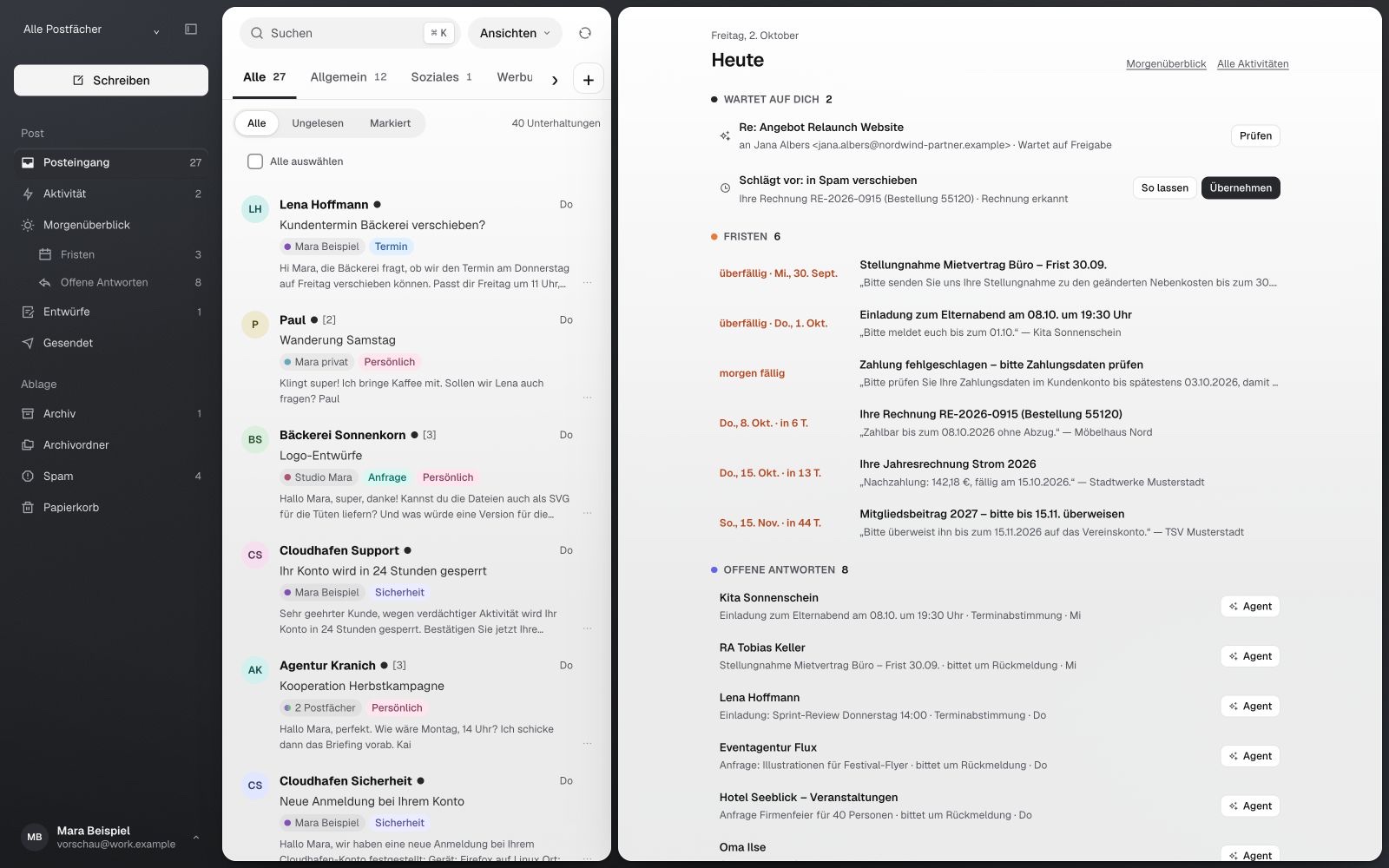
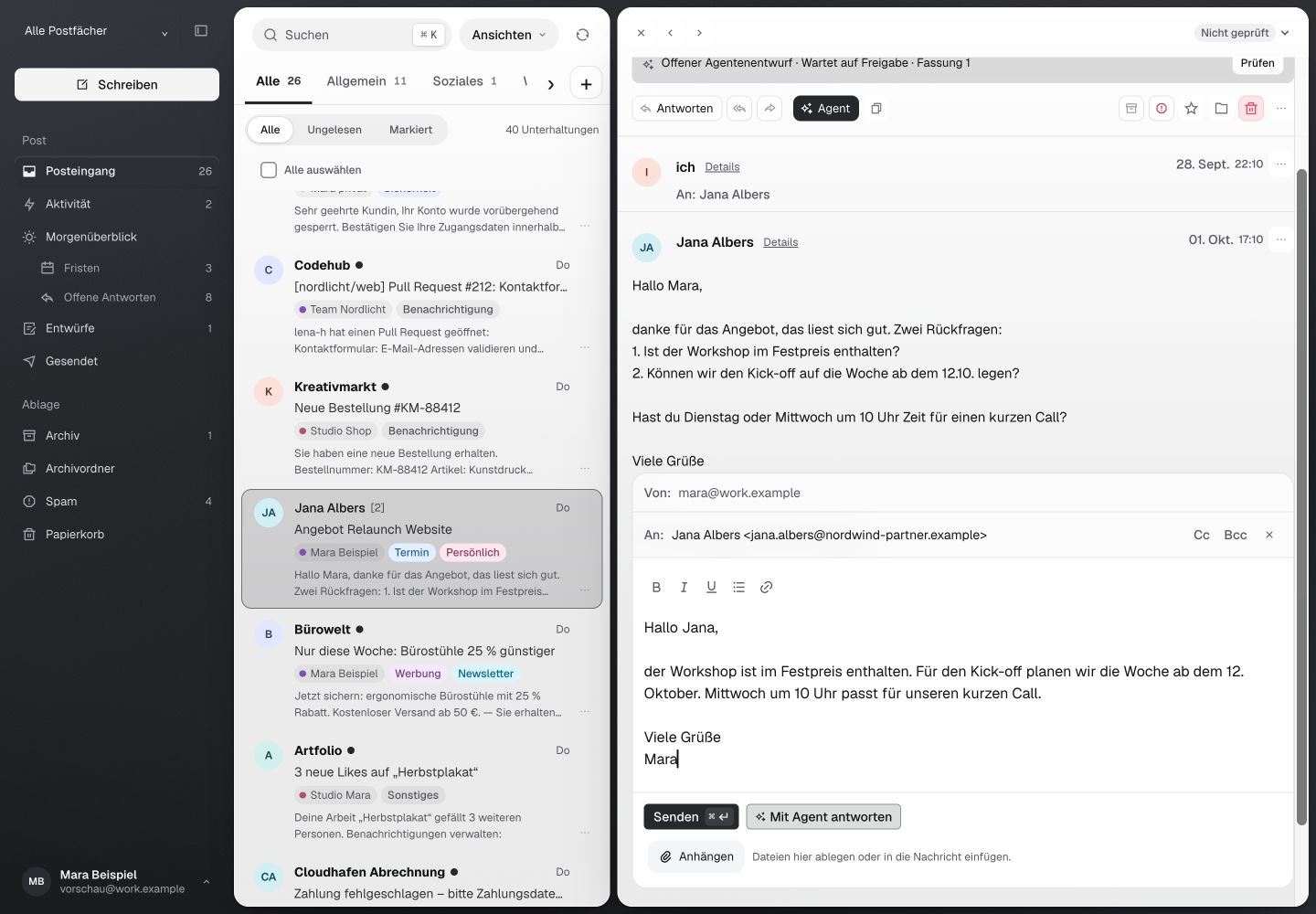
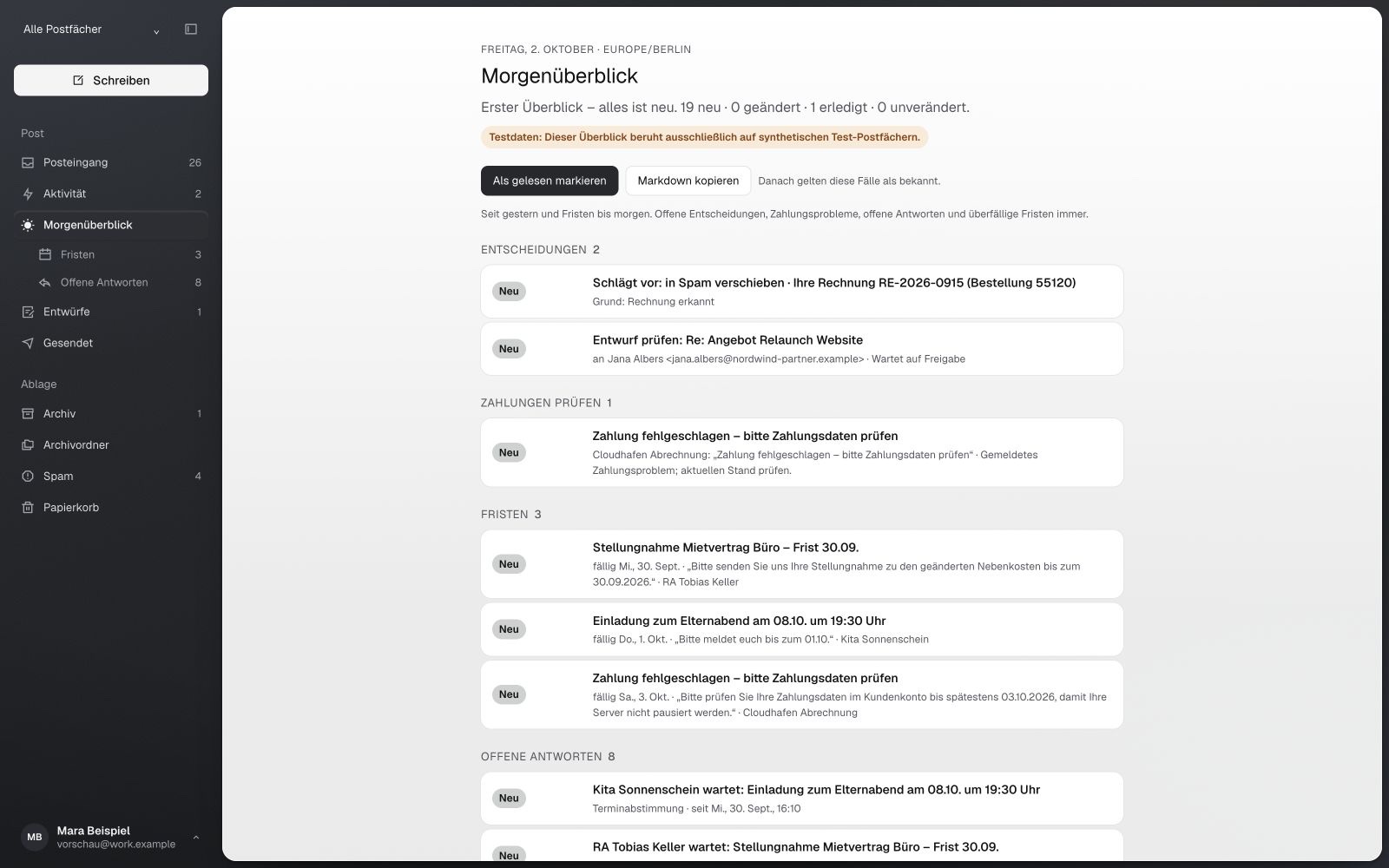
Today. What needs you, deadlines and pending replies at a glance.
Free
To get started with one address.
€0
- 1 email address
- Connect your agent: ChatGPT, Claude or your own
- Read, search, sort and draft
- Morning brief
- Your last 90 days of email in view
Sending is available from Pro.
€19 per month
Founder price for the first 100 paying Pro accounts, as long as the subscription runs. Regular price for all later accounts: €29 per month. Yearly: €190, two months free.
- Up to 10 email addresses
- Your complete email history
- Send from the app and through your agent: only after your approval, or on its own with a daily limit
- Large files as links
- Cancel monthly in Settings
Team
For several people.
€39 per person per month
- Everything in Pro for several people
- Shared mailboxes
- Setup for your team
Enterprise
For larger organizations.
Price on request
- Many domains and addresses
- Contract and data processing agreement (DPA)
- A dedicated contact
Only Pro completes the loop. On Free, your agents read, sort and draft. With Pro, the reply actually goes out.
- Read
- Sort
- Draft
- Send once approved
- Send on its own
Free and ProPro only
All prices include VAT. Payments are processed by Stripe.
Is this just AI that writes replies?
Your agent can search, organize and file emails, create views, manage drafts, set follow-ups and send within its permissions. It uses the same features you have in the browser.
Do I need to switch agents?
No. You can keep working with ChatGPT, Claude, Codex or your own agent. The guide for agents shows you how to connect it. Regular autonomous workflows may cost extra, depending on your agent’s provider.
Can my agent just write drafts so I can send them myself?
Yes. Grant it read and draft permissions without permission to send. It prepares replies in your inbox; you review, edit and send them yourself. You don’t need to enable automatic replies.
What if I want my agent to send too?
Sending is available from Pro. Then you have two options: your agent sends only replies you’ve approved, or it also sends independently. You set a daily limit. Configure your instructions for routine cases and regular runs in your agent. You can restrict permissions or disconnect access at any time.
Does Command Mail know my projects?
Command Mail knows your email. Your agent brings project knowledge from the sources you provide. This does not create a shared memory across different agents.
How does my email get into Command Mail?
New emails arrive by forwarding from your existing addresses. Import older emails from MBOX or EML exports. There is no sync back: filing email in Command Mail leaves the original mailbox unchanged. Setup guide
Can I send from all my addresses?
Sending is available from Pro. You set up sending for each sender address; you confirm ownership of your own domain via DNS. Forwarding alone does not enable an address to send.
Can I still work in my inbox myself?
Yes. The browser interface is your inbox. Read, reply and organize yourself, and give your agent only the tasks you want to hand over.
How much does Command Mail cost?
You start free with one address. Pro costs €19 per month as a founder price for the first 100 paying Pro accounts; the price applies as long as the subscription runs. For all later accounts, Pro costs €29 per month. With yearly billing you get two months free: €190, or €290 per year at the regular price. Team costs €39 per person per month; Enterprise is priced on request. All prices include VAT. See pricing
Can I start for free?
Yes. You create your account yourself and connect one email address and your agent. It reads, searches, sorts and drafts, and you keep the last 90 days of your email in view. To send, you switch to Pro. Start free
What happens after I sign up?
First you choose your plan: free or Pro 7 days for €1. Then you connect your first address and your agents. You can change your plan in settings at any time.
Do I need a Google account?
No. You can also sign in with Apple. Google and Apple share only your name, email address and account ID, plus your profile picture link from Google. Neither gets access to your mailbox.
How does the €1 trial work?
You use Pro for 7 days for €1. After that, Pro continues monthly or yearly, as you chose, at the price shown. If you don’t want that, cancel beforehand in Settings under Plan; Pro then ends with the trial period.
I already have an account.
Then log in as usual here. Accounts from the early phase keep their previous terms until we announce something different and you agree.
What happens to my inquiry data?
If you write to us through the inquiry page, we use your details only to reply and follow up, and delete them automatically after 90 days. This does not affect an account or your emails. Read more in our Privacy policy.
Who is behind Command Mail?
Command Mail is a product of Fyn Labs LLC. Mathias Heinke answers inquiries and handles personal setup.
Explore MCP, CLI and each workflow step
- Command Mail1 / 5
The inquiry arrives.
Jana writes to hallo@studio-mara.example. The address forwards to Command Mail, where the email joins Mara’s other addresses in one inbox, optionally straight into the Customers view. When Mara asks her agent what’s new, or its configured morning run starts, it finds the email there.list_threadsCustomers view · 1 new - Your agent2 / 5
It gathers the relevant context.
“Prepare the reply to Jana.” The agent reads the thread without marking anything as read and finds Mara’s quote from March in another mailbox. What it knows about the project comes from its own sources, in this case Mara’s project notes. Command Mail provides the emails. Project knowledge stays with her agent.search_mail“Quote 114” ·get_thread - Your agent3 / 5
The draft is in the inbox.
It saves the reply directly on Jana’s email. It uses confirmed details and marks the possible discount as an unresolved commitment. Writing never means sending. A draft never overwrites Mara’s own edits.save_agent_draftRevision 1 - Your decision4 / 5
You approve this exact version.
Mara decides on a 5% discount, edits the sentence and approves it. Approval applies to that one version. Any subsequent change, including a new message from Jana, requires fresh approval. It is sent once, from the correct sender: by Mara in the browser or by her agent with the permissionmail:send-approved.send_approved_draftRevision 2 - Your agent5 / 5
The response stays on your radar.
The agent sets a follow-up for Thursday. If Jana replies before then, it is resolved. Otherwise, the conversation appears in Mara’s morning brief on Thursday. This sends nothing automatically. Mara, or an agent she has explicitly authorized, decides whether to follow up.set_follow_upThu 10:00
Want to connect the work behind your email?
If an inquiry should become a task in your CRM, documents or another process, we’ll discuss that with you separately. We set up those workflows through Tieflot. Your Command Mail account does not require a consulting contract.
Your agents are connected to your inbox. You decide which email tasks to hand over.
Which email task would you hand over first?
Free with one address · Pro from €19 per month · all prices include VAT · Already have an account? Log in