VK MCP Server
Run a VK (VKontakte) community from an AI assistant: work through the community inbox and reply as the community, publish posts, comments and stories, and read walls, profiles and communities. 25 tools, stdio, npm vk-mcp-server, MIT.
Documentation
VK MCP Server





Model Context Protocol (MCP) server for VK (VKontakte) social network API
Enables AI assistants like Claude to interact with VK through a standardized interface.
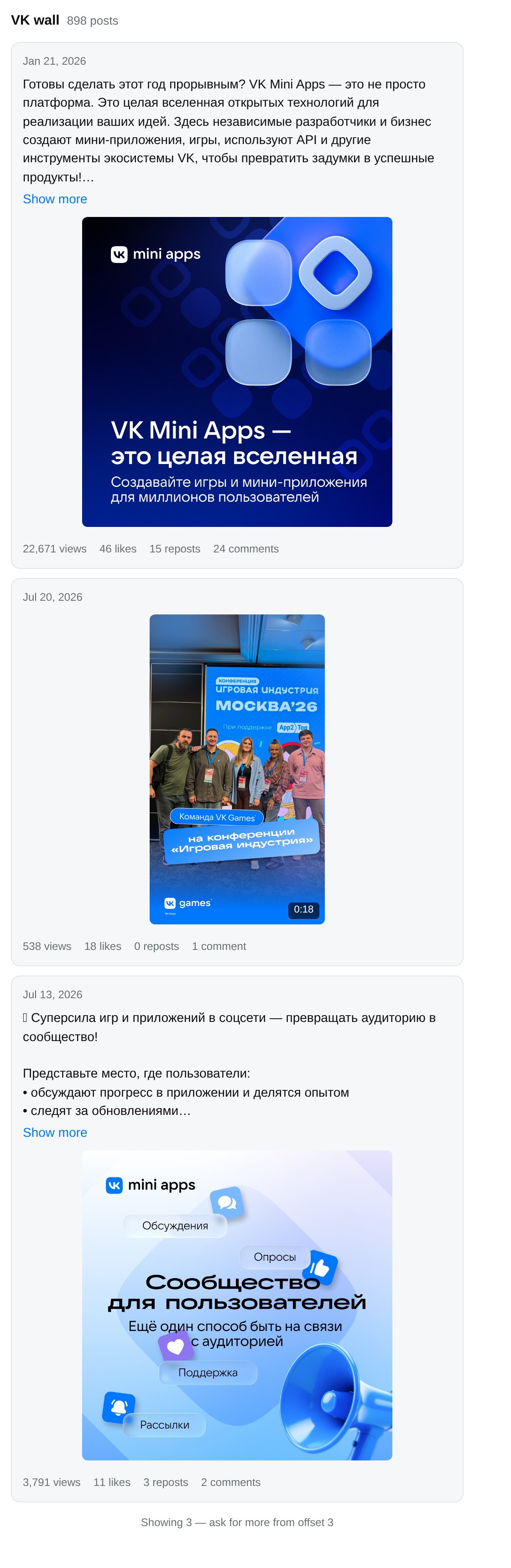
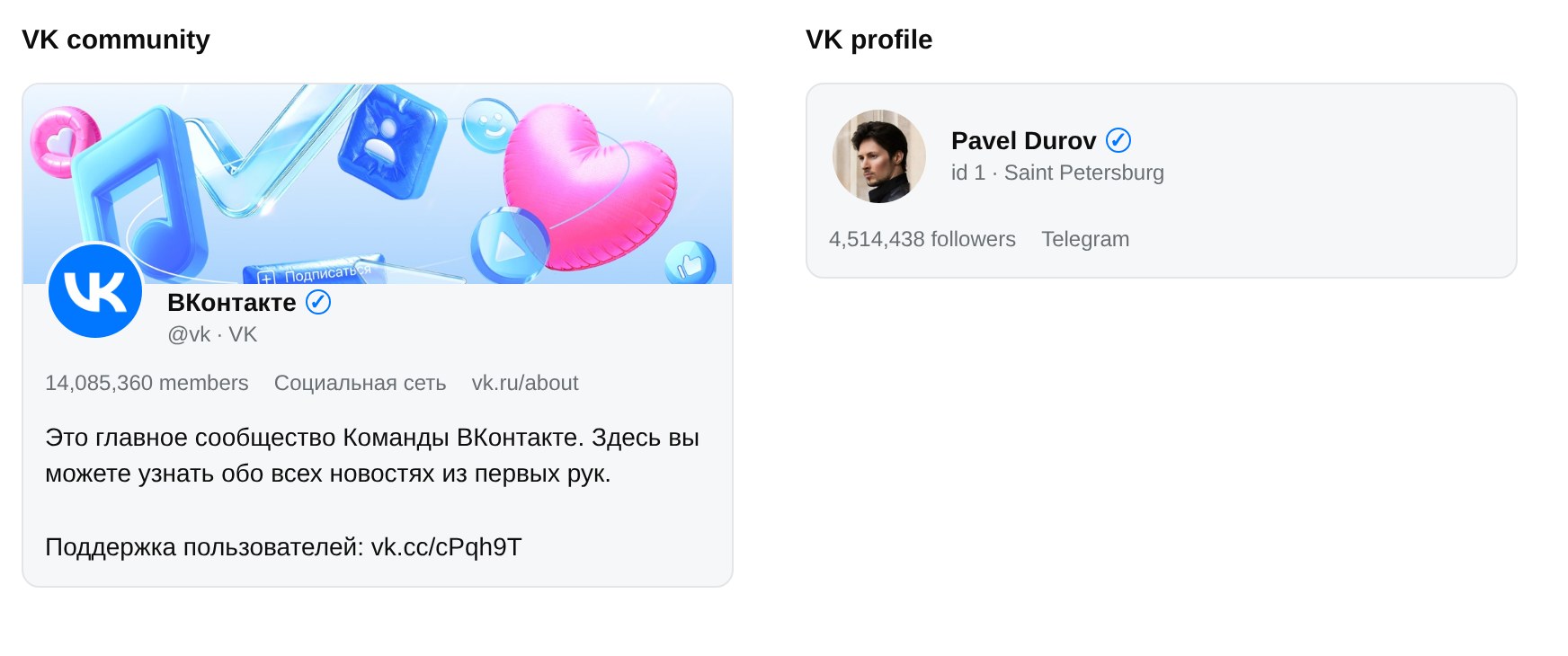
Walls, communities and profiles on a host that supports MCP Apps. The model gets the same structured data either way — this is what the person sees.
Features
- 25 tools across users, walls, communities, photos, stories, community messages, likes and statistics
- Your community's inbox: list unread conversations, read them, and reply as the community — the assistant drafts, you approve, it sends
- Read and write as a community: with a community token and a service key together, the assistant reads walls, profiles and communities and posts, comments, publishes stories and answers messages as your community. Writes are marked as such so your client can ask first. Some tools (search, likes, statistics, editing) need a full user token, which VK no longer issues to new apps — the setup guide lists exactly what each token reaches
- Structured output: every tool declares an output schema, so the model gets typed data instead of a JSON blob it has to parse out of text
- Pagination that explains itself: list results say how many matches exist and which offset continues from here, so the model can page through a wall instead of stopping at the first twenty posts
- Things you can look at: on hosts that support MCP Apps — Claude, Claude Desktop, VS Code Copilot, Goose — walls, communities and profiles render as cards: posts with their photos and clip previews, communities with their banner and size, profiles with avatar and following. Everywhere else it behaves exactly as before
- Prompts: ready-made workflows — community digest, engagement report, audience snapshot, community search, community inbox
- Resilient: request timeouts, automatic backoff when VK rate-limits, and clear messages for captchas and HTTP failures
- Honest about tokens: VK has three kinds and they differ enormously in
reach.
--checknames which one you hold and probes what it can actually do,--loginwalks the VK ID flow for the reading kind, and every VK error carries the fix rather than the code alone - Tested: 84 tests driving the real server over the MCP protocol
Quick Start
Claude Desktop — one click
Download the latest .mcpb bundle from the
releases page and
open it. It installs the server, asks for your VK token in a form field, and
stores it securely — no Node.js, no config files, no terminal.
VS Code — one click

VS Code prompts for your VK token and keeps it out of the config file. From a terminal instead:
code --add-mcp '{"name":"vk","command":"npx","args":["-y","vk-mcp-server"],"env":{"VK_ACCESS_TOKEN":"your_token"}}'
npm
npx vk-mcp-server
Or install globally with npm install -g vk-mcp-server.
MCP Registry
Also available in the official MCP Registry:
io.github.bulatko/vk
Getting VK Access Token
To let the assistant post, you need a community token. Open a community you
manage → Manage → API usage → Access tokens → Create token,
ticking wall, photos, stories, messages and manage. Three clicks, no
app, never expires, tied to no browser or IP. It posts, comments and publishes
stories as the community.
Add a service key next to it, and the assistant reads walls too. VK refuses
a community token wall reads (error 27). Set the service key from your VK app's
settings page as VK_SERVICE_KEY, and the server makes every read the token is
refused with the key instead — writes never go to it:
"env": {
  "VK_ACCESS_TOKEN": "vk1.a...community token",
  "VK_SERVICE_KEY": "...service key"
}
What no token VK issues to a new app can do, checked against the live API in October 2026: edit or delete posts, upload wall photos, read statistics, likes, photo albums, search or the newsfeed. VK keeps those for full user tokens, which it no longer grants.
For public reads alone, the service key on its own is enough (as
VK_SERVICE_KEY or VK_ACCESS_TOKEN), or sign in as yourself:
npx vk-mcp-server --login <YOUR_APP_ID>
Worth knowing before you spend an evening on it: --login returns a VK ID
token (vk2.a…), which VK issues for signing in rather than for the API. It
reads public profiles, walls and community info; posting, photos, friends,
feeds and statistics all answer error 1051, whatever scopes you request. The
older flow that granted full user tokens now refuses newly created apps
outright. npx vk-mcp-server --check names which kind you hold and what it
reaches.
Use your own app rather than an App ID from somewhere else: a token dies with the app that issued it, and the error gives no hint that this is what happened.
📖 Full setup guide — every step with the exact screens, what the scopes unlock, remote installs, and what each error means.
Configuration
Claude Desktop
Add to ~/Library/Application Support/Claude/claude_desktop_config.json (macOS) or %APPDATA%\Claude\claude_desktop_config.json (Windows):
{
  "mcpServers": {
    "vk": {
      "command": "npx",
      "args": ["-y", "vk-mcp-server"],
      "env": {
        "VK_ACCESS_TOKEN": "your_access_token_here"
      }
    }
  }
}
Claude Code
Add to your project's .mcp.json:
{
  "mcpServers": {
    "vk": {
      "command": "npx",
      "args": ["-y", "vk-mcp-server"],
      "env": {
        "VK_ACCESS_TOKEN": "your_access_token_here"
      }
    }
  }
}
Environment variables
| Variable | Required | Default | Purpose |
|---|---|---|---|
VK_ACCESS_TOKEN | for tool calls | — | The token tools act with, usually a community token. The server starts and lists its tools without one; calling a tool then returns an error saying so |
VK_SERVICE_KEY | no | — | Service key from your VK app. Reads the access token is refused (a wall, under a community token) are made with it; never used for writes. On its own, it is enough for public reads |
VK_TIMEOUT_MS | no | 30000 | Abort a VK request that hangs longer than this |
VK_API_BASE | no | https://api.vk.com/method | Point the server at an API mirror or proxy |
VK rate-limits user tokens to a few calls per second. When it answers with error 6 (too many requests), the server backs off and retries up to three times before giving up, so short bursts of tool calls do not fail outright.
Command line
| Command | What it does |
|---|---|
npx vk-mcp-server | Runs the MCP server (this is what your client calls) |
npx vk-mcp-server --login <APP_ID> | Gets a token through VK ID in your browser |
npx vk-mcp-server --check | Reports what your token is and which tools it can use |
npx vk-mcp-server --help | Lists the commands and environment variables |
Troubleshooting
Start with:
VK_ACCESS_TOKEN=your_token npx vk-mcp-server --check
It identifies which of the three token types you have — user, community or service — and probes what that token can actually reach, so you find out up front instead of discovering it tool by tool. It never calls a write method.
Common cases:
| What you see | What it means |
|---|---|
error 8: Application is blocked | The VK app that issued the token is blocked. Every token from it fails this way, however valid the token looks. Create your own app and issue a fresh token. |
error 5: User authorization failed | The token expired or was revoked — run --login again. |
error 27: Group authorization failed | A community token asked for something VK keeps from it — reading a wall, say. Set VK_SERVICE_KEY and reads go to the key; edits, deletions and statistics stay closed. |
error 1051 or error 28 | A VK ID token or a service key asked for a method closed to it. To post, use a community token. |
error 15: Access denied | The data is restricted — a private profile, or a community that hides its members. |
error 5 with subcode 1130 | VK bound the token to the IP that authorised it, and the server is on a different one. Common when the server runs on a VPS but you signed in from your laptop. Get the token on the machine that runs the server, or use a community token. |
Security Error when authorising | The old implicit OAuth flow. Use --login, which does the current VK ID flow. |
No VK token configured on every tool | The server is running but your client never passed VK_ACCESS_TOKEN to it. Check the env block in your client config — a token in your shell does not reach a server the client spawns itself. |
The server turns these into messages that say what to do, so the model can usually explain the fix without you reading this table.
Available Tools
Tools marked ✏️ change something on VK — they post, edit, delete or join on
behalf of whoever owns the access token. Each tool also carries MCP annotations
(readOnlyHint, destructiveHint), so a client can auto-approve lookups while
still asking before a post is edited or deleted.
Users
| Tool | Description |
|---|---|
vk_users_get | Get user profiles by IDs or screen names |
vk_users_search | Search users by name, city, age and other criteria |
Wall
| Tool | Description |
|---|---|
vk_wall_get | Get posts from user/community wall |
vk_wall_get_by_id | Get specific posts by {owner_id}_{post_id} |
vk_wall_post | ✏️ Publish a new post |
vk_wall_edit | ✏️ Edit an existing post |
vk_wall_delete | ✏️ Delete a post |
vk_wall_create_comment | ✏️ Add comment to a post |
Groups
| Tool | Description |
|---|---|
vk_groups_get | Get user's communities list |
vk_groups_get_by_id | Get community info by ID |
vk_groups_search | Search communities by name and criteria |
vk_groups_get_members | Get community members |
vk_groups_join | ✏️ Join a community or request to join |
Photos
| Tool | Description |
|---|---|
vk_photos_get | Get photos from albums |
vk_photos_upload_wall | ✏️ Upload a photo and get an attachment string for vk_wall_post — needs a full user token; VK refuses community tokens here |
Stories
| Tool | Description |
|---|---|
vk_stories_post_photo | ✏️ Publish a photo story, personal or on behalf of a community |
vk_stories_post_video | ✏️ Publish a video story, personal or on behalf of a community |
Community messages
Need a community token with the messages right, and messages switched on in
the community settings. VK lets a community write only to people who wrote to
it first or allowed its messages.
| Tool | Description |
|---|---|
vk_messages_get_conversations | List the inbox, newest first; filter: "unread" shows what waits for a reply |
vk_messages_get_history | Read one conversation |
vk_messages_send | ✏️ Reply as the community — reaches a real person, so clients should ask first |
vk_messages_mark_as_read | ✏️ Mark a conversation as read |
Other
| Tool | Description |
|---|---|
vk_friends_get | Get user's friends list |
vk_newsfeed_get | Get user's newsfeed |
vk_likes_get | Get users who liked an object, with reaction counts |
vk_stats_get | Get community statistics (admin only) |
Prompts
Prompts appear in your client as ready-made workflows — pick one, fill in the community, and the model knows which tools to use.
| Prompt | What it does |
|---|---|
community_digest | Reads recent posts and summarises themes, standouts and cadence |
engagement_report | Ranks posts by likes and by comments, then explains what the winners share |
audience_snapshot | Samples members and describes the audience by sex, city and activity |
publish_post | Drafts a post in the community's own tone, shows it for approval, publishes it |
find_communities | Searches communities on a topic and compares the candidates |
community_inbox | Goes through unread messages, summarises each and drafts replies; sends only what you approve |
Usage Examples
Once configured, you can ask Claude:
- "Get information about Pavel Durov's VK profile"
- "Show me the latest 5 posts from the VK official community"
- "Post 'Hello World!' on my wall"
- "Get the list of communities I'm a member of"
- "Show my newsfeed"
Example Conversation
A real exchange — the numbers below came back from VK while this was written.
You:    How big is the VK Mini Apps community, and how are its recent posts doing?

Claude: [vk_groups_get_by_id  group_ids="apiclub", fields="members_count,activity"]
        [vk_wall_get          domain="apiclub", count=3]

        VK Mini Apps (@vkappsdev, id 166562603) — 245,457 members, filed under
        Programming, with 898 posts on the wall. The three most recent:

        21 Jan   22,653 views   46 likes   15 reposts   "Готовы сделать этот год прорывным?..."
        20 Jul      529 views   18 likes    0 reposts   (photo post, no text)
        13 Jul    3,782 views   11 likes    3 reposts   "Суперсила игр и приложений в соцсети..."

        The January post reached forty times the audience of the July ones —
        worth a look at what it did differently.
The model gets each of those numbers as typed fields rather than text it has to parse, because every tool declares an output schema.
Changelog
See CHANGELOG.md.
Testing
Run the test suite:
npm test
Run tests with coverage:
npm run test:coverage
API Reference
This server wraps VK API v5.199. For detailed parameter documentation, see:
Security Notes
- Never share your access token
- The
offlinescope provides a non-expiring token - Review permissions before authorizing
- For production, consider using a service token
Contributing
Contributions are welcome! Please read the Contributing Guidelines first.
- Fork the repository
- Create your feature branch (
git checkout -b feature/amazing-feature) - Commit your changes (
git commit -m 'Add some amazing feature') - Push to the branch (
git push origin feature/amazing-feature) - Open a Pull Request
License
MIT © 2026 bulatko
Links
Made with ❤️ for the MCP ecosystem