COVER
Official MCP server for COVER, Suresofttech's code coverage tool. Answers questions about coverage types, supported languages and editions from the official product page.
Hosted MCP Server
npx add-mcp 'https://apps.suresofttech.com/cover/mcp'Installs into Claude Code, Codex, Cursor and more
Documentation
- C/C++, C#, Java Supported languages: Enterprise (EE) Standalone (SE): C/C++, C#
- Up to 10 in EEUp to 7 in SE Coverage types measured EE: Enterprise; SE: Standalone
- Around 10% Execution overhead Actual overhead may vary with the language, target performance, coverage types measured, and instrumentation scope.
- 9 Built-in standard and guideline measurement criteria (C/C++)
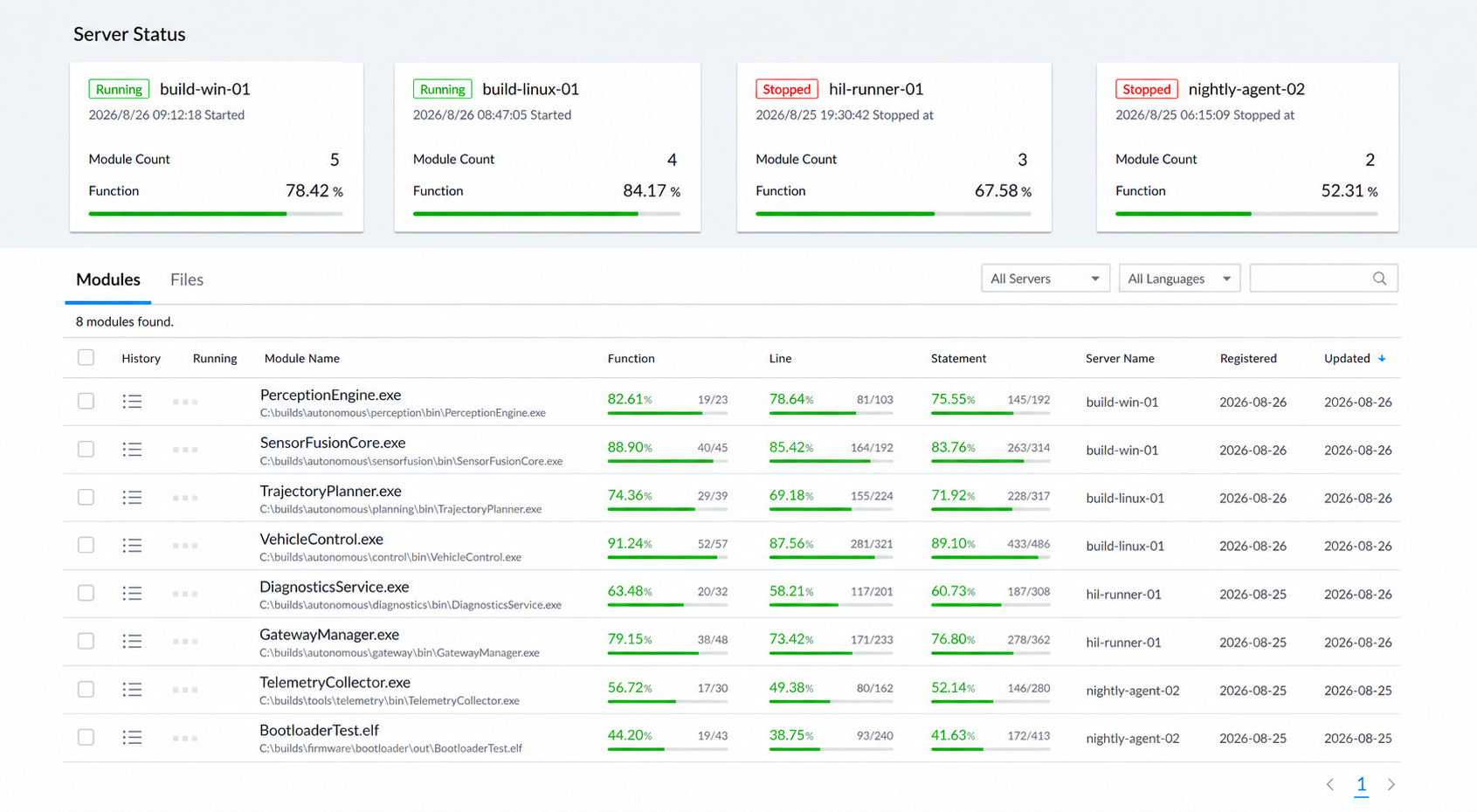
Example of the COVER Enterprise main screen check server activation status and per-module coverage status on one screen
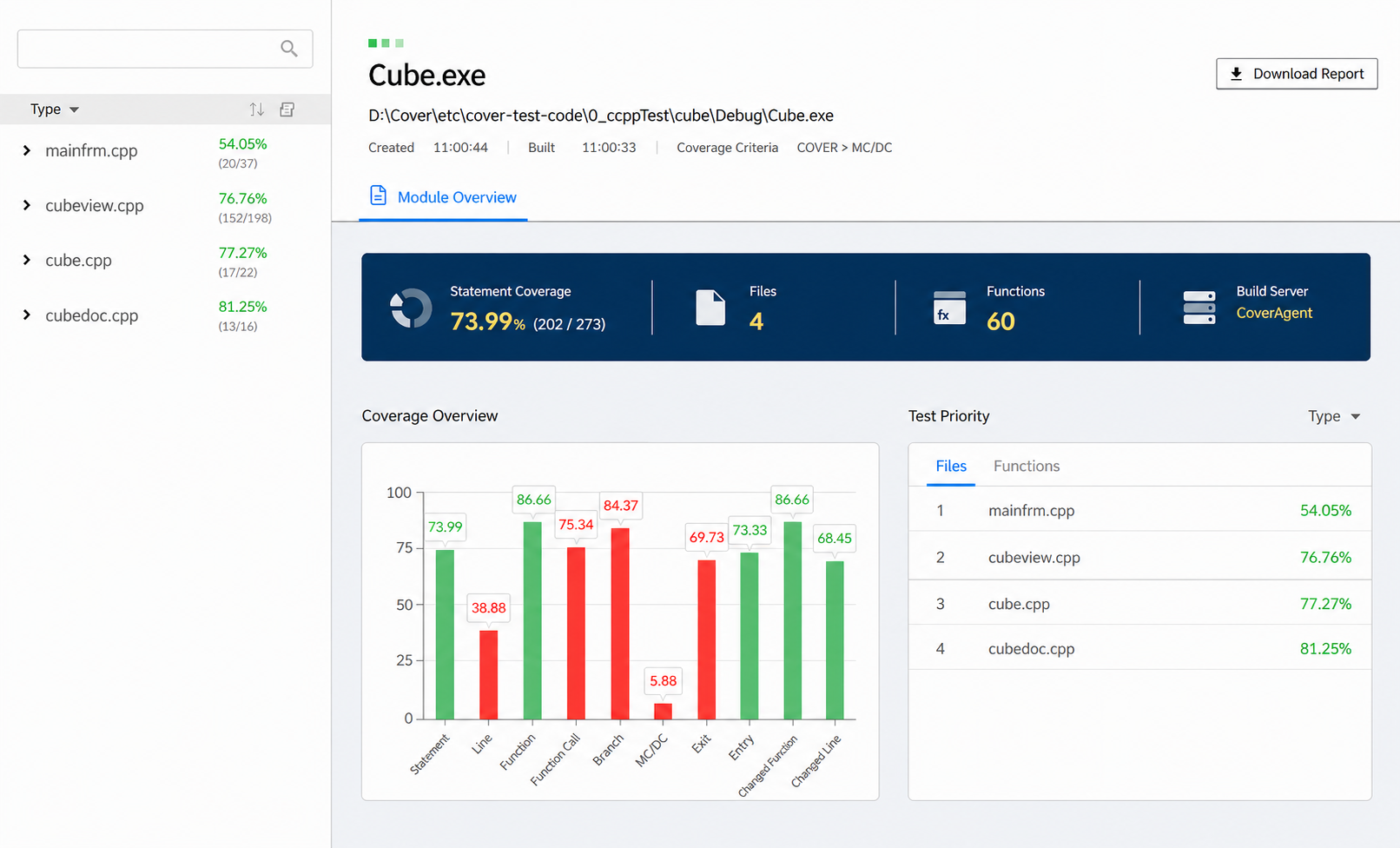
Example of the COVER Enterprise module detail coverage summary, status by type, test priority, and treemap on one screen
Whether a test passed and how much code it executed are two different indicators.
- It is unclear whether testing was actually performed there is a report saying "testing is complete," but no numbers to back it up.
- Defects in unexecuted code go undiscovered branches and conditions that testing never reached become production failures.
- Progress per work area cannot be gauged managers have no way to know how much of each work area has been verified.
- Regulated and safety projects require measurement evidence depending on the applicable standard and project grade, structural coverage measurement results and traceable reporting materials may be required.
What Is Code Coverage?
Code coverage is an indicator that expresses, as a quantitative figure, the range of source code actually executed during testing. Measuring coverage reveals which code has not been tested, so you know exactly where testing needs to be reinforced.
- Function coverage was each defined function executed?
- Statement coverage was each statement executed?
- Branch coverage were the true and false paths of if/for/while/switch branches executed?
- MC/DC was each condition executed in a case where it independently affects the decision?
After the initial integration setup, COVER measures coverage while your existing test procedures stay as they are.
- Multiple coverage types from a single test run Enterprise can measure up to 10 coverage indicators and Standalone up to 7 from the results of a single test run.
- Existing test procedures preserved once the wrapper, COVER Toolbox, or the per-language plugin is configured at adoption, you continue to use your existing compilers, IDEs, and test methods, and the application source code is not modified by hand.
- Proprietary probe insertion method (Registered Patent No. 10-1667262) the control flow is analyzed so that only one probe is inserted per basis path. Because the probes occupy little code, measurement is possible even on targets with limited memory.
- Execution overhead of around 10% the actual value may vary with the target and measurement conditions.
- Regression test scoping centered on changed code COVER identifies functions and lines that changed against the previous configuration, providing a basis for deciding the retest scope. (EE)
- Measurement down to embedded targets COVER supports 20 C/C++ development environments and can be applied even on resource-constrained targets. (SE)
COVER is offered in two configurations: centrally managed and locally independent.
COVER Enterprise Edition (COVER EE) consists of agents, a server, and a web UI and manages the coverage of multiple projects centrally, while COVER Standalone Edition (COVER SE) is installed on a local PC and used without an internet connection.
| Comparison item | COVER Enterprise | COVER Standalone |
|---|---|---|
| One-line definition | Company-wide coverage management platform for large development organizations | Lightweight coverage measurement tool for embedded targets |
| Coverage types | Up to 10 | Up to 7 |
| Supported languages | C, C++, C#, Java | C, C++, C# |
| Architecture | Agent + server + web | Integrated with the development environment, installed on a local PC |
| Result review | Web dashboard (real time) | Local result screen |
| Strengths | Group aggregation, report scheduling, Open API, change coverage, coverage copy | Quick guides for embedded development environments, debugger collection, probe exclusion per file and function |
| Network conditions | No external internet required, but an internal network connection between the agents and the COVER server is required | Usable on a local PC without internet. Floating licenses require a connection to the license server |
| Main application fields | Next-generation finance, large-scale SI, enterprise systems | Defense, automotive, aerospace, embedded targets |
When to choose COVER Enterprise
- When test results scattered across multiple teams and servers must be viewed in one place
- When progress reporting by organization, work area, or supplier is required
- When API integration with an in-house quality management system is required
- When coverage is needed for Java-based web and MSA systems
When to choose COVER Standalone
- When you want to measure coverage on an embedded target
- When coverage for a regulated or safety project must be measured per development PC without server infrastructure
The two editions can be used together. Target coverage measured in COVER SE can be uploaded to COVER EE and merged into the company-wide view.
Code Coverage Measurement by Edition
From a single test run, COVER can measure the multiple coverage indicators supported by your edition and measurement criteria. Enterprise supports up to 10 types and Standalone up to 7.
| # | Coverage | What it confirms | EE | SE |
|---|---|---|---|---|
| 1 | Function coverage | Were all defined functions executed | ||
| 2 | Statement coverage | Were all statements in the source code executed | ||
| 3 | Line coverage | Were the executable lines executed | ||
| 4 | Branch coverage | Were branch statements such as if/for/while/switch executed | ||
| 5 | Function call coverage | Were the internal and external functions called within a function executed | ||
| 6 | Modified condition/decision coverage (MC/DC) | Were all cases in which a single condition changes the decision executed | ||
| 7 | Exit coverage | Were all exit conditions of a function invoked | ||
| 8 | Entry coverage | Was a given function called from every function that calls it | ||
| 9 | Changed function coverage | Were functions modified, changed, or added since the previous target executed | ||
| 10 | Changed line coverage | Were lines modified, changed, or added since the previous target executed |
Measurement results are provided as figures at various levels — project, module, file, and function — together with per-source-line execution markers. Enterprise automatically consolidates and accumulates distributed test results on the server, while Standalone accumulates test results computed locally. For C/C++ source, clicking a branch icon shows the MC/DC decision rationale as a truth table.
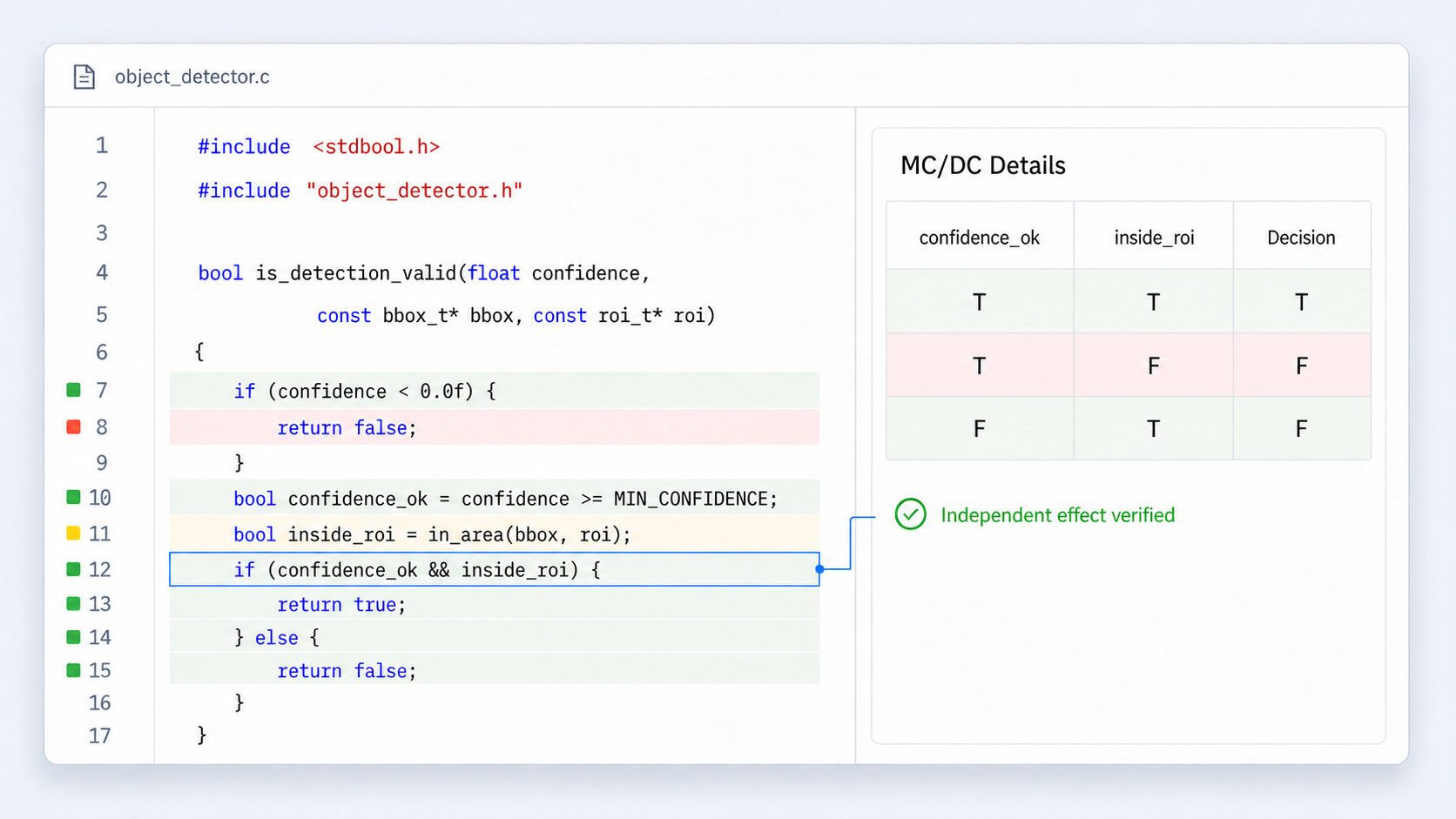
Source code view distinguish execution state and change status per line, and review the MC/DC decision rationale for the selected decision statement
Changed Function and Changed Line Coverage (Enterprise)
COVER Enterprise identifies functions and lines that changed against the previous configuration and provides coverage for those areas.
- Detects configuration changes and identifies functions and lines that were modified, changed, or added. (EE)
- Compares a unique value per function to classify changed and unchanged functions, and computes results for unchanged functions by loading their existing coverage values (Registered Patent No. 10-1667262).
- Coverage targets can be maintained by retesting only the changed elements.
- Coverage for unchanged functions can be preserved, depending on the product settings and the configuration comparison conditions.
Status Visualization and Aggregation by Organization (Enterprise)
COVER Enterprise aggregates coverage status by project, organization, and work area, and exports it as reports.
- Test priority sorts files by ascending coverage to guide you to test the weakest files first.
- Treemap shows file size as area and coverage as color, exposing the risk areas that are large but poorly covered.
- Coverage trend shows changes in coverage and code size over time side by side.
- Group feature groups registered files by path and file mapping to manage status by project, organization, work area, and supplier. Setting a coverage threshold per group automatically marks shortfalls in red and attainment in green, and group permissions can be split into three levels: all users, the same user group, and the owner.
- Group reports generates the status of all groups or selected groups in XLS format, and can be scheduled to generate automatically on a daily, weekly, or monthly basis.
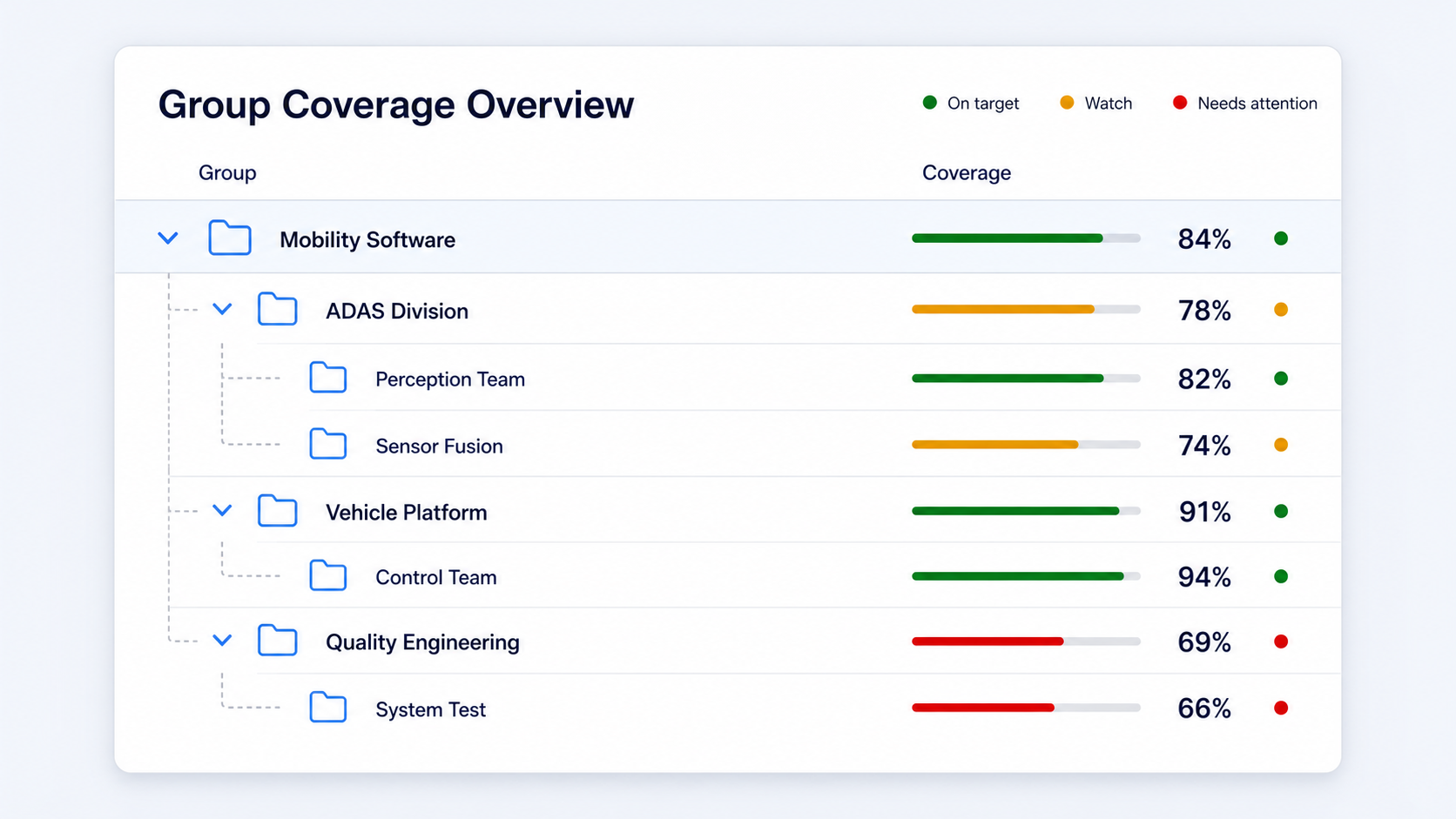
Group coverage management compare coverage status and target attainment across the organization and work hierarchy at a glance
Result Report Generation
COVER generates document reports of the coverage results of measured modules.
- Enterprise module report download in EXCEL, PDF, WORD, or PPT format.
- Standalone module report export in XLSX, PDF, DOCX, or PPTX format.
- Enterprise group report generated in XLS format, with daily, weekly, or monthly automatic generation schedules.
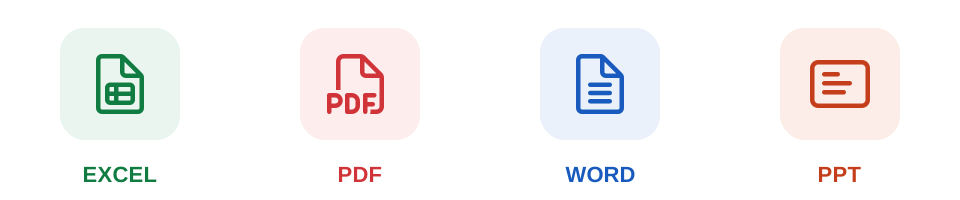
COVER module reports share results in spreadsheet, PDF, word processor, and presentation formats
Embedded Target Measurement (Standalone)
COVER Standalone collects coverage data on the actual embedded target.
- A quick guide is built in for each supported development environment, so you can follow the procedure even in an environment you are setting up for the first time.
- Collects coverage logs through embedded debuggers (Trace32, UDE, XDS, iSystem) and over Ethernet (TCP·UDP).
- Excludes instrumentation (probes) per file and function to work within target memory constraints.
- For C/C++, selectively measures only the coverage required by the standard and guideline measurement criteria built into the product, controlling binary and execution overhead.
Measurement Scope Optimization and Coverage Copy
COVER adjusts the measurement scope and migrates existing coverage data through edition-specific features.
- Coverage exclusion policy (EE) specify the files and functions to exclude by regular expression or plain string. Use it to exclude targets that require separate handling, such as getters/setters or generated code.
- File and function inclusion settings (EE, C/C++) specify targets per module so that probes are inserted only into selected files and functions.
- Probe exclusion (SE) exclude selected files, functions, or directories from probe insertion during the coverage build to control target resource usage.
- Coverage copy (EE) when an agent server is migrated or a project path changes, copy existing coverage to a target with the same measurement criteria and matching relative paths and source. Copy eligibility is checked in advance and a result report is retained.
External System Integration
COVER links measurement results with in-house quality systems and with our own tools.
| Integration target | Description | Edition |
|---|---|---|
| Open API | Feeds coverage status per project and work area into the customer system using an API key. Issued per user, HTTPS (TLS) required | EE |
| CI and build automation | Integrates into the build process to automate coverage measurement | EE |
| Docker and containers | Measures Java coverage in the deployment environment by adding a single option | EE |
| MSA | Measures microservice coverage with the dedicated cover-javalib-agent.jar, with real-time lookup of connected agents on the Java monitoring page | EE |
| Configuration management | Detects changes by comparing against the latest configuration in supported integration scenarios. Other flows require prior consultation | EE |
| COVER SE → EE | Export a module created in SE and register it in EE for consolidated management | SE (export) → EE (register and manage) |
| CT | Import and export coverage for C/C++ modules through *.csd files | Common |
| VPES | File download or direct online transfer, with bulk sharing of multiple modules | EE |
| VPES | Export the results of selected modules online or offline | SE |
Coding Agent Integration (Enterprise)
COVERA
COVERA (COVER AI Agent) is an AI agent that lets you use COVER code coverage in AI coding agents. Describe what you want, such as "make a coverage build of this project", and COVERA identifies the original build of a C/C++, C#, or Java project and runs the COVER instrumented build while keeping the original output paths. It is provided as Skills and an MCP server and works with coding agents such as Claude Code, Codex CLI, Cursor, and GitHub Copilot.
Official COVERA MCP server and Skills: installation and connection
| Task | Role of COVERA and COVER |
|---|---|
| Coverage build | Finds the original build and the actual tools, runs the original build, then runs the COVER instrumented build and judges the result by the build's exit code. Supports CMake, Make, Visual Studio/MSBuild, STM32CubeIDE, C# (COVER Toolbox), and Java (JACOV CLI, Maven, Gradle). |
| Reusing the build setup | Keeps the successful setup for your IDE's next rebuild, or gives you a command to run again. Visual Studio, C#, and STM32CubeIDE project settings are changed so that later builds keep coverage; CMake, Make, Maven, and Gradle build files are not modified. |
| Coverage result lookup | Looks up a module's latest cumulative coverage stored on the COVER server, with per-file and per-function results on request. The lookup only reads results from the server; it does not run tests or build. |
| Recovering files excluded by analysis errors | For C/C++ files excluded by analysis errors, gets the error data and finds the cause, verifies a parser configuration fix on the COVER server, then registers the fixed toolchain and connects the wrapper so that you can rebuild. |
COVERA does not replace COVER's results. COVER performs the instrumentation and measurement and produces the coverage results; COVERA prepares and runs that work from inside the coding session, then verifies and reports the results.
COVER Enterprise supports C/C++, C#, and Java.
COVER Standalone supports C/C++ and C#.
View supported versions and environments
For C/C++ coverage measurement, COVER lets you select a built-in measurement criterion aligned with a standard, guideline, and test grade.
C/C++ users can select a measurement criterion predefined in the product so that only the coverage mapped to that criterion is measured and displayed. This reduces unnecessary instrumentation and lets you control binary and execution time overhead. For languages other than C/C++, the COVER-Branch criterion applies by default.
| Domain | Standard / guideline criterion built into the product | Selectable items in the product |
|---|---|---|
| Automotive | ISO 26262 | ASIL A–D (unit level / architectural level) |
| Aerospace | DO-178B/C | Software Level A–D |
| Aviation software tool qualification | DO-330 | TQL-1 – TQL-5 |
| Railway | EN 50128, IEC 62279 | SIL 0 – SIL 4 |
| Functional safety | IEC 61508 | SIL 1–4 |
| Nuclear | IEC 60880 | Statement / Branch / MC/DC |
| Medical | IEC 62304 | Class A – C |
| Defense | DAPA weapon system S/W (Defense Acquisition Program Administration, Republic of Korea) | Statement / Branch / MC/DC |
Coverage Mapping by Grade Built Into the Product
ISO 26262 (automotive)
| Measurement criterion | Displayed coverage |
|---|---|
| unit level > ASIL A | Statement |
| unit level > ASIL B / C | Branch, statement |
| unit level > ASIL D | MC/DC, branch, statement |
| architectural level > ASIL A–D | Function, function call |
DO-178B/C (aviation)
| Measurement criterion | Displayed coverage |
|---|---|
| Software Level A | MC/DC, branch, statement |
| Software Level B | Branch, statement |
| Software Level C | Statement |
| Software Level D | Function |
IEC 61508 (functional safety)
| Measurement criterion | Displayed coverage |
|---|---|
| SIL 1 | Function |
| SIL 2 | Statement, function |
| SIL 3 | Branch, statement, function |
| SIL 4 | MC/DC, branch, statement, function |
If you need your own criterion that is not defined in a standard, C/C++ lets you use the COVER in-house measurement criteria COVER-Branch and COVER-MC/DC to set which coverage is displayed and its threshold.
Financial IT
coverage as the gate for promotion to production
Problem
changed code was promoted to production without confirming test sufficiency, creating a risk of failures
Application
connected COVER real-time monitoring to the production promotion approval check. Requests below 80% function coverage were rejected, prompting teams to review the unexecuted functions and add test cases; promotion was approved only when 80% was reached
Result
established a quality gate that requires reinforced testing before promotion to production. Used for company-wide quality measurement in a large financial IT organization and in a next-generation finance project
Defense embedded, Company A
meeting reliability test criteria
Problem
the Company A project required 100% statement coverage and the execution of reliability testing
Application
measured the coverage of requirements-based testing with COVER and supplemented the gaps with structure-based testing in CT. Uploaded each set of results to VPES to generate the reliability test report
Result
established a procedure that collects requirements-based test, structure-based test, and target test results to generate a reliability test report
What is COVER?
COVER is a test coverage measurement tool. It analyzes test execution results as quantitative code coverage figures to confirm the sufficiency of software testing. Because it measures based on the results of actually executing the code, it is a form of dynamic analysis, and its role differs from static analysis, which inspects source code without executing it. From a single test run, COVER measures coverage indicators such as function, statement, line, branch, and MC/DC, and shows figures at the project, module, file, and function levels together with per-source-line execution status. COVER Enterprise Edition, the centrally managed form, supports up to 10 coverage types and C, C++, C#, and Java. COVER Standalone Edition, the locally independent form, supports up to 7 coverage types and C, C++, and C#.
Which code coverage types can be measured?
COVER Enterprise supports up to 10 types: function, statement, line, branch, function call, modified condition/decision (MC/DC), entry, exit, changed function, and changed line. COVER Standalone supports up to 7 of these, excluding entry, changed function, and changed line. From a single test run you can measure the multiple coverage indicators supported by your edition and measurement criteria. For C/C++ you can select a standard or guideline measurement criterion built into the product to measure and display only the mapped coverage; for other languages the COVER-Branch criterion applies by default. Entry coverage confirms whether a given function was called from every function that calls it, and changed function and changed line coverage confirm whether the parts modified, changed, or added since the previous configuration were executed. Definitions of each type are available in Code Coverage Measurement by Edition.
How can coverage be used?
Coverage is used as the basis for judging test results and deciding what to do next. The most basic use is selecting what to test further: unexecuted statements and branches and unsatisfied condition combinations become the list of tests to add. Second is the test exit criterion. With a coverage target set, you decide when to stop testing by criterion rather than by negotiation, and you can operate it as a quality gate that blocks progress to the next stage when the criterion is not met. Third is certification and audit response. Safety standards require different coverage types per grade, and the measurement results become deliverables that demonstrate test sufficiency. Fourth is scoping regression tests: you check the coverage of the changed parts to narrow down what must be retested. Beyond these, coverage is also used to find dead code that can never execute so it can be cleaned up, and to prioritize reviews of modules where unverified areas are concentrated.
What is the difference between Enterprise and Standalone?
COVER Enterprise consists of agents, a server, and a web UI, and centrally accumulates and manages coverage for multiple users and projects. It supports C, C++, C#, and Java and up to 10 coverage types, and provides group aggregation, report scheduling, Open API integration, change coverage, and coverage copy. COVER Standalone is an independent product installed on a local PC and used without an internet connection; it supports C, C++, and C# and up to 7 coverage types, with strengths in quick guides for embedded development environments, debugger collection, and probe exclusion per file and function. The two editions can be used together, so target coverage measured in Standalone can be uploaded to Enterprise and merged into the company-wide view. For selection criteria, see the edition comparison.
Do we have to modify our existing source code or test code to measure coverage?
You do not need to modify application source code or test code by hand, but per-language build configuration is required at initial adoption. For C/C++, the compiler invocation during the build is replaced with a wrapper matched to the toolchain — for the GCC family, csgcc, csg++, csld, and csar are used. Java in Enterprise uses the CLI, Maven, or Gradle methods, and C# in Enterprise designates the project as a measurement target in the COVER Toolbox. C# in Standalone specifies the original CSC to create a C# coverage builder, activates the project or solution with CoverCSharpEnabler, and then builds in Visual Studio. If the compiler and linker in your Makefile are parameterized, you can specify the wrapper in the build command without editing the Makefile itself. After configuration, you can keep your existing test methods, including UI testing, batch runs, and automation scripts.
How much performance overhead does measurement add?
Execution overhead is around 10%. The actual value may vary with target performance, language, the coverage types measured, and the instrumentation scope. For C/C++, you can select a standard or guideline measurement criterion built into the product and measure only the coverage you need, controlling the memory and execution time burden. In environments with limited target resources, you can reduce the instrumentation scope using the file and function inclusion settings in Enterprise or the file, function, and directory probe exclusion features in Standalone. For example, the IEC 61508 SIL 2 criterion displays only statement and function coverage, so its instrumentation burden is smaller than the SIL 4 criterion, which measures MC/DC as well. For performance-sensitive projects, we recommend measuring the overhead with your actual target and build configuration during the adoption review.
Will a coverage build slow down our builds?
The coverage build that creates a module can take up to four times as long as an ordinary build. However, when a unique value comparison of the source identifies the configuration as identical to the previous one, probe insertion and compilation are skipped and the existing executable is reused (Registered Patent No. 10-1667262), so rebuilding the same configuration can take the same time as a build with your existing settings. This condition does not mean the same time is guaranteed for a new configuration or when build settings change. Coverage computation happens after module creation, so it does not occupy the build pipeline for long. When applying this in a CI environment, consider a setup that performs the initial coverage build once as a separate job. Actual build time varies with the language, the extent of configuration changes, and the build cache and environment, so it should be confirmed on your real project before adoption.
Is coverage measurement supported for testing on real embedded target boards?
Yes, COVER Standalone is designed for embedded environments. It supports 20 C/C++ development environments including IAR Embedded Workbench, Keil uVision, Code Composer Studio, STM32CubeIDE, MPLAB X IDE, and Tasking VX-toolset, with a quick guide built in for each environment so you can follow the procedure even on first use. Coverage data from the actual target is collected through embedded debuggers such as Trace32, UDE, XDS, and iSystem, or over Ethernet (TCP·UDP). When target memory is limited, probe exclusion per file and function and selective measurement by grade are available, and environments not on the supported list can be discussed for support through porting.
If the code changes, does all the coverage we have accumulated disappear?
Coverage for unchanged functions can be preserved, depending on the product settings and the configuration comparison conditions. COVER Enterprise provides changed function coverage and changed line coverage, which identify functions and lines modified, changed, or added against the previous configuration, giving you a basis for deciding the retest scope. Change coverage does not mean that testing only the changed code is sufficient; it must be applied together with impact analysis and the regression test policy of your project. When migrating an agent server or changing a project path, the coverage copy feature can be used for targets with the same measurement criteria and matching relative paths and source.
Does it support MC/DC coverage?
Yes, both COVER Enterprise and Standalone support modified condition/decision coverage (MC/DC). MC/DC is an indicator that confirms whether each condition making up a decision statement independently affects the decision result. In the C/C++ measurement criteria of COVER, MC/DC is mapped to DO-178B/C Software Level A, ISO 26262 unit level ASIL D, and IEC 61508 SIL 4, among others. In C/C++ source you can click a branch icon to review the MC/DC decision rationale as a truth table.
Can it be used on an ISO 26262 or DO-178C project?
Yes, COVER can be used to produce structural coverage measurement materials required by safety-critical standards and guidelines. When you select a measurement criterion built into the product for C/C++, such as ISO 26262 or DO-178B/C, the coverage mapped to that grade is measured and displayed. Module measurement results in COVER Enterprise can be generated as reports in EXCEL, PDF, WORD, or PPT format. The in-product mapping is summarized in Measurement Criteria by Industry Standard and Guideline.
Our coverage is low because of generated code. Can it be excluded?
Yes, you can adjust the measurement scope with the feature that matches your edition. COVER Enterprise provides a coverage exclusion policy that specifies files and functions to exclude by regular expression or plain string, and for C/C++ modules the file and function inclusion settings let you choose which targets to instrument. COVER Standalone can exclude files, functions, or directories from probe insertion. The source code screen distinguishes lines excluded from measurement and dead code that can never execute with separate colors, so you can confirm the exclusion result directly on the code. That said, whether to exclude generated code should be decided only after confirming your project coverage policy and certification evidence requirements, and it is good practice to keep a separate record of what was excluded and why.
Can it be used in an environment without internet access?
Yes, COVER Standalone is an independent tool used on a local PC without an internet connection, so it can be used on air-gapped and network-separated environments. It supports floating, node-locked, and dongle licenses; in environments where a network connection is impossible, a node-locked or dongle option that meets the issuing conditions can be considered. COVER Enterprise can be operated on an internal network without external internet, but a network connection between the agents and the COVER server is required; the default communication port is 9080 and it can be changed. In Enterprise, server issues and logs can be downloaded from the web, and in Standalone, analysis results and logs can be downloaded from the local problem reporting menu and sent to technical support.
Can it integrate with CI/CD, Docker, or configuration management systems?
Yes, COVER Enterprise can be integrated into build automation and CI environments to automate coverage measurement. In Docker-based container deployment environments, Java coverage is measured simply by adding one option, and MSA environments are measured with the dedicated cover-javalib-agent.jar, with the host name, IP, measurement path, and number of executed classes of connected agents visible in real time on the Java monitoring page. The Open API feeds coverage status per project and work area into your in-house quality management system on an API key basis, and all calls use HTTPS (TLS). Configuration management tool integration detects changes by comparing against the latest configuration in supported scenarios and computes change coverage. Other configuration management flows must be discussed for applicability before adoption.
How is it different from free coverage tools such as gcov?
The differences are the coverage types, target languages, embedded collection methods, and central management features. COVER Enterprise supports up to 10 coverage types including MC/DC, and Standalone up to 7. For C/C++, you can select standard and guideline measurement criteria built into the product, such as ISO 26262 and DO-178B/C. Depending on the edition, it also provides collection from real targets through embedded debuggers, adjustment of instrumentation targets, changed function and changed line coverage, group aggregation by organization and work area, report generation and scheduling, and Open API integration. These capabilities are separate from third-party tool certification or passing an audit. When comparing with free tools, review the supported compilers and targets, the coverage you need, how results are consolidated and reported, and the licensing and technical support conditions together.
- Measuring coverage in an embedded environmentCode coverage concepts, an introduction to COVER SE, and a measurement demo in an embedded environment — seminar (in Korean)
- Measuring code coverage in a container environmentHow to measure and apply code coverage in container-based development and deployment environments — seminar (in Korean)
- How to use test coverage by job roleHow to use test coverage from the perspective of developers, testers, and managers — seminar (in Korean)
- Using test coverage indicators | Software quality assurance casesTesting problem cases and solutions, test coverage concepts, a COVER demo, and a development process that uses coverage — seminar (in Korean)