Bilibili Scraper 哔哩哔哩 (Apify)
Search Bilibili (哔哩哔哩 B站) videos by keyword and get video details, stats, tags, UP主 profiles, followers and comments. No login. JSON or CSV.
Hosted MCP Server
npx add-mcp 'https://mcp.apify.com/?tools=monkey.d.scraping/bilibili-scraper'Installs into Claude Code, Codex, Cursor and more
Documentation
Bilibili Scraper 哔哩哔哩 B站 - Videos, Creators, Comments & Search (monkey.d.scraping/bilibili-scraper) Actor
Bilibili scraper API / 哔哩哔哩 B站数据采集. Search videos by keyword, get video details, stats, tags, UP主 profiles, full upload catalogs and comments by URL. 视频/UP主/评论/搜索 → JSON, CSV, Excel. No login 无需登录. From $0.49 per 1,000 videos.
- URL: https://apify.com/monkey.d.scraping/bilibili-scraper.md
- Developed by: Monkey D. Scraping (community)
- Categories: Social media, Videos, MCP servers
- Features: Limited permissions
- Stats: 2 total users, 2 monthly users, 87.5% runs succeeded, 0 bookmarks
- User rating: No ratings yet
Pricing
from $0.49 / 1,000 video or creator results
This Actor is paid per event. You are not charged for the Apify platform usage, but only a fixed price for specific events.
Learn more: https://docs.apify.com/actors/running/actors-in-store.md#pay-per-event
What's an Apify Actor?
An Actor is a serverless cloud program that runs on the Apify platform. It has two run modes. In Batch mode, an Actor accepts a well-defined JSON input, performs an action which can take anything from a few seconds to a few hours, and optionally produces a well-defined JSON output, datasets with results, or files in key-value store. In Standby mode, an Actor provides a web server which can be used as a website, API, or an MCP server.
Apify vocabulary and the platform model are defined once, in the agent quickstart at https://apify.com/agents.md.
How to integrate an Actor?
If asked about integration, you help developers integrate Actors into their projects. You adapt to their stack and deliver integrations that are safe, well-documented, and production-ready.
Do not guess an integration path. Every one of them is in the agent quickstart at https://apify.com/agents.md: the Apify MCP server, Agent Skills with the Apify CLI, the JavaScript and Python clients, the REST API, and the account-free path for an agent with no human to sign in. It also carries the rule on stating cost before the first paid run.
For examples already wired to this Actor's own input schema, see the API section below.
Each client library has reference documentation the quickstart does not restate: JavaScript/TypeScript (npm install apify-client) and Python (pip install apify-client).
README
Bilibili Scraper 哔哩哔哩 B站 – Videos, Creators, Comments & Search API
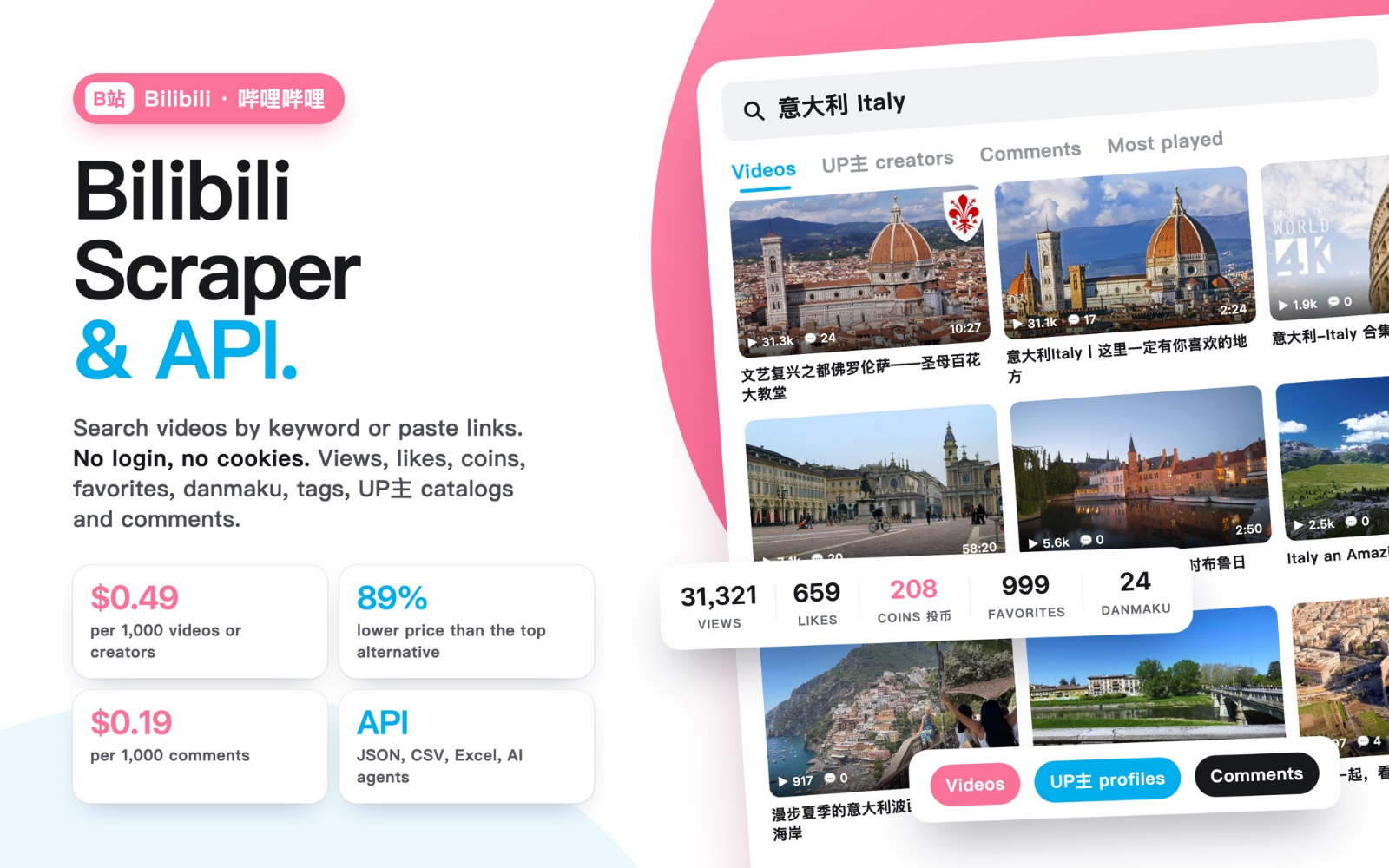
Bilibili scraper and API for videos, UP主 creator profiles, complete upload catalogs, comments and keyword search. Search Bilibili (哔哩哔哩, B站) by keyword or paste video and creator URLs, then export views, likes, coins, favorites, shares, tags and comments to JSON, CSV or Excel. No Bilibili login or cookies required. Videos and creator results cost $0.49/1,000; standalone or extra comments cost $0.19/1,000. Ten requested comments per parent result are included; each start costs $0.00005. See total-price examples and catalog billing.
Total for one run: 1,000 videos without comments = $0.49005; 1,000 standalone root comments = $0.19005, including one start and platform usage. No separate compute or proxy surcharge. Compare matching volumes.
中文用户 / 中文用戶: 简体中文说明 · 繁體中文說明(B站数据采集、哔哩哔哩爬虫、B站评论采集、UP主数据)
Export results from Apify datasets as JSON, CSV or Excel, or read them through the Apify API; complete JSON files are available for oversized results. Start with five videos, then choose the collection that fits your research.
What does this Bilibili scraper do?
- Bilibili video search scraper: search by keyword and sort by relevance, views, newest, comments, favorites or danmaku count, with date filters.
- Bilibili video details: paste BV/av links or b23.tv short links to get title, description, category, tags, parts and seven engagement counters.
- Bilibili creator (UP主) scraper: get profile, followers, following, video count and recent uploads, or the complete public upload catalog with full video details.
- Bilibili comments scraper: export root comments with author, likes, reply count, publication time and video association, sorted by recent or top.
Who is it for?
- Marketing and influencer teams shortlisting Bilibili creators and comparing their recent performance.
- Brand and market researchers following topics, products and audience reactions on Chinese video platforms.
- Data analysts and developers feeding Bilibili video statistics and comments into dashboards, sentiment analysis or AI agents through the Apify API.
- Academic researchers building datasets of public Bilibili videos, creators and comments.
Switching from another Bilibili scraper?
The input uses the field names common to popular Bilibili scrapers on Apify: mode (search, videos, profiles, comments), searchTerms, startUrls, sortBy, onlyPostsAfter, onlyPostsBefore, getComments, commentsSort, maxCommentsPerVideo and maxItems. In most cases you can reuse your existing JSON input and compare the total price for the same output. Every option, including up to 5,000 comments per video, is available on every Apify plan, Free included.
Choose your collection
| Mode | Input | Output |
|---|---|---|
search | Keywords or Bilibili search URLs | Video details, statistics, tags and parts |
videos | BV/av video URLs, including b23.tv redirects | Video details and optional comments |
profiles | Creator URLs or keywords | Public profile and ten recent upload summaries; optional complete catalog with full video details; comments on the ten recent videos |
comments | Video URLs | One row per comment, with author, publication time and video association |
Search supports relevance, views, newest, comments, favorites and danmaku ordering. Comment order is recent or the source's top order. Date filters apply to search and standalone comments. Video search sends the requested date window to Bilibili and validates returned dates locally.
What can you use it for?
- Research Bilibili creators: compare public follower counts, biographies and recent uploads before choosing creators to investigate further.
- Compare video performance: search a topic or supply video URLs to collect views, likes, coins, favorites, shares and tags in a consistent format.
- Export a creator's public catalog: enable
includeAllUploadsfor full details on every available catalog video, with explicit completion checks. - Prepare audience research: collect root comments with their video association for your own qualitative or sentiment analysis.
Output fields
| Record | Selected fields | Coverage |
|---|---|---|
| Video | bvid, url, title, description, category, publishedAt, tags, pages, creatorId, viewCount, likeCount, coinCount, favoriteCount, shareCount, commentCount, danmakuCount | Public video details as published by Bilibili |
| Creator | mid, name, bio, followerCount, followingCount, videoCount, topVideos | Profile and up to ten recent upload summaries |
| Complete catalog | uploads, uploadsCoverage | Optional full video details, listing and detail completion checks |
| Root comment | id, message, authorName, likeCount, replyCount, publishedAt, videoBvid | Standalone rows or attached comments |
replyCount and danmakuCount are counts. Use JSON to preserve nested arrays such as uploads, pages and attached comments.
Low-cost pricing
| Event | USD price |
|---|---|
| Complete video or creator result | $0.49 per 1,000 |
| First 10 requested comments per complete video/creator | Included |
| Additional comments, or every standalone comment | $0.19 per 1,000 |
| Each start at the supported memory setting, including resurrection | $0.00005 |
For a creator, the inclusion is ten comments across the whole profile, not ten per nested video. The ten topVideos summaries are included in the creator result. Comments are optional and off by default. With the optional complete catalog, each additional unique upload not already delivered in that run beyond the ten included summaries is another result event at $0.49 per 1,000. The uploader ID is preserved separately from the creator under whose catalog it was listed; these may differ.
Totals in a single run: 1,000 plain videos = $0.49005; 1,000 standalone comments = $0.19005; one creator with 10,000 comments = $1.89864. The model includes platform usage; there is no separate compute/proxy surcharge.
Error/status records, duplicates and incomplete recovery files are free. Only complete, saved requested units are charged. Complete results already saved stay charged if a later request in the same run stops; the start fee applies to every run, including empty or failed runs. Apify also charges the start event again when a finished run is resurrected; saved result/comment events are not repeated. The maximum run charge is checked before expensive collection and before saving each complete result. A conservative reservation uses the requested maximum nested comment count; if the budget cannot cover it, the result is not started. Confirmed result/comment charges are not repeated on restart.
When is this Bilibili scraper cheaper?
Choose this Actor for low unit prices on public videos and root comments, with explicit total costs. The table compares delivered data units in one run. USD list prices checked on November 3, 2026, through Apify MCP pricing metadata. Our rates are the same across the listed tiers; account credits and subscriptions are not included. Lofomachines totals assume one start event (at most 1 GB); additional start events would increase its total. TopAPI has no start event in the checked list.
| Same requested output in one run | Our total, start included | Comparator total | Where we stand |
|---|---|---|---|
| 1,000 videos, no comments — Free tier | $0.49005 | Lofomachines $4.50005 | 89.1% lower |
| 1,000 videos, no comments — Gold / Platinum / Diamond | $0.49005 | Lofomachines $2.00005 | 75.5% lower, even against its lowest listed result tier |
| 1,000 videos, no comments | $0.49005 | TopAPI $0.90000 | 45.6% lower |
| 1,000 standalone root comments, no videos or replies | $0.19005 | TopAPI $0.44000 | 56.8% lower |
| One video with 100 attached root comments — Gold tier | $0.01764 | Lofomachines $0.00205, if all comments are included in one result | Lofomachines can be cheaper; its delivery at this volume was not verified |
| Zero delivered units, one start | $0.00005 | TopAPI $0.00000 | Our start fee still applies |
Sources: Lofomachines pricing and TopAPI pricing and feature scope. Lofomachines also lists Bronze at $3.50 and Silver at $2.50 per 1,000 result events, plus start. Its Free-plan comment limit prevents treating a 1,000-comment Free run as an equivalent delivered-volume comparison.
Ready-to-run examples
Choose a focused example, review its input and spending limit, then run your own copy.
| Public example | Expected output |
|---|---|
| Search videos by keyword | Up to five videos with details and statistics |
| Research a creator | One public profile and up to ten recent upload summaries |
| Export recent comments | Up to twenty root comments, one row per comment |
| Export a complete creator catalog | One creator with full public video details and coverage checks; allow 15 minutes |
Input examples
The exact prefill returns up to five videos:
{"searchTerms":["minecraft"],"maxItems":5}
Creator example:
{"mode":"profiles","startUrls":[{"url":"https://space.bilibili.com/5970160"}],"maxItems":1,"getComments":false}
Standalone comment example:
{"mode":"comments","startUrls":[{"url":"https://www.bilibili.com/video/BV1oe4y1Y7n5"}],"maxItems":20,"maxCommentsPerVideo":20,"commentsSort":"recent"}
Complete creator catalog example (allow 15 minutes and a spending cap that covers the catalog):
{
  "mode": "profiles",
  "startUrls": [
    {
      "url": "https://space.bilibili.com/3745000386988717"
    }
  ],
  "maxItems": 1,
  "includeAllUploads": true,
  "largeResultFiles": true
}
This creator returned 83 fully detailed uploads in a cloud check on November 3, 2026. At that volume, one creator plus 73 extra uploads costs $0.03631 including one start, without comments. maxItems: 1 limits creator rows, not the number of nested uploads.
Real video output example
Selected fields from the five-video prefill check on November 3, 2026. The full record contains additional fields listed above.
{
  "type": "video",
  "bvid": "BV1Nxxr6oES2",
  "url": "https://www.bilibili.com/video/BV1Nxxr6oES2",
  "title": "耗资上万!我重制了网页版MC!【B站AI创造公开赛】",
  "publishedAt": "2026-10-31T03:55:11.000Z",
  "durationSeconds": 168,
  "creatorId": 1987439458,
  "viewCount": 651513,
  "likeCount": 76670,
  "commentCount": 5831,
  "scrapedAt": "2026-11-03T11:24:17.478Z"
}
Large results and recovery files
Default delivery preserves nested JSON in the dataset. The inline budget is conservatively 4.5 MB of decoded UTF-8 JSON per result. HTTP gzip reduces upload bandwidth without removing fields.
With largeResultFiles: true, an oversized complete result is saved as a gzip JSON file containing {"complete":true,"result":...}. The default dataset contains an explicit index with delivery: "complete-file" and fullResult.url; nested comments and the optional full upload array are available in the file instead of duplicated in that dataset index. Every original field remains in the file. Smaller results stay inline. Large exports select 256 MB automatically unless you override memory; use at least 15 minutes of timeout. Set the maximum run charge to cover the requested ceiling: for one creator requesting 1,500 comments on each of ten videos, $3 covers the $2.84864 maximum. A request for 5,000 per video needs a cap of at least $9.49864, even when fewer comments may be available. A private run verified 41,225 unique comments across ten videos in a complete file, in about 12 minutes.
When a nested result is not completed, the data collected so far can be saved separately as an INCOMPLETE-*.json.gz recovery file. SUMMARY.recoveryFiles lists these with complete: false and progress. Recovery files are not dataset results and are free.
In video search, deleted or hidden videos returned by Bilibili are skipped and listed in warnings and skippedUnavailableVideos; they are not charged and do not stop the run. Console logs show a compact summary; full diagnostics are in SUMMARY.
Optional complete public creator catalog
includeAllUploads: true in profiles mode adds an uploads array and uploadsCoverage, preserving the original ten topVideos. Comments apply to those ten videos. Cloud checks returned complete video details for catalogs of 83, 134 and 1,203 unique uploads.
Every catalog video is enriched with the full video-detail schema, including description, category, tags, parts, actual uploader and seven engagement counters; a counter Bilibili does not publish stays empty rather than zero. uploadsCoverage separately reports listing and detail completion. A catalog is marked complete when every listed page has been visited, the public-video count matches and all ten initial video IDs are retained; both the public and pagination counts are exposed, and paginationCountMatches shows whether they agree. A creator result is charged only when its catalog is complete. Large catalogs require one detail request per video; allow 15 minutes.
Frequently asked questions
When is this Bilibili scraper cheaper? At the checked list prices, one run delivering 1,000 plain videos costs $0.49005 here versus TopAPI's $0.90 and Lofomachines' $2.00005 on Gold/Platinum/Diamond, including one start. One run delivering 1,000 standalone root comments costs $0.19005 here versus TopAPI's $0.44. These are scoped price comparisons checked November 3, 2026. Lofomachines can be cheaper for many comments nested inside a single result.
What exactly is charged? Each complete video or creator costs $0.00049. Up to ten requested attached comments per parent result are included; each extra or standalone comment costs $0.00019. Additional unique catalog uploads beyond the ten included summaries count as video results. Each start costs $0.00005, including an empty or failed run. Platform usage is included; there is no separate compute or proxy surcharge.
Do I need a Bilibili account? No. Only publicly accessible data is requested. Apify account access is still required to run the Actor and access its stored exports.
How do I scrape Bilibili comments, and how many can I get? Use comments mode, or enable getComments, and request up to 5,000 root comments per video with maxCommentsPerVideo. The delivered count depends on the comments publicly available on the video.
Are creator comments included ten per video? The price includes ten across the complete creator result. The collection limit is independently controlled by maxCommentsPerVideo.
How do I export a complete creator catalog? Select profiles, provide a creator URL and enable includeAllUploads. Full details are saved in uploads, with completion reported in uploadsCoverage. The creator result is charged only when the catalog is complete. Comments apply to the ten recent videos.
How much does a small test cost? Five plain video results in one start cost $0.00250; 20 standalone comments cost $0.00385. These are list-price calculations for those delivered volumes, including platform usage and one start.
Can I use the API? The Actor accepts the JSON inputs above through Apify. The run output links to its dataset and coverage summary. Actor metadata, prices and documentation can also be read through Apify MCP.
Can I export Bilibili data to CSV or Excel? Yes. Every run saves its results in an Apify dataset that you can download as JSON, CSV or Excel. Use JSON to keep nested arrays such as uploads, pages and attached comments.
Can I reuse the input from another Bilibili scraper? Usually yes: mode, searchTerms, startUrls, sortBy, date filters, comment options and maxItems use the common field names. Check the total price for the same output before switching.
Chinese Simplified
中文说明:哔哩哔哩(B站)数据采集工具(Bilibili 爬虫 / API)
Bilibili Scraper 无需登录B站账号,即可采集哔哩哔哩公开视频、UP主资料、UP主完整公开视频目录和视频根评论,并导出为结构化JSON。视频及UP主结果 每1,000条0.49美元,独立或额外评论 每1,000条0.19美元,每次启动另收 0.00005美元。平台用量已包含,不另收计算或代理费用。
支持关键词搜索B站视频、视频详情(播放、点赞、投币、收藏、分享、标签)、UP主资料与完整视频目录、B站评论采集,结果可导出为 JSON、CSV 或 Excel,也可通过 Apify API 调用。
适合谁使用?
- 营销与达人团队:筛选B站UP主,对比近期视频表现。
- 品牌与市场研究人员:追踪话题、产品和用户评论反馈。
- 数据分析师与开发者:通过 Apify API 将B站视频数据和评论接入看板、情感分析或AI智能体。
- 学术研究人员:构建公开B站视频、UP主和评论数据集。
从其他B站采集工具迁移
输入字段与Apify上常见的B站采集工具一致:mode、searchTerms、startUrls、sortBy、onlyPostsAfter、onlyPostsBefore、getComments、commentsSort、maxCommentsPerVideo、maxItems。多数情况下可直接复用现有JSON输入,再按相同输出比较总价。所有选项(包括每个视频最多5,000条评论)在所有Apify套餐中均可使用,包括免费套餐。
为什么选择这款哔哩哔哩爬虫?
- 单价低,总价清楚:单次运行采集1,000条视频(不含评论)总价0.49005美元,1,000条独立根评论总价0.19005美元,均已包含一次启动费和平台用量。
- 评论附带免费额度:每个完整的视频或UP主结果包含前10条已请求的评论。
- 四种采集模式:关键词搜索、视频链接、UP主资料、独立评论,一个工具覆盖常见的B站研究需求。
- UP主完整公开视频目录:开启
includeAllUploads后,目录中每个视频都附带完整详情,包括简介、分区、标签、分P、实际上传者和七项互动统计;uploadsCoverage分别报告目录和详情的完整性。云端测试已完整采集83、134和1,203个视频的目录。 - 只为完整结果付费:错误记录、重复记录和不完整的恢复文件不收费;已确认的结果和评论费用在重启后不会重复收取。
- 大型结果完整保存:开启
largeResultFiles后,超大的完整结果保存为gzip JSON文件,保留全部原始字段,数据集中通过fullResult.url索引。 - 无需B站账号或Cookie:只采集公开可访问的数据。
同等数据量价格对比
以下为2026年11月3日核对的美元标价,按一次运行、相同交付数据量计算。本工具总价包含一次启动费及平台用量;对比工具的总价按一次启动事件计算。
| 单次运行的输出 | 本工具总价 | 对比工具总价 | 结论 |
|---|---|---|---|
| 1,000条视频,不含评论(对比Free档) | $0.49005 | Lofomachines $4.50005 | 低89.1% |
| 1,000条视频,不含评论(对比Gold / Platinum / Diamond档) | $0.49005 | Lofomachines $2.00005 | 低75.5% |
| 1,000条视频,不含评论 | $0.49005 | TopAPI $0.90000 | 低45.6% |
| 1,000条独立根评论,不含视频或回复 | $0.19005 | TopAPI $0.44000 | 低56.8% |
单个结果内嵌大量评论时(例如1个视频附100条根评论),按结果计费的Lofomachines可能更便宜,请按实际需要的输出比较总价。价格来源及完整条件见英文对比表。
适用场景
- B站视频数据采集与表现对比:按关键词搜索或输入视频链接,统一导出播放、点赞、投币、收藏、分享、评论和弹幕数量及标签,比较不同内容的表现。
- UP主数据研究:获取UP主公开资料、粉丝数、关注数、视频数和十个近期视频摘要,筛选值得深入研究的创作者。
- 导出UP主完整视频目录:一次获取UP主目录中每个公开视频的完整详情,并附带完整性检查。
- B站评论采集与受众研究:导出根评论的文本、作者、点赞数、回复数、发布时间和所属视频,用于你自己的定性研究或情感分析。
可以获取哪些数据?
- 视频:
bvid、url、title、description、category、publishedAt、tags、pages(分P)、creatorId、viewCount、likeCount、coinCount、favoriteCount、shareCount、commentCount、danmakuCount。 - UP主:
mid、name、bio、followerCount、followingCount、videoCount,以及topVideos中十个近期视频摘要。 - 完整目录(可选):
uploads保存每个目录视频的完整详情,uploadsCoverage报告目录和详情的完成情况。 - 根评论:
id、message、authorName、likeCount、replyCount、publishedAt、videoBvid,可作为独立行,也可附在视频或UP主结果中。 - 搜索与筛选:视频搜索支持按相关度、播放量、最新发布、评论数、收藏数或弹幕数排序;搜索和独立评论支持按发布日期筛选。评论可按最新(
recent)或热门(top)排序。 - 导出:结果保存在Apify数据集中,以结构化JSON导出;嵌套的
uploads、pages和评论建议使用JSON保留完整结构。replyCount和danmakuCount为数量统计。
价格
按完整结果付费,平台用量已包含:
| 计费项 | 价格 |
|---|---|
| 完整的视频或UP主结果 | 0.49美元 / 1,000条 |
| 每个完整视频或UP主结果的前10条已请求评论 | 已包含 |
| 额外评论,或独立评论模式中的每条评论 | 0.19美元 / 1,000条 |
| 完整目录中,超出十个已包含摘要的每个新增视频 | 0.49美元 / 1,000条 |
| 每次启动(含重新恢复运行) | 0.00005美元 |
单次运行总价示例:5条视频0.00250美元;20条独立评论0.00385美元;1,000条不含评论的视频0.49005美元;1,000条独立评论0.19005美元;1个UP主附10,000条评论1.89864美元。以上均为按交付数量计算的标价,包含一次启动费及平台用量。
UP主结果的10条评论额度按整个资料合计,并非每个视频10条。启动费在没有结果或运行失败时同样收取。可在Apify中设置每次运行的最高费用:工具会在采集前检查预算,并按请求的评论上限预留费用。
使用方法
- 在 What to collect(
mode)中选择模式:search(搜索视频)、videos(视频链接)、profiles(UP主)或comments(独立评论)。 - 输入 关键词(
searchTerms),或输入 B站链接(startUrls):支持BV/av视频链接、b23.tv短链接和space.bilibili.comUP主主页链接。 - 设置 最大结果数(
maxItems),建议先用5条查看结果。 - 可选:搜索排序(
sortBy)、发布时间范围(onlyPostsAfter/onlyPostsBefore)、附带评论(getComments)、每个视频的评论数(maxCommentsPerVideo)、评论排序(commentsSort)、完整目录(includeAllUploads)和大型结果文件(largeResultFiles)。 - 点击 Start,完成后在数据集中查看并导出结果,或通过API读取。
先获取五个视频(与默认预填一致):
{"searchTerms":["minecraft"],"maxItems":5}
采集独立评论,每条评论一行:
{"mode":"comments","startUrls":[{"url":"https://www.bilibili.com/video/BV1oe4y1Y7n5"}],"maxItems":20,"maxCommentsPerVideo":20,"commentsSort":"recent"}
导出UP主完整公开视频目录(大型目录建议设置15分钟超时,并预留足够的运行费用上限):
{
  "mode": "profiles",
  "startUrls": [
    {
      "url": "https://space.bilibili.com/3745000386988717"
    }
  ],
  "maxItems": 1,
  "includeAllUploads": true,
  "largeResultFiles": true
}
2026年11月3日的云端测试中,该UP主返回83个完整详情视频,不含评论时总价0.03631美元(含一次启动)。maxItems: 1 限制的是UP主结果行数,而不是嵌套的视频数量。
常见问题
需要登录B站或提供Cookie吗? 不需要。工具只采集公开可访问的数据;运行工具和查看导出结果需要Apify账号。
采集20条评论需要多少钱? 单次运行成功返回20条独立评论的标价为0.00385美元,已包含启动费及平台用量。
每个视频最多能采集多少条评论?
每个视频最多可请求5,000条根评论,由 maxCommentsPerVideo 控制。实际数量取决于视频公开的评论数量。
UP主结果的免费评论怎么计算?
每个UP主结果合计包含10条已请求评论;采集数量由 maxCommentsPerVideo 单独控制,超出部分按每1,000条0.19美元计费。
如何导出UP主的完整视频目录?
选择 profiles 模式,输入UP主主页链接并开启 includeAllUploads。完整详情保存在 uploads 中,完成情况见 uploadsCoverage。
能导出JSON或通过API调用吗?
可以。通过Apify API以上述JSON作为输入运行,结果保存在数据集中,运行输出同时提供数据集和覆盖报告的链接;大型完整文件通过 fullResult.url 获取。工具说明和价格也可以通过Apify MCP读取。
中文说明会翻译采集到的数据吗? 不会。中文说明只是使用文档;采集到的数据保持来源的原始语言(视频标题、简介和评论按发布时的原文呈现)。
其他工具
- YouTube 视频、字幕与评论采集:视频、Shorts、频道与播放列表,字幕文本和每个视频最多100条评论已包含,每1,000个视频0.19美元起。
- Telegram频道采集工具:导出公开Telegram频道的历史帖子,含文本、浏览量、表情回应和媒体链接,支持CSV、Excel、JSON和Markdown。
- Telegram关键词搜索工具:按关键词或品牌搜索公开Telegram帖子,追踪品牌提及。
- Lemon8帖子与评论采集工具:按主页、关键词或话题采集Lemon8帖子、评论和回复。
- Likee视频采集工具:采集Likee视频、评论、创作者资料和话题。
- TikTok广告库采集工具:按品牌或关键词导出TikTok广告库中的公开广告及定向数据。
以上均为独立工具,本B站工具不会调用它们。
Chinese Traditional
中文說明(繁體):嗶哩嗶哩(B站)資料擷取工具(Bilibili 爬蟲 / API)
Bilibili Scraper 不需登入B站帳號,即可依關鍵字搜尋或貼上連結,擷取嗶哩嗶哩公開影片、UP主資料、UP主完整公開影片目錄與影片根留言,並匯出為 JSON、CSV 或 Excel,也可透過 Apify API 呼叫。輸入欄位與Apify上常見的B站擷取工具一致,可直接沿用現有JSON輸入;所有選項在所有Apify方案(含免費方案)皆可使用。影片及UP主結果每1,000筆0.49美元,獨立或額外留言每1,000筆0.19美元,每次啟動另收0.00005美元,平台用量已包含。
為什麼選擇這款嗶哩嗶哩爬蟲?
- 單價低、總價清楚:單次執行擷取1,000筆影片(不含留言)總價0.49005美元,已含一次啟動費與平台用量。
- 留言附免費額度:每個完整的影片或UP主結果包含前10則已請求的留言。
- 四種模式:關鍵字搜尋、影片連結、UP主資料、獨立留言。
- UP主完整公開影片目錄:開啟
includeAllUploads後,目錄中每部影片都附完整詳細資料(簡介、分區、標籤、分P與七項互動統計),uploadsCoverage分別回報目錄與詳細資料的完整性。 - 只為完整結果付費:錯誤、重複與不完整的記錄不收費。
適用場景
- 影片表現比較:匯出播放、按讚、投幣、收藏、分享、留言與彈幕數量。
- UP主研究:取得UP主公開資料、粉絲數與十個近期影片摘要。
- 匯出UP主完整影片目錄:一次取得目錄中每部公開影片的完整詳細資料,並附完整性檢查。
- 留言與受眾研究:匯出根留言的文字、作者、按讚數與發布時間。
使用方法
- 在 What to collect(
mode)選擇search、videos、profiles或comments。 - 輸入關鍵字(
searchTerms)或B站連結(startUrls),並設定最大結果數(maxItems),建議先用5筆。 - 點擊 Start,完成後從資料集匯出,或透過API讀取。
{"searchTerms":["minecraft"],"maxItems":5}
價格
影片或UP主結果每1,000筆0.49美元,額外或獨立留言每1,000筆0.19美元,每次啟動0.00005美元(沒有結果或執行失敗時同樣收取),平台用量已包含。單次執行總價範例:5筆影片0.00250美元;1,000筆獨立留言0.19005美元。每個UP主結果的10則留言額度是整份資料合計,並非每部影片10則。
常見問題
需要登入B站或提供Cookie嗎? 不需要。工具只擷取公開資料;執行工具與查看匯出結果需要Apify帳號。
擷取20則留言要多少錢? 單次執行成功回傳20則獨立留言的定價為0.00385美元,已含啟動費與平台用量。
如何匯出UP主的完整影片目錄?
選擇 profiles,輸入UP主主頁連結並開啟 includeAllUploads,完整詳細資料存於 uploads。
中文說明會翻譯擷取到的資料嗎? 不會。說明是中文,資料保留來源的原始語言(影片標題、簡介與留言以發布時的語言呈現)。
Related public-data tools
- YouTube Scraper | Transcripts, Comments, Shorts — videos, Shorts, channels and playlists with transcripts and up to 100 comments per video included, from $0.19/1K.
For complementary community research, Telegram Channel Scraper exports public channel history to structured records. This is a separate Actor and is never called by this Bilibili Actor.
Actor input Schema
mode (type: string):
Search/videos: complete video results at $0.49/1,000. Profiles: creator results at the same rate. Comments: standalone root comments at $0.19/1,000. Each start adds $0.00005; platform usage is included.
searchTerms (type: array):
Used for video search or creator discovery. Leave empty for video URLs and comments.
startUrls (type: array):
Video URLs for details/comments; space.bilibili.com URLs for creators. Short b23.tv video links are accepted.
maxItems (type: integer):
Maximum dataset rows across all inputs. In profiles mode this counts creators; nested uploads and comments are set by their own options. Complete video/creator rows cost $0.49/1,000; standalone comment rows $0.19/1,000; $0.00005/start.
sortBy (type: string):
Applies to video search.
onlyPostsAfter (type: string):
Search and standalone comments only. Use an ISO date or a relative age such as 3 months; date-only boundaries include the selected day.
onlyPostsBefore (type: string):
Search and standalone comments only. Use an ISO date or a relative age such as 3 months; date-only boundaries include the selected day.
getComments (type: boolean):
Adds comments to videos or the ten summaries in each creator. Ten comments total per parent result are included; extra comments cost $0.19 per 1,000.
commentsSort (type: string):
Recent follows publication time; top follows the source popularity order.
maxCommentsPerVideo (type: integer):
Maximum standalone or attached comments per video. Large nested requests take longer to run.
includeAllUploads (type: boolean):
Profiles only. Adds every public catalog video with full video details and engagement statistics. Extra unique videos beyond ten included summaries cost $0.49 per 1,000. Allow 15 minutes for large catalogs. Recovery files are free.
largeResultFiles (type: boolean):
When a result exceeds the inline dataset budget, save the complete unchanged result as a downloadable gzip JSON file. The dataset contains an explicit index with fullResult.url instead of nested comments/uploads. Recovery files stay separate and free. Use this option for large creator collections.
Actor input object example
{
  "mode": "search",
  "searchTerms": [
    "minecraft"
  ],
  "maxItems": 5,
  "sortBy": "relevance",
  "getComments": false,
  "commentsSort": "top",
  "maxCommentsPerVideo": 50,
  "includeAllUploads": false,
  "largeResultFiles": false
}
Actor output Schema
results (type: string):
Complete saved video, creator or standalone root-comment records. Large-file results contain fullResult.url. A creator row may contain separately billed extra catalog uploads and comments, so billable units can exceed the row count.
summary (type: string):
Collection summary, skipped-video warnings, errors and recovery-file references. Recovery files are kept separate from dataset results and are not billed as results.
API
You can run this Actor programmatically using our API. Below are code examples in JavaScript, Python, and CLI, as well as the OpenAPI specification and MCP server setup.
JavaScript example
import { ApifyClient } from 'apify-client';

// Initialize the ApifyClient with your Apify API token
// Replace the '<YOUR_API_TOKEN>' with your token
const client = new ApifyClient({
    token: '<YOUR_API_TOKEN>',
});

// Prepare Actor input
const input = {
    "searchTerms": [
        "minecraft"
    ],
    "maxItems": 5
};

// Run the Actor and wait for it to finish
const run = await client.actor("monkey.d.scraping/bilibili-scraper").call(input);

// Fetch and print Actor results from the run's dataset (if any)
console.log('Results from dataset');
console.log(`💾 Check your data here: https://console.apify.com/storage/datasets/${run.defaultDatasetId}`);
const { items } = await client.dataset(run.defaultDatasetId).listItems();
items.forEach((item) => {
    console.dir(item);
});

// 📚 Want to learn more 📖? Go to → https://docs.apify.com/api/client/js/docs
Python example
from apify_client import ApifyClient

# Initialize the ApifyClient with your Apify API token
# Replace '<YOUR_API_TOKEN>' with your token.
client = ApifyClient("<YOUR_API_TOKEN>")

# Prepare the Actor input
run_input = {
    "searchTerms": ["minecraft"],
    "maxItems": 5,
}

# Run the Actor and wait for it to finish
run = client.actor("monkey.d.scraping/bilibili-scraper").call(run_input=run_input)

# Fetch and print Actor results from the run's dataset (if there are any)
print(f"💾 Check your data here: https://console.apify.com/storage/datasets/{run.default_dataset_id}")
for item in client.dataset(run.default_dataset_id).iterate_items():
    print(item)

# 📚 Want to learn more 📖? Go to → https://docs.apify.com/api/client/python/docs/quick-start
CLI example
echo '{
  "searchTerms": [
    "minecraft"
  ],
  "maxItems": 5
}' |
apify call monkey.d.scraping/bilibili-scraper --silent --output-dataset
MCP server setup
{
    "mcpServers": {
        "apify": {
            "type": "http",
            "url": "https://mcp.apify.com/?tools=fetch-actor-details,monkey.d.scraping/bilibili-scraper"
        }
    }
}
The hosted server signs you in with OAuth on first connect, so no API token belongs in this config. Clients without OAuth support can send an Authorization: Bearer <APIFY_API_TOKEN> header instead, using a token from API & Integrations in Apify Console (https://console.apify.com/settings/integrations).
OpenAPI specification
Download the OpenAPI definition: https://api.apify.com/v2/actors/csOv4VgWsRc8sCpOG/builds/4oUaepPXY1cJnTTpV/openapi.json