AI Visibility Tracker
Check whether ChatGPT, Perplexity, Gemini and Google AI Overviews mention and cite your brand: rank, citations, competitors and share of voice for each prompt. $0.01 per check.
Hosted MCP Server
npx add-mcp 'https://mcp.apify.com/?tools=gaelasao/ai-visibility-tracker'Installs into Claude Code, Codex, Cursor and more
Documentation
AI Visibility Tracker: ChatGPT, Perplexity, Gemini, AIO (gaelasao/ai-visibility-tracker) Actor
AI visibility tracker and AI rank tracker for brand monitoring: check if ChatGPT, Perplexity, Gemini, Google AI Overview and AI Mode mention and cite your brand. LLM brand mentions, rank, citations, sources, competitors and share of voice for GEO and AI search visibility. $0.01 per check.
- URL: https://apify.com/gaelasao/ai-visibility-tracker.md
- Developed by: Gaël GERARD (community)
- Categories: AI, SEO tools, Marketing
- Stats: 2 total users, 1 monthly users, 100.0% runs succeeded, 0 bookmarks
- User rating: No ratings yet
Pricing
from $8.00 / 1,000 ai answer checkeds
This Actor is paid per event. You are not charged for the Apify platform usage, but only a fixed price for specific events. Since this Actor supports Apify Store discounts, the price gets lower the higher subscription plan you have.
Learn more: https://docs.apify.com/actors/running/actors-in-store.md#pay-per-event
What's an Apify Actor?
An Actor is a serverless cloud program that runs on the Apify platform. It has two run modes. In Batch mode, an Actor accepts a well-defined JSON input, performs an action which can take anything from a few seconds to a few hours, and optionally produces a well-defined JSON output, datasets with results, or files in key-value store. In Standby mode, an Actor provides a web server which can be used as a website, API, or an MCP server.
Apify vocabulary and the platform model are defined once, in the agent quickstart at https://apify.com/agents.md.
How to integrate an Actor?
If asked about integration, you help developers integrate Actors into their projects. You adapt to their stack and deliver integrations that are safe, well-documented, and production-ready.
Do not guess an integration path. Every one of them is in the agent quickstart at https://apify.com/agents.md: the Apify MCP server, Agent Skills with the Apify CLI, the JavaScript and Python clients, the REST API, and the account-free path for an agent with no human to sign in. It also carries the rule on stating cost before the first paid run.
For examples already wired to this Actor's own input schema, see the API section below.
Each client library has reference documentation the quickstart does not restate: JavaScript/TypeScript (npm install apify-client) and Python (pip install apify-client).
README
Find out whether ChatGPT, Perplexity, Gemini, Google AI Overviews and Google AI Mode mention and cite your brand when people ask the questions your customers ask. For each prompt and engine you get one row:
- is your brand named, and in which position;
- is your website one of the sources;
- which competitors are named or cited;
- your share of voice;
- which websites the engine relied on.
Built for AI visibility tracking (also called generative engine optimization, GEO, or AI search optimization) by marketers, SEO teams, agencies and AI agents. $0.01 per check, with no subscription. That is about 5 times less than typical AI rank trackers.
Ready-to-run examples
Open an example, then replace the brand, competitors and prompts with yours. Each asks 2 prompts and has a $0.25 spending limit.
| Example | What is already configured |
|---|---|
| Check if ChatGPT mentions your brand | ChatGPT with web search, HubSpot against Salesforce, Pipedrive and Zoho |
| Track your citations in Perplexity | Perplexity, Shopify against WooCommerce, BigCommerce and Wix |
| Is your brand in Google AI Overviews? | Google AI Overview, Mailchimp against Klaviyo, Brevo and MailerLite |
| Your brand's visibility in Gemini | Gemini, Canva against Figma, Adobe Express and Visme |
| Your brand in Google AI Mode | Google AI Mode, Airbnb against Vrbo, Expedia and Tripadvisor |
| AI share of voice against competitors | 4 engines, Asana against Trello, ClickUp, Jira and Wrike |
| AI visibility audit for a SaaS brand | 4 engines, Slack against Microsoft Teams, Google Chat, Discord and Zoom |
| Which product brands AI assistants recommend | ChatGPT, Perplexity and AI Overview, Hoka against Nike, Brooks, Asics and New Balance |
| The websites AI engines cite in your niche (GEO) | ChatGPT, Perplexity and AI Overview, Semrush against Ahrefs, Moz and Similarweb |
| Visibilité de votre marque dans ChatGPT (France) | 4 moteurs depuis la France, Doctolib face à Maiia, Qare et Livi |
What does AI Visibility Tracker do?
You enter your brand, your website and the prompts to check, for example best note-taking app for teams. The Actor asks each selected engine every prompt, from the country you choose, and analyses the answer:
| Field | What it tells you |
|---|---|
brand_mentioned, brand_mention_count | Whether the answer names your brand (or one of its other names), and how often |
brand_rank | Order of your first mention among the brands named: 1 means your brand comes first |
brand_cited, brand_citation_rank, brand_cited_urls | Whether one of your pages is a source of the answer, its position among the sources, and which pages |
competitors_mentioned, competitors_cited | The competitors you listed that the answer names or cites, in order |
share_of_voice | Your mentions divided by all mentions of you and your competitors, from 0 to 1 |
top_cited_domains, sources | The websites the engine used, in order: the pages to win a mention on |
brands_detected | ChatGPT only: every brand ChatGPT marked in its answer, a quick way to spot competitors you did not list |
fan_out_queries | The searches the engine ran to build its answer, when it reports them |
answer_excerpt, answer_text | The text around your first mention, and the full answer (up to 6,000 characters) |
status | ok, no_ai_answer (Google showed no AI answer for that query) or error (failed check, not charged) |
The run also writes a SUMMARY record, linked in the Output tab:
- mention rate, citation rate, average rank and share of voice, overall and for each engine;
- each competitor's mention rate;
- the most cited domains;
- what was charged.
Output example
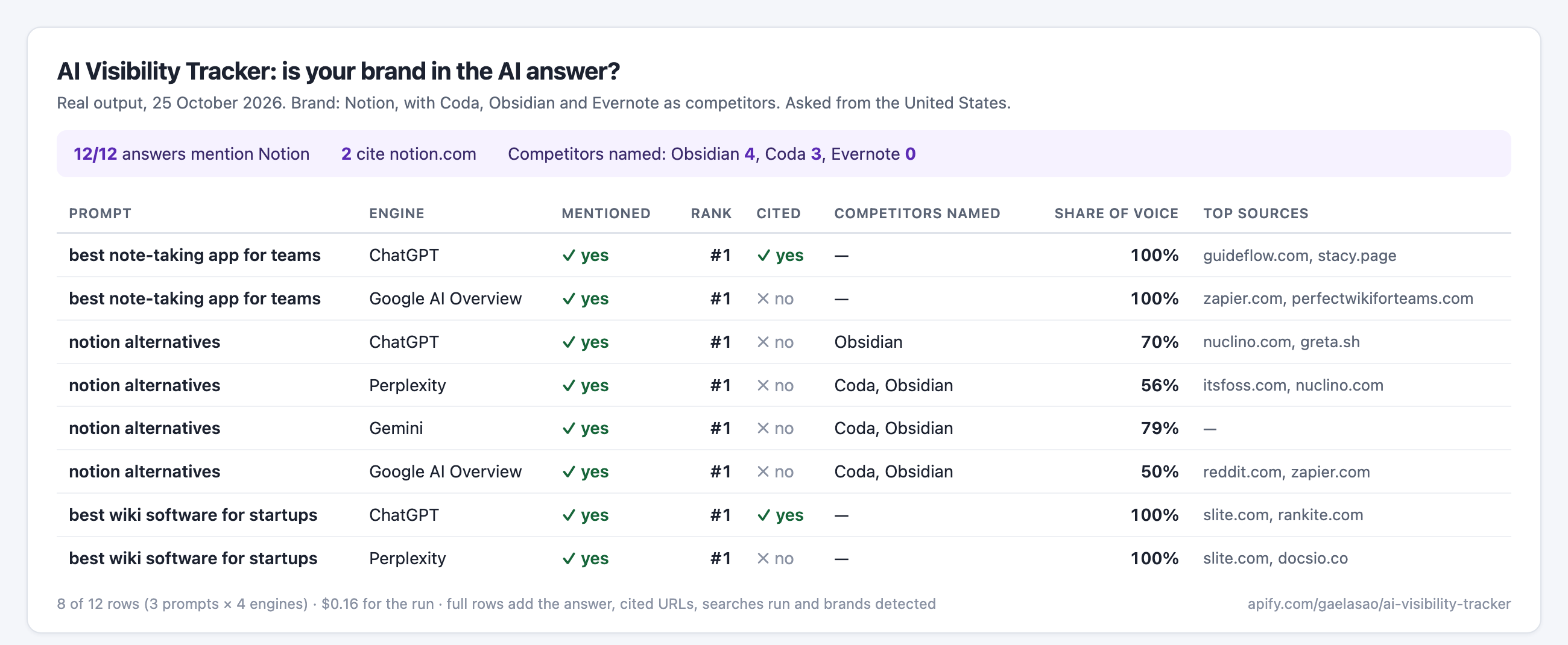
A real row from a run on 25 October 2026: ChatGPT, asked from the United States, for the prompt best note-taking app for teams. The answer text and the source list are shortened here.
{
  "prompt": "best note-taking app for teams",
  "engine": "chatgpt",
  "status": "ok",
  "brand": "Notion",
  "brand_mentioned": true,
  "brand_mention_count": 5,
  "brand_rank": 1,
  "brand_cited": true,
  "brand_citation_rank": 4,
  "brand_cited_urls": [
    "https://www.notion.com/"
  ],
  "competitors_mentioned": [],
  "competitors_cited": [],
  "share_of_voice": 1,
  "sources_count": 11,
  "top_cited_domains": [
    "guideflow.com",
    "stacy.page",
    "dupple.com",
    "notion.com",
    "onenote.com"
  ],
  "brands_detected": [
    "Notion",
    "Microsoft OneNote",
    "Confluence",
    "Slite",
    "Google Docs",
    "Fathom"
  ],
  "fan_out_queries": [
    "best team note taking apps comparison Notion Microsoft OneNote Slack AI meeting notes 2026",
    "best collaborative note-taking apps for teams pricing features Notion Slite Confluence Google Docs"
  ],
  "answer_excerpt": "# Best note-taking apps for teams (2026) **My top recommendation is Notion** for most teams. It combines shared notes, documentation, team wikis, databases, and project organization in one workspace.…",
  "model": "gpt-6",
  "country": "US",
  "language": "en",
  "checked_at": "2026-10-25T18:02:46.461Z",
  "checks_charged": 1
}
Which AI engines are covered?
| Engine | How it is asked | Checks per prompt |
|---|---|---|
| Google AI Overview | Google search from the chosen country, with the AI Overview loaded | 1 |
| Google AI Mode | Google AI Mode answer (available in fewer countries) | 1 |
| ChatGPT | ChatGPT with web search | 1 |
| Gemini | Gemini answer | 1 |
| Perplexity | Perplexity sonar with web search | 2 |
By default the Actor asks Google AI Overview, ChatGPT, Perplexity and Gemini. Pick the engines you need in the input. All five engines were tested on 25 October 2026 from the United States and from France. The answers come from DataForSEO's SERP and AI Optimization APIs, collected live at run time.
How to use it
- Enter your brand and your websites (for citation checks).
- Add the prompts to check: up to 100 per run, as a buyer would type them.
- Optionally list up to 10 competitors, as a name or as
name | domain, to measure share of voice. - Choose the engines and the country, then start. Download the rows as JSON, CSV or Excel, or read the
SUMMARY.
{
  "brand": "Notion",
  "brandDomains": ["notion.so", "notion.com"],
  "competitors": ["Coda | coda.io", "Obsidian | obsidian.md", "Evernote | evernote.com"],
  "prompts": ["best note-taking app for teams", "notion alternatives", "best wiki software for startups"],
  "engines": ["google_ai_overview", "chatgpt", "perplexity", "gemini"],
  "country": "US"
}
Answers change from one run to the next and depend on location, so treat one run as a snapshot. To follow a trend, save your input as a task and schedule it weekly: each run keeps the same columns.
How much does it cost?
$0.01 per check, where a check is one prompt asked to one engine. A Perplexity answer counts as 2 checks, because Perplexity charges more for each answer. There is also a $0.01 start fee per run that returns at least one answer. Lower prices apply on higher Apify plans.
| Run | Checks | Price |
|---|---|---|
| 10 prompts × Google AI Overview, ChatGPT, Gemini | 30 | $0.31 |
| 10 prompts × the 4 default engines | 50 | $0.51 |
| 100 prompts × the 4 default engines | 500 | $5.01 |
- Failed checks are free. They are stored with
status: "error"and the reason. - Google showing no AI answer is a result, so it is charged like an answer:
status: "no_ai_answer". - Your maximum cost per run is never exceeded. Checks are booked before the Actor asks the engines. When the limit is reached, the run stops cleanly and its status message says how many checks are left.
- Free Apify plans can check 2 prompts per run, to try the Actor.
How does it compare?
| This Actor | Single-engine scrapers | AI rank trackers | |
|---|---|---|---|
| Engines in one run | 5 | 1 | 3 to 5 |
| Brand mention, rank, citation and share of voice | Yes | No: raw answers only | Yes |
| Competitors | Up to 10 | No | Yes |
| Typical price per prompt and engine | $0.01 | $0.002 to $0.013 | $0.05 to $0.09 |
Use it from an AI agent (MCP)
The Actor is available as a tool through the Apify MCP server. In Claude, Cursor, VS Code or any MCP client, connect to:
https://mcp.apify.com/?tools=gaelasao/ai-visibility-tracker
Then ask, for example: "Check whether ChatGPT, Perplexity and Google AI Overviews mention Notion for these 10 prompts in the US, and compare with Coda and Obsidian."
FAQ
How is a mention detected?
The Actor looks for your brand name and its other names as whole words, ignoring case, in the text of the answer. Link targets and bare URLs are ignored, so a link to your site is not counted as a mention; it counts as a citation if it is a source. Names that are common words, such as Apple, can match in other senses. Use specific names or aliases.
How is a citation detected?
A citation is a source of the answer whose domain is one of your websites or one of their subdomains, for example help.notion.so for notion.so. Without websites in the input, citation fields stay empty.
Why is there no AI Overview for some prompts?
Google shows AI Overviews for some queries only, and less often for brand or shopping queries. Those rows have status: "no_ai_answer". This also tells you which prompts have no AI Overview to win.
Will I see the same answers in my browser?
Not exactly. AI answers vary between runs and users, and depend on location, language, signed-in history and the model version. The Actor asks from the country and language you choose, without a personal history. Run the same prompts regularly and compare rates rather than single answers.
Which countries and languages are supported?
Every country DataForSEO serves for each engine. Enter an ISO code such as US, GB, DE or FR, or a country name. The language defaults to the country's main language. Google AI Mode and some engines are available in fewer countries; an unsupported combination returns a free error row.
Can I find out how many people ask these questions?
Yes, with Keyword Research API. It returns the Google search volume and the AI search volume of each prompt or keyword, so you can pick the prompts worth tracking.
Is the data source reliable?
The answers come live from DataForSEO, a data provider for SEO tools, through its SERP and AI Optimization APIs. Each row keeps the time of the check and the model when reported, and the SUMMARY reports what the source charged.
Changelog
This Actor's version history is a separate document: https://apify.com/gaelasao/ai-visibility-tracker/changelog.md
Actor input Schema
brand (type: string):
The brand or product name to look for in the answers, for example Notion. Matching ignores case and needs whole words.
brandDomains (type: array):
Your domains, for example notion.so. An answer citing a page of these domains or their subdomains counts as a citation. Up to 5. Leave empty to skip citation checks.
brandAliases (type: array):
Other spellings or product names that count as a mention of your brand, for example Notion AI. Up to 10.
prompts (type: array):
The questions to ask each engine, as a buyer would type them, for example best CRM for small business. Up to 100 prompts of up to 500 characters. Each prompt is checked once per selected engine.
competitors (type: array):
Up to 10 competitors, as a name or as name | domain, for example Coda | coda.io. Their mentions and citations are counted to compute your share of voice.
engines (type: array):
Engines to ask. Each prompt costs one check per engine ($0.01), and Perplexity counts as 2 checks. Google AI Mode is available in fewer countries.
country (type: string):
Where the answers are asked from: an ISO code such as US, GB, DE or FR, or a country name.
language (type: string):
Language code such as en, fr or de. Leave empty for the country's main language (English where unknown).
Actor input object example
{
  "brand": "Notion",
  "brandDomains": [
    "notion.so",
    "notion.com"
  ],
  "prompts": [
    "best note-taking app for teams",
    "notion alternatives"
  ],
  "competitors": [
    "Coda | coda.io",
    "Obsidian | obsidian.md",
    "Evernote | evernote.com"
  ],
  "engines": [
    "google_ai_overview",
    "chatgpt",
    "perplexity",
    "gemini"
  ],
  "country": "US"
}
Actor output Schema
results (type: string):
No description
csv (type: string):
No description
summary (type: string):
No description
API
You can run this Actor programmatically using our API. Below are code examples in JavaScript, Python, and CLI, as well as the OpenAPI specification and MCP server setup.
JavaScript example
import { ApifyClient } from 'apify-client';

// Initialize the ApifyClient with your Apify API token
// Replace the '<YOUR_API_TOKEN>' with your token
const client = new ApifyClient({
    token: '<YOUR_API_TOKEN>',
});

// Prepare Actor input
const input = {
    "brand": "Notion",
    "brandDomains": [
        "notion.so",
        "notion.com"
    ],
    "prompts": [
        "best note-taking app for teams",
        "notion alternatives"
    ],
    "competitors": [
        "Coda | coda.io",
        "Obsidian | obsidian.md",
        "Evernote | evernote.com"
    ],
    "country": "US"
};

// Run the Actor and wait for it to finish
const run = await client.actor("gaelasao/ai-visibility-tracker").call(input);

// Fetch and print Actor results from the run's dataset (if any)
console.log('Results from dataset');
console.log(`💾 Check your data here: https://console.apify.com/storage/datasets/${run.defaultDatasetId}`);
const { items } = await client.dataset(run.defaultDatasetId).listItems();
items.forEach((item) => {
    console.dir(item);
});

// 📚 Want to learn more 📖? Go to → https://docs.apify.com/api/client/js/docs
Python example
from apify_client import ApifyClient

# Initialize the ApifyClient with your Apify API token
# Replace '<YOUR_API_TOKEN>' with your token.
client = ApifyClient("<YOUR_API_TOKEN>")

# Prepare the Actor input
run_input = {
    "brand": "Notion",
    "brandDomains": [
        "notion.so",
        "notion.com",
    ],
    "prompts": [
        "best note-taking app for teams",
        "notion alternatives",
    ],
    "competitors": [
        "Coda | coda.io",
        "Obsidian | obsidian.md",
        "Evernote | evernote.com",
    ],
    "country": "US",
}

# Run the Actor and wait for it to finish
run = client.actor("gaelasao/ai-visibility-tracker").call(run_input=run_input)

# Fetch and print Actor results from the run's dataset (if there are any)
print(f"💾 Check your data here: https://console.apify.com/storage/datasets/{run.default_dataset_id}")
for item in client.dataset(run.default_dataset_id).iterate_items():
    print(item)

# 📚 Want to learn more 📖? Go to → https://docs.apify.com/api/client/python/docs/quick-start
CLI example
echo '{
  "brand": "Notion",
  "brandDomains": [
    "notion.so",
    "notion.com"
  ],
  "prompts": [
    "best note-taking app for teams",
    "notion alternatives"
  ],
  "competitors": [
    "Coda | coda.io",
    "Obsidian | obsidian.md",
    "Evernote | evernote.com"
  ],
  "country": "US"
}' |
apify call gaelasao/ai-visibility-tracker --silent --output-dataset
MCP server setup
{
    "mcpServers": {
        "apify": {
            "type": "http",
            "url": "https://mcp.apify.com/?tools=fetch-actor-details,gaelasao/ai-visibility-tracker"
        }
    }
}
The hosted server signs you in with OAuth on first connect, so no API token belongs in this config. Clients without OAuth support can send an Authorization: Bearer <APIFY_API_TOKEN> header instead, using a token from API & Integrations in Apify Console (https://console.apify.com/settings/integrations).
OpenAPI specification
Download the OpenAPI definition: https://api.apify.com/v2/actors/VjsfjKz5UdYyYsl7i/builds/9ZM7fEhVsaDHCyO80/openapi.json