Xiaohongshu (RedNote) Notes Scraper (Apify Actor)
Get public Xiaohongshu (RedNote) notes from note links, author profiles or the trending feed: title, text, hashtags, images, video, likes, saves, comments, author and date. Useful for trend and brand research in China. No login, no cookies. Export JSON or CSV. Price: $2.45 per 1,000 notes, plus $0.01 per run start. Runs as an Apify Actor, callable from MCP clients via the Apify MCP server (https://mcp.apify.com/?tools=cliqtomedia/xiaohongshu-scraper).
Hosted MCP Server
npx add-mcp 'https://mcp.apify.com/?tools=cliqtomedia/xiaohongshu-scraper'Installs into Claude Code, Codex, Cursor and more
Documentation
Xiaohongshu (RedNote) Notes Scraper, No Login (cliqtomedia/xiaohongshu-scraper) Actor
Get public Xiaohongshu (RedNote) notes with title, text, hashtags, images, video, likes, saves, comments, author and date from note links, author profiles or the trending feed. No login, no cookies.
- URL: https://apify.com/cliqtomedia/xiaohongshu-scraper.md
- Developed by: Cliqto Media (community)
- Categories: Social media
- Features: Limited permissions
- Stats: 5 total users, 2 monthly users, 94.9% runs succeeded, 0 bookmarks
- User rating: No ratings yet
Pricing
from $1.71 / 1,000 notes
This Actor is paid per event. You are not charged for the Apify platform usage, but only a fixed price for specific events. Since this Actor supports Apify Store discounts, the price gets lower the higher subscription plan you have.
Learn more: https://docs.apify.com/actors/store.md#pay-per-event
What's an Apify Actor?
An Actor is a serverless cloud program that runs on the Apify platform. It has two run modes. In Batch mode, an Actor accepts a well-defined JSON input, performs an action which can take anything from a few seconds to a few hours, and optionally produces a well-defined JSON output, datasets with results, or files in key-value store. In Standby mode, an Actor provides a web server which can be used as a website, API, or an MCP server.
Apify vocabulary and the platform model are defined once, in the agent quickstart at https://apify.com/agents.md.
How to integrate an Actor?
If asked about integration, you help developers integrate Actors into their projects. You adapt to their stack and deliver integrations that are safe, well-documented, and production-ready.
Do not guess an integration path. Every one of them is in the agent quickstart at https://apify.com/agents.md: the Apify MCP server, Agent Skills with the Apify CLI, the JavaScript and Python clients, the REST API, and the account-free path for an agent with no human to sign in. It also carries the rule on stating cost before the first paid run.
For examples already wired to this Actor's own input schema, see the API section below.
Each client library has reference documentation the quickstart does not restate: JavaScript/TypeScript (npm install apify-client) and Python (pip install apify-client).
README
Get public Xiaohongshu (RedNote, 小红书) notes as clean data rows: title, text, hashtags, images, video, likes, saves, comments, shares, author and date. Start from note links, author profiles or the trending Explore feed.
It is for marketers, brand teams and researchers who track content on RedNote. The form opens ready to run: 20 full notes from the trending feed usually in under a minute, for about $0.06. No login and no cookies.
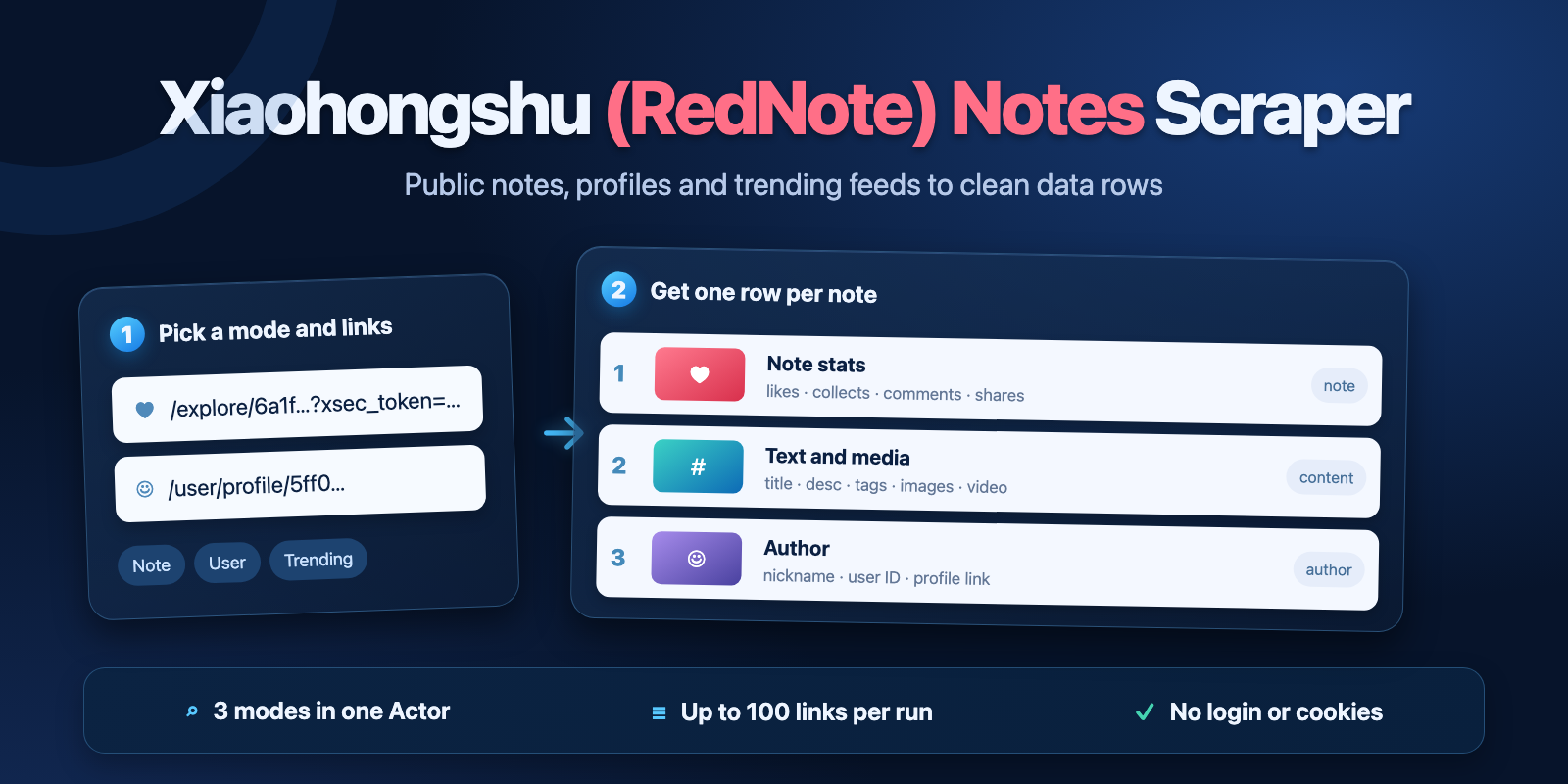
Table of contents
- What it does
- How it works
- Quick start
- Use cases
- Input
- Output
- Pricing
- Limits
- API, export and integrations
- Troubleshooting
- FAQ
- Related Actors
- Support
What it does
The Actor reads public Xiaohongshu pages the same way a visitor sees them and saves one row per note. It has three modes:
- Note links — full notes from your links: text, hashtags, all images with Live Photo clips, video link and encodings, subtitle files, counters, author, dates.
- Author profiles — the notes a profile shows to visitors (about 30 latest per profile). Xiaohongshu hides note text and note IDs on profiles from visitors, so these rows are short "cards": title, cover, likes, author, date.
- Trending feed — notes from the Explore feed or one of its channels (fashion, food, travel and more). Each note is opened and saved in full.
It does not log in and does not search by keyword: Xiaohongshu shows search only to signed-in users.
Good fit
- Check likes, saves and comments of your own or competitor notes.
- See what the Explore feed of a channel shows right now, on a schedule. The feed mixes new and older notes, so check
createdAtif you need only recent ones. - Watch the latest posts of creators you work with.
How it works
- The Actor opens each public note page, profile page or Explore feed page.
- It reads the note data from the page and cleans it: hashtags without the
[话题]mark, empty counters as0, dates in ISO format. - It saves one Dataset row per note, and a short run report (
RUN_SUMMARY) with a status for every link.
Quick start
-
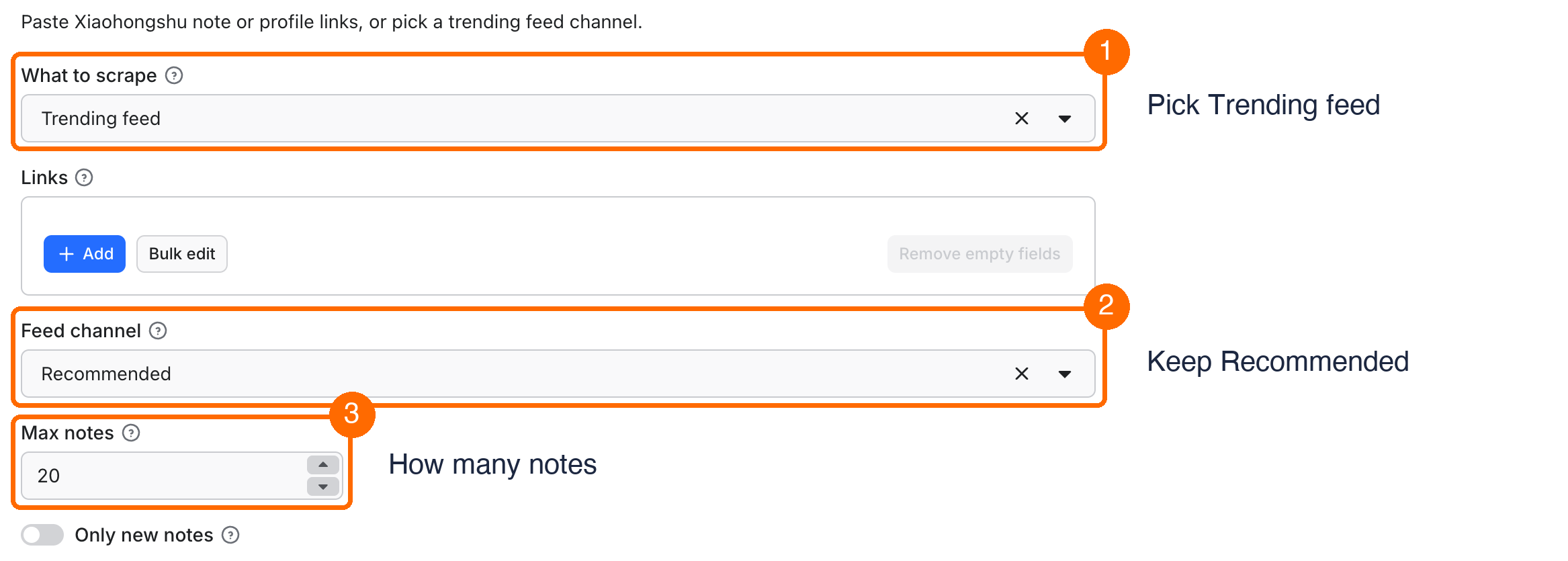
Open the Input tab. What to scrape is already
Trending feed(box 1). To use your own links, pickNote linksorAuthor profilesand add them in Links. -
Keep Feed channel =
Recommended, or pick another channel (box 2). -
Keep Max notes =
20(box 3), then click Start at the bottom of the form. -
Open the Output tab and check the title, author, likes, saves and comments (box 4).
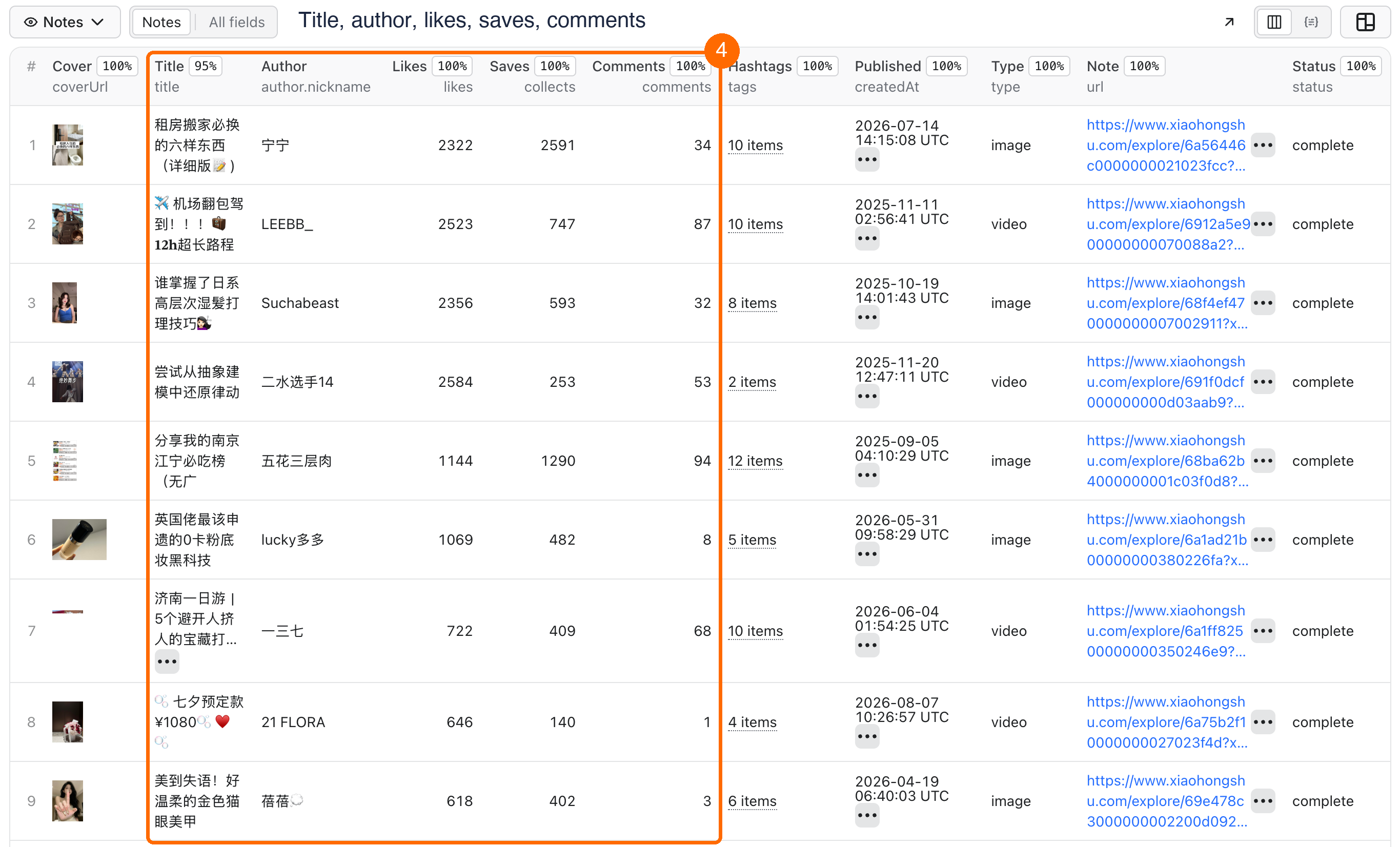
Expected result: 20 full notes for about $0.06. Most of our test runs took 9–25 seconds; a few took up to 95 seconds.
Use cases
| Buyer job | Input path | Output entity | Key fields | Next integration |
|---|---|---|---|---|
| Track counters of chosen notes | mode: note, urls | full note | likes, collects, comments, shares | schedule + export to Google Sheets |
| Find trending content in a niche | mode: trending, channel | full note | title, tags, likes, createdAt | schedule + onlyNew |
| Watch creators' new posts | mode: user, urls | note card | title, likes, coverUrl, createdAt, author.followers | schedule + onlyNew, webhook |
Input
Input fields
| Field | Plain name | Type | Required | Default / prefill | Allowed values | Effect | Example | Recommendation |
|---|---|---|---|---|---|---|---|---|
mode | What to scrape | string | yes | default note (user when every link is a profile link), prefill trending | note, user, trending | picks the source | trending | note for exact notes, trending for discovery |
urls | Links | array of strings | in note and user modes | none | note links with xsec_token, xhslink.com share links, profile links, 24-character user IDs | what to open | https://www.xiaohongshu.com/user/profile/5ff0e6410000000001008400 | up to 100 note links or 20 profiles; duplicates are removed |
channel | Feed channel | string | no | default and prefill recommend | recommend, fashion, food, cosmetics, movies, career, relationships, home, gaming, travel, fitness, video | Explore channel | food | only for trending |
maxItems | Max notes | integer | no | 20 | 1–500 | most notes in the whole run | 100 | you pay per saved note, so set it to what you need |
onlyNew | Only new notes | boolean | no | false | true / false | skips notes this account already got before | true | for scheduled runs |
stateName | Memory name | string | no | default | letters, digits, - | which memory onlyNew uses | food-daily | one name per monitoring task |
proxyConfiguration | Proxy | object | no | Apify Proxy (datacenter) | Apify Proxy settings | how pages are fetched | — | keep the default; it is included in the price. Residential and other paid proxy groups are not used; your own proxy URLs work |
deliveryConnector | Send results to (optional) | string | no | none | one of your Apify MCP connectors | posts a short run summary to Slack or Notion | your Notion connector | leave empty if you do not need it |
deliveryTarget | Notion page or channel (optional) | string | no | none | a Notion page link or a Slack channel ID | where the summary goes | a Slack channel ID | needed only with deliveryConnector |
Names from other scrapers also work: startUrls (strings or {"url": …}) is read as urls, and maxResults, limit or resultsLimit as maxItems. When both names are set, this Actor's own field wins. Fields this Actor does not know are skipped with a warning and listed in RUN_SUMMARY.ignoredInputFields.
A link that does not fit the mode (for example a profile link in note mode) gives a free status: invalid_input row with a hint, and the other links are still read. If no link is valid, the run fails with a message that names the field and shows an example.
Note links must keep their xsec_token=… part. Xiaohongshu opens a note to visitors only with this token. Links copied from Share in the app or from the browser address bar have it. The token does not last forever: after some time the same link stops opening and gives a free not_found row. If that happens, copy a fresh link. Trending and profile runs do not need a token from you.
Interacting settings
| When | Input A | Input B | Effective behavior | Example | Cost/result effect |
|---|---|---|---|---|---|
| Many links | urls | maxItems | stops when maxItems notes are saved; links not opened get the status skipped; RUN_SUMMARY.limitReached is MAX_ITEMS | 20 profiles, maxItems: 25 | you pay for 25 notes only |
| Run option | Max items in run options | maxItems | the smaller of the two is used | run option 10, maxItems: 20 | you pay for 10 notes at most |
| Monitoring | onlyNew | stateName | notes saved before under the same memory name are skipped | daily run, stateName: food-daily | only new notes are charged |
| Trending | mode: trending | maxItems | Xiaohongshu shows visitors about 180–280 notes of a channel per run | maxItems: 500 | you get about 180–280 and a warning in RUN_SUMMARY |
Input examples
Full notes from links
{
  "mode": "note",
  "urls": [
    "https://www.xiaohongshu.com/discovery/item/6adb353a000000002a028a34?xsec_token=YBd35GuM-QFDA-zWqoOCqGvfjH7N0cffdkKKWfjg2BVjs%3D&xsec_source=app_share"
  ],
  "maxItems": 20
}
Expected behavior: opens the note and saves it. This example link can expire; use a fresh one if you get not_found.
Expected output: one full note with title, desc, tags, likes, collects.
Limit or cost note: one start fee and one Note event.
Daily trending in one channel
{
  "mode": "trending",
  "channel": "fashion",
  "maxItems": 100,
  "onlyNew": true,
  "stateName": "fashion-daily"
}
Expected behavior: reads the fashion feed and opens new notes.
Expected output: up to 100 full notes with channel: "fashion".
Limit or cost note: about 180–280 notes per run at most; the next run pays only for new notes.
Output
Output fields
| Field | Meaning | Type | Can be empty? | Example / enum | Source / notes |
|---|---|---|---|---|---|
noteId | note ID | string | yes, on profile cards | 64abf31b00000000120125be | Xiaohongshu hides IDs on profiles from visitors |
url | note link that opens | string | yes, on profile cards | https://www.xiaohongshu.com/explore/…?xsec_token=… | with a fresh token |
title | title | string | yes | 大家要的短裙来咯 | some notes have no title |
desc | note text | string | yes, on cards | text with #hashtags | [话题] marks removed |
type | note type | string | yes | image, video | |
author | author | object | yes | {userId, nickname, avatarUrl, profileUrl, redId, followers, following, likesAndCollects, location} | public fields only. redId, followers, following, likesAndCollects and location come from the profile page, so they are filled in user mode and null in other modes. The site rounds the numbers: 10+ becomes 10, 1万+ becomes 10000 |
likes | likes | integer | yes | 2526 | big numbers are rounded by the site: 8.7万 becomes 87000 |
collects | saves | integer | yes, on cards | 646 | rounded like likes |
comments | comments | integer | yes, on cards | 140 | the site shows an empty value for zero; we save 0 |
shares | shares | integer | yes, on cards | 151 | |
tags | hashtags | array of strings | no (can be []) | ["ootd穿搭"] | |
images | images | array of objects | no (can be []) | [{url, width, height, livePhotoUrl}] | all images of the note; livePhotoUrl is the short clip of a Live Photo, null for a still photo |
coverUrl | cover image | string | yes | image link | |
videoUrl | video stream | string | yes | .mp4 link | video notes only |
videoStreams | every video encoding | array of objects | no (can be []) | [{codec, url, width, height, quality, sizeBytes}] | video notes only; the site often has one encoding for guests |
subtitles | subtitle files | array of objects | no (can be []) | [{language, url}] | .srt links the site made for a video; language source is the original speech. Empty when the site has none |
createdAt | publish time | string (ISO) | yes | 2023-07-10T12:01:31.000Z | |
updatedAt | last edit time | string (ISO) | yes | not on cards; can be earlier than createdAt, as the site shows it | |
ipLocation | author region as the site shows it | string | yes | 浙江 | often empty: the site does not show it on many notes |
detail | how complete the row is | string | no | full, card | card = profile or feed card only |
mode | mode that found the note | string | no | note, user, trending | |
channel | feed channel | string | yes | fashion | trending only |
inputUrl | your link | string | yes | empty in trending | |
status | row status | string | no | complete, partial | partial = feed card saved, note page did not open |
error | reason for partial | string | yes | ||
fetchedAt | when it was collected | string (ISO) | no |
Moving from another RedNote scraper? Common names: id → noteId, engagement.liked_count → likes, collected_count → collects, comments_count → comments, shared_count → shares, video → videoUrl, timestamp → createdAt.
Output entities and surfaces
| Situation | Dataset/API/KVS/live view | Result shape | User action |
|---|---|---|---|
| Normal item | Dataset, view Notes | one row per note, status: complete | open, export or use likes, tags |
| Domain-empty result | Dataset holds only free not_found rows, RUN_SUMMARY | status: not_found rows and inputs[] with the reason | check the link and its xsec_token |
| Partial result | Dataset | status: partial, detail: card, no text | run the note link again in note mode |
| Source stopped answering partway | Dataset, RUN_SUMMARY | saved rows stay, the run ends as Failed, status: partial, stopReason: SOURCE_ERROR, a warning in warnings | run again for the rest |
Input that cannot run (empty urls, every link wrong) | RUN_SUMMARY, status message | the run ends as Succeeded with an empty Dataset, status: invalid_input, the reason in message and inputErrors; only the start fee | fix the field named in the message |
| Technical failure with nothing saved | RUN_SUMMARY | the run ends as Failed, status: failed, stopReason, message | try again later |
Output example
{
  "noteId": "64abf31b00000000120125be",
  "url": "https://www.xiaohongshu.com/explore/64abf31b00000000120125be?xsec_token=ABtBwHcu7rrk2ZOH0uuALyQCzfi9sLXTZzr34IPsd2p6o%3D&xsec_source=pc_feed",
  "title": "大家要的短裙来咯",
  "desc": "姐妹们要的网红格子短裙来咯,这个颜色很赞!#公主的100条连衣裙 #无法拒绝温柔感小裙子 #ootd穿搭 #网红女装测评 #辣妹穿搭",
  "type": "video",
  "author": {
    "userId": "6416ce0f0000000011020e22",
    "nickname": "油克李李",
    "avatarUrl": "https://sns-avatar-qc.xhscdn.com/avatar/642d445bc687b724391f6a2a.jpg",
    "profileUrl": "https://www.xiaohongshu.com/user/profile/6416ce0f0000000011020e22",
    "redId": null,
    "followers": null,
    "following": null,
    "likesAndCollects": null,
    "location": null
  },
  "likes": 2526,
  "collects": 646,
  "comments": 140,
  "shares": 151,
  "tags": ["公主的100条连衣裙", "无法拒绝温柔感小裙子", "ootd穿搭", "网红女装测评", "辣妹穿搭"],
  "images": [
    { "url": "https://sns-webpic-qc.xhscdn.com/…!nd_dft_wlteh_jpg_3", "width": 1080, "height": 1920, "livePhotoUrl": null }
  ],
  "coverUrl": "https://sns-webpic-qc.xhscdn.com/…!nd_dft_wlteh_jpg_3",
  "videoUrl": "https://sns-video-zl.xhscdn.com/stream/110/258/…_258.mp4?sign=…",
  "videoStreams": [
    { "codec": "h264", "url": "https://sns-video-zl.xhscdn.com/stream/110/258/…_258.mp4?sign=…", "width": 720, "height": 1280, "quality": "HD", "sizeBytes": 47003285 }
  ],
  "subtitles": [
    { "language": "zh-CN", "url": "https://sns-subtitle-s10.xhscdn.com/subtitle/…_1.srt?sign=…" },
    { "language": "en-US", "url": "https://sns-subtitle-s10.xhscdn.com/subtitle/…_12.srt?sign=…" }
  ],
  "createdAt": "2023-07-10T12:01:31.000Z",
  "updatedAt": "2023-07-10T12:01:31.000Z",
  "ipLocation": null,
  "detail": "full",
  "mode": "trending",
  "channel": "fashion",
  "inputUrl": null,
  "fetchedAt": "2026-10-26T14:25:21.971Z",
  "status": "complete",
  "error": null
}
This is one real row from the fashion feed; image and video links are shortened. null means the site did not show this value to a visitor. A profile card has detail: "card", noteId: null, url: null, desc: null and only likes from the counters, and its author also has redId, followers, following, likesAndCollects and location.
Send results to Slack or Notion
Pick your connector in the optional deliveryConnector field. After the run saves its data, the Actor posts a short summary (up to 25 rows and a link to the full dataset) there. Put a Notion page link or a Slack channel ID in deliveryTarget: in Notion every run is added on top of that one page, so your workspace does not fill up with new pages. A delivery error never fails the run and costs nothing extra. Connect a service once in Apify Console → MCP connectors.
Use case → fields
| Buyer job | Input path | Output entity | Key fields | Next integration |
|---|---|---|---|---|
| Track counters of chosen notes | mode: note, urls | full note | likes, collects, comments, shares | schedule + export to Google Sheets |
| Find trending content in a niche | mode: trending, channel | full note | title, tags, likes, createdAt | schedule + onlyNew |
| Watch creators' new posts | mode: user, urls | note card | title, likes, coverUrl, createdAt, author.followers | schedule + onlyNew, webhook |
Pricing
Pricing unit
You pay per event:
- Actor Start — $0.01 per run. It scales with run memory: one event per GB, at least one. The default memory is 256 MB, so it is one event.
- Note — per saved note row: $2.45 per 1,000 notes on the free plan, lower on paid plans (down to $1.71 per 1,000 on Gold).
Every saved row is a Note event, also a partial row (feed card without text). Links that are not found, fail or are skipped are free. A run with no notes costs only the start fee. A monitoring run with onlyNew and no new notes costs only the start fee. A failed or stopped run is charged the start fee and the notes it saved. Platform usage and the proxy are included.
Cost examples
| Scenario | Input scope | Expected item/event count | Base charge | Optional charge | Stop/cap behavior |
|---|---|---|---|---|---|
| One note | 1 note link | 1 note | $0.01245 | none | — |
| Default | 20 notes | 20 notes | $0.06 | none | stops at maxItems |
| Trending run | one channel, maxItems: 100 | 100 notes | $0.255 | none | about 180–280 at most per run |
| Large run | one channel, maxItems: 300 | 280 notes, measured in our largest test | $0.696 | none | the feed ended at 280 |
| Nothing found | 100 deleted note links | 0 notes | $0.01 | none | statuses in RUN_SUMMARY |
Prices are for the free plan. On Gold, 100 notes cost $0.181.
Limits
- No keyword search: Xiaohongshu shows search only to signed-in users.
- Note links need their
xsec_token. A bare/explore/<id>link, or a link with an expired token, givesnot_found. - Profiles show visitors about 30 latest notes, as short cards without text, hashtags or note IDs.
- Xiaohongshu refuses profile pages more often than note pages. A run with many profiles can stop early with
SOURCE_ERROR. The run then ends as Failed, but rows saved before the stop stay in the Dataset (and are charged), andRUN_SUMMARY.statusispartial. For big lists, use several smaller runs. - The trending feed shows visitors about 180–280 notes per channel per run (280 in our largest test). For more, run it on a schedule with
onlyNew. - Up to 100 note links or 20 profiles per run. In our tests 20 profiles gave 500 short cards in one run and stopped at 246 after a refusal in another; see the line above.
- The Actor stops opening pages 30 seconds before the run timeout (
stopReason: DEADLINE) and keeps the saved rows; the run ends as Succeeded if it saved notes and as Failed if it saved none. A longer timeout in run options lets it read more. - If you set Max items in run options, the run stops there (
limitReached: MAX_ITEMS). - If you set a maximum charge per run, the run stops there (
stopReason: CHARGE_LIMIT) and keeps the saved notes. - "Only new notes" remembers the last 50,000 notes per Memory name. Older ones can count as new again. Memory name (
stateName) takes up to 40 characters: letters, digits and-. - The memory is kept in a store named
xiaohongshu-seen-<name>. If that name is taken and not available to the Actor, it usesxiaohongshu-scraper-m-<name>. - A page larger than 5 MB is not read. Its note is not saved and not charged.
- No comments text, no follower lists, no private profiles. Contacts from profile bios are not collected.
- Counters change all the time; a row shows the value at
fetchedAt. - Image, Live Photo, video and subtitle links are signed by Xiaohongshu and can stop working after some time. Download the files soon if you need them.
API, export and integrations
- Source: public pages of xiaohongshu.com, opened as a visitor.
- API: start the Actor with the same JSON input and read the Dataset items.
- Export: JSON, CSV, Excel and other Dataset formats from the Output tab.
- Scheduling: create a Task with
onlyNew: trueand astateName, then add a schedule. - Webhooks / no-code: use Apify integrations to send new rows on run finish.
Use with AI agents (MCP)
- MCP server with only this Actor:
https://mcp.apify.com?tools=cliqtomedia/xiaohongshu-scraper. - Smallest useful input:
{"mode": "trending", "channel": "recommend", "maxItems": 20}. It gives 20 full notes for about $0.06. - Key output fields:
titleanddesc(note text),likes,collectsandcomments(engagement),tags(hashtags),author.nickname. - One note takes a few seconds; 50 note links took 19 seconds; 100 note links took 30 seconds; 20 trending notes took 9–95 seconds (most under 25); a full trending run of 280 notes took about 3 minutes. Up to 100 note links or 20 profiles per run.
Troubleshooting
The run saved 0 notes
Symptom: the Dataset has only free status: not_found rows and RUN_SUMMARY lists not_found with "note not available: deleted, private or the share token expired".
Likely reason: the note was deleted or hidden, or the link has no xsec_token, or the token is old.
Check: open the link in a private browser window.
Action: copy a fresh link from Share in the app and run again.
The run failed with "Xiaohongshu did not answer"
Symptom: the platform run is Failed, RUN_SUMMARY.status is failed, stopReason is SOURCE_ERROR, and no notes were saved.
Likely reason: Xiaohongshu refused many requests in a row. The Actor stops early so you do not pay for an empty long run.
Check: RUN_SUMMARY.counts.blocked.
Action: try again later.
The run failed with "Xiaohongshu stopped answering partway"
Symptom: the run is Failed, but it has some notes, RUN_SUMMARY.status is partial and warnings has this message.
Likely reason: Xiaohongshu began to refuse requests after a part of the run. You paid only for the saved notes; they stay in the Dataset.
Action: keep the saved notes and run again for the rest, with fewer links per run.
The run finished with no results and an input error message
Symptom: the run is Succeeded, the Dataset is empty, the status message starts with "Invalid input:" and RUN_SUMMARY.status is invalid_input.
Likely reason: a required field is empty or every link is wrong for the chosen mode. Only the start fee is charged.
Action: fix the field named in the message (it shows an example) and run again.
A row has status: invalid_input
Symptom: a free row with error, for example "this is a profile link; note mode takes note links".
Likely reason: the link does not fit the chosen mode, or it is not a Xiaohongshu link.
Action: put profile links in a run with "mode": "user" and note links in "mode": "note". The other links of the run were read as usual.
A warning says "asked to slow down"
Symptom: warnings in RUN_SUMMARY says Xiaohongshu asked to slow down (HTTP 429).
Likely reason: too many requests through too few proxy addresses. The Actor lowers its pace by itself and goes on, so the run only takes longer.
Action: use fewer notes per run or more proxy addresses.
A warning says the "Only new notes" memory could not be opened or saved
Symptom: warnings in RUN_SUMMARY names the memory; the run is Succeeded and has its notes.
Likely reason: a storage with the same name already exists on your account and the Actor has no access to it.
Check: Apify Console → Storage → Key-value stores, a store named xiaohongshu-seen-<Memory name>.
Action: use another Memory name. Notes from earlier runs may repeat once.
Trending gave fewer notes than maxItems
Symptom: a warning "The guest feed gave … new notes".
Likely reason: Xiaohongshu shows visitors only part of a channel per run.
Action: run it on a schedule with onlyNew.
A row has status: partial
Symptom: a feed row with title and likes but no text.
Likely reason: the note page did not open in time.
Action: run its url again in note mode.
FAQ
Do I need a Xiaohongshu account or cookies?
No. The Actor reads only what any visitor sees.
Why are some ipLocation or title values empty?
The site does not show them on many notes. null means "not shown", not an error.
Why do profile rows have no text and no note ID?
Xiaohongshu shows visitors only note cards on a profile. To get the full note, open it in the app, copy its link and use note mode.
Do I pay for links that do not work?
No. Only saved rows (also partial ones) and the start fee are charged.
Related Actors
- Bilibili Scraper: videos, comments and creators from Bilibili, no login.
- Weibo Scraper: posts, comments and profiles from Weibo, no login.
- Douyin Scraper: videos, search and trends from Douyin, no login.
Support
For a bug, question or feature request, open the Actor's Issues tab on Apify. Include the run ID, the mode and the error text from RUN_SUMMARY. Do not send tokens or cookies.
⭐ Found it useful? Rate this Actor. Something wrong? Report a problem — we fix reported problems.
Changelog
This Actor's version history is a separate document: https://apify.com/cliqtomedia/xiaohongshu-scraper/changelog.md
Actor input Schema
mode (type: string):
Note links: full notes from the links below. Author profiles: the notes an author profile shows to visitors (about 30 latest, card fields only: Xiaohongshu hides note text and IDs there without login). Trending feed: notes from the Explore feed or one of its channels, each read in full.
urls (type: array):
Note links (https://www.xiaohongshu.com/explore/?xsec_token=…, /discovery/item/… or share links http://xhslink.com/…) for Note links mode, or profile links (https://www.xiaohongshu.com/user/profile/) and 24-character user IDs for Author profiles mode. Copy note links from the app's Share button or from the browser: Xiaohongshu opens a note to visitors only with its xsec_token. Up to 100 note links or 20 profiles per run.
channel (type: string):
Trending feed mode only: which Explore channel to read.
maxItems (type: integer):
Most notes to return in the whole run (1–500). Each returned note is one Note event; not found and failed links are free.
onlyNew (type: boolean):
Skip notes this account already got from earlier runs with the same memory name, so scheduled runs pay only for new notes.
stateName (type: string):
Name of the memory used by "Only new notes" (letters, digits and -). Use a different name for each monitoring task.
proxyConfiguration (type: object):
Apify Proxy datacenter addresses are used by default and are included in the price. Residential and other paid proxy groups are not used: the Actor falls back to datacenter. You can also give your own proxy URLs.
deliveryConnector (type: string):
Your Slack, Notion or other MCP connector. After the run the Actor posts a short summary there. Connect services once in Apify Console → MCP connectors.
deliveryTarget (type: string):
Where to post the summary: a Notion page link (each run is added on top of that page) or a Slack channel ID. Leave empty to let the connector decide.
Actor input object example
{
  "mode": "trending",
  "channel": "recommend",
  "maxItems": 20,
  "onlyNew": false,
  "stateName": "default",
  "proxyConfiguration": {
    "useApifyProxy": true
  }
}
Actor output Schema
notes (type: string):
One row per note: title, text, hashtags, images, likes, saves, comments, author, date.
runSummary (type: string):
Status, stop reason, counts and the outcome of every input link.
API
You can run this Actor programmatically using our API. Below are code examples in JavaScript, Python, and CLI, as well as the OpenAPI specification and MCP server setup.
JavaScript example
import { ApifyClient } from 'apify-client';

// Initialize the ApifyClient with your Apify API token
// Replace the '<YOUR_API_TOKEN>' with your token
const client = new ApifyClient({
    token: '<YOUR_API_TOKEN>',
});

// Prepare Actor input
const input = {
    "mode": "trending",
    "channel": "recommend",
    "maxItems": 20,
    "proxyConfiguration": {
        "useApifyProxy": true
    }
};

// Run the Actor and wait for it to finish
const run = await client.actor("cliqtomedia/xiaohongshu-scraper").call(input);

// Fetch and print Actor results from the run's dataset (if any)
console.log('Results from dataset');
console.log(`💾 Check your data here: https://console.apify.com/storage/datasets/${run.defaultDatasetId}`);
const { items } = await client.dataset(run.defaultDatasetId).listItems();
items.forEach((item) => {
    console.dir(item);
});

// 📚 Want to learn more 📖? Go to → https://docs.apify.com/api/client/js/docs
Python example
from apify_client import ApifyClient

# Initialize the ApifyClient with your Apify API token
# Replace '<YOUR_API_TOKEN>' with your token.
client = ApifyClient("<YOUR_API_TOKEN>")

# Prepare the Actor input
run_input = {
    "mode": "trending",
    "channel": "recommend",
    "maxItems": 20,
    "proxyConfiguration": { "useApifyProxy": True },
}

# Run the Actor and wait for it to finish
run = client.actor("cliqtomedia/xiaohongshu-scraper").call(run_input=run_input)

# Fetch and print Actor results from the run's dataset (if there are any)
print(f"💾 Check your data here: https://console.apify.com/storage/datasets/{run.default_dataset_id}")
for item in client.dataset(run.default_dataset_id).iterate_items():
    print(item)

# 📚 Want to learn more 📖? Go to → https://docs.apify.com/api/client/python/docs/quick-start
CLI example
echo '{
  "mode": "trending",
  "channel": "recommend",
  "maxItems": 20,
  "proxyConfiguration": {
    "useApifyProxy": true
  }
}' |
apify call cliqtomedia/xiaohongshu-scraper --silent --output-dataset
MCP server setup
{
    "mcpServers": {
        "apify": {
            "type": "http",
            "url": "https://mcp.apify.com/?tools=fetch-actor-details,cliqtomedia/xiaohongshu-scraper"
        }
    }
}
The hosted server signs you in with OAuth on first connect, so no API token belongs in this config. Clients without OAuth support can send an Authorization: Bearer <APIFY_API_TOKEN> header instead, using a token from API & Integrations in Apify Console (https://console.apify.com/settings/integrations).
OpenAPI specification
Download the OpenAPI definition: https://api.apify.com/v2/actors/0AngE0nFT06i7RVMw/builds/bLKdoOBl3gsln4tIJ/openapi.json