Wellfound Jobs Scraper: Startup Jobs to CSV (Apify Actor)
Export public Wellfound startup jobs by role, location or job URL: stable job ID, title, company, location, remote flag, salary text as the source shows it and the full description. Clear coverage limits per run. No login. Export JSON or CSV. Price: $0.25 per 1,000 jobs, plus $0.0133 per run start. Runs as an Apify Actor, callable from MCP clients via the Apify MCP server (https://mcp.apify.com/?tools=cliqtomedia/wellfound-jobs-scraper).
Hosted MCP Server
npx add-mcp 'https://mcp.apify.com/?tools=cliqtomedia/wellfound-jobs-scraper'Installs into Claude Code, Codex, Cursor and more
Documentation
Wellfound Jobs Scraper: Startup Jobs to CSV & JSON (cliqtomedia/wellfound-jobs-scraper) Actor
Export public Wellfound startup jobs by role, location or job URL. Get stable job IDs, source salary text, descriptions and CSV or JSON output with explicit coverage limits.
- URL: https://apify.com/cliqtomedia/wellfound-jobs-scraper.md
- Developed by: Cliqto Media (community)
- Categories: Jobs, Developer tools
- Features: Limited permissions
- Stats: 7 total users, 3 monthly users, 85.7% runs succeeded, 0 bookmarks
- User rating: No ratings yet
Pricing
from $0.18 / 1,000 wellfound job listings
This Actor is paid per event. You are not charged for the Apify platform usage, but only a fixed price for specific events. Since this Actor supports Apify Store discounts, the price gets lower the higher subscription plan you have.
Learn more: https://docs.apify.com/actors/store.md#pay-per-event
What's an Apify Actor?
An Actor is a serverless cloud program that runs on the Apify platform. It has two run modes. In Batch mode, an Actor accepts a well-defined JSON input, performs an action which can take anything from a few seconds to a few hours, and optionally produces a well-defined JSON output, datasets with results, or files in key-value store. In Standby mode, an Actor provides a web server which can be used as a website, API, or an MCP server.
Apify vocabulary and the platform model are defined once, in the agent quickstart at https://apify.com/agents.md.
How to integrate an Actor?
If asked about integration, you help developers integrate Actors into their projects. You adapt to their stack and deliver integrations that are safe, well-documented, and production-ready.
Do not guess an integration path. Every one of them is in the agent quickstart at https://apify.com/agents.md: the Apify MCP server, Agent Skills with the Apify CLI, the JavaScript and Python clients, the REST API, and the account-free path for an agent with no human to sign in. It also carries the rule on stating cost before the first paid run.
For examples already wired to this Actor's own input schema, see the API section below.
Each client library has reference documentation the quickstart does not restate: JavaScript/TypeScript (npm install apify-client) and Python (pip install apify-client).
README
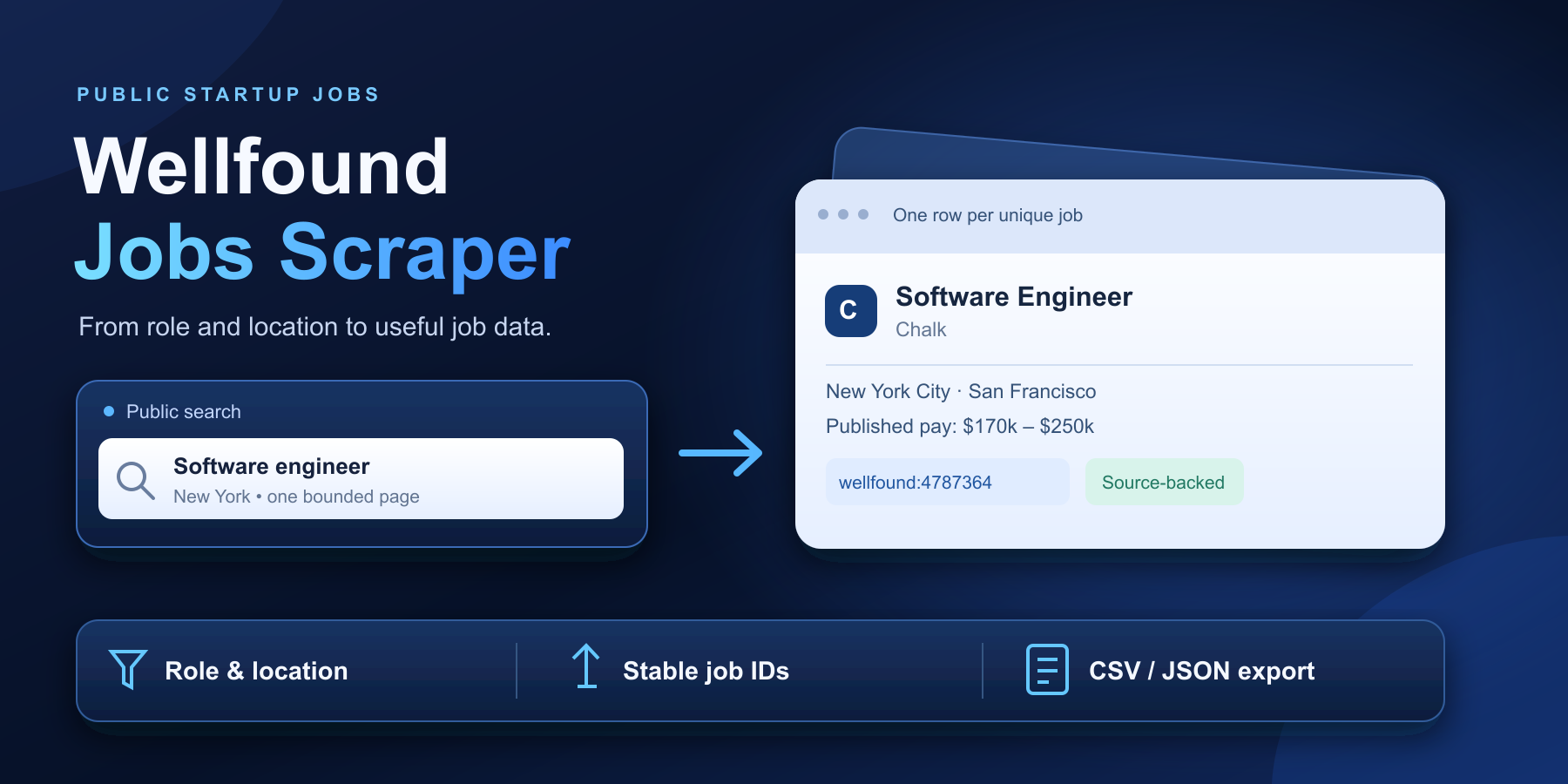
Export public Wellfound startup jobs by role, location or job URL. Get one Dataset row per unique job, with stable IDs, salary text, posting date and description, ready for CSV, JSON or your job board.
- What it does
- How it works
- Quick start
- Use cases
- Input
- Output
- Pricing
- Limits
- API, export and integrations
- Troubleshooting
- FAQ
- Related Actors
- Support
What it does
The Actor reads public Wellfound job search pages and job pages and saves each startup job as one clean row: title, company, locations, remote flag, employment type, published pay, posting date, description and job URL. It reads only what Wellfound shows without a login. It is not a full index of every Wellfound job.
Good fit
- Track startup hiring for one role in one city, for example software engineers in New York.
- Feed a job board or newsletter with fresh startup jobs and their links.
- Compare published salary ranges for a role across startups.
How it works
- You give a Wellfound search URL, or a role and a location, or one job URL.
- The Actor opens the public pages, removes duplicate jobs and applies your
keyword, remote, job type, posting-age and minimum-salary filters. With
onlyNew, it also skips jobs you already received. - It saves one row per job to the Dataset and a short run report
(
RUN_SUMMARY) with the status and any problems.
Quick start
-
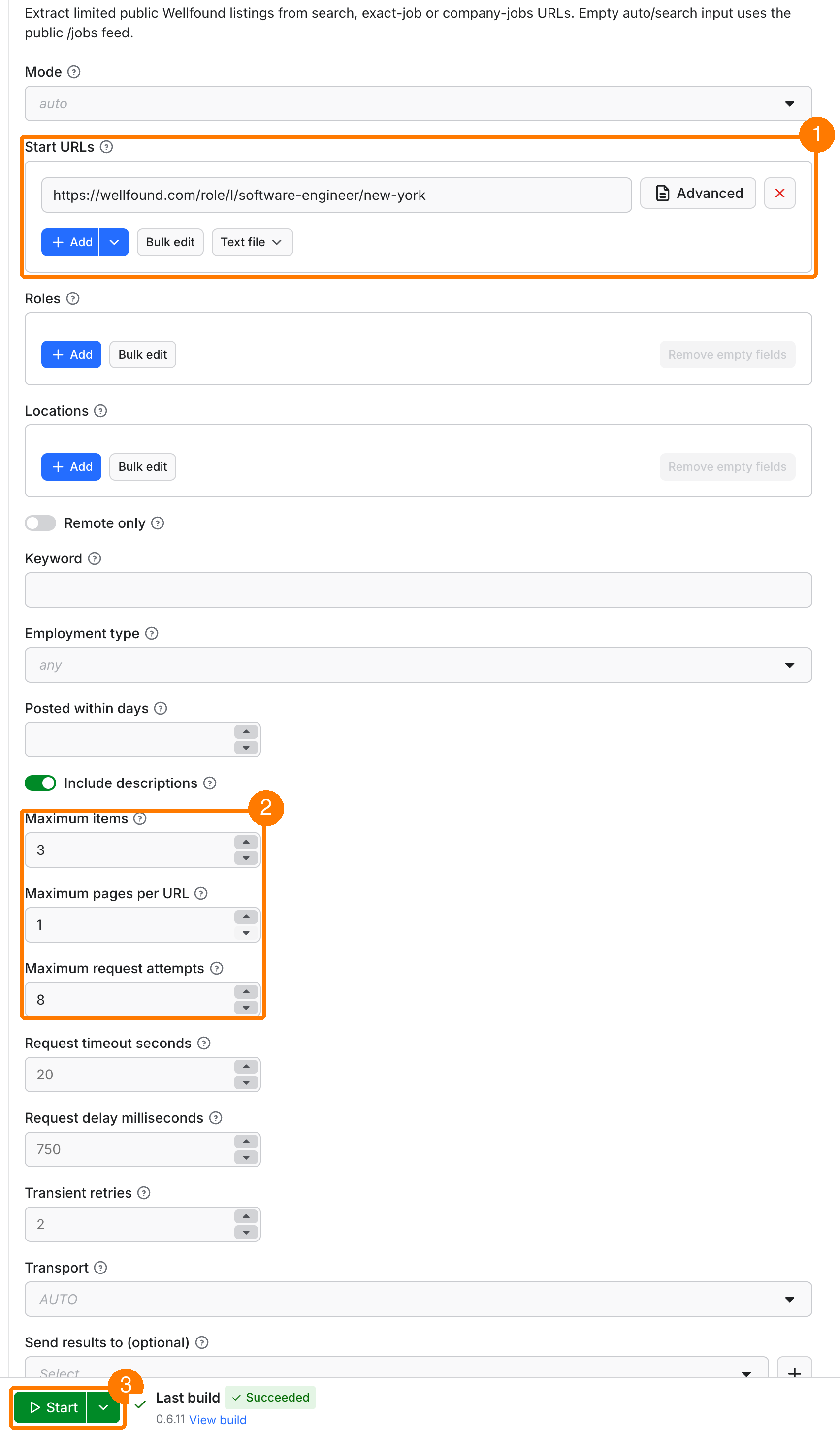
Open the Input tab. The form already has a Wellfound search URL for software engineers in New York (box 1 in the picture).
-
Keep the small limits for your first run: Maximum items 3, Maximum pages per URL 1, Maximum request attempts 8 (box 2).
-
Click Start (box 3).
-
Open the Output tab. Check Job title and Company (box 1), Compensation, Posted and Job URL (box 2). Click Export (box 3) to download CSV, JSON or Excel.
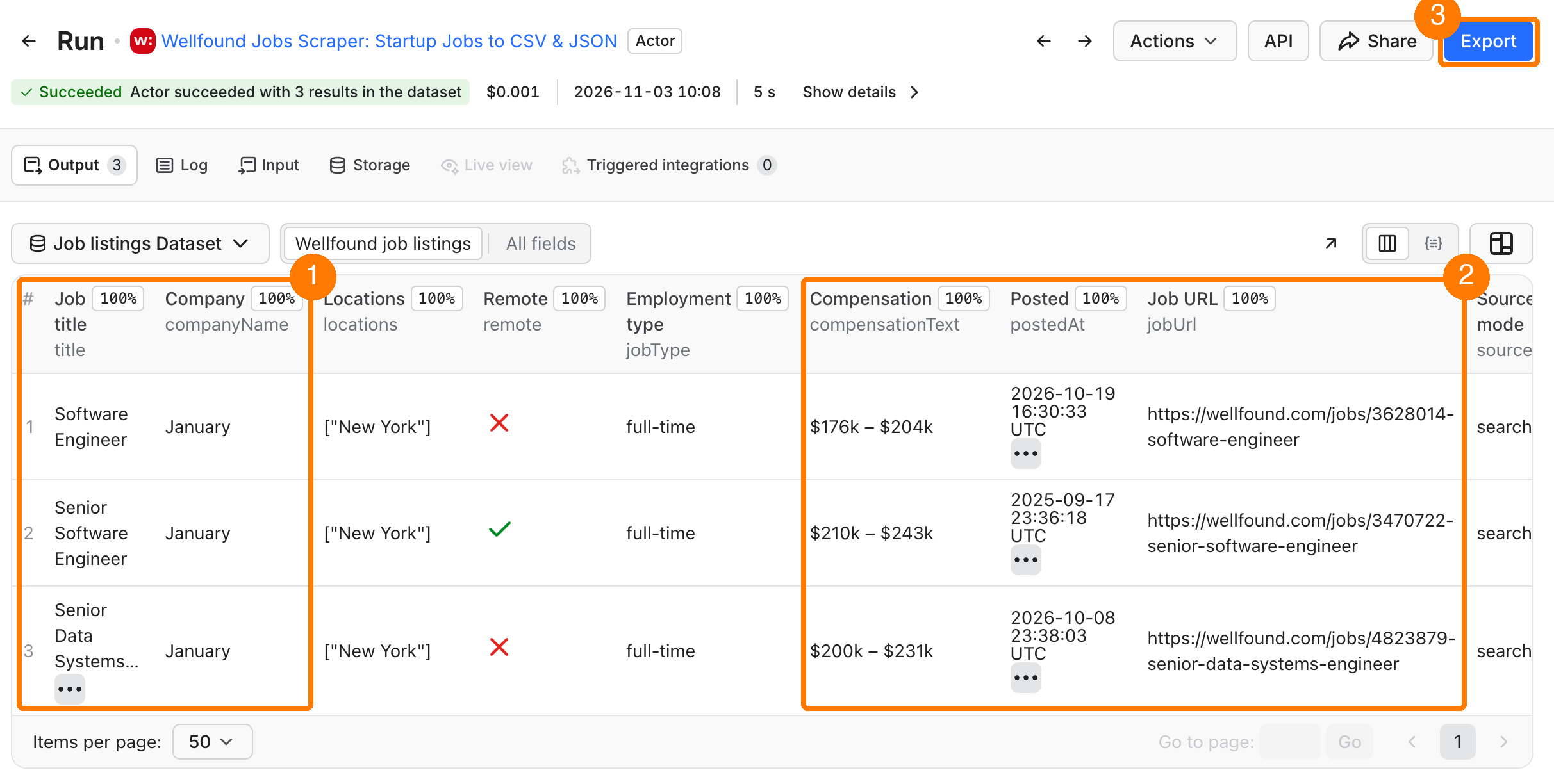
Expected result: three software engineering jobs in New York with company, pay range, posting date and link, in about 5 seconds. Jobs on Wellfound change, so your rows will differ.
The form values are a prefill, not API defaults. An API input {} reads
the public /jobs feed with maxItems: 50, three pages and descriptions on.
Use cases
| Buyer job | Input path | Output entity | Key fields | Next integration |
|---|---|---|---|---|
| Startup hiring in one city | roles + locations | job row | companyName, title, locations | CSV export to a spreadsheet |
| Job board or newsletter feed | startUrls, maxItems | job row | jobId, title, jobUrl, postedAt | Dataset API, scheduled task |
| Remote startup jobs | remoteOnly: true | job row | remote, remoteKind, acceptedRemoteLocations | CSV or JSON export |
| Salary research | small role search | job row | compensationText, salaryMin, salaryMax, salaryCurrency | spreadsheet pivot |
| Check one known job | one job URL, mode: exact_job | job row | description, postedAt, jobUrl | RUN_SUMMARY status |
| Daily new-jobs alert | onlyNew: true + schedule | job row | jobId, title, companyName, postedAt | Slack or Notion summary |
Input
No field is required. Roles and locations are Wellfound URL slugs
(lowercase letters, numbers and hyphens, for example software-engineer,
new-york), not free text. If the input cannot work (only non-Wellfound
URLs, out-of-range limits, bad slugs, a proxy request), the run reads no page
and ends with RUN_SUMMARY.status: invalid_input. The status message names
the field and gives a working example. Only the start fee is charged. In a
mixed list, a bad URL is reported and the valid URLs still return rows.
Input fields
| Field | Plain name | Type | Default / prefill | Allowed values | Effect |
|---|---|---|---|---|---|
mode | Mode | string | auto | auto, search, exact_job, company_jobs | auto detects each URL; other modes require a matching URL. |
startUrls | Start URLs | array of {url} | []; prefill: New York search | HTTPS URLs on wellfound.com or legacy angel.co | Pages to read. Empty and no role/location means the public /jobs feed. |
roles | Roles | string[] | none | up to 5 slugs | Adds /role/r/<role> pages, or every role × location pair. |
locations | Locations | string[] | none | up to 5 slugs | Adds /location/<slug> pages, or every role × location pair. |
remoteOnly | Remote only | boolean | false | Keeps only jobs the source marks remote; unknown is excluded. | |
query | Keyword | string | "" | Keyword match in fetched title, company, role and description. Not a site-wide search. | |
jobType | Employment type | string | any | any, full-time, part-time, contract, internship, cofounder | Filters fetched jobs; unknown type does not match. |
postedWithinDays | Posted within days | integer | none | 0–3650 | Keeps jobs posted in the last N days; unknown dates do not match. |
minSalary | Minimum salary | integer | none | 0–10000000 | Keeps jobs whose published top pay is at least this, in the job's own currency. No published pay does not match. |
includeDescription | Include descriptions | boolean | true | Opens one job page per row when the search page has no description. | |
onlyNew | Only new jobs | boolean | false | Returns only jobs not saved by your earlier runs with the same search. Seen jobs are not charged. | |
monitorKey | Monitor name | string | none | up to 40 letters, digits, hyphens | Name for the onlyNew memory. Empty uses the search and filters as the name. |
maxItems | Maximum items | integer | 50; prefill 3 | 1–1000 | Rows for the whole run. |
maxPagesPerSeed | Maximum pages per URL | integer | 3; prefill 1 | 1–50 | Search pages per URL. |
maxRequests | Maximum request attempts | integer | 200; prefill 8 | 1–1500 | All page requests, including retries and descriptions. |
requestTimeoutSecs | Request timeout seconds | integer | 20 | 5–60 | Time for one page. |
requestDelayMs | Request delay milliseconds | integer | 750 | 500–10000 | Pause between requests, plus up to 25% jitter. |
maxRetries | Transient retries | integer | 2 | 0–2 | Retries for timeouts, 429 and some 5xx. Never for 401/403/404. |
transport | Transport | string | AUTO | AUTO, DIRECT | Both read pages directly over HTTPS. |
deliveryConnector | Send results to (optional) | MCP connector | none | your Slack or Notion connector | Sends a short run summary after the data is saved. |
deliveryTarget | Notion page or channel (optional) | string | none | Notion page link or Slack channel ID | Where the summary goes. |
Field names from other job scrapers also work: maxResults, limit and
resultsLimit mean maxItems; urls means startUrls; queries,
searchTerms and keywords mean query. Other unknown fields are ignored
with a warning and listed in RUN_SUMMARY.ignoredInputFields. The
Maximum items run option in Apify Console also caps the rows.
Interacting settings
| When | Input A | Input B | Effective behavior |
|---|---|---|---|
| Both URLs and slugs | startUrls | roles / locations | Combined and deduplicated, at most 25 unique pages to start from. |
| Roles and locations | roles | locations | Every role × location pair becomes one search page. |
| Filters | query, remoteOnly, jobType, postedWithinDays, minSalary | maxItems | Collection stops at maxItems unique jobs before filters, so a narrow filter can return fewer rows. |
Input examples
Remote software jobs in New York
{
  "roles": ["software-engineer"],
  "locations": ["new-york"],
  "remoteOnly": true,
  "maxItems": 20,
  "maxPagesPerSeed": 1,
  "maxRequests": 8
}
Expected output: up to 20 job rows with remote: true.
Check one job
{
  "mode": "exact_job",
  "startUrls": [
    { "url": "https://wellfound.com/jobs/3628014-software-engineer" }
  ],
  "maxItems": 1,
  "maxRequests": 3
}
Copy a fresh jobUrl from a search run: a job can close after you copy it.
Output
The Dataset has job rows only, no error or billing rows. Every field is
always present: unknown text and numbers are null, unknown lists are [].
Nothing is guessed: no salary, date or remote flag is filled in when the
source does not show it.
Output fields
| Field | Meaning | Type | Can be empty? |
|---|---|---|---|
recordType | always JOB_LISTING | string | no |
id | wellfound:<jobId> | string | no |
jobId | Wellfound numeric job ID, as text | string | no |
title | job title | string | no |
slug | job slug from the URL | string | yes |
jobUrl | https://wellfound.com/jobs/<id>-<slug> | URL | no |
companyId, companyName, companySlug, companyUrl | public employer details | string / URL | yes |
companyTagline, companySize, companyStage | one-line pitch, team size (for example 51-200), stage label | string | yes |
companyLogoUrl | company logo image | URL | yes |
primaryRole | role label shown by the source | string | yes |
jobType | full-time, part-time, contract, internship, cofounder | string | yes |
locations | listed work locations | string[] | empty list if none |
acceptedRemoteLocations | regions the job hires remotely from | string[] | empty list if none |
remote | source marks the job remote | boolean | yes |
remoteKind | REMOTE, ONSITE_OR_REMOTE, ONSITE | string | yes |
wfhFlexible | source work-from-home flag | boolean | yes |
compensationText | pay as published, for example $176k – $204k | string | yes |
salaryMin, salaryMax | parsed pay range, only when clear | number | yes |
salaryCurrency | USD, EUR, GBP or source code; never converted | string | yes |
equityMinPercent, equityMaxPercent | equity range in percent | number | yes |
compensationParseStatus | not_present, parsed, partial, ambiguous | string | no |
experienceMinYears, experienceMaxYears | required experience | number | yes |
postedAt | posting time, ISO | string | yes |
postedAtSource | liveStartAt, jsonld, source_text, absent | string | no |
description | public job description | string | yes |
descriptionFormat | markdown, html_text, absent | string | no |
atsSource | public applicant-tracking label; not opened | string | yes |
badges | public company and job labels | string[] | empty list if none |
sourceUrl, sourceMode, sourcePage | page that produced the row | mixed | sourcePage yes |
observedAt | time the row was read, UTC | string | no |
coverage | always public_page_subset | string | no |
Pay keeps the source scale and period: it is not turned into a yearly amount or converted between currencies. Equity is in percent, not a fraction.
Output entities and surfaces
| Situation | Where | What you see | What to do |
|---|---|---|---|
| Normal run | Dataset, RUN_SUMMARY | job rows; status: SUCCEEDED | export CSV or JSON |
| No matching jobs | RUN_SUMMARY | empty Dataset; status: EMPTY | loosen filters or pick another role/location |
| Some pages failed | Dataset, RUN_DIAGNOSTICS | rows kept; status: PARTIAL | read the diagnostic codes |
| Input error | RUN_SUMMARY.inputErrors | empty Dataset; status: invalid_input | fix the field named in the status message |
| Blocked | RUN_SUMMARY, RUN_DIAGNOSTICS | status: FAILED, run exits with an error | see Troubleshooting |
RUN_PROGRESS shows the current page and counters while the run is going.
A green platform status is not enough: check RUN_SUMMARY.status.
Output example
One row from the Quick start run on 26 November 2026, description left out:
{
  "recordType": "JOB_LISTING",
  "id": "wellfound:5095010",
  "jobId": "5095010",
  "title": "Software Engineer",
  "jobUrl": "https://wellfound.com/jobs/5095010-software-engineer",
  "companyName": "January",
  "companyTagline": "We're fixing what’s broken in consumer credit with our data-driven platform",
  "companySize": "51-200",
  "companyStage": "Growth Stage",
  "jobType": "full-time",
  "locations": ["New York"],
  "remote": false,
  "compensationText": "$176k – $204k",
  "salaryMin": 176000,
  "salaryMax": 204000,
  "salaryCurrency": "USD",
  "postedAt": "2026-11-18T00:48:22.000Z",
  "descriptionFormat": "markdown",
  "sourceMode": "search",
  "coverage": "public_page_subset"
}
Send results to Slack or Notion
Pick your connector in the optional deliveryConnector field. After the
run saves its data, the Actor posts a short summary (up to 25 rows and a
link to the full dataset) there. Put a Notion page link or a Slack channel
ID in deliveryTarget: in Notion every run is added on top of that one
page, so your workspace does not fill up with new pages. A delivery error
never fails the run and costs nothing extra. Connect a service once in
Apify Console → MCP connectors. The result is in RUN_SUMMARY.delivery.
Pricing
You pay per result. Platform usage is included in the price.
| Event | Free | Bronze | Silver | Gold+ |
|---|---|---|---|---|
| Job listing saved to the Dataset, per 1,000 | $0.25 | $0.225 | $0.20 | $0.175 |
| Actor start, per GB of memory | $0.0133 | $0.0133 | $0.0133 | $0.0133 |
- The start fee is charged once per started GB of run memory, at least once. The default 256 MB run pays it once.
- Example: 100 jobs on the Free plan with default memory cost about $0.0133 + 100 × $0.00025 = $0.038.
- Empty, filtered, duplicate, already-seen (
onlyNew) and failed results have no row fee. A run that saves nothing pays only the start fee. - Set Maximum cost per run in Run options to cap what one run can spend.
Limits
- Supported pages:
/jobs,/role/r/<role>,/role/l/<role>/<location>,/location/<slug>and job pages/jobs/<id>-<slug>. Onlywellfound.comand legacyangel.coHTTPS URLs; up to 5 redirects inside Wellfound. - Company job pages (
/company/<slug>/jobs) often return a login wall (HTTP 403). They are accepted and reported, but company coverage is not promised. Use a search or job URL instead. - Up to 1,000 rows and 25 start pages per run. This is a cap, not a promise: pages stop when the source runs out, repeats jobs or hits your limits.
- One search URL gave about 49 unique jobs in our tests; later pages repeated the same jobs. For more jobs, add several role or location URLs.
- At the default delay one request takes about a second. A job whose search card has no description takes one more request, so 200 jobs with descriptions need about 4–5 minutes (an estimate, not a tested maximum).
- Source work uses the run timeout you set and keeps 15 seconds to save the
rows. Rows found before the timeout are kept with
PARTIALandpartialReason: DEADLINE. The run needs more than 15 seconds left to start. maxRequestsaccepts up to 1,500 (default 200).- Busy or failing pages (HTTP 429 and 5xx) are retried a few times with a pause.
- One page may be up to 8 MB; larger pages are skipped with
BODY_TOO_LARGE. - Memory 256–512 MB, default 256 MB. The Actor uses about 120 MB, so 512 MB does not make it faster; it only doubles the platform cost of the run.
- Results are a sample of public pages (
coverage: public_page_subset), not every Wellfound job. Jobs, order and fields can change between runs. - Wellfound serves its public pages from a cache that can be several hours
old, up to about a day. A job posted minutes ago may appear in a later run,
so
onlyNewand posting-date filters can lag by up to a day. - No login, cookies, proxy, browser or CAPTCHA solving.
onlyNewremembers up to 20,000 job IDs per monitor name, in thewellfound-jobs-scraper-monitorstore of your account. Jobs that you filtered out or that did not fitmaxItemsare not remembered and can come back later.
This tool is independent of Wellfound and AngelList. Use the data in line with the Wellfound terms and the rules that apply to you.
API, export and integrations
-
API: start a run with the same JSON input as the form. A small run:
curl --request POST \
  'https://api.apify.com/v2/acts/cliqtomedia~wellfound-jobs-scraper/runs?memory=256&timeout=300&maxTotalChargeUsd=0.05' \
  --header "Authorization: Bearer $APIFY_TOKEN" \
  --header 'Content-Type: application/json' \
  --data '{"roles":["software-engineer"],"locations":["new-york"],"maxItems":3,"maxPagesPerSeed":1,"maxRequests":8}'
Then read the run's default Dataset. See the Run API.
-
Export: the Dataset Export button gives CSV, JSON, Excel and other formats.
-
Scheduling: save your input as a task with
onlyNew: trueand add a schedule in Apify Console. Each run then returns only jobs you have not received yet. -
Slack or Notion: see Send results to Slack or Notion.
Use with AI agents (MCP)
- MCP server with only this Actor:
https://mcp.apify.com?tools=cliqtomedia/wellfound-jobs-scraper. - Smallest useful input:
{"startUrls":[{"url":"https://wellfound.com/role/l/software-engineer/new-york"}],"maxItems":3,"maxPagesPerSeed":1,"maxRequests":8}. - Key output fields:
title(job title),companyName(employer),compensationText(pay as published),postedAt(posting time),jobUrl(link to apply). - The Quick start input takes about 5 seconds and costs about $0.014 on the
Free plan. Keep
maxItemssmall; one run returns at most 1,000 rows.
Troubleshooting
RUN_SUMMARY.status tells how the run ended:
SUCCEEDED: all pages were read.PARTIAL: rows are saved, but something was skipped.partialReasonsays why:CHARGE_LIMIT(your maximum cost per run),DEADLINE(run timeout),CANCELLED(you aborted the run; inputs it never reached are listed asNOT_PROCESSED) orSOURCE_ERROR(some list pages failed). A failed description request alone keeps the runSUCCEEDED: the row stays,descriptionis empty andDETAIL_FETCH_FAILEDis listed in the diagnostics. The saved rows are valid, but a partial run is best-effort: it may miss jobs a full run would find.EMPTY: the pages worked but no job matched. Loosen filters. WithonlyNew, it means no new jobs since the last run.invalid_input: the input cannot work. The status message andinputErrorsname the field; nothing was read and only the start fee was charged.FAILED: nothing could be read. Check the codes below.
| Code or symptom | What it means and what to do |
|---|---|
SOURCE_BLOCKED or login wall | Wellfound refused the page. Use a public search or job URL. Do not add cookies. |
SOURCE_EMPTY | The page had no jobs. Try a wider role or location. |
HTTP_404 | The job was closed or the ID is wrong. Copy a fresh jobUrl. |
HTTP_ERROR | Wellfound returned an error after retries. Try again later. |
TIMEOUT | A page or the run timeout ran out. Raise the timeout or lower maxItems or pages. |
REQUEST_BUDGET_EXHAUSTED | maxRequests was used up. Raise it or narrow the search. |
BODY_TOO_LARGE | A page was over 8 MB and was skipped. |
REDIRECT_OUTSIDE_ALLOWLIST or REDIRECT_LIMIT | A link left Wellfound or redirected more than 5 times. Use a direct Wellfound URL. |
MALFORMED_STATE or MISSING_STABLE_ID | Wellfound answered, but the page had no job data (layout change) or a job had no ID. Valid rows are kept; report the run ID. |
DETAIL_FETCH_FAILED | One job description could not be read. The row is saved without it. |
DUPLICATE or FILTERED | Repeated or filtered jobs were skipped. They are not charged. |
invalid_input, INVALID_INPUT | Fix the field named in inputErrors, for example use a https://wellfound.com/role/... URL. |
INVALID_RESOURCES | Use 256–512 MB memory and leave more than 15 seconds of run time. |
TRANSPORT_UNAVAILABLE or INTERNAL_ERROR | A temporary run problem. Start again; if it repeats, report the run ID. |
CHARGE_LIMIT_REACHED | Your maximum cost per run was reached. Raise it or lower maxItems. |
Fewer rows than maxItems | Filters, page limits and source end can stop early. A larger limit cannot remove a login wall. |
| Missing pay, remote or description | null means the source did not show it. |
FAQ
Do I need a Wellfound account or a proxy?
No. The Actor reads public pages without login and without a proxy.
Does the keyword search all Wellfound jobs?
No. query filters the jobs read from your search pages. Choose the role
and location to set the search window.
Why do some jobs have no salary or date?
The source did not show them. Unknown values stay null; nothing is guessed.
Will a repeat run return only new jobs?
Yes, with onlyNew: true. The Actor remembers the jobs it already gave you
for the same search (or the same monitorKey) and returns and charges only
new ones. Without onlyNew, each run is a full snapshot.
Is this an official Wellfound API?
No. It is an independent tool that reads public pages.
Related Actors
- YC Companies Scraper — Y Combinator startups with founders and open jobs.
- Remote Jobs Aggregator — remote jobs from RemoteOK, We Work Remotely and Himalayas.
- Google Jobs Scraper — jobs from many boards with salary and apply links.
- Ashby Jobs Scraper — many startups post jobs on Ashby job boards.
- Lever Jobs Scraper — jobs from public Lever boards.
Support
For a bug, question or feature request, open the Issues tab of this Actor on Apify. Include the run ID, input mode and the status or diagnostic code. Never post tokens, cookies or private data.
⭐ Found it useful? Rate this Actor. Something wrong? Report a problem — we fix reported problems.
Changelog
This Actor's version history is a separate document: https://apify.com/cliqtomedia/wellfound-jobs-scraper/changelog.md
Actor input Schema
mode (type: string):
Detects the route automatically. A company-jobs challenge is reported as a terminal source result.
startUrls (type: array):
Optional public HTTPS Wellfound search, company-jobs or exact-job URLs. Leave empty to use the bounded public /jobs feed; roles and locations build their own search URLs.
roles (type: array):
Role slugs such as software-engineer. Combine with locations to build a public search URL.
locations (type: array):
Location slugs such as new-york.
remoteOnly (type: boolean):
Keep only rows with an explicit public remote signal. Unknown remote status is not included.
query (type: string):
Match fetched title, company, role and verified description text. This is a local filter over fetched pages.
jobType (type: string):
Filter fetched rows by employment type; any keeps all observed types.
postedWithinDays (type: integer):
Keep rows posted within this many days when the source provides an exact timestamp.
minSalary (type: integer):
Keep only jobs whose published salary reaches this amount (top of the range, in the job's own currency, usually USD per year). Jobs without a published salary are skipped and counted in RUN_SUMMARY. Leave empty to keep all.
includeDescription (type: boolean):
Fetches one bounded exact job page when a listing page has no inline description; disable for link-first output.
onlyNew (type: boolean):
For scheduled runs: return only jobs this search has not returned before. The Actor remembers delivered job IDs in your named key-value store wellfound-jobs-scraper-monitor. The first run returns everything and sets the baseline.
monitorKey (type: string):
Only with "Only new jobs". Give each tracked search its own name (letters, digits, dashes) to keep separate memories. Empty = the same searches and filters share one memory.
maxItems (type: integer):
Maximum valid rows to write. The source or filters may return fewer rows.
maxPagesPerSeed (type: integer):
Maximum number of pages to read for each URL. The source may end earlier.
maxRequests (type: integer):
Hard run-wide request budget, including redirects, retries and optional detail requests.
requestTimeoutSecs (type: integer):
Timeout for each direct HTTPS request attempt.
requestDelayMs (type: integer):
Minimum delay between direct source requests. A source retry delay may extend it.
maxRetries (type: integer):
Retries temporary timeouts, connection errors, rate limits and 5xx responses.
transport (type: string):
AUTO and DIRECT use the supported direct HTTPS path. Proxy transports are not available.
deliveryConnector (type: string):
Your Slack, Notion or other MCP connector. After the run the Actor posts a short summary there. Connect services once in Apify Console → MCP connectors.
deliveryTarget (type: string):
Where to post the summary: a Notion page link (each run is added on top of that page) or a Slack channel ID. Leave empty to let the connector decide.
Actor input object example
{
  "mode": "auto",
  "startUrls": [
    {
      "url": "https://wellfound.com/role/l/software-engineer/new-york"
    }
  ],
  "remoteOnly": false,
  "query": "",
  "jobType": "any",
  "includeDescription": true,
  "onlyNew": false,
  "maxItems": 3,
  "maxPagesPerSeed": 1,
  "maxRequests": 8,
  "requestTimeoutSecs": 20,
  "requestDelayMs": 750,
  "maxRetries": 2,
  "transport": "AUTO"
}
Actor output Schema
dataset (type: string):
No description
runSummary (type: string):
No description
runDiagnostics (type: string):
No description
runProgress (type: string):
No description
API
You can run this Actor programmatically using our API. Below are code examples in JavaScript, Python, and CLI, as well as the OpenAPI specification and MCP server setup.
JavaScript example
import { ApifyClient } from 'apify-client';

// Initialize the ApifyClient with your Apify API token
// Replace the '<YOUR_API_TOKEN>' with your token
const client = new ApifyClient({
    token: '<YOUR_API_TOKEN>',
});

// Prepare Actor input
const input = {
    "startUrls": [
        {
            "url": "https://wellfound.com/role/l/software-engineer/new-york"
        }
    ],
    "maxItems": 3,
    "maxPagesPerSeed": 1,
    "maxRequests": 8
};

// Run the Actor and wait for it to finish
const run = await client.actor("cliqtomedia/wellfound-jobs-scraper").call(input);

// Fetch and print Actor results from the run's dataset (if any)
console.log('Results from dataset');
console.log(`💾 Check your data here: https://console.apify.com/storage/datasets/${run.defaultDatasetId}`);
const { items } = await client.dataset(run.defaultDatasetId).listItems();
items.forEach((item) => {
    console.dir(item);
});

// 📚 Want to learn more 📖? Go to → https://docs.apify.com/api/client/js/docs
Python example
from apify_client import ApifyClient

# Initialize the ApifyClient with your Apify API token
# Replace '<YOUR_API_TOKEN>' with your token.
client = ApifyClient("<YOUR_API_TOKEN>")

# Prepare the Actor input
run_input = {
    "startUrls": [{ "url": "https://wellfound.com/role/l/software-engineer/new-york" }],
    "maxItems": 3,
    "maxPagesPerSeed": 1,
    "maxRequests": 8,
}

# Run the Actor and wait for it to finish
run = client.actor("cliqtomedia/wellfound-jobs-scraper").call(run_input=run_input)

# Fetch and print Actor results from the run's dataset (if there are any)
print(f"💾 Check your data here: https://console.apify.com/storage/datasets/{run.default_dataset_id}")
for item in client.dataset(run.default_dataset_id).iterate_items():
    print(item)

# 📚 Want to learn more 📖? Go to → https://docs.apify.com/api/client/python/docs/quick-start
CLI example
echo '{
  "startUrls": [
    {
      "url": "https://wellfound.com/role/l/software-engineer/new-york"
    }
  ],
  "maxItems": 3,
  "maxPagesPerSeed": 1,
  "maxRequests": 8
}' |
apify call cliqtomedia/wellfound-jobs-scraper --silent --output-dataset
MCP server setup
{
    "mcpServers": {
        "apify": {
            "type": "http",
            "url": "https://mcp.apify.com/?tools=fetch-actor-details,cliqtomedia/wellfound-jobs-scraper"
        }
    }
}
The hosted server signs you in with OAuth on first connect, so no API token belongs in this config. Clients without OAuth support can send an Authorization: Bearer <APIFY_API_TOKEN> header instead, using a token from API & Integrations in Apify Console (https://console.apify.com/settings/integrations).
OpenAPI specification
Download the OpenAPI definition: https://api.apify.com/v2/actors/eaQ1ML6xexgwMEz5z/builds/gdURP3EYephVRnLVd/openapi.json