Home Depot Products & Prices Scraper, No Login (Apify Actor)
Collect Home Depot products by search, category, item ID or ZIP code: price, store stock, aisle and bay, ratings, reviews and Q&A, and compare nearby stores. No login or API key. Price: $4.50 per 1,000 products, $2 per 1,000 detail pages, $1.80 per 1,000 reviews or questions, $0.45 per 1,000 stores, plus $0.0045 per run start. Runs as an Apify Actor, callable from MCP clients via the Apify MCP server (https://mcp.apify.com/?tools=cliqtomedia/home-depot-scraper).
Hosted MCP Server
npx add-mcp 'https://mcp.apify.com/?tools=cliqtomedia/home-depot-scraper'Installs into Claude Code, Codex, Cursor and more
Documentation
Home Depot Products & Prices Scraper - No Login (cliqtomedia/home-depot-scraper) Actor
Collect Home Depot prices, store stock, aisle and bay, reviews and Q&A by search, category, item ID or ZIP code, and compare nearby stores. No login or API key.
- URL: https://apify.com/cliqtomedia/home-depot-scraper.md
- Developed by: Cliqto Media (community)
- Categories: E-commerce
- Features: Limited permissions
- Stats: 2 total users, 1 monthly users, 100.0% runs succeeded, 0 bookmarks
- User rating: No ratings yet
Pricing
from $3.15 / 1,000 product rows
This Actor is paid per event. You are not charged for the Apify platform usage, but only a fixed price for specific events. Since this Actor supports Apify Store discounts, the price gets lower the higher subscription plan you have.
Learn more: https://docs.apify.com/actors/running/actors-in-store.md#pay-per-event
What's an Apify Actor?
An Actor is a serverless cloud program that runs on the Apify platform. It has two run modes. In Batch mode, an Actor accepts a well-defined JSON input, performs an action which can take anything from a few seconds to a few hours, and optionally produces a well-defined JSON output, datasets with results, or files in key-value store. In Standby mode, an Actor provides a web server which can be used as a website, API, or an MCP server.
Apify vocabulary and the platform model are defined once, in the agent quickstart at https://apify.com/agents.md.
How to integrate an Actor?
If asked about integration, you help developers integrate Actors into their projects. You adapt to their stack and deliver integrations that are safe, well-documented, and production-ready.
Do not guess an integration path. Every one of them is in the agent quickstart at https://apify.com/agents.md: the Apify MCP server, Agent Skills with the Apify CLI, the JavaScript and Python clients, the REST API, and the account-free path for an agent with no human to sign in. It also carries the rule on stating cost before the first paid run.
For examples already wired to this Actor's own input schema, see the API section below.
Each client library has reference documentation the quickstart does not restate: JavaScript/TypeScript (npm install apify-client) and Python (pip install apify-client).
README
Enter a search term, a category link, an item ID or a ZIP code, and get Home Depot products with price, store stock, aisle and bay, plus reviews, questions and store locations, with no login and no API key; a first run of 10 products costs about $0.05.
Use it to watch prices, check stock in your local stores or compare one product across many stores.
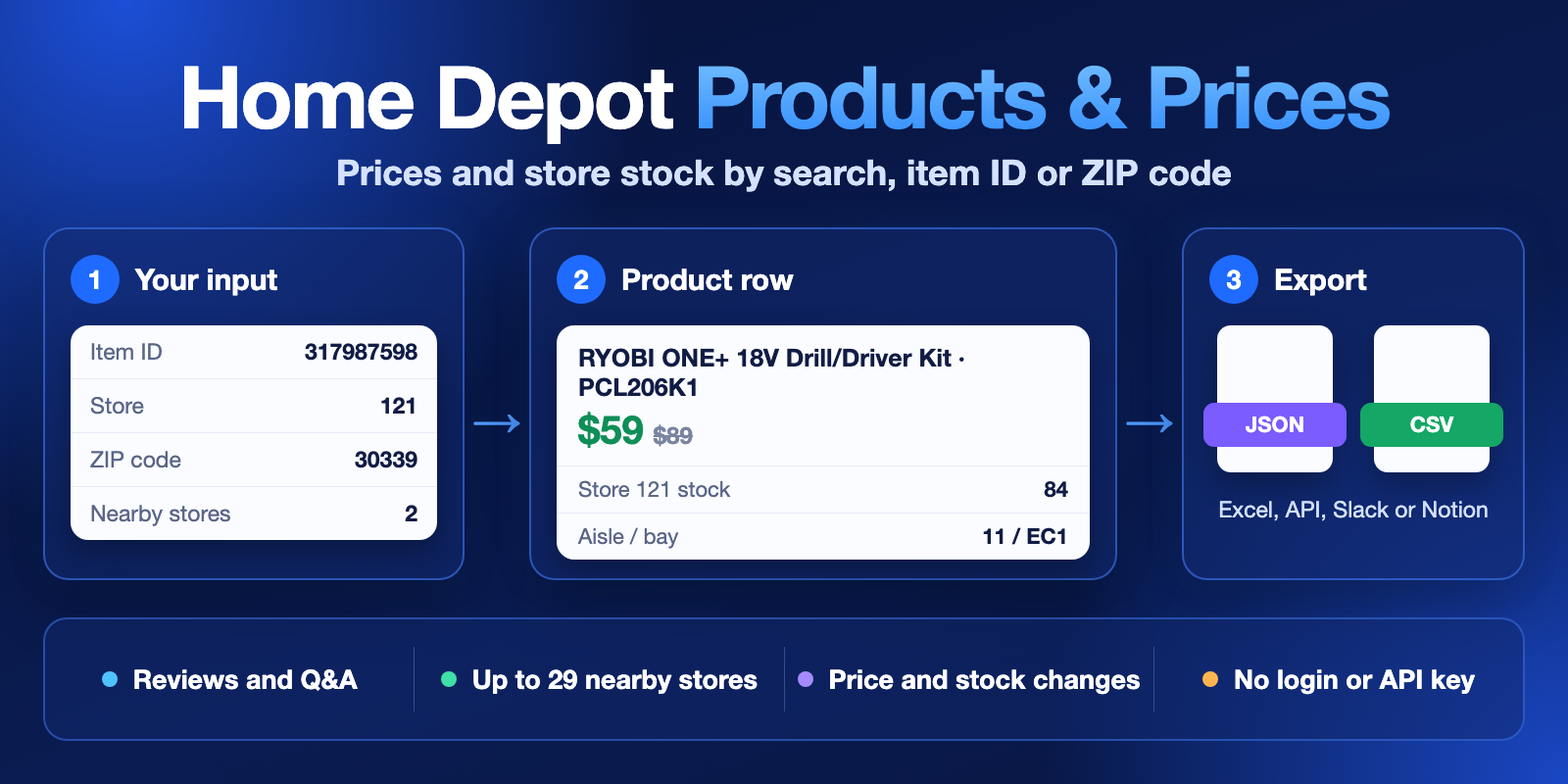
Table of contents
- What it does
- How it works
- Quick start
- Use cases
- Input
- Output
- Pricing
- Limits
- API, export and integrations
- Troubleshooting
- FAQ
- Related Actors
- Support
What it does
This Actor reads public pages of homedepot.com, the US Home Depot website. It returns one row for each product, review, question or store. A product row has the price, the previous price, the discount, stock, delivery dates and, for your chosen store, the quantity, aisle and bay.
The Actor shows what the source shows for one store at one moment. It does not buy anything, and it does not read your Home Depot account.
Good fit
- You sell or resell products and want to watch Home Depot prices and clearance items.
- You want to know which nearby store has a product, how many units it has and where the product is in the store.
- You want reviews or customer questions for a list of products.
- You want a list of Home Depot stores near a ZIP code, with phone and hours.
- You run the same check every day and want only the products that changed.
How it works
- You choose what to collect and add search terms, links, item IDs or a ZIP code.
- The Actor reads the matching public Home Depot pages for your store and applies your filters and limits.
- The Actor saves the rows to a Dataset. It also adds a free status row when an input finds nothing, and saves a short run summary.
Quick start
-
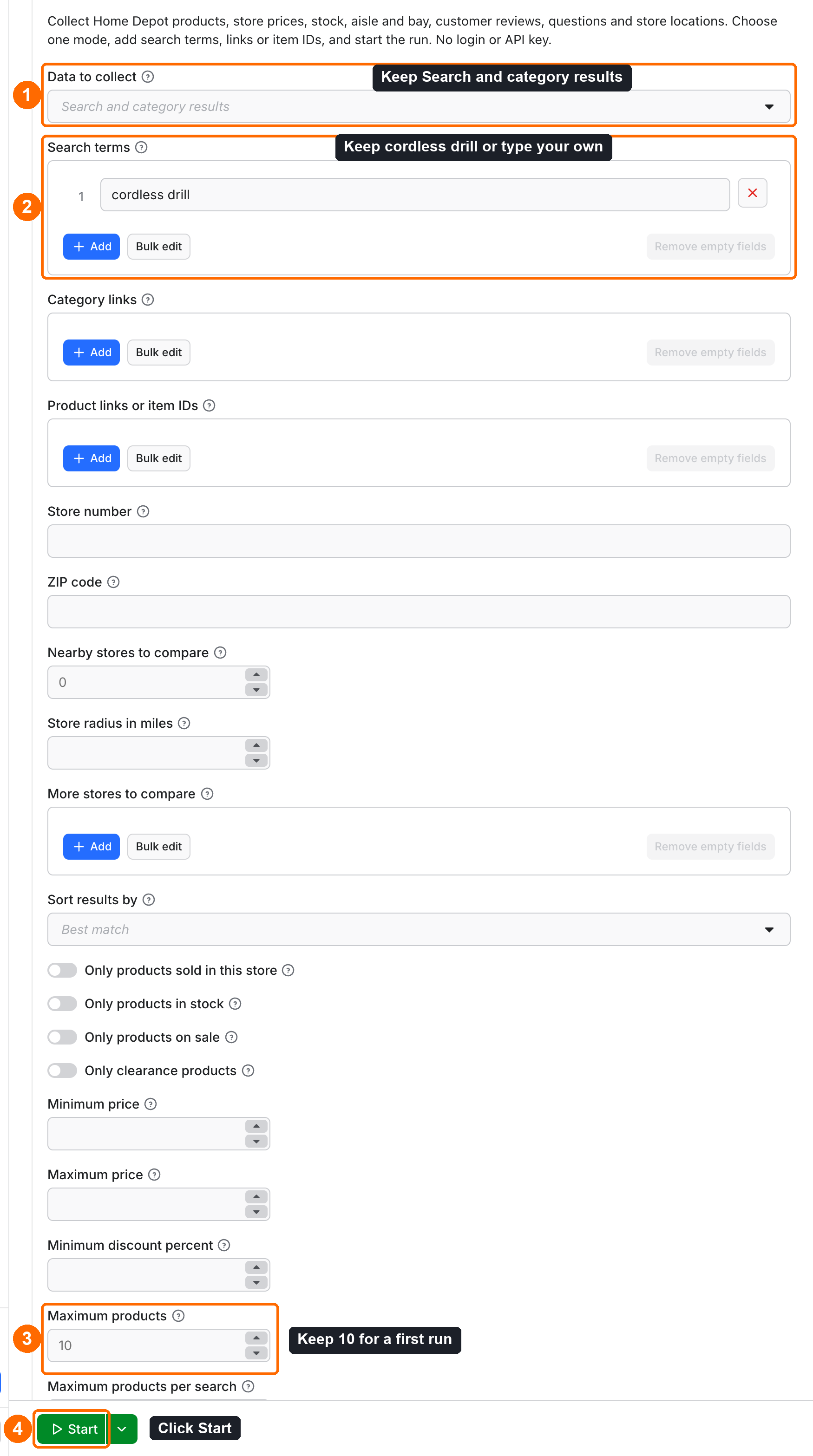
Open the Input tab. Keep Search and category results in Data to collect (box 1 in the picture).
-
Keep
cordless drillin Search terms or type your own (box 2). -
Keep
10in Maximum products for a first run (box 3). -
Click Start (box 4).
-
Open the Output tab and choose the Products view. Check
priceandwasPrice(box 5).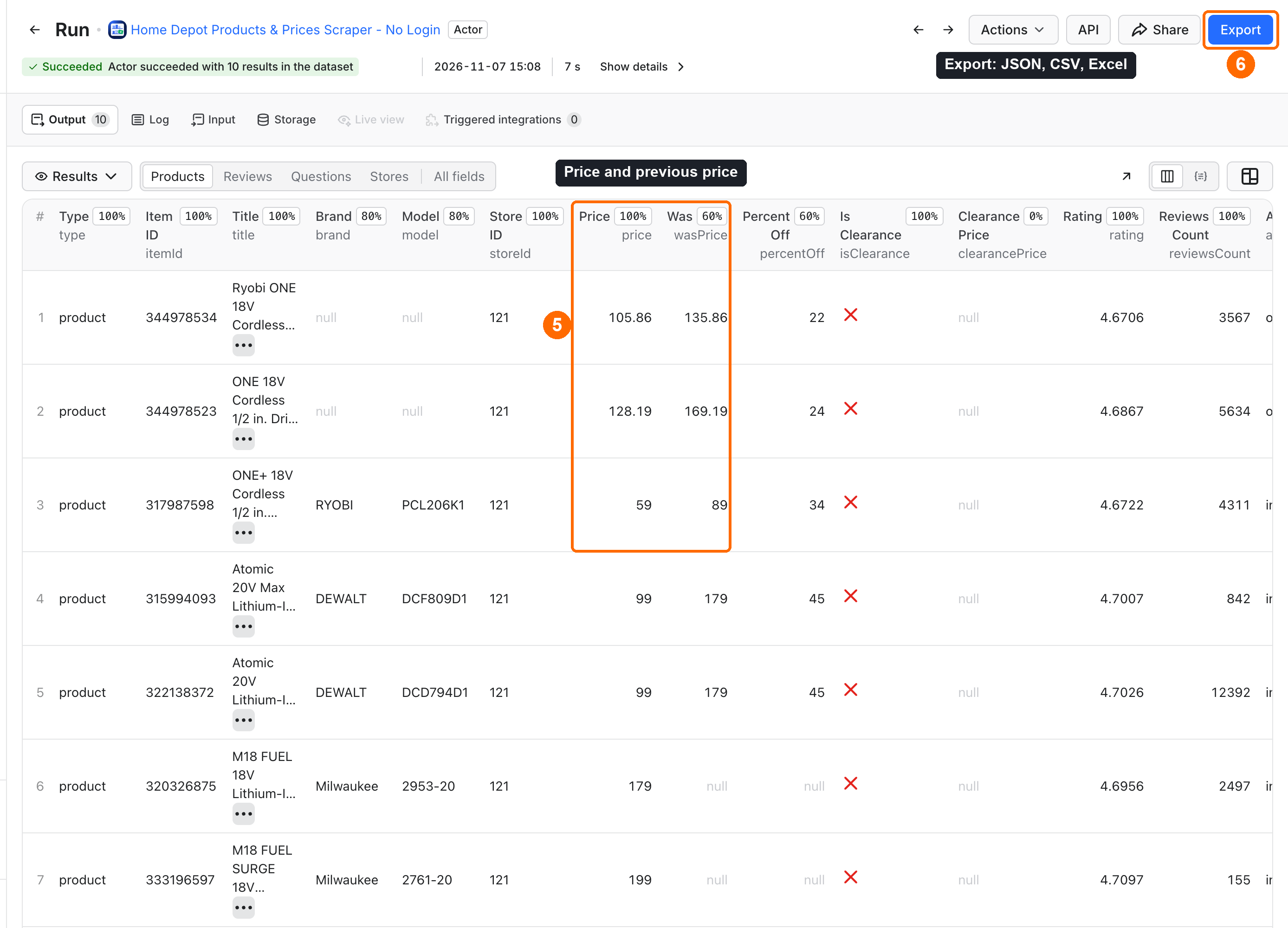
-
Click Export to get JSON, CSV or Excel (box 6).
Expected result: 10 product rows in about 10 seconds. This run costs $0.0495 on the Free plan.
Use cases
| Buyer job | Input path | Output entity | Key fields | Next integration |
|---|---|---|---|---|
| Watch prices and discounts | searchQueries or categoryUrls, with onlyOnSale if you want | Product | price, wasPrice, percentOff, isClearance | Google Sheets or a price database |
| Check stock in your stores | productUrls, storeId, zipCode, nearbyStores | Product | storeAvailability, availability, delivery | Stock alert in Slack |
| Report only what changed | searchQueries or productUrls, onlyChanges, monitorName | Product | change, price, storeAvailability | Daily schedule and a webhook |
| Read customer opinions | mode: reviews or mode: questions, productUrls | Review, question | rating, text, question, answers | Sentiment or support analysis |
| Build a store list | mode: stores, zipCode | Store | storeId, name, phone, hours | CRM or a map |
Input
Each mode needs its own field. mode: search needs searchQueries or categoryUrls, and a run with neither stops with an input error. Each list takes up to 1000 values, and the Actor removes duplicates. One run uses one mode.
Input fields
| Field | Plain name | Type | Required | Default / prefill | Allowed values | Effect | Example | Recommendation |
|---|---|---|---|---|---|---|---|---|
mode | Data to collect | string | no | search | search, product, reviews, questions, stores | Chooses the row kind | search | Start with search |
searchQueries | Search terms | array | no | prefill ["cordless drill"] | Text | Searches Home Depot | ["cordless drill"] | Use normal product words |
categoryUrls | Category links | array | no | empty | homedepot.com/b/ links | Reads a category | https://www.homedepot.com/b/Tools-Power-Tools-Drills/N-5yc1vZc27f | Use it for one whole category |
productUrls | Product links or item IDs | array | for product, reviews, questions | empty | Links or IDs | Reads these products | ["317987598"] | IDs are shorter |
storeId | Store number | string | no | Store nearest to zipCode, or 121 | Store number | Store for price, stock, aisle and bay | 121 | Check storeId in the output |
zipCode | ZIP code | string | for stores, nearbyStores | empty | 5 digits | Sets delivery dates and the nearest store | 30339 | Add it for local results |
nearbyStores | Nearby stores to compare | integer | no | 0 | 0 to 29 | Adds the nearest stores to storeAvailability | 2 | Each extra store costs more |
radiusMiles | Store radius in miles | number | no | no limit | 1 to 500 | Limits nearby stores and stores mode by distance | 25 | Use it in rural areas |
extraStoreIds | More stores to compare | array | no | empty | Up to 50 store numbers | Adds these stores to storeAvailability | ["616"] | Each extra store costs more |
sortBy | Sort results by | string | no | best_match | best_match, top_sellers, top_rated, price_low, price_high | Listing order | price_low | Use it with a low maxItems |
inStoreOnly | Only products sold in this store | boolean | no | false | true, false | Search mode only | true | Use it for store checks |
onlyInStock | Only products in stock | boolean | no | false | true, false | Keeps in stock and limited stock | true | See the filter cost note |
onlyOnSale | Only products on sale | boolean | no | false | true, false | Keeps discounted products | true | See the filter cost note |
onlyClearance | Only clearance products | boolean | no | false | true, false | Search mode only; reads the clearance list | true | clearancePrice can be empty for your store |
minPrice | Minimum price | number | no | empty | 0 or more, USD | Skips cheaper products and products with no price | 50 | See the filter cost note |
maxPrice | Maximum price | number | no | empty | 0 or more, USD | Skips dearer products and products with no price | 150 | Must not be below minPrice |
minDiscountPercent | Minimum discount percent | number | no | empty | 0 to 100 | Keeps products with this discount or more | 20 | See the filter cost note |
maxItems | Maximum products | integer | no | 10 | 1 to 5000 | Most products; in reviews and questions modes, most rows | 10 | Start low |
maxItemsPerQuery | Maximum products per search | integer | no | only maxItems | 1 to 5000 | Shares the limit across searches | 50 | Use it with many terms |
includeDetails | Add full product details | boolean | no | false | true, false | Adds description, specifications, documents, all images | true | One more charge per product |
includeReviews | Add customer reviews | boolean | no | false | true, false | Adds review rows in search and product modes | true | Each review is charged |
maxReviews | Maximum reviews per product | integer | no | 20 | 1 to 2000 | Most reviews per product | 100 | Raise maxItems too in reviews mode |
reviewsSort | Sort reviews by | string | no | newest | newest, oldest, most_helpful, highest_rating, lowest_rating, with_photos | Review order | lowest_rating | Use it to find problems |
reviewStars | Only these star ratings | array | no | all | Numbers 1 to 5 | Keeps these ratings | [1, 2] | Use it for complaints |
verifiedOnly | Only verified purchases | boolean | no | false | true, false | Keeps verified reviews | true | Fewer rows |
includeQuestions | Add questions and answers | boolean | no | false | true, false | Adds question rows in search and product modes | true | Each question is charged |
maxQuestions | Maximum questions per product | integer | no | 20 | 1 to 2000 | Most questions per product | 20 | Raise maxItems too in questions mode |
maxStores | Maximum stores | integer | no | 10 | 1 to 30 | Most rows in stores mode | 5 | The source gives up to 30 |
trackChanges | Compare with the last run | boolean | no | false | true, false | Fills change with new, changed or unchanged | true | Use the same monitorName |
onlyChanges | Return only new and changed products | boolean | no | false | true, false | Leaves out unchanged products | true | Turns on trackChanges |
minQuantityChange | Smallest stock change to report | integer | no | 1 | 1 or more | Ignores smaller stock changes | 5 | Price changes always count |
monitorName | Comparison list name | string | no | default | Letters, digits, hyphens, up to 40 | Keeps one saved list per name | atlanta-drills | One name per task |
deliveryConnector | Send results to (optional) | string | no | empty | Your MCP connector | Posts a short summary | Your Slack connector | Connect it once in Console |
deliveryTarget | Notion page or channel (optional) | string | no | connector decides | Notion page link or Slack channel ID | Where the summary goes | C0123456789 | Set one page or channel |
Interacting settings
| When | Input A | Input B | Effective behavior | Example | Cost/result effect |
|---|---|---|---|---|---|
| Both are set | storeId | zipCode | storeId is the store. zipCode sets delivery dates and the center for nearby stores | 121 and 30339 | None |
| Only ZIP is set | zipCode | storeId | The nearest store is used | 30339 | None |
| Neither is set | storeId | zipCode | Store 121 is used | Search terms only | Check storeId in the output |
| Nothing to search | mode: search | searchQueries or categoryUrls | The run stops with an input error | {} | Run fails before reading the source |
| ZIP is missing | nearbyStores | zipCode | The run stops with an input error | nearbyStores: 2 alone | Run fails before reading the source |
| Both are set | maxItems | maxItemsPerQuery | The run stops at maxItems. Each search stops at maxItemsPerQuery | 100 and 25 | Shares the budget |
| Reviews mode | maxItems | maxReviews | Each product gives up to maxReviews. The run gives up to maxItems | 100 and 100 | With the default maxItems you get 10 rows |
| Questions mode | maxItems | maxQuestions | Each product gives up to maxQuestions. The run gives up to maxItems | 20 and 20 | With the default maxItems you get 10 rows |
| Changes only | onlyChanges | trackChanges | onlyChanges turns on tracking | onlyChanges: true | Unchanged products cost one page-scan per source page or ID |
| Any filter | minPrice, onlyOnSale and others | maxItems | The Actor reads pages and then filters. It reads on until it reaches maxItems or the end | minPrice: 90000 | Pages with no match cost one page-scan each |
| Spending limit | maxItems | maxTotalChargeUsd in run options | The run stops at the first limit. The default limit is $1 | 1000 and $1 | $1 fits about 220 products on the Free plan. Raise it for big runs |
Input examples
Prices for a search term
{
  "mode": "search",
  "searchQueries": ["cordless drill"],
  "maxItems": 10
}
Expected behavior: the Actor reads the search for store 121 and stops at 10 products.
Expected output: product rows with itemId, title, price, wasPrice, storeAvailability.
Limit or cost note: $0.0495 on the Free plan.
One product across nearby stores, with reviews and questions
{
  "mode": "product",
  "productUrls": ["317987598"],
  "storeId": "121",
  "zipCode": "30339",
  "nearbyStores": 2,
  "includeDetails": true,
  "includeReviews": true,
  "maxReviews": 5,
  "includeQuestions": true,
  "maxQuestions": 5,
  "maxItems": 1
}
Expected behavior: the Actor reads the full product card, then 2 nearby stores, 5 reviews and 5 questions.
Expected output: 1 product row with 3 stores in storeAvailability, 5 review rows and 5 question rows.
Limit or cost note: $0.0299 on the Free plan.
Stores near a ZIP code
{
  "mode": "stores",
  "zipCode": "30339",
  "maxStores": 5
}
Expected behavior: the Actor finds the 5 nearest stores.
Expected output: store rows with storeId, name, phone, distanceMiles, hours.
Limit or cost note: $0.00675 on the Free plan.
Only what changed since the last run
{
  "mode": "product",
  "productUrls": ["317987598", "344978534"],
  "onlyChanges": true,
  "monitorName": "atlanta-drills"
}
Expected behavior: the first run saves the list. Later runs with the same monitorName return only new and changed products.
Expected output: product rows with change. No rows when nothing changed.
Limit or cost note: an unchanged product costs one page-scan.
Output
Every row has type, source, fetchedAt. The Dataset has four views: Products, Reviews, Questions and Stores. A view shows only its own columns, so rows of other kinds can look empty there. Use one mode or filter by type when you export.
Output fields
| Field | Meaning | Type | Can be empty? | Example / enum | Source / notes |
|---|---|---|---|---|---|
type | Row kind | string | no | product, review, question, store, status | Set by the Actor |
itemId | Home Depot item ID | string | yes | 317987598 | Source |
title | Product or review title | string | yes | ONE+ 18V Cordless 1/2 in. Drill/Driver Kit... | Source |
brand, model | Brand and model number | string | yes | RYOBI, PCL206K1 | The source can leave them out of search rows |
storeSku, upc, parentId | Store SKU, barcode, parent product | string | yes | 1006703281, 033287200177 | Source |
storeId, zipCode | Store and ZIP used for the row | string | yes | 121, 30339 | storeId has no leading zeros |
price, wasPrice | Current and previous price | number | yes | 59, 89 | price is null when the source hides it. wasPrice is null when there is no discount |
currency, unitOfMeasure | Currency and unit | string | yes | USD, each | Source |
dollarOff, percentOff, savingsCenter | Discount in dollars, percent and label | number, string | yes | 30, 34, New Lower Prices | Source |
isSpecialBuy, isClearance, clearancePrice | Deal flags and clearance price | boolean, number | yes | false, false, null | clearancePrice is null when this store has none |
bulkPrice, bulkQuantity, unitPrice, unitsPerCase | Bulk and unit prices | number | yes | null | Only when the source shows them |
rating, reviewsCount, reviewStats | Average rating, count and distribution | number, object | yes | 4.6722, 4311 | In a review row, rating is that review's rating. reviewStats comes with full details |
availability | Stock state | string | yes | in_stock, limited_stock, out_of_stock, backordered, discontinued | Null when the source did not say. Null does not mean out of stock |
discontinued, backordered | Stock flags | boolean | yes | false | Source |
onlineQuantity | Units for shipping | number | yes | 2245 | Source |
storeAvailability | Price, quantity, aisle and bay per store | array | yes | See the example | quantity: null means unknown. 0 means none |
delivery | Delivery availability, charge and dates | object | yes | {"free": true, "charge": 0} | Dates are for the store or zipCode |
images, videos, documents | Media links and manuals | array | yes | https://images.thdstatic.com/... | documents and all images need details |
description, highlights, specifications, keyFeatures | Product content | string, array | yes | {"name": "Chuck Size (In.)", "value": "1/2 In."} | description and specifications need details |
breadcrumbs, category, collection | Category path and collection | array, string | yes | Power Drills | Source |
badges, favoriteCount, isSponsored | Labels, favorites and sponsored flag | array, number, boolean | yes | Best Seller | favoriteCount needs details |
returnPolicy, quantityLimit, variantCount | Return label, order limit, options | string, number | yes | 90-Day, 5, 7 | Source |
query, position, sourceUrl | What found the row and where | string, number | yes | cordless drill, 3 | Set by the Actor |
change | new, changed or unchanged, with previous price and quantity | object | yes | {"status": "new", "previousPrice": null, "previousQuantity": null} | Only with trackChanges or onlyChanges |
reviewedItemId, reviewId | Reviewed item and review ID | string | yes | 339545347, 308065976 | The reviewed item can be a sibling variant |
text, submittedAt, isRecommended, isSyndicated | Review content | string, boolean | yes | Nice, handy little drill. | Many reviews have stars only, so text can be null. Contact details are removed |
helpfulVotes, unhelpfulVotes, photos | Review votes and photos | number, array | yes | 0, [] | Source |
questionId, question, details, askedAt | Question content | string | yes | 11593290 | Source |
answerCount, answers | Number of answers and the answers | number, array | yes | 1 | Contact details are removed |
name, street, city, state, zip, phone | Store address and phone | string | yes | Buckhead, Atlanta, GA | Business data of the store |
distanceMiles, hours | Distance from zipCode and hours per day | number, object | yes | 6.82 | distanceMiles needs zipCode |
input, status, reason, message | What a status row is about | string | yes | not_found, empty, error | Only in rows with type: status |
url, source, fetchedAt | Source link, source name and time | string | url yes | homedepot.com | Set by the Actor |
Output entities and surfaces
| Situation | Dataset/API/KVS/live view | Result shape | User action |
|---|---|---|---|
| Normal item | Dataset, API, Products, Reviews, Questions or Stores view | One row per entity | Export or read the key fields |
| Domain-empty result | Dataset, RUN_SUMMARY record | A status row with not_found or empty. With onlyChanges and no changes, the Dataset is empty and unchanged counts the products | Check the input and the filters |
| Partial result | Dataset, RUN_SUMMARY record, status message | Saved rows, then status: partial and stopReason in RUN_SUMMARY. unprocessed lists what was not read | Read stopReason, raise the limit and run the rest |
| Technical failure or retry | Run status, status row with error, RUN_SUMMARY record | Failed run or error row. Rows saved earlier stay | Run the same input again. Error rows are free |
Output example
This example comes from the first input example. It is trimmed and contains one product row. In the full row, fields with no value are null or an empty list.
{
  "type": "product",
  "itemId": "317987598",
  "title": "ONE+ 18V Cordless 1/2 in. Drill/Driver Kit with (1) Compact Battery and Charger",
  "brand": "RYOBI",
  "model": "PCL206K1",
  "storeId": "121",
  "zipCode": null,
  "price": 59,
  "wasPrice": 89,
  "currency": "USD",
  "percentOff": 34,
  "isClearance": false,
  "clearancePrice": null,
  "rating": 4.6722,
  "reviewsCount": 4311,
  "availability": "in_stock",
  "onlineQuantity": 2245,
  "storeAvailability": [
    {
      "storeId": "121",
      "storeName": "Cumberland",
      "state": "GA",
      "price": 59,
      "quantity": 84,
      "inStock": true,
      "pickupAvailable": true,
      "aisle": "11",
      "bay": "EC1",
      "locationText": "Aisle 11 - Endcap"
    }
  ],
  "category": "Power Drills",
  "query": "cordless drill",
  "position": 3,
  "url": "https://www.homedepot.com/p/RYOBI-ONE-18V-Cordless-1-2-in-Drill-Driver-Kit-with-1-Compact-Battery-and-Charger-PCL206K1/317987598",
  "source": "homedepot.com"
}
null means the source did not give this value in this run. It does not mean zero.
Send results to Slack or Notion
Pick your connector in the optional deliveryConnector field. After the run saves its data, the Actor posts a short summary (up to 25 rows and a link to the full dataset) there. Put a Notion page link or a Slack channel ID in deliveryTarget: in Notion every run is added on top of that one page, so your workspace does not fill up with new pages. A delivery error never fails the run and costs nothing extra. Connect a service once in Apify Console → MCP connectors.
Use case → fields
| Buyer job | Input path | Output entity | Key fields | Next integration |
|---|---|---|---|---|
| Watch prices | searchQueries | Product | price, wasPrice, percentOff | Spreadsheet |
| Find stock near a customer | productUrls, zipCode, nearbyStores | Product | storeAvailability with quantity, aisle, bay | Slack alert |
| Report changes | onlyChanges, monitorName | Product | change, price | Webhook |
| Read opinions | mode: reviews | Review | rating, text, submittedAt | Analysis tool |
| List stores | mode: stores | Store | name, phone, hours | CRM |
Pricing
Pricing unit
You pay per event. You do not pay for platform usage: event prices include it.
| Event | What it means | Free plan, per 1000 | Bronze | Silver | Gold and above |
|---|---|---|---|---|---|
apify-actor-start | One run start | $4.50 | $4.50 | $4.50 | $4.50 |
product | One product row | $4.50 | $4.05 | $3.60 | $3.15 |
product-detail | Full details for one product | $2.00 | $1.80 | $1.60 | $1.40 |
review | One review row | $1.80 | $1.62 | $1.44 | $1.26 |
question | One question row | $1.80 | $1.62 | $1.44 | $1.26 |
store | One store row | $0.45 | $0.405 | $0.36 | $0.315 |
store-check | One extra store for one product | $0.45 | $0.405 | $0.36 | $0.315 |
page-scan | One source check with no paid rows | $1.50 | $1.35 | $1.20 | $1.05 |
The start fee scales with run memory, per GB. At the default 256 MB you pay it once.
mode: product always reads the full card, so one product costs product plus product-detail.
What you pay when you get no paid rows:
- Search with no results, or an unknown item ID: the start fee and one
page-scanfor each source check. You get a freestatusrow. - ZIP code with no stores in
storesmode: only the start fee. You get a freestatusrow. - Filter with no matches: the Actor must read pages before it can filter. You pay one
page-scanper page read. A deep filter on a large search read 81 pages and cost $0.126 on the Free plan. - Unchanged monitoring run: the start fee and one
page-scanper source page or item ID. Five unchanged item IDs cost $0.012 on the Free plan. - Bad input: a run where every value is invalid fails fast and costs only the start fee.
- Partial or failed run: you pay for rows already saved and checks already done. An
errorrow costs nothing.
Cost examples
Amounts are for the Free plan, from real runs at 256 MB.
| Scenario | Input scope | Expected item/event count | Base charge | Optional charge | Stop/cap behavior |
|---|---|---|---|---|---|
| First run | 1 search, maxItems: 10 | 10 product | $0.0495 | none | Stops at 10 |
| 100 products | 1 search, maxItems: 100 | 100 product | $0.4545 | none | Stops at 100 |
| 1000 products | Searches, maxItems: 1000 | 1000 product | $4.5045 | none | Set maxTotalChargeUsd above $4.51. A slow run can need a timeout of 900 s |
| 5000 products | Searches, maxItems: 5000 | 5000 product | $22.5045 | none | Set maxTotalChargeUsd above $22.51 and timeout to 1500 s |
| 100 products with details | 1 search, includeDetails: true | 100 product, 100 product-detail | $0.4545 | $0.20 | Stops at 100 |
| 1 product, full check | Input example 2 | 1 product, 1 product-detail, 5 review, 5 question, 2 store-check | $0.009 | $0.0209 | Stops at the set limits |
| 100 reviews | mode: reviews | 100 review | $0.1845 | none | Stops at maxItems |
| 20 questions | mode: questions | 20 question | $0.0405 | none | Stops at maxItems |
| 5 stores | mode: stores | 5 store | $0.00675 | none | Stops at maxStores |
| Spending limit | Any run, maxTotalChargeUsd | As many events as fit | Your limit | none | Run succeeds with stopReason: CHARGE_LIMIT |
Limits
- Source: only homedepot.com in the US. No Canada or Mexico sites, no account data, no orders.
- Size: up to 5000 products in one run and 1000 values in each list. Up to 2000 reviews or questions per product.
- Stores: up to 30 rows in
storesmode, 29 nearby stores and 50extraStoreIds. - Time: the default timeout is 300 seconds. Real runs took about 10 seconds for 10 products, 1 to 2.5 minutes for 500 products, and about 3.5 minutes for 2000 products. Two runs of 5000 products took about 10 and 14 minutes. At the slowest speed we saw, 5000 products would take about 17 minutes. Speed depends on the source. For a run over 1000 products, set the timeout to 900 seconds. For 5000 products, set 1500 seconds. Item IDs are slower: 100 IDs with details took about 3 minutes, so 1000 IDs would take about 30 minutes. For a long ID list, set a timeout of 1200 seconds and send up to 500 IDs per run. The timeout must be more than 40 seconds, because the Actor keeps 40 seconds to save its data.
- Spending: the default spending limit is $1. It fits about 220 products on the Free plan.
- Deep listings: the Actor can stop before the end of a very large listing. It then saves what it has and sets
stopReason: PAGE_LIMIT. A single run reads up to 20000 pages or 512 MB. - Large pages: a source page over 4 MB is skipped. You get a free
errorrow, and the rest of the run goes on. - Slow source: if no page answers for 90 seconds, the run stops with
stopReason: DEADLINE. Rows saved earlier stay. - Bad values: the Dataset gets
statusrows for the first 25 bad values. The rest are ininvalidValuesin theRUN_SUMMARYrecord. - Search matching: the source often returns products even for unusual words, so check
titlebefore you trust a result. - Clearance: the clearance list is shared across stores, so
clearancePricecan be null for your store. - Monitoring:
maxItemscounts the changes you get back. Products past the last list size count asnew, so build the first list with a largemaxItems. - Personal data: the Actor removes phone numbers and email addresses from reviews and answers. Answers can still contain first names, as written at the source.
- Freshness: prices and stock are what the source showed at
fetchedAt. This Actor is not linked to The Home Depot.
API, export and integrations
- API: send the input JSON to the run endpoint. Read rows from the run's default Dataset. The next system uses
itemId,price,storeAvailability. - Export: in the Output tab, click Export for JSON, CSV or Excel. For CSV, use the Products view, because
storeAvailabilityis a list. - Scheduling: schedule the same input with
onlyChangesand onemonitorName. Each run returns only what changed, inchangeandprice. - Webhooks / no-code: add a webhook on run success. Then Make, Zapier or n8n can read the Dataset and use
itemId,price,availability. - SDK / MCP / agent: start the Actor
cliqtomedia/home-depot-scraperwith the same input from the Apify SDK or MCP server. Read the rows from the default Dataset.
Use with AI agents (MCP)
MCP server URL with only this Actor: https://mcp.apify.com?tools=cliqtomedia/home-depot-scraper
Smallest useful input:
{
  "mode": "search",
  "searchQueries": ["cordless drill"],
  "maxItems": 10
}
Key output fields:
itemId: the Home Depot item ID.price: the price in the chosen store. Null means the source hid it.wasPrice: the previous price.availability: the stock state. Null means the source did not say.storeAvailability: price, quantity, aisle and bay per store.
A run of 10 products takes about 10 seconds and costs $0.0495 on the Free plan. Limits: up to 5000 products per run, a default spending limit of $1 and a default timeout of 300 seconds.
Troubleshooting
The run stops with fewer rows than I asked for
Symptom: the status message says partial and shows CHARGE_LIMIT.
Likely reason: the run reached maxTotalChargeUsd. The default is $1.
Check: read stopReason in the RUN_SUMMARY record.
Action: raise the limit in run options and start again.
The run stops with DEADLINE
Symptom: the status shows DEADLINE, and the run has some rows or fails with none.
Likely reason: the timeout was too short for this many products, or the source stopped answering for 90 seconds.
Check: read unprocessed in the RUN_SUMMARY record.
Action: raise the timeout to 900 or 1500 seconds for a big run, split a long item ID list into runs of up to 500 IDs, or run the unprocessed values again.
A filter returns no rows and still costs money
Symptom: no products, one status row with empty and some page-scan charges.
Likely reason: the Actor read pages, and no product passed the filter.
Check: read filtered in the RUN_SUMMARY record.
Action: widen minPrice, maxPrice or minDiscountPercent, or set a spending limit first.
I get a not_found row
Symptom: a status row with not_found for one item.
Likely reason: the item ID or link does not exist at the source, or the product was removed.
Check: open the same link on homedepot.com.
Action: fix the ID. Other inputs in the run are not affected.
The run fails with a source error
Symptom: the run fails with SOURCE_ERROR, or an error row appears.
Likely reason: the source did not answer for this input. This is not an empty result.
Check: read sourceError and failedInputs in the RUN_SUMMARY record.
Action: run the same input again later. Error rows cost nothing, and saved rows stay in the Dataset.
The input is rejected
Symptom: the run fails at once with a message such as nearbyStores needs zipCode.
Likely reason: a field is missing or has a bad format.
Check: read the status message and the status rows.
Action: fix the field and start again.
brand, model or text is empty
Symptom: brand or model is null in search rows, or text is null in review rows.
Likely reason: the source did not give it. Many reviews have stars only.
Check: open the url of the row.
Action: for products, use mode: product or includeDetails.
FAQ
Do I need a Home Depot account or an API key?
No. The Actor reads public pages. You need only an Apify account.
Which store does the price come from?
From storeId. If it is empty, the Actor uses the store nearest to zipCode. With no ZIP code, it uses store 121. Each row shows the store it used.
What does an empty run cost?
The start fee and one page-scan for each source check. A ZIP code with no stores costs only the start fee. See the Pricing section for real amounts.
How do I get stock for one product across stores?
Add the item ID to productUrls, your zipCode and a nearbyStores value. Read quantity, aisle and bay in storeAvailability.
Does the Actor return every product and every review?
It returns what the source shows, up to your limits. A very large listing can end early with stopReason: PAGE_LIMIT. A review can belong to a sibling variant, and reviewedItemId shows which one.
How fresh is the data?
The Actor reads the source during the run. fetchedAt shows the time. Prices and stock can change after that.
Is a null stock value the same as zero?
No. quantity: 0 means the store has none. null means the source did not say.
Related Actors
- Amazon Product Scraper: Prices, Reviews, BSR, No Login: compare the same product on Amazon.
- Google Shopping Scraper - Prices, Stores & Offers, No Login: see offers from other shops.
- eBay Search Scraper: Active Listings & Prices, No Login: check active listings and resale prices.
- Idealo Price Scraper: All Shop Offers, 6 Countries, No Login: compare shop offers in Europe.
- AliExpress Scraper: Products, Prices & Reviews, No Login: find import prices for similar products.
Support
For a bug, a question or a feature request, open the Issues tab of this Actor on Apify. Include the run ID, the mode and the error text. Never send tokens, cookies or billing data.
Changelog
This Actor's version history is a separate document: https://apify.com/cliqtomedia/home-depot-scraper/changelog.md
Actor input Schema
mode (type: string):
Choose what to collect: search and category results, product details, customer reviews, questions and answers, or store locations. One mode per run. Default: Search and category results.
searchQueries (type: array):
Words to search on Home Depot, one per line, for example cordless drill. Used in Search and category results mode. This mode needs a search term or a category link.
categoryUrls (type: array):
Home Depot category or search links, one per line, for example https://www.homedepot.com/b/Tools-Power-Tools-Drills/N-5yc1vZc27f. Used in Search and category results mode.
productUrls (type: array):
Home Depot product links or item IDs, one per line, for example 317987598. Required for Product details, Customer reviews, and Questions and answers modes. Duplicates are removed.
storeId (type: string):
The store used for price, stock, aisle and bay, for example 121. Empty: the store nearest to the ZIP code, or store 121 when there is no ZIP code. The run reports which store was used.
zipCode (type: string):
A 5-digit US ZIP code, for example 30339. It sets delivery dates, picks the nearest store when Store number is empty, and is the center for Nearby stores. Required for Store locations mode.
nearbyStores (type: integer):
Also read price and stock in this many stores nearest to the ZIP code, up to 29. Each extra store is charged per product. Default: 0.
radiusMiles (type: number):
Keep only stores within this distance of the ZIP code, for Nearby stores and Store locations mode. Empty: no distance limit.
extraStoreIds (type: array):
Store numbers to read in addition to the main store, one per line, for example 616. Up to 50. Each extra store is charged per product.
sortBy (type: string):
The order of search and category results. Default: Best match.
inStoreOnly (type: boolean):
Ask Home Depot for products sold in the chosen store only. Search and category results only. Default: off.
onlyInStock (type: boolean):
Keep products shown as in stock or limited stock. Default: off.
onlyOnSale (type: boolean):
Keep products with a lower current price than their previous price. Default: off.
onlyClearance (type: boolean):
Read Home Depot's clearance list. Search and category results only. The list is shared by all stores, so the clearance price can be empty for your store. Default: off.
minPrice (type: number):
Keep products at or above this price in US dollars. Products without a price are skipped when this is set.
maxPrice (type: number):
Keep products at or below this price in US dollars. Products without a price are skipped when this is set.
minDiscountPercent (type: number):
Keep products with at least this discount, from 0 to 100.
maxItems (type: integer):
The most products to return in one run, from 1 to 5000. In review and question modes, this is the most rows in one run. Default: 10.
maxItemsPerQuery (type: integer):
The most products from each search term or category link. Empty: only Maximum products applies.
includeDetails (type: boolean):
Add the description, specifications, documents and all images to each search result. This makes one more request and one more charge per product. Default: off.
includeReviews (type: boolean):
Add review rows and rating statistics for each product in search and product modes. Each review is charged. Default: off.
maxReviews (type: integer):
The most reviews for each product, from 1 to 2000. Default: 20.
reviewsSort (type: string):
The order of customer reviews. Default: Newest.
reviewStars (type: array):
Keep reviews with these ratings, for example 1 and 2. Empty: all ratings.
verifiedOnly (type: boolean):
Keep reviews from verified purchases. Default: off.
includeQuestions (type: boolean):
Add question rows with their answers for each product in search and product modes. Each question is charged. Default: off.
maxQuestions (type: integer):
The most questions for each product, from 1 to 2000. Default: 20.
maxStores (type: integer):
The most stores to return in Store locations mode, from 1 to 30. Default: 10.
trackChanges (type: boolean):
Mark each product as new, changed or unchanged since the last run with the same list name. Default: off.
onlyChanges (type: boolean):
Leave out unchanged products. This also turns on Compare with the last run. Default: off.
minQuantityChange (type: integer):
A stock change smaller than this number counts as unchanged. Price changes always count. Default: 1.
monitorName (type: string):
Keep separate comparison history for each list, for example atlanta-drills. Letters, digits and hyphens, up to 40 characters. Default: default.
deliveryConnector (type: string):
Your Slack, Notion or other MCP connector. After the run the Actor posts a short summary there. Connect services once in Apify Console → MCP connectors.
deliveryTarget (type: string):
Where to post the summary: a Notion page link (each run is added on top of that page) or a Slack channel ID. Leave empty to let the connector decide.
Actor input object example
{
  "mode": "search",
  "searchQueries": [
    "cordless drill"
  ],
  "nearbyStores": 0,
  "sortBy": "best_match",
  "inStoreOnly": false,
  "onlyInStock": false,
  "onlyOnSale": false,
  "onlyClearance": false,
  "maxItems": 10,
  "includeDetails": false,
  "includeReviews": false,
  "maxReviews": 20,
  "reviewsSort": "newest",
  "verifiedOnly": false,
  "includeQuestions": false,
  "maxQuestions": 20,
  "maxStores": 10,
  "trackChanges": false,
  "onlyChanges": false,
  "minQuantityChange": 1,
  "monitorName": "default"
}
Actor output Schema
dataset (type: string):
No description
summary (type: string):
No description
API
You can run this Actor programmatically using our API. Below are code examples in JavaScript, Python, and CLI, as well as the OpenAPI specification and MCP server setup.
JavaScript example
import { ApifyClient } from 'apify-client';

// Initialize the ApifyClient with your Apify API token
// Replace the '<YOUR_API_TOKEN>' with your token
const client = new ApifyClient({
    token: '<YOUR_API_TOKEN>',
});

// Prepare Actor input
const input = {
    "searchQueries": [
        "cordless drill"
    ]
};

// Run the Actor and wait for it to finish
const run = await client.actor("cliqtomedia/home-depot-scraper").call(input);

// Fetch and print Actor results from the run's dataset (if any)
console.log('Results from dataset');
console.log(`💾 Check your data here: https://console.apify.com/storage/datasets/${run.defaultDatasetId}`);
const { items } = await client.dataset(run.defaultDatasetId).listItems();
items.forEach((item) => {
    console.dir(item);
});

// 📚 Want to learn more 📖? Go to → https://docs.apify.com/api/client/js/docs
Python example
from apify_client import ApifyClient

# Initialize the ApifyClient with your Apify API token
# Replace '<YOUR_API_TOKEN>' with your token.
client = ApifyClient("<YOUR_API_TOKEN>")

# Prepare the Actor input
run_input = { "searchQueries": ["cordless drill"] }

# Run the Actor and wait for it to finish
run = client.actor("cliqtomedia/home-depot-scraper").call(run_input=run_input)

# Fetch and print Actor results from the run's dataset (if there are any)
print(f"💾 Check your data here: https://console.apify.com/storage/datasets/{run.default_dataset_id}")
for item in client.dataset(run.default_dataset_id).iterate_items():
    print(item)

# 📚 Want to learn more 📖? Go to → https://docs.apify.com/api/client/python/docs/quick-start
CLI example
echo '{
  "searchQueries": [
    "cordless drill"
  ]
}' |
apify call cliqtomedia/home-depot-scraper --silent --output-dataset
MCP server setup
{
    "mcpServers": {
        "apify": {
            "type": "http",
            "url": "https://mcp.apify.com/?tools=fetch-actor-details,cliqtomedia/home-depot-scraper"
        }
    }
}
The hosted server signs you in with OAuth on first connect, so no API token belongs in this config. Clients without OAuth support can send an Authorization: Bearer <APIFY_API_TOKEN> header instead, using a token from API & Integrations in Apify Console (https://console.apify.com/settings/integrations).
OpenAPI specification
Download the OpenAPI definition: https://api.apify.com/v2/actors/AluYRXaTtDm5Y2VG7/builds/zkG0Cc29Rr1djvqin/openapi.json