Facebook Ad Library Scraper: Competitor Ads (Apify Actor)
Find competitor ads in the public Meta Ad Library by keyword, Facebook page URL or domain. Each ad row has days running, a 0-100 winner score, variant count, landing domain and UTM tags, EU reach and political spend; repeat runs flag new and stopped ads. No login and no Meta API token. $0.70 per 1,000 ads, $0.001 per run start. Runs as an Apify Actor, callable from MCP clients via the Apify MCP server (https://mcp.apify.com/?tools=cliqtomedia/facebook-ad-library).
Hosted MCP Server
npx add-mcp 'https://mcp.apify.com/?tools=cliqtomedia/facebook-ad-library'Installs into Claude Code, Codex, Cursor and more
Documentation
Facebook Ad Library Scraper - Competitor Ads, No Login (cliqtomedia/facebook-ad-library) Actor
Scrape Facebook Ad Library ads by keyword, page URL or domain and find the competitor ads that keep running. Get days running, a 0-100 winner score, variant count, landing domain and UTMs, EU reach, political spend and new or stopped ad alerts.
- URL: https://apify.com/cliqtomedia/facebook-ad-library.md
- Developed by: Cliqto Media (community)
- Categories: Marketing, Social media
- Features: Limited permissions
- Stats: 1 total users, 1 monthly users, 100.0% runs succeeded, 0 bookmarks
- User rating: No ratings yet
Pricing
from $0.49 / 1,000 ads
This Actor is paid per event. You are not charged for the Apify platform usage, but only a fixed price for specific events. Since this Actor supports Apify Store discounts, the price gets lower the higher subscription plan you have.
Learn more: https://docs.apify.com/actors/running/actors-in-store.md#pay-per-event
What's an Apify Actor?
An Actor is a serverless cloud program that runs on the Apify platform. It has two run modes. In Batch mode, an Actor accepts a well-defined JSON input, performs an action which can take anything from a few seconds to a few hours, and optionally produces a well-defined JSON output, datasets with results, or files in key-value store. In Standby mode, an Actor provides a web server which can be used as a website, API, or an MCP server.
Apify vocabulary and the platform model are defined once, in the agent quickstart at https://apify.com/agents.md.
How to integrate an Actor?
If asked about integration, you help developers integrate Actors into their projects. You adapt to their stack and deliver integrations that are safe, well-documented, and production-ready.
Do not guess an integration path. Every one of them is in the agent quickstart at https://apify.com/agents.md: the Apify MCP server, Agent Skills with the Apify CLI, the JavaScript and Python clients, the REST API, and the account-free path for an agent with no human to sign in. It also carries the rule on stating cost before the first paid run.
For examples already wired to this Actor's own input schema, see the API section below.
Each client library has reference documentation the quickstart does not restate: JavaScript/TypeScript (npm install apify-client) and Python (pip install apify-client).
README
Facebook Ad Library Scraper collects ads from the public Meta Ad Library. Add keywords, website domains, advertiser pages or ad IDs, pick one or more countries, and get one row per ad: text, creative links, landing page with UTM tags, start date, days running, a 0–100 winner score, variant count and, for EU and political ads, reach and spend ranges.
No Facebook login, cookies or API token. The prefilled run (apify, US, up to 10 ads) takes about 10 seconds and costs about $0.007 on the Free plan.
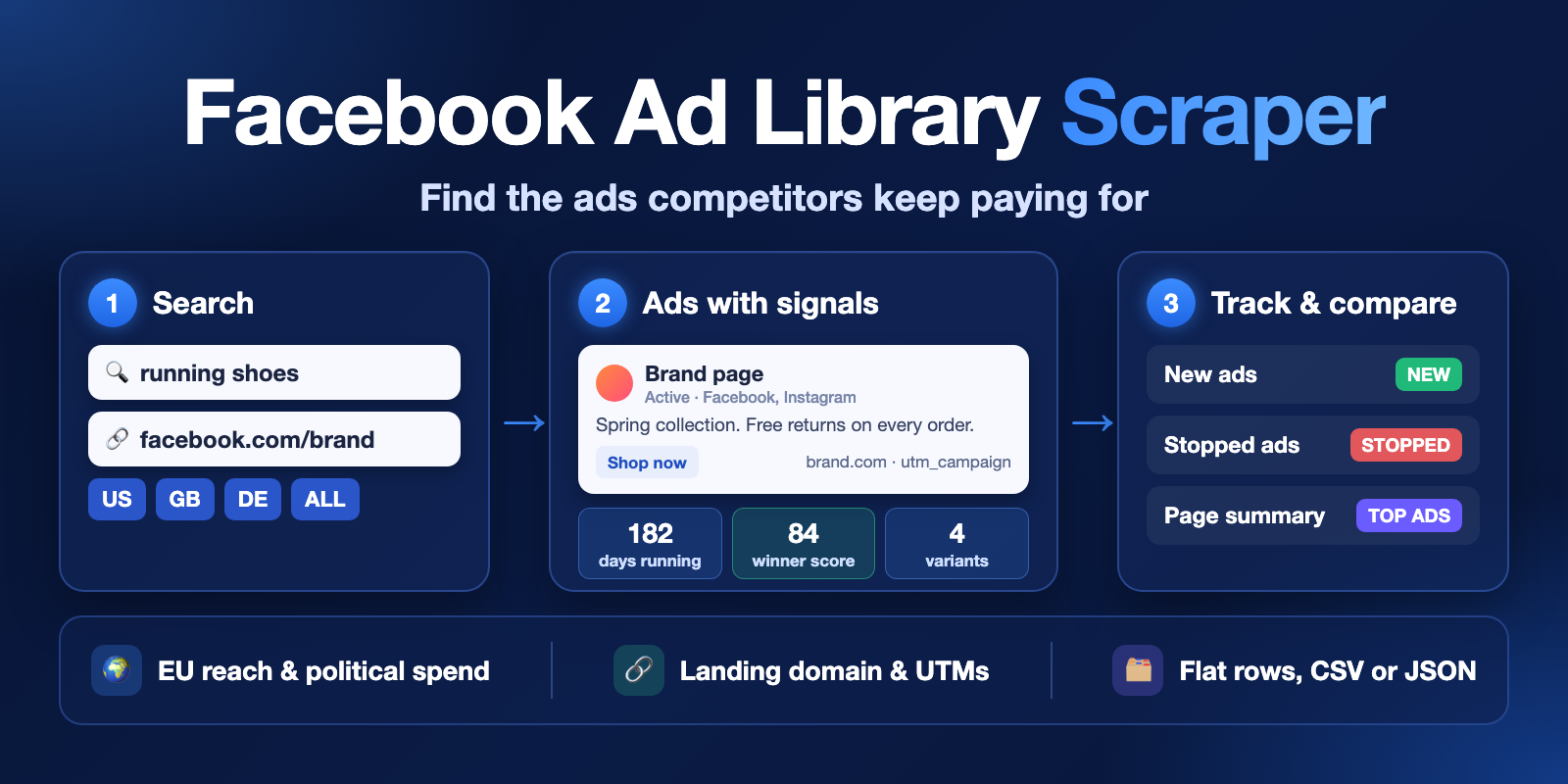
Table of contents
- What it does
- How it works
- Quick start
- Use cases
- Input
- Output
- Pricing
- Limits
- API, export and integrations
- Troubleshooting
- FAQ
- Related Actors
- Support
What it does
The Meta Ad Library lists ads that run on Facebook, Instagram, Messenger, Threads, WhatsApp and the Audience Network. This Actor reads the same public pages for you and saves each ad as a clean Dataset row.
For every ad you get:
- Who: page name, page ID, page link, likes and categories.
- What: ad text, headline, call-to-action, format (
IMAGE,VIDEO,CAROUSEL,DCO,DPA…), image and video links, detected language. - Where it leads: landing link without the Facebook redirect,
landingDomain, andutmSource,utmMedium,utmCampaign,utmContent,utmTerm. - How long and how strong:
startDate,endDate,daysRunning,variantCount(how many versions Facebook groups together) andwinnerScore(0–100). - Political and EU data: spend and impression ranges, "Paid for by" text, and with Add EU reach, demographics and payer details on: EU and UK reach, age, gender, locations, payer and beneficiary.
- Change tracking:
changeStatusneworseenand a list of ads that stopped since the last run.
Good fit
- Find a competitor's long-running ads, the ones they keep paying for.
- Collect ad copy, hooks and calls-to-action for a keyword or a niche.
- Watch a list of advertisers every day and get only the new ads.
- Check political and issue ads: who paid, spend range and impressions.
- Compare 2–3 advertisers side by side with the advertiser summary.
How it works
- The Actor opens the public Ad Library search for each search term or page in each country you chose.
- It reads the result pages until it has Max ads per search ads or the list ends. It removes repeats, works out days running, landing domain, UTM tags, language and winner score, and keeps only the media type you chose.
- If you asked for it, it opens each ad's detail panel (EU reach, payer), saves the first image, and compares the ads with the last run.
- It saves one row per ad in the Dataset and writes
RUN_SUMMARY(status and reason for every search). With tracking on it also writesCHANGES, and with the summary on it writesADVERTISER_SUMMARY.
Quick start
-
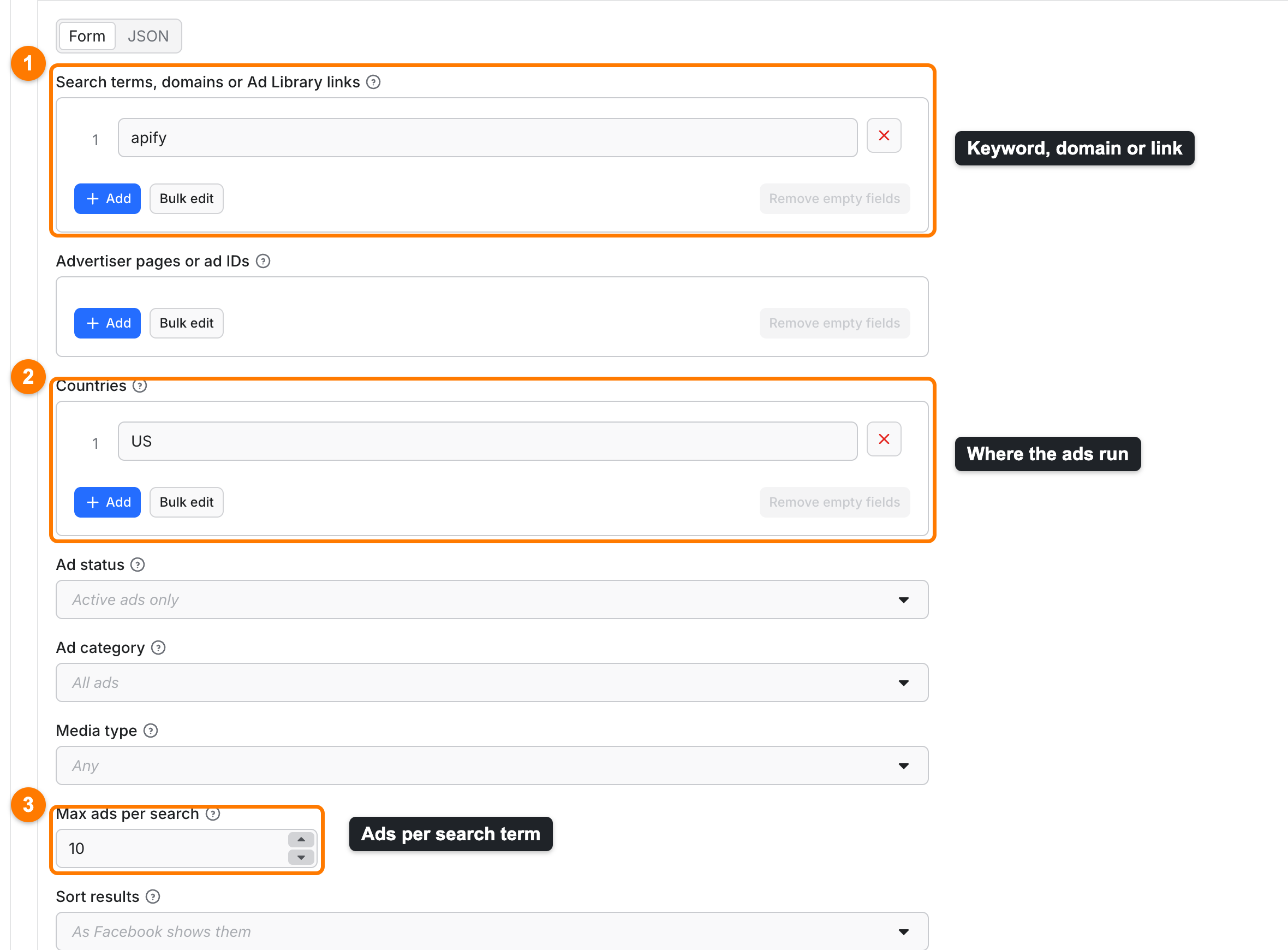
Open the Input tab. Search terms, domains or Ad Library links has
apifyin it (box 1). Replace it with your keyword, a domain such asnike.com, or leave it. -
To list every ad of one advertiser, add the page link (for example
https://www.facebook.com/nike) in Advertiser pages or ad IDs instead. -
Keep Countries at
USand Max ads per search at10(boxes 2 and 3), or choose your own. UseALLfor every country. -
Start the run with the button at the bottom of the page.
-
Open the Output tab. The Ads view (box 1) shows page, days running, winner score, variant count (box 2), ad text and landing domain. Export (box 3) downloads CSV, JSON or Excel.
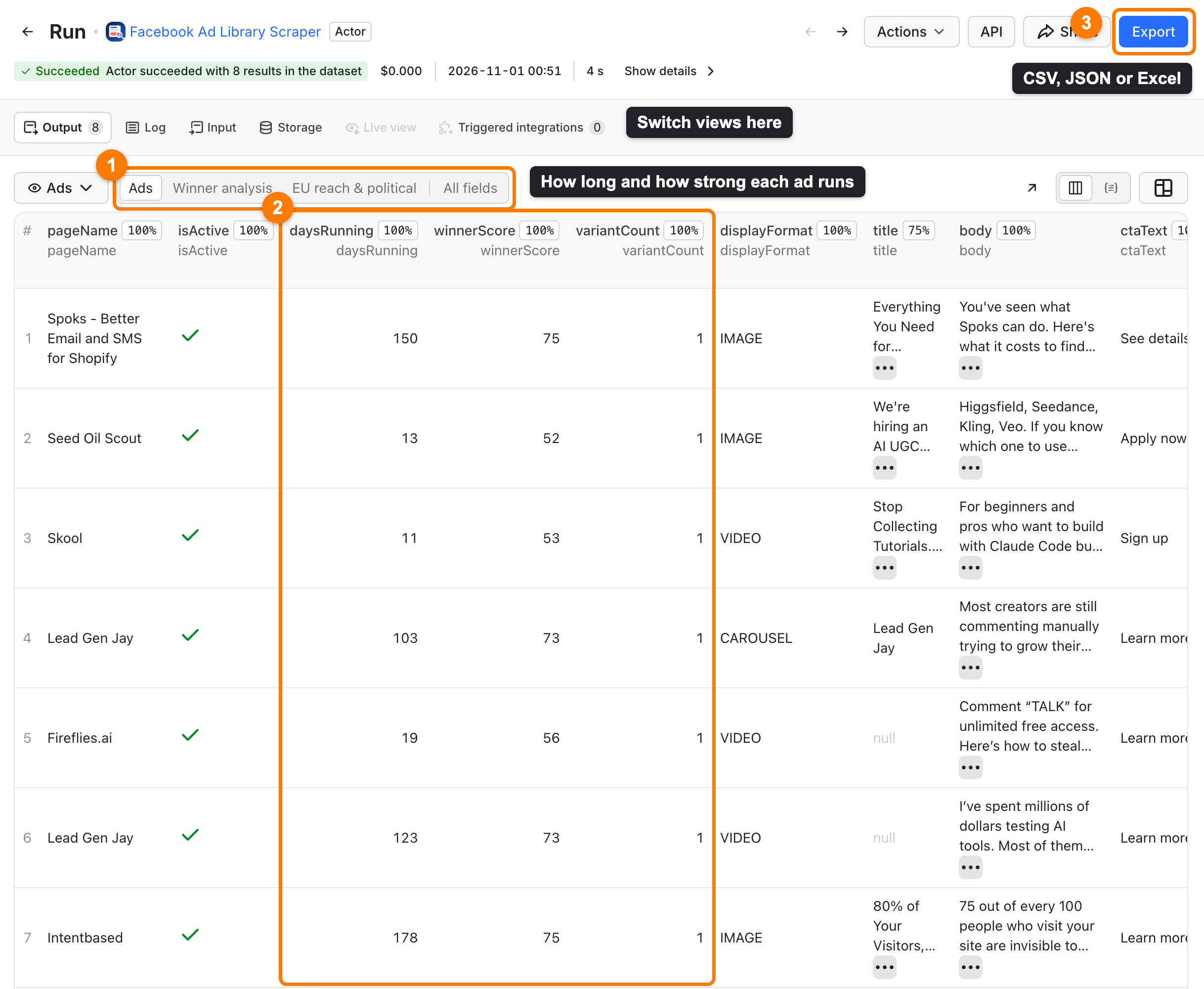
Expected result: up to 10 ad rows for apify in the US. Facebook's "about N results" counts every ad version, so the row count can be smaller than that number.
Use cases
| Buyer job | Input path | Output entity | Key fields | Next step |
|---|---|---|---|---|
| Find winning ads in a niche | searchTerms, sortBy = winnerScore | ad | winnerScore, daysRunning, variantCount, body | Winner analysis view, export to CSV |
| Spy on a competitor | pageUrls, includeAdvertiserSummary | ad + advertiser summary | landingDomain, utmCampaign, ctaText, topAds | Compare 2–3 pages in one run |
| Daily new-ad alerts | pageUrls, onlyNew, schedule | new ad | changeStatus, firstSeenAt, adLibraryUrl | Slack or Notion delivery |
| Political ads and EU reach | adType = political_and_issue_ads, or includeAdDetails with an EU country | ad | paidForBy, spendText, euTotalReach, payers | EU reach & political view |
| Keep creatives | saveMedia | ad + image file | mediaKeys, mediaUrls | Download from the key-value store |
Input
Add at least one entry in searchTerms or pageUrls. Each entry runs once in each country, so 3 terms × 2 countries = 6 searches. Repeated entries run once. An entry that is not an Ad Library link, page or ad ID is skipped and listed in RUN_SUMMARY.invalidSources; the other entries still run.
Input fields
| Field | Plain name | Type | Default / prefill | Allowed values | Effect |
|---|---|---|---|---|---|
searchTerms | Search terms, domains or Ad Library links | array | prefill ["apify"] | up to 50; keyword, domain or Ad Library search link | One keyword search per country. A pasted link keeps its own filters. |
pageUrls | Advertiser pages or ad IDs | array | empty | up to 50; page link, numeric page ID or facebook.com/ads/library/?id=… | Lists every ad of that page, or finds one ad. |
countries | Countries | array | ["US"] | up to 10 two-letter codes, or ALL | Each country is a separate search. |
activeStatus | Ad status | string | active | active, inactive, all | Which ads to return. |
adType | Ad category | string | all | all, political_and_issue_ads, housing_ads, employment_ads, credit_ads | Ad Library category. |
mediaType | Media type | string | all | all, image, video, meme, none | Keep only this kind of creative. |
maxAds | Max ads per search | integer | 100, prefill 10 | 1–3000 | Stops each search (one entry in one country) at this many ads. |
sortBy | Sort results | string | source | source, winnerScore, longestRunning, newest | Order inside each search, after maxAds ads are collected. |
includeAdDetails | Add EU reach, demographics and payer details | boolean | false | Opens each ad's detail panel; extra ad-details event. | |
saveMedia | Save ad images to storage | boolean | false | Saves the first image or video preview; extra media-file event. | |
trackChanges | Track new and stopped ads | boolean | false | Adds changeStatus and the CHANGES record. | |
onlyNew | Only new ads | boolean | false | Delivers only ads not seen before; turns tracking on. | |
stateName | Tracking memory name | string | facebook-ad-library-state | lowercase letters, digits, hyphens | Separate names keep separate monitors. |
includeAdvertiserSummary | Advertiser comparison summary | boolean | false | Writes ADVERTISER_SUMMARY. Free. | |
outputFormat | Row format | string | flat | flat, nested | Flat: one column per field. Nested: grouped objects. |
proxyConfiguration | Proxy for search pages, details and images | object | Apify Proxy | See Interacting settings. | |
deliveryConnector | Send results to | string | empty | your MCP connector | Posts a short summary after the run. |
deliveryTarget | Notion page or channel | string | empty | Notion page link or Slack channel ID | Where the summary goes. |
Interacting settings
| When | Input A | Input B | What happens |
|---|---|---|---|
| Several entries and countries | searchTerms / pageUrls | countries | Every entry runs in every country. maxAds applies to each pair. The same ad found twice is delivered and charged once. |
| Pasted Ad Library link | searchTerms | activeStatus, adType, mediaType | Filters inside the link win; countries still applies. |
| Monitoring | onlyNew | trackChanges | onlyNew turns tracking on. Already seen ads are skipped and cost the small ad-checked fee. |
| Sorting | sortBy | maxAds | The Actor first collects maxAds ads in Facebook's order, then sorts them. It does not search deeper for higher scores. |
| Table views | outputFormat | Output tab views | The Ads, Winner analysis and EU reach & political views need flat. With nested, use JSON export or the API. |
| Proxy | proxyConfiguration | Your setting is used for the first search page, details and images. Next result pages always use Apify residential IPs of the search country, because Facebook limits them from datacenter IPs. |
Input examples
Competitor monitor (run daily on a schedule)
{
  "pageUrls": ["https://www.facebook.com/nike", "https://www.facebook.com/adidas"],
  "countries": ["US"],
  "maxAds": 200,
  "onlyNew": true,
  "stateName": "sportswear-monitor",
  "includeAdvertiserSummary": true
}
Expected behavior: the first run delivers up to 200 ads per page. Later runs deliver only ads that appeared since, and CHANGES lists the ads that stopped.
EU reach of a keyword in Germany
{
  "searchTerms": ["hautpflege"],
  "countries": ["DE"],
  "maxAds": 50,
  "includeAdDetails": true
}
Expected output: ads with euTotalReach, ageMin, ageMax, gender and payers, detailsStatus ok.
Output
Output fields
The main fields of a flat row. The full list is in the Output tab schema.
| Field | Meaning | Can be empty? | Example |
|---|---|---|---|
adArchiveId | Ad Library ID of the ad | no | 1550534860016399 |
adLibraryUrl | Public Ad Library link | no | https://www.facebook.com/ads/library/?id=… |
pageName, pageId | Advertiser | rarely | Perfect themes |
isActive, startDate, endDate | Running state and dates | endDate is null while active | 2026-05-19 |
daysRunning | Days the ad has run, start day included | rarely | 166 |
variantCount | Ad versions Facebook groups together | no | 1 |
winnerScore | 0–100 performance signal, see below | no | 75 |
platforms | Where it runs | can be [] | ["facebook","instagram"] |
body, title, ctaText | Ad text, headline, button | yes | Install now |
linkUrl, landingDomain | Landing page and its domain | yes, for ads without a link | play.google.com |
utmSource … utmTerm | UTM tags of the landing link | yes | facebook |
spendText, impressionsText | Ranges for political and some EU ads | yes | €7K-€8K |
paidForBy | "Paid for by" line | political ads only | |
language | Detected language, ISO 639-3 | null for very short text | eng |
changeStatus, firstSeenAt | new or seen | null when tracking is off | new |
detailsStatus | ok, empty, failed, skipped, not_requested | no | ok |
euTotalReach, ukTotalReach | Reach from the EU or UK panel | yes | 53398 |
searchSource, searchCountry | Your input and the country that found the ad | no | apify, US |
Winner score. winnerScore = 50 × longevity + 20 × variants + 15 × active + 10 × platforms + 5 × reach, rounded. Longevity is ln(1 + daysRunning) / ln(91), capped at 1 (full at 90 days). Variants is (variantCount − 1) / 9, capped at 1. Active is 1 while the ad runs. Platforms is platforms / 4, capped at 1. Reach is 1 when the lower impressions bound is at least 100,000. It is a signal, not Facebook data: advertisers tend to keep ads that work.
Output entities and surfaces
| Situation | Where | What you see |
|---|---|---|
| Normal ad | Dataset | One row per unique ad. |
| Search with no ads | RUN_SUMMARY | No row; the search has status not_found and a reason. Run status NO_RESULTS. |
| Search stopped early | Dataset + RUN_SUMMARY | Rows read so far are kept; the search has status partial and a reason. |
| Detail panel failed | Dataset | The ad row is kept with detailsStatus failed; no ad-details charge. |
| New and stopped ads | CHANGES | New ad IDs and stopped ad IDs for each tracked search. |
| Advertiser comparison | ADVERTISER_SUMMARY | Per page: adsDelivered, activeAds, avgDaysRunning, avgWinnerScore, topAds, formats, platforms, CTAs, landing domains. |
| Saved images | Key-value store | media-<adId>.<ext>; keys in mediaKeys. |
RUN_SUMMARY.status is one of COMPLETE, PARTIAL, NO_RESULTS, CAPPED (stopped at your maximum charge), ERROR, INVALID_INPUT or CANCELLED. Each entry of searches has its own status and reason.
Output example
A trimmed flat row from a real run:
{
  "adArchiveId": "1550534860016399",
  "pageName": "Perfect themes",
  "isActive": true,
  "startDate": "2026-05-19",
  "daysRunning": 166,
  "platforms": ["facebook", "instagram", "audience_network", "messenger", "threads"],
  "variantCount": 1,
  "winnerScore": 75,
  "ctaText": "Install now",
  "landingDomain": "play.google.com",
  "language": "eng",
  "detailsStatus": "ok",
  "euTotalReach": 53398,
  "endDate": null
}
Facebook does not show every field for every ad. null means Facebook did not show the value for this ad. targetedCountries is usually empty because the public guest view does not show it.
Send results to Slack or Notion
Pick your connector in the optional deliveryConnector field. After the run saves its data, the Actor posts a short summary (up to 25 rows and a link to the full dataset) there. Put a Notion page link or a Slack channel ID in deliveryTarget: in Notion every run is added on top of that one page, so your workspace does not fill up with new pages. A delivery error never fails the run and costs nothing extra. Connect a service once in Apify Console → MCP connectors.
Pricing
Pricing unit
You pay per event. Apify platform usage (compute, proxy, storage) is included; you do not pay it separately.
| Event | When it is charged | Free plan | Paid plans |
|---|---|---|---|
| Actor start | Once per run, one event per GB of run memory (minimum one; the default 512 MB is one) | $0.001 | $0.001 |
| Search | One search term or page in one country that got an answer from Facebook, even with no ads | $0.0003 | $0.0003 |
| Ad | One unique ad saved to the Dataset | $0.0007 | from $0.00049 |
| Ad details | One ad that got EU reach, payer or demographic data (only with details on) | $0.0003 | $0.0003 |
| Saved ad image | One image saved (only with Save ad images on) | $0.001 | $0.001 |
| Already seen ad checked | One already seen ad skipped (only with Only new ads on) | $0.00025 | $0.00025 |
Ad price by plan: Free $0.0007, Bronze $0.00063, Silver $0.00056, Gold and higher $0.00049.
- A search with no ads costs the start fee and the search fee, nothing more.
- An entry that is skipped as invalid, and a search that fails before Facebook answers, cost nothing.
- A repeated ad (same ad found by two searches) is charged once.
- A detail panel that fails or comes back empty is not charged.
- The run stops cleanly at your Maximum cost per run; status
CAPPED, rows already saved are kept.
Cost examples
Free plan prices.
| Scenario | Input | Events | Cost |
|---|---|---|---|
| Prefill | apify, US, 10 | start + 1 search + 8 ads | $0.0069 |
| Keyword with no ads | 1 term, US | start + 1 search | $0.0013 |
| One competitor | 1 page, US, 100 | start + 1 search + 100 ads | $0.0713 |
| Niche research with details | 1 term, DE, 1000, details on | start + 1 search + 1000 ads + 1000 details | $1.0013 |
| Daily monitor, nothing new | 1 page, onlyNew, 200 ads seen before | start + 1 search + 200 checked | $0.0513 |
Limits
- Up to 3,000 ads per search (one entry in one country), 50 search terms, 50 pages and 10 countries per run, and at most 100 searches per run (entries × countries: 50 terms in 2 countries is the maximum). A bigger input fails at the start with
INVALID_INPUTand only the start event is charged. For more, split the job across runs. - Each run makes at most 3,000 requests to Facebook. A search page holds about 10 ads, and Add ad details makes one more request per ad. Tested maximum: 3,000 ads without details in about 11 minutes, or 1,000 ads with details in about 10 minutes. With details on, keep the total of all searches under about 2,500 ads per run.
- A run works at most 1 hour (or your run timeout, if shorter), then saves what it has as
PARTIAL. - Saved images are limited to 8 MB each; a bigger image is skipped and not charged.
- The run status is FAILED for invalid input, and for
ERROR(no ads because every search failed) orPARTIALafter a source failure. Rows already saved stay in the Dataset andRUN_SUMMARYnames the reason. - The Actor shows only what the public Ad Library shows. Commercial ads outside the EU and UK have no spend, reach or targeting data. Facebook keeps stopped commercial ads for a limited time and political ads for 7 years.
targetedCountriesis usually empty: the public guest view does not show it.- Image and video links from Facebook expire after some days. Turn on Save ad images to storage to keep them.
- A page name that Facebook cannot match returns
not_found. Paste the page ID or an Ad Library link instead. - The Actor does not log in and does not solve CAPTCHAs. If Facebook blocks a search after all retries, the search is marked
partialorerrorwith the reason. - You are responsible for using the data in line with Meta's terms and the laws that apply to you.
API, export and integrations
- API: start a run with the Apify API and read the Dataset items. The
RUN_SUMMARYrecord is in the default key-value store. - Export: CSV, Excel, JSON, XML or HTML from the Output tab or the Dataset API. Use
flatfor spreadsheets. - Scheduling: add a schedule with
onlyNewon and a fixedstateNameto get only new ads every day. - Webhooks and no-code: use webhooks or the Apify integrations for Zapier, Make and Google Sheets to send rows on.
- Slack or Notion: see Send results to Slack or Notion.
Use with AI agents (MCP)
-
MCP server with only this Actor:
https://mcp.apify.com?tools=cliqtomedia/facebook-ad-library. See Apify MCP. -
Smallest useful input:
{ "searchTerms": ["apify"], "countries": ["US"], "maxAds": 10 } -
Key output fields:
adLibraryUrl(link to the ad),pageName(advertiser),daysRunning(days live),winnerScore(0–100 signal),landingDomain(where the ad leads),changeStatus(neworseen). -
A small run takes about 10 seconds and costs about $0.007 (start, one search, 8 ads); 1,000 ads take about 5–10 minutes. Keep
maxAdsand the number of countries small for quick answers.
Troubleshooting
Fewer rows than Facebook's "about N results"
Symptom: Facebook shows "about 12 results", the run returns 8 rows.
Likely reason: Facebook counts every ad version; the Actor returns one row per ad and puts the versions in variantCount.
Check: RUN_SUMMARY.searches[].status is complete.
Action: nothing to fix. Set activeStatus to all to add stopped ads.
A page returns no ads
Symptom: the search status is not_found.
Likely reason: the page has no ads in that country, or Facebook cannot match the page name.
Check: open the page's Ad Library link in your browser for the same country.
Action: paste the numeric page ID or the Ad Library link, or use ALL in countries.
The run stopped with CAPPED
Symptom: RUN_SUMMARY.status is CAPPED.
Likely reason: the next ad would go over your Maximum cost per run.
Action: raise the maximum cost or lower maxAds. Rows already saved are kept.
The run stopped with PARTIAL and TIME_LIMIT
Symptom: RUN_SUMMARY.reason is TIME_LIMIT.
Likely reason: the run reached 1 hour, your run timeout, or the cap of 3,000 Facebook requests per run (the message says which).
Action: lower maxAds or the number of countries, turn off Add ad details, or split the job across runs. Rows already saved are kept.
The run failed with INVALID_INPUT
Likely reason: more than 100 searches (entries × countries), more than 50 terms or pages, or an unknown country code. Action: fix the input as the message says. Only the start event is charged.
Image links do not open
Likely reason: Facebook image links expire.
Action: run again with Save ad images to storage on and use mediaUrls.
FAQ
Do I need a Facebook account or an access token?
No. The Actor reads the public Ad Library without login.
Can I get ad spend for normal commercial ads?
Only where Facebook shows it: political and issue ads everywhere, and some data for ads in the EU and UK. For other commercial ads Facebook does not publish spend.
How fresh is the data?
Each run reads the Ad Library at that moment. fetchedAt shows when each ad was read. daysRunning counts up to today for active ads.
Why is language empty for some ads?
The language is detected from the ad text. Very short texts give null.
Related Actors
- Google Ads Transparency Scraper - Ad Text, No Login — the same competitor's ads on Google Search, YouTube and Display.
- Threads Scraper — Posts, Profiles, Replies & Search — organic posts of the same brands on Threads.
Support
For a bug, question or feature request, open the Issues tab of this Actor on Apify. Add the run ID, the input mode (keyword, page or link) and the error text from RUN_SUMMARY. Never send tokens, cookies or billing data.
Changelog
This Actor's version history is a separate document: https://apify.com/cliqtomedia/facebook-ad-library/changelog.md
Actor input Schema
searchTerms (type: array):
Keywords ("running shoes"), website domains ("nike.com") or pasted Ad Library search links. Each entry is one search per country. Up to 50.
pageUrls (type: array):
Facebook page links (facebook.com/nike), numeric page IDs (15087023444), or single-ad links (facebook.com/ads/library/?id=…). Lists every ad of that advertiser. Up to 50.
countries (type: array):
Two-letter country codes where the ads are shown (US, GB, DE, …), or ALL for every country. Each country is a separate search. Up to 10.
activeStatus (type: string):
Which ads to return. Facebook keeps inactive commercial ads in the library for a limited time; political ads for 7 years.
adType (type: string):
Ad Library category. Political ads include spend ranges and the "Paid for by" disclaimer.
mediaType (type: string):
Keep only ads with this kind of creative.
maxAds (type: integer):
Stop each search (one term or page in one country) after this many ads. You pay per ad delivered.
sortBy (type: string):
Order of the ads inside each search. Sorting applies to the ads collected up to Max ads.
includeAdDetails (type: boolean):
For each ad, open the Ad Library detail panel: EU and UK reach, age and gender breakdown, target locations, payer and beneficiary, page verification and Instagram followers. Charged as an extra event per ad that returns details.
saveMedia (type: boolean):
Download the first image (or video thumbnail) of each ad into the run's key-value store, because Facebook image links expire. Charged per saved file.
trackChanges (type: boolean):
Remember which ads each search returned. Every ad gets changeStatus new or seen, and the CHANGES record lists ads that stopped since the last run. Use with a schedule to monitor competitors.
onlyNew (type: boolean):
Deliver only ads not seen by the same search in earlier runs. Each skipped, already seen ad costs a small ad-checked fee instead of the full ad price. Turns on change tracking.
stateName (type: string):
Name of the key-value store that keeps the tracking memory. Use different names for independent monitors. Lowercase letters, digits and hyphens.
includeAdvertiserSummary (type: boolean):
Write an ADVERTISER_SUMMARY record: per advertiser ad count, average days running and winner score, top ads, formats, platforms, CTAs and landing domains. Put 2–3 competitors in one run to compare them. Free.
outputFormat (type: string):
Flat puts every field in its own column. Nested groups fields into advertiser, creative, link, metrics, analysis and details objects.
proxyConfiguration (type: object):
Proxy used to open the Ad Library search page, ad details and images. The default (Apify Proxy, automatic datacenter IPs) works for most runs. Next result pages always go through Apify residential IPs of the search country, because Facebook limits them from datacenter IPs. If a datacenter request keeps failing, the Actor retries it through residential IPs.
deliveryConnector (type: string):
Your Slack, Notion or other MCP connector. After the run the Actor posts a short summary there. Connect services once in Apify Console → MCP connectors.
deliveryTarget (type: string):
Where to post the summary: a Notion page link (each run is added on top of that page) or a Slack channel ID. Leave empty to let the connector decide.
Actor input object example
{
  "searchTerms": [
    "apify"
  ],
  "countries": [
    "US"
  ],
  "activeStatus": "active",
  "adType": "all",
  "mediaType": "all",
  "maxAds": 10,
  "sortBy": "source",
  "includeAdDetails": false,
  "saveMedia": false,
  "trackChanges": false,
  "onlyNew": false,
  "stateName": "facebook-ad-library-state",
  "includeAdvertiserSummary": false,
  "outputFormat": "flat",
  "proxyConfiguration": {
    "useApifyProxy": true
  }
}
Actor output Schema
ads (type: string):
One row per ad.
winners (type: string):
Ads with winner score, days running and versions.
advertiserSummary (type: string):
Per-advertiser rollup (when Advertiser comparison summary is on).
changes (type: string):
New ad IDs and stopped ads per search (when tracking is on).
runSummary (type: string):
Status, per-search results and reasons, counts and charged events.
API
You can run this Actor programmatically using our API. Below are code examples in JavaScript, Python, and CLI, as well as the OpenAPI specification and MCP server setup.
JavaScript example
import { ApifyClient } from 'apify-client';

// Initialize the ApifyClient with your Apify API token
// Replace the '<YOUR_API_TOKEN>' with your token
const client = new ApifyClient({
    token: '<YOUR_API_TOKEN>',
});

// Prepare Actor input
const input = {
    "searchTerms": [
        "apify"
    ],
    "countries": [
        "US"
    ],
    "maxAds": 10,
    "proxyConfiguration": {
        "useApifyProxy": true
    }
};

// Run the Actor and wait for it to finish
const run = await client.actor("cliqtomedia/facebook-ad-library").call(input);

// Fetch and print Actor results from the run's dataset (if any)
console.log('Results from dataset');
console.log(`💾 Check your data here: https://console.apify.com/storage/datasets/${run.defaultDatasetId}`);
const { items } = await client.dataset(run.defaultDatasetId).listItems();
items.forEach((item) => {
    console.dir(item);
});

// 📚 Want to learn more 📖? Go to → https://docs.apify.com/api/client/js/docs
Python example
from apify_client import ApifyClient

# Initialize the ApifyClient with your Apify API token
# Replace '<YOUR_API_TOKEN>' with your token.
client = ApifyClient("<YOUR_API_TOKEN>")

# Prepare the Actor input
run_input = {
    "searchTerms": ["apify"],
    "countries": ["US"],
    "maxAds": 10,
    "proxyConfiguration": { "useApifyProxy": True },
}

# Run the Actor and wait for it to finish
run = client.actor("cliqtomedia/facebook-ad-library").call(run_input=run_input)

# Fetch and print Actor results from the run's dataset (if there are any)
print(f"💾 Check your data here: https://console.apify.com/storage/datasets/{run.default_dataset_id}")
for item in client.dataset(run.default_dataset_id).iterate_items():
    print(item)

# 📚 Want to learn more 📖? Go to → https://docs.apify.com/api/client/python/docs/quick-start
CLI example
echo '{
  "searchTerms": [
    "apify"
  ],
  "countries": [
    "US"
  ],
  "maxAds": 10,
  "proxyConfiguration": {
    "useApifyProxy": true
  }
}' |
apify call cliqtomedia/facebook-ad-library --silent --output-dataset
MCP server setup
{
    "mcpServers": {
        "apify": {
            "type": "http",
            "url": "https://mcp.apify.com/?tools=fetch-actor-details,cliqtomedia/facebook-ad-library"
        }
    }
}
The hosted server signs you in with OAuth on first connect, so no API token belongs in this config. Clients without OAuth support can send an Authorization: Bearer <APIFY_API_TOKEN> header instead, using a token from API & Integrations in Apify Console (https://console.apify.com/settings/integrations).
OpenAPI specification
Download the OpenAPI definition: https://api.apify.com/v2/actors/6166ud1oMTp0fnCNf/builds/2iVNol0GoDPCC2TTJ/openapi.json