LoopNet & Crexi Commercial Real Estate Scraper (Apify Actor)
Get US commercial property listings from Crexi and LoopNet for sale, lease or auction: price, cap rate, size, address, coordinates and broker company. No login. Price: $1.10 per 1,000 listings, $0.008 per LoopNet page, $0.009 per LoopNet detail, $0.0004 per Crexi detail, plus $0.005 per run start. Runs as an Apify Actor, callable from MCP clients via the Apify MCP server (https://mcp.apify.com/?tools=cliqtomedia/commercial-real-estate).
Hosted MCP Server
npx add-mcp 'https://mcp.apify.com/?tools=cliqtomedia/commercial-real-estate'Installs into Claude Code, Codex, Cursor and more
Documentation
LoopNet & Crexi Commercial Real Estate Scraper, No Login (cliqtomedia/commercial-real-estate) Actor
Get US commercial property listings from Crexi and LoopNet: price, cap rate, size, address, coordinates and broker company. Sale, lease, auction. No login.
- URL: https://apify.com/cliqtomedia/commercial-real-estate.md
- Developed by: Cliqto Media (community)
- Categories: Real estate
- Features: Limited permissions
- Stats: 3 total users, 3 monthly users, 95.2% runs succeeded, 0 bookmarks
- User rating: No ratings yet
Pricing
from $0.77 / 1,000 listings
This Actor is paid per event. You are not charged for the Apify platform usage, but only a fixed price for specific events. Since this Actor supports Apify Store discounts, the price gets lower the higher subscription plan you have.
Learn more: https://docs.apify.com/actors/running/actors-in-store.md#pay-per-event
What's an Apify Actor?
An Actor is a serverless cloud program that runs on the Apify platform. It has two run modes. In Batch mode, an Actor accepts a well-defined JSON input, performs an action which can take anything from a few seconds to a few hours, and optionally produces a well-defined JSON output, datasets with results, or files in key-value store. In Standby mode, an Actor provides a web server which can be used as a website, API, or an MCP server.
Apify vocabulary and the platform model are defined once, in the agent quickstart at https://apify.com/agents.md.
How to integrate an Actor?
If asked about integration, you help developers integrate Actors into their projects. You adapt to their stack and deliver integrations that are safe, well-documented, and production-ready.
Do not guess an integration path. Every one of them is in the agent quickstart at https://apify.com/agents.md: the Apify MCP server, Agent Skills with the Apify CLI, the JavaScript and Python clients, the REST API, and the account-free path for an agent with no human to sign in. It also carries the rule on stating cost before the first paid run.
For examples already wired to this Actor's own input schema, see the API section below.
Each client library has reference documentation the quickstart does not restate: JavaScript/TypeScript (npm install apify-client) and Python (pip install apify-client).
README
Give this Actor a US place and it returns commercial property listings from Crexi and LoopNet in one table: price, cap rate, size, address, coordinates and broker company. You need no login and no account on these sites. A run for 10 Crexi listings takes about 3 seconds and costs about $0.016.
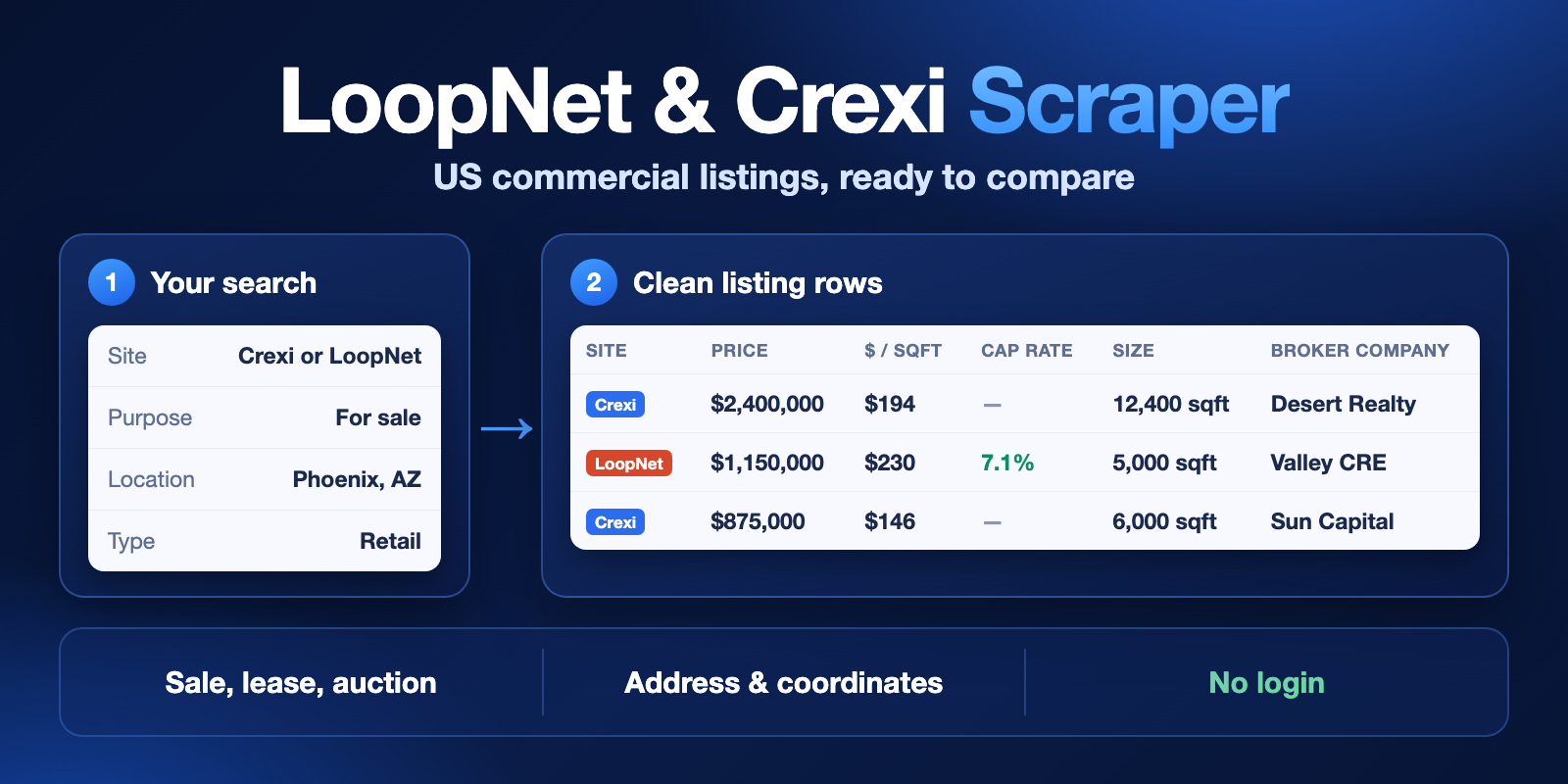
Table of contents
- What it does
- How it works
- Quick start
- Use cases
- Input
- Output
- Pricing
- Limits
- API, export and integrations
- Troubleshooting
- FAQ
- Related Actors
- Support
What it does
The Actor finds commercial property listings by place or by link. It saves each listing as one row with the same fields for both sites.
- It reads Crexi, LoopNet or both in one run.
- It covers listings for sale, for lease and at auction.
- It filters by price, size, cap rate, lot, year built, units, rent, keyword and date.
- It can also read each listing page for more fields, such as cap rate, NOI, year built and zoning.
- It saves the broker company. It has no fields for people's contacts, and it removes emails and phone numbers in common formats from listing text.
Good fit
- You watch a US market and want new listings in a table.
- You compare asking prices and price per square foot across sites.
- You need a list of properties with coordinates for a map or a model.
It is not a good fit if you need broker names and phone numbers, sold prices, or listings outside the US.
How it works
- You choose a site, a purpose (sale, lease or auction) and a place, or paste links to listings.
- The Actor reads the public search pages of that site and turns each listing into one row. If you turn on listing pages, it also opens each listing.
- You get the rows in a dataset. You can see them in Apify Console, download them or get them through the API.
Quick start
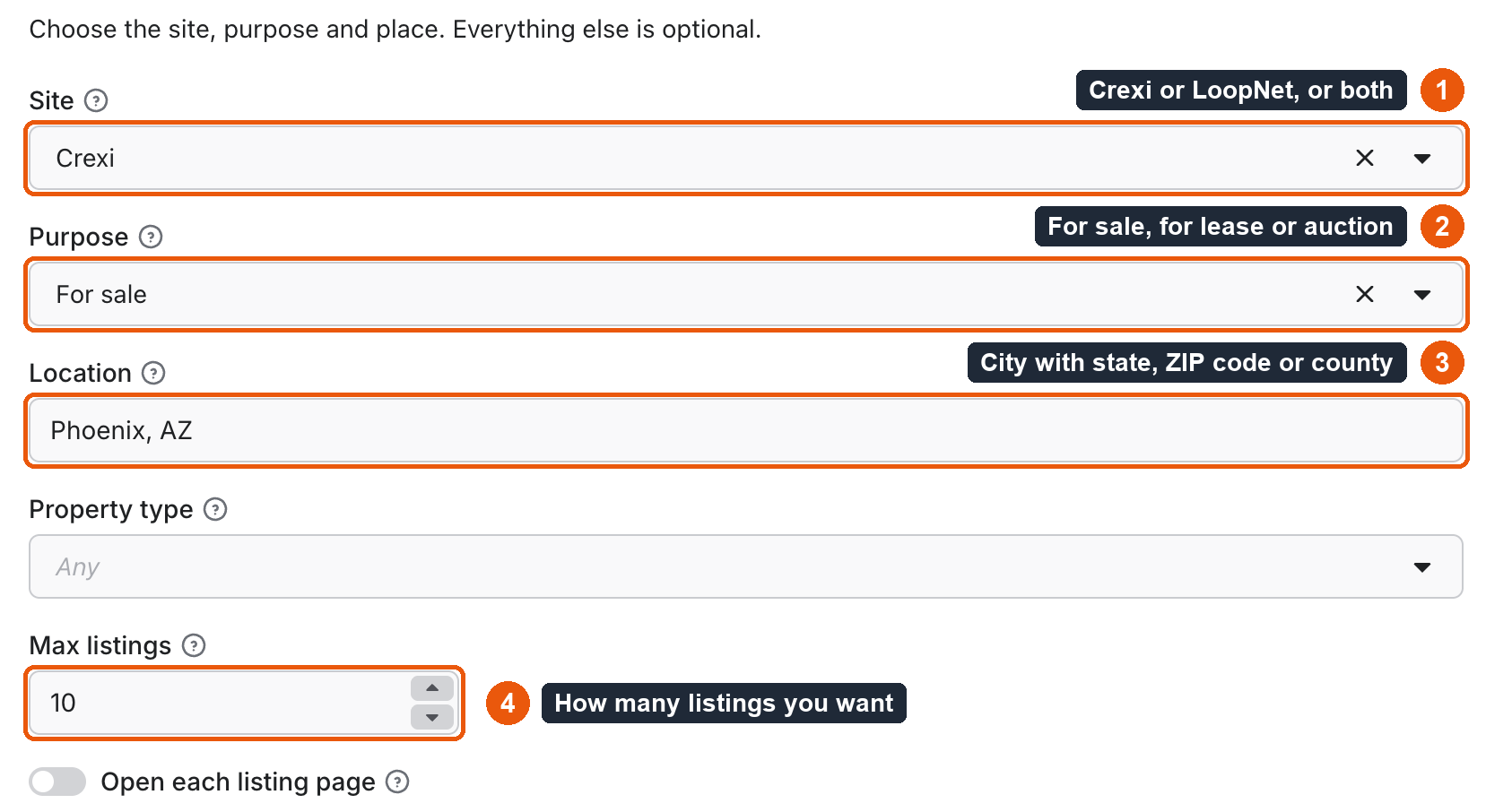
- In Site, keep
Crexi(box 1). - In Purpose, keep
For sale(box 2). - In Location, keep
Phoenix, AZor type your own US place (box 3). - In Max listings, keep
10(box 4). - Click Start, wait for the run to end and open the Output tab.
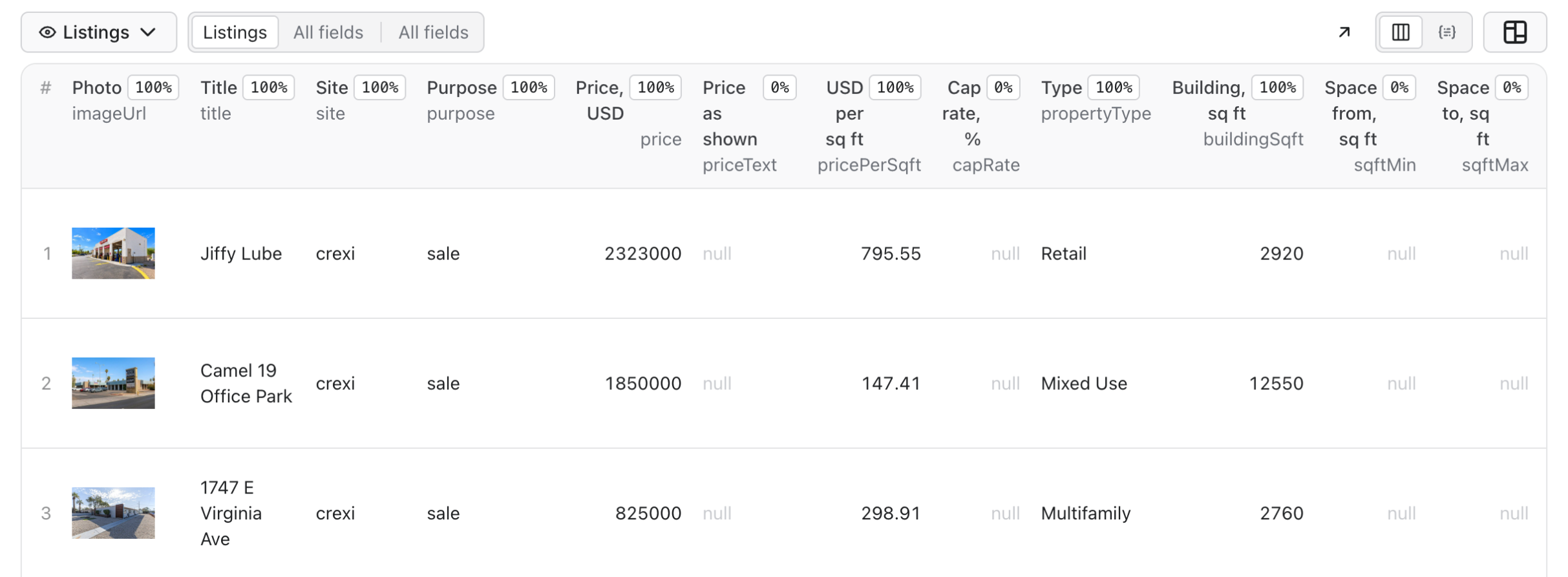
Expected result: 10 Phoenix listings in the table after a few seconds, each with a link to the listing on Crexi.
Use cases
| Buyer job | Input path | Output entity | Key fields | Next integration |
|---|---|---|---|---|
| Find properties for sale in a market | site, purpose: sale, location | Listing | price, pricePerSqft, capRate, address | Sheet or CRM |
| Compare lease rates in a city | purpose: lease, location, propertyType | Listing | rentPerSqftYearMin, rentPerSqftYearMax, sqftMin, sqftMax | Sheet or BI tool |
| Watch new deals by schedule | site: crexi, listedWithinDays, sort: newest | Listing | listingId, activatedOn, price, url | Apify schedule, Slack or Notion |
| Screen investment deals | minCapRate, includeDetails: true | Listing with details | capRate, noi, yearBuilt, zoning | Financial model |
| Refresh a list of known listings | startUrls | One listing per link | status, price, listingStatus | Your database |
Input
You need one of location, locations or startUrls. An empty input stops the run with INVALID_INPUT and costs nothing. Exact duplicates in lists are read once, and a listing found twice is saved and charged once.
Input fields
| Field | Plain name | Type | Required | Default / prefill | Allowed values | Effect | Example | Recommendation |
|---|---|---|---|---|---|---|---|---|
site | Site | string | no | crexi / crexi | crexi, loopnet, both | Where to search | both | Start with crexi: it is faster and cheaper |
purpose | Purpose | string | no | sale / sale | sale, lease, auction | Which listings to read | lease | Set it for each search |
location | Location | string | one of three | none / Phoenix, AZ | A US place | The place to search | Maricopa County, AZ | See the place forms below |
propertyType | Property type | string | no | any | any, office, industrial, retail, multifamily, land, hospitality, specialty, shopping_center, restaurant, flex, coworking, mixed_use, self_storage, senior_living, mobile_home_park, business_for_sale | Limits the search to one type | office | Some types exist on one site only |
maxItems | Max listings | integer | no | 100 / 10 | 1 to 1,500 | The most rows to save in the run | 200 | Keep it small on a first run |
includeDetails | Read each listing page | boolean | no | false | true, false | Adds cap rate, NOI, year, zoning, lot size and more | true | Costs extra per listing |
locations | Several places | array of strings | one of three | none | Up to 20 places | Runs one search per place and shares maxItems | ["Dallas, TX", "Austin, TX"] | Use it to get past the limit of one search |
startUrls | Listing links | array of { "url": "..." } | one of three | none | Up to 100 links | Reads single listings on either site, or a LoopNet search page | [{ "url": "https://www.crexi.com/properties/2749151/arizona-jiffy-lube" }] | A listing link is always read in full |
minPrice, maxPrice | Price | number | no | none | 0 and up | Sale and auction listings | 1000000 | Pair with includeUnpriced |
minSqft, maxSqft | Size in square feet | number | no | none | 0 and up | Building or space size | 5000 | |
minCapRate, maxCapRate | Cap rate in % | number | no | none | 0 to 100 | A listing that hides its cap rate stays in the result | 6 | Add includeDetails to see more cap rates |
minLotAcres, maxLotAcres | Lot size in acres | number | no | none | 0 and up | Applied to listings that show a lot size | 2 | |
minYearBuilt, maxYearBuilt | Year built | integer | no | none | 1700 to 2100 | Applied to listings that show the year | 1990 | |
minUnits, maxUnits | Units | integer | no | none | 0 and up | Applied to listings that show units | 20 | |
minRentPerSqft, maxRentPerSqft | Rent per square foot per year | number | no | none | 0 and up | Lease listings | 25 | |
keyword | Keyword | string | no | none | Any text | A word or phrase to find in the listing | medical | |
includeUnpriced | Keep listings with no price | boolean | no | true | true, false | Keeps listings that show no price or rent | false | Many listings say "Upon Request" |
listedWithinDays | Listed in the last days | integer | no | none | 1 to 3650 | Crexi only | 7 | Good for a schedule |
opportunityZoneOnly | Opportunity zones only | boolean | no | false | true, false | Crexi only | true | |
sort | Sort | string | no | relevance | relevance, newest, updated, price_asc, price_desc | Crexi only: LoopNet keeps its own order | newest | |
deliveryConnector | Send summary to | string | no | none | Your MCP connector | Posts a short summary after the run | See below in Output | |
deliveryTarget | Delivery target | string | no | none | A Notion page link or a Slack channel ID | Where the summary goes | Leave empty to let the connector decide |
Place forms: Phoenix, AZ, AZ, Maricopa County, AZ, Phoenix, AZ 85004, 85004 or USA. LoopNet needs a city with a ZIP, not a ZIP alone. A form the Actor does not understand, such as Texas, USA, stops the run with INVALID_INPUT and costs nothing.
Interacting settings
| When | Input A | Input B | Effective behavior | Example | Cost/result effect |
|---|---|---|---|---|---|
| Both sites | site: both | maxItems | The first half of maxItems comes from Crexi, the rest from LoopNet | maxItems: 100 gives up to 50 and 50 | If one site has fewer listings, the run saves fewer rows |
| Several places | locations | maxItems | All places share one maxItems | 3 places, maxItems: 300 | The run stops at 300 rows in total |
| Links and search | startUrls | location | Links run first, then the search | 2 links and one place | Links count toward maxItems |
| LoopNet filters | site: loopnet | Any filter | LoopNet filters run after the pages are read | A very narrow minPrice | You pay for every page read, even with no match |
| Crexi filters with no search field | site: crexi | listedWithinDays, lot, year, units, lease rent, or purpose: auction | The Actor reads up to 15 Crexi pages and stops with SCAN_LIMIT | A very narrow minUnits | Each page has a small charge |
| Crexi-only filter on LoopNet | site: loopnet or both | listedWithinDays, opportunityZoneOnly | LoopNet saves an error row with UNSUPPORTED_FILTER. Crexi still runs with both | listedWithinDays: 7 | Error rows are free |
| Min above max | minPrice | maxPrice | The run stops with INVALID_INPUT | minPrice: 5, maxPrice: 1 | Costs nothing |
| One-site type | site: crexi | propertyType of LoopNet only | The other site saves an error row and no listings | flex on the wrong site | Error rows are free |
| Price filter | minPrice | includeUnpriced: true | Listings with no price stay in the result | minPrice: 1000000 | Set includeUnpriced: false to drop them |
Input examples
Small first run
{
  "site": "crexi",
  "purpose": "sale",
  "location": "Phoenix, AZ",
  "maxItems": 10
}
Expected behavior: one Crexi search. Expected output: 10 listings. Limit or cost note: about 3 seconds and $0.016 on the Free plan.
Lease listings on LoopNet
{
  "site": "loopnet",
  "purpose": "lease",
  "location": "Denver, CO",
  "maxItems": 100
}
Expected behavior: 4 LoopNet search pages. Expected output: up to 100 rows with rent and space size. Limit or cost note: about 10 to 35 seconds and $0.147 on the Free plan.
Investment screen with listing pages
{
  "site": "loopnet",
  "purpose": "sale",
  "location": "Denver, CO",
  "propertyType": "multifamily",
  "includeDetails": true,
  "maxItems": 20
}
Expected behavior: search pages, then one listing page for each row. Expected output: up to 20 rows with cap rate, NOI, year built and zoning when the listing shows them. Limit or cost note: about 2.5 seconds per listing on LoopNet. Up to about 100 listings fit in the default 300 seconds (247 seconds in our one test).
Links to known listings
{
  "startUrls": [
    { "url": "https://www.crexi.com/properties/2749151/arizona-jiffy-lube" }
  ]
}
Expected behavior: the Actor opens each link.
Expected output: one row per link, or a not_found row if the listing is gone.
Limit or cost note: up to 100 links. A Crexi link has no broker company.
Output
Each row is one listing. Sizes are in square feet, lot size is in acres, and prices are in US dollars. A value the site does not show is null, never 0.
Output fields
| Field | Meaning | Type | Can be empty? | Example / enum | Source / notes |
|---|---|---|---|---|---|
listingId | Listing ID on the site | string | yes, on some service rows | 2749151 | From the listing |
site | Which site | string | no | crexi, loopnet | |
purpose | Sale, lease or auction | string | no | sale, lease, auction | From your input or the link |
status | Row result | string | no | complete, partial, not_found, error | See the next table |
statusReason | Why the row is not complete | string | yes | DETAILS_FAILED | |
errorCode | Technical code of an error row | string | yes | SOURCE_BLOCKED | |
title | Listing title | string | yes | Jiffy Lube | |
price | Asking price in USD | number | yes | 2323000 | null when the listing hides it |
priceText | Price as the site writes it | string | yes | Price Upon Request | |
pricePerSqft | Price per square foot | number | yes | 795.55 | |
pricePerSqftBasis | Where that number comes from | string | yes | source, computed | computed is price divided by size |
capRate | Cap rate in % | number | yes | 6.5 | On Crexi it needs a login, so it stays null |
propertyType, propertySubType | Type and subtype | string | yes | Retail | As the site names them |
buildingSqft | Building size | number | yes | 2920 | |
sqftMin, sqftMax | Space size range | number | yes | 1200 | Mostly lease listings |
rentPerSqftYearMin, rentPerSqftYearMax | Rent per square foot per year | number | yes | 17.95 | null for "Upon Request" |
rentType | Rent type | string | yes | NNN | |
lotSize | Lot size in acres | number | yes | 4.76 | On Crexi only from listing pages |
units, spaces, properties | Units, spaces and properties in the listing | integer | yes | 24 | |
yearBuilt | Year built | integer | yes | 1998 | On Crexi it needs a login |
address, city, state, zip | Address | string | yes | Phoenix | |
lat, lng | Coordinates | number | yes | 33.3316876 | |
broker | Broker company from the listing | string | yes | Matthews | Crexi links do not have it |
url | Link to the listing | string | yes, on some service rows | https://www.crexi.com/properties/... | |
imageUrl, imageUrls | Listing images | string, array | yes | Links on the site | |
description | Listing text | string | yes | Emails and phone numbers are removed | |
listingStatus, activatedOn | Status and date on the site | string | yes | ||
noi, zoning, stories, buildings, saleType, tenancy | Details | mixed | yes | 210000 | Mostly with includeDetails |
source | Page or API that gave the row | string | no | api.crexi.com/assets/search | |
fetchedAt | When the row was read | string | no | 2026-11-07T09:29:31.606Z | ISO time |
Output entities and surfaces
| Situation | Dataset/API/KVS/live view | Result shape | User action |
|---|---|---|---|
| Normal item | Dataset | status: complete with listing fields | Use the rows |
| Domain-empty result | Dataset | One not_found row with no charge for a listing. The run ends SUCCEEDED | Change the place or the filter |
| Partial result | Dataset and RUN_SUMMARY in the key-value store | Rows saved so far. The summary says partial and why: CHARGE_LIMIT, DEADLINE, SOURCE_CAP, SCAN_LIMIT, UNSUPPORTED_FILTER, SOURCE_ERROR or SOURCE_PAGE_TRUNCATED | Read the message, then raise the limit or split the search |
| Technical failure or retry | Run status FAILED, error row, RUN_SUMMARY | The rows saved before the failure stay in the dataset. The Actor retries by itself before it gives up | Run it again later. An error is not an empty market |
The dataset has two views in Console: Listings and All fields.
Output example
{
  "listingId": "2749151",
  "site": "crexi",
  "purpose": "sale",
  "status": "complete",
  "title": "Jiffy Lube",
  "price": 2323000,
  "pricePerSqft": 795.55,
  "pricePerSqftBasis": "computed",
  "capRate": null,
  "propertyType": "Retail",
  "buildingSqft": 2920,
  "lotSize": null,
  "address": "4848 East Warner Road, Phoenix, Maricopa County, AZ 85044",
  "lat": 33.3316876,
  "lng": -111.9793332,
  "broker": "Matthews",
  "url": "https://www.crexi.com/properties/2749151/arizona-jiffy-lube",
  "source": "api.crexi.com/assets/search",
  "fetchedAt": "2026-11-07T09:29:31.606Z"
}
This example is a real row from the small first run, with some fields left out. capRate and lotSize are null because the Crexi search page does not show them.
Send results to Slack or Notion
Pick your connector in the optional deliveryConnector field. After the run saves its data, the Actor posts a short summary (up to 25 rows and a link to the full dataset) there. Put a Notion page link or a Slack channel ID in deliveryTarget: in Notion every run is added on top of that one page, so your workspace does not fill up with new pages. A delivery error never fails the run and costs nothing extra. Connect a service once in Apify Console → MCP connectors.
Use case → fields
| Use case | Fields to read |
|---|---|
| Price comparison | price, pricePerSqft, pricePerSqftBasis, buildingSqft |
| Lease comparison | rentPerSqftYearMin, rentPerSqftYearMax, rentType, sqftMin, sqftMax |
| Map | lat, lng, address |
| Investment screen | capRate, noi, yearBuilt, units |
| Market share of brokers | broker, city, propertyType |
| Change tracking | listingId, site, price, fetchedAt |
Pricing
Pricing unit
You pay per event. Apify platform usage and proxies are included in these prices.
| Event | When it is charged | Free | Bronze | Silver | Gold and higher |
|---|---|---|---|---|---|
| Run start | Once per started run. It does not depend on memory | $0.005 | $0.005 | $0.005 | $0.005 |
| Listing | One saved listing | $0.0011 | $0.00099 | $0.00088 | $0.00077 |
| LoopNet page | One LoopNet search or listing page read, even if no listing on it matches | $0.008 | $0.008 | $0.008 | $0.008 |
| LoopNet details | Listing page for one LoopNet search row, only with includeDetails | $0.009 | $0.009 | $0.009 | $0.009 |
| Crexi details | Listing page for one Crexi row, or one Crexi link | $0.0004 | $0.0004 | $0.0004 | $0.0004 |
| Filtered Crexi page | One extra Crexi page read for a filter that Crexi search does not have | $0.0001 | $0.0001 | $0.0001 | $0.0001 |
- A run with zero results still pays the run start. On LoopNet it also pays for the pages it read.
- A filter that matches nothing is charged the same way, with no charge for listings.
not_foundanderrorrows are free. A LoopNet page is not charged when LoopNet refuses it.- A run that stops early keeps its rows and pays only for what it did.
- A wrong input pays nothing.
- Max charge on the run sets your own limit. The smallest allowed limit is $0.02. At the limit, the run stops and keeps its rows.
Cost examples
Prices are for the Free plan. One LoopNet search page has up to 25 listings.
| Scenario | Input scope | Expected item/event count | Base charge | Optional charge | Stop/cap behavior |
|---|---|---|---|---|---|
| Crexi, 10 listings | One place | 10 listings | $0.016 | None | Ends at 10 |
| Crexi, 100 listings | One place | 100 listings | $0.115 | $0.04 with listing pages | Ends at 100 |
| Crexi, 1,000 listings | One place | 1,000 listings | $1.105 | $0.40 with listing pages | One search stops at 1,500 |
| LoopNet, 10 listings | One place | 10 listings, 1 page | $0.024 | $0.09 with listing pages | Ends at 10 |
| LoopNet, 100 listings | One place | 100 listings, 4 pages | $0.147 | $0.90 with listing pages | Ends at 100 |
| LoopNet, 1,000 listings | Two or more places | 1,000 listings, 40 pages | $1.425 | Not advised: too slow for one run | One search stops at 750 |
| LoopNet filter with no match | One large place | 0 listings, up to 30 pages | Up to $0.245 | None | Set a Max charge to stop earlier |
| Listing link that is gone | One link | 0 listings | Crexi $0.005, LoopNet $0.013 | None | One not_found row |
The same runs on each plan:
| Run | Free | Bronze | Silver | Gold and higher |
|---|---|---|---|---|
| Crexi, 10 listings | $0.016 | $0.015 | $0.014 | $0.013 |
| Crexi, 100 listings | $0.115 | $0.104 | $0.093 | $0.082 |
| Crexi, 1,000 listings | $1.105 | $0.995 | $0.885 | $0.775 |
| LoopNet, 10 listings | $0.024 | $0.023 | $0.022 | $0.021 |
| LoopNet, 100 listings | $0.147 | $0.136 | $0.125 | $0.114 |
| LoopNet, 1,000 listings | $1.425 | $1.315 | $1.205 | $1.095 |
Limits
- One run: up to 1,500 listings. To get more, start several runs.
- One search: Crexi shows up to 1,500 listings and LoopNet shows up to 750. To get more, split the search by city or by type. The run tells you with
SOURCE_CAPwhen a search was cut. - Time: the default timeout is 300 seconds. In our tests, 700 to 1,500 Crexi rows took 9 to 17 seconds. 750 LoopNet rows took 141 to 195 seconds. Over 1,300 LoopNet rows from three places took about 280 seconds, and one such run reached the time limit at 1,350 rows. For the largest LoopNet runs, raise the timeout to 600 seconds.
- Listing pages: 100 LoopNet listings with
includeDetailstook 247 seconds. For more than 100, raise the timeout. - Narrow LoopNet filters over many places: a run with 20 places and a filter that matched nothing reached the 300-second limit, failed with
DEADLINEand read 61 pages. Use fewer places or filters that match. - Crexi fields:
capRate, NOI and year built need a Crexi login, so they staynull. Lot size comes only from listing pages. Crexi links have no broker company. - Links: a Crexi search link is not read, and it saves an error row. Use a place or links to single listings.
- LoopNet fields: search pages do not show every field. A LoopNet search page has no price on auction listings. Read listing pages to get more.
- Blocks: we read public pages, and either site can change or close them at any time. If LoopNet closes the fast way in, the run uses a slower one. A page can then take from 7 to 170 seconds, and the default 300 seconds gives at most about 120 rows, often fewer. If LoopNet refuses every way in, the run stops with an
errorrow within about 3 minutes of the first refused try. A refused page is not charged, and a block never becomes an empty result. - Plan: most runs were on a paid Apify plan. On a small proxy pool like the Free plan's, LoopNet returned 200 rows in about 55 seconds in one test run. Details were not tested on such a pool.
- Freshness: rows show the site at the time of
fetchedAt. The Actor keeps no history between runs. - People's contacts: the Actor has no fields for them. It saves the broker company and removes emails and phone numbers in common formats from listing text.
- Site terms: the terms of both sites limit automated collection. Read them and decide how you use the data. This Actor is not connected with Crexi or LoopNet.
API, export and integrations
- API: start a run with
POST https://api.apify.com/v2/acts/cliqtomedia~commercial-real-estate/runs, then read the rows from the run's default dataset. - Export: download the dataset as JSON, CSV, Excel, XML or RSS.
- Scheduling: use an Apify schedule to run the same search every day or week. With Crexi, add
listedWithinDaysandsort: newestto read new listings first. - Webhooks and no-code: use Apify webhooks, or the Apify apps in Make, Zapier and n8n. To post a summary, use
deliveryConnectorwith Slack or Notion. - SDK and agents: use the Apify client for JavaScript or Python, or the MCP server below.
Use with AI agents (MCP)
MCP server URL with this Actor only: https://mcp.apify.com?tools=cliqtomedia/commercial-real-estate
The smallest useful input:
{
  "site": "crexi",
  "purpose": "sale",
  "location": "Phoenix, AZ",
  "maxItems": 10
}
Key output fields:
price: asking price in USD, ornullwhen the listing hides it.pricePerSqft: price per square foot.capRate: cap rate in %,nullon Crexi.address,lat,lng: where the property is.url: the link to the listing.
A typical Crexi run for 10 listings takes about 3 seconds and costs about $0.016. A LoopNet run for 10 listings takes about 5 to 11 seconds and costs about $0.024. The limits are 1,500 listings per run, 20 places and 100 links. not_found means the source has no such listing. error means the source failed and does not say that nothing exists.
Troubleshooting
The run stopped with INVALID_INPUT
Symptom: the run fails at once and saves no rows.
Likely reason: the place form is not understood, or a link is not from Crexi or LoopNet.
Check: read the message in the run log. Compare the place with the forms in Input.
Action: use a form like Dallas, TX or TX. This run costs nothing.
I got fewer rows than Max listings
Symptom: the run ends with SUCCEEDED and fewer rows.
Likely reason: the search has no more listings, the site cap was reached (SOURCE_CAP), or the time or charge limit was reached (DEADLINE, CHARGE_LIMIT).
Check: read RUN_SUMMARY in the key-value store, or the message on the run page.
Action: split the search by city or type, or raise the timeout or the Max charge.
The run failed with DEADLINE and no rows
Symptom: the run fails after about 280 seconds with "Time limit reached before any listing was saved". Likely reason: LoopNet filters matched nothing over many pages or places, and the pages take time to read. Check: look at the filters and the number of places. Action: use fewer places, soften the filter or raise the timeout. The pages that were read are charged.
The result has an error row with SOURCE_BLOCKED or SOURCE_TIMEOUT
Symptom: an error row, or a FAILED run.
Likely reason: the site refused or did not answer after all retries.
Check: read errorCode and the run log.
Action: run it again later. An error does not mean that the place has no listings. Refused LoopNet pages are not charged.
capRate is null in all rows
Symptom: the capRate column is empty.
Likely reason: on Crexi it needs a login. On LoopNet many listings do not show it on the search page.
Check: look at the site column.
Action: use site: loopnet with includeDetails: true. Some listings still hide it.
FAQ
Do I need a login or an account on Crexi or LoopNet?
No. The Actor reads public pages only. You need only an Apify account.
Why does a run with no results cost money?
A run start is always charged. On LoopNet, each page read is charged too, because filters are applied after the page is read. Set a Max charge if you use narrow filters.
Does it give broker names, phones or emails?
No. It saves the broker company only, by design.
How complete and how fresh are the rows?
The rows show what the site showed at fetchedAt. A field is null when the site does not show it. In one test on 300 LoopNet sale rows, 284 had a price and 41 had a cap rate from search pages only.
Which site should I start with?
Start with Crexi for most cases: a run is faster and cheaper, and you get price, size and coordinates in most rows. Use LoopNet for cap rate, year built and lot size on search pages, and for lease rates.
Related Actors
- Redfin & Realtor Listings Scraper (US) — US homes for sale, sold and for rent, when your market also needs residential data.
- Zillow Listings Scraper — Zillow homes with Zestimates and price cuts for the same places.
Support
For a bug, a question or a feature request, open the Issues tab of this Actor on Apify. Include the run ID, your input mode (place or links) and the error text. Never send tokens, cookies, private data or billing data.
Changelog
This Actor's version history is a separate document: https://apify.com/cliqtomedia/commercial-real-estate/changelog.md
Actor input Schema
site (type: string):
Where to search. With both, the first half of Max listings comes from Crexi and the rest from LoopNet.
purpose (type: string):
For sale, for lease or at auction.
location (type: string):
A US place: "Phoenix, AZ", "AZ", "Maricopa County, AZ", "Phoenix, AZ 85004", "85004" or "USA". LoopNet needs a city with a ZIP.
propertyType (type: string):
Types marked with a site name exist on that site only; the other site reports it in an error row.
maxItems (type: integer):
How many listings to save at most, 1 to 1,500. One search stops at 1,500 on Crexi and 750 on LoopNet. For the largest LoopNet runs over several places, raise the timeout to 600 s.
includeDetails (type: boolean):
Adds cap rate, NOI, year built, zoning, lot size and more from each listing page, for an extra charge per listing. Search pages alone give price, size, address and broker company.
locations (type: array):
Several places, one per line, in the same form as Location. Up to 20. Max listings is shared among them.
startUrls (type: array):
Links to single listings on Crexi or LoopNet, or to a LoopNet search page. Up to 100. A listing link is always read in full. Crexi listing links return no broker company: the page does not have it.
minPrice (type: number):
Sale and auction listings.
maxPrice (type: number):
Sale and auction listings.
minSqft (type: number):
Building or space size.
maxSqft (type: number):
Building or space size.
minCapRate (type: number):
A listing that hides its cap rate stays in the result. Turn on listing pages to see more of them.
maxCapRate (type: number):
A listing that hides its cap rate stays in the result.
minLotAcres (type: number):
Applied to listings that show a lot size.
maxLotAcres (type: number):
Applied to listings that show a lot size.
minYearBuilt (type: integer):
Applied to listings that show the year.
maxYearBuilt (type: integer):
Applied to listings that show the year.
minUnits (type: integer):
Applied to listings that show units.
maxUnits (type: integer):
Applied to listings that show units.
minRentPerSqft (type: number):
Lease listings.
maxRentPerSqft (type: number):
Lease listings.
keyword (type: string):
A word or phrase to find in the listing.
includeUnpriced (type: boolean):
Keep listings that do not show a price or rent.
listedWithinDays (type: integer):
Crexi only.
opportunityZoneOnly (type: boolean):
Crexi only.
sort (type: string):
Crexi only: LoopNet keeps its own order.
deliveryConnector (type: string):
Your Slack, Notion or other MCP connector. After the run the Actor posts a short summary there. Connect services once in Apify Console → MCP connectors.
deliveryTarget (type: string):
Where to post the summary: a Notion page link (each run is added on top of that page) or a Slack channel ID. Leave empty to let the connector decide.
Actor input object example
{
  "site": "crexi",
  "purpose": "sale",
  "location": "Phoenix, AZ",
  "propertyType": "any",
  "maxItems": 10,
  "includeDetails": false,
  "includeUnpriced": true,
  "opportunityZoneOnly": false,
  "sort": "relevance"
}
Actor output Schema
overview (type: string):
Listings with the main columns.
listings (type: string):
Listings with every field.
runSummary (type: string):
Status, counters, inputs not reached and the request statistics of the run.
API
You can run this Actor programmatically using our API. Below are code examples in JavaScript, Python, and CLI, as well as the OpenAPI specification and MCP server setup.
JavaScript example
import { ApifyClient } from 'apify-client';

// Initialize the ApifyClient with your Apify API token
// Replace the '<YOUR_API_TOKEN>' with your token
const client = new ApifyClient({
    token: '<YOUR_API_TOKEN>',
});

// Prepare Actor input
const input = {
    "site": "crexi",
    "purpose": "sale",
    "location": "Phoenix, AZ",
    "maxItems": 10
};

// Run the Actor and wait for it to finish
const run = await client.actor("cliqtomedia/commercial-real-estate").call(input);

// Fetch and print Actor results from the run's dataset (if any)
console.log('Results from dataset');
console.log(`💾 Check your data here: https://console.apify.com/storage/datasets/${run.defaultDatasetId}`);
const { items } = await client.dataset(run.defaultDatasetId).listItems();
items.forEach((item) => {
    console.dir(item);
});

// 📚 Want to learn more 📖? Go to → https://docs.apify.com/api/client/js/docs
Python example
from apify_client import ApifyClient

# Initialize the ApifyClient with your Apify API token
# Replace '<YOUR_API_TOKEN>' with your token.
client = ApifyClient("<YOUR_API_TOKEN>")

# Prepare the Actor input
run_input = {
    "site": "crexi",
    "purpose": "sale",
    "location": "Phoenix, AZ",
    "maxItems": 10,
}

# Run the Actor and wait for it to finish
run = client.actor("cliqtomedia/commercial-real-estate").call(run_input=run_input)

# Fetch and print Actor results from the run's dataset (if there are any)
print(f"💾 Check your data here: https://console.apify.com/storage/datasets/{run.default_dataset_id}")
for item in client.dataset(run.default_dataset_id).iterate_items():
    print(item)

# 📚 Want to learn more 📖? Go to → https://docs.apify.com/api/client/python/docs/quick-start
CLI example
echo '{
  "site": "crexi",
  "purpose": "sale",
  "location": "Phoenix, AZ",
  "maxItems": 10
}' |
apify call cliqtomedia/commercial-real-estate --silent --output-dataset
MCP server setup
{
    "mcpServers": {
        "apify": {
            "type": "http",
            "url": "https://mcp.apify.com/?tools=fetch-actor-details,cliqtomedia/commercial-real-estate"
        }
    }
}
The hosted server signs you in with OAuth on first connect, so no API token belongs in this config. Clients without OAuth support can send an Authorization: Bearer <APIFY_API_TOKEN> header instead, using a token from API & Integrations in Apify Console (https://console.apify.com/settings/integrations).
OpenAPI specification
Download the OpenAPI definition: https://api.apify.com/v2/actors/bbyMLS5cFCWddBT0c/builds/BO3FjEMltKG5ZFjs0/openapi.json