fast-html-mcp
Quick Start: npx -y @aimino/fast-html-mcp-server
Documentation
OpenTalk2HTML-NotMD MCP Server







AI talks to you through beautiful pages — not overwhelming markdown dumps.
OpenTalk2HTML-NotMD is an MCP server that transforms how AI agents communicate with you. Instead of drowning in raw markdown files that nobody can read, AI builds clean, organized HTML pages — reports, dashboards, landing pages, invoices, anything — delivered instantly, no browser required.
The Vision
AI should communicate with humans the way humans communicate with each other: through well-designed pages, not raw text files.
Every time an AI agent dumps markdown on you, it's choosing the easiest path for the machine — not the best path for you. OpenTalk2HTML-NotMD changes that. It gives AI agents a tool to create proper, structured, beautiful HTML pages that you can actually read, scan, and share.
One command. Any AI platform. Real pages.
npx -y @aimino/fast-html-mcp-server
The Problem → The Solution
| 🚫 You're stuck with this | ✅ You get this instead |
|---|---|
| Raw markdown walls you can't scan | Clean HTML pages with navigation and sections |
## Headings and - bullets everywhere | Styled reports, dashboards, and data tables |
| Scroll for 20 minutes to find one number | Jump between sections, read what matters |
| One massive file you'll never open again | Beautiful pages you'll actually share |
| AI choosing what's easy for it | AI building what's good for you |
See It In Action
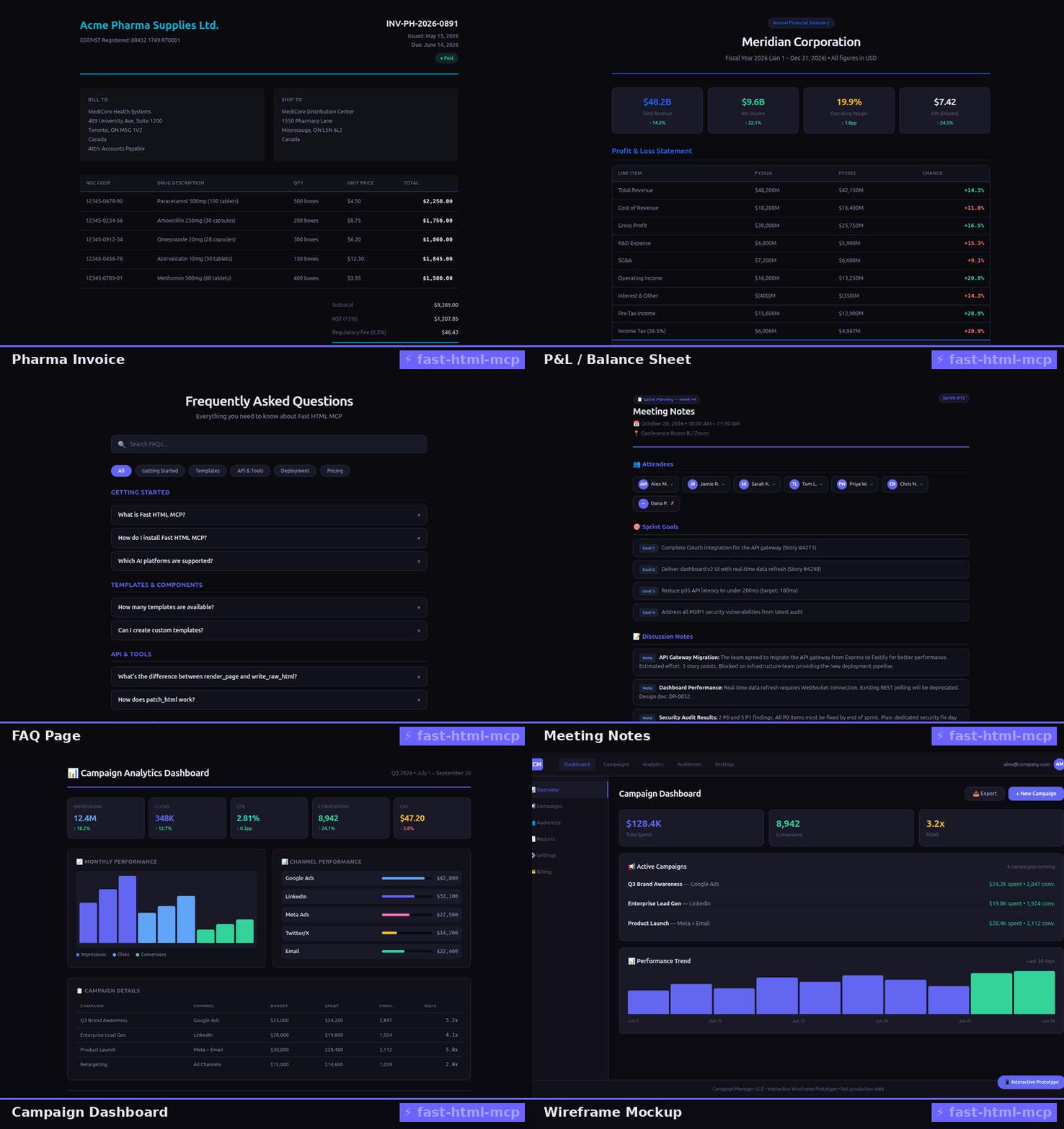
AI builds a real dashboard page in seconds — no browser, no Playwright, no Docker.
Quick Start
npx -y @aimino/fast-html-mcp-server
Add to Claude Desktop, Cursor, VS Code, or any MCP client:
{
  "mcpServers": {
    "open-talk-2-html-not-md": {
      "command": "npx",
      "args": ["-y", "@aimino/fast-html-mcp-server"]
    }
  }
}
That's it. Your AI agent now talks to you through pages.
What Does This Look Like?
An AI agent using OpenTalk2HTML-NotMD can build you:
| You ask for... | Instead of markdown | AI creates |
|---|---|---|
| "Show me Q3 numbers" | ## Q3\n- Revenue: $1.2M\n- Users: 45K | A styled report with tables & badges |
| "Make an invoice" | # Invoice\n**Client:** Acme Corp | A proper invoice page |
| "Dashboard please" | ## Metrics\n**ARR:** $10M | Analytics dashboard with visuals |
| "Pitch deck for investors" | Raw text with --- slides | Slide deck with real design |
| "API documentation" | Markdown with ``` blocks | Proper API docs page |
See all 22+ use cases in the interactive showcase.
How It Works
OpenTalk2HTML-NotMD is a five-tier MCP server purpose-built for AI-to-human communication:
OpenTalk2HTML-NotMD MCP Server
├── Assembly   → render_page (compose pages from components)
├── Patch      → patch_html, set_attribute, edit_html_range (make surgical edits)
├── Read       → read_html (inspect with 97% token savings)
├── Raw        → write_raw_html, format_html, preview_html
├── Email      → render_email, html_to_email (send to inbox)
└── Consistency→ propagate_edit, check_consistency (keep data in sync)
AI builds, edits, reads, and refines HTML pages — the same way you'd work with a document, except it happens in milliseconds and costs pennies.
Why This Exists
The Markdown Trap
AI agents default to markdown because it's the easiest output format. But markdown was designed for lightweight text formatting, not for communicating complex AI outputs to humans. The result:
- Users drown in walls of raw text
- No structure — everything is flat, nothing is scannable
- No visuals — tables, charts, and badges are ASCII at best
- No sharing — you can't send a markdown file to a colleague
The HTML Alternative
HTML fixes all of this: structure, navigation, styling, visuals, sharing — built in, no browser needed on the server side. The AI creates real pages that humans can actually consume.
OpenTalk2HTML-NotMD bridges the gap: AI writes HTML instead of markdown, and you get pages you can read, scan, and share.
Tools
| Tier | Tool | What It Does |
|---|---|---|
| Assembly | render_page | Compose a page from components & template |
| Assembly | register_template | Add your own template at runtime |
| Patch | patch_html | Replace content by CSS selector |
| Patch | set_attribute | Change an attribute by CSS selector |
| Patch | edit_html_range | Replace lines (most token-efficient edit) |
| Read | read_html | Inspect HTML in 4 modes (97% token savings) |
| Raw | write_raw_html | Write raw HTML to file |
| Raw | format_html | Beautify HTML |
| Raw | preview_html | Preview without writing to disk |
render_email | Build email-safe HTML | |
html_to_email | Convert web HTML to email-safe | |
| Consistency | propagate_edit | Update all cross-references |
| Consistency | check_consistency | Audit for stale references |
| Utility | list_components | Browse available components |
| Utility | list_templates | Browse available templates |
| Utility | get_template_schema | See template variables |
| Utility | get_component_schema | See component props |
Components & Templates
22 Components
Layout: header, footer, sidebar, card-deck, grid
Data: data-table, stats-grid, timeline, financial-table, evidence-grid
Visual: risk-matrix, valuation-chart, prisma-flow
Media: figure, image-gallery
Interactive: tabs, accordion
Utility: hero, callout, code-block, citation-block
25+ Templates
Reports: report, exploration, research, code-review, equity-research, lit-review, research-briefing, scientific-paper, journal-club, earnings-summary, industry-overview
Business: invoice, budget, financial-summary, data-sheet, dashboard, financial-dashboard
Communication: newsletter, changelog, faq, meeting-notes, comparison, landing-page, error-page
Presentation: pitch-deck, deck, design, prototyping, illustrations
Developer: api-doc, custom-editor, minimal, documentation
Performance Benchmarks
| Operation | OpenTalk2HTML-NotMD | Alternatives |
|---|---|---|
| Cold start → first render | ~1.5s | Playwright/Puppeteer: 5-15s |
| page render | ~900ms | Handlebars: similar |
| Patch by #id | ~200ms | Cheerio: 2-5s |
| Patch by CSS selector | ~800ms | Regex: 1-3s |
| 5 sequential patches | ~2s total | Re-parsing: 10s+ |
| Compression ratio | 40-70% | html-minifier: 10-30% |
| AI-compressed read (106KB page) | ~1,000 tokens (97% saved) | Raw: 30,553 tokens |
Why is it this fast?
- #id fast-path — direct text substitution instead of full AST parsing (~10x faster)
- Pre-compiled doT.js — templates compiled at startup, not render time
- No browser runtime — operates on strings and AST, zero headless overhead
Architecture
The Ping-Pong Loop
1. Discover   → list templates & components
2. Build      → render a page
3. Inspect    → read it back (97% token savings)
4. Refine     → patch, edit, set attributes
5. Consistency→ propagate edits across sections
Key Design Decisions
- doT.js — 10x faster compile time than Handlebars/EJS
- #id fast-path — direct string substitution for id-targeted edits
- parse5 — safe AST-based HTML patching (not regex)
- DOMPurify — XSS prevention on all output
- Atomic writes — tmp file + rename to prevent corruption
- ESM — Node.js 20+, TypeScript, ES modules
Token Efficiency (Why AI Agents Love This)
Designed from the ground up for AI token budgets:
Reading a 106KB HTML Page
| Mode | Tokens | Savings | Use |
|---|---|---|---|
| Text | 1,000 | 97% | Token-minimal reading |
| Compressed | 3,909 | 87% | Summary + stats |
| Content | 7,991 | 74% | Typed blocks |
| Structure | 9,163 | 70% | Tree overview |
Editing (500-line page, one value change)
| Approach | Tokens | When to use |
|---|---|---|
patch_html by id | ~2,396 | Small targets |
edit_html_range | ~48 | Large containers, surgical changes |
Development
git clone https://github.com/Aimino-Tech/OpenTalk2HTML-NotMD.git
cd OpenTalk2HTML-NotMD
npm install
npm run build
npm run dev              # hot reload
npm test                 # vitest
License
GNU General Public License v3.0 — see LICENSE.
Built by Aimino Tech — making AI communicate like a human.