CaptureMind
Turn Claude Desktop conversations into visual mind maps via MCP. Highlights blockers to surface where you're stuck. No extra API key needed.
Documentation
CaptureMind
将 Claude Desktop 对话直接整理成可视化思维导图
Turn your Claude Desktop conversations into visual mind maps — via MCP, no extra API key needed.
截图 · Screenshots
为什么需要它 · Why
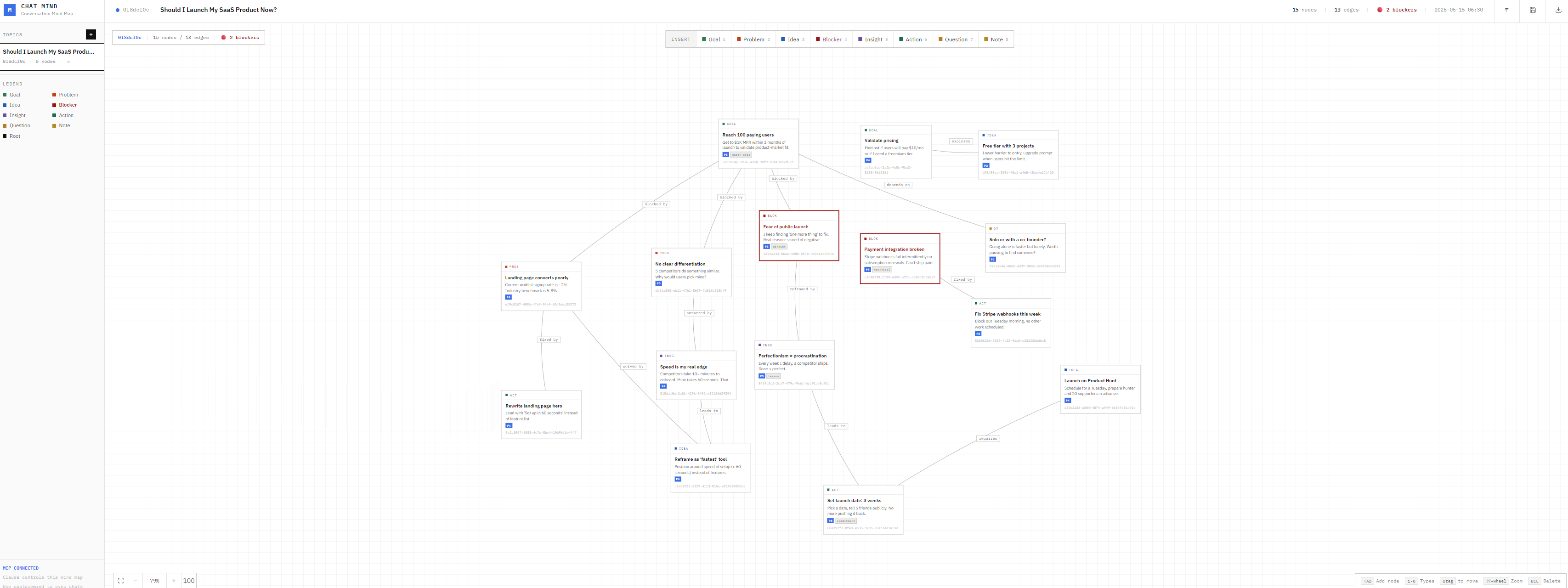
用 Claude 聊产品思路、创业方向、个人决策时,对话结束后思路往往还是散的。CaptureMind 让 Claude 在对话结束后直接把想法、目标、卡点、行动项结构化到一张导图里——尤其是卡点(Blocker),会被高亮显示,帮你看清自己真正卡在哪。
When you finish a deep conversation with Claude about product ideas, business strategy, or personal decisions, your thoughts are often still scattered. CaptureMind lets Claude structure them into a visual mind map — highlighting Blockers so you can finally see where you're stuck.
功能 · Features
-
capturemindMCP 工具 — Claude 自行分析对话,提取节点写入导图,无需额外 API Key
capturemindMCP tool — Claude analyzes the conversation itself and writes structured nodes to the map, no extra API key required -
卡点高亮 — Blocker 节点深红色高亮,一眼看出瓶颈
Blocker highlight — Blocker nodes are rendered in deep red, making bottlenecks instantly visible -
自动布局 — 节点按层级树状排列,不拥挤
Auto layout — Nodes are arranged in a hierarchical tree, clean and readable -
双语界面 — 中文 / English 一键切换,偏好自动记忆
Bilingual UI — Switch between Chinese and English with one click, preference is remembered -
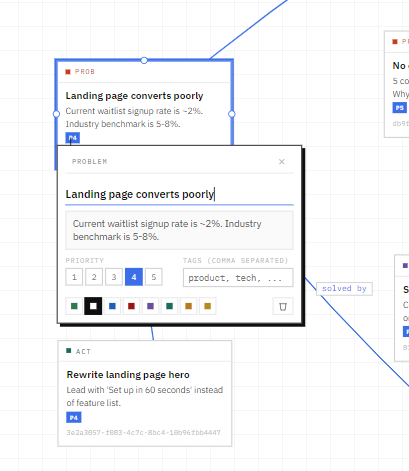
画布交互 — 拖拽、缩放、连线、快捷键全支持
Canvas interactions — Drag, zoom, connect nodes, full keyboard shortcut support -
MCP 完整控制 — Claude 可直接增删节点、搜索、导出
Full MCP control — Claude can add/edit/delete nodes, search, and export without opening the browser
安装 · Setup
前置要求 / Prerequisites: Node.js 18+、Claude Desktop
# 克隆项目 / Clone
git clone https://github.com/acearv09876/capturemind.git
cd capturemind

# 安装依赖 / Install
npm install

# 启动 / Start (default port 3001)
npm start
浏览器打开 / Open in browser: http://localhost:3001
Claude Desktop MCP 配置 · MCP Configuration
找到 Claude Desktop 配置文件 / Locate the Claude Desktop config file:
- macOS:
~/Library/Application Support/Claude/claude_desktop_config.json - Windows:
%APPDATA%\Claude\claude_desktop_config.json
添加以下内容 / Add the following:
{
  "mcpServers": {
    "capturemind": {
      "command": "node",
      "args": ["/path/to/capturemind/mcp-server.js"]
    }
  }
}
将 /path/to/capturemind/ 替换为实际路径,重启 Claude Desktop。
Replace /path/to/capturemind/ with the actual path, then restart Claude Desktop.
使用方式 · Usage
① 新建主题 / Create a topic
帮我用 create_topic 新建一个主题,名字叫"产品定位探讨"
Create a new topic called "Product Positioning" using create_topic
② 对话结束后,让 Claude 整理 / After the conversation, ask Claude to capture it
帮我用 capturemind 把这段对话整理成思维导图,topic_id: <主题ID>
Use capturemind to turn this conversation into a mind map, topic_id: <topic_id>
Claude 会自己分析对话,提取节点并写入导图。打开 http://localhost:3001 查看结果。
Claude will analyze the conversation, extract nodes, and write them to the map. Open http://localhost:3001 to see the result.
③ 整理布局 / Clean up layout
帮我用 layout_topic 重新整理一下布局,topic_id: <主题ID>
Use layout_topic to reorganize the layout, topic_id: <topic_id>
节点类型 · Node Types
| Type | 中文 | English | 说明 / Description |
|---|---|---|---|
root | 主题 | Topic | 导图根节点 / Root node |
goal | 目标 | Goal | 想要达成的结果 / Desired outcome |
problem | 问题 | Problem | 需要解决的挑战 / Challenge to solve |
idea | 想法 | Idea | 可能的方案或创意 / Possible solution |
blocker | 卡点 | Blocker | 进展瓶颈,高亮显示 / Bottleneck, highlighted |
insight | 洞察 | Insight | 重要的认识或发现 / Key realization |
action | 行动 | Action | 可立即执行的下一步 / Next step to take |
question | 待解答 | Question | 还没有明确答案的问题 / Unanswered question |
note | 备注 | Note | 其他补充信息 / Supplementary info |
MCP 工具列表 · MCP Tools
| 工具 / Tool | 说明 / Description |
|---|---|
capturemind | 核心工具 / Core tool: 分析对话提取节点 / Analyze conversation and extract nodes |
layout_topic | 自动重新排列节点(层级树状)/ Auto-arrange nodes (hierarchical tree) |
create_topic | 新建主题 / Create a new topic |
list_topics | 列出所有主题 / List all topics |
get_topic | 获取主题详情 / Get topic details |
delete_topic | 删除主题 / Delete a topic |
add_node | 添加节点 / Add a node |
update_node | 修改节点 / Update a node |
delete_node | 删除节点 / Delete a node |
add_edge | 连接两个节点 / Connect two nodes |
delete_edge | 删除连接 / Remove a connection |
batch_add | 批量导入节点和连接 / Batch import nodes and edges |
search | 全文搜索节点 / Full-text search nodes |
export_topic | 导出为 Mermaid / JSON / Markdown |
技术栈 · Tech Stack
| Backend | Node.js + Express, JSON file storage |
| Frontend | React 18 (Babel standalone, no build step) + plain CSS |
| MCP | @modelcontextprotocol/sdk |
License
MIT