ReelDrop
Agende reels do Instagram, leia análises e gerencie automações de comentário para DM na sua própria conta, a partir do Claude.
Documentação
Instagram MCP Server for Claude, ChatGPT and Cursor | ReelDrop
Model Context Protocol
Run your Instagram from Claude, ChatGPT or Cursor
Updated October 2026
ReelDrop's Instagram MCP server lets Claude, ChatGPT, Cursor and other AI assistants schedule reels, posts and stories, read your analytics, answer DMs and run comment-to-DM automations on your Instagram account. The endpoint is https://mcp.reeldrop.io/mcp, and the server is listed in the official MCP registry as io.reeldrop/reeldrop. It speaks Streamable HTTP and you sign in with OAuth, so there is no API key to create. MCP access is included on the Influencer and Creator plans; on the free Starter plan the connection works, but each tool answers with an upgrade prompt.
Connect your assistantSetup for your assistant
Works with
- Claude
- ChatGPT
- Cursor
- VS Code
- Windsurf
- Gemini
- Meta Muse
On this page
- Set up your assistant
- See it in the app
- Connect once, from the app
- Schedule reels by chat
- Edit, cancel, and check the queue
- Ask real analytics questions
- Manage DM automations
- ChatGPT and Meta Muse
- The 58 tools
- In practice
- Compared with other servers
- FAQ
- Keep exploring
Set up your assistant
Every client below adds the same server URL and signs in with your ReelDrop account. Meta Muse is the exception: it takes a personal token, because it has no browser to sign in with.
Claude
Claude Desktop, claude.ai and Claude Code
- On claude.ai or in Claude Desktop, open Customize → Connectors → + Add → Add custom connector, name it ReelDrop and paste the server URL. Free accounts get one custom connector.
- In Claude Code it is one command (below).
- Sign in with your ReelDrop account when the browser opens.
Claude Code
claude mcp add --transport http reeldrop https://mcp.reeldrop.io/mcp
ChatGPT
chatgpt.com, as a custom MCP plugin
- Open Plugins, click + and choose Add custom MCP server. Paste the server URL and leave authentication on OAuth.
- Create it as a plugin, install it and sign in with your ReelDrop account.
- Type @ in a new chat and pick ReelDrop.
Business, Enterprise and Edu plans get every tool. Pro gets read-only access, so reports work but scheduling does not.
Cursor
The Cursor editor agent
- Open Customize → MCPs and the MCP config, or edit
~/.cursor/mcp.jsondirectly. - Add the server with a
urlfield (below) and save. - Connect reeldrop from the MCPs list and sign in with your ReelDrop account.
~/.cursor/mcp.json
{
  "mcpServers": {
    "reeldrop": { "url": "https://mcp.reeldrop.io/mcp" }
  }
}
VS Code
GitHub Copilot in agent mode
- Run MCP: Add Server from the Command Palette, choose HTTP and paste the server URL. Or add it to
mcp.json(below). - Allow the sign-in when VS Code asks, and sign in with your ReelDrop account.
- Open Chat, switch to Agent, and pick the reeldrop tools in the tools menu.
mcp.json
{
  "servers": {
    "reeldrop": { "type": "http", "url": "https://mcp.reeldrop.io/mcp" }
  }
}
Windsurf
Devin Desktop, which Windsurf became in June 2026
- Add the server with the command line that ships with the app (below). It writes
~/.config/devin/mcp_config.json. - Run
devin mcp login reeldrop, or click Authenticate next to reeldrop in the app, and sign in with your ReelDrop account.
terminal
devin mcp add -s user reeldrop https://mcp.reeldrop.io/mcp
Gemini
Antigravity CLI, Gemini CLI and the Gemini app
- In Antigravity CLI, add the server with one command (below). It is saved to
~/.gemini/config/mcp_config.json. - Run
/mcpin a session and authenticate reeldrop with your ReelDrop account. - In the Gemini app, add it under Settings → Connected Apps → Add a custom app, where Google offers custom apps (the US only today).
terminal
agy mcp add reeldrop https://mcp.reeldrop.io/mcp
Meta Muse
Muse app, muse.ai and WhatsApp
- Muse cannot open a browser to sign in, so it uses a personal access token instead of OAuth.
- Create a token on the Connect your AI assistant page, ask Muse to build a custom connector from the server URL, and paste the token into its secure credential prompt.
See it in the app
-
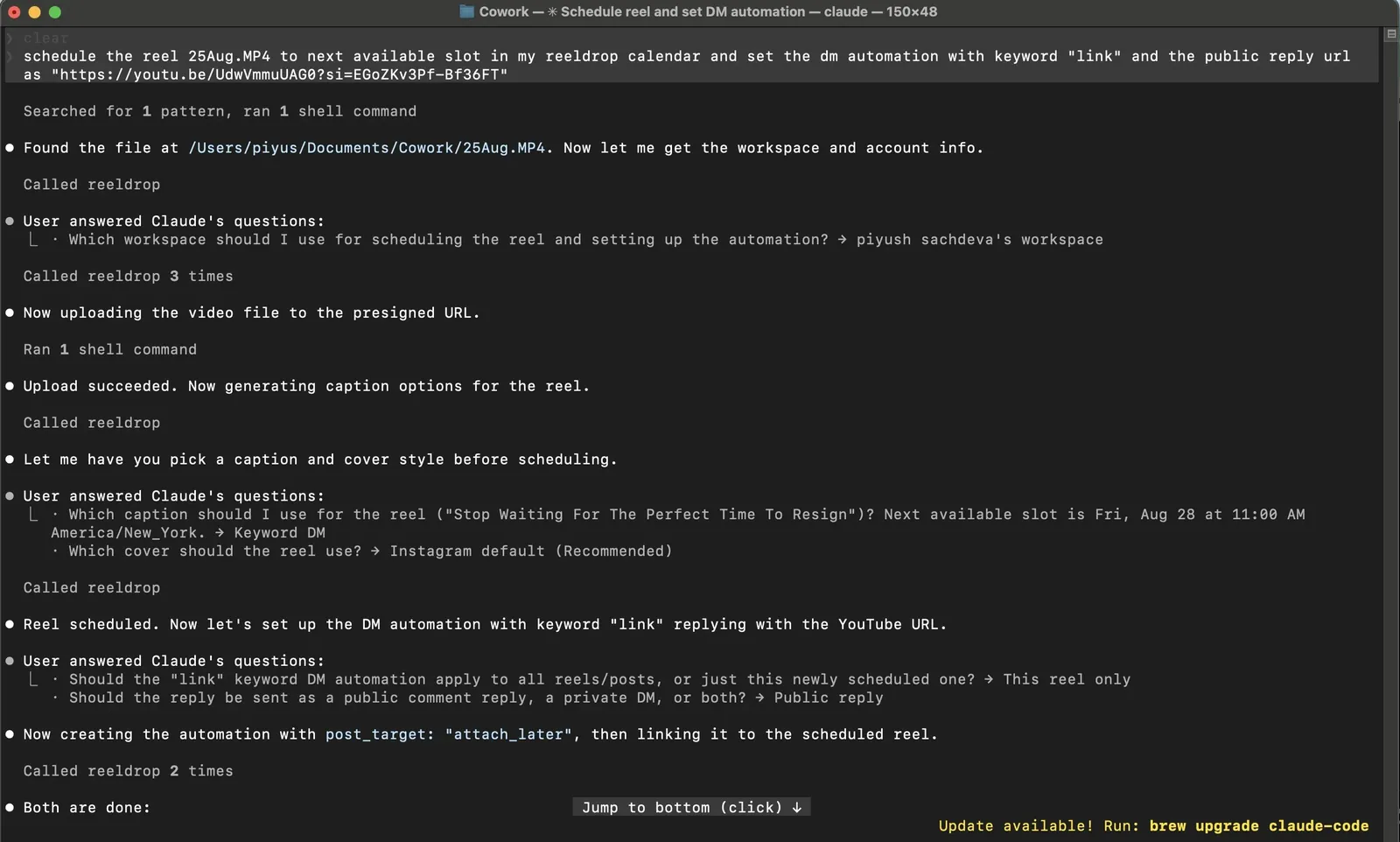
One message in Claude Code: the reel is uploaded, captioned, scheduled, and gets a DM automation.
-
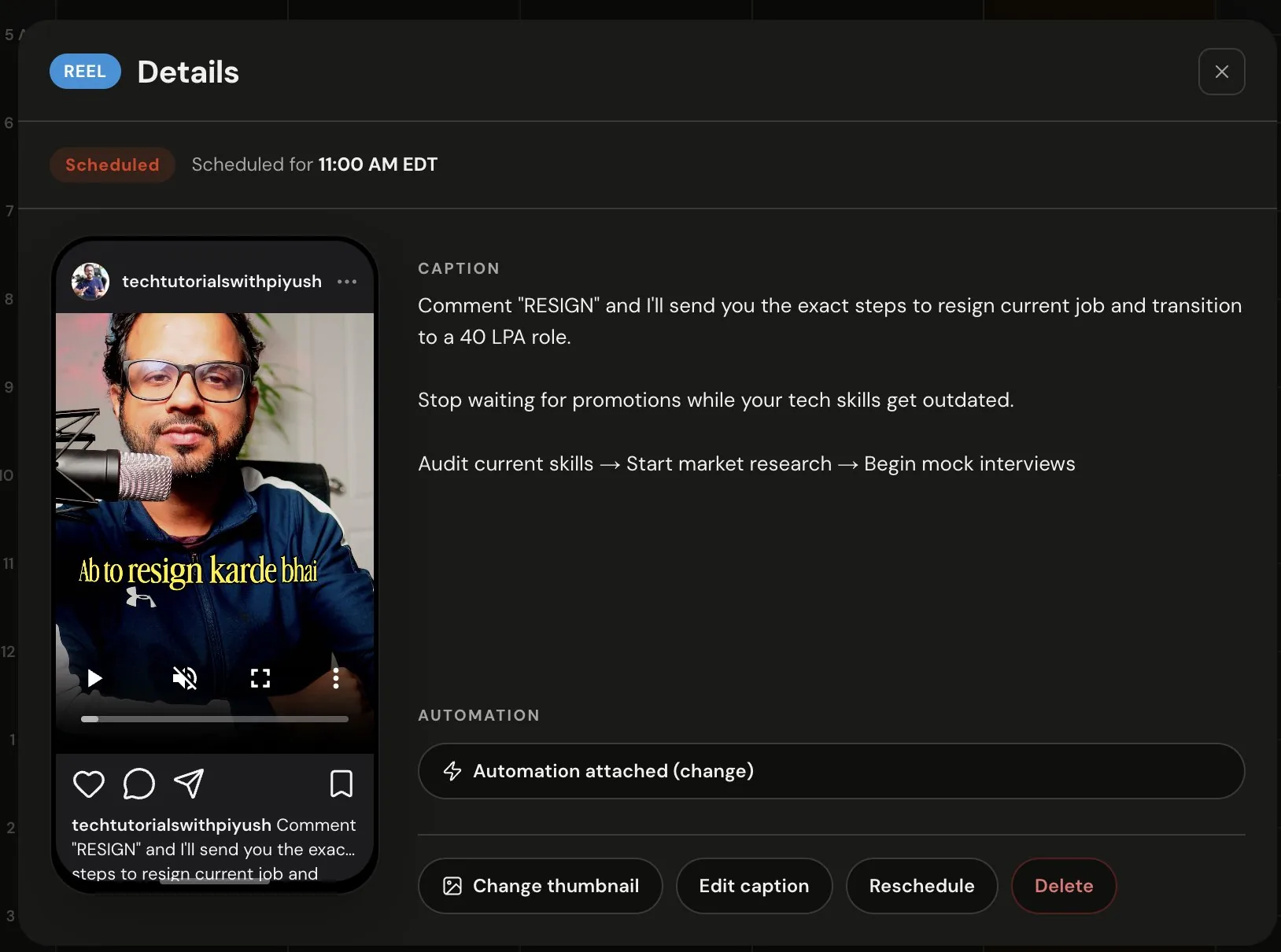
The result in ReelDrop: scheduled for 11:00 AM with the automation attached.
1 of 2
Connect once, from the app
Copy the server URL and add it to your assistant as a remote MCP server: a custom connector in Claude or ChatGPT, an entry in mcp.json in Cursor or VS Code, or one command in Claude Code: claude mcp add --transport http reeldrop https://mcp.reeldrop.io/mcp. Each client's steps are in the setup section above, with a full guide for each.
When the assistant first reaches the server, a browser window opens and you sign in with your normal ReelDrop account. That is the whole setup. There is no API key to generate and nothing to paste except the URL, and you never hand over a password.
Schedule reels by chat
Give the assistant a video link that anyone can open, a Google Drive file shared with a link works, or let it upload a local file directly. It runs ReelDrop's caption generator, shows you the options, asks which cover you want, and books the slot. Captions come out of the same monthly allowance the app uses, so nothing is billed differently just because Claude asked.
Bulk works too: hand it fifteen videos and a rough plan like "spread these over the next two weeks, evenings" and it schedules the lot against your saved posting slots. If you have never set posting times, the assistant asks for your timezone once and saves it to the workspace.
Edit, cancel, and check the queue
Anything already scheduled stays editable from chat: caption, hashtags, time, cover, or flipping a post between draft and scheduled. "Move Thursday's reel to Friday morning and shorten the caption" is one message. You can also list what is queued, filter by date or status, and cancel a post before it goes out.
Ask real analytics questions
The server exposes ReelDrop's analytics, so the assistant answers from your actual numbers rather than guessing: per-reel views and reach, account growth and demographics, story performance, and trial reel results. "Which of my last 20 reels held viewers longest" is the kind of question this was built for.
Manage DM automations
Claude can create, edit, and remove comment-to-DM automations, and attach one to a reel it is about to schedule so the automation goes live with the post. It will ask which reel you mean rather than guessing, which is the behaviour you want from software that touches your DMs. Every automation Claude creates starts paused: it reads back the exact messages and which posts they cover, and only turns the automation on after you say yes.
ChatGPT and Meta Muse
ReelDrop is not in ChatGPT's plugin directory yet, so until it is listed you add it yourself: on chatgpt.com, open Plugins, choose Add custom MCP server, paste the server URL and sign in with your ReelDrop account. ChatGPT gets 56 of the 58 tools, because the two upload-link tools need a client that can send a file itself; share a link to the video instead. Codex, OpenAI's coding agent, connects to the same server URL and sees the same tools.
Meta Muse, in the Muse app, on muse.ai and in WhatsApp, cannot open a browser to sign in, so it uses a personal access token instead of OAuth. Create the token on the Connect your AI assistant page, ask Muse to build a custom connector from the server URL, and paste the token into its secure credential prompt. The permissions you give the token decide what Muse can do, and you can revoke it at any time in Settings → AI assistants.
The 58 tools your assistant gets
The same actions you take in ReelDrop yourself, grouped the way you’d reach for them. Search, or pick a group.
All58Setup7Captions3Scheduling12Analytics7Automations13Inbox4Comments4Grid8
Workspaces & setup7
Ask which accounts it can see, how much of your plan is left this month, or when your next open posting slot is.
-
list_workspaces
Reads
List the workspaces your account belongs to.
-
list_ig_accounts
Reads
List the Instagram accounts connected to a workspace.
-
get_plan_usage
Reads
How much of your plan’s allowances are used: reel schedules, captions, trial reels, AI replies.
-
get_instagram_profile
Reads
Your followers, following and post count, plus whether the connection is healthy.
-
list_notifications
Reads
What the in-app bell shows: posts published or failed, milestones, nudges.
-
get_posting_slots
Reads
Get the next open slots from your saved schedule, or from when your followers are online.
-
update_scheduling_settings
Changes
Set the workspace timezone and posting cadence.
Show 5 more toolsShow 3 more tools
Captions & media3
Ask it to draft captions and hashtags for a video, upload a file from your computer, or find a reel from its Instagram link.
-
generate_reel_captions
Changes
Draft caption and hashtag options from the video with AI. The video is sent to Google Gemini.
-
get_video_upload_url
Changes
Get an upload URL for a local video with no public link.
-
resolve_reel_by_link
Reads
Turn a pasted Instagram link into a reel it can target.
Show 1 more tool
Scheduling12
Ask it to schedule a reel, photo, carousel or story, spread a batch over the next two weeks, move or cancel something queued, or retry a post that failed.
-
schedule_reel
Changes
Schedule a single reel from a video URL, or publish it now. Can go out as a trial reel.
-
schedule_reels_bulk
Changes
Schedule up to 15 reels in one call.
-
list_scheduled_posts
Reads
See what’s queued, filtered by status, kind, or date range. A failed post says why.
-
update_scheduled_post
Changes
Edit a queued post’s caption, hashtags, time, or cover. A story can be rescheduled.
-
retry_failed_post
Changes
Publish a failed post again, now or at a new time. The failure reason is shown first.
-
schedule_post
Changes
Schedule a photo post or a 2–10 image carousel, or publish it now.
-
publish_story
Changes
Publish a photo or video straight to Instagram Stories.
-
schedule_story
Changes
Schedule a photo or video story for a future time.
-
get_publishing_limit
Reads
Check how much of Instagram’s daily publishing allowance is used.
-
list_recent_media
Reads
Your latest posts and reels on Instagram, including ones posted outside reeldrop.
-
list_live_stories
Reads
See the stories that are up on Instagram right now.
-
cancel_scheduled_post
Deletes
Cancel a draft, scheduled, or failed post before it goes out.
Show 10 more toolsShow 8 more tools
Analytics7
Ask how last month’s reels did, which posts held viewers longest, how the account is growing, or how this week compares with your plan.
-
get_analytics_summary
Reads
Posting activity, AI usage, and cadence for a date range.
-
get_reel_analytics
Reads
Per-post views, reach, likes, saves, and average watch time.
-
get_account_analytics
Reads
Account reach, follower growth, and audience demographics.
-
get_story_analytics
Reads
Story views, reach, replies, taps, and exits.
-
get_content_plan
Reads
Which formats are working, the cadence to aim for, and the best slots.
-
get_weekly_recap
Reads
Last week against your plan and the week before.
-
get_trial_reel_analytics
Reads
Trial reel performance and reach-surge detection.
Show 5 more toolsShow 3 more tools
DM automations13
Ask it to put a comment-to-DM automation on a reel, find out why one did not fire, or dry-run a comment to see what would be sent.
-
list_automations
Reads
List the DM and comment automations in a workspace.
-
get_automation
Reads
Read one automation in full: keywords, replies, buttons, counters and health.
-
get_automation_logs
Reads
See each time an automation fired, what it sent, and why a follow-up did not.
-
preview_automation
Reads
Dry-run a comment or DM: which automations would fire, and what they would send.
-
create_automation
Changes
Create a comment, DM, story-reply, Live comment, or AI DM automation. It is created paused and goes live only when you approve it. AI DM replies tell people they are talking to an AI, and send their message text to Google Gemini.
-
get_pdf_upload_url
Changes
Get an upload URL for a PDF an automation hands out.
-
duplicate_automation
Changes
Copy an automation as a new paused one.
-
get_reply_variants
Reads
Ready-made public-reply or DM wording to choose from.
-
preview_ai_dm
Changes
Try an AI DM brief: what would it say to this message? The test message goes to Google Gemini.
-
resubscribe_webhooks
Changes
Re-subscribe the account to comments and DMs if automations stopped firing.
-
retrigger_automation
Changes
Replay an automation over recent comments it missed. Can DM real people.
-
update_automation
Changes
Edit an automation, or pause it. Switching it on needs your explicit confirmation.
-
delete_automation
Deletes
Permanently delete an automation and its activity log.
Show 11 more toolsShow 9 more tools
Inbox4
Ask who is waiting on a reply, read a thread, pin or tag it, and send an answer once you have approved the wording.
-
list_conversations
Changes
List DM threads — unread, hot leads, pinned, archived — with who wrote last.
-
get_conversation
Changes
Read one DM thread, oldest message first.
-
update_conversation
Changes
Pin, archive, tag, or mark a thread read.
-
reply_to_conversation
Changes
Send a text DM reply, inside Instagram’s 24-hour window.
Show 2 more tools
Comments4
Ask what people are saying under a post, answer a question publicly, or hide spam.
-
list_comments
Reads
Read the comments on one of your posts, newest first.
-
reply_to_comment
Changes
Post a public reply under a comment.
-
hide_comment
Changes
Hide a comment from view, or show it again. Nothing is deleted.
-
delete_comment
Deletes
Permanently delete a comment.
Show 2 more tools
Grid planner8
Ask what your grid will look like next week, pencil in an idea tile, or swap two planned posts.
-
get_grid
Reads
See your grid: latest posts, planned posts, and idea tiles.
-
create_grid_placeholder
Changes
Pencil an idea into a time slot on the grid.
-
update_grid_placeholder
Changes
Change an idea tile’s slot, note, or colour.
-
convert_grid_placeholder
Changes
Turn an idea tile into a draft post.
-
add_grid_collab
Changes
Add a Collab post to the grid by its link.
-
remove_grid_collab
Deletes
Take a Collab tile off the grid.
-
swap_grid_entries
Changes
Swap the time slots of two planned tiles.
-
delete_grid_placeholder
Deletes
Remove an idea tile.
Show 6 more toolsShow 4 more tools
MCP access is included on the Influencer and Creator plans. On Starter the tools connect but answer with an upgrade prompt. ChatGPT sees 56 of the 58: the two upload-link tools need a client that can send a file itself, so in ChatGPT you share a link to the video instead.
In practice
Sunday batch night, without opening ReelDropA creator drops eight filmed reels into Google Drive, opens Claude, and says: schedule these across the next two weeks in my evening slots, captions in my usual tone, ask me before locking each one. Twenty minutes of yes/no answers later the fortnight is booked, covers chosen, one automation attached to the launch reel.
The mid-week rearrangeA product drop slips two days. Instead of dragging posts around a calendar, the founder tells Claude to push the three launch posts back 48 hours and swap the teaser caption for the new date. The queue updates, and the confirmation lists exactly what changed.
A weekly performance check-inEvery Friday, a social media manager asks the same question in Claude: how did this week's reels do against last week's, and what should I double down on? The assistant pulls the analytics, compares the two weeks, and answers with the actual numbers. What used to be a spreadsheet ritual is now one message.
Compared with other Instagram MCP servers
Checked 23 October 2026
The Instagram MCP servers on GitHub are community projects you run yourself. Of the four most-starred, three reach Instagram through unofficial routes: instagram_dm_mcp and instagram-engagement-mcp sign in with your Instagram username and password through the private mobile API (the instagrapi and instagram-private-api libraries), and instagram-server-next-mcp drives a logged-in Chrome session. Instagram’s terms do not allow that kind of automated access, so the risk sits with your account, and only one of the three says so in its README. The most-starred, ig-mcp, uses Meta’s official Graph API but publishes immediately. None of the four can schedule a post.
Scheduling tools now ship their own connectors, so scheduling from chat is no longer rare. Metricool’s official Claude and ChatGPT connectors, launched on 10 September 2026, work on every plan including Free and schedule Instagram posts, reels and stories; Metricool has DM automation (Flows), but its MCP leaves the inbox out. Buffer’s MCP is on every plan including Free and schedules Instagram posts and reels; Buffer has no DM automation. Postiz is open source and its MCP schedules posts, but it cannot read or reply to comments and Postiz has no DM automation. Metricool, Buffer and Postiz connect Instagram through Meta’s own login, the official API route. SuperProfile’s connector exposes its comment-to-DM automations, which it says run on Meta’s official messaging API. ReelDrop’s server covers scheduling, analytics, comment-to-DM automations, the DM inbox and comment moderation in one connection, all through Meta’s official Instagram API.
Sources (14), from each project’s own README or docs
- 1.jlbadano/ig-mcp (GitHub) github.com (opens in a new tab)
- 2.trypeggy/instagram_dm_mcp (GitHub) github.com (opens in a new tab)
- 3.duhlink/instagram-server-next-mcp (GitHub) github.com (opens in a new tab)
- 4.Bob-lance/instagram-engagement-mcp (GitHub) github.com (opens in a new tab)
- 5.Instagram Terms of Use help.instagram.com (opens in a new tab)
- 6.Metricool: official connectors for Claude and ChatGPT metricool.com (opens in a new tab)
- 7.Metricool: FAQs about the Metricool MCP help.metricool.com (opens in a new tab)
- 8.Metricool: Flows on Instagram help.metricool.com (opens in a new tab)
- 9.Buffer MCP buffer.com (opens in a new tab)
- 10.Buffer developer docs: MCP developers.buffer.com (opens in a new tab)
- 11.Postiz docs: MCP docs.postiz.com (opens in a new tab)
- 12.Postiz docs: Instagram provider docs.postiz.com (opens in a new tab)
- 13.SuperProfile MCP superprofile.bio (opens in a new tab)
- 14.SuperProfile MCP (GitHub) github.com (opens in a new tab)
Frequently asked questions
Which plans include MCP access?
Influencer and Creator. On the free Starter plan you can connect, but the tools reply with an upgrade prompt instead of doing the work, so nothing breaks; it just points you at billing.
Which apps can I connect?
Claude (Desktop, claude.ai and Code), ChatGPT, Cursor, VS Code with GitHub Copilot, Windsurf (now Devin Desktop), Antigravity CLI and Gemini CLI, and the Gemini app where Google offers custom apps. Each has a setup guide. Meta Muse connects with a personal token. Any other client that speaks MCP over Streamable HTTP with OAuth works the same way, because ReelDrop follows the open MCP standard rather than a private plugin API.
Is this safe? What can the assistant actually touch?
The assistant signs in through your ReelDrop account with the same OAuth flow the app uses, so it can do what you can do in ReelDrop and nothing more. It never sees your Instagram password, publishing still goes through the official Instagram API, and you can disconnect it from your assistant's settings whenever you like.
Do AI captions requested through Claude cost extra?
No. They draw from the same monthly caption allowance as the app. If the allowance runs out, the assistant tells you instead of silently failing.
Can it post to all my accounts?
Yes, one workspace at a time. Each ReelDrop workspace holds its own Instagram connection, and the assistant lists your workspaces and asks which one you mean, so on Creator you can drive up to 5 accounts from one chat.
Does the video need to be online somewhere?
Either works. A publicly fetchable link (Google Drive shared with the link, a direct URL) is the fast path. For a file that only exists on your machine, the assistant requests an upload URL and sends the file straight to ReelDrop first.
Will Claude post things without asking me?
The server is built to make that hard. Scheduling requires a caption you have seen and a cover choice, so the assistant has to check in before anything is booked. It also refuses to guess posting times; it reads your saved slots or asks.
Keep exploring
Related features2How it stacks up3Keep reading8
- Instagram schedulerThe calendar the assistant is booking into.
- Instagram DM automationThe automations Claude can create and attach.
On this page
- Set up your assistant
- See it in the app
- Connect once, from the app
- Schedule reels by chat
- Edit, cancel, and check the queue
- Ask real analytics questions
- Manage DM automations
- ChatGPT and Meta Muse
- The 58 tools
- In practice
- Compared with other servers
- FAQ
- Keep exploring
Two minutes to connect
No API key. Sign in once with your ReelDrop account.
Connect your assistant in about two minutes.
No API keys. You sign in once with your normal ReelDrop account, and it can schedule and edit reels, posts and stories, and report on your numbers, from chat.
Open the connect pageSetup guides
Built in Toronto by Piyush Sachdeva.