Tabby-MCP-Server
A Tabby plugin implementing an MCP server for AI-powered terminal control and automation.
🚀 Tabby-MCP-Server


Powerful Tabby plugin that implements Model Context Protocol (MCP) server, enabling AI-powered terminal control and automation.
Plugin for Tabby Terminal - a modern, highly configurable terminal emulator.
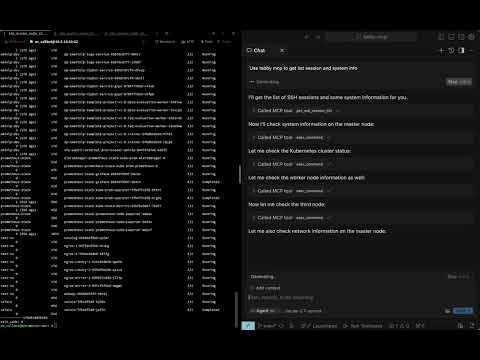
📹 Video Demo
Watch the full video demonstration of Tabby-MCP in action:
✨ Features
- 🤖 AI Connection: Seamlessly connect AI assistants to your terminal
- 🔌 MCP Server: Built-in Model Context Protocol server implementation
- 🖥️ Terminal Control: Allow AI to execute commands and read terminal output
- 🔍 Session Management: View and manage SSH sessions
- 🚫 Command Abort: Safely abort running commands
- 📋 Buffer Access: Retrieve terminal buffer content with flexible options
- 🔒 Pair Programming Mode: Optional confirmation dialog before command execution
- 📊 Command History: Track and review previously executed commands
- 🔄 Command Output Storage: Paginated access to complete command outputs
📋 Table of Contents
- 🚀 Tabby-MCP-Server
🔧 Installation
Install from Tabby Plugin Store
- Go to Tabby settings → Plugins → MCP
- Click "Install" on the Tabby MCP plugin
- Restart Tabby
- Configure your AI client to connect to the MCP server (see Connecting to MCP)
Using Docker
You can build and install the plugin using Docker with the following command:
git clone https://github.com/thuanpham582002/tabby-mcp-server.git
cd tabby-mcp-server
# Build the Docker image
docker build -t tabby-mcp . && docker run -v $(pwd)/build:/output tabby-mcp
bash scripts/copy_to_plugin_folder.sh
This command builds a Docker image tagged as 'tabby-mcp' and runs a container from this image, mounting your local 'build' directory to '/output' in the container. The script scripts/copy_to_plugin_folder.sh will copy the built files to the Tabby plugin folder.
🚀 Quick Start
- Install the plugin using one of the methods above
- Start Tabby and navigate to Settings → Plugins → MCP
- Configure the MCP server port (default: 3001)
- Toggle "Start on Boot" to automatically start the server when Tabby launches
- Connect to the MCP server from any supported AI client listed at https://modelcontextprotocol.io/clients
💻 Usage Examples
Connect an AI to Control Your Terminal
- Start Tabby with the MCP plugin enabled
- Configure your AI client to connect to the MCP server (see Connecting to MCP)
- Ask your AI assistant to run commands or manage your terminal sessions
Example AI prompt:
Connect to my Tabby MCP server and list all available terminal sessions.
Then execute the command "ls -la" in the first available terminal.
🔗 Connecting to MCP
To configure AI clients to use your MCP server, add the following to your ~/.cursor/mcp.json file:
STDIO mode:
{
  "mcpServers": {
    "Tabby MCP": {
      "command": "npx",
      "args": [
        "-y",
        "tabby-mcp-stdio",
        "--port",
        "3001"
      ]
    }
  }
}
SSE mode:
{
  "mcpServers": {
    "Tabby MCP": {
      "type": "sse",
      "url": "http://localhost:3001/sse"
    }
  }
}
Select your preferred MCP server in your AI client settings. The Tabby MCP plugin must be running for the "Tabby MCP" (SSE) option to work, while the STDIO and Docker options will start their own server instances.
⚙️ Configuration in Tabby Setting
Configure the MCP server through the Tabby settings:
{
  "mcp": {
    "port": 3001,
    "host": "http://localhost:3001",
    "enableLogging": false,
    "startOnBoot": true,
    "pairProgrammingMode": {
      "enabled": true,
      "showConfirmationDialog": true,
      "autoFocusTerminal": true
    }
  }
}
Pair Programming Mode
The plugin includes a "Pair Programming Mode" that adds safety features when AI assistants control your terminal:
- Confirmation Dialog: Prompt user before executing commands
- Auto Focus Terminal: Automatically focus terminal when commands are executed
- Command Rejection: Ability to reject commands with feedback
To enable Pair Programming Mode:
- Go to Tabby settings → Plugins → MCP
- Toggle "Enable Pair Programming Mode"
- Configure additional safety options as needed
📚 API Reference
Available Tools
| Tool | Description | Parameters |
|---|---|---|
get_ssh_session_list | Get list of all terminal sessions | None |
exec_command | Execute a command in terminal | command, tabId, commandExplanation |
get_terminal_buffer | Get terminal content | tabId, startLine, endLine |
get_command_output | Retrieve complete command output | outputId, startLine, maxLines |
🤝 Contributing
Contributions are welcome! Here's how you can help:
- Fork the repository
- Create a feature branch (
git checkout -b feature/your-feature) - Commit your changes (
git commit -m 'Add your feature') - Push to the branch (
git push origin feature/your-feature) - Open a Pull Request
See the contributing guidelines for more details.
Development Workflow
-
Clone the repository and install dependencies:
git clone https://github.com/thuanpham582002/tabby-mcp-server.git cd tabby-mcp-server npm install -
Make your changes to the codebase
-
Build the plugin:
docker build -t tabby-mcp . && docker run -v $(pwd)/build:/output tabby-mcp -
Test the plugin with Tabby:
bash scripts/copy_to_plugin_folder.sh
📝 License
This project is licensed under the MIT License - see the LICENSE file for details.
Made with ❤️ by Pham Tien Thuan
Servidores relacionados
Alpha Vantage MCP Server
patrocinadorAccess financial market data: realtime & historical stock, ETF, options, forex, crypto, commodities, fundamentals, technical indicators, & more
TokenCost
An MCP (Model Context Protocol) server that provides real-time LLM token pricing data for 60+ AI models across 15 providers.
Angular MCP Server
An MCP server for accessing the official Angular documentation.
Imagen3-MCP
Generate images using Google's Imagen 3.0 model via the Gemini API.
Web3 Playground & Sandbox - Learn, Develop, Test MCP Servers + Toolkit SDK
Free Solidity compiler & Web3 IDE with interactive tutorials. Learn blockchain development, deploy smart contracts to 8+ chains (Ethereum, Polygon, Base, Arbitrum, Solana). Templates for tokens, NFTs, DeFi, DAOs. Monaco Editor, AI assistance, WCAG accessible. Remix alternative. Gas optimization, MetaMask integration, open source. Beginner-friendly. MCP toolkit.
SolHunt Solana Wallet Intelligence
Solana wallet health analysis platform and top-notch dev tool. Helps people and agents to recover their SOLs from burner and old wallets super securely. Features a complete trustless recovery flow natively via MCP: preview yields, build unsigned transactions, and sign locally.
GhidraMCP
An embedded MCP server for Ghidra, exposing program data and reverse engineering functionalities.
MCP Proxy Hub
Aggregates multiple MCP resource servers into a single interface using a JSON configuration file.
npm Package README
Fetch READMEs, metadata, and search for packages on the npm registry.
MCP SSH Server
Securely execute remote commands and perform file operations over SSH, with support for both password and key-based authentication.
Authless Remote MCP Server
A remote MCP server without authentication, designed for easy deployment on Cloudflare Workers.