Flame MCP Server
Fornece documentação ao vivo e atualizada para o motor de jogos Flame.
Documentação
Flame MCP Server
Um servidor Model Context Protocol (MCP) que fornece acesso abrangente à documentação do motor de jogos Flame para assistentes de IA como Claude Desktop e Amazon Q Developer.
🎯 O Que Isso Faz
- Acesso à Documentação: Fornece acesso pesquisável à documentação completa do motor Flame
- Sistema de Tutoriais: Oferece tutoriais de desenvolvimento de jogos passo a passo (Space Shooter, Platformer, Klondike)
- Cache Local: Armazena documentação localmente para acesso rápido e offline
- Integração MCP: Funciona perfeitamente com Claude Desktop e Amazon Q CLI
- Ferramentas de Busca: Busca inteligente em toda a documentação e tutoriais
🚀 Início Rápido
1. Build e Configuração
# Clone and build the server
git clone <repository-url>
cd flame_mcp_server
./build_clean.sh
Isso irá:
- Instalar dependências Dart
- Compilar o executável do servidor MCP
- Baixar e armazenar em cache toda a documentação do Flame (~146 arquivos)
2. Configure Seu Cliente MCP
Amazon Q Developer
Adicione à sua configuração MCP:
{
  "mcpServers": {
    "flame-docs": {
      "command": "/absolute/path/to/flame_mcp_server/build/flame_mcp_live"
    }
  }
}
Claude Desktop
Adicione ao claude_desktop_config.json:
{
  "mcpServers": {
    "flame-docs": {
      "command": "/absolute/path/to/flame_mcp_server/build/flame_mcp_live"
    }
  }
}
Locais dos arquivos de configuração:
- macOS:
~/Library/Application Support/Claude/claude_desktop_config.json - Windows:
%APPDATA%\\Claude\\claude_desktop_config.json - Linux:
~/.config/Claude/claude_desktop_config.json
3. Reinicie Seu Cliente MCP
Reinicie o Claude Desktop ou o Amazon Q CLI para carregar o servidor de documentação do Flame.
🛠️ Ferramentas Disponíveis
search_documentation
Pesquise em toda a documentação do Flame por tópicos específicos.
Exemplos de consultas:
- "Como implemento detecção de colisão no Flame?"
- "Pesquisar exemplos do sistema de componentes"
- "Encontrar informações sobre animações de sprites"
tutorial
Obtenha tutoriais completos de desenvolvimento de jogos passo a passo.
Tutoriais disponíveis:
- Space Shooter: Tutorial completo em 6 etapas para criar um space shooter clássico
- Platformer: Tutorial em 7 etapas para criar um platformer de rolagem lateral (Ember Quest)
- Klondike: Tutorial em 5 etapas para criar um jogo de paciência
Exemplos de uso:
- "Mostre-me como criar um jogo space shooter" → Tutorial completo com todas as etapas
- "Quero criar um jogo platformer" → Tutorial completo de platformer
- "Liste todos os tutoriais disponíveis" → Visão geral de todos os tutoriais
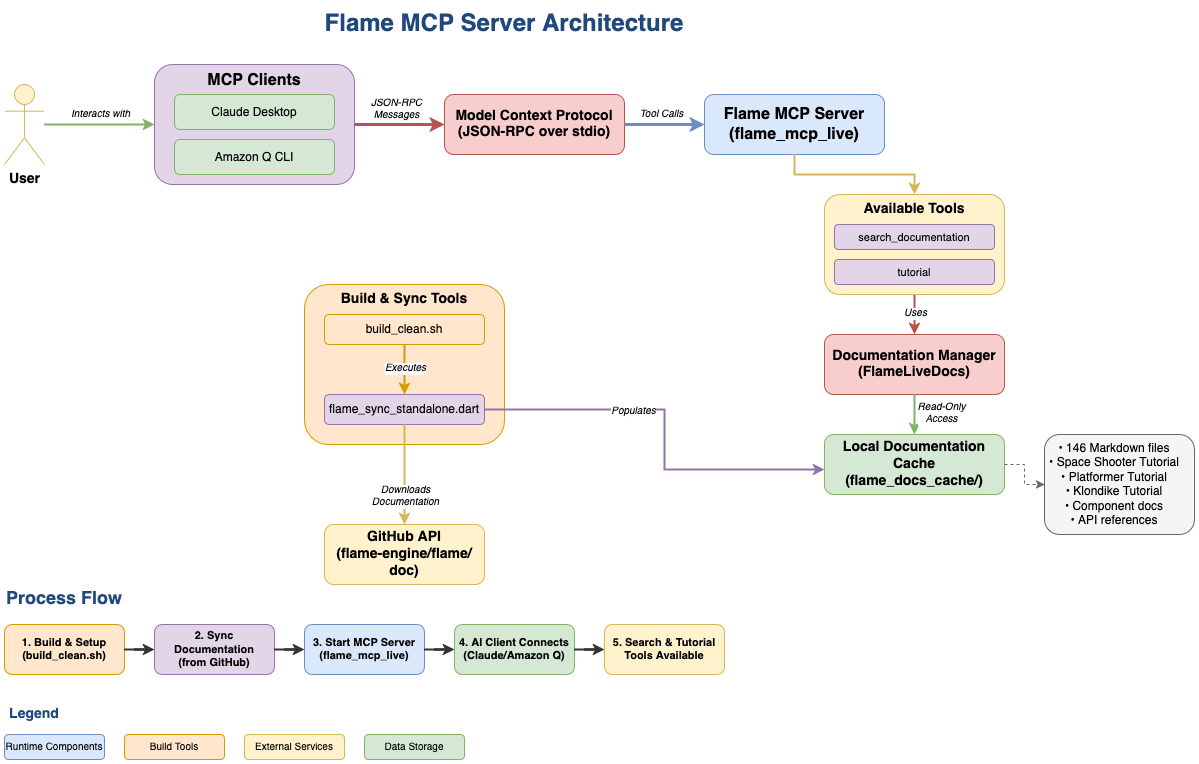
📊 Arquitetura
┌─────────────────┐    ┌──────────────────┐    ┌─────────────────┐
│   MCP Client    │    │  Flame MCP       │    │  Documentation  │
│ (Claude/Amazon Q)│◄──►│     Server       │◄──►│     Cache       │
└─────────────────┘    └──────────────────┘    └─────────────────┘
                              │
                              ▼
                       ┌──────────────────┐
                       │   GitHub API     │
                       │ (flame-engine/   │
                       │    flame/doc)    │
                       └──────────────────┘
🔧 Configuração
Token do GitHub (Recomendado)
Para melhores limites de taxa (5.000 vs 60 solicitações/hora):
-
Crie um Personal Access Token do GitHub:
- Vá para Configurações do GitHub → Configurações de desenvolvedor → Personal access tokens
- Gere um novo token com escopo
public_repo
-
Defina a variável de ambiente:
# macOS/Linux
export GITHUB_TOKEN=your_token_here

# Windows
setx GITHUB_TOKEN "your_token_here"
📁 Estrutura do Projeto
flame_mcp_server/
├── bin/
│   ├── flame_mcp_live.dart           # Main MCP server
│   └── flame_sync_standalone.dart    # Documentation sync utility
├── lib/src/
│   ├── flame_live_docs.dart          # Documentation management
│   └── flame_mcp_live.dart           # MCP protocol implementation
├── build/
│   └── flame_mcp_live                # Compiled MCP server
├── flame_docs_cache/                 # Cached documentation (146 files)
├── build_clean.sh                    # Build and setup script
└── README.md                         # This file
🎮 Exemplos de Interação
Criando um Jogo Space Shooter
Você: "Quero criar um jogo space shooter no Flame. Mostre-me o tutorial completo."
Resposta: Tutorial completo em 6 etapas incluindo:
- Configuração do projeto e estrutura básica do jogo
- Controles do jogador e gráficos
- Animações e efeitos visuais
- Spawn de inimigos e movimento
- Mecânicas de tiro
- Detecção de colisão e pontuação
Aprendendo Sobre Componentes
Você: "Como funciona o sistema de componentes do Flame?"
Resposta: Documentação detalhada sobre:
- Ciclo de vida dos componentes
- Hierarquia de componentes
- Componentes integrados
- Criando componentes personalizados
- Comunicação entre componentes
🔄 Manutenção
Atualizar Cache de Documentação
# Update to latest Flame documentation
dart run bin/flame_sync_standalone.dart
Recompilar Servidor
# Clean rebuild with fresh documentation
./build_clean.sh
📋 Pré-requisitos
- Dart SDK: Versão 3.2.0 ou superior
- Conexão com a Internet: Necessária para a sincronização inicial da documentação
- Cliente MCP: Claude Desktop, Amazon Q CLI ou cliente compatível
🐛 Solução de Problemas
Servidor Não Encontrado
- Certifique-se de usar o caminho absoluto para o executável na sua configuração MCP
- Verifique se o executável existe:
ls -la build/flame_mcp_live - Verifique as permissões do arquivo:
chmod +x build/flame_mcp_live
Sem Resultados de Busca
- Execute
./build_clean.shpara recompilar o cache e o servidor - Verifique se o cache existe:
ls flame_docs_cache/ - Verifique se o cache tem conteúdo:
find flame_docs_cache -name "*.md" | wc -l(deve mostrar ~146)
Problemas de Limite de Taxa
- Configure um personal access token do GitHub (veja a seção Configuração)
- Verifique o status do limite de taxa nos logs de sincronização
📈 Desempenho
- Arquivos de Documentação: 146 arquivos Markdown
- Tamanho do Cache: ~3 MB
- Tempo de Sincronização: 30-60 segundos (depende da rede)
- Uso de Memória: <50 MB em execução
- Tempo de Inicialização: <2 segundos
🤝 Contribuindo
- Faça um fork do repositório
- Crie um branch de funcionalidade
- Faça suas alterações
- Teste com
./build_clean.sh - Envie um pull request
📄 Licença
Este projeto está licenciado sob a Licença MIT.
🔗 Links Relacionados
Pronto para começar a criar jogos com Flame? Execute ./build_clean.sh e adicione o servidor ao seu cliente MCP! 🎮