Zendesk MCP Server
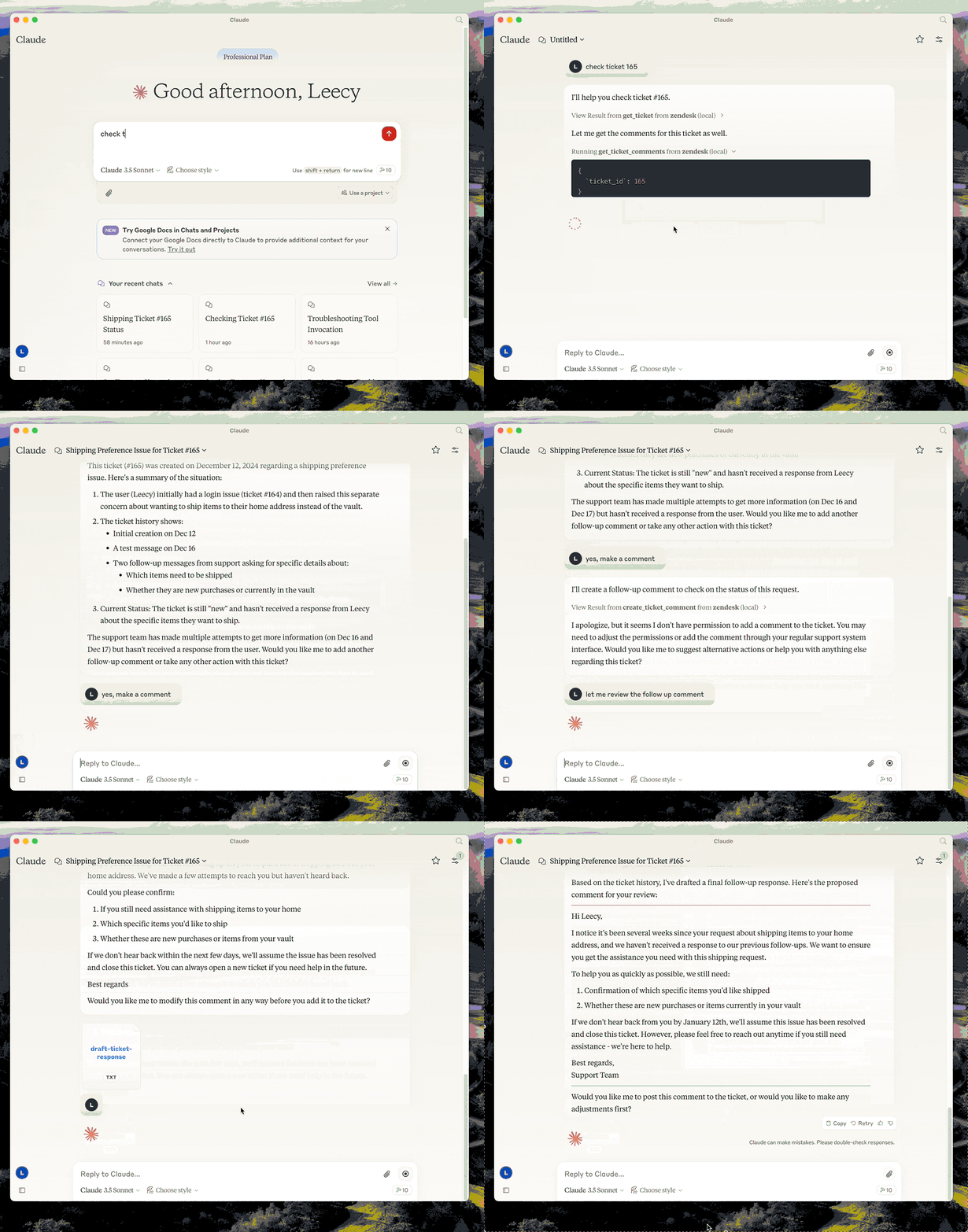
Gerencie tickets e comentários do Zendesk, analise tickets, redija respostas e acesse artigos da Central de Ajuda como base de conhecimento.
Documentação
Servidor MCP Zendesk


Um servidor Model Context Protocol para Zendesk.
Este servidor fornece uma integração abrangente com o Zendesk. Ele oferece:
- Ferramentas para recuperar e gerenciar tickets e comentários do Zendesk
- Prompts especializados para análise de tickets e elaboração de respostas
- Acesso completo aos artigos do Zendesk Help Center como base de conhecimento
Configuração
- build:
uv venv && uv pip install -e .ouuv build, resumidamente. - configure a autenticação: veja Autenticação abaixo.
- configure no Claude desktop:
{
  "mcpServers": {
      "zendesk": {
          "command": "uv",
          "args": [
              "--directory",
              "/path/to/zendesk-mcp-server",
              "run",
              "zendesk"
          ]
      }
  }
}
Autenticação
Este servidor autentica com OAuth. Cada operador autoriza com seu próprio login do Zendesk, então as chamadas de API carregam sua identidade e o Zendesk aplica exatamente as permissões que aplica na interface — o papel do usuário, suas restrições de grupo, seu acesso a tickets. Os comentários que eles publicam são de autoria deles.
A autenticação por token de API ainda funciona, mas está obsoleta. Veja Migrando de um token de API.
1. Registre um cliente OAuth público
No Admin Center, vá para Apps e integrações > APIs > Clientes OAuth e crie um cliente:
| Campo | Valor |
|---|---|
| Tipo de cliente | Público — este servidor roda na máquina de cada operador, então não há segredo que ele possa guardar. PKCE é usado em vez disso. |
| URLs de redirecionamento | http://localhost:4567/callback |
| Escopos permitidos | tickets:read tickets:write ticket_attachments:read users:read hc:read |
Definir Escopos permitidos é opcional, mas recomendado: limita o que qualquer token deste cliente pode solicitar, mesmo que o código mude.
Anote o Identificador do cliente — esse é o ZENDESK_CLIENT_ID abaixo.
Se o Zendesk rejeitar http://localhost:4567/callback, registre https://localhost
em vez disso e use zendesk-auth --manual no passo 3.
2. Configure o ambiente
Copie .env.example para .env e defina:
ZENDESK_SUBDOMAIN=acme        # for https://acme.zendesk.com
ZENDESK_CLIENT_ID=your-client-identifier
Mantenha .env fora do controle de versão.
Duas configurações opcionais, ambas devem concordar com o cliente OAuth:
| Variável | Padrão | Quando alterar |
|---|---|---|
ZENDESK_OAUTH_REDIRECT_URI | http://localhost:4567/callback | A porta 4567 está em uso, ou o cliente está registrado com uma URL de redirecionamento diferente. Deve corresponder exatamente a uma URL de redirecionamento no cliente. |
ZENDESK_TOKEN_FILE | $XDG_CONFIG_HOME/zendesk-mcp/tokens.json | Armazenando tokens em outro lugar, por exemplo, um volume Docker. |
3. Autorize esta máquina, uma vez
uv run zendesk-auth
Isso abre um navegador, pede que o operador aprove o acesso e armazena os tokens resultantes localmente. A partir daí, o servidor renova o acesso por conta própria; o operador nunca repete isso, a menos que os tokens sejam revogados ou fiquem sem uso além da vida útil do token de atualização (90 dias, conforme solicitado por este servidor).
Se o navegador não conseguir acessar esta máquina — um shell remoto, ou um cliente OAuth
registrado com https://localhost — use o fluxo baseado em colar texto:
uv run zendesk-auth --manual
Os tokens são gravados em $XDG_CONFIG_HOME/zendesk-mcp/tokens.json
(~/.config/zendesk-mcp/tokens.json por padrão), criado 0600 dentro de um diretório 0700.
Substitua o local com ZENDESK_TOKEN_FILE. O arquivo contém credenciais
ativas: trate-o como uma senha e nunca o envie para o controle de versão.
Como funciona a renovação de tokens
Os tokens de acesso do Zendesk têm vida curta — 30 minutos por padrão, 48 horas no máximo — então o servidor os renova para você:
- antes da expiração, quando o token armazenado está a 60 segundos de expirar, e
- na rejeição, quando o Zendesk responde
401com{"error": "invalid_token"}, caso em que a solicitação é tentada novamente uma vez com um token novo.
Somente invalid_token aciona uma nova tentativa. Um 401 ou 403 por escopo insuficiente
ou pelas próprias permissões do Zendesk do operador é repassado sem alteração, então
problemas de permissão permanecem visíveis em vez de parecerem instabilidade de autenticação.
Cada atualização rotaciona o token de atualização e invalida o anterior imediatamente, então o novo par é gravado em disco antes de ser usado. As gravações são atômicas e protegidas por um arquivo de bloqueio, o que importa se você executar o servidor a partir de mais de um cliente MCP ao mesmo tempo.
Quando o token de atualização em si está expirado ou revogado, as ferramentas falham com uma mensagem
dizendo ao operador para executar novamente zendesk-auth.
Escolhendo escopos
Os escopos padrão cobrem todas as ferramentas que este servidor expõe:
| Escopo | Necessário para |
|---|---|
tickets:read | get_ticket, get_tickets, get_ticket_comments |
tickets:write | create_ticket, update_ticket, create_ticket_comment |
ticket_attachments:read | get_ticket_attachment |
users:read | detalhes do solicitante e do responsável nos tickets |
hc:read | o recurso zendesk://knowledge-base |
Restrinja-os com ZENDESK_OAUTH_SCOPES se você não precisar de todas as ferramentas — para
acesso somente leitura, tickets:read users:read hc:read.
Escopos são um teto, não uma concessão: um token nunca pode fazer mais do que o
operador autorizador tem permissão para fazer. Observe que o Zendesk aceita nomes de escopo
não reconhecidos ao emitir um token, mas depois rejeita todas as solicitações com 403, então
zendesk-auth imprime o escopo que o Zendesk realmente concedeu para comparação.
Migrando de um token de API
O Zendesk está descontinuando os tokens de API neste cronograma:
| Data | Mudança |
|---|---|
| 2026-07-28 | Tokens não usados por 30 dias são desativados automaticamente; novas contas não podem criar tokens. |
| 2026-10-27 | Nenhuma conta pode criar novos tokens de API. |
| 2027-04-30 | Todos os tokens de API param de funcionar permanentemente. |
Até lá, ZENDESK_EMAIL + ZENDESK_API_KEY continuam funcionando, e o servidor
registra um aviso de descontinuação na primeira vez que autentica. Defina
ZENDESK_CLIENT_ID e o OAuth terá precedência, então você pode migrar sem
remover as variáveis antigas.
Além do prazo, há um motivo para migrar mais cedo: um token de API do Zendesk é de nível de conta e sem escopo. Quem o possui obtém o acesso total do usuário ao qual está vinculado, que para a maioria das instalações é um administrador. É isso que o OAuth por operador corrige.
Por que não o fluxo de credenciais do cliente? É mais simples — sem etapa de navegador, sem tokens de atualização — mas seus tokens são atribuídos ao usuário do Zendesk que criou o cliente OAuth. Cada operador agiria como esse único usuário, geralmente um administrador, e os logs de auditoria e a autoria dos comentários apontariam todos para eles. Como o objetivo é que os operadores tenham exatamente suas próprias permissões do Zendesk, o fluxo de código de autorização é o único que se encaixa.
Docker
Você pode conteinerizar o servidor se preferir um runtime isolado:
-
Copie
.env.examplepara.enve preencha com sua configuração do Zendesk. Mantenha este arquivo fora do controle de versão. -
Construa a imagem:
docker build -t zendesk-mcp-server . -
Autorize no host, não no contêiner.
zendesk-authprecisa de um navegador e uma porta de retorno de chamada local, então execute uma vez fora do Docker:uv run zendesk-auth -
Execute o servidor, passando o arquivo de ambiente e montando o armazenamento de tokens:
docker run --rm \
  --env-file /path/to/.env \
  --user "$(id -u):$(id -g)" \
  -e ZENDESK_TOKEN_FILE=/tokens/tokens.json \
  -v "$HOME/.config/zendesk-mcp:/tokens" \
  zendesk-mcp-server
A montagem deve ser gravável: o servidor reescreve o arquivo toda vez que rotaciona o token de atualização, e uma montagem somente leitura o deixará preso em um token expirado.
--userfaz o contêiner rodar como você, para que ele possa ler o arquivo de token0600criado no host.Adicione
-iao conectar o contêiner a clientes MCP via STDIN/STDOUT (o Claude Code usa este modo). Para execuções como daemon, adicione-d --name zendesk-mcp.
A imagem instala dependências de requirements.lock e reduz privilégios para um usuário não root. Com autenticação por token de API, nenhum volume é necessário, já que a configuração vem inteiramente de variáveis de ambiente.
Integração com Claude MCP
Para usar o servidor conteinerizado a partir do Claude Code/Desktop, adicione uma entrada ao settings.json do Claude Code, semelhante a:
{
  "mcpServers": {
    "zendesk": {
      "command": "/usr/local/bin/docker",
      "args": [
        "run",
        "--rm",
        "-i",
        "--env-file",
        "/path/to/zendesk-mcp-server/.env",
        "zendesk-mcp-server"
      ]
    }
  }
}
Ajuste os caminhos para corresponder ao seu ambiente. Após salvar o arquivo, reinicie o Claude para que o novo servidor MCP seja detectado.
Desenvolvimento
Execute a suíte de testes:
uv pip install -e '.[test]'
pytest
Os testes usam HTTP simulado e nunca contatam o Zendesk. Eles cobrem os caminhos de token de API e OAuth, derivação PKCE, armazenamento e rotação de tokens, e cada uma das quatro formas como este servidor chama o Zendesk.
Recursos
- zendesk://knowledge-base, obtenha acesso a todos os artigos do help center.
Prompts
analyze-ticket
Analise um ticket do Zendesk e forneça uma análise detalhada do ticket.
draft-ticket-response
Elabore uma resposta para um ticket do Zendesk.
Ferramentas
get_tickets
Busque os tickets mais recentes com suporte a paginação
-
Entrada:
page(inteiro, opcional): Número da página (padrão: 1)per_page(inteiro, opcional): Número de tickets por página, máximo 100 (padrão: 25)sort_by(string, opcional): Campo para ordenar — created_at, updated_at, priority ou status (padrão: created_at)sort_order(string, opcional): Ordem de classificação — asc ou desc (padrão: desc)
-
Saída: Retorna uma lista de tickets com campos essenciais, incluindo id, assunto, status, prioridade, descrição, carimbos de data/hora e informações do responsável, junto com metadados de paginação
get_ticket
Recupere um ticket do Zendesk pelo seu ID
- Entrada:
ticket_id(inteiro): O ID do ticket a ser recuperado
get_ticket_comments
Recupere todos os comentários de um ticket do Zendesk pelo seu ID
- Entrada:
ticket_id(inteiro): O ID do ticket para obter os comentários
create_ticket_comment
Crie um novo comentário em um ticket existente do Zendesk
- Entrada:
ticket_id(inteiro): O ID do ticket para comentarcomment(string): O texto/conteúdo do comentário a ser adicionadopublic(booleano, opcional): Se o comentário deve ser público (padrão: true)
create_ticket
Crie um novo ticket do Zendesk
- Entrada:
subject(string): Assunto do ticketdescription(string): Descrição do ticketrequester_id(inteiro, opcional)assignee_id(inteiro, opcional)priority(string, opcional): um delow,normal,high,urgenttype(string, opcional): um deproblem,incident,question,tasktags(array[string], opcional)custom_fields(array[object], opcional)
update_ticket
Atualize campos em um ticket existente do Zendesk (por exemplo, status, prioridade, responsável)
- Entrada:
ticket_id(inteiro): O ID do ticket a ser atualizadosubject(string, opcional)status(string, opcional): um denew,open,pending,on-hold,solved,closedpriority(string, opcional): um delow,normal,high,urgenttype(string, opcional)assignee_id(inteiro, opcional)requester_id(inteiro, opcional)tags(array[string], opcional)custom_fields(array[object], opcional)due_at(string, opcional): data/hora ISO8601