Photon
Um framework TypeScript que transforma uma única classe em um servidor MCP, ferramenta CLI e painel web com um marketplace de 35 fótons prontos.
Documentação








Uma única capacidade TypeScript vira toda a stack de agentes.
Photon é a forma mais rápida de transformar um método TypeScript pequeno e verificado em algo que humanos podem operar e agentes podem confiar. Escreva a capacidade uma vez; Photon deriva as interfaces, contratos e comportamento em tempo de execução ao redor dela:
- Servidor MCP para Claude, ChatGPT, Cursor e agentes
- UI de aplicativo incorporada para clientes de chat que suportam recursos de aplicativo MCP
- Ferramenta CLI para scripts, demonstrações e automação
- Interface web Beam para humanos
- Rotas web, agendamentos, webhooks, retries, estado e histórico de auditoria quando a capacidade cresce para um fluxo de trabalho de produção
Photon é software livre e de código aberto lançado sob a licença MIT. A documentação completa está em photon.portel.dev.
Projeto relacionado da Portel: NCP dá aos agentes uma interface MCP natural para descobrir e executar ferramentas em todo um ecossistema de ferramentas. Photon constrói capacidades confiáveis voltadas para agentes; NCP ajuda agentes a encontrá-las e usá-las junto com todas as outras MCP.
Experimente em dois minutos:
bun add -g @portel/photon
photon new my-tool
photon
Isso abre o Beam, a UI humana gerada. Adicione photon mcp install my-tool quando
quiser a mesma capacidade dentro do Claude Desktop ou de outro cliente MCP.
Interfaces são opcionais. Intenção é obrigatória.
gh repo star portel-dev/photon
De um único método para todas as superfícies
O exemplo de clima é intencionalmente pequeno: um método TypeScript, algumas
tags de docblock e um asset HTML @ui. Photon transforma isso em um comando CLI,
UI Beam, ferramenta MCP e superfície de aplicativo incorporada para clientes de chat compatíveis com aplicativos MCP.
O Claude Desktop pode executá-lo a partir de um comando MCP stdio local; o modo
desenvolvedor do ChatGPT pode se conectar ao mesmo Photon por um endpoint HTTPS /mcp público.
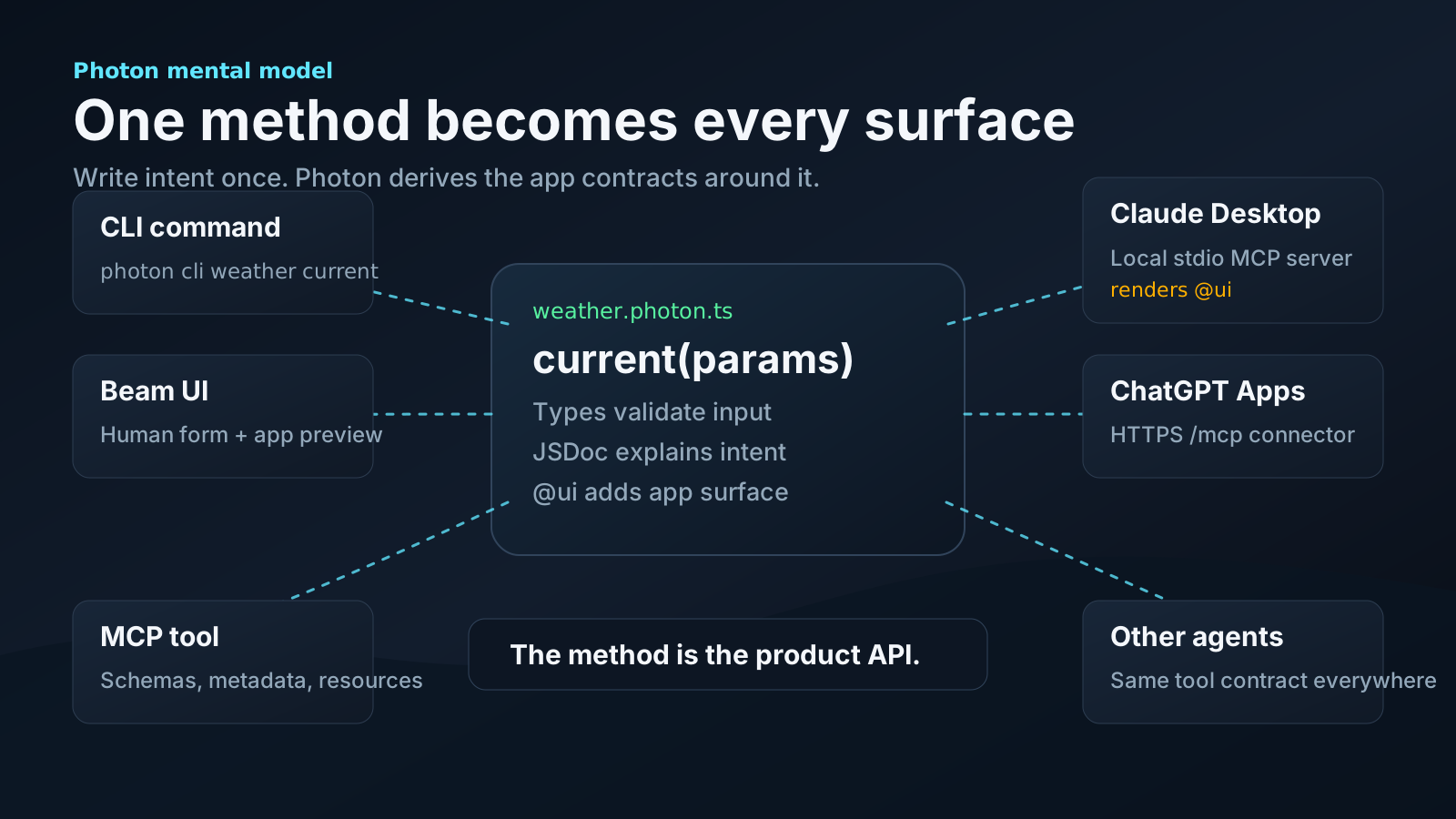
Clientes reais, mesmo Photon:
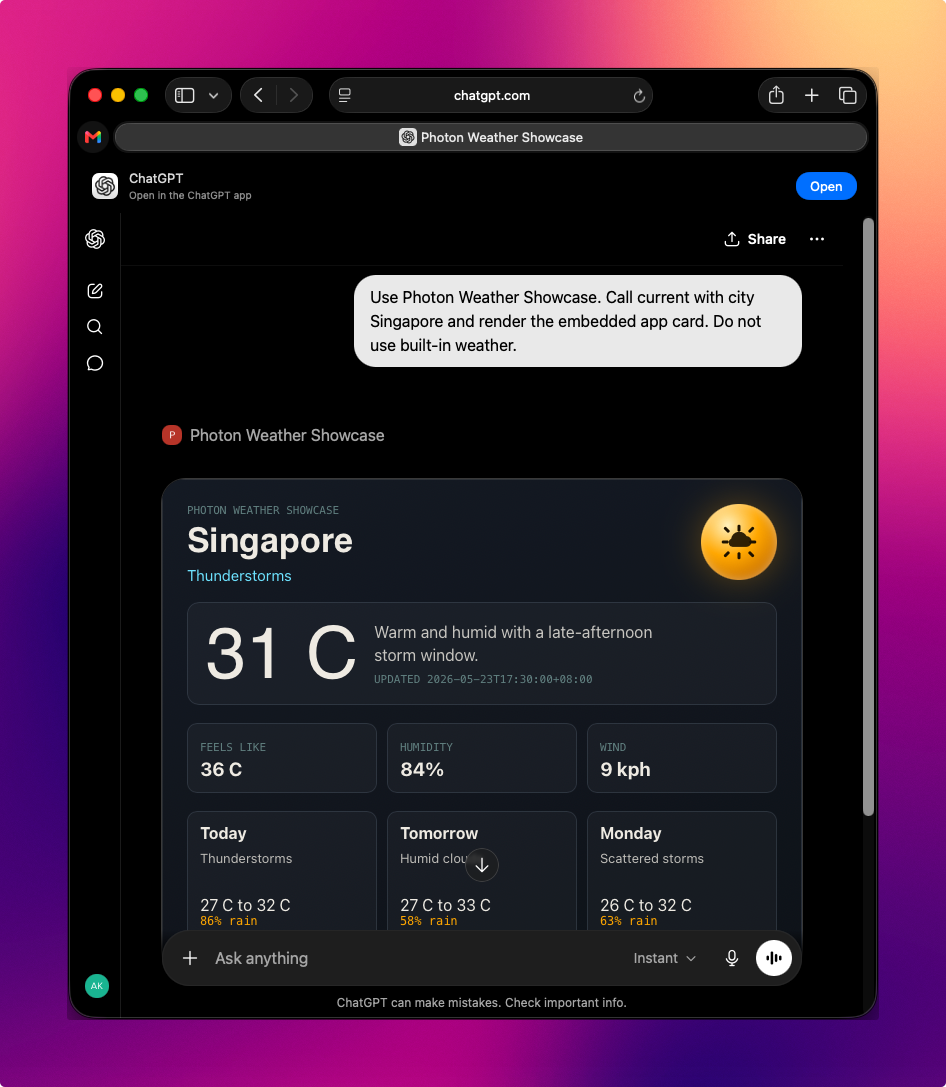
Modo desenvolvedor do ChatGPT renderizando a UI de clima do Photon a partir de um endpoint HTTPS /mcp público.
|
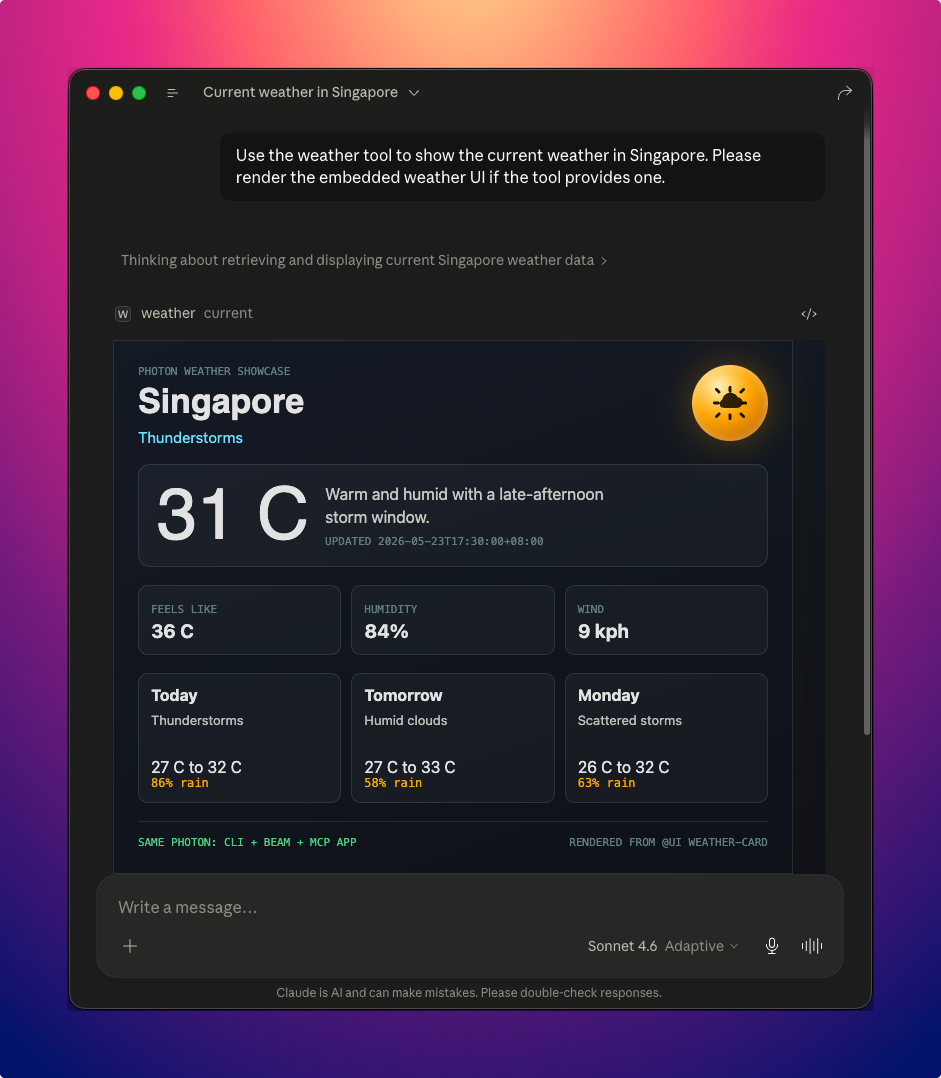
Claude Desktop renderizando o mesmo Photon por MCP local. |
Siga o tutorial passo a passo
ou abra o exemplo executável em
examples/weather-showcase.
O tutorial também inclui Beam, CLI e uma animação conceitual para a
transformação completa.
A Promessa do Photon
Photon é a stack de desenvolvimento moderna para a era dos agentes: cada photon é um tijolo pequeno e auditável que pode ser usado por humanos, agentes, agendadores, webhooks e aplicativos sem reescrever a mesma capacidade para cada interface.
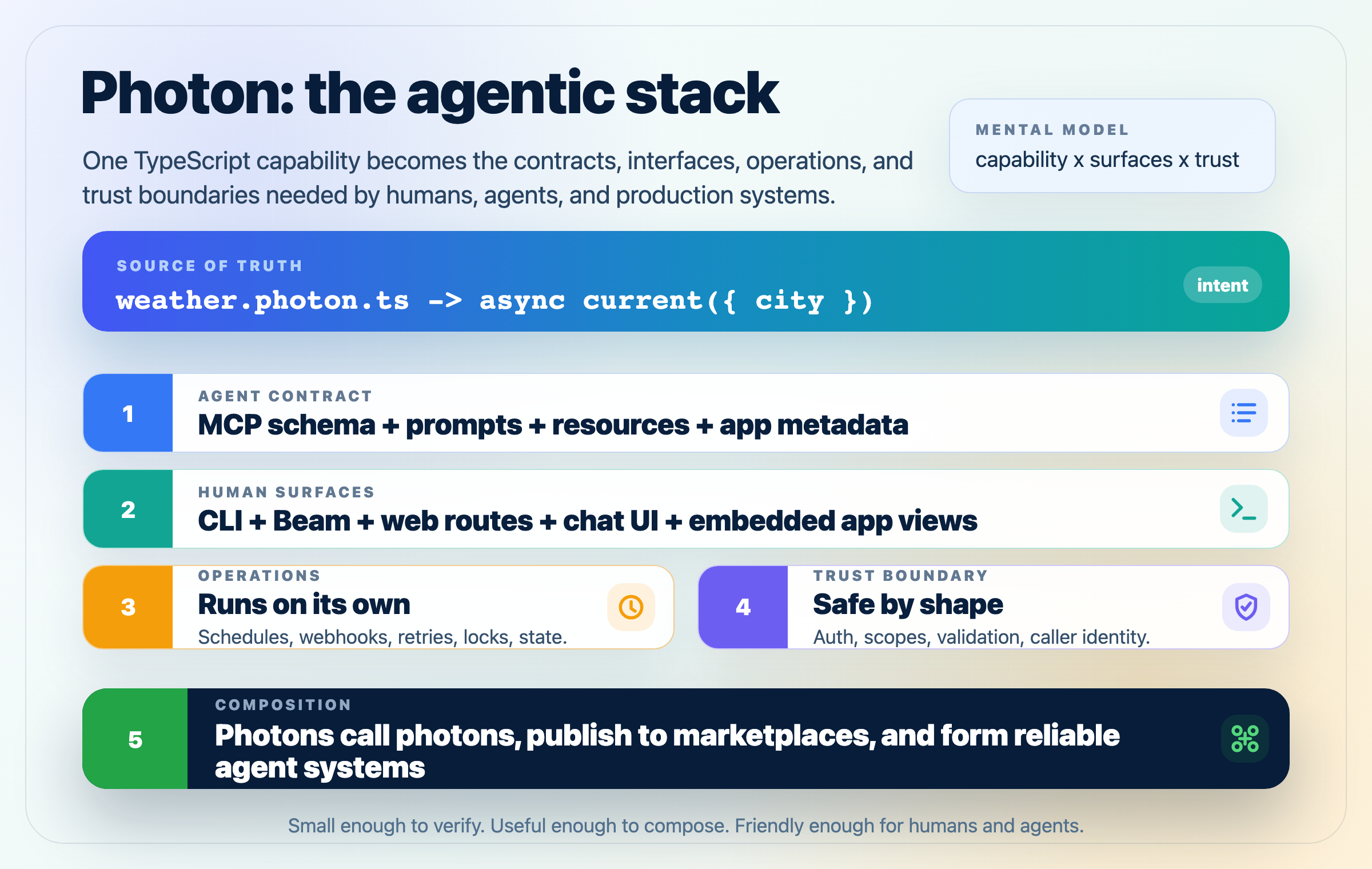
Essa é a ideia central: capacidades minúsculas e confiáveis compõem sistemas maiores. Um photon pode começar como um método auxiliar, virar um comando CLI, renderizar como um aplicativo, rodar em um agendamento, aceitar webhooks e ainda expor um contrato limpo e legível por agentes.
Exemplo
// hello.photon.ts
export default class Hello {
  greet(name: string) {
    return `Hello, ${name}!`;
  }
}
Esse é um photon completo. Deste único arquivo você obtém:
$ photon cli hello greet --name Ada        # CLI
$ photon                                    # Web UI at localhost:3008
$ photon mcp hello                          # MCP server for Claude, Cursor, etc.
Sem decoradores. Sem registro. Sem boilerplate de servidor. Apenas defina a intenção. Photon cuida do resto.
Início Rápido
Do zero a um servidor MCP conectado ao Claude Desktop em três comandos:
bun add -g @portel/photon
photon new my-tool                  # Scaffolds ./my-tool.photon.ts in your CWD
photon mcp install my-tool          # Registers it in Claude Desktop's config
# Restart Claude Desktop. Your tool is live.
Prefere o painel web? Pule o passo 3 e execute photon — ele abre o Beam, a UI gerada automaticamente.
Ou tente sem instalar globalmente:
bunx @portel/photon new my-tool
bunx @portel/photon mcp install my-tool

# pnpm users can use pnpm dlx instead:
pnpm dlx @portel/photon new my-tool
pnpm dlx @portel/photon mcp install my-tool
Requer Node.js 20+. TypeScript é compilado internamente; não é necessário
tsconfig.json.Onde os arquivos photon ficam?
./(um diretório de projeto onde você faz cd) ou~/.photon/(global, descoberto automaticamente). As configurações do usuário persistem em~/.photon/state/<photon>/. Veja Onde as coisas ficam.
Como Funciona
Você escreve uma classe TypeScript. Métodos são suas capacidades. Tipos descrevem o que é válido. Comentários explicam a intenção. Photon lê tudo isso e gera três interfaces a partir de um arquivo. Mesma lógica. Mesma validação. Mesmos dados.
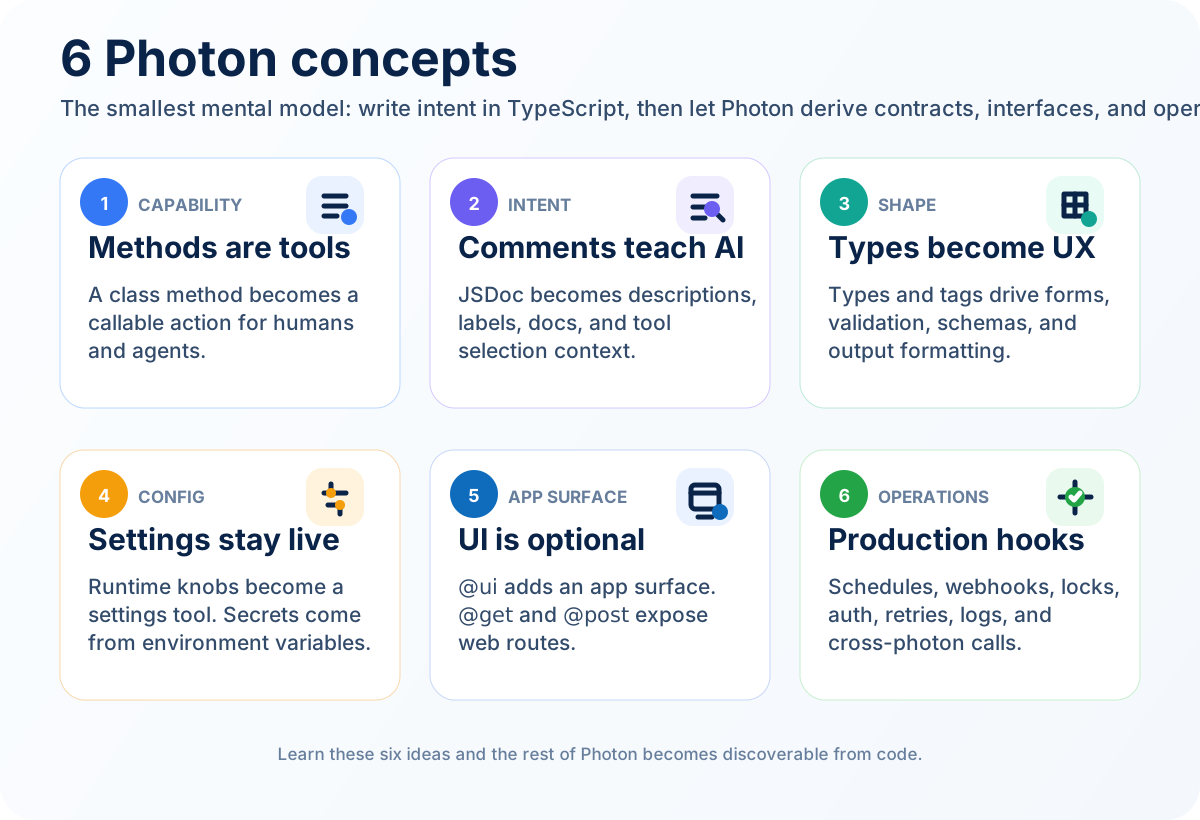
analytics.photon.ts → Beam · Web app · Webhook · WebSocket · CLI · MCP
Quanto mais você expressa, mais Photon deriva:
| O que você escreve | O que Photon deriva |
|---|---|
| Assinaturas de método | Definições de ferramenta: nomes, entradas, saídas |
| Anotações de tipo | Regras de validação de entrada, tipos de campo de UI |
| Comentários JSDoc | Documentação para clientes de IA e usuários humanos |
| Parâmetros de construtor | UI de configuração, mapeamento de variáveis de ambiente, injeção em tempo de execução (Photon, Cloudflare, CloudflareEnv) |
@tags | Validação, formatação, agendamento, webhooks e rotas HTTP |
Quando você adiciona uma anotação @param city {@pattern ^[a-zA-Z\s]+$}, o Beam valida no formulário, o CLI valida antes de executar e o schema MCP aplica para a IA. Uma anotação. Três consumidores.
Três formas de criar
extends Photon é uma forma. Você também pode injetar Photon como parâmetro de construtor quando já estende outra coisa, ou compor sem herança — mesma API de qualquer forma. Recursos CF alcançam o photon por uma injeção separada de Cloudflare para que photons portáveis permaneçam portáveis. Veja docs/guides/PHOTON-INJECTION.md.
Beam: Exploração Humana
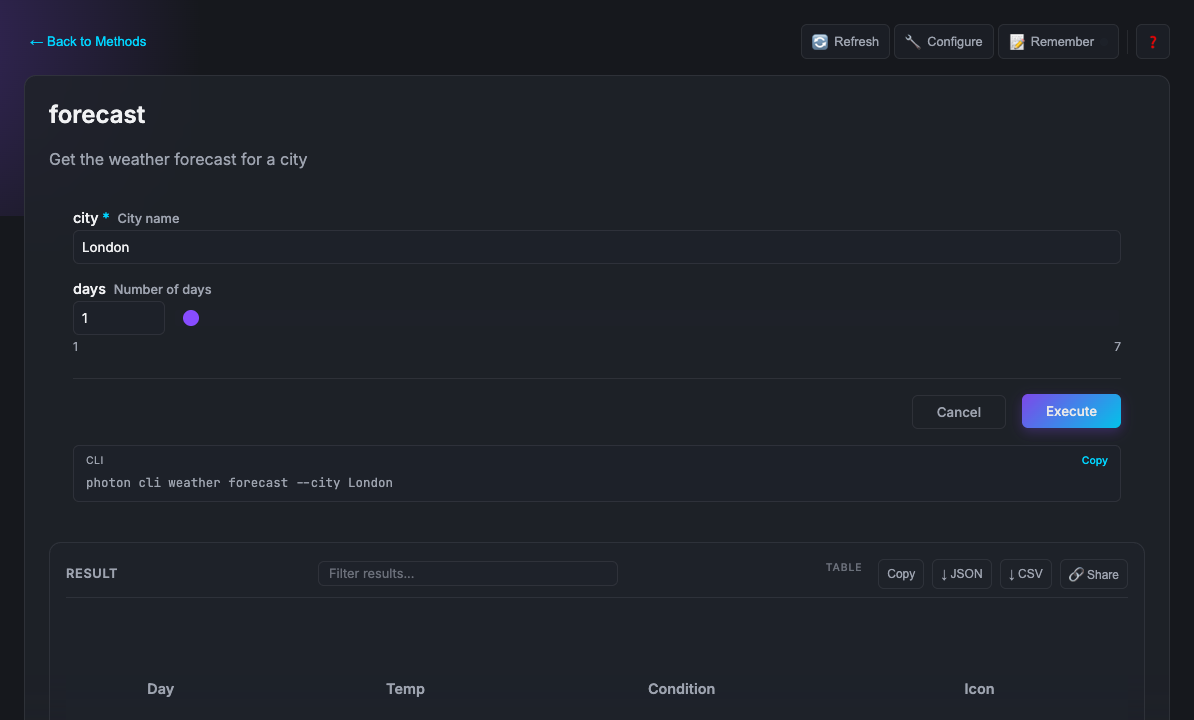
Beam é o painel web. Cada photon vira um formulário interativo automaticamente. Execute photon. Esse é o comando inteiro.
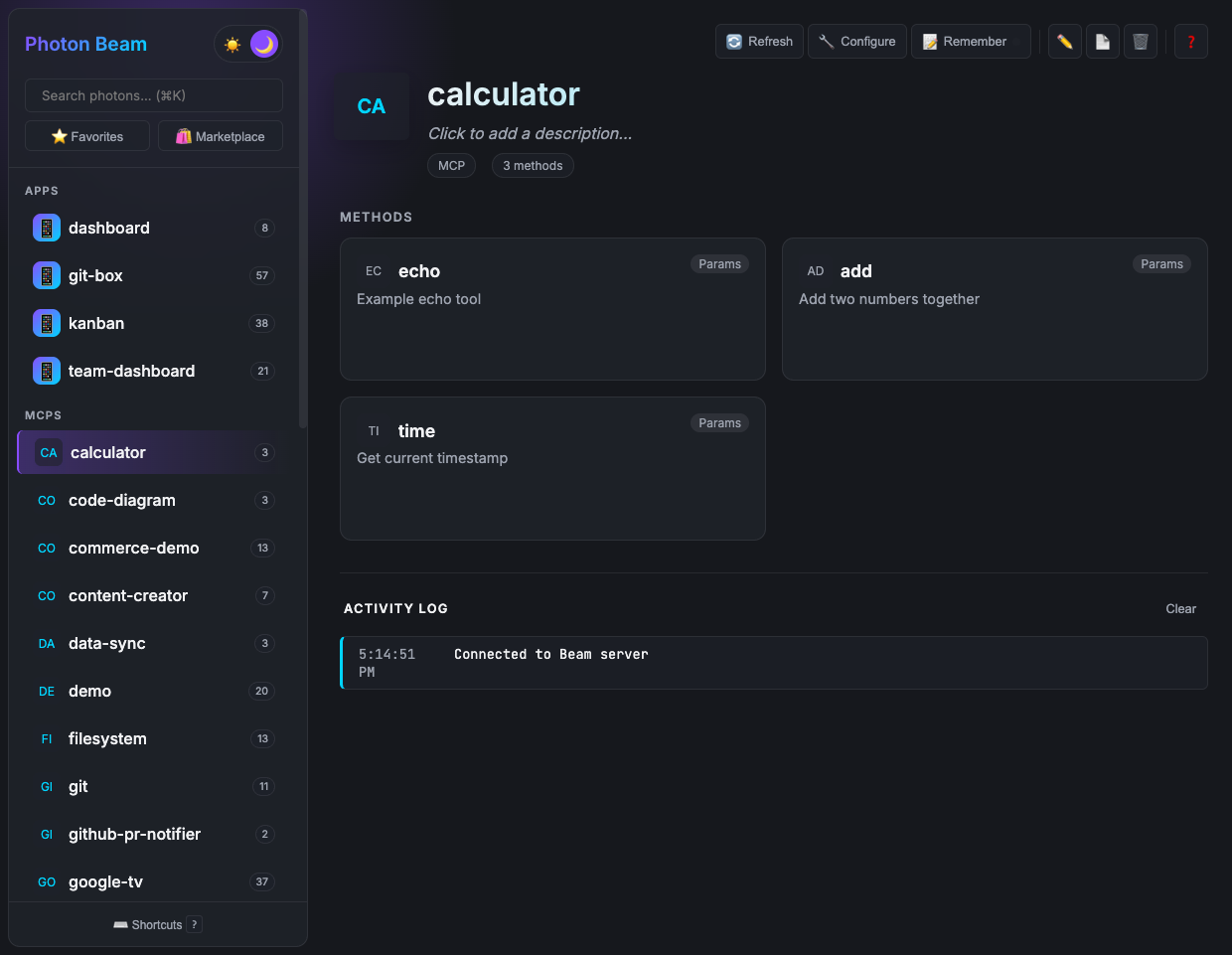
A UI é totalmente gerada automaticamente a partir das suas assinaturas de método: tipos de campo, validação, padrões, layouts. Você nunca escreve código de frontend. Quando você adiciona uma tag {@choice a,b,c} a um parâmetro, Beam renderiza um dropdown. Quando você marca uma string como {@format email}, o campo valida formato de email. A UI evolui conforme seu código evolui.
Quando formulários não são a interface certa para o que você está construindo, você pode substituir a visão gerada automaticamente do Beam pela sua própria HTML. Uma global nomeada após seu photon é injetada automaticamente (ex.: analytics.onResult(data => ...)) — sem necessidade de framework. window.photon.url também é injetado e resolve para a URL base do Beam para que sua HTML possa construir caminhos fetch corretamente, seja rodando localmente ou atrás de um proxy reverso.
UIs personalizadas seguem a Extensão Oficial de Aplicativos MCP e funcionam em hosts compatíveis. Veja o Guia de UI Personalizada.
Photons que declaram rotas HTTP com @get, @post, @put, @patch ou @delete são mostrados no Beam como aplicativos web. Rotas suportam segmentos de caminho dinâmicos (ex.: @get /items/:id) correspondidos por especificidade: segmentos literais vencem sobre parâmetros. Beam faz proxy de requisições para essas rotas e injeta um cabeçalho x-photon-base-path para que o aplicativo possa construir caminhos absolutos corretos independentemente de onde o Beam está hospedado. Aplicativos web e WebSockets são alvos de aplicativo Photon; Aplicativos MCP são uma extensão MCP oficial separada para recursos de UI incorporados.
Agentes de IA: Invocação por Máquina
Photon inclui adaptadores MCP separados e testados: MCP 2025 com sessão sobre stdio e
HTTP Streamable, além de suporte a candidato a release MCP 2026-07-28 sem estado sobre
HTTP Streamable. Veja a
matriz de compatibilidade e clientes executáveis,
ou execute photon doctor mcp contra seu runtime instalado.
photon info analytics --mcp
{
  "mcpServers": {
    "analytics": {
      "command": "photon",
      "args": ["mcp", "analytics"]
    }
  }
}
Cole na configuração do seu cliente de IA. Seu photon agora é um servidor MCP. Claude pode chamar seus métodos. Cursor pode chamar seus métodos. Qualquer host compatível com MCP pode chamar seus métodos.
A IA vê a mesma coisa que um humano vê no Beam: os nomes dos métodos, as descrições de parâmetros do seu JSDoc, as regras de validação dos seus tipos. O comentário JSDoc que você escreveu para documentar a ferramenta para si mesmo é o que Claude lê para decidir quando e como chamá-la.
As próprias ferramentas MCP funcionam com Claude Desktop, Claude Code, Cursor e qualquer cliente compatível com MCP. Quando seu photon tem uma UI personalizada, clientes que suportam a Extensão de Aplicativos MCP podem renderizá-la nativamente, como mostrado na prova de clima acima.
Como um Photon Evolui
Aqui está como um photon cresce. Cada passo adiciona uma coisa e obtém múltiplas capacidades dela.
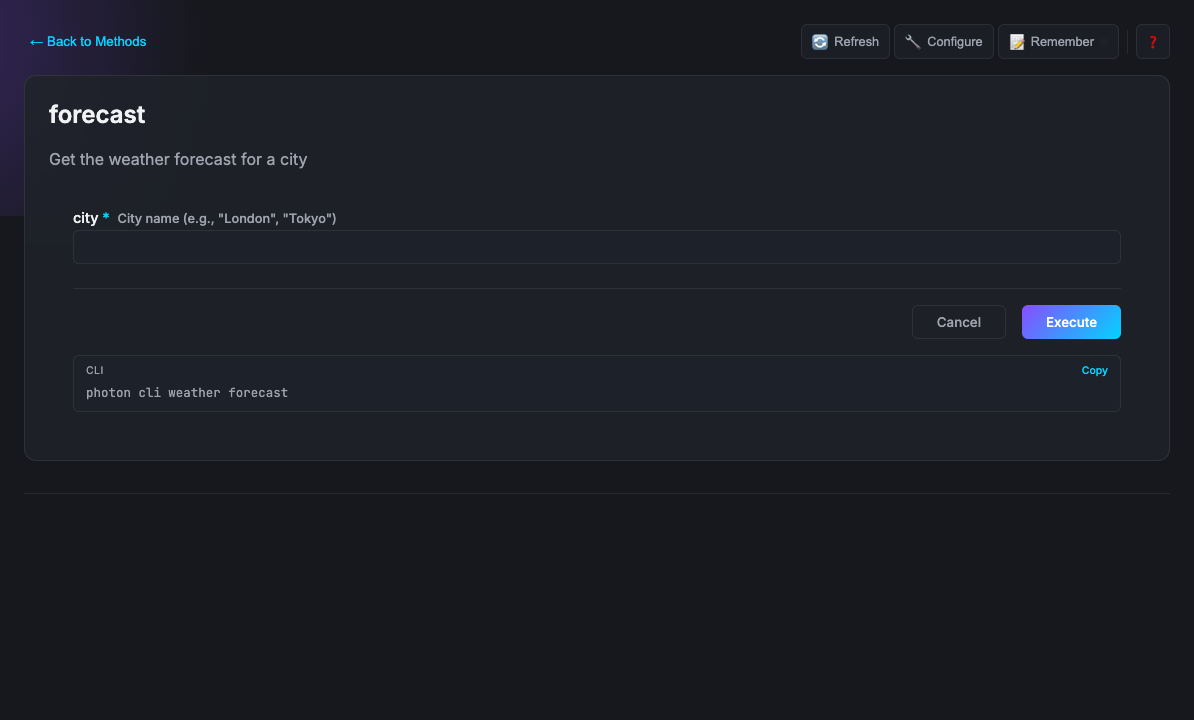
Adicione comentários: a IA entende sua intenção
/**
 * Weather - Check weather forecasts worldwide
 */
export default class Weather {
  /**
   * Get the weather forecast for a city
   * @param city City name (e.g., "London")
   */
  async forecast(params: { city: string }) { ... }
}
A descrição da classe se torna como clientes de IA apresentam a ferramenta aos usuários. A descrição @param é o que a IA lê antes de decidir qual valor passar. Mesmos comentários. Texto de ajuda humano e contrato de IA ao mesmo tempo.
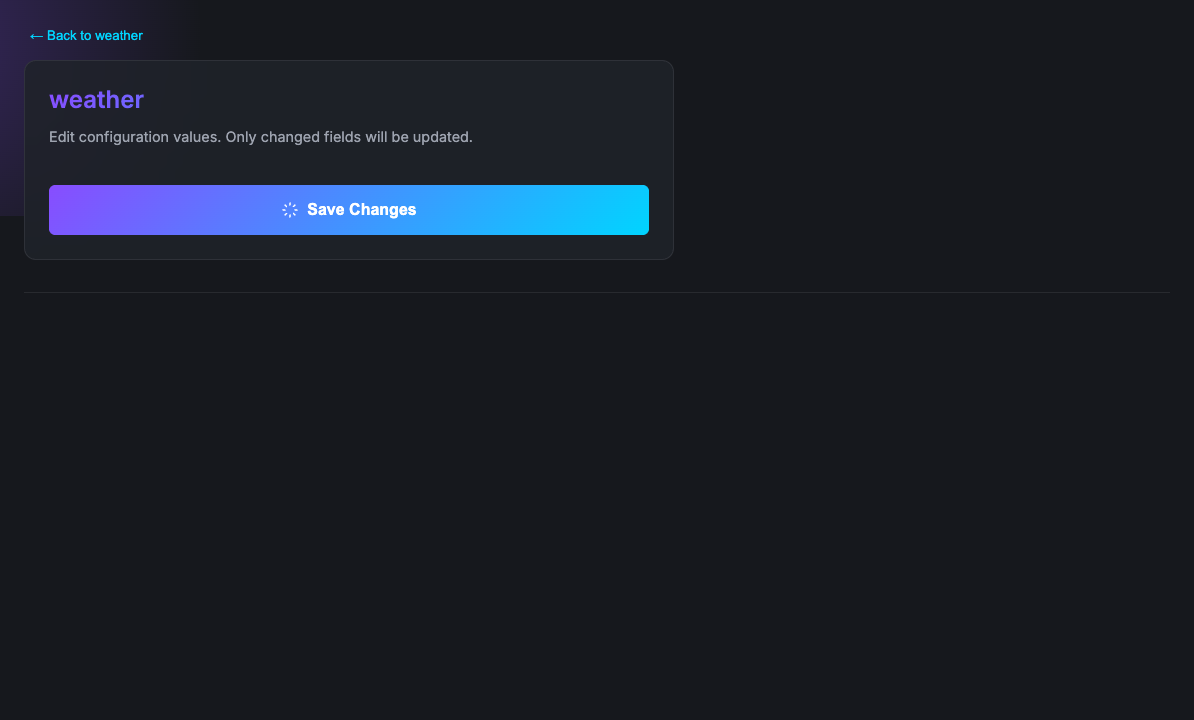
Declare configuração: uma ferramenta de configurações aparece
export default class Weather {
  /** User-tunable knobs. Photon auto-generates a `settings` tool from this. */
  protected settings = {
    /** Units for forecast values */
    units: 'metric',
    /** Polling interval in seconds */
    pollIntervalSec: 300,
  };

  async forecast(params: { city: string }) {
    const res = await fetch(`...?units=${this.settings.units}`);
    return await res.json();
  }
}
protected settings é a forma canônica de expor controles em tempo de execução. Photon lê o JSDoc de cada propriedade, gera uma ferramenta MCP settings com entradas tipadas e persiste mudanças do usuário em ~/.photon/state/<photon>/<instance>-settings.json. Dentro dos métodos, this.settings é um Proxy somente leitura. Para mudar um valor, o usuário (ou a IA) chama a ferramenta gerada automaticamente settings.
Para segredos que nunca devem ser persistidos em um arquivo de configurações (chaves de API, tokens), use um parâmetro de construtor. Photon mapeia o nome do parâmetro para uma variável de ambiente:
export default class Weather {
  constructor(private apiKey: string) {}  // → WEATHER_API_KEY
}
O padrão de construtor é para primitivos que vêm de .env. O padrão protected settings é para todo o resto, incluindo qualquer controle que o usuário deva poder mudar em tempo de execução sem reiniciar. Em caso de dúvida, use settings.
Adicione tags: o comportamento se estende por todas as superfícies
/**
 * @dependencies node-fetch@^3.0.0
 */
export default class Weather {
  /**
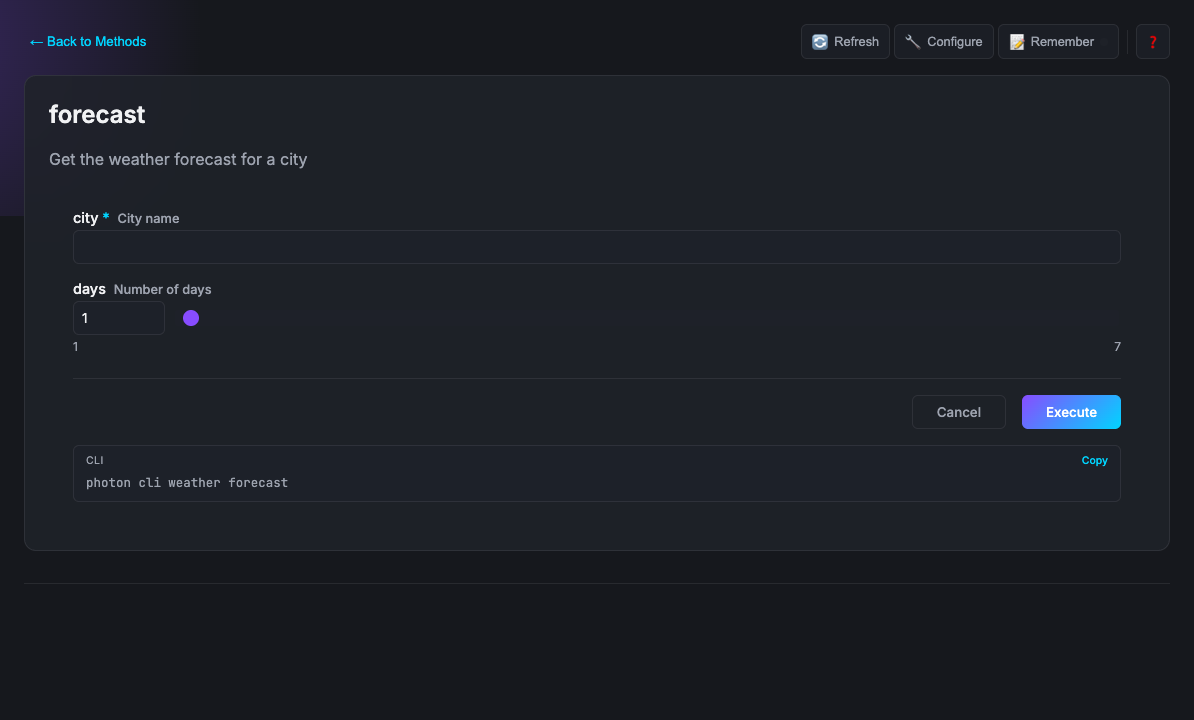
   * @param city City name {@example London} {@pattern ^[a-zA-Z\s]+$}
   * @param days Number of days {@min 1} {@max 7}
   * @format table
   */
  async forecast(params: { city: string; days?: number }) { ... }
}
@dependencies instala node-fetch automaticamente na primeira execução, sem necessidade de instalação manual de pacote. O {@pattern} valida no formulário, no CLI e no schema MCP simultaneamente. days vira um spinner numérico com limites. @format table renderiza o resultado como uma tabela no Beam. Uma anotação, três superfícies.
Dependências de CLI do sistema
Se seu photon envolve uma ferramenta de linha de comando, declare-a e Photon a aplica no momento do carregamento:
/**
 * @cli ffmpeg - https://ffmpeg.org/download.html
 */
export default class VideoProcessor {
  async convert({ input, format }: { input: string; format: string }) {
    // ffmpeg is guaranteed to exist when this runs
  }
}
O Que Vem de Graça
Coisas que você não constrói porque Photon cuida delas:
| Auto-UI | Formulários, tipos de campo, validação e layouts gerados a partir das suas assinaturas |
| Instâncias com estado | Múltiplas instâncias nomeadas do mesmo photon, cada uma com estado isolado |
| Memória persistente | this.memory dá ao seu photon armazenamento chave-valor por instância, sem necessidade de banco de dados |
| Execução agendada | @scheduled executa qualquer método em um agendamento cron |
| Webhooks | @webhook expõe qualquer método como um endpoint HTTP |
| OAuth (cliente) | Fluxos OAuth 2.0 integrados para Google, GitHub, Microsoft |
| Servidor de Autorização OAuth | Emita tokens para clientes MCP você mesmo: CIMD + DCR, PKCE, OIDC id_token, troca de token RFC 8693 |
| Persistência SQLite | Log de auditoria, histórico de execução e concessões OAuth sobrevivem à reinicialização do daemon (bun:sqlite ou better-sqlite3) |
| Operações do daemon | photon ps lista e controla trabalhos agendados, webhooks e sessões ativas |
| Locks distribuídos | @locked serializa o acesso: um chamador por vez, entre processos |
| Chamadas entre photons | this.call() invoca métodos de outro photon |
| Runtime Cloudflare | this.cf.r2('blobs'), this.cf.d1('app'), this.cf.kv('cache') — mesma forma localmente (miniflare) e implantado (bindings reais). Veja CF-BINDINGS.md |
| Eventos em tempo real | this.emit() dispara eventos nomeados para a UI do navegador sem nenhuma configuração |
| Renderização ao vivo | this.render() envia saída formatada para CLI e Beam em tempo real |
| LLM delegado | this.sample() pede ao modelo do agente condutor para gerar texto — sem chave de API, o agente paga |
| Confirmação / entrada inline | this.confirm() e this.elicit() roteiam pela UI nativa do cliente (diálogo do Beam, prompt do Claude) |
| Acesso remoto com escopo | photon claim gera um código de curta duração para escopar uma sessão MCP remota a um diretório |
| Binários autônomos | photon build compila qualquer photon em um único executável via Bun |
| Gerenciamento de dependências | @dependencies instala automaticamente pacotes npm na primeira execução |
Coordenação: Locks + Eventos
Duas primitivas. Juntas, elas desbloqueiam uma classe de coisas que são surpreendentemente difíceis de construir hoje.
Locks serializam o acesso. Quando um método é marcado com @locked, apenas um chamador pode executar por vez, seja esse chamador um humano no Beam, um script CLI ou um agente de IA. Todos os outros esperam sua vez.
Eventos enviam mudanças de estado para qualquer UI do navegador em tempo real. this.emit({ event: 'boardUpdated', data: board }) no servidor torna-se chess.onBoardUpdated(handler) na sua UI personalizada — nomeado após o arquivo do seu photon. Sem WebSockets para configurar. Sem polling. Os eventos são entregues via SSE através do transporte MCP Streamable HTTP.
Juntos: coordenação baseada em turnos com estado ao vivo.
export default class Chess {
  /** Make a move. Locks ensure human and AI alternate turns. */
  /** @locked */
  async move(params: { from: string; to: string }) {
    const result = await this.applyMove(params.from, params.to);

    // Browser UI updates instantly, no polling needed
    this.emit({ event: 'boardUpdated', data: result.board });
    this.emit({ event: 'turnChanged', data: { next: result.nextPlayer } });

    return result;
  }
}
// In your custom UI (ui/chess.html)
// The global `chess` is auto-injected, named after your photon file
chess.onBoardUpdated(board => renderBoard(board));
chess.onTurnChanged(({ next }) => showTurn(next));

// Call server methods directly
chess.move({ from: 'e2', to: 'e4' });
Um humano se move pelo Beam. Claude está configurado com o servidor MCP. O lock garante que eles realmente alternem. Os eventos mantêm o tabuleiro ao vivo em ambos os lados. Isso é um jogo de xadrez por turnos totalmente funcional, humano vs IA, em cerca de 50 linhas de lógica de aplicação.
O mesmo padrão se aplica além de jogos: fluxos de aprovação onde um humano revisa antes da IA continuar, ferramentas colaborativas onde edições de qualquer fonte aparecem instantaneamente, simulações onde etapas devem executar em sequência estrita, qualquer sistema onde quem age em seguida importa.
Primitivas MCP no this
As primitivas voltadas ao usuário do protocolo MCP são expostas como métodos simples em cada instância de photon — sem decoradores, sem flags de capacidade, sem imports de SDK. O runtime roteia cada chamada pela superfície pela qual a solicitação chegou (Beam, Claude Desktop, Cursor, CLI).
export default class Editor {
  async summarize(params: { text: string }) {
    // Ask the driving agent's LLM. No API key. Agent pays.
    return await this.sample({
      prompt: `Summarize in one sentence:\n\n${params.text}`,
      maxTokens: 128,
    });
  }

  async deploy() {
    if (!(await this.confirm('Ship to production?'))) return;
    const env = await this.elicit<string>({
      ask: 'select',
      message: 'Which environment?',
      options: ['staging', 'prod'],
    });
    await this.run(env);
  }
}
| Primitiva | O que faz |
|---|---|
await this.sample({ prompt }) | Delega a geração de LLM ao modelo do chamador via amostragem MCP |
await this.confirm(question) | Prompt sim/não — retorna boolean |
await this.elicit(params) | Entrada arbitrária (texto, seleção, formulário, arquivo, etc.) |
this.status(msg) / this.progress(v) | Feedback ao vivo durante trabalhos longos; roteia para o stream SSE no Beam |
this.roots | Raízes de workspace MCP declaradas pelo cliente conectado (roots/list) |
this.notifyResourceUpdated(uri) | Envia notifications/resources/updated para clientes inscritos |
Referência completa: docs/reference/MCP-PRIMITIVES.md.
Acesso Remoto: Códigos de Reivindicação
Por padrão, todo photon instalado é visível para todo cliente MCP conectado. Quando você quiser parear um agente remoto com um subconjunto dos seus photons — seu celular dirigindo o Beam, um colega revisando um projeto, um agente de CI com escopo em um único diretório — gere um código de reivindicação:
$ photon claim --scope /workspace/proj --ttl 4h --label "phone"
✓ Claim code: R3K-9QZ
  Scope:      /workspace/proj
  Expires in: 4h
O cliente remoto apresenta o código como o cabeçalho Mcp-Claim-Code na
sua sessão MCP. tools/list então expõe apenas photons cuja fonte
vive sob aquele diretório. Sessões sem código mantêm acesso total —
o recurso é estritamente opt-in.
Referência completa: docs/reference/CLAIM-CODES.md.
Marketplace
Um conjunto selecionado de photons está pronto para instalar. A galeria pública agora é mantida pequena de propósito: aplicativos e ferramentas polidos em um lugar, exemplos de ensino em outro.
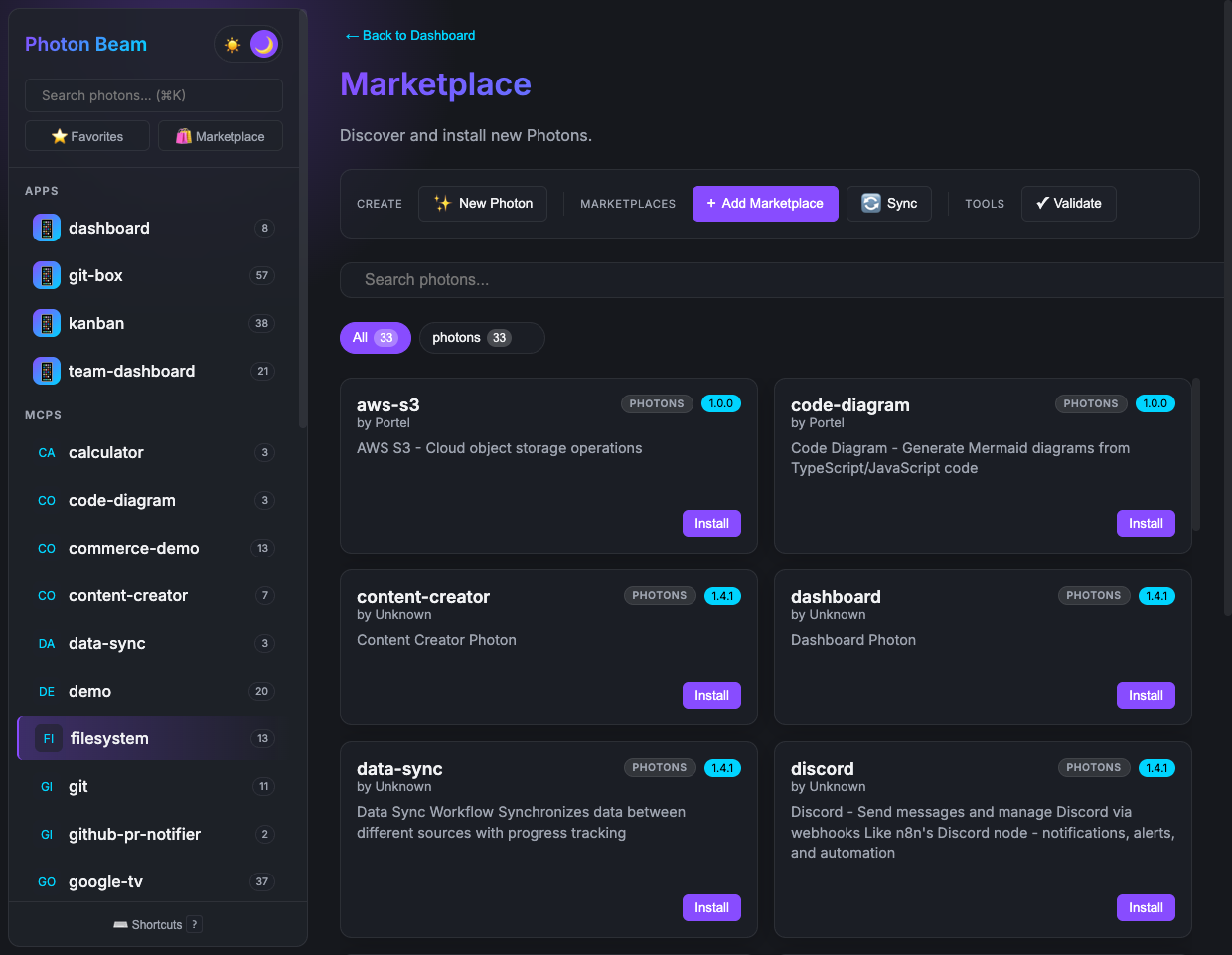
photon search boards
photon add boards
Você também pode instalar diretamente de qualquer repositório GitHub usando refs qualificados:
photon add owner/repo/photon-name
Navegue pelo marketplace de Photon Apps para photons prontos para uso, ou pelo marketplace de Photon Examples para exemplos de aprendizado focados. Você também pode hospedar um marketplace privado para sua equipe: ferramentas internas que ficam fora da internet pública.
Comandos
# Run
photon                            # Open Beam UI
photon mcp <name>                 # Run as MCP server
photon mcp <name> --dev           # MCP server with hot reload
photon cli <name> [method]        # Run as CLI tool

# Install from GitHub
photon beam owner/repo/name       # Install & open in Beam
photon cli owner/repo/name method # Install & run via CLI

# Create
photon maker new <name>           # Scaffold a new photon

# Build
photon build <name>               # Compile to standalone binary
photon build <name> --with-app    # Include Beam UI in binary

# Manage
photon info                       # List all photons
photon info <name> --mcp          # Get MCP client config
photon maker validate <name>      # Check for errors

# Marketplace
photon add <name>                 # Install photon
photon search <query>             # Search marketplace
photon upgrade                    # Upgrade all

# Ops
photon doctor                     # Diagnose environment
photon test                       # Run tests
photon ps                         # Observe & control scheduled jobs, webhooks, sessions
photon ps: trabalhos agendados, webhooks e sessões
photon ps é a superfície de operador para o daemon. Sem argumentos,
ele imprime um instantâneo de quatro seções — AGENDAMENTOS ATIVOS, DECLARADOS-mas-
não-inscritos, WEBHOOKS e SESSÕES ATIVAS.
photon ps                          # full snapshot
photon ps --json                   # structured output for scripts
photon ps --type active            # one section only
photon ps --base ~/Projects/kith   # filter to one PHOTON_DIR
Modelo de duas etapas. Uma anotação @scheduled no código-fonte é DECLARADA
até ser inscrita. A inscrição é por máquina, persistente e explícita:
photon ps enable  newsletter:sendDigest    # DECLARED → ACTIVE
photon ps disable newsletter:sendDigest    # ACTIVE → suppressed (survives restart)
photon ps pause   newsletter:sendDigest    # stop firing without removing enrollment
photon ps resume  newsletter:sendDigest    # undo pause
photon ps history newsletter:sendDigest    # last 20 firings: timestamp, status, error
Para agendamentos cron manuais sem uma tag @scheduled, use o painel Beam Pulse
("Adicionar agendamento") ou chame this.schedule.create() a partir do código do photon.
this.schedule.create() (agendamentos programáticos) pula DECLARADO e
vai direto para ATIVO. Veja
docs/GUIDE.md#scheduling
para a referência completa, o layout do estado do daemon e .photon-no-host
para configurações multi-host.
Instalar do GitHub
Use refs qualificados para instalar e executar photons diretamente de qualquer repositório GitHub:
photon beam Arul-/photons/claw        # Install from GitHub, open in Beam
photon cli Arul-/photons/todo add     # Install from GitHub, run method
O formato é owner/repo/photon-name. Dependências @photon transitivas do mesmo repositório são resolvidas automaticamente.
Compilar para Binário
Construa executáveis autônomos a partir de qualquer photon — sem necessidade de Node.js na máquina de destino:
photon build my-tool                         # Binary for current platform
photon build my-tool -t bun-linux-x64        # Cross-compile for Linux
photon build my-tool --with-app              # Embed Beam UI as a desktop app
Usa o compilador do Bun internamente. O binário agrupa o photon, seu @dependencies e dependências @photon transitivas em um único arquivo.
Referência de Tags
| Tag | Onde | O que faz |
|---|---|---|
@dependencies | Classe | Instala automaticamente pacotes npm na primeira execução |
@cli | Classe | Declara dependências de CLI do sistema, verificadas no momento do carregamento |
@format | Método | Renderização de resultado (tabela, lista, markdown, código, etc.) |
@param ... {@choice a,b,c} | Parâmetro | Seleção suspensa no Beam |
@param ... {@choice-from method} | Parâmetro | Seleção suspensa dinâmica preenchida a partir do valor de retorno de outro método |
@param ... {@format email} | Parâmetro | Validação de entrada e tipo de campo |
@param ... {@min N} {@max N} | Parâmetro | Restrições de intervalo numérico |
@ui | Classe/Método | Vincular um template HTML personalizado |
@auth | Classe | Exigir ou descrever autenticação MCP, incluindo métodos sem senha como @auth email passkey, e preencher this.caller |
@scope | Método | Substituir o escopo OAuth inferido para uma chamada de ferramenta MCP protegida |
@expose | Método | Vincular automaticamente a POST /api/<kebab> para fetch SPA (public ignora a barreira SameSite) |
@get /path | Método | Rota GET somente HTTP; exibida como um aplicativo web no Beam, não como uma ferramenta MCP. Suporta segmentos :param |
@post /path | Método | Rota POST somente HTTP; exibida como um aplicativo web no Beam, não como uma ferramenta MCP. Suporta segmentos :param |
@put /path | Método | Rota PUT somente HTTP; exibida como um aplicativo web no Beam, não como uma ferramenta MCP. Suporta segmentos :param |
@patch /path | Método | Rota PATCH somente HTTP; exibida como um aplicativo web no Beam, não como uma ferramenta MCP. Suporta segmentos :param |
@delete /path | Método | Rota DELETE somente HTTP; exibida como um aplicativo web no Beam, não como uma ferramenta MCP. Suporta segmentos :param |
@resource <uri> | Método | Resolvedor de recurso MCP dinâmico (forma canônica; substitui @Static) |
@prompt | Método | Template de prompt MCP (forma canônica; substitui @Template) |
@webhook | Método | Expor como endpoint HTTP |
@scheduled | Método | Executar em um agendamento cron |
@locked | Método | Lock distribuído entre processos |
@autorun | Método | Executar automaticamente quando selecionado no Beam |
@mcp | Classe | Injetar outro servidor MCP como dependência |
@icon | Classe/Método | Definir ícone de emoji |
Veja a Referência de Tags completa para todas as 30+ tags com exemplos.
Documentação
Comece aqui:
| Guia | |
|---|---|
| Começando | Instale, construa e execute seu primeiro photon em 5 minutos |
| Do Método ao App de Chat | Demonstração de clima: CLI, Beam, MCP e UI de aplicativo incorporada a partir de um método |
| Conceitos Principais | As 6 ideias por trás do Photon |
| Referência de Tags | Referência pública para cada tag de docblock que o Photon entende |
| Formatos de Saída | Galeria visual de cada tipo de @format |
| Metadados de Intenção | Como comentários, esquemas, anotações e formatos mapeiam para superfícies nativas |
| Configurações | Declare ajustes de runtime com protected settings (o padrão de configuração canônico) |
| Solução de Problemas | Problemas comuns e soluções |
Aprofunde-se:
| Tópico | |
|---|---|
| UI Personalizada | Construa interfaces interativas ricas com a API de ponte do photon |
| OAuth | OAuth 2.0 integrado com Google, GitHub, Microsoft |
| Autenticação MCP JWT | Proteja chamadas de ferramentas MCP implantadas com JWTs de escopo curto |
| Registro de Cliente MCP | Registre clientes MCP com o AS do Photon via CIMD ou DCR |
| Observabilidade | Rastreamentos OpenTelemetry, métricas, logs e erros estruturados |
| Recursos do Protocolo | Handshake de capacidade, erros estruturados, correlação de rastreamento |
| Arquitetura Multi-alvo | Como um método Photon mapeia para CLI, MCP, web, webhook, WebSocket e MCP Tasks |
| Pub/Sub do Daemon | Mensagens em tempo real entre processos |
| Webhooks | Endpoints HTTP para serviços externos |
| Locks | Locks distribuídos para acesso exclusivo |
| Padrões Avançados | Hooks de ciclo de vida, injeção de dependência, fluxos de trabalho interativos |
| Configuração do Marketplace | Compartilhando configurações entre photons relacionados em um marketplace |
| Implantação | Docker, Cloudflare Workers, AWS Lambda, Systemd |
Opere:
| Tópico | |
|---|---|
| O Daemon Photon | Ciclo de vida, resolução de PHOTON_DIR, resiliência, solução de problemas |
| Segurança | Melhores práticas e lista de verificação de auditoria |
| Publicação no Marketplace | Crie e compartilhe marketplaces de equipe |
| Melhores Práticas | Padrões para photons de produção |
| Referência: Guia Completo para Desenvolvedores · Referência de Tags · Convenções de Nomenclatura · Arquitetura · Ciclo de Vida e Ingress · PHOTON_DIR e Namespace · Changelog · Contribuindo |
Código Aberto
O Photon é gratuito e de código aberto sob a licença MIT.
O projeto ainda está em evolução e contribuições são bem-vindas.
- Marque o repositório com uma estrela se a ideia ressoar com você:
gh repo star portel-dev/photon - Relatar problemas
- Contribuir com melhorias ou exemplos