budget-mcp
MCP que permite ao seu agente gerenciar um banco de dados de orçamento pessoal
Documentação
💰 Servidor MCP de Orçamento Pessoal


Acompanhe finanças pessoais conversando com um LLM. Um servidor MCP que oferece a qualquer cliente compatível com MCP ferramentas tipadas para registrar transações, gerenciar uma biblioteca de categorias e analisar gastos — além de painéis interativos renderizados diretamente no cliente de chat.
Construído com Python, FastMCP, SQLAlchemy, SQLite e PostgreSQL.
Por que isso existe
Chat é uma boa interface para registrar despesas. "Gastei R$ 42 no mercado e R$ 8 em café" é mais rápido do que abrir um aplicativo e preencher dois formulários, e um LLM pode categorizar isso para você.
O problema é que um LLM sem ferramentas vai alegremente dizer que registrou sua transação. Para que isso funcione, o modelo precisa ser incapaz de confundir "eu registrei isso" com "eu descrevi que registrei isso" — então as ferramentas precisam retornar sucesso ou falha inequívocos, rejeitar entradas inválidas em vez de corrigi-las silenciosamente, e expor superfície de consulta suficiente para que o agente leia o estado real em vez de reconstruí-lo a partir do histórico da conversa.
Esse problema de design é o verdadeiro objetivo deste repositório. O orçamento é apenas a desculpa.
📸 Capturas de tela
| Painel de orçamento | Tendências de gastos |
|---|---|
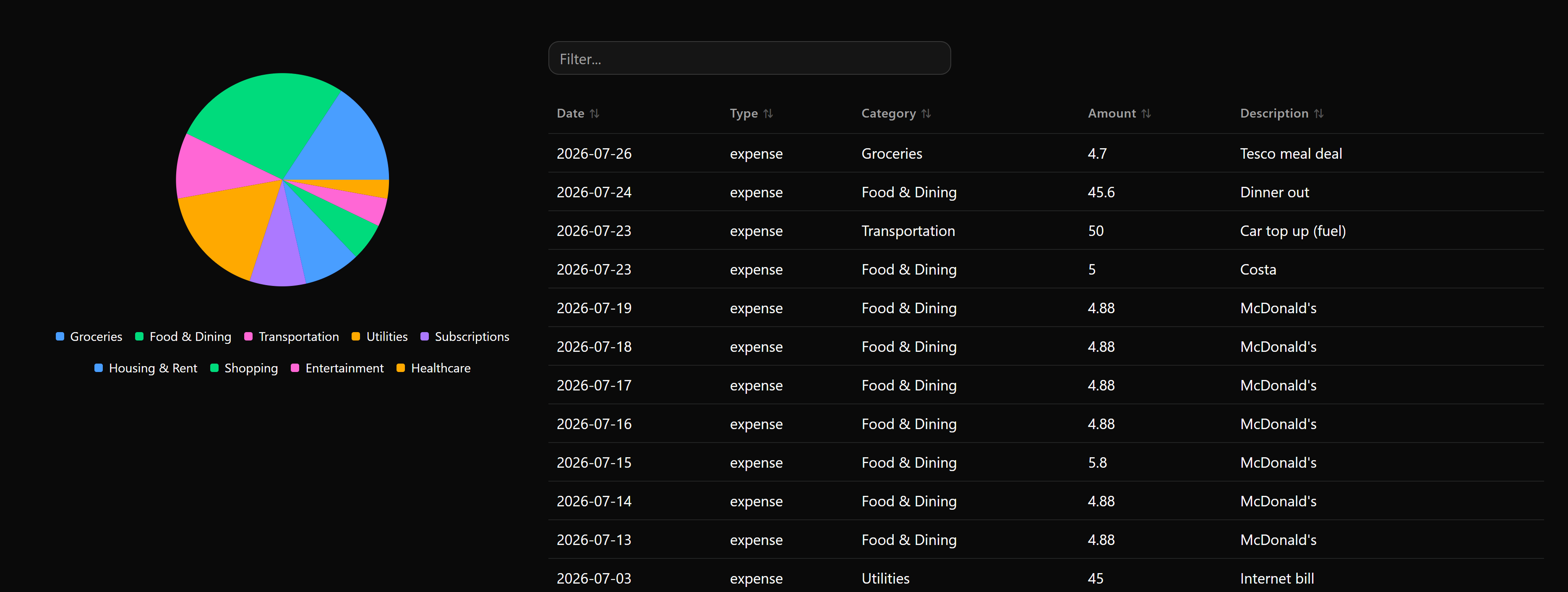 | 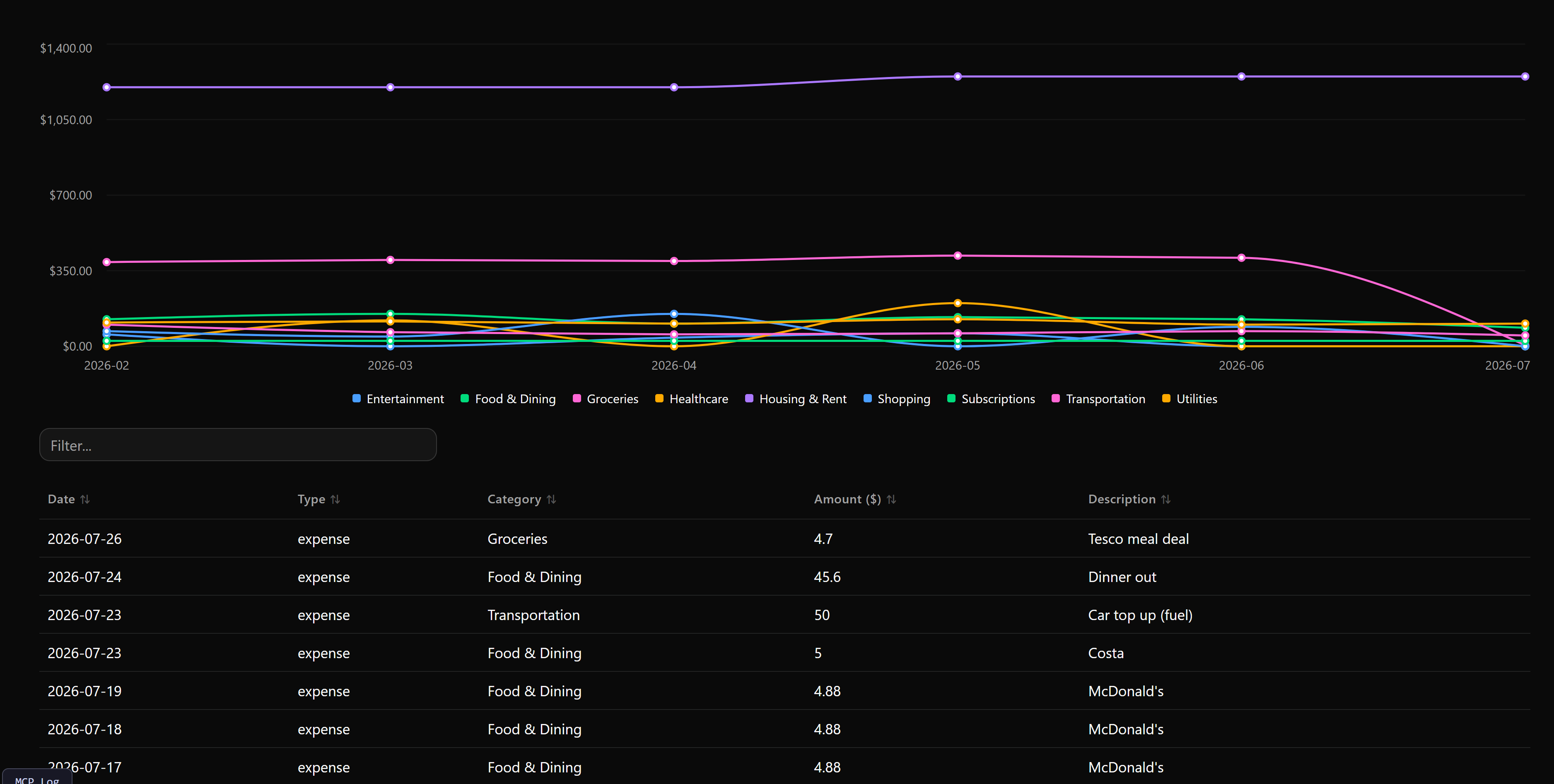 |
🧠 Notas de design: tornando chamadas de agente confiáveis
Falha explícita em vez de correção silenciosa. As ferramentas validam a entrada e retornam um erro estruturado indicando o que estava errado, em vez de adivinhar a intenção. Um type inválido, uma data mal formatada ou um category_id que não existe falham de forma visível, para que o agente possa se corrigir e reportar com precisão ao usuário em vez de inventar uma confirmação.
Ferramentas de escrita em lote primeiro. add_transaction, update_transaction, delete_transaction e add_category aceitam tanto um único item quanto uma lista items. Agentes naturalmente lidam com várias coisas ao mesmo tempo ("registre essas cinco despesas"), e forçá-los a uma chamada por registro multiplica tanto a latência quanto o número de lugares onde uma falha parcial pode se esconder.
Integridade referencial na fronteira das ferramentas. delete_category aceita um reassign_to_category_id opcional, para que remover uma categoria não possa órfã silenciosamente suas transações. A decisão de integridade é exposta como um parâmetro sobre o qual o agente deve raciocinar, em vez de um efeito colateral descoberto depois.
Superfície de leitura dimensionada para uso multi-turno. get_summary, get_transactions e get_uncategorized_transactions cobrem leituras agregadas, detalhadas e de triagem com argumentos de filtro consistentes entre as três. get_uncategorized_transactions retorna resultados ordenados por descrição especificamente para que um agente possa categorizar importações em massa em grupos coerentes em vez de uma linha por vez.
Bootstrap de esquema idempotente. Tabelas e 15 categorias padrão são criadas na primeira inicialização, então um clone novo ou uma nova implantação em nuvem fica imediatamente utilizável e não há estado parcialmente inicializado onde uma chamada de ferramenta possa cair.
✨ Recursos
- Armazenamento local ou em nuvem — SQLite sem configuração (em memória ou
data/budget.db), ou PostgreSQL via qualquer provedor como Neon. - Painéis interativos no cliente — gráficos de pizza por categoria e tabelas de transações pesquisáveis renderizados via
prefab-ui, retornados como aplicativos de UI MCP em vez de texto simples. - Tendências de gastos — gráfico de linhas contínuo por categoria com alternância de granularidade mês/semana/dia, controle deslizante de intervalo de datas e tabela pesquisável.
- Operações em lote — escrita de item único ou em massa em transações e categorias.
- Ambiente reproduzível —
uvpara resolução de dependências rápida e travada. - Suporte amplo a clientes — Claude Desktop, Claude Code, Cursor, Goose, Open WebUI e qualquer outro host MCP.
🚀 Início rápido
git clone https://github.com/PedroLiu1999/budget-mcp.git
cd budget-mcp
uv sync
uv run pytest          # confirm the install works
uv run server.py       # start the server (in-memory SQLite by default)
Em seguida, registre-o no seu cliente — Claude Code é o comando de uma linha:
claude mcp add budget -- uv run --directory "/absolute/path/to/budget-mcp" server.py
Para persistir dados, defina DATABASE_URL em um arquivo .env primeiro (veja Configuração do banco de dados).
🛠 Ferramentas disponíveis
12 ferramentas — clique para expandir a referência completa
| Ferramenta | Descrição | Argumentos |
|---|---|---|
budget_dashboard | Aplicativo de UI interativo: gráfico de divisão por categoria e tabela de transações pesquisável. | search (str, opc)month (str YYYY-MM, opc)type (income|expense, opc)limit (int, padrão 100) |
spending_trends | Aplicativo de UI interativo: gastos ao longo do tempo com gráfico de linhas por categoria, alternância de granularidade, controle deslizante de intervalo de datas e tabela pesquisável. | granularity (month|week|day, padrão month)days_range (lista de intervalo [start, end], opc)category_id (int, opc)type (expense|income, opc)start_date (str, opc)end_date (str, opc)limit (int, padrão 1000) |
add_transaction | Registra uma ou várias transações de receita/despesa. | items (lista de dicionários, opc — lote)amount (float, opc)category_id (int, opc)description (str, opc)type (expense|income, opc)date (str YYYY-MM-DD, opc) |
get_summary | Resumo agregado: receita, despesa, saldo líquido, divisão por categoria opcional. | month (str YYYY-MM, opc)start_date / end_date (str YYYY-MM-DD, opc)category_id (int, opc)type (income|expense, opc)by_category (bool, padrão False) |
get_transactions | Registros detalhados de transações por filtro. | category_id (int, opc)type (income|expense, opc)month (str, opc)start_date / end_date (str, opc)min_amount / max_amount (float, opc)search (str, opc)limit (int, padrão 50) |
get_uncategorized_transactions | Transações não categorizadas ordenadas por descrição, para categorização em massa. | type (income|expense, opc)search (str, opc)limit (int, padrão 100) |
update_transaction | Atualiza uma ou várias transações. | items (lista de dicionários de atualização, opc)transaction_id (int, opc)amount (float, opc)category_id (int, opc)description (str, opc)type (str, opc)date (str YYYY-MM-DD, opc) |
delete_transaction | Remove uma ou várias transações por ID. | transaction_ids (int ou lista de int) |
list_categories | Lista categorias ativas. | type (expense|income, opc) |
add_category | Adiciona uma ou várias categorias. | items (lista de dicionários, opc)name (str, opc)type (expense|income, opc)description (str, opc) |
update_category | Atualiza as propriedades de uma categoria. | category_id_or_name (str)new_name (str, opc)type (str, opc)description (str, opc) |
delete_category | Remove uma ou várias categorias, opcionalmente reatribuindo suas transações. | category_ids_or_names (str, int ou lista)reassign_to_category_id (int, opc) |
⚙️ Configuração do banco de dados
Defina via variável de ambiente DATABASE_URL em um arquivo .env. Mantenha .env fora do controle de versão.
SQLite local — em memória (padrão se DATABASE_URL não estiver definido):
DATABASE_URL=sqlite:///:memory:
Arquivo SQLite local — persiste entre reinicializações:
DATABASE_URL=sqlite:///data/budget.db
PostgreSQL / Neon:
DATABASE_URL=postgresql://<user>:<password>@<hostname>/<dbname>?sslmode=require
Tabelas e 15 categorias padrão são criadas automaticamente na primeira inicialização.
🔌 Configuração do cliente
Claude Code, Claude Desktop, Cursor, Open WebUI
Claude Code (CLI)
claude mcp add budget -- uv run --directory "/absolute/path/to/budget-mcp" server.py
Claude Desktop
Adicione ao claude_desktop_config.json:
{
  "mcpServers": {
    "personal-budget": {
      "command": "uv",
      "args": ["run", "--directory", "/absolute/path/to/budget-mcp", "server.py"]
    }
  }
}
IDE Cursor
Configurações → Recursos → MCP → Adicionar novo servidor MCP
- Tipo:
command - Nome:
budget-mcp - Comando:
uv run --directory "/absolute/path/to/budget-mcp" server.py
Open WebUI
Faça a ponte do servidor stdio sobre HTTP com mcpo:
uvx mcpo --port 8000 -- uv run server.py
Depois, em Painel de Administração → Configurações → Ferramentas Externas, adicione a URL de conexão OpenAPI http://localhost:8000 (ou http://host.docker.internal:8000 do Docker).
☁️ Implantação em nuvem
Para hosts remotos, Docker ou plataformas como Horizon:
- Defina
DATABASE_URLpara uma string de conexão PostgreSQL em nuvem no ambiente de implantação — SQLite em memória não persistirá entre reinicializações. - Aponte o executor para o aplicativo ASGI:
fastmcp run server.py:mcp
Tabelas de esquema e categorias padrão são inicializadas na importação, então nenhuma etapa de migração é necessária na primeira inicialização.
🧪 Testes
uv run pytest
Inspecione ferramentas interativamente com o FastMCP Inspector:
uv run fastmcp dev inspector server.py:mcp
Ou visualize aplicativos de UI interativos diretamente no navegador:
uv run fastmcp dev apps server.py:mcp
📝 Licença
MIT — veja LICENSE.