piia-engram
Memória persistente de IA entre ferramentas — lembre suas preferências, padrões de código e decisões no Claude Code, Cursor, Codex e qualquer ferramenta MCP. Local-first, sem nuvem.
Documentação
Piia Engram
Identidade de trabalho de IA local-first que você pode ver, editar e substituir — portátil entre suas ferramentas de codificação MCP.
Diga à IA uma única vez quem você é, como você trabalha e o que significa "bom". Claude Code, Codex, Cursor, Windsurf e outras ferramentas compatíveis com MCP podem partir da mesma camada de identidade de trabalho de IA — arquivos locais que você possui, sem conta na nuvem, sem memória oculta que você não possa inspecionar.
Instalar · Veja em Ação · Ferramentas Suportadas · Ferramentas MCP · FAQ







Listado em:



Também listado em: awesome-agents · Awesome-MCP-ZH · mcpservers.org · Cursor Directory · ModelScope · PulseMCP
Resumo: piia-engram é uma camada de identidade de IA pessoal local-first. Ela ajuda vários agentes de codificação a partirem do mesmo entendimento sobre você: suas preferências, padrão de qualidade, lições aprendidas, decisões e contexto de projeto. Não é um banco de dados de memória de agente; é a camada de propriedade do usuário acima de suas ferramentas.
Por que não usar apenas a memória nativa? Claude Code, Codex, Cursor e Windsurf estão adicionando suas próprias memórias e regras. Elas são úteis, mas limitadas a uma ferramenta ou espaço de trabalho. piia-engram oferece uma camada de identidade portátil acima delas: arquivos locais que você possui, conhecimento proposto por IA que você revisa e contexto que pode acompanhá-lo entre ferramentas.
Modelo de confiança em quatro linhas:
- Sem conta na nuvem: instale com
pip, mantenha o armazenamento principal na sua máquina. - Arquivos locais: identidade e conhecimento vivem sob
~/.engram/como JSON/Markdown. - Aprovação do usuário: a IA escreve localmente; itens de alto risco (credenciais, comandos de shell, configuração MCP, regras de permissão) aguardam sua revisão, enquanto gravações de baixo/médio risco são absorvidas automaticamente, mas totalmente auditáveis e reversíveis. Defina
ENGRAM_APPROVAL=strictpara bloquear cada gravação. "Verificado" significa aceito por você ou por essa política, não revalidado contra seu código atual. - Continuidade de sessão: a saída de retomada também pode incluir registros de sessões anteriores (checkpoints e snapshots) que não são revisados e não autorizam ações. As alegações de aprovação e revisão se aplicam à identidade e ao conhecimento de longo prazo sob a política configurada.
- Limites documentados: veja Modelo de confiança, Privacidade e Segurança.
Quer prova? Veja a prova de continuidade entre ferramentas ao vivo — uma memória escrita por Claude Code, lida de volta por Codex através de um armazenamento local — ou a demonstração de código reproduzível com um comando.
Veja em Ação
You  → "Help me refactor this auth module"

# WITHOUT piia-engram: AI starts from scratch
AI   → "What language? What framework? What's your testing preference?"

# WITH piia-engram: AI can load your approved identity and long-term knowledge
AI   → "Based on your preference for pytest + 90% coverage, and your
        lesson about always separating auth middleware from business
        logic (from the March incident), here's my approach..."
E você nunca precisa aceitar isso por fé — Memory Lens (engram preview --html) mostra exatamente o que qualquer chamada de IA receberia e o que a governança reteve, antes de qualquer envio:
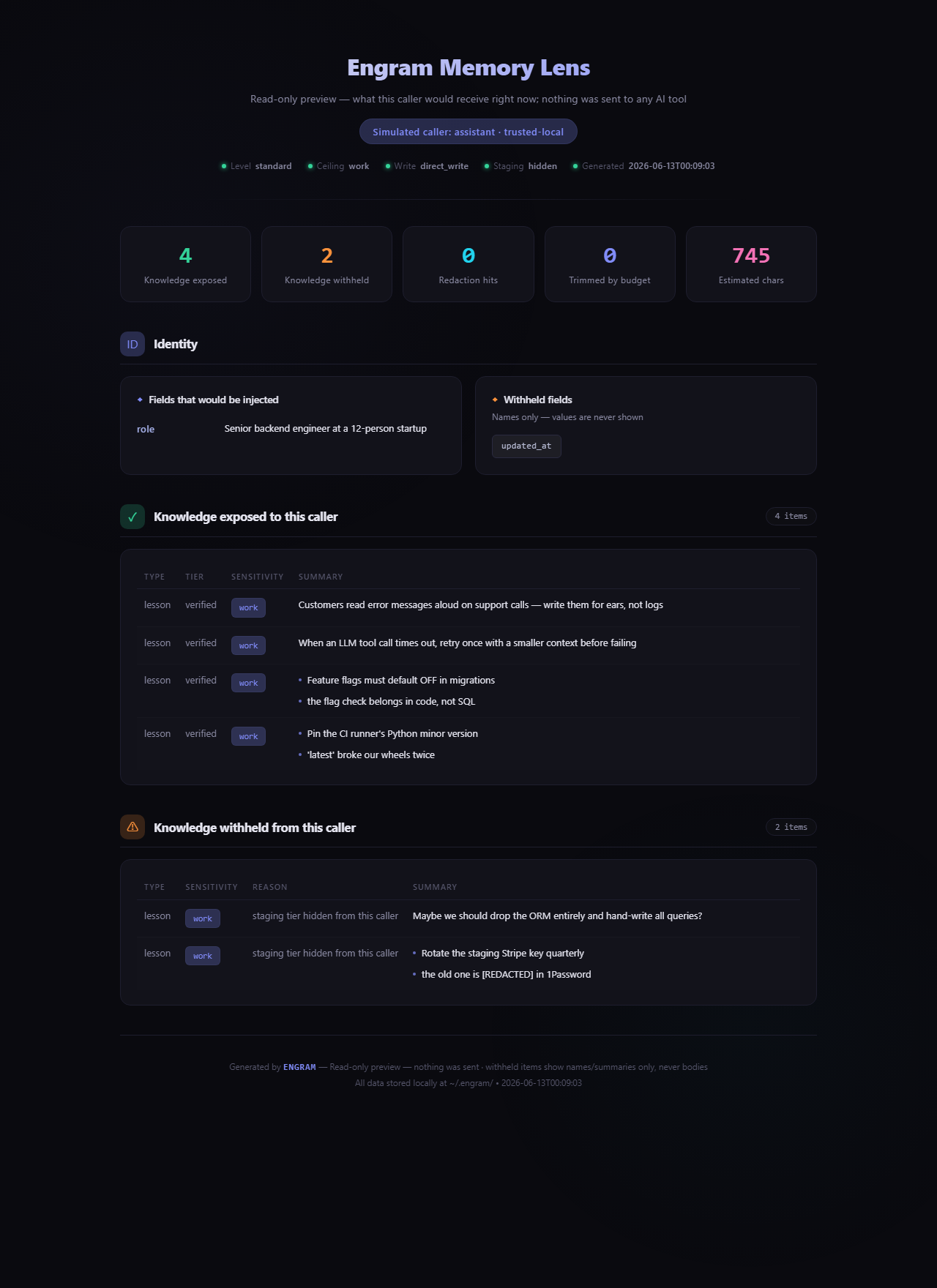
Acima: um relatório real de um armazenamento de demonstração — 4 itens expostos; uma nota de staging não revisada e uma lição contendo uma credencial são retidas, com o segredo mostrado como [REDACTED].
Instalar
pip install piia-engram && engram setup
O assistente detecta automaticamente suas ferramentas de IA — Claude Code, Cursor, Codex, Claude Desktop — lista os arquivos de configuração exatos que tocará e grava a conexão MCP após uma confirmação de uma tecla (cada gravação é copiada primeiro; recuse e nada muda). Ele pré-visualiza seu cartão de identidade, então você reinicia a ferramenta configurada; a primeira conversa pode carregar sua identidade aprovada e conhecimento de longo prazo através de ferramentas de inicialização ou busca. (passo a passo completo ↓)
Deixe seu agente de IA instalar
Peça ao seu agente de codificação para instalar o Engram e inspecionar o plano antes de aplicar:
pip install piia-engram
engram setup --non-interactive --json
engram setup --non-interactive --apply
engram doctor --json
A configuração não faz perguntas. Use --clients cursor,codex para limitar clientes e
--lang zh|en para o idioma de saída (padrão en). Sem --apply, o modo de planejamento
não grava nada no armazenamento do Engram, diretório inicial ou configurações do cliente. O Python
em si pode usar o diretório temporário do sistema. Aplicar configura conexões MCP
com backups, preserva modos de ferramenta existentes e nunca importa memórias, grava
identidade/conhecimento ou aprova propostas. Reinicie os clientes configurados; código de saída
1 significa que uma etapa manual permanece. Veja llms.txt para instruções do agente e
o contrato CLI e JSON para detalhes.
Ferramentas Suportadas
Os níveis de evidência seguem o runbook de validação de clientes de agente: L0 = descoberta, L1 = acesso ao protocolo, L2 = comportamento de leitura/busca, L3 = ganho de comportamento A/B, L4 = continuidade entre clientes, L5 = evidência pública reproduzível.
| Ferramenta | Integração | Status de evidência |
|---|---|---|
| Claude Code | MCP via stdio | L4 prova parcial de continuidade (Claude Code -> Codex) |
| Codex | MCP via stdio | L4 prova parcial de continuidade (Claude Code -> Codex) |
| Cursor | MCP via stdio | L2 caminho de evidência de configuração/leitura-busca |
| Claude Desktop | MCP via stdio | Caminho de configuração L1/L2; evidência específica do cliente pendente |
| Hermes | MCP via stdio | L4 continuidade de marcador CLI controlado; alegações de desktop e benchmark amplo não verificadas |
| OpenClaw | Importação e exportação SOUL.md / MEMORY.md / USER.md | L3 evidência de ponte de arquivo estático (somente snapshot estático A/B; comportamento de agente ao vivo não verificado) |
| ChatGPT / Gemini / Kimi | Fallback de cartão de identidade Markdown | Utilizável |
| Windsurf | MCP via stdio | Esperado funcionar |
| GitHub Copilot | MCP via stdio | Esperado funcionar |
| Cline | MCP via stdio | Esperado funcionar |
| Roo Code | MCP via stdio | Esperado funcionar |
| Amazon Q | MCP via stdio | Esperado funcionar |
| Augment | MCP via stdio | Esperado funcionar |
| Zed | MCP via stdio | Esperado funcionar |
| Trae | MCP via stdio | Esperado funcionar |
| Tencent CodeBuddy | MCP via stdio | Esperado funcionar |
Pelos números
Estes são fatos atuais do repositório de docs/public-facts.json. Registros públicos e selos de pacotes são atualizados apenas durante lançamento/publicação.
| Fatos atuais do repositório / desenvolvimento | |
|---|---|
| Estrutura de versão | v4.24.0 (verificado em 2026-10-11; verifique PyPI e GitHub Releases para o pacote publicado mais recente) |
| Ferramentas de IA suportadas | 16 (nível de evidência varia por cliente; veja Ferramentas Suportadas e o runbook de validação) |
| Ferramentas MCP | 19 Core (carregadas por padrão) + 40 Avançadas (opt-in via ENGRAM_TOOLS=all) |
| Tipos de conhecimento | 3 (lições, decisões, playbooks) |
| Suíte de testes | Unitária + integração; execute pytest tests/ para verificar |
Linhas em core.py | 1770 (fachada; a lógica de domínio agora vive em mixins focados — veja architecture.md) |
| Iterações PBKDF2 | 600.000 (piso OWASP 2023+; 100k legado ainda descriptografa) |
| Criptografia | AES-256-GCM opcional em nível de campo para campos de perfil suportados; arquivos locais são JSON/Markdown em texto simples por padrão |
| Tempo de inicialização a frio | < 100 ms típico (JSON local, sem rede) |
| Chamadas de rede por padrão | Um ping anônimo de uso por dia (engram telemetry off ou DO_NOT_TRACK=1 desativa); o comando engram também verifica PyPI para uma versão mais recente no máximo uma vez por dia em terminais interativos, e engram doctor verifica a cada execução (ENGRAM_NO_UPDATE_CHECK=1 desativa); ferramentas de identidade e conhecimento não fazem nenhuma, exceto o opcional read_web_content; telemetria remota e feedback exigem opt-in explícito separado e enviam apenas contagens (veja detalhes de privacidade) |
Sua IA esquece você toda vez que você troca de ferramenta ou inicia um novo chat. piia-engram corrige a transferência.
Toda vez que você abre uma nova janela de chat, troca de Claude Code para Codex, atualiza sua ferramenta de IA ou muda para um projeto diferente, você volta ao zero:
- suas preferências de comunicação — perdidas
- seus padrões de código e padrão de qualidade — esquecidos
- quais erros você já aprendeu — perdidos
- por que você tomou aquela decisão de arquitetura no mês passado — apagado
Isso acontece porque a memória de IA hoje está bloqueada dentro de cada plataforma. Ela pertence à ferramenta, não a você. A ferramenta atualiza, redefine ou é substituída — e seu contexto desaparece com ela.
piia-engram oferece uma camada de identidade pessoal que vive na sua máquina, independente de qualquer ferramenta de IA. Você diz uma vez quem é, como trabalha e o que aprendeu. Ferramentas compatíveis com MCP podem ler a mesma identidade aprovada e conhecimento de longo prazo. Novo chat, nova ferramenta, nova versão — sua identidade permanece portátil.
piia-engram não é um banco de dados de memória de agente. Ferramentas como Mem0, Zep e Letta armazenam contexto de tarefa e histórico de sessão para agentes de IA. piia-engram armazena quem você é como pessoa — sua identidade, preferências, lições difíceis e decisões-chave. É uma camada diferente: não o que aconteceu em uma tarefa, mas quem está por trás de cada tarefa.
Por que piia-engram?
| Sem piia-engram | Com piia-engram |
|---|---|
| Nova janela de chat = começar do zero | Conversas configuradas podem carregar sua identidade aprovada e conhecimento de longo prazo |
| Atualizações de ferramenta de IA e suas preferências desaparecem | Sua identidade vive na sua máquina, sobrevive a qualquer atualização |
| Trocar de ferramenta perde contexto acumulado | Claude Code, Codex e Cursor leem a mesma memória |
| Erros passados são repetidos | Lições aprendidas seguem você entre ferramentas e sessões |
| Memória está bloqueada dentro de um produto | Dados permanecem locais, editáveis e portáteis |
Quem Usa piia-engram
piia-engram é feito para desenvolvedores que usam múltiplas ferramentas de codificação de IA e estão cansados de se reexplicar.
Se você alterna entre Claude Code, Codex e Cursor — seus padrões de código, decisões de arquitetura e lições difíceis são redefinidos toda vez. piia-engram faz cada ferramenta partir do mesmo entendimento de quem você é.
Se você abre 10+ janelas de chat de IA por semana — cada uma começa do zero. piia-engram permite que cada conversa comece do mesmo contexto de identidade e conhecimento aprovado.
Se você perdeu preferências após uma atualização de ferramenta — sua identidade vive na sua máquina, não dentro de nenhuma plataforma. Atualizações, redefinições e migrações não tocam sua memória.
Outros casos de uso
Analistas de investimento Decisões são tomadas, mas o raciocínio se perde. piia-engram armazena a cadeia completa de raciocínio para que seis meses depois, "por que eu passei nisso?" tenha uma resposta real — e sua estrutura analítica viaja com você em cada nova análise.
Arquitetos de sistemas Decisões de arquitetura precisam de contexto: o que você escolheu, o que descartou e por quê. piia-engram mantém Registros de Decisão de Arquitetura vivos que viajam com você entre empresas e projetos, consultáveis por qualquer ferramenta de IA.
Desenvolvedores backend Peculiaridades de API, pegadinhas de integração, trade-offs de desempenho — conhecimento tácito que normalmente vive na sua cabeça e é redefinido quando você muda de emprego. piia-engram transforma isso em uma biblioteca pesquisável que persiste em tudo.
Frontend e design A filosofia de design raramente é documentada de uma forma que ferramentas de IA possam usar. piia-engram armazena seus padrões reais, lições de UX de usuários reais e o raciocínio por trás de decisões de componentes — para que cada projeto comece onde o último terminou.
Codificadores por vibração Você constrói com IA e se move rápido. O problema: a cada nova sessão sua IA começa do zero — escolhas de estilo diferentes, padrões inconsistentes, reexplicando as mesmas preferências. piia-engram torna cada ferramenta consistente desde a primeira sessão: sua stack, seus padrões, sua voz, já lá.
O que piia-engram Armazena
Todos os dados ficam sob ~/.engram/ como arquivos JSON e Markdown simples que você pode abrir, editar, fazer backup ou migrar por conta própria.
- Identidade: quem você é, como você se comunica, quais idiomas prefere
- Padrões de qualidade: seu critério de revisão de código, expectativas de cobertura de testes, o que você se recusa a entregar
- Preferências: estilo de codificação, comportamento de IA, como você gosta de explicações
- Limites de confiança: quais campos manter privados, quais ferramentas podem acessar
- Instantâneos de projeto: contexto para trabalho em andamento, capturado e recarregável
- Lições aprendidas: erros, surpresas, coisas que funcionaram e que não funcionaram
- Decisões importantes: o que você escolheu, o que descartou e por quê
- Conhecimento de domínio: insights reutilizáveis entre projetos e ferramentas
O que o piia-engram Faz (Além do Armazenamento)
A maioria das ferramentas de memória é passiva — você coloca coisas nelas, elas devolvem. O piia-engram também é ativo.
Herança de conhecimento entre projetos
Descreva um novo projeto em texto simples. get_knowledge_inheritance retorna um pacote inicial selecionado com as lições e decisões mais relevantes de tudo que você já trabalhou. Seu décimo projeto se beneficia de todos os nove anteriores — a uma chamada de ferramenta de distância.
Captura passiva de conhecimento
Cole um resumo de sessão em extract_session_insights e o piia-engram extrai e armazena as lições e decisões. Sem anotações manuais. O conhecimento se acumula por meio de conversas normais com IA.
Funciona com ferramentas que não suportam MCP
ChatGPT, Gemini, Kimi — get_identity_card exporta um cartão de identidade Markdown pronto para colar. Seu contexto viaja até para ferramentas que não conseguem se conectar diretamente.
Extração automática de playbooks
Termine um fluxo de trabalho de várias etapas — publicação no PyPI, deploy no Cloudflare, publicação no MCP Registry — e o piia-engram detecta isso no final da sessão. Ele gera um rascunho estruturado de playbook (etapas, armadilhas, palavras-chave de gatilho) e o salva em uma área de preparação. Na próxima vez que você fizer a mesma tarefa, a IA pode recuperar o playbook confirmado como referência passiva, percorrer as etapas com você e registrar o resultado. Sem registro manual necessário — o Engram inicia o rascunho, você confirma, a IA do host permanece responsável. Veja Extração Automática de Playbook abaixo.
Registro local de ferramentas
Ferramentas de IA buscam constantemente por programas locais, runtimes e CLIs. register_tool registra o que está instalado e onde; find_tool recupera isso instantaneamente. Chega de which python a cada sessão — o mapa do ambiente persiste entre ferramentas e conversas.
Saúde e descoberta de conhecimento
get_knowledge_overview expõe lições desatualizadas (não revisadas há mais de 30 dias), calcula uma pontuação de saúde de 0 a 100 em quatro dimensões (atualidade, qualidade, cobertura, clareza) e sinaliza lacunas que valem a pena revisitar. explore_knowledge examina sua base de conhecimento em busca de quase duplicatas (e percorre itens relacionados/semelhantes) com comandos de mesclagem acionáveis. manage_relation conecta lições e decisões relacionadas em um grafo de conhecimento navegável.
Busca híbrida (opcional, desativada por padrão)
A busca por palavras-chave padrão permanece inalterada. Opte pela recuperação híbrida — texto completo FTS5 mais uma camada vetorial semântica — para recuperação entre idiomas, por exemplo, uma consulta em inglês encontrando uma nota em chinês: pip install "piia-engram[vector]" e defina ENGRAM_SEARCH=hybrid, ou deixe engram setup ativá-la com um toque de tecla. O índice é um arquivo SQLite reconstruível; seu armazenamento JSON permanece como a fonte única da verdade. Veja docs/hybrid-search.md.
Início Rápido
pip install piia-engram
engram setup
Novo no piia-engram? Veja o início rápido de primeiro valor mais completo para o caminho instalação -> primeira memória -> recuperação em nova sessão usando apenas as 19 ferramentas principais padrão, ou o Guia do Usuário completo cobrindo instalação -> primeiro valor -> continuidade entre ferramentas -> governança -> privacidade -> FAQ. Cartões de configuração específicos por host estão disponíveis para Claude Code, Codex e Cursor. Para rascunhos de contexto seguro somente para proposta, reprodução, atualidade/conflito e evidências, veja Governança de contexto.
O assistente de configuração irá:
- Detectar seu ambiente Python
- Deixar você escolher a pasta de dados do Engram (
~/.engram, outro drive ou um caminho personalizado) - Detectar suas ferramentas de IA, listar os arquivos de configuração exatos que tocará e escrever a conexão MCP após uma confirmação de um toque de tecla (com backup primeiro; recusar deixa tudo intocado)
- Orientar você pelo conhecimento inicial (função, stack tecnológico, idioma)
- Oferecer importação de regras e memórias de suas outras ferramentas de IA —
CLAUDE.md,.cursorrules, arquivos de memória (padrão não; lista primeiro, depois a fila de revisão, aprove comengram review) - Mostrar um breve aviso de uso diário; nenhum modo de configuração pergunta sobre telemetria ou altera suas escolhas
- Pré-visualizar seu cartão de identidade de IA — prova imediata de valor
Após a configuração escrever a conexão MCP (você confirma no prompt primeiro), reinicie sua ferramenta de IA. Muitos clientes podem chamar get_user_context na inicialização; quando um host não faz isso proativamente, uma chamada explícita de search_knowledge ou get_resume_brief ainda é o caminho L2 esperado.
Para execuções não interativas ou CI, pule o prompt de confirmação e escreva diretamente:
engram setup --apply-external-config
De qualquer forma, toda escrita de configuração externa recebe backup na pasta de dados do Engram selecionada, e recusar o prompt deixa toda configuração externa intocada.
Para revisão local por clique, abra piia-engram-review (clique duas vezes no launcher Windows instalado). Revise propostas completas e escolha aprovar, rejeitar ou depois, com prompts opcionais sem corpo enquanto a janela está em execução. Python com suporte a Tk é necessário; permissões de aprovação MCP permanecem inalteradas. Veja o guia da janela de revisão local.
Verifique a saúde a qualquer momento:
engram status        # redacted install + memory health summary
engram status --html # write a local redacted status page
engram preview --as automation  # see exactly what a given AI caller would receive (read-only)
engram continuity    # metadata-only proof that cross-tool handoff is ready
engram management    # metadata-only review/playbook management view
engram doctor        # diagnose all tools
engram doctor --fix  # auto-repair issues + inject missing instructions
engram doctor --days 7 --json  # which AI clients are configured and called Engram lately (read-only)
engram repair-encoding        # dry-run scan for garbled / mojibake text
engram repair-encoding --apply  # repair reversible cases with a backup
engram continuity é somente metadados: relata contagens de sessões salvas, ferramentas contribuintes, prontidão de resumo de retomada e sinais agregados de carregamento de contexto / encerramento sem imprimir corpos de memória, eventos brutos de telemetria, IDs de sessão ou caminhos locais.
Para uma prova de loop sintético legível por máquina, execute:
python demos/cross_tool_continuity_demo.py --json
engram continuity relata metadados de prontidão. O JSON de demonstração prova um loop isolado de escrita -> retomada -> busca -> proveniência usando apenas dados sintéticos.
Modo de experiência de reprodução
Reproduções offline e avaliações que realimentam material histórico em ordem cronológica podem inicializar um armazenamento isolado com "mode": "replay_experience" em sua configuração de launcher. O modo raiz é imutável. A admissão requer parâmetros admitted_before e now com ciência de fuso horário; a recuperação também requer now. A admissão histórica usa o horário fornecido enquanto os recibos mantêm carimbos de tempo reais, e a exclusão automática de mesma família é desativada. As evidências ainda param no as_of do ponto de decisão. A admissão de reprodução mantém resumos normalizados não idênticos verificados mesmo quando a similaridade de modelo é alta; duplicatas exatas e regras existentes de lápide, aposentado e arquivado gêmeo ainda se aplicam. O tratamento de duplicatas de produção e todos os limites de capacidade permanecem inalterados. Raízes de reprodução podem fixar hard_cap até 10.000 (por exemplo, 1.400); raízes de produção mantêm o padrão de 1.000. Backups nativos e entradas retornadas carregam store_mode: replay_experience, e raízes comuns recusam raízes de reprodução e importações marcadas.
A separação evita misturas acidentais, como usar a configuração errada, anexar outra raiz ou importar uma exportação não marcada. Novos recibos de inicialização são vinculados à identidade do diretório, e o texto de contexto retém seu marcador de reprodução. Isso não é um limite à prova de adulteração contra alguém que possa editar ambas as raízes e seus registros. Raízes de produção existentes criadas antes do modo de reprodução mantêm anexação direta sem configuração de launcher.
Para evidências de lançamento mais amplas, execute o benchmark sintético MCIC:
python demos/mcic_benchmark.py --json
O MCIC v1 contém 10 cenários de continuidade com rótulos de propósito cobrindo recuperação explícita, sinais implícitos de personalização, sinais de proteção contra premissas falsas, limites de ação pública, seleção de HEAD em cadeia de versões, controle negativo e proveniência. Sua afirmação é restrita: o Engram disponibiliza o sinal certo ao próximo cliente; a conformidade do modelo ao vivo ainda precisa de testes A/B separados.
Confiança e Evidências
O piia-engram trata afirmações de confiança como artefatos de lançamento, não como texto de marketing:
| Afirmação | Evidência pública | O que prova | Limite |
|---|---|---|---|
| A recuperação de memória permanece mensurável | docs/trust-evidence.md, docs/benchmarks/memory-eval-suite-v1.md, python scripts/run_memory_evals.py | Testes de recuperação/admissão passam em verificações determinísticas pontuadas por ID de conhecimento sem juiz LLM | Piso de regressão sintética, não um benchmark amplo de agente ao vivo |
| Números públicos não mudam silenciosamente | python scripts/check_public_fact_sync.py e python scripts/check_public_claim_drift.py | Fatos de README / registro / arquitetura correspondem a docs/public-facts.json | CHANGELOG histórico mantém fatos antigos de lançamento |
| Limites do produto permanecem explícitos | docs/product-boundary.md, python scripts/check_product_boundary.py | Módulos/importações do pacote, fatos públicos/superfície de ferramentas, documentação pública, exportações, superfície de lançamento e lista de permissões permanecem dentro do contrato público | Proteção somente de metadados, não uma revisão de repositórios privados ou branches não rastreados |
| Redação de segurança e privacidade permanece consistente | python scripts/check_public_trust_claims.py | Declarações de rede, telemetria, endpoint, texto simples e criptografia opcional permanecem alinhadas entre documentos públicos | Proteção de consistência de prosa, não uma auditoria de segurança de terceiros |
| Lançamentos não podem pular evidências | python scripts/check_release_gate.py | Cada lançamento carrega evidências estruturadas de que as verificações exigidas passaram | Registros de evidências são internos ao mantenedor |
Verifique você mesmo (5 minutos)
Não aceite a tabela acima por fé — execute as verificações em sua própria máquina:
- Verifique sua configuração —
engram doctorrelata ferramentas detectadas, saúde do armazenamento e o modo de capacidade ativo. - Veja o que a IA vê —
engram preview --as automationrenderiza exatamente o contexto que um chamador receberia (somente leitura, nada é enviado). - Controle a superfície — defina
ENGRAM_TOOLS=core(ou componha grupos) e execute novamenteengram doctorpara confirmar que relata a superfície principal esperada. Veja modos de capacidade. - Audite seus dados — siga o runbook de auditoria de soberania de dados para confirmar que dados de identidade e conhecimento permanecem sob sua raiz do Engram, com escritas externas explícitas e auditadas.
- Verifique as afirmações — cada afirmação de confiança em evidências de confiança mapeia para uma verificação determinística ou caminho de inspeção que você pode executar localmente.
Configure para Sua Ferramenta de IA
Os trechos usam o nome de servidor engram, o nome que engram setup escreve. Uma
entrada chamada piia-engram (de instruções anteriores) ainda é reconhecida, e a
configuração a move para engram após fazer backup do arquivo em vez de adicionar um segundo
servidor.
Claude Code
# Guided setup; confirms before writing external client configs (backed up first)
engram setup
# Skip the confirmation prompt for non-interactive/CI runs
engram setup --apply-external-config
# Or manual (user scope, available in all your projects):
claude mcp add --scope user engram -- piia-engram-mcp
A configuração registra o Engram por meio do comando claude na configuração de usuário do Claude Code
(~/.claude.json, ou $CLAUDE_CONFIG_DIR/.claude.json); ela nunca edita
esse arquivo por conta própria. Se claude não estiver no seu PATH, a configuração imprime o comando
exato a ser executado. Os valores passados com -e aparecem na linha de comando do processo claude
enquanto ele está em execução. O Engram também reconhece uma entrada chamada piia-engram
de instruções anteriores. Versões de configuração anteriores a esta correção escreviam em
~/.claude/.mcp.json, que o Claude Code não lê: execute engram setup
novamente para registrar no lugar certo (ele oferece remover a entrada antiga).
Cursor
Adicione a ~/.cursor/mcp.json:
{
  "mcpServers": {
    "engram": {
      "command": "piia-engram-mcp",
      "args": ["--transport", "stdio"]
    }
  }
}
Fallback compatível se scripts de console não estiverem no PATH:
{
  "command": "python",
  "args": ["-m", "piia_engram.mcp_server"]
}
Codex (OpenAI)
Adicione a ~/.codex/config.toml (o arquivo que engram setup escreve para Codex):
[mcp_servers.engram]
command = "python"
args = ["-m", "piia_engram.mcp_server"]
Nota do manifesto do plugin (Codex CLI 0.130.0+): o piia-engram inclui um
.claude-plugin/plugin.jsoncujo esquema também é reconhecido pelo Codex CLI. A instalação nativa do plugin com um único comando via fluxo de marketplace do Codex ainda não é suportada (o Codex espera um manifesto de marketplace com múltiplos plugins na raiz do repositório, o que entraria em conflito com o manifesto de plugin único usado por outras ferramentas). Por enquanto, configure o Codex por meio do snippet~/.codex/config.tomlacima — é o caminho suportado e funciona em todas as versões do Codex.
Claude Desktop
Adicione ao claude_desktop_config.json (Windows: %APPDATA%\Claude\; macOS: ~/Library/Application Support/Claude/):
{
  "mcpServers": {
    "engram": {
      "command": "python",
      "args": ["-m", "piia_engram.mcp_server"]
    }
  }
}
Windsurf / Copilot / Cline / Outros clientes MCP
Qualquer ferramenta que suporte MCP via stdio funciona. Use esta configuração:
{
  "mcpServers": {
    "engram": {
      "command": "python",
      "args": ["-m", "piia_engram.mcp_server"]
    }
  }
}
Para ferramentas sem suporte a MCP (ChatGPT, Gemini, Kimi): execute get_identity_card em qualquer ferramenta MCP e cole o cartão Markdown exportado no seu chat.
IDEs de IA domésticas — Trae / CodeBuddy / Tongyi Lingma / Comate / Qoder
O engram setup detecta Trae (~/.trae/mcp.json) e Tencent CodeBuddy (~/.codebuddy/mcp.json) sem alterar esses arquivos por padrão. Para permitir que o Engram grave esses arquivos padrão mcpServers para você, execute engram setup --apply-external-config; o arquivo anterior é copiado como backup na pasta de dados do Engram selecionada primeiro.
Tongyi Lingma (通义灵码), Baidu Comate (文心快码) e Qoder gerenciam servidores MCP por meio do painel MCP do aplicativo (ou de uma configuração no nível do projeto), então o assistente não pode gravá-los para você. Abra as configurações de MCP da ferramenta e cole:
{
  "mcpServers": {
    "engram": {
      "command": "python",
      "args": ["-m", "piia_engram.mcp_server"]
    }
  }
}
Alternativa sem instalação (sem necessidade de pip install prévio) — defina "command": "uvx" e "args": ["--from", "piia-engram", "piia-engram-mcp"]. Todos falam o mesmo protocolo padrão MCP-over-stdio.
Verifique sua configuração
Após a configuração, execute engram doctor para verificar se tudo está conectado:
$ engram doctor

  Detected 3 AI tool(s):
    [ok] Claude Code — Engram configured
    [ok] Cursor — Engram configured
    [ok] Codex — Engram configured

  [ok] All configured tools look healthy.

  ── Functional Checks ──
    [ok] piia_engram.core importable
    [ok] Engram initialized (~/.engram)
    [ok] Identity loaded (role: Senior Backend Developer)
    [ok] quick_context.md ready (4096 bytes)
    [ok] MCP server: 19 tools registered

  -- Terminal encoding --

    [ok] stdout/stderr: utf-8 / utf-8
    [ok] PYTHONIOENCODING not set (stdout/stderr already UTF-8)
    [ok] Runtime encodings: preferred=UTF-8, filesystem=utf-8

  -- Config Integrity --

    [ok] MCP configs: 3/13 files found, 3 configured
    [ok] Instruction files: 3/4 found, 3 fresh
    [ok] Project rule files: 1 found
    [ok] Shared instructions: 1 found
    [ok] Claude hooks: 4/4 registered
    [ok] Report is metadata-only (hashes + counts; no rule bodies)

  -- Continuity --

    [--] No saved agent sessions yet
         Run an AI session, then wrap up or stop the tool to create one.
    [ok] Resume brief builds (2 section(s))
Para verificações de compatibilidade legíveis por máquina, execute engram capabilities --json.
Ele relata códigos de capacidade estáveis e versões de contrato sem ler a memória
do usuário ou o conteúdo do projeto; o MCP doctor(output_format="json") inclui a mesma
impressão digital.
Atualização
pip install --upgrade piia-engram
Após a atualização, o piia-engram migra automaticamente quaisquer configurações MCP desatualizadas na próxima vez que o servidor iniciar (modo stdio). Se sua ferramenta de IA ainda mostrar um erro de "MCP desconectado" após reiniciar, execute:
piia-engram doctor        # show what's wrong
piia-engram doctor --fix  # auto-repair and fix in one step
Em seguida, reinicie a ferramenta de IA afetada. O comando doctor verifica Claude Code, Cursor, Codex, Windsurf, Claude Desktop e locais de configuração MCP com suporte da comunidade, remove entradas de servidor obsoletas e imprime um resumo de integridade da configuração apenas com metadados.
Implantação Remota
Execute o piia-engram no seu próprio servidor e conecte-se de qualquer lugar.
Configuração do Servidor
# Install with remote support
pip install piia-engram[remote]

# Generate an auth token
python -c "import secrets; print(secrets.token_urlsafe(32))"
# Save the output, e.g. "abc123..."

# Start in SSE mode
ENGRAM_AUTH_TOKEN=abc123... python -m piia_engram.mcp_server --transport sse --host 0.0.0.0 --port 8767
Configuração do Cliente (Claude Code)
{
  "mcpServers": {
    "engram": {
      "url": "http://your-server:8767/sse",
      "headers": {
        "Authorization": "Bearer abc123..."
      }
    }
  }
}
Configuração do Cliente (Cursor)
{
  "mcpServers": {
    "engram": {
      "url": "http://your-server:8767/sse",
      "headers": {
        "Authorization": "Bearer abc123..."
      }
    }
  }
}
Notas de segurança:
- Sempre use HTTPS em produção, atrás de nginx ou caddy com TLS.
- O token de autenticação protege seus dados de identidade. Mantenha-o em segredo.
- O bind padrão é
127.0.0.1apenas para localhost. Use0.0.0.0somente atrás de um proxy reverso. - Defina
ENGRAM_CORS_ORIGINSpara restringir o acesso entre origens (por exemplo,https://your-domain.com). - Os dados permanecem no seu servidor e nunca tocam nuvens de terceiros.
Ferramentas MCP
O piia-engram inclui 59 ferramentas MCP. Por padrão, apenas as 19 ferramentas Tier-1 Core são carregadas para manter o contexto da IA limpo. "Core" significa "usadas na maioria das sessões", não "somente leitura": algumas ferramentas core gravam memória local ou arquivos de exportação controlados pelo proprietário, e a camada de governança ainda controla esses efeitos colaterais. Cada ferramenta também carrega dicas MCP padrão (somente leitura, destrutiva, idempotente, mundo aberto) para o cliente; elas são conselhos, não controle de acesso, que permanece com o modo estrito e a governança. Para a visão curta do operador, consulte a folha de referência MCP. Para desbloquear todas as 59 ferramentas, adicione ENGRAM_TOOLS=all à sua configuração MCP:
Você também pode expor modos de capacidade compostos, como gerenciamento de conhecimento, governança, administração ou integrações; consulte o guia de modos de capacidade.
{
  "mcpServers": {
    "engram": {
      "command": "python",
      "args": ["-m", "piia_engram.mcp_server"],
      "env": { "ENGRAM_TOOLS": "all" }
    }
  }
}
Importação de outras ferramentas de IA: o Engram nunca lê a memória ou os arquivos de regras de outras ferramentas de IA por conta própria: nem na inicialização do servidor, nem na inicialização a frio, nem no final da sessão. Execute engram import-memories para trazê-los; ele lista o que encontrou primeiro (--dry-run para por aí), depois os adiciona à fila de revisão após sua confirmação e grava um recibo em import_receipts/ no armazenamento. ENGRAM_MCP_STARTUP_SYNC ainda é aceito, mas não faz mais nada; ENGRAM_RECONCILE=0 desativa completamente a leitura dos arquivos de outras ferramentas de IA. ENGRAM_EPHEMERAL=1 pula a verificação de configuração na inicialização em clientes de contêiner/efêmeros.
A inicialização do MCP nunca importa memórias de outras ferramentas nem altera o conteúdo de conhecimento ou identidade. As ferramentas de inicialização e leitura ainda podem gravar checkpoints de sessão, registros de uso, registros de auditoria e metadados de acesso; elas não são operações de zero gravação.
Tier-1 Core (19 ferramentas — fluxo de trabalho diário)
| Ferramenta | Finalidade |
|---|---|
get_user_context | Inicialização — Carrega identidade + conhecimento no início da sessão (suporta token_budget para controle de tamanho de contexto) |
wrap_up_session | Fim da sessão — Salva insights + sincroniza no final da sessão |
memory_store | Writeback — Endpoint de gravação unificado: roteia para add_lesson / add_decision / add_playbook por kind |
add_lesson | Armazena uma lição aprendida reutilizável |
add_decision | Registra uma decisão importante com justificativa |
add_playbook | Registra um playbook operacional (procedimento de várias etapas com palavras-chave de gatilho) |
search_knowledge | Recuperação — Pesquisa lições, decisões e playbooks (suporta filters_json para filtragem por domínio/nível/data) |
get_relevant_knowledge | Encontra conhecimento relevante para o projeto atual |
get_recall | Retorna um payload de recall com identidade estruturada + atividade recente + conhecimento relevante |
get_knowledge_history | Lê o histórico de revisões de um item (snapshots substituídos; consulta exata por versão) |
get_identity_card | Exportação controlada pelo proprietário: grava e retorna um cartão de identidade Markdown para ferramentas não MCP |
update_identity | Propõe mudanças de identidade, preferência ou padrão de qualidade para revisão local (todos os modos) |
get_project_context | Lê um snapshot de projeto salvo |
save_project_snapshot | Persiste o estado do projeto para sessões futuras |
get_recent_context | Recupera o contexto de sessão perdido após reiniciar |
get_daily_log | Lê uma linha do tempo do projeto legível por humanos para um dia |
get_resume_brief | Cria um resumo de retomada entre sessões/ferramentas |
get_wrap_up_session_status | Consulta uma operação de encerramento pela sua chave de idempotência antes de tentar novamente |
doctor | Executa o autodiagnóstico do sistema de memória |
Tier-2 Avançado (40 ferramentas — gerenciamento de conhecimento, revisão, governança, importação/exportação)
As ferramentas avançadas incluem integrações locais opcionais, superfícies de proprietário/admin e utilitários de manutenção. Ferramentas que exportam arquivos, importam armazenamentos inteiros, geram páginas de revisão ou alteram a confiança do chamador são superfícies de proprietário/admin/exportação, mesmo quando são capacidades de produto amplamente úteis. Operações relacionadas são consolidadas em ferramentas únicas com um seletor mode/action (v4.0).
Clique para expandir a lista completa de ferramentas
| Ferramenta | Finalidade |
|---|---|
register_tool | Integração local opcional com gravação governada: registra uma ferramenta local, runtime ou CLI no mapa de ambiente |
find_tool | Integração local opcional: consulta uma ferramenta local registrada pelo nome |
list_tools | Integração local opcional: lista ferramentas locais registradas (opcionalmente filtra por categoria) |
save_agent_context | Salva o checkpoint da sessão de IA (também é executado automaticamente) |
list_agent_sessions | Navega pelos registros de sessão salvos entre ferramentas |
refresh_quick_context | Atualiza o snapshot local quick_context.md para uso offline/entre ferramentas |
get_identity_facets | Lê facetas de identidade via facet: perfil, preferências, trust_boundaries, work_style, quality_standards, domínios ou todos |
user_portrait | action: obter / salvar / comparar o retrato do usuário mantido pela IA |
preview_context_governance | Visualização avançada controlada pelo proprietário: cria propostas de contexto seguro, frescor/conflito, replay ou evidência sem aplicar mudanças |
get_playbooks | Leituras de playbook via mode: listar, obter (conteúdo completo), recentes, gerenciamento (incl. metadados arquivados/excluídos) |
manage_playbook | Ciclo de vida do playbook via action: atualizar, arquivar, excluir, restaurar (mutações permanecem com confirmação e precisam de expected_version) |
playbook_execution | Execução guiada via action: preparar um plano de etapas, update_step, resumo de status (referência passiva; sem execução automática) |
get_lessons | Lista lições aprendidas reutilizáveis |
get_decisions | Lista decisões importantes; thread_seed_id / history_question reconstroem threads de decisão e histórico de revisões |
get_knowledge_inheritance | Cria um pacote inicial de conhecimento entre projetos |
list_projects | Lista snapshots de projeto salvos |
extract_session_insights | Extrai lições e decisões do texto da sessão |
ingest_notes | Analisa notas de formato livre em conhecimento estruturado |
update_knowledge | Atualiza uma lição, decisão ou playbook por ID (precisa de expected_version) |
archive_knowledge | Arquivar uma lição, decisão ou playbook por ID (precisa de expected_version) |
confirm_knowledge | Carimbo de confirmação exclusivo do proprietário via proveniência humana, de teste ou âncora |
onboard_repo | Varredura de repositório exclusiva do proprietário: cria candidatos de fatos de repositório em estágio a partir de âncoras |
onboard_accept | Somente local: aceitar um candidato de onboarding é engram onboard-accept <id>; via MCP responde local_review_only e não grava nada |
check_anchors | Revalidação exclusiva do proprietário para fatos existentes baseados em âncoras |
merge_knowledge | Mescla um duplicado no item primário (precisa das versões de ambos os itens) |
manage_relation | action: vincular / desvincular — gerencia relações tipadas entre itens de conhecimento (threads de decisão) |
explore_knowledge | Exploração do grafo de conhecimento via mode: related, similar, merge_candidates |
get_knowledge_overview | Resumo de conhecimento, relatório de saúde, verificações de desatualização |
get_stale_knowledge | Lista itens que precisam de revisão |
review_staging | Revisão em estágio via action: listar pendentes, visualização em lote (dry_run=true), review_item. Aprovar, rejeitar ou arquivar itens pendentes é somente local (engram review); via MCP responde local_review_only |
export_knowledge_report | Exportação controlada pelo proprietário: grava um relatório de conhecimento Markdown legível |
request_outline_review | Exportação controlada pelo proprietário: gera uma página HTML de revisão local interativa |
export_engram | Exportação controlada pelo proprietário: grava um backup completo (format="openclaw" para arquivos compatíveis com OpenClaw) |
import_engram | Visualização de importação exclusiva do proprietário/admin (dry_run=True): um plano de mesclagem/conflito apenas com metadados (format="openclaw" suportado). Aplicar uma importação é local: engram import <backup.json> --apply --yes (OpenClaw: engram import --format openclaw ... --apply --yes) |
read_web_content | Busca uma URL fornecida pelo usuário: prefere um sidecar local se estiver em execução, caso contrário usa o leitor integrado autocontido (pip install "piia-engram[reader]") |
get_audit_log | Obtém entradas recentes do log de auditoria |
start_project | Inicia um projeto com conhecimento herdado |
get_permission_profile | Visualiza os níveis de confiança e limites de acesso de todos os chamadores |
manage_caller_trust | Proprietário/admin action: conceder / revogar o nível de confiança de um chamador |
export_feedback_report | Feedback do mantenedor: gera um relatório de feedback agregado anônimo |
A migração de escopo do Playbook legado (classificar / aplicar / reverter / fila de revisão) saiu da superfície MCP para a CLI local exclusiva do proprietário: engram playbook scope classify|apply|rollback|queue|resolve (visualiza por padrão; gravações exigem --apply --yes).
Extração Automática de Playbook
piia-engram pode detectar fluxos de trabalho de várias etapas que você conclui durante uma sessão e redigir automaticamente playbooks estruturados — sem necessidade de registro manual.
Como Funciona
- Detecção — Quando você chama
wrap_up_sessionousave_agent_context, o piia-engram verifica sinais de fluxo de trabalho processual: etapas de checkpoint, verbos de ação e palavras-chave de gatilho. - Geração de rascunho — Se um fluxo de trabalho for detectado, um rascunho de playbook é criado com etapas, armadilhas, palavras-chave de gatilho e pré-condições. Informações sensíveis (chaves de API, tokens, caminhos absolutos) são automaticamente ocultadas antes do armazenamento.
- Preparação — O rascunho é salvo em uma área de preparação, nunca promovido automaticamente para verificado. Você revisa e confirma antes que ele se torne um playbook confiável.
- Contrato de esquema — Os playbooks armazenados são normalizados em um contrato versionado: palavras-chave de gatilho, pré-condições, armadilhas, etapas estruturadas e declarações opcionais de
required_tools. Rascunhos simples permanecem revisáveis, mas carregam avisos de qualidade legíveis por máquina. - Resolução de ferramentas — Os playbooks declaram necessidades de ferramentas por nome ou propósito, enquanto os caminhos locais permanecem no registro de ferramentas.
playbook_execution(açãoprepare) retornaresolved_tools,tools_readyemissing_toolsem tempo de execução para que a IA do host possa ver quais ferramentas locais estão disponíveis sem armazenar caminhos resolvidos no Playbook. - Reutilização e resultado — Na próxima vez que uma ferramenta de IA encontrar uma tarefa semelhante,
search_knowledgecorresponde às palavras-chave de gatilho e retorna o playbook como referência passiva. A IA do host percorre as etapas com você eplaybook_execution(açãostatus) relata um resumo de resultado (pending,partial,succeededoufailed) em vez de tratar etapas ignoradas como sucesso silencioso.
Filosofia de Design: Engram Inicia, Você Confirma, IA Aplica
A extração automática de playbooks não é totalmente automática. O piia-engram detecta o fluxo de trabalho e gera um rascunho preliminar — mas o rascunho permanece em preparação até que você o confirme explicitamente. Uma vez confirmado, as ferramentas de IA podem usar o playbook como uma referência passiva e governada e registrar os resultados das etapas; o Engram não executa silenciosamente o fluxo de trabalho por elas. Isso mantém os humanos no controle para o controle de qualidade, eliminando o trabalho manual de escrever procedimentos operacionais.
Níveis de Confiança
| Nível | Sinal | Comportamento da IA |
|---|---|---|
| alto | 3+ etapas de checkpoint de save_agent_context | A IA notifica você: "Fluxo de trabalho reutilizável detectado, rascunho de playbook gerado." |
| médio | Detecção baseada em texto (palavras-chave de gatilho + verbos de ação) | A IA salva silenciosamente em preparação, sem notificação. |
Ocultação de Informações Sensíveis
Antes que qualquer rascunho seja armazenado, o piia-engram oculta automaticamente:
- Chaves de API e tokens (
Bearer,sk-,ghp_, etc.) - Caminhos de arquivo absolutos (Windows e Unix)
- Endereços de e-mail
- Segredos de variáveis de ambiente
Interruptor de Desativação
Os usuários podem desativar ou reativar a extração automática de playbooks a qualquer momento:
- Desativar: Diga à sua IA "关闭 playbook" / "stop playbook" / "disable playbook auto-extraction"
- Ativar: Diga à sua IA "开启 playbook" / "start playbook" / "enable playbook auto-extraction"
A IA pode propor uma alteração de playbook_auto_extract com update_identity(field="preferences", ...); ela só entra em vigor após você aprová-la localmente com engram review. O padrão é ativado.
Criação Manual de Playbooks
Você sempre pode criar playbooks manualmente com add_playbook, independentemente da configuração de extração automática. O interruptor de desativação afeta apenas a detecção automática durante wrap_up_session.
Layout de Dados
~/.engram/
|-- schema_version.json
|-- identity/
|   |-- profile.json
|   |-- preferences.json
|   |-- quality_standards.json
|   `-- trust_boundaries.json
|-- knowledge/
|   |-- lessons.json
|   |-- decisions.json
|   `-- domains.json
|-- playbooks/
|   |-- _index.json
|   `-- {playbook_id}.json
|-- tools/
|   `-- registry.json
|-- projects/
|   `-- {project_id}.json
|-- contexts/
|   `-- {tool_name}/
|       `-- {session_id}.md
|-- exports/
`-- compat/
    `-- openclaw/
Possua e exporte seus dados
Tudo vive em JSON local que você possui — inspecione, edite, faça backup ou exclua diretamente. Três caminhos de exportação explícitos, cada um com um limite diferente:
| Desejo | Ferramenta | O que inclui |
|---|---|---|
| Um cartão portátil para colar no ChatGPT/Gemini/Kimi | get_identity_card | Markdown selecionado: quem você é, como você trabalha, lições/decisões verificadas recentes. Exclui conhecimento bruto de arquivos de configuração e limita itens recentes. |
| Um relatório de conhecimento legível | export_knowledge_report | Lições/decisões ativas agrupadas por domínio/mês (Markdown). |
| Um backup local completo | export_engram / import_engram(dry_run=True) / engram import <backup.json> | Todo o armazenamento como JSON. Trate o arquivo como sensível — é um backup completo, incluindo itens em preparação e rotulados. Visualize as importações primeiro para ver contagens de adição/ignoração/conflito sem gravar dados. |
| Arquivos OpenClaw | export_engram (format="openclaw") | SOUL.md / MEMORY.md / USER.md. |
| Um resumo AGENTS.md/CLAUDE.md passível de commit | engram export-agents-md | Somente lições/decisões verificadas e não sensíveis, como um bloco de resumo. Itens em preparação e sensíveis são excluídos por construção; recusa sobrescrever um arquivo existente. |
As exportações são controladas pelo proprietário quando ENGRAM_GOVERNANCE=1 (veja
docs/governance.md). Não há cópia em nuvem e nenhuma memória oculta:
o que você exporta é exatamente o que está no seu disco.
Limites de armazenamento. Memórias revisadas nunca são movidas para fora porque o armazenamento está
cheio; as não revisadas aguardam em uma fila de revisão por pelo menos 7 dias, e qualquer coisa
movida para fora vai para um arquivo de estouro somente anexação do qual você pode restaurar
(engram retention plan mostra as contagens, engram retention restore <id>
traz uma entrada de volta).
Soberania de dados local. Backup e restauração cobrem apenas o diretório Engram
— engram backup-plan imprime uma lista somente de metadados do que copiar antes de uma
atualização (não lê corpos de conhecimento armazenados e nunca alcança fora da
raiz do Engram). Para backups JSON, import_engram(..., dry_run=True) ou
engram import <backup.json> retorna um plano de mesclagem somente de metadados com
contagens de adição/ignoração/conflito antes de qualquer gravação; aplicá-lo é apenas local:
engram import <backup.json> --apply --yes (via MCP, import_engram apenas visualiza). Lições com o mesmo resumo e decisões com a mesma pergunta com campos
semânticos divergentes são visualizadas como candidatas a cadeia de versões; elas são materializadas
somente quando o proprietário executa explicitamente
engram import <backup.json> --apply --yes --materialize-version-chain. O Engram
nunca faz backup, modifica ou exclui arquivos em suas pastas de projeto.
Veja docs/runbooks/setup-upgrade-safety.md.
Comparação
| Recurso | piia-engram | Claude Memory | Manual CLAUDE.md | Mem0 | Letta (MemGPT) |
|---|---|---|---|---|---|
| Propósito principal | Identidade do usuário entre ferramentas | Memória por conversa | Notas por projeto | Memória vetorial de agente | Memória de autoedição de agente |
| Entre ferramentas por design | ✅ Nativo MCP (19 ferramentas principais) | ❌ Somente Claude | ❌ específico de ferramenta | ⚠ requer configuração por ferramenta | ⚠ requer configuração por ferramenta |
| Armazenamento | JSON local em ~/.engram/ | Nuvem | Local | Banco vetorial + Mem0 Cloud | Postgres ou Letta Cloud |
| Local-first por padrão | ✅ | ❌ | ✅ | ⚠ Nuvem é o padrão | ⚠ Nuvem é o padrão |
| Criptografia em repouso | ✅ AES-256-GCM, PBKDF2 600k (opt-in) | depende da Nuvem | ❌ Markdown simples | depende da configuração do armazenamento | depende da configuração do Postgres |
| Camadas de conhecimento | ✅ alto risco em preparação; modo estrito bloqueia tudo | ❌ | ❌ | ❌ | ❌ |
| Detecção de conflitos | ✅ | ❌ | ❌ | ❌ | ❌ |
| Nativo MCP | ✅ | n/a | n/a | ⚠ terceiros | ⚠ terceiros |
| Preço | Gratuito, AGPL-3.0 | Incluído na assinatura | Gratuito | Gratuito / camadas de Nuvem | Gratuito / camadas de Nuvem |
📊 Para a comparação completa lado a lado, incluindo quando escolher um concorrente em vez do piia-engram, veja docs/comparison.md.
Construído Com
O piia-engram é um projeto de código aberto dirigido por humanos e assistido por IA.
| Colaborador | Papel |
|---|---|
| @Patdolitse | Criador, direção de produto, estratégia, propriedade |
| Claude Code | Arquitetura, planejamento de tarefas, assistência de revisão de código |
| Codex | Implementação, testes, assistência de documentação |
FAQ
Qual servidor MCP me permite compartilhar memória entre Claude Code e Cursor?
O piia-engram. Instale com pip install piia-engram && engram setup, e ambas as ferramentas leem a mesma identidade, preferências e lições de ~/.engram/. Sem nuvem, sem serviço de sincronização — ambas leem arquivos JSON locais via MCP.
O que é o piia-engram? O piia-engram é uma camada de identidade de trabalho de IA local-first para ferramentas de codificação compatíveis com MCP. Ele armazena sua identidade, preferências, padrões de código, lições aprendidas e decisões-chave como arquivos JSON locais na sua máquina. Ferramentas configuradas (Claude Code, Codex, Cursor, Windsurf, Claude Desktop) podem ler o mesmo contexto de propriedade do usuário, para que novos chats e trocas de ferramentas possam começar a partir da mesma base de memória e identidade governada.
Como o piia-engram é diferente do servidor de memória MCP oficial?
O @modelcontextprotocol/server-memory oficial armazena um grafo de conhecimento genérico de entidades e relações. O piia-engram é especializado em identidade de desenvolvedor: ele tem campos estruturados para seu perfil, padrões de código, barra de qualidade, lições aprendidas e decisões-chave — além de 59 ferramentas para gerenciamento do ciclo de vida do conhecimento (busca, revisão, mesclagem, herança entre projetos). Se você precisa de memória de entidade de propósito geral, use o servidor oficial. Se você quer que ferramentas de codificação compatíveis com MCP comecem a partir da mesma compreensão aprovada de suas preferências e erros passados, use o piia-engram.
Como o piia-engram é diferente de ferramentas de memória de agente como Mem0, Zep ou Letta? Essas ferramentas armazenam contexto de tarefa e histórico de sessão para agentes de IA — o que aconteceu durante um fluxo de trabalho. O piia-engram armazena quem você é como pessoa — sua identidade, preferências, lições difíceis e decisões-chave. É uma camada diferente: a identidade persiste entre ferramentas, sessões e projetos, enquanto a memória de tarefa é limitada a uma única execução de agente. Seus dados são arquivos JSON locais que você possui e pode editar diretamente.
Por que não usar apenas AGENTS.md / CLAUDE.md / .cursorrules? Esses arquivos de configuração são ótimos para regras específicas de repositório (etapas de build, convenções de codificação). O piia-engram é para você — suas preferências, lições e decisões que podem acompanhá-lo entre repositórios e ferramentas compatíveis com MCP configuradas. Eles se complementam: use AGENTS.md para o projeto, piia-engram para a pessoa. Veja a comparação completa em docs/comparison.md.
Posso usar o piia-engram com várias ferramentas de IA ao mesmo tempo?
Sim. Esse é o caso de uso principal. O piia-engram usa armazenamento de arquivos local (~/.engram/) com gravações atômicas e bloqueio de arquivos. Claude Code, Cursor, Codex e qualquer outro cliente MCP podem se conectar simultaneamente. Uma lição registrada no Claude Code está imediatamente disponível no Cursor.
Quais ferramentas de IA o piia-engram suporta?
Qualquer ferramenta compatível com MCP: Claude Code, OpenAI Codex, Cursor, Claude Desktop, Windsurf, GitHub Copilot, Cline, Roo Code, Amazon Q, Augment, Zed e mais. Para ferramentas sem suporte MCP (ChatGPT, Gemini, Kimi), exporte um cartão de identidade Markdown com get_identity_card e cole-o.
Onde meus dados são armazenados?
Todos os dados vivem em ~/.engram/ na sua máquina local como arquivos JSON e Markdown simples. Sem nuvem, sem conta, sem assinatura. Você pode abrir, editar, fazer backup ou migrar os arquivos você mesmo. Criptografia opcional AES-256-GCM está disponível via pip install piia-engram[secure].
Como instalo o piia-engram?
pip install piia-engram
engram setup
O assistente de configuração detecta suas ferramentas de IA sem alterar seus arquivos de configuração por padrão. Para configurar automaticamente entradas MCP com backups, execute engram setup --apply-external-config e reinicie sua ferramenta de IA. A IA chamará get_user_context no início de cada sessão.
Após a atualização, minha ferramenta de IA mostra "MCP server disconnected". Como corrijo?
Execute engram doctor --fix em um terminal e reinicie sua ferramenta de IA. Este comando verifica todos os arquivos de configuração MCP conhecidos, remove entradas de servidor desatualizadas e repara caminhos quebrados em uma única etapa.
O piia-engram envia dados para a nuvem?
Suas memórias nunca saem da sua máquina. O Engram envia um ping anônimo de uso por dia por padrão (ID de instalação aleatório, versão, SO, versão do Python, nome do cliente de IA, data). Nenhum conteúdo, prompt ou caminho de arquivo é enviado; endereços IP não são armazenados. Desative com engram telemetry off, ENGRAM_TELEMETRY=0 ou DO_NOT_TRACK=1 (está desativado em CI e em contêineres); engram telemetry preview mostra o payload exato. A configuração exibe um aviso informativo sem perguntar sobre telemetria. Estatísticas detalhadas permanecem desativadas, a menos que sejam explicitamente habilitadas com engram telemetry on; envio remoto (engram telemetry remote on) e feedback semanal (engram telemetry feedback on) exigem aceites separados. A configuração preserva as escolhas existentes. Consulte PRIVACY.md.
Quantas ferramentas MCP o piia-engram fornece? Dois níveis, projetados para que a maioria dos usuários veja apenas 19 ferramentas:
| Nível | Ferramentas | O que fazem | Carregado por |
|---|---|---|---|
| Núcleo | 19 | Identidade, leitura/escrita de conhecimento, contexto de projeto, recuperação de sessão, diagnósticos | Padrão |
| Avançado | 40 | Revisão de conhecimento, mesclagem, threads de decisão, gerenciamento de permissões, registro de ferramentas, importação/exportação, auditoria | ENGRAM_TOOLS=all |
A maioria dos usuários nunca precisa habilitar as ferramentas Avançadas — o Núcleo cobre o uso diário.
O piia-engram é gratuito? Sim. O núcleo de código aberto é software livre sob AGPL-3.0. O uso pessoal/local não tem assinatura, nível de nuvem ou bloqueio de fornecedor. Se você planeja incorporação de código fechado, redistribuição hospedada ou empacotamento empresarial, revise as obrigações da AGPL primeiro; o piia-engram atualmente não oferece uma licença comercial separada.
Limitações
O piia-engram é funcional e ativamente usado, mas algumas coisas que ele intencionalmente ainda não faz:
| Área | Estado Atual | Planejado |
|---|---|---|
| Segurança de arquivos | Gravações JSON atômicas com bloqueio de arquivo portalocker compartilhado | Testes de estresse mais amplos |
| Controle de acesso | restricted_fields filtra a saída do perfil. Governança opcional de agentes (ENGRAM_GOVERNANCE=1) adiciona portões de leitura/escrita por nível de confiança, controles de exportação/importação somente do proprietário e um livro-razão de divulgação encadeado por hash. Consulte docs/governance.md. | Vinculação mais forte de identidade do chamador requer suporte MCP/cliente |
| Criptografia | Criptografia opcional AES-256-GCM em nível de campo via variável de ambiente ENGRAM_SECRET. Instale pip install piia-engram[secure]. | Criptografia de disco completo para todos os arquivos (v4.0) |
| Registro de auditoria | Registro de auditoria de acesso local ativado por padrão em ~/.engram/audit.log; opte por sair com ENGRAM_AUDIT=0. Apenas arquivo local — nunca enviado a lugar algum. | Auditoria por chamador (bloqueada pela especificação MCP) |
| Identidade do chamador | O protocolo MCP não transmite identidade da ferramenta | Bloqueado pela especificação MCP |
| Gravações concorrentes | Protegido por bloqueio de arquivo + substituição atômica para gravações JSON do piia-engram | Casos extremos de sistema de arquivos de rede não garantidos |
O que isso significa na prática:
- Não armazene senhas, chaves de API ou PII de clientes no piia-engram
- Qualquer processo com acesso de leitura a
~/.engram/pode ler seus dados restricted_fieldsreduz o que o piia-engram emite no contexto de inicialização a frio, mas não é criptografia nem uma ACL verdadeira
Isso não é um aviso para evitar o piia-engram — é uma descrição honesta do que ele é: uma camada de memória local para contexto pessoal de IA. Para uso pessoal, funciona bem hoje.
Configuração de Segurança
Criptografia em nível de campo (opcional)
Criptografe campos sensíveis do perfil (e-mail, telefone, localização, etc.) em repouso:
pip install piia-engram[secure]
export ENGRAM_SECRET="your-strong-passphrase"
Campos criptografados são armazenados como enc:v2:... em arquivos JSON; valores legados enc:v1:... ainda são descriptografados. Sem ENGRAM_SECRET, o piia-engram funciona normalmente com texto simples (compatível com versões anteriores).
Registro de auditoria (ativado por padrão)
Um registro de auditoria local registra todas as operações de leitura/escrita em ~/.engram/audit.log no formato JSON-lines. É um arquivo local apenas — nunca enviado a lugar algum. Consulte com a ferramenta get_audit_log ou grep.
Para optar por sair:
export ENGRAM_AUDIT=0
Governança de agentes (avançado, opcional)
Habilite níveis de confiança por chamador e recibos de divulgação:
export ENGRAM_GOVERNANCE=1
export ENGRAM_CLIENT_TYPE=claude_code
A governança está desativada por padrão. Quando habilitada, agentes de codificação locais conhecidos são filtrados para conhecimento público/de trabalho, chamadores desconhecidos falham fechados para somente público, e exportações/importações/alterações de concessão somente do proprietário exigem private-self. Consulte docs/governance.md para os níveis exatos de confiança, portões, limites honestos e comandos do livro-razão.
Roteiro recomendado: mantenha o padrão global compatível, mas habilite a governança em cada ambiente de cliente MCP quando usar o Engram em várias ferramentas de IA, automação ou qualquer ponte voltada para remoto. engram status e engram doctor relatam se esta camada está ativa. A identidade do chamador ainda é fornecida por variáveis de ambiente MCP, não por autenticação criptográfica, então a governança é um limite prático de política local, não um sandbox endurecido.
Comandos CLI
engram setup            # Interactive install wizard (confirms before writing client configs)
engram setup --apply-external-config  # Skip the confirm prompt (non-interactive/CI); writes with backups
piia-engram doctor           # Check config health + governance state
piia-engram status           # Redacted install + memory/governance summary
piia-engram status --html    # Write a local redacted status page
piia-engram preview          # Show what a simulated AI caller would receive (--as ROLE, --level, --html)
piia-engram continuity       # Prove cross-tool handoff readiness (metadata only)
piia-engram management       # Show a metadata-only review/playbook management view
piia-engram doctor --fix     # Auto-repair any issues found
piia-engram sessions         # List saved cross-tool agent sessions
piia-engram sessions show <id>  # Print one saved session
piia-engram review           # List staging knowledge awaiting review
piia-engram review interactive  # Decide pending proposals one at a time (a/r/s/k/v/q, confirm with y)
piia-engram review show <id> # Inspect one review item
piia-engram review approve <id> --yes  # Promote a staging item
piia-engram review archive <id> --yes  # Archive a review item
piia-engram management action review approve <id> --yes --json  # Structured metadata-only action receipt
piia-engram management action playbook delete <id> --yes --json # Soft-delete a Playbook without body echo
piia-engram management action playbook_scope accept_project <id> --project . --yes --json # Resolve ambiguous Playbook scope
piia-engram management action playbook_scope accept_shared <id> --project ./app-a --project ./app-b --yes --json # Share one Playbook with selected projects
piia-engram dock-status      # Zero-write Dock owner-console status (--json)
piia-engram repair-encoding  # Dry-run scan for garbled / mojibake text
piia-engram repair-encoding --apply  # Repair reversible cases with a backup
piia-engram backup-plan      # Metadata-only plan of what to copy before upgrading (local-only)
piia-engram retention plan   # Read-only: memory counts per pool and what the next write would archive
piia-engram export-agents-md # Export verified, non-sensitive knowledge as an AGENTS.md/CLAUDE.md block
piia-engram stats            # Show project growth metrics (GitHub + PyPI)
piia-engram stats --log      # Append stats snapshot to local log
engram telemetry        # Manage the daily usage ping and opt-in detailed statistics
engram privacy          # Show what data piia-engram stores and where
Contribuindo
Contribuições, problemas e feedback são bem-vindos.
Consulte CONTRIBUTING.md.
Licença
AGPL-3.0. O piia-engram é software livre. Sua identidade de trabalho de IA e memória pertencem a você.