Park Graph
Encontre, consulte preços e reserve estacionamento. Agentes de IA pesquisam vagas do Park Graph perto de qualquer local, obtêm uma cotação, reservam uma vaga e estendem uma sessão. O Park Graph é pagamento de estacionamento por QR code: motoristas escaneiam e pagam em 30 segundos, sem app ou cancela. Endpoint remoto streamable-HTTP: https://parkgraph.com/api/mcp (nenhuma chave necessária para motoristas).
Servidor MCP hospedado
npx add-mcp 'https://parkgraph.com/api/mcp'Instala no Claude Code, Codex, Cursor e outros
Documentação
Claude (MCP Server)
Park Graph runs a hosted Model Context Protocol (MCP) server at https://parkgraph.com/api/mcp. It works in Claude (web, desktop, mobile, Claude Code) and any MCP client. There is nothing to install: point Claude or any MCP client at the URL. No key is needed. 8 tools, over Streamable HTTP (JSON-RPC 2.0).
Server v2.2.0 · Recommended Claude model: claude-sonnet-4-5-20250929 · Last updated November 3, 2026
Listed in the Claude directory: Park Graph in Claude.
Every payment completes on parkgraph.com with the driver present; no tool charges money on its own.
Quick Start
Connect in one step
Add https://parkgraph.com/api/mcp as a remote MCP server. No install, no key.
Add the server to your client's MCP config (Claude Desktop, Cursor, Windsurf, VS Code and others use this shape). In Claude, you can instead add a custom connector with the URL.
MCP client config json
{
  "mcpServers": {
    "parkgraph": {
      "url": "https://parkgraph.com/api/mcp"
    }
  }
}
/mcp is an alias of /api/mcp; both answer the same way.
Add Park Graph to your assistant
No sign-in or API key is needed. ChatGPT uses its own Park Graph server; every other client uses https://parkgraph.com/api/mcp.
ChatGPT
- Open chatgpt.com/plugins, select the plus button, then Add custom MCP server.
- Name it Park Graph and enter the server URL: https://parkgraph.com/api/mcp/chatgpt
- Leave authentication off, tick “I understand and want to continue”, then create the plugin.
- In a chat, type @ and pick Park Graph.
On Business, Enterprise and Edu workspaces, an admin or owner adds it first.
Claude
- Open claude.ai/customize/connectors, select + Add, then Add custom connector.
- Name it Park Graph, enter the URL https://parkgraph.com/api/mcp and select Continue.
- Choose No sign in for authentication, then Add.
- In a chat, open + (lower left) → Connectors and turn Park Graph on.
Claude Code bash
claude mcp add --transport http parkgraph https://parkgraph.com/api/mcp
On Team and Enterprise, an owner adds it under Organization settings → Connectors, then members select Connect.
Gemini
- In Gemini CLI, run the command below.
- In Antigravity CLI, add Park Graph to ~/.gemini/config/mcp_config.json instead.
- Run /mcp to check that Park Graph is connected.
Gemini CLI bash
gemini mcp add --transport http --scope user parkgraph https://parkgraph.com/api/mcp
~/.gemini/config/mcp_config.json json
{
  "mcpServers": {
    "parkgraph": {
      "serverUrl": "https://parkgraph.com/api/mcp"
    }
  }
}
Grok
- Open grok.com/connectors and select New Connector, then Custom.
- Enter the MCP server URL: https://parkgraph.com/api/mcp
- Then ask Grok to find parking.
On Business and Enterprise, an admin adds it first.
Copilot
- In Copilot Studio, open your agent, go to Tools and select Add a tool → Model Context Protocol.
- Name it Park Graph, enter the server URL https://parkgraph.com/api/mcp and choose no authentication.
- Select Add, review the tools, then Save.
GitHub Copilot in VS Code uses the VS Code steps.
Cursor
- Add Park Graph to ~/.cursor/mcp.json (every project) or.cursor/mcp.json (one project).
- Save the file and restart Cursor.
~/.cursor/mcp.json json
{
  "mcpServers": {
    "parkgraph": {
      "url": "https://parkgraph.com/api/mcp"
    }
  }
}
VS Code
- Open the Command Palette and run MCP: Add Server.
- Choose HTTP, enter https://parkgraph.com/api/mcp and name it parkgraph.
- Choose Global, then trust the server when VS Code asks.
Store kit
The 60-second walkthrough, recorded in MCP Inspector against the live server with no key.
-
No key: connect to
https://parkgraph.com/api/mcpand ask. No account, sign-in or API key for six of the eight tools. -
Test near downtown Redmond, WA (47.674, -122.122), where 16300 Redmond Way is. Don't pay on its pay page: it is a real customer's lot.
-
The sample phone code
Q7M4RXwith plate4FDreturnsSESSION_NOT_FOUND.
What is MCP?
The Model Context Protocol is Anthropic's open standard for connecting AI models to external data sources and tools. Claude Desktop users can add Park Graph as an MCP server to search, book, and manage parking directly from their conversations.
Programmatic Usage
curl https://parkgraph.com/api/v1/lots/search \
  -G -d "lat=39.6403" -d "lng=-106.3742" -d "radius_km=5"
Authentication
Every tool works without a key. No client config on this page needs one.
Drivers check their own session with what's on the receipt: get_session and extend_session take the 6-character phone code from the driver's receipt or pass (phone_code) and the last 3 characters of the plate (plate_last3). extend_session answers with the price and a pay link to the driver's session page, and the time is added once the driver pays there.
Sign-in is optional, and only for my_sessions and my_vehicles: they are for a driver signed in to Park Graph (OAuth 2.1 with PKCE). Called without sign-in they answer 401, and the client offers the sign-in.
Available Tools
search_lots Works without a key; more with one
Find Park Graph lots near a point, nearest first: name, address, coordinates, spaces left, current rate and booking page. No API key needed.
get_lot No key needed
Full public details for one lot: address, coordinates, spaces, features, hours, default pricing and current occupancy.
quote No key needed
Price to park at a lot for a number of hours, at the lot's current rate (daily max applied). Also says how to book: reserve here, or send the driver to the lot's QR pay page.
reserve Works without a key; more with one
Place a short hold on space at a lot (POST /api/v1/reserve rules). Lots on the Starter plan don't take agent bookings: you get status pay_at_qr_page and a pay_url to give the driver. Confirm a hold with POST /api/v1/reserve/confirm before it expires.
get_session Works without a key; more with one
Status, times and charges for a parking session. No API key needed: send the phone code from the driver's receipt or pass and the last 3 characters of the plate. With an API key (sessions:read), any session on your account.
extend_session Works without a key; more with one
Add time to an active parking session. No API key needed: send the same two codes, and the answer is the price and a pay link to the driver's session page; the time is added once the driver pays. With an API key (sessions:write), any session on your account.
my_sessions Driver sign-in required
The signed-in driver's own recent sessions, spaces held through the connector and monthly passes, matched by their verified sign-in email. Needs the driver to sign in to Park Graph (parking.read).
my_vehicles Driver sign-in required
The signed-in driver's saved plates (up to 5, with labels), plus plates from past parking to offer. Listing needs parking.read; saving, renaming or removing a plate needs parking.book.
Every tool returns JSON, as structuredContent and as a text block.
Example prompts
Three things to ask for each tool. The assistant picks the tool; you just ask.
search_lots
- “Find parking near Union Station in Denver.”
- “Is there a lot with spaces left within a kilometer of Lionshead Village in Vail?”
- “Show me the three closest parking lots to the Eagle County airport.”
get_lot
- “What are the hours at the first lot you found?”
- “Does that lot have EV charging, and how many spaces are left right now?”
- “What's the full address of that lot?”
quote
- “How much is 3 hours at that lot?”
- “What would a full day cost there?”
- “Compare 2 hours at the two closest lots.”
reserve
- “Hold a space there for 2 hours. My plate is ABC123.”
- “Book 4 hours at the closest lot and send me the link to pay.”
- “Hold 2 spaces at that lot for tonight.”
get_session
- “Check my parking. My receipt code is 4F7K2Q and my plate ends in 4XZ.”
- “When does my parking end? Code 4F7K2Q, plate ending 4XZ.”
- “How much has my parking session cost so far?”
extend_session
- “Add an hour to my parking. Code 4F7K2Q, plate ending 4XZ.”
- “Extend my session by 30 minutes and send me the pay link.”
- “How much would 2 more hours cost on my current session?”
my_sessions
- “Where did I park last week?”
- “Am I parked anywhere right now, and when does it end?”
- “Show me my monthly passes and when they renew.”
my_vehicles
- “Which plates do I have saved?”
- “Save my plate ABC123 as Work truck.”
- “Hold a space at the closest lot for my work truck.”
Resources
parkgraph://docs/overview
Platform overview, API capabilities, and integration documentation
Lots on the Starter plan
Lots on the free Starter plan are listed and quotable, but they don't take agent bookings. For those lots, reserve returns the lot's QR pay page instead of a hold, and quote says so up front. Hand the link to the driver.
reserve result for a Starter lot json
{
  "status": "pay_at_qr_page",
  "lot_id": "5c2f7d1e-8a43-4b9e-b0d6-3e71a9c4f2b8",
  "pay_url": "https://parkgraph.com/p/AB12CD",
  "message": "This lot takes payment at its QR page. Send the driver there to park."
}
Calling the server directly
The endpoint takes JSON-RPC 2.0 over POST and answers with JSON. The server is stateless, so there is no session header to keep.
curl -X POST https://parkgraph.com/api/mcp \
  -H "Content-Type: application/json" \
  -H "Accept: application/json, text/event-stream" \
  -d '{"jsonrpc":"2.0","id":1,"method":"initialize","params":{"protocolVersion":"2025-06-18","capabilities":{},"clientInfo":{"name":"curl","version":"1"}}}'
Tool Schema
search_lots schema json
{
  "name": "search_lots",
  "description": "Find Park Graph lots near a point, nearest first: name, address, coordinates, spaces left, current rate and booking page. No API key needed.",
  "inputSchema": {
    "type": "object",
    "properties": {
      "lat": {
        "type": "number",
        "minimum": -90,
        "maximum": 90,
        "description": "Latitude of the search center"
      },
      "lng": {
        "type": "number",
        "minimum": -180,
        "maximum": 180,
        "description": "Longitude of the search center"
      },
      "radius_km": {
        "type": "number",
        "minimum": 0.1,
        "maximum": 100,
        "default": 5,
        "description": "Search radius in km"
      },
      "limit": {
        "type": "integer",
        "minimum": 1,
        "maximum": 50,
        "default": 10,
        "description": "Max results"
      }
    },
    "required": [
      "lat",
      "lng"
    ],
    "additionalProperties": false
  }
}
Example Conversation
Claude
User: Find parking near the stadium for 3 hours
Claude: I found two lots within 1 km. The closest is $4/hr, so 3 hours comes to $12. Want me to reserve it?
User: Yes, please.
Claude: This lot takes payment at its own page, so here's the link to park and pay: parkgraph.com/p/…
Try It
search_lots answers from Park Graph's lot search. Run the same search here, with no key:
Try it The lot search behind search_lots
lat
lng
radius_km
Limitations
- Requires Claude Desktop or an MCP-compatible client
- JSON responses only: the server doesn't open SSE streams or send notifications
- 120 MCP messages a minute per IP, and 60 tool calls a minute per caller. AI platforms that route many users through shared addresses (Claude, ChatGPT) get a higher shared limit.
- Real-time availability may vary by lot refresh interval
- Starter-plan lots return a QR pay link instead of a hold
Support, privacy and terms
Questions or problems with the MCP server: email support@parkgraph.com.
Read the Privacy Policy and the Developer and AI Agent Terms. Using the server accepts the Developer and AI Agent Terms for you and for every person you act for.
Security model
The Park Graph MCP server sits behind the same security perimeter as the dashboard and the public website. The notes below summarise the controls that apply to every MCP server request; a deeper write-up lives in the developer changelog.
No tool on the hosted MCP server needs an API key. The key notes below are for the REST API.
- Authentication Every authenticated request carries an API key in the Authorization header (`Bearer pk_live_…`). Keys are issued per project from /dashboard/api-keys. Rotation is an HTTP DELETE + re-create in the dashboard; old keys are revoked immediately. Live and sandbox keys use the `pk_live_` and `pk_test_` prefixes so they cannot be confused in code review.
- Transport security TLS 1.3 with HSTS preloaded on every host (parkgraph.com, *.parkgraph.com). Plaintext requests are rejected at the edge with HTTP 426. Certificates are issued through the public Let's Encrypt CA and pinned in the CT logs.
- Payment handling Card data is tokenised inside Stripe Elements on the driver's device — Park Graph never observes raw PANs and is therefore SAQ-A scope. Sessions reference Stripe PaymentIntents by id only; webhooks are signed by Stripe using HMAC-SHA256 and verified server-side before any state change.
- Data retention Driver email addresses and license plates are retained for the lifetime of the operator's relationship with Park Graph (or 30 days after a verified delete request, whichever comes first). Search-only requests with no booking outcome are anonymised after 24 hours. Aggregated occupancy data has no personal identifiers and is retained indefinitely.
- Audit trail Every write — session create, end, extend, refund, rate change, agent registration — appends an immutable row to the audit_log table with actor type, actor id, and the diff. The log is exposed to operators through the dashboard activity feed and via a per-lot CSV export. Deletes are tombstoned, not hard-removed.
Rate limits
Limits are enforced per API key (or per IP for unauthenticated reads) using a rolling token bucket. Every response carries X-RateLimit-Limit, X-RateLimit-Remaining, and X-RateLimit-Reset headers; 429 responses additionally carry Retry-After. Bursts above the per-minute budget should be backed off with jitter — the official SDK does this automatically.
The hosted MCP server, which needs no key, allows 120 MCP messages a minute per IP and 60 tool calls a minute per caller. The table below is for the REST API.
| Scope | Budget | Window |
|---|---|---|
| Per-action AI-agent calls (search, availability, rates) | 240 requests | per API key per minute |
| Agent-driven session creation | 60 requests | per API key per minute |
| Per-end-user agent fan-out (operator opt-in) | 20 requests | per end-user identifier per minute |
| Sandbox AI-agent calls | 30 requests | per key per minute |
Need a higher ceiling? Email developers@parkgraph.com with your projected throughput and we will lift the burst budget on a per-key basis.
Error codes
Every error response uses the same envelope: { "error": { "code": "…", "message": "…", "request_id": "req_…" } }. The HTTP status indicates the broad class; the code field disambiguates within a class. Surface the request_id to your support team — we can look up the full server-side trace by id alone.
| Code | HTTP status | Meaning |
|---|---|---|
| BAD_REQUEST | 400 | Required parameter missing or out of range. Response body lists the offending field. |
| UNAUTHORIZED | 401 | Missing or malformed Authorization header. Send `Authorization: Bearer pk_live_…`. |
| FORBIDDEN | 403 | API key is valid but the plan does not include this scope (e.g. agent or intelligence endpoints on Starter). |
| NOT_FOUND | 404 | Lot, session, or webhook id does not exist or has been deleted. |
| CONFLICT | 409 | Idempotent retry of a non-terminal session, or attempt to end an already-completed session. |
| RATE_LIMITED | 429 | Per-key burst budget exceeded. Inspect `Retry-After` and back off. |
| PAYLOAD_TOO_LARGE | 413 | Webhook delivery body or batch upload exceeds 1 MB. |
| INTERNAL | 500 | Unexpected server error. Park Graph automatically opens an incident and retries idempotent writes. |
| BAD_GATEWAY | 502 | Upstream payment processor returned an error. Safe to retry with the same idempotency key. |
AI-agent use cases
Park Graph is built for agentic distribution: every commercial endpoint (search, availability, rates, sessions, refunds) is callable by an LLM through MCP, OpenAI Actions, Gemini function declarations, xAI function calling, Perplexity Agent API, or Microsoft Copilot plugins. The grid below maps the most common agent-driven workflows on top of the MCP server.
On the hosted MCP server, which needs no key, an assistant can search lots, read rates, quote a stay and hold a space, and the driver pays on parkgraph.com. Starting sessions and refunds through the REST API take an operator's API key.
Conversational booking
An end user asks ChatGPT, Claude, Gemini, Grok, or Perplexity to find parking near a destination. The model calls /lots/search, summarises 3-5 lots with prices and walking distance, then on confirmation calls /sessions to start a session and returns the QR-coded receipt URL.
Travel-app companion
A flight-booking or hotel-booking assistant pre-fetches arrival-airport parking for the trip dates and displays inline lot suggestions inside its itinerary view. The same surface backs in-app booking and a fallback web checkout.
Voice-first ordering
Realtime voice assistants (e.g. gpt-realtime, Gemini Live, Grok Voice) confirm a lot, plate, and duration verbally, then call /sessions and read back the session code. Drivers never touch a screen until they walk away from the car.
Fleet dispatcher
An autonomous-vehicle fleet (rideshare, delivery, robotaxi) holds AV-fleet allocations with /av-fleet/dispatch, then commits the spot at handoff. See /developers/av-fleet for the AV-specific contract.
Procurement / expense agent
An accounts-payable agent reconciles staff parking against company-card statements by querying /sessions/search by plate, then files reimbursements through the agent's own ledger.
City planning analytics
A research agent queries /api/v2/intelligence/market-rate and /api/v2/intelligence/agent-demand for an address corridor, then drafts a report on rate elasticity and AI-agent traffic.
Architecture
Every Park Graph request — whether it arrives from the MCP server, the dashboard, the QR-driven mobile checkout, or an agent — runs through the same Next.js Edge front door, hits the same Postgres-backed core, and shares the same audit log and webhook fan-out. There is no divergent code path between "agent traffic" and "human traffic": anything an agent can do, a human can do, and vice versa.
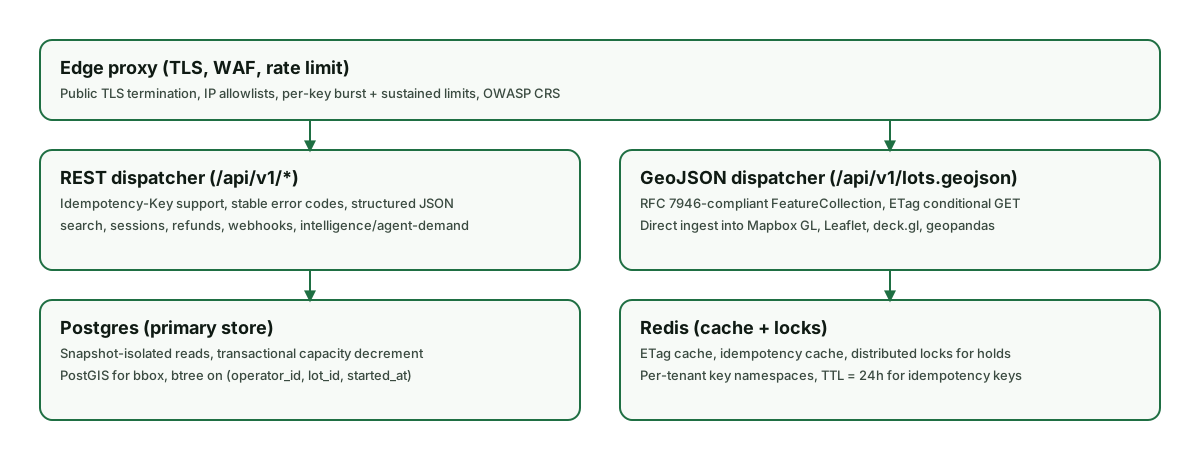
MCP server request architecture — edge proxy, REST + GeoJSON dispatchers, Postgres primary store, Redis cache and distributed locks. Identical perimeter for human, agent, and webhook traffic.
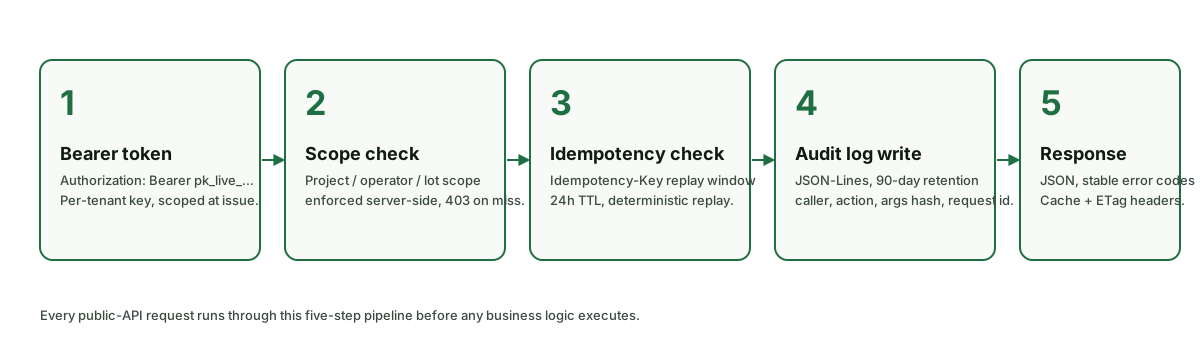
Five-step MCP server request pipeline that runs before any business logic — bearer auth, scope check, idempotency replay window, audit log write, structured response.
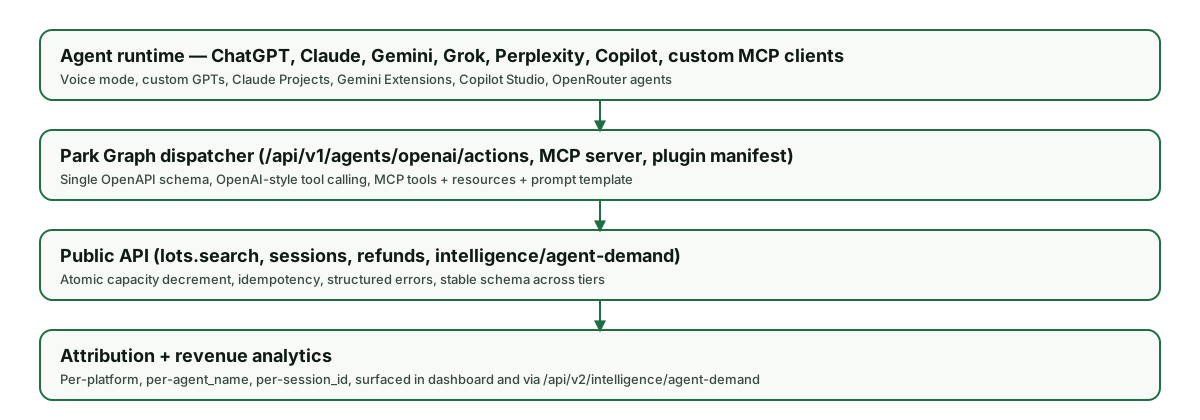
The AI integration stack that sits on top of the public API — agent runtimes (ChatGPT, Claude, Gemini, Grok, Perplexity, Copilot, custom MCP), dispatcher, public API, and attribution analytics.
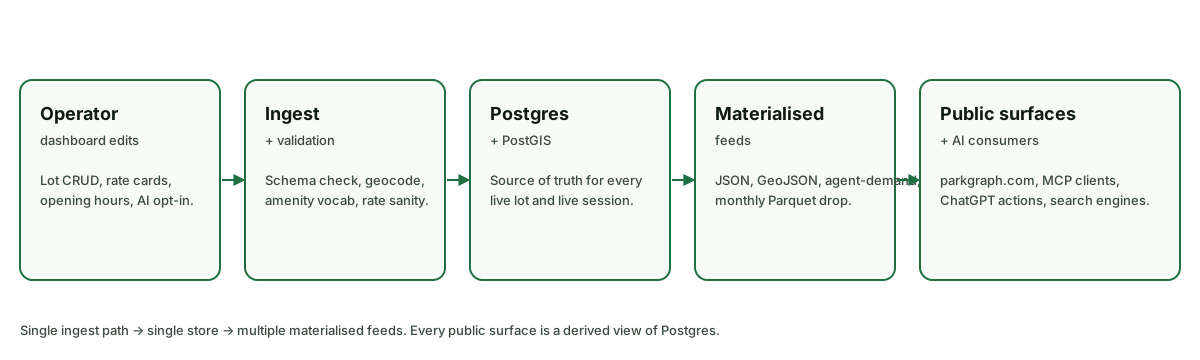
The data pipeline behind every Park Graph public surface — single ingest path, single source of truth in Postgres, multiple materialised feeds for AI consumers, search engines, and the public site.
Sandbox & getting help
Every operator gets a sandbox key prefixed with pk_test_. Sandbox traffic uses Stripe test mode, synthetic lots, and never charges a real card. Spin one up at /developers/sandbox, then point your client at https://parkgraph.com/api/v1 exactly as you would in production.
For integration help, reach the developer team at developers@parkgraph.com or open an issue on the public GitHub org. Status and incident history live at /developers/changelog; subscribe to the JSON feed for machine-readable updates.
Open the sandbox Test keys, sample lots, and Stripe test cards. Read the changelog Every API and surface change, dated and tagged. Talk to a human Solutions team for enterprise rollouts and bespoke contracts.