Gitee
oficialIntegração com a API do Gitee, gerenciamento de repositórios, issues e pull requests, e muito mais.
O que você pode fazer com Gitee MCP?
- Gerenciar problemas do repositório — Peça ao seu assistente para listar, criar ou atualizar problemas em um repositório usando
list_repo_issues,create_issueeupdate_issue. - Lidar com pull requests — Peça ao seu assistente para listar, criar, mesclar ou revisar pull requests com ferramentas como
list_repo_pulls,create_pull,merge_pullemanage_pull_review. - Explorar conteúdo do repositório — Obtenha conteúdos de arquivos, compare branches ou tags e pesquise arquivos por conteúdo usando
get_file_content,compare_branches_tagsesearch_files_by_content. - Gerenciar releases e forks — Crie releases, liste os existentes ou faça fork de um repositório via
create_release,list_releasesefork_repository. - Pesquisar e descobrir — Encontre repositórios de código aberto ou usuários no Gitee com
search_open_source_repositoriesesearch_users. - Acompanhar notificações — Verifique suas notificações mais recentes com
list_user_notifications.
Documentação
Servidor MCP Gitee
O Servidor MCP Gitee é uma implementação de servidor Model Context Protocol (MCP) para Gitee. Ele fornece um conjunto de ferramentas para interagir com a API do Gitee, permitindo que assistentes de IA gerenciem repositórios, issues, pull requests e muito mais.

Recursos
- Interaja com repositórios, issues, pull requests e notificações do Gitee
- URL base da API configurável para suportar diferentes instâncias do Gitee
- Flags de linha de comando para fácil configuração
- Suporta operações pessoais, de organização e empresariais
- Ativação/desativação dinâmica de conjunto de ferramentas
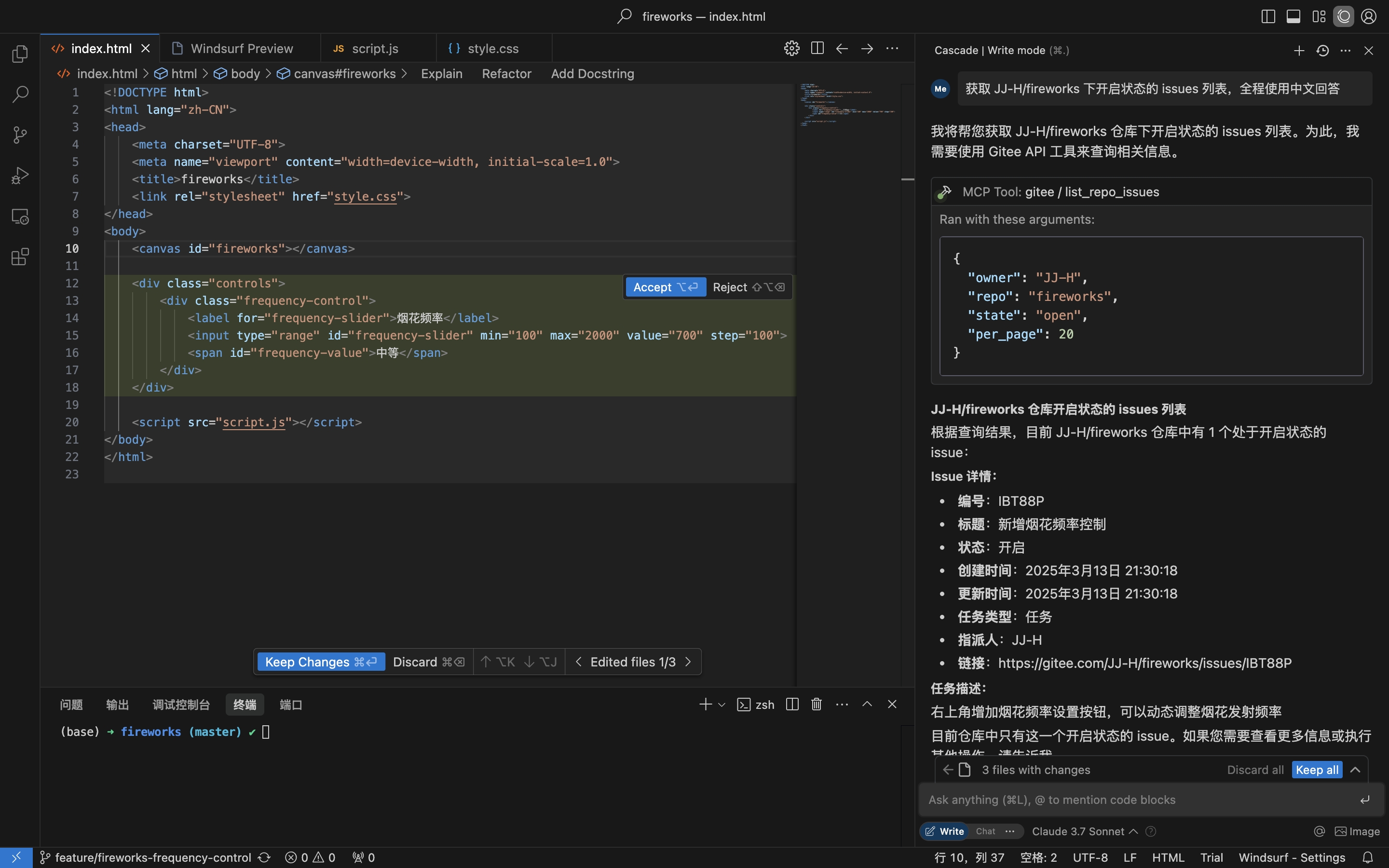
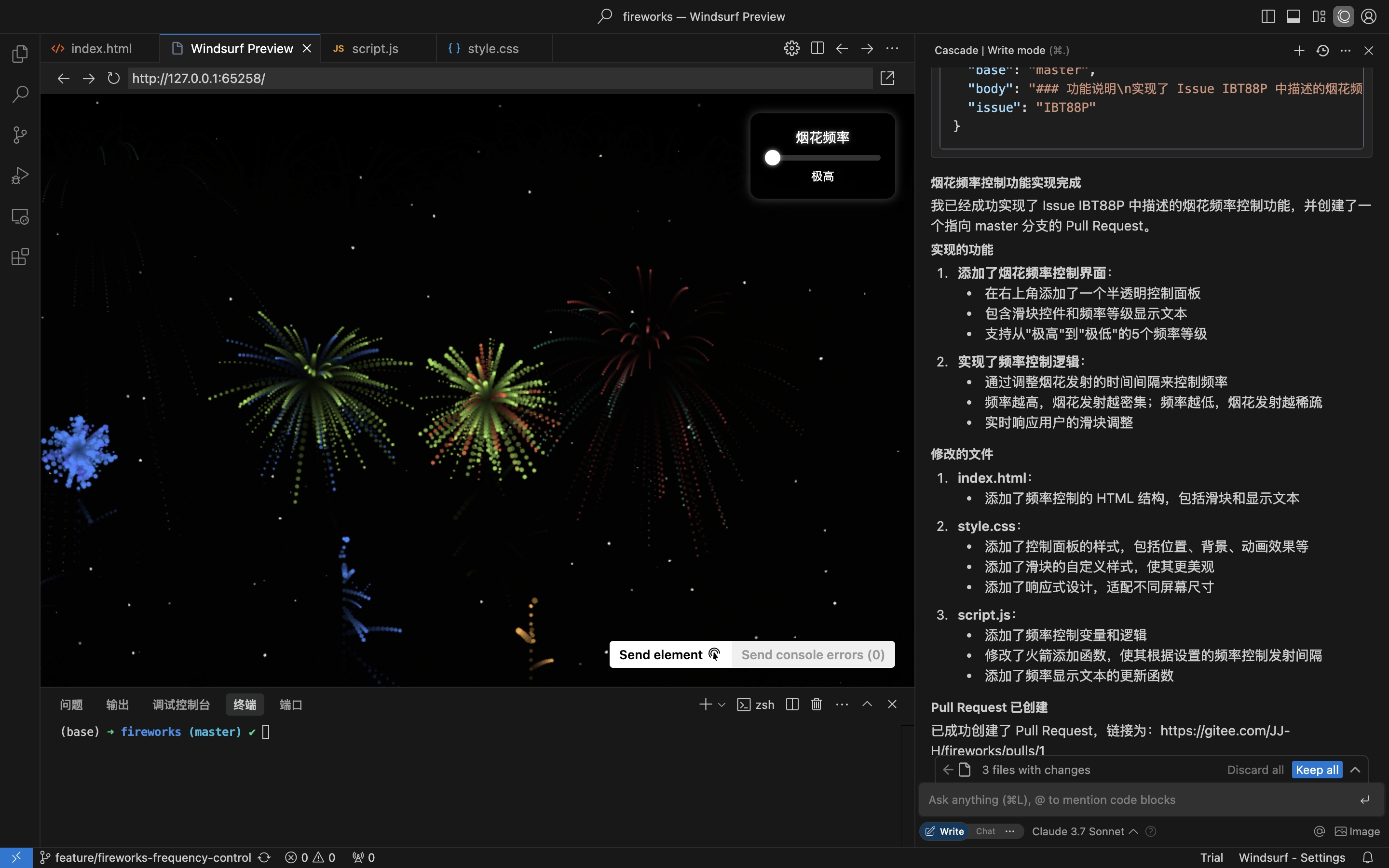
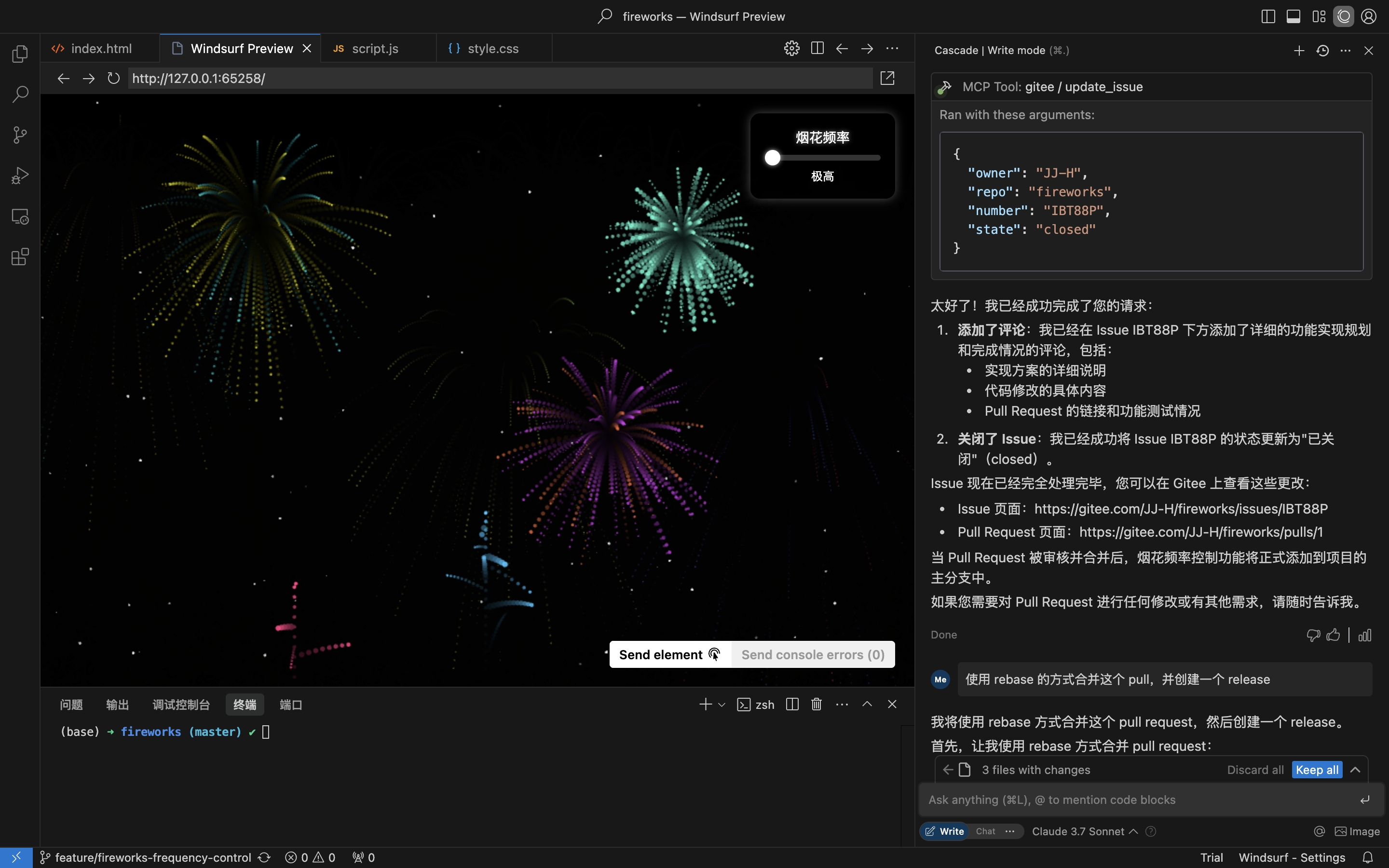
Cenário prático: Obter Issue do repositório, implementar e criar um Pull Request
- Obter Issues do repositório
- Implementar codificação e criar Pull Request com base nos detalhes da Issue
- Comentar e fechar Issue
Instalação
O Servidor MCP Remoto não requer instalação e funciona imediatamente. Para executar mcp-gitee localmente (stdio), escolha uma das opções abaixo.
Servidor MCP Remoto (Recomendado)
Adicione o seguinte à seção mcpServers da configuração do seu host, substituindo <your personal access token> por um token de aqui:
{
  "mcpServers": {
    "gitee": {
      "url": "https://api.gitee.com/mcp",
      "headers": {
        "Authorization": "Bearer <your personal access token>"
      }
    }
  }
}
Para caminhos e formatos de arquivo de configuração por cliente (Claude Code, Codex, Cursor, Trae, Cline, Continue, opencode), siga os guias vinculados na seção Configuração de Hosts MCP abaixo.
Local (stdio)
Baixar Binários Pré-compilados
Pegue o arquivo para sua plataforma (linux-amd64 / linux-arm / darwin-amd64 / darwin-arm64 / windows-amd64) em Releases, extraia e coloque mcp-gitee no seu PATH (no Windows, o executável é mcp-gitee.exe).
Usar npx
Nenhuma instalação necessária; o binário pré-compilado para sua plataforma é baixado automaticamente na inicialização:
{
  "mcpServers": {
    "gitee": {
      "command": "npx",
      "args": [
        "-y",
        "@gitee/mcp-gitee@latest"
      ],
      "env": {
        "GITEE_API_BASE": "https://gitee.com/api/v5",
        "GITEE_ACCESS_TOKEN": "<your personal access token>"
      }
    }
  }
}
Compilando a partir do Código Fonte
Requer Go 1.23.0 ou superior.
-
Clone o repositório:
git clone https://gitee.com/oschina/mcp-gitee.git cd mcp-gitee -
Compile o projeto:
make buildMova ./bin/mcp-gitee para a variável de ambiente PATH
Usar go install
go install gitee.com/oschina/mcp-gitee@latest
Usar o Executável Instalado
Uma vez que mcp-gitee esteja disponível no seu PATH (via Releases, compilação do código fonte ou go install):
{
  "mcpServers": {
    "gitee": {
      "command": "mcp-gitee",
      "env": {
        "GITEE_API_BASE": "https://gitee.com/api/v5",
        "GITEE_ACCESS_TOKEN": "<your personal access token>"
      }
    }
  }
}
Windows: o executável deve incluir o sufixo
.exe, e o caminho emcommanddeve usar barras normais/(o Windows as aceita, e evita erros de escape de barras invertidas em JSON):{ "mcpServers": { "gitee": { "command": "C:/Users/<you>/bin/mcp-gitee.exe", "env": { "GITEE_ACCESS_TOKEN": "<your personal access token>" } } } }
Configuração de Hosts MCP




Exemplos de configuração: Clique para ver mais configurações de aplicativos
Opções de Linha de Comando
--token: Token de acesso do Gitee--api-base: URL base da API do Gitee (padrão: https://gitee.com/api/v5)--version: Mostrar informações de versão--transport: Tipo de transporte (stdio, sse ou http, padrão: stdio)--address: O host e a porta para iniciar o servidor (padrão: localhost:8000)--enabled-toolsets: Lista separada por vírgulas de ferramentas para ativar (se especificado, apenas essas ferramentas serão ativadas)--disabled-toolsets: Lista separada por vírgulas de ferramentas para desativar
Variáveis de Ambiente
Você também pode configurar o servidor usando variáveis de ambiente:
GITEE_ACCESS_TOKEN: Token de acesso do GiteeGITEE_API_BASE: URL base da API do GiteeENABLED_TOOLSETS: Lista separada por vírgulas de ferramentas para ativarDISABLED_TOOLSETS: Lista separada por vírgulas de ferramentas para desativar
Gerenciamento de Conjunto de Ferramentas
O gerenciamento de conjunto de ferramentas suporta dois modos:
-
Ativar ferramentas especificadas (modo lista de permissões):
- Use o parâmetro
--enabled-toolsetsou a variável de ambienteENABLED_TOOLSETS - Após especificar, apenas as ferramentas listadas serão ativadas, as demais serão desativadas
- Exemplo:
--enabled-toolsets="list_user_repos,get_file_content"
- Use o parâmetro
-
Desativar ferramentas especificadas (modo lista de bloqueio):
- Use o parâmetro
--disabled-toolsetsou a variável de ambienteDISABLED_TOOLSETS - Após especificar, as ferramentas listadas serão desativadas, as demais serão ativadas
- Exemplo:
--disabled-toolsets="list_user_repos,get_file_content"
- Use o parâmetro
Observação:
- Se ambos
enabled-toolsetsedisabled-toolsetsforem especificados,enabled-toolsetsterá precedência - Os nomes das ferramentas diferenciam maiúsculas de minúsculas
Filtragem de Ferramentas por Solicitação (Cabeçalhos HTTP)
Ao usar o servidor MCP remoto (transporte HTTP/SSE), você pode filtrar dinamicamente as ferramentas disponíveis por solicitação via cabeçalhos HTTP. Isso é útil para clientes que precisam de controle refinado sobre a exposição de ferramentas sem reiniciar o servidor.
-
Ativar ferramentas especificadas via cabeçalho (lista de permissões):
- Use o cabeçalho
X-MCP-Enabled-Tools - Apenas as ferramentas listadas serão ativadas para essa solicitação
- Exemplo:
X-MCP-Enabled-Tools: list_user_repos,get_file_content
- Use o cabeçalho
-
Desativar ferramentas especificadas via cabeçalho (lista de bloqueio):
- Use o cabeçalho
X-MCP-Disabled-Tools - As ferramentas listadas serão desativadas para essa solicitação
- Exemplo:
X-MCP-Disabled-Tools: create_repo,delete_repo
- Use o cabeçalho
Regras de prioridade:
- Se ambos
X-MCP-Enabled-ToolseX-MCP-Disabled-Toolsestiverem presentes na mesma solicitação, a lista de permissões (X-MCP-Enabled-Tools) terá precedência - Os nomes das ferramentas diferenciam maiúsculas de minúsculas
Exemplo de configuração para Cursor/Claude:
{
  "mcpServers": {
    "gitee": {
      "url": "https://api.gitee.com/mcp",
      "headers": {
        "Authorization": "Bearer <your personal access token>",
        "X-MCP-Enabled-Tools": "list_user_repos,get_file_content,list_repo_issues"
      }
    }
  }
}
Licença
Este projeto é licenciado sob a Licença MIT. Consulte o arquivo LICENSE para mais detalhes.
Ferramentas Disponíveis
O servidor fornece várias ferramentas para interagir com o Gitee:
| Ferramenta | Categoria | Descrição |
|---|---|---|
| list_user_repos | Repositório | Listar repositórios autorizados do usuário |
| get_file_content | Repositório | Obter o conteúdo de um arquivo em um repositório |
| create_repo | Repositório | Criar um repositório (usuário, organização ou empresa) |
| fork_repository | Repositório | Bifurcar um repositório |
| create_release | Repositório | Criar um release para um repositório |
| list_releases | Repositório | Listar releases do repositório |
| search_open_source_repositories | Repositório | Pesquisar repositórios de código aberto no Gitee |
| search_files_by_content | Repositório | Pesquisar arquivos por conteúdo em um repositório |
| compare_branches_tags | Repositório | Comparar duas branches, tags ou commits em um repositório |
| list_repo_pulls | Pull Request | Listar pull requests em um repositório |
| merge_pull | Pull Request | Mesclar um pull request |
| create_pull | Pull Request | Criar um pull request |
| update_pull | Pull Request | Atualizar um pull request |
| get_pull_detail | Pull Request | Obter detalhes de um pull request |
| get_diff_files | Pull Request | Obter arquivos de diff de um pull request |
| manage_pull_review | Pull Request | Gerenciar uma revisão de pull request (aprovar ou cancelar) |
| create_comment | Comentário | Criar um comentário em uma issue ou pull request |
| list_comments | Comentário | Listar todos os comentários de uma issue ou pull request |
| create_issue | Issue | Criar uma issue |
| update_issue | Issue | Atualizar uma issue |
| get_repo_issue_detail | Issue | Obter detalhes de uma issue do repositório |
| list_repo_issues | Issue | Listar issues do repositório |
| get_user_info | Usuário | Obter informações do usuário autenticado atual |
| search_users | Usuário | Pesquisar usuários |
| list_user_notifications | Notificação | Listar notificações do usuário |
Contribuição
Aceitamos contribuições da comunidade de código aberto! Se você deseja contribuir para este projeto, siga estas diretrizes:
- Bifurque o repositório.
- Crie uma nova branch para sua funcionalidade ou correção de bug.
- Faça suas alterações e garanta que o código esteja bem documentado.
- Envie um pull request com uma descrição clara das suas alterações.
Para mais informações, consulte o arquivo CONTRIBUTING.