NOVA MCP connector for Kommo
MCP remoto para Kommo CRM: leads, contatos, tarefas, pipelines, chats. OAuth, sem chaves de API.
Servidor MCP hospedado
npx add-mcp 'https://sp1-nova.com/api/mcp-server/mcp/'Instala no Claude Code, Codex, Cursor e outros
Documentação
Connects Claude, ChatGPT, Cursor, Gemini, Grok and other AI to Kommo. The AI reads and updates leads, contacts, companies, tasks and notes.
Features
Read, update and delete leads, contacts and companies
Tasks, notes, custom fields, tags and catalogs
Connect Claude, ChatGPT, Cursor, Gemini and other AI
Installation and setup guide
Detailed guide for working with widget "MCP connector for Kommo"
About the widget
The widget creates a secure MCP server so that external AI clients (Claude, ChatGPT, Cursor, Gemini and others) can securely request data from your Kommo.
Important: the connector works only while Kommo is open in a browser tab. Keep at least one Kommo tab open on any computer — otherwise requests from the AI client won't be executed.
Release connection data
In the widget settings, the profile has an MCP address. It is inserted into the AI client.
Create a profile in the widget settings. The profile will have an MCP address. It is enough: the login takes place via OAuth when the client opens this address.
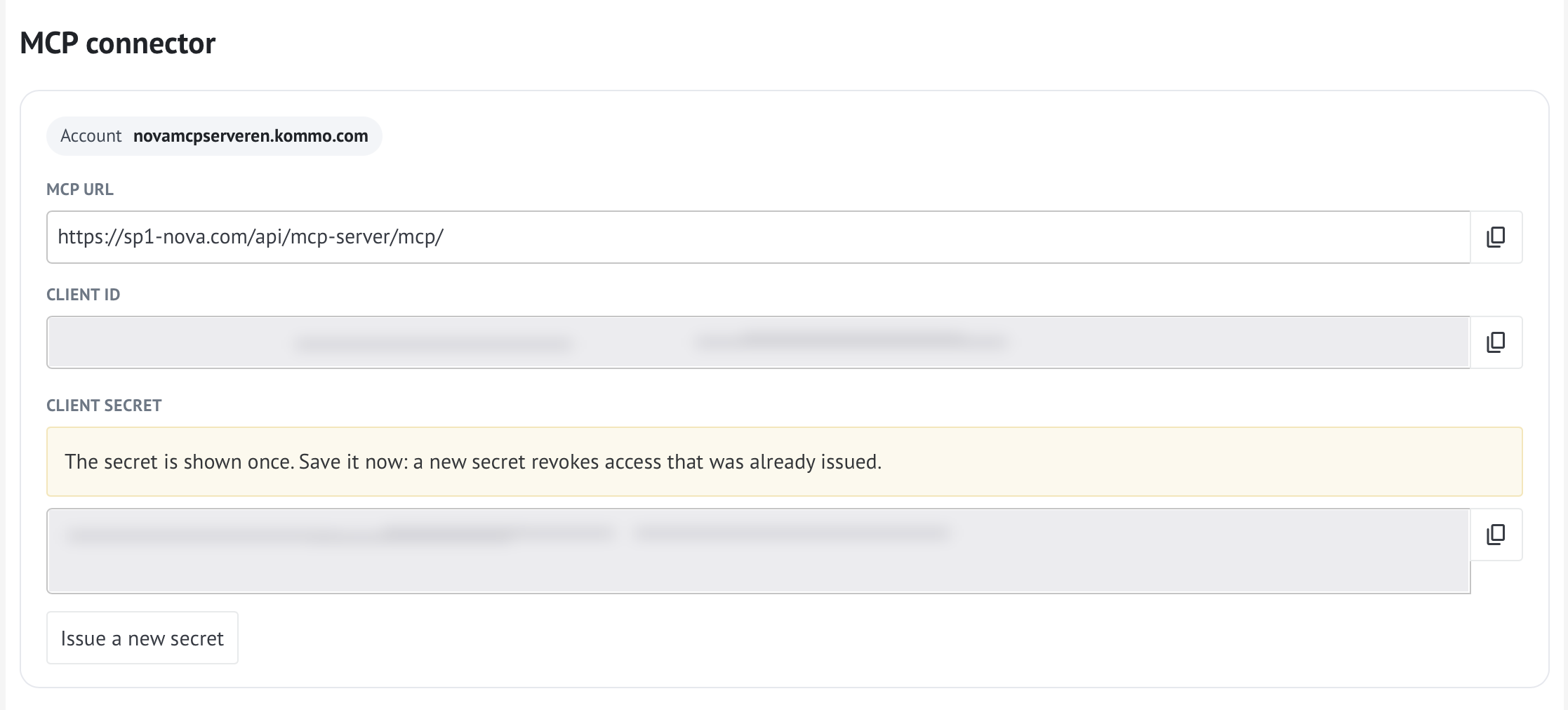
MCP profile address
Each profile has its own address. For Kommo it is on sp1-nova.ru, for Kommo - on sp1-nova.com. Copy it from the settings, do not assemble it manually.
Setting up the AI client
Insert the MCP address into the AI client settings and go through OAuth.
Paste the MCP address into your AI client settings. The process is slightly different depending on the service:
- Claude: Settings → Connectors → Add custom connector. Paste the server address and leave the published identity as Claude. Give permission to access Kommo data.
- ChatGPT: in MCP settings, create a custom MCP server and paste the address.
- Cursor: Add the server to the mcp.json file and provide the address.
- Gemini: Insert the address as instructed by your MCP host.
After pasting the address, the client will open authorization (OAuth) and request permission to access Kommo data. For detailed steps for different clients, see the Chats, Editors, and Agents and Automation sections below.
Access check
After authorization, check that the AI client sees the available tools (functions). The widget provides a set of actions: searching for leads and contacts, uploading statistics on pipelines, reading correspondence history, generating summaries. Make sure all the necessary tools are active.
Sometimes, after widget updates, access marks may be reset - periodically check that all tools have a permission (for example, “Always allow”).
Important nuances
- Access mode. By default, the widget provides read-only access (search, analytics, reports). AI does not automatically perform direct recording (creating, editing, deleting records in CRM). If you need recording capabilities, enable the appropriate methods in the widget settings.
- Safety. The profile address is issued individually. Deleting a profile revokes access.
- Data structure. If your account uses custom fields (for example, the lead source is stored not in a standard field, but in a separate one), indicate this in the widget settings. This way the AI agent will correctly understand the structure of your data.
Frequently asked questions and solutions
- Error during authorization. Check that the entire address has been copied and that the widget is active in Kommo.
- AI doesn't see tools. Make sure that the widget settings for these tools are set to Always allow.
- Data is not updated. Check the expiration date of the OAuth token—if necessary, the widget should automatically renew it.
If any difficulties arise at any stage, write to support - we will help you figure it out!
Functions
The AI calls functions itself. Lists of leads, contacts, companies, customers, and the event feed can be filtered. Lists return up to 250 records per page, 50 by default. pipelines_delete removes a pipeline, and users_create invites a user. If a function is missing, the AI adds an idea to the wishlist. A bug or an error goes through bug_report.
Lists of leads, contacts, companies, customers, and the event feed can be filtered. A lead can be filtered by name, pipeline and stage, created, closed and next-task dates, source, unsorted category, owner, creator, editor, tasks, budget, labor cost, loss reason, tags, products, conversations, main contact, company, and custom fields. A contact or company can be filtered by name, created and updated dates, pipelines of linked leads, including records without leads, owner, author, tasks, tags, and fields. A customer can also be filtered by the next purchase date and amount, status, LTV, number of purchases, and average check. An event can be filtered by date, author, type, and the value before and after. A contact phone and email are still found by the search string.
These calls do nothing without confirm true: deleting a pipeline or a stage, a regular list, an invoice, a role, a source, a chat template, a loss reason, a custom task type, a customer stage or segment, a purchase, a field group, list fields, or segment fields; deactivating a user; installing or uninstalling a widget; declining an incoming lead; restoring from trash; merging duplicates. Deleting a lead, contact, company, customer, task, note, tag, custom field, file, or webhook does not need this flag. salesbot_run and export_start do not need it either.
Leads, contacts and companies
| Function | What it does |
|---|---|
| leads_list | Lead list. Can be filtered by stage, date, owner, fields, and other list conditions |
| leads_get | One lead by id |
| leads_create | Create leads |
| leads_update | Update leads |
| leads_delete | Delete leads by id |
| leads_complex_create | A lead, a contact, and a company in one call, up to 50. The contact goes in _embedded.contacts, the company in _embedded.companies |
| contacts_list | Contact list. Can be filtered by date, linked leads, owner, and fields |
| contacts_get | One contact by id |
| contacts_create | Create contacts |
| contacts_update | Update contacts |
| contacts_delete | Delete contacts by id |
| companies_list | Company list. Can be filtered by date, linked leads, owner, and fields |
| companies_get | One company by id |
| companies_create | Create companies |
| companies_update | Update companies |
| companies_delete | Delete companies by id |
Customers
| Function | What it does |
|---|---|
| customers_list | Customer list. Can be filtered by purchase date, status, amount, and fields |
| customers_get | One customer by id |
| customers_create | Create customers |
| customers_update | Update customers |
| customers_delete | Delete customers by id |
| customers_enable | Enable the Customers section. Mode: segments or periodicity |
| customer_statuses_list | Customer periodicity stages. The id is used as status_id. In segments mode there are no stages |
| customer_statuses_create | A new customer stage: name, sort, and color from the stage palette. The API does not accept entry conditions |
| customer_statuses_update | Name, color, and order of a customer stage. The object needs an id |
| customer_statuses_delete | Deletes a customer stage. Needs confirm true |
| customer_segments_list | Customer segments. If the section is off, call customers_enable with mode segments first |
| customer_segments_create | A new segment: name, and optional sort and color. The API does not accept entry conditions |
| customer_segments_update | Name, color, and order of a segment. The object needs an id. The API does not accept conditions |
| customer_segments_delete | Deletes a segment. Needs confirm true |
| customer_transactions_list | Purchases of one customer. customer_id is the customer id. Up to 250 per page |
| customer_transactions_create | A customer purchase. customer_id and items, price is required, dates are unix time |
| customer_transactions_delete | Deletes one purchase. Needs customer_id, id, and confirm true |
| segment_conditions_get | A segment card. amo does not return conditions, and the tool reports that limit |
| segment_conditions_update | Tries to save segment conditions. amo rejects the conditions field |
| segment_custom_fields_list | Custom fields of customer segments. These are not custom fields on the customer card |
| segment_custom_fields_create | New custom fields for segments. This does not set segment conditions |
| segment_custom_fields_update | Updates segment custom fields. Each object needs an id |
| segment_custom_fields_delete | Deletes segment custom fields by ids. Needs confirm true |
Invoices
| Function | What it does |
|---|---|
| invoices_enable | Enable Invoices/purchases. A second list is not created |
| invoices_list | Invoices of a lead or customer, one page |
| invoices_get | Invoice by id, including the payment link |
| invoices_create | Create an invoice and attach it to a lead or customer |
| invoices_update | Invoice status and lines. status is created, paid, or partially_paid. items, when sent, replace the lines entirely |
| invoices_delete | Deletes an invoice. Needs confirm true. This does not turn the invoices section off |
Webhooks
You can attach a Grok routine to the hook address: for example, to a new incoming message (add_message) or a new lead (add_lead). Other AI providers have the same technique - routine, automation or webhook, which accept HTTP POST. amo can't add a title. webhooks_add_bearer registers a hook on sp1-nova.ru (for Kommo - sp1-nova.com), and sp1 forwards the same POST to your address with the Authorization: Bearer header. If the address already exists, amo replaces its entire events. Deleting removes the address from all events. No more than 100 hooks per account.
Events: responsible_lead, responsible_contact, responsible_company, responsible_customer, responsible_task — change of responsible person; restore_lead, restore_contact, restore_company - restoration; add_lead, add_contact, add_company, add_customer, add_talk, add_task - adding; update_lead, update_contact, update_company, update_customer, update_talk, update_task - change; delete_lead, delete_contact, delete_company, delete_customer, delete_task - deletion; status_lead — change of lead stage; note_lead, note_contact, note_company, note_customer - note; add_message - incoming message, add_outgoing_message - outgoing message, add_chat_template_review - WhatsApp template for approval. For a list: add_catalog_{id}, update_catalog_{id}, delete_catalog_{id}.
| Function | What it does |
|---|---|
| webhooks_list | Account webhooks. destination keeps a single URL |
| webhooks_add | Subscribe a URL to events. An existing URL is replaced entirely |
| webhooks_add_bearer | Webhook via sp1-nova.ru that adds Authorization: Bearer on your URL |
| webhooks_delete | Delete a webhook by its exact URL. A proxied hook accepts the sp1 URL or your URL |
Tasks and notes
| Function | What it does |
|---|---|
| tasks_list | Task list |
| tasks_get | One task by numeric id |
| tasks_create | Create tasks |
| tasks_update | Update tasks |
| tasks_delete | Delete tasks by id |
| task_types_list | Task types, including the built-in ones |
| task_types_create | A custom task type. color is six hex characters without a hash, default 568FFA |
| task_types_update | Name, color, order, or icon of a custom task type. The object needs an id |
| task_types_delete | Deletes a custom task type. System types 1, 2, and 3 stay. Needs confirm true |
| notes_list | Notes on leads, contacts, companies or customers. With a card id, only that card |
| notes_create | Create notes |
| notes_update | Update notes. Each item needs the note id and the card entity_id |
| notes_delete | Delete notes by id |
Pipelines, stages and loss reasons
| Function | What it does |
|---|---|
| pipelines_list | Pipelines and stages |
| pipelines_get | One pipeline by id |
| pipelines_statuses | Stages of a pipeline |
| pipelines_create | Create pipelines. name, sort, is_main and is_unsorted_on are required. Stage color must be from the amo palette |
| pipelines_update | Name, order, the main-pipeline flag, and the incoming-leads flag. is_main true makes this pipeline the main one |
| pipelines_delete | Deletes one pipeline. amo may refuse the main pipeline or one that still has records. Needs confirm true |
| pipeline_statuses_create | New pipeline stages. items take name, sort, and color from the amo stage palette. Up to 50 |
| pipeline_statuses_update | Name, color, and order of stages. System stages 142 and 143 cannot be changed this way |
| pipeline_statuses_delete | Deletes one stage. Stages 142, 143, and Incoming leads cannot be deleted. Needs confirm true |
| loss_reasons_list | Loss reasons: id and name. The id is set on a lead with loss_reason_id |
| loss_reasons_create | New loss reasons, up to 50 |
| loss_reasons_update | Renames one loss reason |
| loss_reasons_delete | Deletes one loss reason. Needs confirm true |
Digital Pipeline
| Function | What it does |
|---|---|
| digital_pipeline_catalog | Digital Pipeline trigger types: type and a short summary. The schema is in digital_pipeline_describe |
| digital_pipeline_describe | Schema of one trigger type: parameters, which ones are required, and an example |
| digital_pipeline_list | Triggers of one pipeline. page starts at 1, limit defaults to 50, maximum 100 |
| digital_pipeline_get | One trigger. settings from the response can be sent to digital_pipeline_update |
| digital_pipeline_create | One trigger on a stage. pipeline_id, status_id, action, and settings are required |
| digital_pipeline_update | Updates one trigger. settings is replaced entirely. dry_run true does not save |
| digital_pipeline_delete | Deletes one trigger. If the action sits on several stages, only this id is removed. dry_run true does not save |
Tags and custom fields
A lead tag color in tags_create is six hex characters. A leading hash is optional. Only these 23 colors work: EBEBEB, D0D0D0, F2DDF7, D1A4DC, FF8F92, FFC8C8, C7DB8C, DDEBB5, 8699DA, AABDFF, FFCE5A, FFE193, 90CDB0, C6F4DE, A9A5D7, D8D5FF, 86C0FC, 832161, 6A0F49, 0C7C59, 10599D, 9D2B32, 247BA0. amo does not accept pipeline stage colors.
| Function | What it does |
|---|---|
| tags_list | Tags of an entity, one page. page starts at 1, up to 250. Continue while _links.next is present |
| tags_create | A tag in the tag list. color is only for leads and only one of 23 amo tag colors, for example DDEBB5. The pipeline stage palette does not work. Put the tag on a card with tags_to_add |
| tags_delete | Delete tags by id |
| custom_fields_list | Custom fields |
| custom_fields_create | Create custom fields |
| custom_fields_update | Update custom fields |
| custom_fields_delete | Delete custom fields by id |
| custom_field_groups_list | Field groups on a card. entity_type is leads, contacts, companies, or customers |
| custom_field_groups_create | New field groups. items take name and an optional sort |
| custom_field_groups_update | Name and order of groups. The object needs an id |
| custom_field_groups_delete | Deletes one group. The custom fields stay on the card. Needs confirm true |
Lists and links
links_link attaches another card to a lead, contact, company, or customer. The same call attaches a list item, including a product. For it, to_entity_type is catalog_elements, and to_entity_id is the element id from catalog_elements_list. The same list searches with query by name and filled fields. metadata needs catalog_id from catalogs_list and quantity, how many units to attach. price_id is optional. links_unlink removes this link: metadata still needs catalog_id.
| Function | What it does |
|---|---|
| catalogs_list | Lists in the account. query filters by name, ignoring letter case. Up to 250 per page. There are no other filters |
| catalogs_get | One list by id from catalogs_list |
| catalogs_create | A new regular list. type is always regular. invoices_enable creates invoices, and products are already in the account |
| catalogs_update | The list name. The object needs an id and name or sort. sort alone is not enough: the current name is kept. This method does not change the order |
| catalogs_delete | Deletes a regular list together with its elements. Invoices and products stay. Needs confirm true |
| catalog_elements_list | Catalog elements, one page. query searches by name and filled fields. page starts at 1, up to 250. Continue while _links.next is present |
| catalog_elements_get | One list element. Needs catalog_id and the element id |
| catalog_elements_create | Create catalog elements |
| catalog_elements_update | Update catalog elements |
| catalog_elements_delete | Delete catalog elements |
| catalog_custom_fields_list | Custom fields of a list, of products, or of invoices. catalog_id comes from catalogs_list. custom_fields_list does not accept a list |
| catalog_custom_fields_create | New custom fields for a list. catalog_id is required. items take name, type, and enums |
| catalog_custom_fields_update | Updates list custom fields. Each object needs the field id |
| catalog_custom_fields_delete | Deletes list custom fields by ids. Needs confirm true |
| products_list | Products from the system list. query searches by name. Attach one to a lead with links_link. Up to 250 per page |
| links_list | Links of a card, one page. page starts at 1, up to 250. Continue while _links.next is present |
| links_link | Link records to a card. List item and product: to_entity_type catalog_elements, metadata with catalog_id and quantity |
| links_unlink | Unlink records. List item and product: to_entity_type catalog_elements and metadata.catalog_id |
| entity_subscribers_list | Who follows the card. This call cannot subscribe a user |
Users and roles
| Function | What it does |
|---|---|
| users_list | Account users |
| users_get | One user by id |
| users_create | Invites users, up to 10. Needs name, email, and password: at least 6 characters, a digit, a lowercase letter, and an uppercase letter. lang is ru, en, or es. The password is not returned. confirm is not required |
| users_activate | Activates users by ids, up to 10. Administrator and the Enterprise plan only. An administrator cannot be activated this way |
| users_deactivate | Deactivates users by ids, up to 10. Needs confirm true. Administrator and the Enterprise plan only. An administrator cannot be deactivated this way |
| roles_list | Roles and their rights. Administrator rights are required. Up to 250 per page |
| roles_get | One role by id: name and rights, including stage rights |
| roles_create | New roles. amo refuses a role without rights for leads, contacts, companies, and tasks. Up to 50 |
| roles_update | Updates roles. Each object needs an id |
| roles_delete | Deletes one role. Users stay in the account without that role. Needs confirm true |
Events
| Function | What it does |
|---|---|
| events_list | Event feed: calls, stage and owner changes. Can be filtered by date, author, and type. Up to 100 per page |
| events_get | One event by id |
| Function | What it does |
|---|---|
| mail_mailboxes | Connected mailboxes |
| mail_threads | Mail threads. Folders: inbox, sent, drafts, spam, trash. Up to 50 |
| mail_messages | Messages of one thread |
| mail_send | Send a message from an account mailbox, without attachments. If there are no mailboxes, connect one in amo mail |
| mail_reply | Replies in a thread. thread_id comes from mail_threads. There are no attachments. Without a mailbox, mail says the mailbox was not found |
| mail_connect | Connects a mailbox. The password is not returned. Without a working IMAP server the mailbox is not created |
Messages in a lead
| Function | What it does |
|---|---|
| lead_messages_list | Client chat messages in a lead. The reply includes channel, for example telegram. Several chats require chat_id |
| lead_messages_send | Send text to the client in the chat channel, for example telegram. This is not mail and not a note |
Files
| Function | What it does |
|---|---|
| files_list | Account files, one page. An empty drive is an empty list. page starts at 1, up to 250 |
| files_upload | Upload a file, up to 100 MB. Can be linked to a lead, contact, company or customer |
| files_delete | Delete a file by uuid |
Bots
| Function | What it does |
|---|---|
| salesbot_catalog | Salesbot step types. salesbot_describe returns the schema |
| salesbot_describe | Schema of one Salesbot step: parameters, which ones are required, and an example |
| bots_list | Bot list: id, name and type. Needed to run a bot |
| bots_get | One bot with its scenario. On Kommo an open tab with the NOVA MCP widget reads the scenario. Without that tab the response has no scenario |
| bots_create | A new bot is created switched off. name and scenario are required. active true is not accepted |
| bots_update | Name, active, and other bot fields. The whole scenario is replaced only with replace_scenario true |
| bots_delete | Deletes a bot by id. A read-only bot is not deleted. dry_run true does not delete it |
| salesbot_step_add | One new step. handler comes from salesbot_catalog. dry_run true does not save |
| salesbot_step_update | Replaces one step by its step number. dry_run true does not save |
| salesbot_step_delete | Deletes one step. The other step numbers stay. dry_run true does not delete it |
| salesbot_run | Run a bot. Take bot_id from the bot list |
Statistics
| Function | What it does |
|---|---|
| stats_consolidated_get | The summary report: total count, sum, and open stages |
| stats_pipeline_get | Sales analysis: pipelines and stage names. Stage numbers come from the summary report |
| stats_employees_get | The report by user. If the columns have no numbers, the response states that limit |
| stats_calls_get | The calls dashboard. This is not calls_add and not call notes. Up to 50 rows |
| stats_customers_get | The customers report. If the section is missing, amo returns an empty placeholder |
| stats_goals_get | Goals for leads. If the plan has no goals, the tool reports that limit |
Import, export, trash and duplicates
| Function | What it does |
|---|---|
| import_list | The import queue in the amo interface |
| export_start | Exports leads, contacts, or companies to csv or xlsx. Returns the job uuid, not the file. confirm is not required |
| export_status_get | Export status and a link to the file inside the account. The file is not downloaded outside |
| trash_list | Trash: only deleted leads, contacts, or companies. entity is leads, contacts, or companies. Live cards are not included |
| trash_restore | Restores cards from trash. Companies use the same route as contacts. Needs confirm true |
| duplicates_merge | Merges two leads, contacts, or companies. master_id stays, duplicate_id is absorbed. Needs confirm true |
Incoming leads and conversations
| Function | What it does |
|---|---|
| unsorted_list | Incoming leads. pipeline_id keeps one pipeline. uid is needed to accept, decline, or link. Up to 250 per page |
| unsorted_get | One incoming lead by uid from unsorted_list |
| unsorted_accept | Accepts an incoming lead into a stage. Needs user_id and status_id |
| unsorted_decline | Declines an incoming lead. Needs confirm true and user_id |
| unsorted_link | Links an incoming lead to a lead or a customer. entity_type is leads or customers |
| unsorted_create | Creates an incoming lead from a call or a form. kind is sip or form. This method does not create chat or mail |
| talks_list | Account conversations. This is not the lead chat: lead_messages_list returns that history. Up to 250 per page |
| talks_get | One conversation by id from talks_list |
| talks_close | Closes a conversation. force_close true closes it even when the customer message has no reply |
Account, widgets, sources and calls
| Function | What it does |
|---|---|
| account_get | Account settings, read only: name, country, customers mode, time zone, task types, and chat rights |
| widgets_list | Widgets. is_active_in_account true returns those installed in the account. Passwords in the response are hidden |
| widgets_get | A widget by code. settings_template shows the fields needed to install it. Passwords are hidden |
| widgets_install | Installs a widget. settings are the fields from settings_template. Needs confirm true |
| widgets_uninstall | Uninstalls a widget. Its settings are removed. Needs confirm true |
| sources_list | Sources of this integration. Other lead sources are not included. Up to 250 per page |
| sources_get | One integration source by id |
| sources_create | A new integration source. items take name, external_id, pipeline_id, and default |
| sources_update | Updates an integration source. The object needs an id |
| sources_delete | Deletes an integration source. Needs confirm true |
| calls_add | Adds a call to a card by phone number. direction is inbound or outbound. uniq is the call id, duration is seconds. This is not the calls dashboard |
| chat_templates_list | Chat templates of this integration. Other templates are not included. Administrator rights are required |
| chat_templates_create | A new chat template for the integration. items take name, content, and external_id |
| chat_templates_update | Updates a chat template. The object needs an id |
| chat_templates_delete | Deletes a chat template. Needs confirm true |
| short_links_create | A short amo link to a url. entity_id is the contact id. Without a contact, amo rejects the link |
Notifications
| Function | What it does |
|---|---|
| inbox_notify | Notification in the bell. Type: error or call |
Wishlist
| Function | What it does |
|---|---|
| wishlist_list | Ideas for the MCP connector. Search by text, filter by status |
| wishlist_add | A new idea when the function does not exist. The text is moderated |
| wishlist_vote | A vote for an existing idea. One account, one vote |
| bug_report | A widget bug or error: link, steps, expected and actual result |
Chats
The MCP address is taken from the widget settings. Next, the client opens the OAuth login.
Claude
- Open claude.ai and go to Customize → Connectors.
- Click Add custom connector.
- Paste the MCP address from the widget settings.
- Confirm your login when the login window opens.
- On Free you can connect one connector. Claude Code with the same account will pick it up himself.
ChatGPT
- Open chatgpt.com/plugins.
- Click Add, then Create custom MCP server. On some accounts the button is also called Create MCP App.
- This is your connection. There is no need to publish the application to the market.
- Paste the MCP address from the widget settings.
- Confirm access to Kommo.
- Reading available on Plus, Pro, Business, Enterprise and Edu. Recording in Kommo - for Business, Enterprise and Edu.
Gemini
- Open gemini.google.com → Connected Apps → Custom apps.
- Add your server.
- Paste the MCP address from the widget settings.
- Confirm your entry.
- You need a personal Google account in the USA, over 18 years of age and an English interface.
Grok
- Open grok.com/connectors and select Custom.
- Paste the MCP address from the widget settings.
- Confirm your entry.
- Available on all plans. An administrator adds a connector to a team.
Perplexity
- Open Connectors → Custom connector and select Remote.
- Paste the MCP address from the widget settings.
- Confirm your entry.
- You need a Pro, Max or Enterprise plan.
Mistral
- In Mistral Work, open Connectors → Add Connector.
- Paste the MCP address from the widget settings.
- The server is added by the account administrator.
- Confirm your entry.
Cursor
- Open Customize → MCPs or add the server to the mcp.json file.
- Specify the MCP address from the widget settings.
- When you connect for the first time, Cursor will open an input. Confirm it.
VS Code
- Run the MCP:Add Server command.
- Specify the remote server: MCP address from the widget settings.
- Login via OAuth takes place in Local harness.
- Tools appear in agent mode.
JetBrains
- Open Junie → Authorize or MCP Settings.
- Paste the MCP address from the widget settings.
- Confirm your entry.
- AI Assistant does not have OAuth login; it will not connect to this server.
Zed
- Open Settings → AI → MCP Servers and add Remote.
- Paste the MCP address from the widget settings.
- Click Authenticate and confirm your login.
Windsurf
- In Devin, add the server to mcp_config.json or with the devin mcp add command.
- Specify the MCP address from the widget settings.
- When you launch it for the first time, the login will open. Confirm it.
Cline
- Open MCP Servers → Remote Servers.
- Server type select streamableHttp.
- Paste the MCP address from the widget settings.
- Confirm your entry.
Agents and automation
MCP address from widget settings. Transport - Streamable HTTP.
Claude Code
- Run claude mcp add and specify the MCP address, or use the connector already added to claude.ai.
- Confirm your entry.
- The connector from the site is picked up if the login is not via an API key.
Codex
- Run codex mcp add.
- Specify the MCP address from the widget settings.
- Confirm your login upon first launch.
- One config works in the CLI, in the editor extension and in the ChatGPT application.
Gemini CLI
- Run gemini mcp add.
- Specify the MCP address from the widget settings.
- Confirm your entry.
- A regular Google account is not suitable: you need Code Assist or an API key.
Qwen Code
- Open settings.json.
- Write the MCP address into the httpUrl key. The url key means old SSE and will not work here.
- Confirm your entry.
OpenCode
- Open opencode.json.
- Add a server with a type field and a remote value. Without type, the server will not boot.
- Paste the MCP address from the widget settings.
- Confirm your entry.
Kiro
- Add the server to mcp.json: MCP address from widget settings.
- Confirm your entry.
- There is no MCP in the mobile application.
GitHub Copilot CLI
- In chat, run the /mcp add command.
- Specify the MCP address from the widget settings.
- This is a user config, not a repository file.
- Confirm your entry.
Warp
- Open Settings → Agents → MCP servers.
- Add server: MCP address from widget settings.
- Confirm your entry.
- The cloud agent does not pass this OAuth. Connect a local agent.
Goose
- Open Extensions → Add custom extension and select Remote.
- Specify the type streamable_http.
- Paste the MCP address from the widget settings.
- Confirm your entry.
LM Studio
- Open Program → mcp.json.
- Add remote server: MCP address from widget settings.
- Choose a model that can call tools.
- Confirm your login on the first call.
Raycast
- Run the Install MCP Server command.
- Paste the MCP address from the widget settings.
- Confirm your entry.
- You need a Pro, Pro+ or Max plan.
Copilot Studio
- In the agent, open Tools → Model Context Protocol.
- In the wizard, specify the MCP address.
- Author's license required. Confirm your entry.
n8n
- Add an MCP Client node to the AI agent.
- Transport select Streamable HTTP, authorization – OAuth2.
- Paste the MCP address from the widget settings.
- Pass OAuth2 login.
Open WebUI
- The administrator opens Admin → Integrations → External Tool Servers.
- Adds server: MCP address from widget settings.
- Login takes place separately for each user.