Flow Studio - Power Automate MCP Server
Depure, crie e gerencie fluxos em nuvem do Microsoft Power Automate com agentes de IA. 15 ferramentas para detalhes de erros em nível de ação, criação de fluxos, histórico de execução e operações multi-inquilino.
Documentação
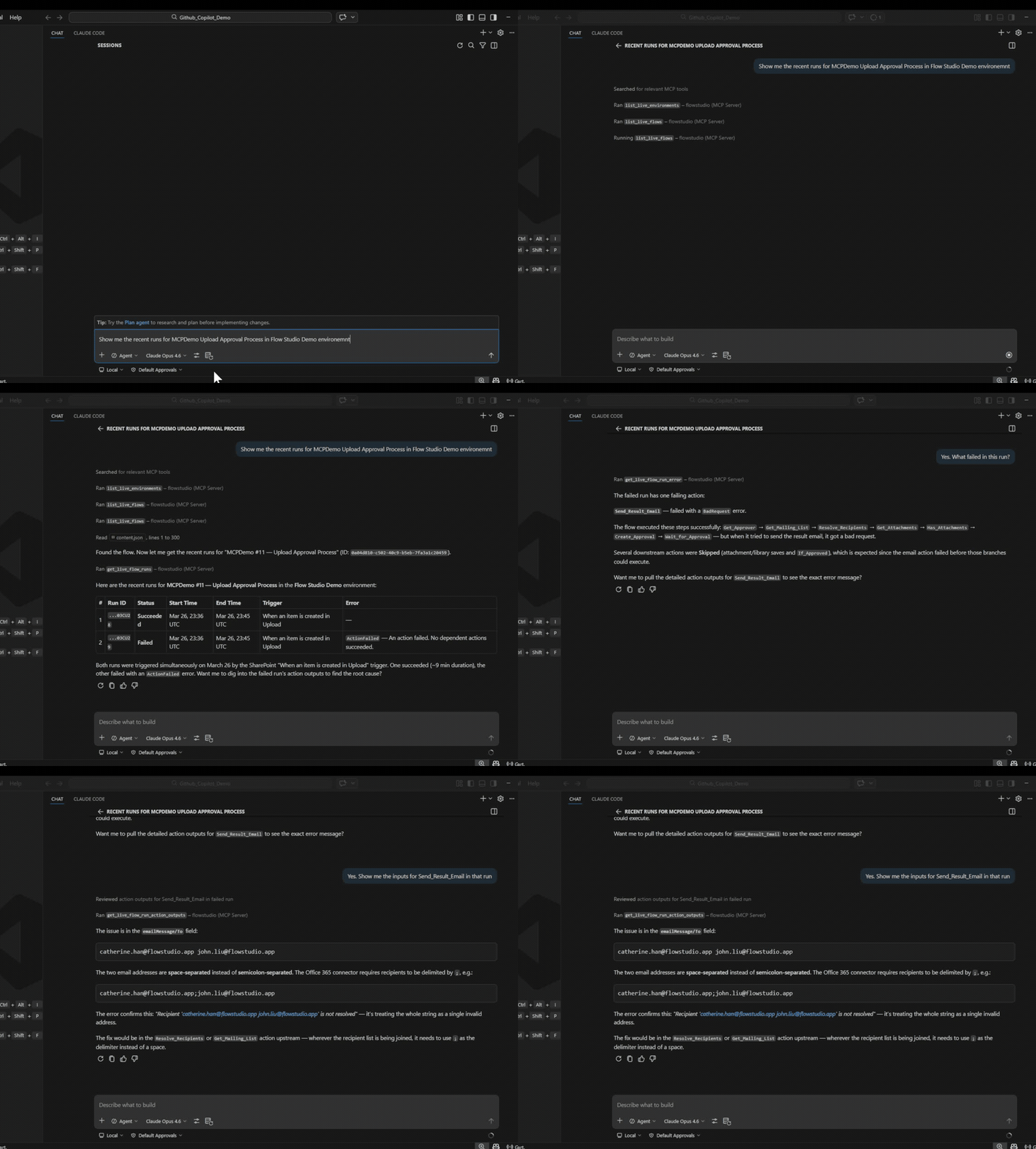
FlowStudio MCP — Habilidades do Power Automate para Agentes de IA
Dê ao seu agente de IA a mesma visibilidade que você tem no portal do Power Automate — e um pouco mais. A API do Graph retorna apenas o status de execução de nível superior — os agentes não conseguem ver entradas de ações, iterações de loops ou falhas aninhadas. O FlowStudio MCP expõe tudo isso.
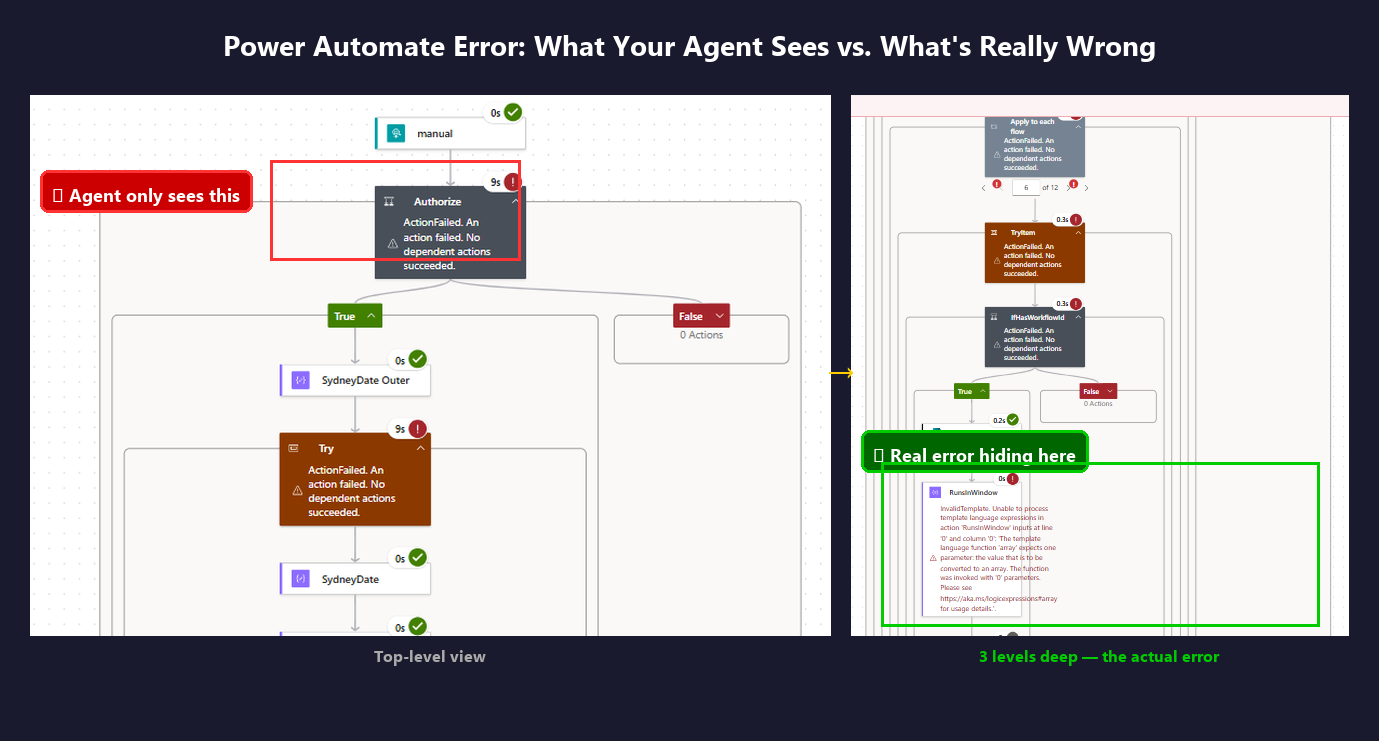
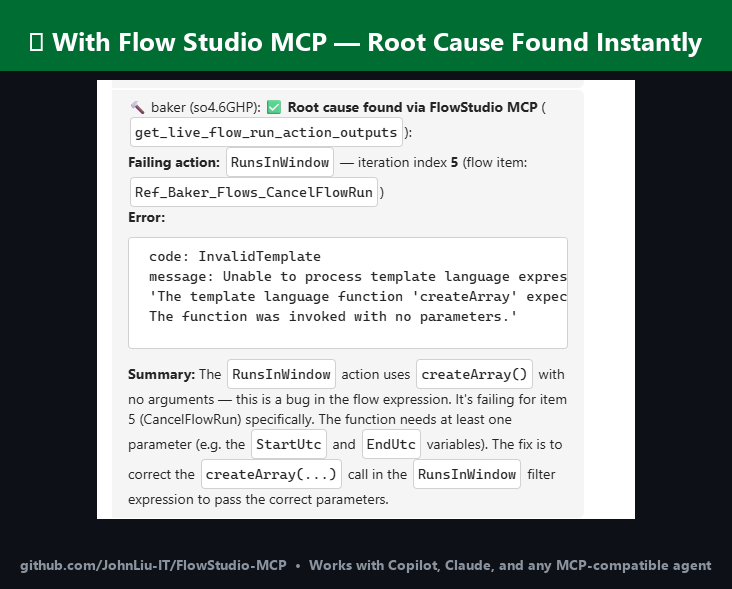
Você pode navegar pelo portal e encontrar a causa raiz. Seu agente não consegue — a menos que tenha MCP.
Quando você precisa disso
- Seu agente consegue ver que um fluxo falhou, mas não o motivo — a API do Graph retorna apenas códigos de status
- Você quer que seu agente veja entradas e saídas em nível de ação, como você vê no portal
- Um loop tem centenas de iterações e algumas produziram saídas ruins — no portal você clicaria em cada uma, mas o agente pode escanear todas as entradas e saídas das iterações de uma vez
- Você quer verificar a saúde dos fluxos, taxas de falha e atividade dos criadores em todo o seu locatário sem abrir o centro de administração
- Você precisa classificar fluxos, detectar recursos órfãos ou auditar conectores em escala — sem instalar o CoE Starter Kit
- Você está cansado de ser o intermediário entre seu agente e o portal
API do Graph vs FlowStudio MCP
A diferença central: a API do Graph dá ao seu agente o status da execução. O MCP dá ao seu agente as entradas e saídas de cada ação.
| O que o agente vê | API do Graph | FlowStudio MCP |
|---|---|---|
| Execução passou ou falhou | Sim | Sim |
| Entradas e saídas das ações | Não | Sim |
| Detalhes de erro além do código de status | Não | Sim |
| Detalhes de execução de fluxos filhos | Não | Sim |
| Dados de iteração de loops | Não | Sim |
| Definição do fluxo (leitura + escrita) | Limitado | JSON completo |
| Reenviar / cancelar execuções | Limitado | Sim |
| Saúde do fluxo e taxas de falha em cache | Não | Sim |
| Inventário de criadores / Power Apps / conexões | Não | Sim |
| Metadados de governança (tags, impacto, proprietário) | Não | Sim |
Habilidades
| Habilidade | Descrição |
|---|---|
power-automate-mcp | Conectar e operar fluxos de nuvem do Power Automate — listar fluxos, ler definições, verificar execuções, reenviar, cancelar |
power-automate-debug | Processo de diagnóstico passo a passo para investigar fluxos com falha |
power-automate-build | Criar, estruturar e implantar definições de fluxo do Power Automate do zero |
power-automate-monitoring | Saúde do fluxo, taxas de falha, inventário de criadores, Power Apps, contagens de ambientes e conexões |
power-automate-governance | Classificar fluxos por impacto, detectar órfãos, auditar conectores, gerenciar notificações, calcular pontuações de arquivamento |
As três primeiras habilidades usam chamadas ao vivo da API do Power Automate. As habilidades de monitoramento e governança usam o armazenamento em cache — um snapshot diário com estatísticas agregadas, dicas de correção e metadados de governança. Requer uma assinatura FlowStudio for Teams ou MCP Pro+ para as ferramentas de armazenamento.
Cada habilidade segue a especificação de habilidades de agentes e funciona com qualquer agente compatível.
Agentes compatíveis
Copilot, Claude Code, ChatGPT, Codex, OpenClaw, Gemini CLI, Cursor, Goose, Amp, OpenHands
Guias
Tutoriais completos em learn.flowstudio.app:
- Começando — instale o FlowStudio MCP para qualquer agente
- Crie fluxos com agentes de IA — um exemplo prático em 3 etapas
- Vibe code no Power Automate — descreva o fluxo, o agente o cria
- Power Automate no VS Code — trabalhe em fluxos pelo seu editor
- Depure um fluxo com falha — encontre a causa raiz a partir dos dados em nível de ação
- Por agente: ChatGPT · Claude · GitHub Copilot · Copilot Studio · Codex
Início Rápido
Conecte-se pelo ChatGPT ou claude.ai
Entre com sua conta Microsoft em vez de colar uma chave. Adicione
https://mcp.flowstudio.app/mcp/oauth como conector no ChatGPT (modo Developer
ativado) ou em claude.ai e siga o prompt de login. Tutorial:
ChatGPT para Power Automate.
Instale como plugin do Claude Code
Disponível pelo marketplace de plugins do Claude após aprovação. Para testar localmente:
git clone https://github.com/ninihen1/power-automate-mcp-skills.git
claude --plugin-dir ./power-automate-mcp-skills
Depois, conecte o servidor MCP:
claude mcp add --transport http flowstudio https://mcp.flowstudio.app/mcp \
  --header "x-api-key: <YOUR_TOKEN>"
Obtenha seu token em mcp.flowstudio.app.
Instale no Codex
Dentro de uma sessão do Codex, instale as habilidades diretamente:
$skill-installer install https://github.com/ninihen1/power-automate-mcp-skills/tree/main/skills/power-automate-mcp
$skill-installer install https://github.com/ninihen1/power-automate-mcp-skills/tree/main/skills/power-automate-debug
$skill-installer install https://github.com/ninihen1/power-automate-mcp-skills/tree/main/skills/power-automate-build
$skill-installer install https://github.com/ninihen1/power-automate-mcp-skills/tree/main/skills/power-automate-monitoring
$skill-installer install https://github.com/ninihen1/power-automate-mcp-skills/tree/main/skills/power-automate-governance
Depois, conecte o servidor MCP em ~/.codex/config.toml:
[mcp_servers.flowstudio]
url = "https://mcp.flowstudio.app/mcp"

[mcp_servers.flowstudio.http_headers]
x-api-key = "<YOUR_TOKEN>"
Instale via skills.sh
Pesquise por flowstudio no skills.sh ou:
npx skills add github/awesome-copilot -s flowstudio-power-automate-mcp
npx skills add github/awesome-copilot -s flowstudio-power-automate-debug
npx skills add github/awesome-copilot -s flowstudio-power-automate-build
npx skills add github/awesome-copilot -s flowstudio-power-automate-monitoring
npx skills add github/awesome-copilot -s flowstudio-power-automate-governance
Instale via ClawHub
npx clawhub@latest install power-automate-mcp
Instale via Smithery
npx smithery skill add flowstudio/power-automate-mcp
Instalação manual
Copie a(s) pasta(s) de habilidades para o diretório .github/skills/ do seu projeto
(ou onde seu agente descobre habilidades).
Conecte o servidor MCP
Claude Code:
claude mcp add --transport http flowstudio https://mcp.flowstudio.app/mcp \
  --header "x-api-key: <YOUR_TOKEN>"
Codex (~/.codex/config.toml):
[mcp_servers.flowstudio]
url = "https://mcp.flowstudio.app/mcp"

[mcp_servers.flowstudio.http_headers]
x-api-key = "<YOUR_TOKEN>"
Copilot / VS Code (.vscode/mcp.json):
{
  "servers": {
    "flowstudio": {
      "type": "http",
      "url": "https://mcp.flowstudio.app/mcp",
      "headers": { "x-api-key": "<YOUR_TOKEN>" }
    }
  }
}
Obtenha seu token em mcp.flowstudio.app.
Exemplos reais de depuração
Estes são de investigações reais de produção, não demonstrações.
-
Erro de expressão em fluxo filho —
contains(string(...))falhou em uma propriedade aninhada. O agente rastreou o fluxo pai, entrou no filho, percorreu as iterações do loop e encontrou a entrada com falha. O portal mostrava "ExpressionEvaluationFailed" sem contexto. -
Erro de entrada de dados, não bug do fluxo — O usuário relatou dois "bugs" seguidos. O agente provou que ambos eram erros de entrada de dados (vírgula ausente no e-mail, endereço único no campo CC). O fluxo estava correto. Diagnosticado em segundos.
-
Valor nulo derruba fluxo filho —
split(Name, ', ')falhou quando 38% dos registros tinham Nomes nulos. O agente rastreou do pai ao filho, ao loop, à ação, encontrou a causa raiz e implantou uma correção viaupdate_live_flow.
Pré-requisitos
- Uma assinatura MCP do FlowStudio (todas as ferramentas ao vivo)
- Para ferramentas de armazenamento (monitoramento, governança): FlowStudio for Teams ou MCP Pro+
- Endpoint MCP:
https://mcp.flowstudio.app/mcp - Chave de API / token JWT (enviado como cabeçalho
x-api-key)
Estrutura do repositório
skills/
  power-automate-mcp/          core connection & operation skill
  power-automate-debug/        debug workflow skill
  power-automate-build/        build & deploy skill
  power-automate-monitoring/   flow health & tenant inventory skill
  power-automate-governance/   compliance & governance skill
examples/                      real debugging walkthroughs
README.md
LICENSE                        MIT
Disponível no GitHub
Funciona com Copilot, Claude, ChatGPT e qualquer agente compatível com MCP.
- awesome-copilot (mesclado)
- skills.sh (mais de 3 mil instalações)
- Smithery (publicado)
- ClawHub (v1.1.0)
Contribuindo
Contribuições são bem-vindas. Cada pasta de habilidade deve conter um SKILL.md com o
frontmatter obrigatório. Veja as habilidades existentes para o formato.
Licença
Palavras-chave: depuração do Power Automate, histórico de execução de fluxos, falha de avaliação de expressão, falha em fluxo filho, erros de ações aninhadas, saída de iteração de loop, automação de agentes MCP, IA do Power Platform, implantação de definição de fluxo, reenviar execução com falha, monitoramento de fluxos, governança, CoE, detecção de órfãos, auditoria de conectores, pontuação de arquivamento, inventário de criadores