Canvas Assignment Assistant
Interaja programaticamente com cursos e tarefas do Canvas/Instructure.
Documentação
Canvas Assignment Assistant MCP Server
Visão Geral
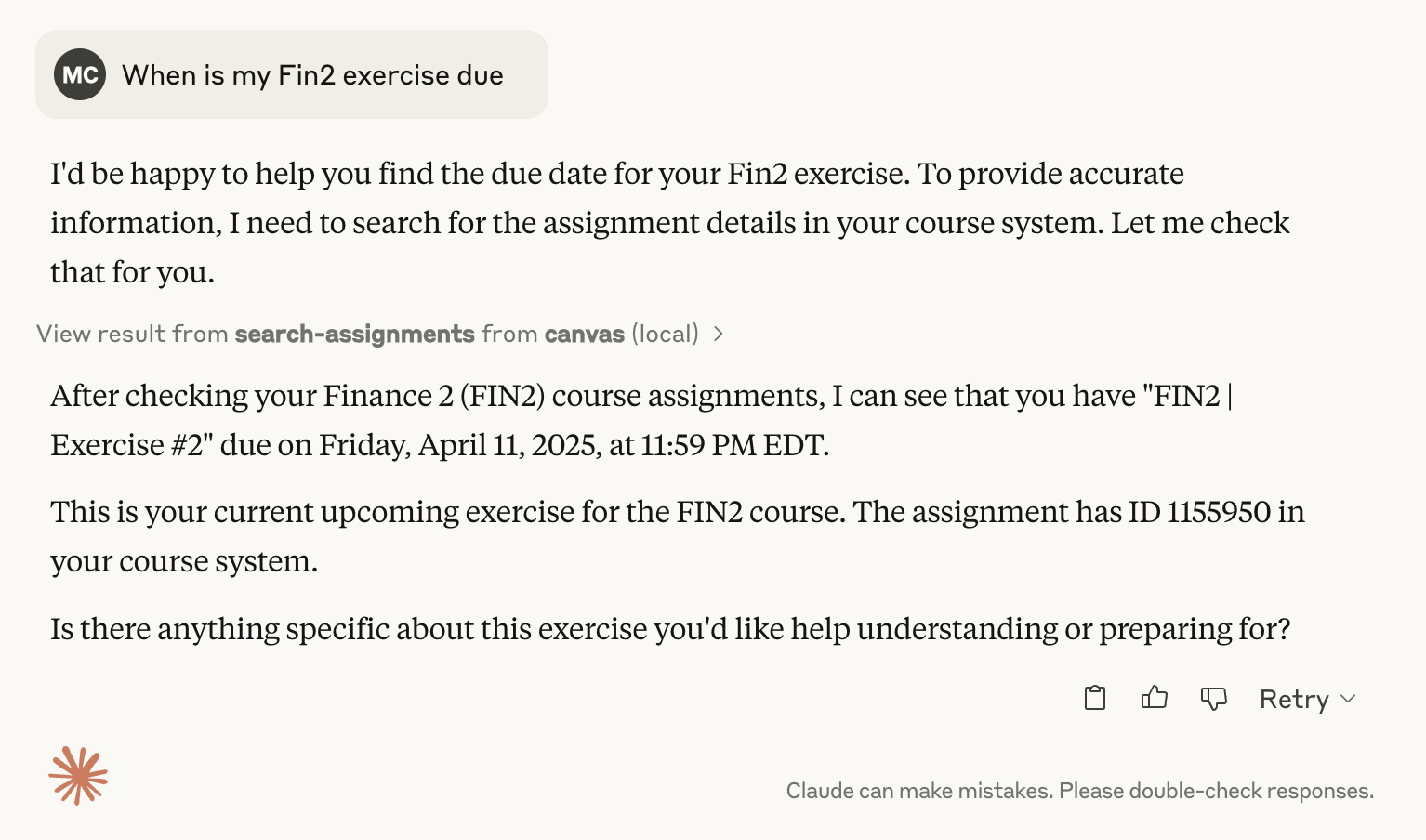
Este servidor MCP (Model Context Protocol) permite que você interaja com cursos e tarefas do Canvas/Instructure, sem sair do seu LLM (ex.: Claude Desktop).
Ele permite recuperar, pesquisar e resumir informações de cursos e tarefas programaticamente, por exemplo, para verificar datas de vencimento de tarefas futuras:
Funcionalidades
Ferramentas
-
Listar Cursos
- Recupera uma lista de cursos
- Filtra por estado do curso (ativo, concluído ou todos)
-
Pesquisar Tarefas
- Pesquisa em todos os cursos por tarefas
- Filtra por:
- Consulta de pesquisa
- Intervalo de datas de vencimento
- Curso específico
- Incluir/excluir cursos concluídos
-
Obter Detalhes da Tarefa
- Busca informações detalhadas sobre uma tarefa específica
- Múltiplos formatos de saída (HTML completo, texto simples, markdown)
Recursos
- Conteúdo da Tarefa: Recupera detalhes completos da tarefa usando um formato de URI padronizado
Pré-requisitos
- Um cliente compatível com MCP (Claude Desktop, Cursor, etc.)
- Conta no Canvas LMS
- Token da API do Canvas
- Domínio do Canvas
Configuração
Ao instalar o pacote MCP, você será solicitado a configurar:
- Token da API do Canvas: Seu token de acesso à API do Canvas (veja as instruções abaixo)
- Domínio do Canvas: O domínio da sua instituição Canvas (ex.:
canvas.youruniversity.edu)
Esses valores são armazenados com segurança pelo seu cliente MCP e não são expostos nos seus arquivos de configuração.
Nota de Segurança
Mantenha seu token da API do Canvas confidencial. O pacote marca o token como sensível, portanto ele será armazenado com segurança pelo seu cliente MCP.
Instalação
Este servidor MCP é distribuído como um pacote MCP (arquivo .mcpb) para facilitar a instalação.
Opção 1: Instalar a partir do arquivo de pacote (Recomendado)
-
Baixe o pacote
Baixe o arquivo
canvas-mcp.mcpbda página de releases ou compile-o você mesmo (veja a Opção 2). -
Instale no seu cliente MCP
Para Claude Desktop:
- Abra as configurações do Claude Desktop
- Navegue até a seção de servidores MCP
- Clique em "Adicionar Servidor" ou "Instalar a partir do Pacote"
- Selecione o arquivo
canvas-mcp.mcpb - Quando solicitado, insira seu token da API do Canvas e o domínio
Para Cursor:
- Abra as configurações do Cursor
- Navegue até a configuração do MCP
- Instale o arquivo do pacote
- Configure seu token da API do Canvas e o domínio quando solicitado
-
Configure suas credenciais
Ao instalar o pacote pela primeira vez, você será solicitado a inserir:
- Token da API do Canvas: Seu token de acesso à API do Canvas (veja as instruções abaixo)
- Domínio do Canvas: O domínio da sua instituição Canvas (ex.:
canvas.youruniversity.edu)
Opção 2: Compilar a partir do código-fonte
Se você quiser compilar o pacote você mesmo:
-
Clone o repositório e instale as dependências
git clone https://github.com/mbcrosiersamuel/canvas-mcp.git cd canvas-mcp npm install -
Compile o pacote
npm run packageIsso criará um arquivo
canvas-mcp.mcpbque você poderá instalar usando a Opção 1.
Como Obter Seu Token da API do Canvas
- Faça login no Canvas
- Vá para Conta > Configurações
- Role até a seção "Integrações Aprovadas"
- Clique em "Novo Token de Acesso"
- Copie o token gerado
Para mais detalhes, veja estas instruções do Canvas.
Ferramentas MCP
list_courses: Mostra todos os cursos ativos por padrão. Use flags para mostrar cursos concluídos ou todossearch_assignments: Pesquisa títulos e descrições de tarefasget_assignment: Recupera detalhes completos da tarefa
Solução de Problemas
Problemas Comuns
-
Token Inválido:
- Regere seu token da API do Canvas
- Garanta que o token tenha as permissões adequadas
-
Domínio Incorreto:
- Verifique novamente o domínio da sua instituição Canvas
- Confirme que não há erros de digitação
Aviso Legal
Este é um MCP não oficial do Canvas e não é afiliado ao Canvas ou à Instructure. Também não sou um engenheiro de software profissional, e este projeto foi codificado com vibe usando Claude, então use por sua conta e risco :)
Agradecimentos!
- Agradecimentos a Luke Harries pela inspiração e por parte do texto deste Readme.
- Agradecimentos à equipe da Anthropic pelas ótimas instruções sobre como usar LLMs para criar MCPs!