Spendlog
Acompanhe despesas, receitas, orçamentos e faturas diretamente no Claude, com exportação em PDF e relatórios fiscais.
Documentação
Spendlog
Rastreamento de custos e despesas para empreendedores individuais, direto no Claude Code. Sem aplicativos. Sem planilhas. Sem conta.
Acompanhe os gastos do seu negócio, gerencie orçamentos, emita faturas — tudo em linguagem natural. Seus dados permanecem 100% locais em SQLite. Nada sai da sua máquina.




Funciona com
Claude Code | Claude Desktop | VS Code | Cursor
Início Rápido
npx spendlog
Ou instalação com um clique:


O instalador configura automaticamente o Claude Desktop e o Claude Code. Reinicie o Claude e experimente:
"Registrar 50€ para hospedagem"
É isso. Requer Node.js 20+.
Por que Spendlog?
- Zero mudança de contexto — registre custos enquanto você desenvolve, exatamente onde já trabalha
- Local primeiro — todos os dados em
~/.spendlog/spendlog.db, sem conta, sem nuvem - Linguagem natural — sem formulários, sem menus, basta dizer ao Claude o que você gastou
- 38 ferramentas — faturamento, orçamentos, despesas recorrentes, exportação CSV, rastreamento multi-projetos
- Multilíngue — inglês e alemão (EN/DE), com i18n pronto para mais idiomas
Exemplos
Rastreamento:
You: "29€ for ChatGPT subscription"
Claude: Expense saved: 29.00 € — Category: IT & Software

You: "Export 2025 for my accountant"
Claude: 247 transactions written to ~/spendlog-export-2025.csv
Faturas:
You: "Create invoice for TechCorp, web development, 8h at 95€/h"
Claude: Invoice #2026-004 created — 760.00 €

You: "Mark it as paid"
Claude: Invoice #2026-004 marked as paid, income recorded.
Análise:
You: "How much did I spend on software this quarter?"
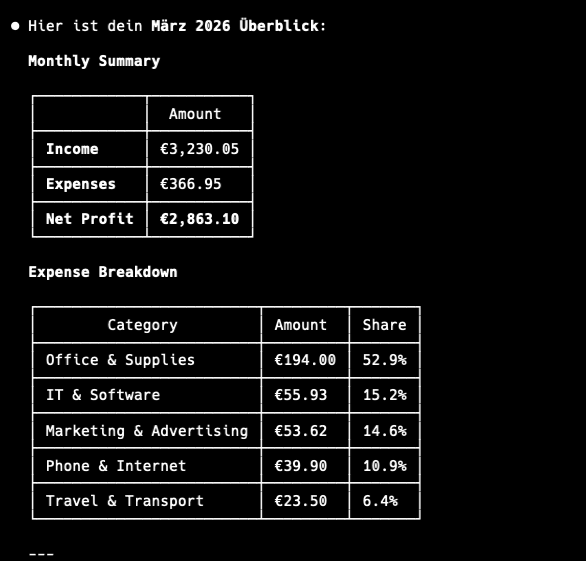
Claude: IT & Software: 287.00 € (12 transactions) — 23% of total expenses

You: "Compare January vs February"
Claude: Expenses up 15%. Biggest increase: Marketing (+120€)
Ferramentas
38 ferramentas em 9 categorias:
| Categoria | Ferramentas |
|---|---|
| Transações | add_expense add_income list_transactions update_transaction delete_transaction |
| Análise | get_summary get_category_breakdown compare_periods get_tax_summary |
| Faturas | create_invoice list_invoices get_invoice mark_invoice_sent mark_invoice_paid delete_invoice duplicate_invoice |
| Orçamentos | set_budget get_budget_status list_budgets update_budget delete_budget |
| Recorrentes | create_recurring list_recurring delete_recurring process_recurring |
| Projetos | create_project list_projects rename_project delete_project |
| Categorias | list_categories add_category delete_category |
| Exportação | export_transactions export_invoices export_for_tax_advisor |
| Configurações | get_profile set_profile get_notifications |
Configuração
Configuração manual (se o instalador não funcionou)
Claude Desktop — edite seu arquivo de configuração:
{
  "mcpServers": {
    "spendlog": {
      "command": "npx",
      "args": ["-y", "--package=spendlog", "spendlog-mcp"]
    }
  }
}
Claude Code:
claude mcp add spendlog -- npx -y --package=spendlog spendlog-mcp
Variáveis de ambiente
| Variável | Descrição | Padrão |
|---|---|---|
SPENDLOG_LANGUAGE | en ou de | en |
SPENDLOG_DATA_DIR | Caminho do diretório de dados | ~/.spendlog |
DATABASE_PATH | Caminho completo para o banco de dados SQLite | $SPENDLOG_DATA_DIR/spendlog.db |
SPENDLOG_PROJECT | Projeto padrão para todas as transações | nenhum |
Privacidade
Todos os dados permanecem na sua máquina, em um arquivo SQLite local. Sem conta, sem nuvem, sem telemetria — nada é enviado a lugar algum.
Nota: Spendlog é um rastreador de custos, não um software de contabilidade. Use-o para seus próprios insights, não para escrituração oficial ou declaração de impostos.
Desenvolvimento
TypeScript (estrito), Vitest para testes, TypeORM + SQLite para armazenamento.
git clone https://github.com/makz81/spendlog.git
cd spendlog
npm install
npm run dev       # MCP server with watch mode
npm run test      # 382 tests
npm run typecheck # type check (no emit)
Consulte CONTRIBUTING.md para detalhes de arquitetura e como adicionar novas ferramentas.