Auto-Browser
Framework de automação de navegador com perfis de autenticação salváveis e opções de conformidade viáveis para desenvolvimentos empresariais.
Documentação
Auto Browser




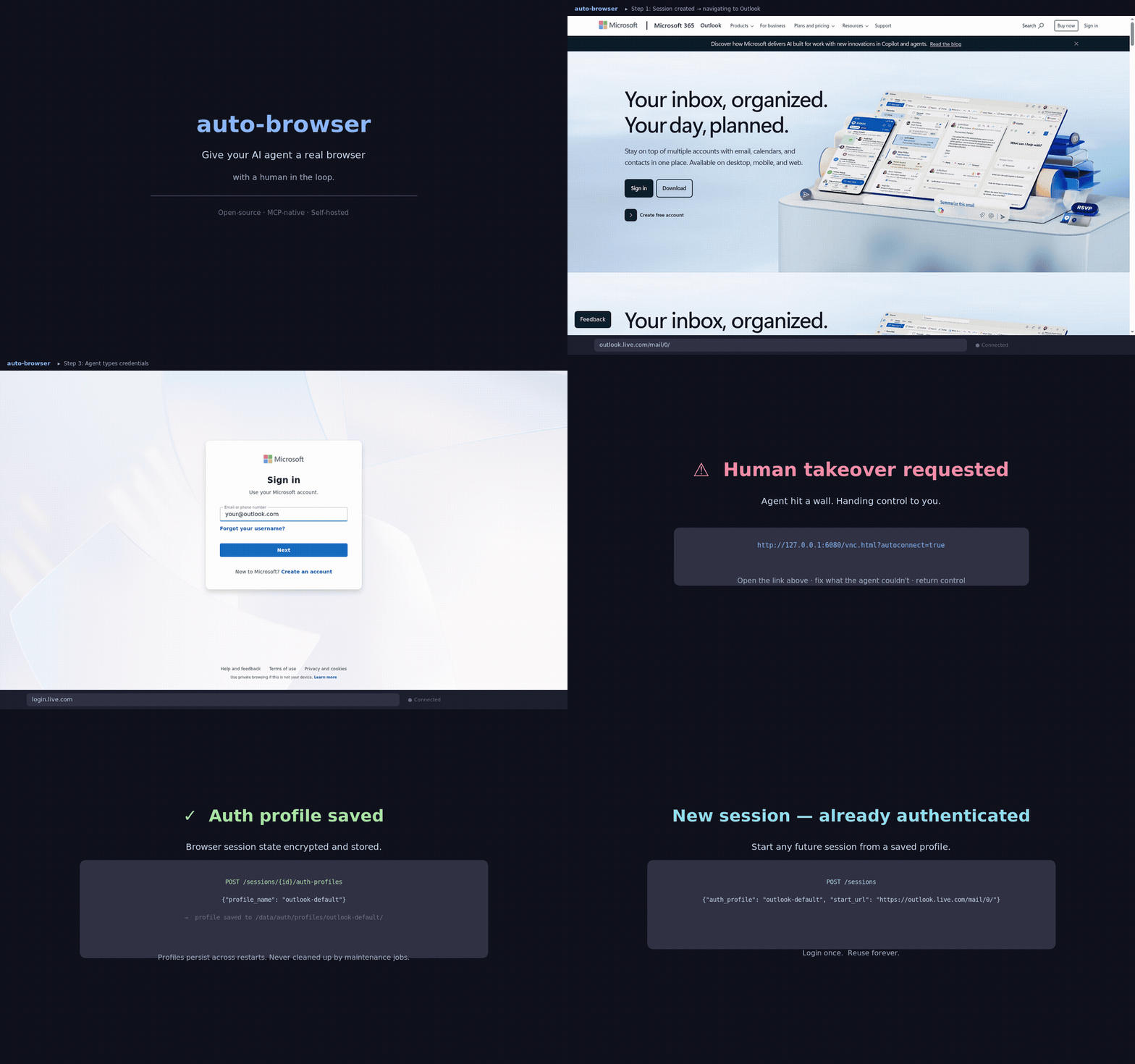
Give your AI agent a real browser, with a human in the loop.
Auto Browser is an MCP-native browser control plane for authorized workflows. It gives MCP clients, LLM agents, and operators a shared Playwright browser with human takeover, reusable auth profiles, approvals, audit trails, and local-first deployment.
Works with:
- Claude Code, Cursor, and VS Code, connected directly over HTTP
- Claude Desktop, through the bundled stdio bridge
- any MCP client that can talk HTTP or stdio
- direct REST callers when you want curl-first control
Why Auto Browser
- MCP-native from day one. The browser surface is already packaged as an MCP server instead of bolted on after the fact.
- Human takeover when the web gets brittle. noVNC keeps the same live session available when a person needs to step in.
- Login once, reuse later. Save named auth profiles and reopen fresh sessions that are already signed in.
- Local-first by default. Run the full stack on your own box with Docker Compose, or use Codespaces for a quick hosted demo.
- Safety rails built in. Approvals, operator identity, PII scrubbing, Witness receipts, and policy presets are all part of the product surface.
- Evidence you can hand to someone else. Witness receipt chains are Ed25519-signed, and an exported bundle verifies with
scripts/verify_witness_bundle.py— which imports nothing from this project, so a recipient need not run or trust this controller to check it. - We audit ourselves in public.
docs/audits/2026-08-execution-audit.mddocuments an adversarial audit of this repo that found safety controls which reported success while doing nothing, with reproductions, the fixes, and the gates that close the class. - Governed skill induction. Verified browser traces can become staged skill candidates with provenance that is signed when a mesh identity is configured — and checked on read, not just produced — plus verifier adapters and review-only graduation — agents that prove they can repeat themselves correctly, not just act once.
Good Fits
- internal dashboards and admin tools
- operator-assisted QA and browser debugging
- login-once, reuse-later account workflows
- brittle sites where a human may need to recover the flow
- MCP-powered agent workflows that need a real browser, not just HTML fetches
Not the Goal
- CAPTCHA solving
- unauthorized scraping or account automation
- deceptive identity shaping or bypass tooling
What You Get
| Browser Control | Operator Safety | Deployment and Integration |
|---|---|---|
| Playwright-backed sessions with screenshots, DOM summaries, OCR excerpts, tab controls, downloads, and network inspection | approval gates, operator identity headers, audit events, PII scrubbing, Witness receipts, and protection profiles | MCP over HTTP, bundled stdio bridge, REST API, Docker Compose, Codespaces, auth profiles, and optional per-session isolation |
Quickstart
git clone https://github.com/LvcidPsyche/auto-browser.git
cd auto-browser
docker compose up --build
That is enough for local development with the default settings.
Optional:
cp .env.example .env
make doctor
Run make doctor from a normal terminal with local Docker access and permission to open localhost sockets.
Open:
- API docs:
http://127.0.0.1:8000/docs - Operator dashboard:
http://127.0.0.1:8000/dashboard, which includes the queue of actions waiting on your approval - Visual takeover:
http://127.0.0.1:6080/vnc.html?autoconnect=true&resize=scale
All published ports bind to 127.0.0.1 by default.
Try It in Codespaces
Codespaces provisions the stack automatically. The dashboard and noVNC tabs are usually ready in about 90 seconds.
First Useful Demo
The highest-signal flow in this repo is:
- create a session
- log in manually if the site needs a human
- save the session as a named auth profile
- open a new session from that auth profile
- continue work without reauthing
Start here:
Minimal session creation:
curl -s http://127.0.0.1:8000/sessions \
  -X POST \
  -H 'content-type: application/json' \
  -d '{"name":"demo","start_url":"https://example.com"}' | jq
Minimal observation:
curl -s http://127.0.0.1:8000/sessions/<session-id>/observe | jq
Recent Changes
1.8.0
- Smaller results for agents. MCP results refer to sessions instead of repeating the full session record, and
execute_actionno longer returns the pre-action snapshot (detail="full"restores both). An action result is less than half its old size. The default tool list carries the 20 tools a browsing agent needs, and the rest are oneMCP_TOOL_PROFILE=fullaway. - Agents can see and read.
browser.screenshotand observe'sfastpreset return the screenshot as MCP image content.browser.read_downloadreads a downloaded CSV, JSON or text file.browser.get_html(text_only=true)is paged and keeps line breaks and table cells. - Approvals you can find and trust. The dashboard has a pending-approvals queue with Approve and Reject. A governed tool call such as
browser.eval_jsis approved for its exact arguments, which the operator sees. - Observations name things as a person reads them. Fields are labelled from their
<label>, never from what was typed into them. The accessibility outline works again on current Playwright. - A security pass. The navigation allowlist now matches how Chromium parses URLs. A tokenless controller refuses DNS-rebinding Host headers, downloaded artifacts are served sandboxed, share links are scoped, and the browser runs as an unprivileged user.
- A leaner image. The controller leaves out the provider CLIs (about 750 MB) unless built with
INSTALL_AGENT_CLIS=true.
1.7.0 closed the fail-open design issues from GHSA-xmh3-cw7j-9gp5. A reachable API now needs a token (API_BIND_SCOPE), operator identity can be proven by a named credential, auth profiles belong to the operator who saved them, and staged skills are signature-checked on read.
See CHANGELOG.md for the full release history.
MCP Clients
Auto Browser exposes:
- an HTTP MCP endpoint at
http://127.0.0.1:8000/mcp - convenience endpoints at
http://127.0.0.1:8000/mcp/toolsandhttp://127.0.0.1:8000/mcp/tools/call - a stdio bridge:
uvx auto-browser-mcpfrom PyPI, orscripts/mcp_stdio_bridge.pyin a repo checkout
Clients that speak MCP over HTTP connect directly. With Claude Code:
claude mcp add --transport http auto-browser http://127.0.0.1:8000/mcp
Cursor, VS Code, bearer tokens, and pairing Auto Browser with a web-search MCP
server are covered in docs/mcp-clients.md.
The default MCP tool profile is curated: the 20 tools a browsing agent needs (sessions, observe and screenshot, execute_action, page and download reading, tabs, auth profiles, human takeover). Every listed tool costs the model context on every request, so the diagnostics, audit, harness, and admin tools are in the full profile. To expose them, set:
MCP_TOOL_PROFILE=full
Raw tool-call example:
curl -s http://127.0.0.1:8000/mcp/tools/call \
  -X POST \
  -H 'content-type: application/json' \
  -d '{
    "name":"browser.create_session",
    "arguments":{
      "name":"demo",
      "start_url":"https://example.com"
    }
  }' | jq
Client setup guides:
docs/mcp-clients.mdexamples/claude-desktop-setup.mdexamples/cursor-mcp-setup.mdexamples/claude_desktop_config.json
For resource listing, resource reads, and subscription-style update examples,
see docs/mcp-clients.md#resources-and-subscriptions.
Convergence Harness
Auto Browser ships a Stage 0 convergence harness for Agent Skill Induction. It runs a structured task contract, records tamper-checked traces, verifies completion, and writes a staged skill candidate carrying provenance. With a mesh identity configured that provenance is signed, and the registry verifies the signature before serving a candidate — a candidate that fails the check, or that was dropped into the staging directory unsigned, is refused. Candidates induced from a mock run are marked simulated so they cannot pass as converged. Generated skills are staged only — promotion stays explicit and reviewed.
The harness tools — convergence runs, run status and traces, drift checks, candidate management, and graduation — are in the full MCP tool profile (MCP_TOOL_PROFILE=full), or can be invoked directly over REST.
Start with docs/convergence-harness.md. A deterministic local smoke is:
python -m controller.harness.run --contract evals/contracts/example_read.json --mock-final-url https://example.com --mock-final-text "Example Domain"
For MCP clients, set MCP_TOOL_PROFILE=full to expose the harness.* tools.
Security and Compliance
For a real private deployment, set at least:
APP_ENV=production
API_BIND_SCOPE=exposed
API_BEARER_TOKEN=<strong-random-secret>
REQUIRE_OPERATOR_ID=true
AUTH_STATE_ENCRYPTION_KEY=<44-char-fernet-key>
REQUIRE_AUTH_STATE_ENCRYPTION=true
REQUEST_RATE_LIMIT_ENABLED=true
METRICS_ENABLED=true
STEALTH_ENABLED=false
COMPLIANCE_TEMPLATE can apply a preconfigured posture at startup:
| Preset | Auth Encryption | Operator ID | PII Scrub | Isolation | Max Session Age |
|---|---|---|---|---|---|
strict | required | required | all layers | docker_ephemeral | 4h |
balanced | - | required | network + text | shared | 24h |
Both presets require upload approvals and enable Witness receipts. Startup writes the applied policy to /data/compliance-manifest.json. The legacy names (HIPAA, SOC2, GDPR, PCI-DSS) still work as deprecated aliases and emit a warning at startup.
Example:
COMPLIANCE_TEMPLATE=strict docker compose up
For deployment details, hosted Witness notes, CLI auth modes, and reverse-SSH guidance, see:
Architecture at a Glance
flowchart LR
    User[Human operator] -->|watch / takeover| noVNC[noVNC]
    LLM[Any model: OpenAI / Claude / Gemini / OpenRouter / Grok / DeepSeek / MiniMax / local] -->|shared tools| Controller[Controller API]
    Controller -->|Playwright protocol| Browser[Browser node]
    noVNC --> Browser
    Browser --> Artifacts[(screenshots / traces / auth state)]
    Controller --> Artifacts
    Controller --> Policy[Allowlist + approval gates]
Model providers
First-class adapters for OpenAI, Claude, and Gemini (API or CLI). Beyond those,
a single generic OpenAI-compatible adapter drives any model reachable over an OpenAI
/chat/completions endpoint — set an API key to enable it:
| Provider | Reaches |
|---|---|
openrouter | one key → ~every frontier model (Claude, GPT, Gemini, Grok, DeepSeek, Llama, Mistral, Qwen, …) |
xai | Grok |
deepseek | DeepSeek (text-only; driven from the DOM/accessibility outline) |
minimax | MiniMax |
openai_compatible | any custom base URL — self-hosted Ollama / vLLM / LM Studio, Azure OpenAI, Together, Groq, Fireworks, … |
Vision (screenshots) is used for every provider except text-only ones. See .env.example for
the *_API_KEY / *_BASE_URL / *_MODEL settings.
Core components:
browser-node/runs Chromium, Xvfb, x11vnc, and noVNCcontroller/exposes the FastAPI controller, MCP transport, policy rails, and orchestration endpointsdata/holds runtime artifacts, auth state, approvals, audit logs, and optional CLI cachesscripts/contains local helpers for doctor, smoke tests, bridges, and release checks
Repo Guide
| Path | What It Contains |
|---|---|
controller/ | controller API, MCP transport, tests, and packaging |
browser-node/ | browser runtime and Playwright connection layer |
examples/ | copy-paste flows and MCP client setup |
integrations/langchain/ | LangChain, LangGraph, and CrewAI adapters |
docs/ | architecture, deployment, hardening, and launch docs |
scripts/ | doctor, smoke harnesses, stdio bridge, and auth helpers |
ops/ | supporting service templates and operational assets |
Common Commands
| Command | Purpose |
|---|---|
make help | list available repo commands |
make lint | run Ruff checks on app, tests, and helper scripts |
make test | run controller tests in Docker |
make test-local | run controller tests on host Python 3.11+ |
make eval | run deterministic provider/profile eval scoring |
make doctor | run the local readiness smoke |
make release-audit | run the fuller release-validation pass |
make smoke-isolation | verify per-session Docker isolation |
make smoke-reverse-ssh | verify reverse-SSH remote access |
Documentation Map
| If You Want To... | Start Here |
|---|---|
| understand the system shape | docs/architecture.md |
| connect Claude Desktop or Cursor | docs/mcp-clients.md |
| run the curl-first examples | examples/README.md |
| deploy on a trusted host | docs/deployment.md |
| review production constraints | docs/production-hardening.md |
| run the convergence harness | docs/convergence-harness.md |
| inspect release history | CHANGELOG.md |
| see where the project is headed | ROADMAP.md |
Contributing
If you want to help, start with:
If Auto Browser is useful, a star helps other people find it. Sponsorship and tip options live in TIPS.md.