notify-mcp
Um servidor MCP leve baseado em Bash para enviar notificações de desktop via notify-send.
Documentação
notify-mcp
Um servidor MCP (Model Context Protocol) leve baseado em Bash para enviar notificações de desktop via notify-send. Este servidor sem dependências permite que assistentes de IA como Claude, Cursor e VS Code enviem notificações do sistema diretamente para seu desktop Linux e MacOS.
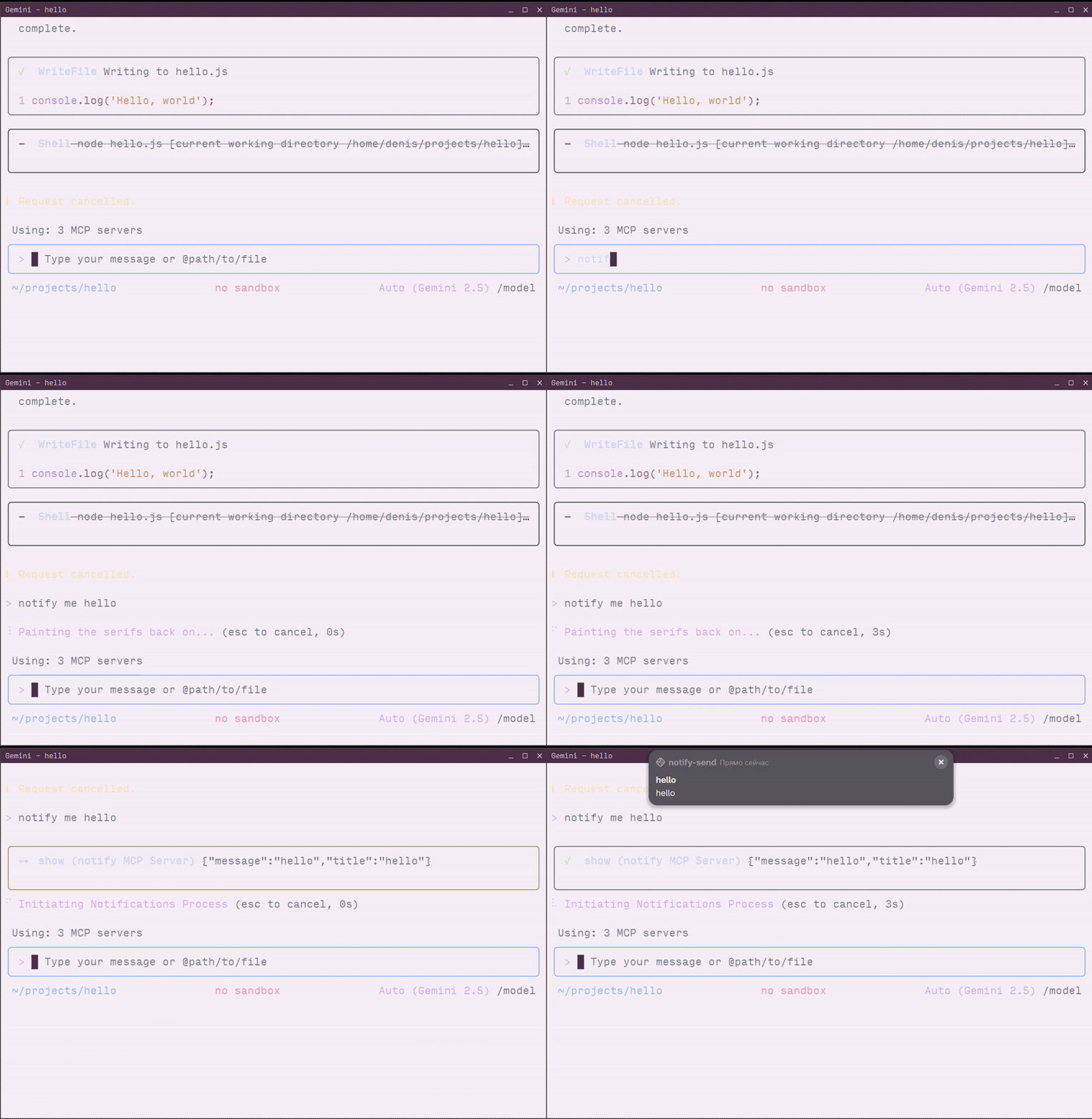
Pré-requisitos
- Sistema Linux com suporte a notificações ou MacOS
- Comando
notify-sendpara Linux (geralmente fornecido pelo pacotelibnotify) - Ferramenta
jq
Instalando o notify-send
Se o notify-send não estiver instalado no seu sistema:
Ubuntu/Debian:
sudo apt-get install libnotify-bin
Fedora/RHEL:
sudo dnf install libnotify
Arch Linux:
sudo pacman -S libnotify
Alt Linux:
sudo apt-get install notify-send
Instalação
- Clone o repositório:
git clone https://github.com/longdog/notify-mcp.git
cd notify-mcp
- Torne o script executável:
chmod +x notify-mcp.sh
- (Opcional) Adicione ao seu PATH para acesso mais fácil:
sudo ln -s $(pwd)/notify-mcp.sh /usr/local/bin/notify-mcp
Configuração
Claude Desktop
O Claude Desktop usa um arquivo de configuração JSON para definir servidores MCP.
-
Abra as configurações do Claude Desktop:
- Clique no menu Claude → Configurações → aba Desenvolvedor
- Clique em Editar Config para abrir o
claude_desktop_config.json
-
Adicione a configuração do servidor notify-mcp:
{
  "mcpServers": {
    "notify": {
      "command": "/absolute/path/to/notify-mcp.sh",
      "args": []
    }
  }
}
Exemplo com caminho completo:
{
  "mcpServers": {
    "notify": {
      "command": "/home/username/notify-mcp/notify-mcp.sh",
      "args": []
    }
  }
}
-
Salve o arquivo e reinicie o Claude Desktop
-
Verifique a conexão procurando pelo indicador do servidor MCP (ícone 🔌) na interface do Claude Desktop
Cursor
O IDE Cursor suporta servidores MCP através de sua configuração de configurações.
-
Abra as configurações do Cursor:
- Pressione
Ctrl+Shift+P(Linux/Windows) ouCmd+Shift+P(macOS) - Pesquise por "MCP: Add MCP Server"
- Selecione Command (stdio)
- Pressione
-
Configure o servidor:
- Nome:
notify - Comando:
/absolute/path/to/notify-mcp.sh - Argumentos: (deixe vazio)
- Nome:
Alternativa: Configuração manual
Edite o arquivo de configurações do Cursor (.cursor/mcp.json no seu workspace):
{
  "mcpServers": {
    "notify": {
      "command": "/home/username/notify-mcp/notify-mcp.sh",
      "args": []
    }
  }
}
- Reinicie o Cursor para aplicar as alterações
VS Code
O VS Code suporta servidores MCP através da extensão GitHub Copilot.
-
Via Paleta de Comandos:
- Pressione
Ctrl+Shift+P(Linux/Windows) ouCmd+Shift+P(macOS) - Execute "MCP: Add Server"
- Selecione Command (stdio)
- Insira as informações do servidor:
- Nome:
notify - Comando:
/absolute/path/to/notify-mcp.sh
- Nome:
- Pressione
-
Via Arquivo de Configuração:
Adicione às suas configurações de usuário (
.vscode/mcp.json) ou configurações do workspace:
{
  "servers": {
    "notify": {
      "command": "/home/username/notify-mcp/notify-mcp.sh",
      "args": []
    }
  }
}
-
Reinicie o VS Code para carregar o servidor MCP
-
Verifique executando "MCP: List Servers" na Paleta de Comandos
Gemini CLI
O Gemini CLI suporta servidores MCP através do seu arquivo de configuração.
- Localize o arquivo de configurações do Gemini CLI:
~/.gemini/settings.json
- Adicione o servidor notify-mcp à seção
mcpServers:
{
  "mcpServers": {
    "notify": {
      "command": "/home/username/notify-mcp/notify-mcp.sh",
      "args": []
    }
  }
}
Exemplo completo:
{
  "apiKey": "your-api-key",
  "mcpServers": {
    "notify": {
      "command": "/home/username/notify-mcp/notify-mcp.sh",
      "args": []
    }
  },
  "mcp": {
    "allowed": ["notify"]
  }
}
- Reinicie o Gemini CLI ou inicie uma nova sessão:
gemini-cli
- Verifique se o servidor foi carregado:
/mcp
Isso listará todos os servidores MCP conectados, incluindo notify.
Alternativa: Usando Transporte STDIO Diretamente
Para testes ou casos de uso avançados, você pode interagir com o servidor MCP diretamente via stdio:
echo '{"jsonrpc":"2.0","id":"2","method":"tools/call","params": {"arguments":{"title":"Hello","message":"World"}}}' | ./notify-mcp.sh