Google Stitch MCP
Servidor MCP universal para Google Stitch. Conecte agentes de IA aos seus designs de UI.
Documentação
Stitch MCP



Servidor MCP Universal para Google Stitch
Crie designs de UI/UX incríveis instantaneamente com IA. Funciona perfeitamente com Cursor, Claude, Antigravity e qualquer editor compatível com MCP.
Criado por Aakash Kargathara.
🚀 Como Funciona
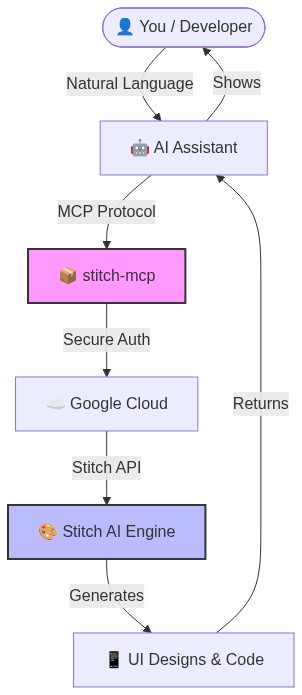
✨ Por que isso é legal
- Zero Configuração: Basta fazer login uma vez e funciona em qualquer lugar.
- Universal: Funciona em Windows, Mac e Linux.
- Grátis: A API do Google Stitch é gratuita para usar.
##️ Configuração Rápida (2 Minutos)
1. Pré-requisito: Google Cloud
Você precisa de um projeto do Google Cloud com a API Stitch habilitada.
# Login to your Google Cloud
gcloud auth login

# Set your project (replace with your actual project ID)
gcloud config set project YOUR_PROJECT_ID
gcloud auth application-default set-quota-project YOUR_PROJECT_ID

# Enable the magic
gcloud beta services mcp enable stitch.googleapis.com
2. Instale as Credenciais
Isso dá a stitch-mcp permissão para falar com o Google em seu nome.
gcloud auth application-default login
3. Adicione ao Seu Editor de IA
Copie e cole isso no seu arquivo de configuração MCP:
Para Claude Desktop:
~/Library/Application Support/Claude/claude_desktop_config.json
Para Cursor: Configurações > MCP > Adicionar Novo Servidor
{
  "mcpServers": {
    "stitch": {
      "command": "npx",
      "args": ["-y", "stitch-mcp"],
      "env": {
         "GOOGLE_CLOUD_PROJECT": "YOUR_PROJECT_ID"
      }
    }
  }
}
🛠️ Ferramentas Disponíveis
| Nome da Ferramenta | O que faz |
|---|---|
extract_design_context | 🧠 Escaneia uma tela para extrair o "DNA do Design" (Fontes, Cores, Layouts). Use isso para manter o estilo consistente. |
fetch_screen_code | 💾 Baixa o código HTML/Frontend bruto de uma tela. |
fetch_screen_image | 🖼️ Baixa a captura de tela em alta resolução de uma tela. |
generate_screen_from_text | ✨ Gera uma NOVA tela com base no seu prompt (e contexto). |
create_project | 📁 Cria uma nova pasta de workspace/projeto. |
list_projects | 📋 Lista todos os seus projetos Stitch disponíveis. |
list_screens | 📱 Lista todas as telas dentro de um projeto específico. |
get_project | 🔍 Recupera detalhes de um projeto específico. |
get_screen | ℹ️ Obtém metadados de uma tela específica. |
💡 Dica Profissional: O "Fluxo do Designer"
Para gerar UI consistente, use este fluxo em 2 etapas:
- Extrair: "Obtenha o contexto de design da Tela Inicial..."
- Gerar: "Usando esse contexto, gere uma Tela de Chat..."
Isso garante que sua nova tela corresponda perfeitamente ao seu sistema de design existente.
📄 Licença
Apache 2.0 - Código aberto e gratuito para usar.
Histórico de Estrelas
Feito com ❤️ por Aakash Kargathara