VMS Integration
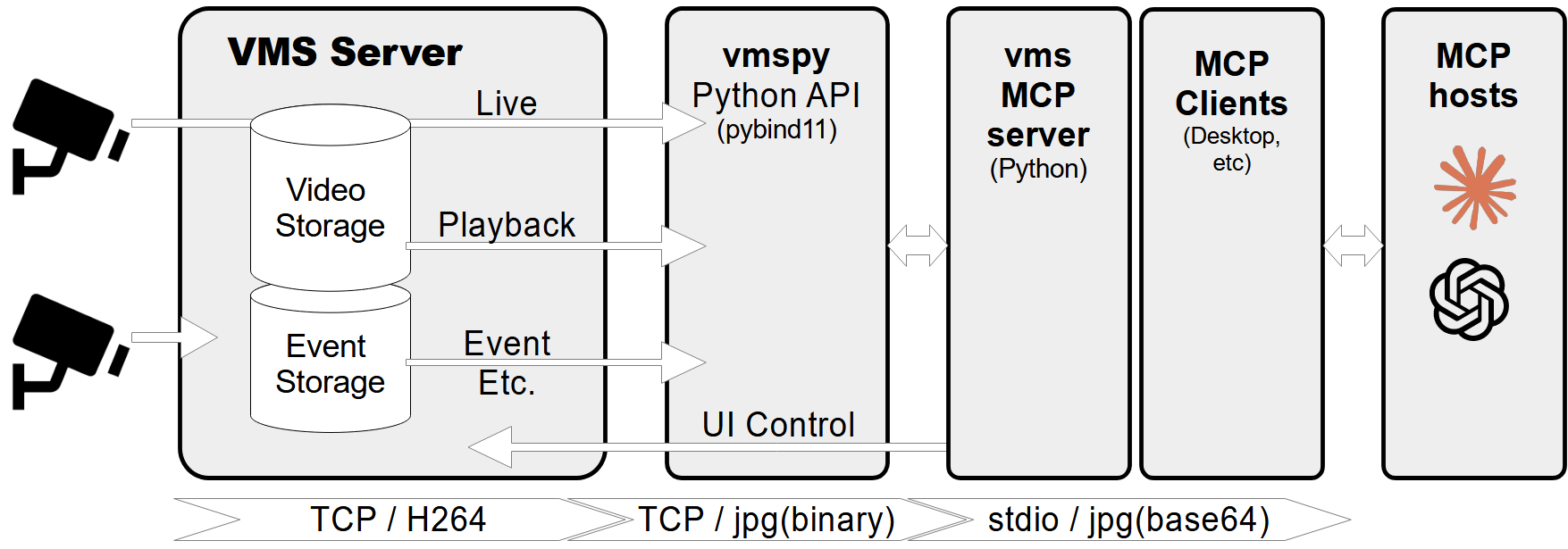
Conecta-se a um programa de gravação de CFTV (VMS) para recuperar fluxos de vídeo gravados e ao vivo e controlar o software VMS.
Documentação
Servidor MCP - VMS Integration
Um servidor Model Context Protocol (MCP) projetado para conectar-se a um programa de gravação CCTV (VMS) para recuperar fluxos de vídeo gravados e ao vivo. Ele também fornece ferramentas para controlar o software VMS, como exibir diálogos ao vivo ou de reprodução para canais específicos em horários determinados.
Recursos
- Recuperar informações dos canais de vídeo, incluindo status de conexão e gravação.
- Buscar datas e horários de gravação para canais específicos.
- Buscar imagens ao vivo ou gravadas dos canais de vídeo.
- Exibir fluxos de vídeo ao vivo ou diálogos de reprodução para canais e horários específicos.
- Controlar câmeras PTZ (Pan-Tilt-Zoom) movendo-as para posições predefinidas.
- Tratamento abrangente de erros e registro de logs.
Pré-requisitos
- Python 3.12+
- biblioteca
vmspy(para integração VMS) - biblioteca
Pillow(para processamento de imagens)
Configuração do servidor MCP
Se você quiser usar mcp-vms com o Claude desktop, você precisa configurar o arquivo claude_desktop_config.json da seguinte forma:
{
  "mcpServers": {
	"vms": {
	  "command": "uv",
	  "args": [
		"--directory",
		"X:\\path\\to\\mcp-vms",
		"run",
		"mcp_vms.py"
	  ]
	}
  }
}
Configuração de conexão VMS
O servidor usa a seguinte configuração padrão para conectar-se ao VMS:
- mcp_vms_config.py
vms_config = {
    'img_width': 320,
    'img_height': 240,
    'pixel_format': 'RGB',
    'url': '127.0.0.1',
    'port': 3300,
    'access_id': 'admin',
    'access_pw': 'admin',
}
Instalação
1. Instalar o gerenciador de pacotes UV
Execute o seguinte comando no PowerShell para instalar UV:
powershell -ExecutionPolicy ByPass -c "irm https://astral.sh/uv/install.ps1 | iex"
Para métodos alternativos de instalação, consulte a documentação oficial do UV.
2. Instalar o servidor VMS
Baixe e instale o servidor VMS a partir de:
http://surveillance-logic.com/en/download.html
(Necessário antes de usar este servidor MCP)
3. Instalar dependências Python
Baixe a biblioteca vmspy:
vmspy1.4-python3.12-x64.zip
Extraia o conteúdo para o diretório mcp_vms
O diretório mcp-vms deve ficar assim:
mcp-vms/
├── .gitignore
├── .python-version
├── LICENSE
├── README.md
├── pyproject.toml
├── uv.lock
├── mcp_vms.py            # Main server implementation
├── mcp_vms_config.py     # VMS connection configuration
├── vmspy.pyd             # VMS Python library
├── avcodec-61.dll        # FFmpeg libraries
├── avutil-59.dll
├── swresample-5.dll
├── swscale-8.dll
