MCP Interactive
Permite a comunicação entre um LLM e um usuário por meio de uma interface interativa Electron.
Documentação
MCP Interactive




Um servidor MCP (Model Context Protocol) interativo com interface Electron para interação com o usuário.
Principais Recursos
Este servidor MCP aprimora a coordenação de LLMs, oferecendo maior controle e previsibilidade, e reduz significativamente as solicitações cobráveis ao minimizar as interações com o usuário dentro de uma única tarefa.
Para um histórico detalhado de alterações, consulte o Changelog.
Demonstração
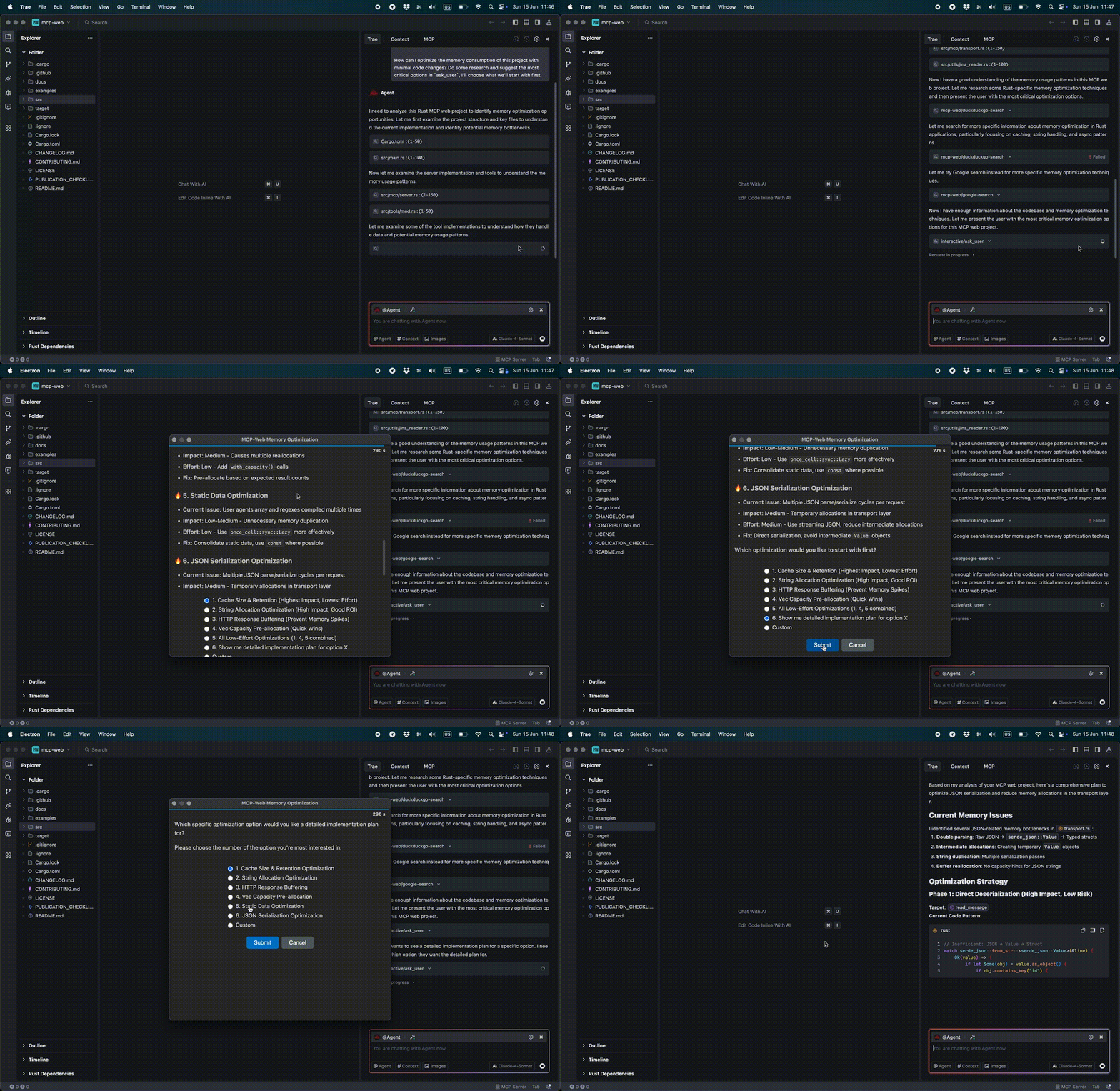
Compatibilidade
- Testado e Confirmado:
- Trae IDE
- Claude para Mac
- augment code
- Cursor IDE
- VSCode com Copilot
Ferramentas Disponíveis
ask_user - Apresenta uma pergunta ao usuário por meio de um prompt de comando pop-up e aguarda a resposta interativa.
Esquema de Entrada:
{
  "type": "object",
  "properties": {
    "projectName": {
      "type": "string",
      "description": "Identifies the context/project making the request"
    },
    "message": {
      "type": "string",
      "description": "The specific question for the user. Supports Markdown formatting."
    },
    "predefinedOptions": {
      "type": "array",
      "items": {
        "type": "string"
      },
      "description": "Predefined options for the user to choose from (optional)"
    }
  },
  "required": [
    "projectName",
    "message"
  ]
}
Instalação
Usando npx
{
  "mcpServers": {
    "interactive": {
      "command": "npx",
      "args": [
        "mcp-interactive",
        "-t",
        "300"
      ]
    }
  }
}
Instalação Local
Instale as dependências:
npm install
Configure o servidor MCP:
{
  "mcpServers": {
    "interactive": {
      "command": "node",
      "args": [
        "/path/to/project/mcp-interactive/index.js",
        "-t",
        "300"
      ]
    }
  }
}
Recomendações de Prompt de Sistema para Visual Studio Code, Cursor IDE
## Decision Making
- **Ambiguous tasks**: ALWAYS clarify using `mcp_interactive_ask_user` tool
- **Requires decisions**: ALWAYS clarify using `mcp_interactive_ask_user` tool

## Code Development
- **Final confirmation**: MUST ask user if all requirements from specification are completed using `mcp_interactive_ask_user` tool with work report

## Final gate
- Before ANY final answer (after actions/edits/checks), it is **MANDATORY** to call `mcp_interactive_ask_user` with a report on the work done and the option ["Yes, everything is OK"].
- If the answer is not "Yes, everything is OK" — continue working until the comments are resolved and repeat every time `mcp_interactive_ask_user`.
- There are no exceptions (including minor edits).
Exemplo do modo "Human In The Loop" no chat do Visual Studio Code
Can you check the docs and explain how the project works? #interactive
Recomendações de Prompt de Sistema para Trae IDE
Esta seção descreve diretrizes recomendadas para prompts de sistema ou regras para LLMs, garantindo interação e execução de tarefas ideais.
## Decision Making
- **Ambiguous tasks**: ALWAYS clarify using `ask_user` tool via MCP
- **Requires decisions**: ALWAYS clarify using `ask_user` tool via MCP

## Code Development
- **Final confirmation**: MUST ask user if all requirements from specification are completed using `ask_user` tool via MCP with work report

## Final gate
- Before ANY final answer (after actions/edits/checks), it is **MANDATORY** to call `ask_user` with a report on the work done and the option ["Yes, everything is OK"].
- If the answer is not "Yes, everything is OK" — continue working until the comments are resolved and repeat every time `ask_user`.
- There are no exceptions (including minor edits).
Opções de Linha de Comando
--timeoutou-t(segundos): Especifica o tempo de espera para o diálogo de resposta do usuário. Se nenhuma resposta for recebida dentro desse período, a resposta "User did not reply: Timeout occurred." será enviada.
Solução de Problemas
Problemas Comuns
Electron não iniciando:
- Certifique-se de que a versão atual do Node.js está instalada
- Tente reinstalar as dependências executando:
npm install
Problemas de tempo limite para resposta (barra de progresso):
- Aumente o valor do tempo limite usando o parâmetro
-t - O tempo limite padrão é de 60 segundos; ajuste conforme necessário
Contribuindo
Contribuições são bem-vindas! Sinta-se à vontade para enviar um Pull Request. Para alterações significativas, abra uma issue primeiro para discutir o que você gostaria de alterar.
Certifique-se de atualizar os testes conforme apropriado e seguir o estilo de código existente.
Suporte
Se você encontrar problemas ou tiver dúvidas, abra uma issue no GitHub.
Dependências
Este projeto inclui uma cópia local do marked.js (marked.min.js) para funcionalidade de análise de Markdown. O Marked é licenciado sob a Licença MIT e é mantido pela equipe do Marked.js e colaboradores.
Licença
MIT
Licenças de Terceiros
- marked.js: Licença MIT - Copyright (c) 2018+, contribuidores do MarkedJS