VNC
Controle remotamente qualquer sistema que execute um servidor VNC, incluindo Windows, Linux e macOS, por meio de um agente de IA.
Documentação
💻 mcp-vnc



Um servidor Model Context Protocol (MCP) que permite que agentes de IA controlem remotamente Windows, Linux, macOS ou qualquer outra coisa que possa executar um servidor VNC (não se preocupe, provavelmente funciona).
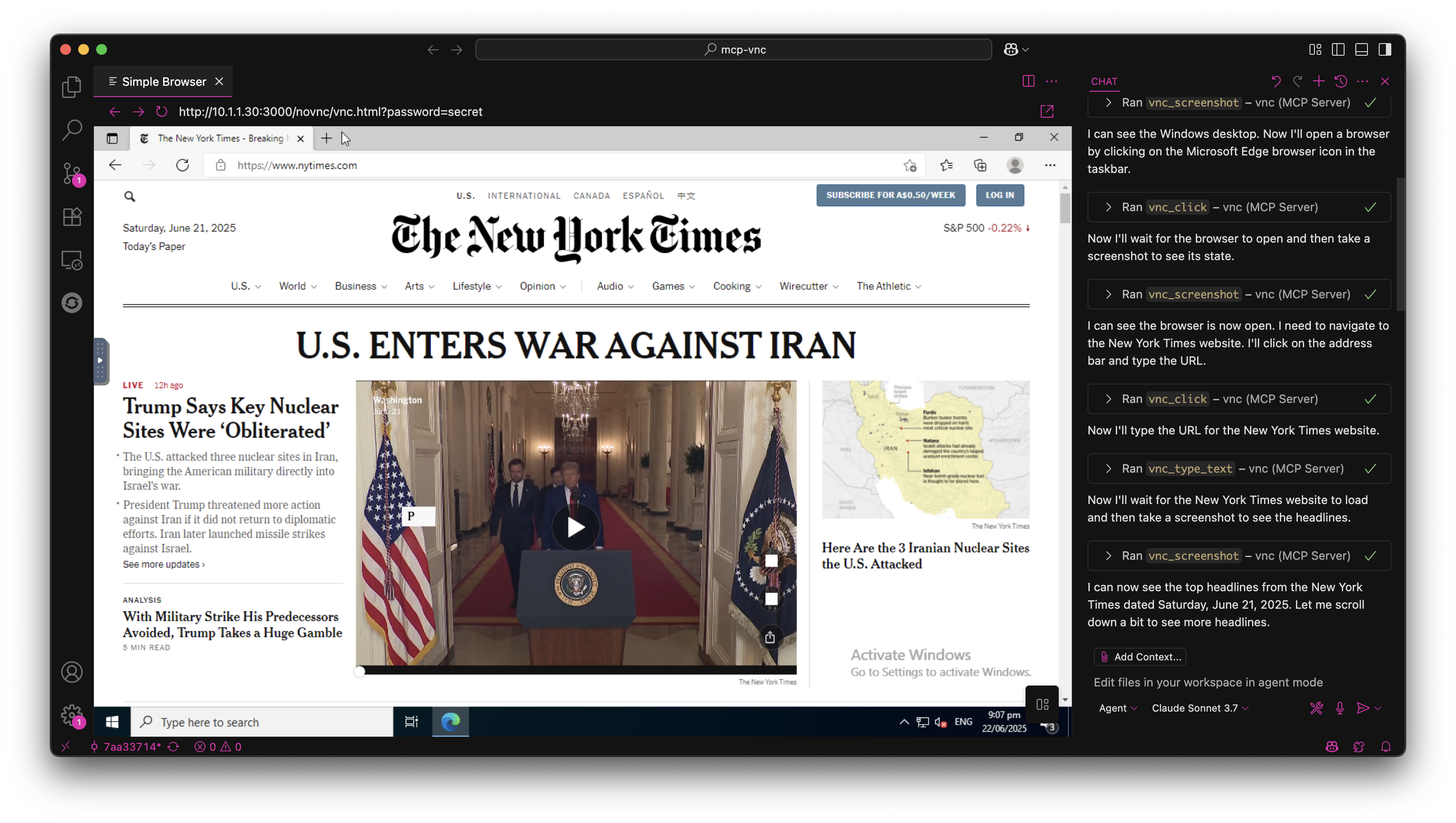
🚀 Início Rápido
Instalar via NPM
npm install -g @hrrrsn/mcp-vnc
Instalar a partir do Código-Fonte
git clone https://github.com/hrrrsn/mcp-vnc
cd mcp-vnc
npm install
npm run build
⚙️ Configuração
Claude Desktop
-
Localize e abra o arquivo de configuração do Claude Desktop:
- macOS:
~/Library/Application Support/Claude/claude_desktop_config.json - Windows:
%APPDATA%\Claude\claude_desktop_config.json - Linux:
~/.config/Claude/claude_desktop_config.json
- macOS:
-
Adicione a seguinte configuração:
Usando Instalação via NPM:
{
  "mcpServers": {
    "vnc-controller": {
      "type": "stdio",
      "command": "mcp-vnc",
      "env": {
        "VNC_HOST": "192.168.1.100",
        "VNC_PORT": "5900",
        "VNC_PASSWORD": "your-vnc-password"
      }
    }
  }
}
Compilado a partir do Código-Fonte:
{
  "mcpServers": {
    "vnc-controller": {
      "type": "stdio",
      "command": "node",
      "args": ["dist/index.js"],
      "cwd": "/path/to/mcp-vnc",
      "env": {
        "VNC_HOST": "192.168.1.100",
        "VNC_PORT": "5900",
        "VNC_PASSWORD": "your-vnc-password"
      }
    }
  }
}
VS Code
Consulte a documentação do VS Code
🛠️ Ferramentas Disponíveis
O servidor MCP fornece as seguintes ferramentas para controle remoto de desktop:
🖱️ Controle do Mouse
vnc_click - Clicar nas coordenadas especificadas
| Parâmetro | Obrigatório | Tipo | Descrição | Padrão |
|---|---|---|---|---|
x | ✅ | number | Coordenada X | - |
y | ✅ | number | Coordenada Y | - |
button | ❌ | string | Botão do mouse (left, right, middle) | left |
double | ❌ | boolean | Duplo clique em vez de clique único | false |
Exemplo: vnc_click(x=100, y=200, button="right", double=true)
vnc_move_mouse - Mover o cursor do mouse
| Parâmetro | Obrigatório | Tipo | Descrição |
|---|---|---|---|
x | ✅ | number | Coordenada X |
y | ✅ | number | Coordenada Y |
Exemplo: vnc_move_mouse(x=500, y=300)
⌨️ Controle do Teclado
vnc_key_press - Enviar teclas e combinações de teclas
| Parâmetro | Obrigatório | Tipo | Descrição |
|---|---|---|---|
key | ✅ | string | Tecla ou combinação de teclas para pressionar |
Teclas Suportadas:
- Teclas individuais:
a,Enter,F1,Escape,Up,Down,Tab,Space - Combinações de teclas:
Ctrl+c,Alt+F4,Ctrl+Alt+Delete,Shift+Tab - Modificadores:
Ctrl,Alt,Shift,Super/Win,Meta/Cmd
Exemplos:
vnc_key_press(key="Enter")vnc_key_press(key="Ctrl+Alt+Delete")
📝 Entrada de Texto
vnc_type_text - Digitar texto de linha única
| Parâmetro | Obrigatório | Tipo | Descrição | Padrão |
|---|---|---|---|---|
text | ✅ | string | Texto para digitar | - |
enter | ❌ | boolean | Pressionar Enter após digitar | false |
Exemplo: vnc_type_text(text="Hello World!", enter=true)
vnc_type_multiline - Digitar múltiplas linhas
| Parâmetro | Obrigatório | Tipo | Descrição |
|---|---|---|---|
lines | ✅ | string[] | Matriz de linhas para digitar |
Exemplo: vnc_type_multiline(lines=["Line 1", "Line 2", "Line 3"])
📸 Captura de Tela
vnc_screenshot - Capturar tela
| Parâmetro | Obrigatório | Tipo | Descrição | Padrão |
|---|---|---|---|---|
delay | ❌ | number | Atraso antes da captura (0-300000ms) | 0 |
Exemplo: vnc_screenshot(delay=1000) - Aguardar 1 segundo antes da captura
🤝 Contribuindo
Contribuições são bem-vindas! Sinta-se à vontade para enviar um Pull Request.
📄 Licença
Este projeto está licenciado sob a Licença MIT - consulte o arquivo LICENSE para detalhes.