ClickHouse MCP Server
Um servidor Node.js para consultar bancos de dados ClickHouse.
Documentação
Servidor MCP do ClickHouse
Uma implementação de servidor Model Context Protocol (MCP) que permite que a IA Claude interaja com bancos de dados ClickHouse por meio de uma interface segura e eficiente.
Pré-requisitos
- Node.js (versão 18 ou superior)
- Banco de dados ClickHouse em execução local ou remota
- Aplicativo Claude Desktop instalado
Ferramentas Disponíveis
-
clickhouse_query
- Executa consultas SELECT no seu cluster ClickHouse
- Entrada:
sql(string): A consulta SQL a ser executada - Observação: Apenas consultas SELECT são permitidas por questões de segurança
-
clickhouse_show_tables
- Lista todas as tabelas no banco de dados ClickHouse
- Nenhum parâmetro de entrada necessário
-
clickhouse_describe_table
- Descreve o esquema de uma tabela específica
- Entrada:
table(string): O nome da tabela a ser descrita
Etapas de Instalação
1. Instalar Dependências
npm install @modelcontextprotocol/sdk @clickhouse/client typescript @types/node
2. Compilar o TypeScript
npm run build
3. Criar o Arquivo do Servidor
Copie o código principal do servidor para index.js e torne-o executável:
chmod +x dist/index.js
4. Configurar o Claude Desktop
-
Abra o aplicativo Claude Desktop, vá para configurações, depois Desenvolvedor e clique em "Editar Arquivo de Configuração"
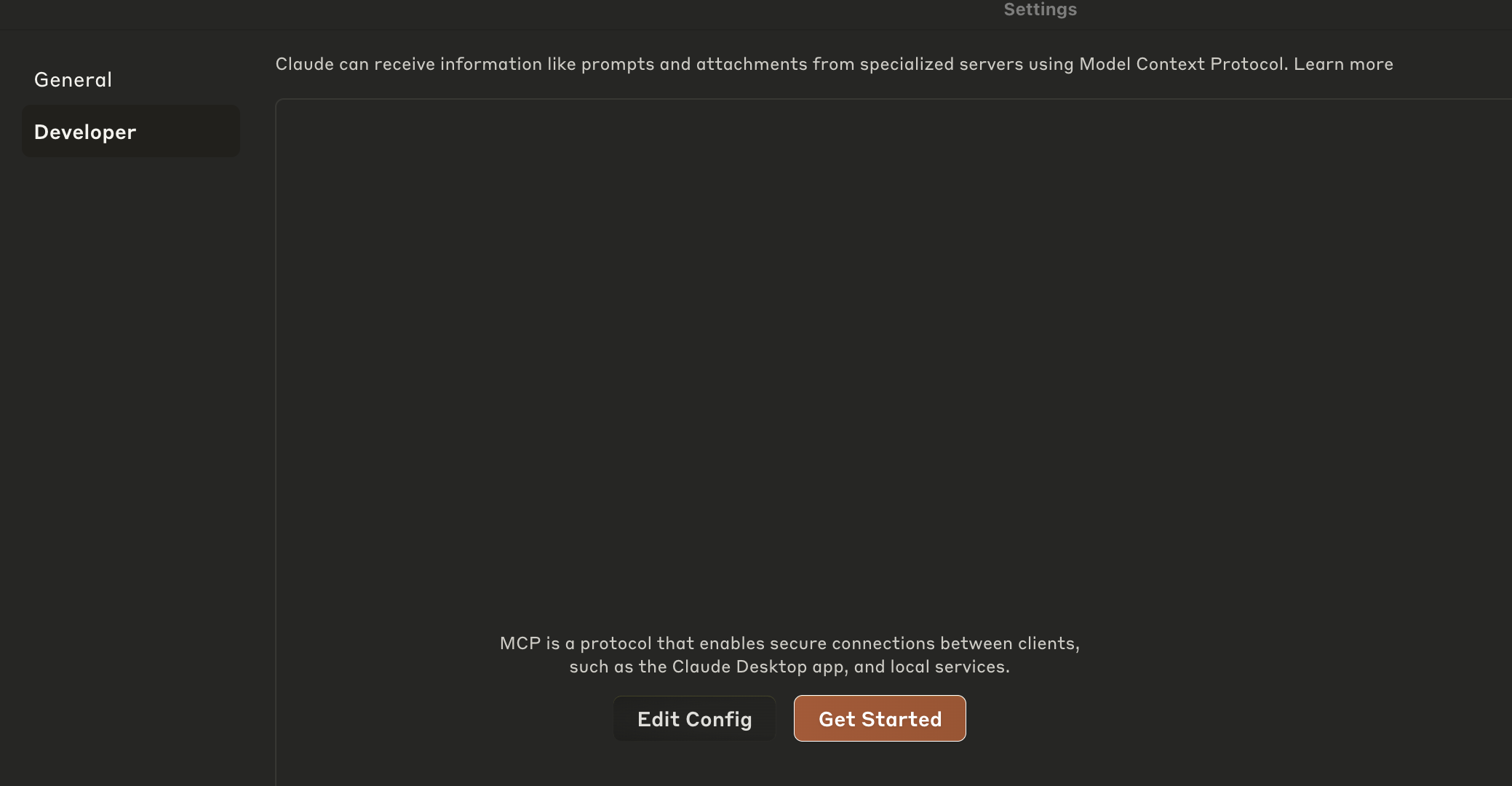
-
OU Abra o arquivo de configuração do Claude Desktop localizado em:
- No macOS:
~/Library/Application Support/Claude/claude_desktop_config.json - No Windows:
%APPDATA%/Claude/claude_desktop_config.json
- No macOS:
-
Adicione o seguinte:
{
  "mcpServers": {
    "clickhouse": {
      "command": "node",
      "args": ["/path/to/your/clickhouse-mcp-server/dist/index.js"],
      "env": {
        "CLICKHOUSE_HOST": "<clickhouse-host>",
        "CLICKHOUSE_PORT": "<clickhouse-port>",
        "CLICKHOUSE_USER": "<clickhouse-user>",
        "CLICKHOUSE_PASSWORD": "<clickhouse-password>",
        "CLICKHOUSE_SECURE": "true",
        "CLICKHOUSE_VERIFY": "true",
        "CLICKHOUSE_CONNECT_TIMEOUT": "30",
        "CLICKHOUSE_SEND_RECEIVE_TIMEOUT": "30"
      }
    }
  }
}
Atualize as variáveis de ambiente para apontar para o seu próprio serviço ClickHouse.
Ou, se você quiser experimentar com o ClickHouse SQL Playground, você pode usar a seguinte configuração:
{
  "mcpServers": {
    "clickhouse": {
      "command": "node",
      "args": ["/path/to/your/clickhouse-mcp-server/dist/index.js"],
      "env": {
        "CLICKHOUSE_HOST": "sql-clickhouse.clickhouse.com",
        "CLICKHOUSE_PORT": "8443",
        "CLICKHOUSE_USER": "demo",
        "CLICKHOUSE_PASSWORD": "",
        "CLICKHOUSE_SECURE": "true",
        "CLICKHOUSE_VERIFY": "true",
        "CLICKHOUSE_CONNECT_TIMEOUT": "30",
        "CLICKHOUSE_SEND_RECEIVE_TIMEOUT": "30"
      }
    }
  }
}
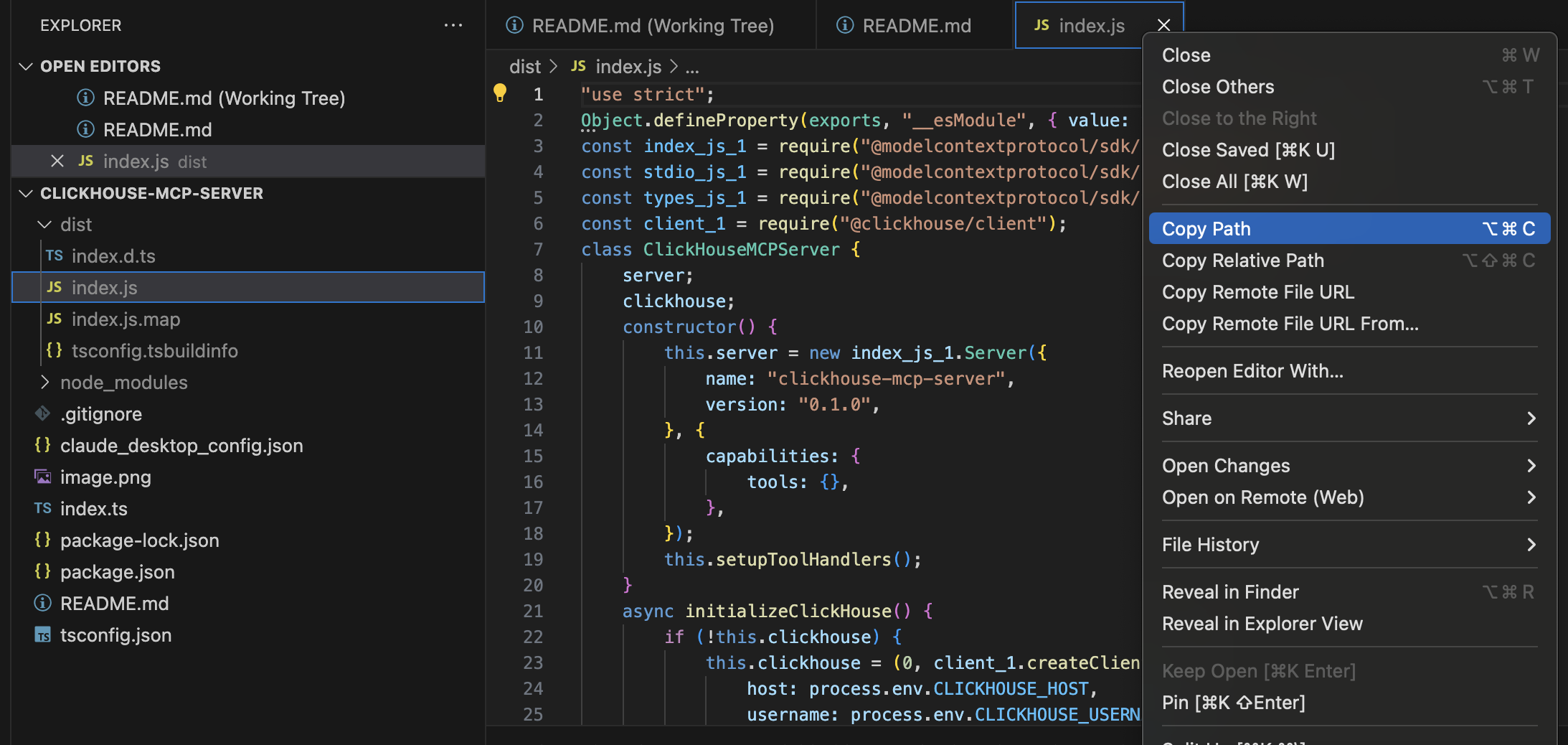
Importante: Atualize o caminho na configuração para apontar para a localização real do seu arquivo dist/index.js. Copie o caminho completo conforme mostrado na imagem abaixo.
5. Testar o Servidor
Antes de configurar o Claude Desktop, teste o servidor localmente:
node dist/index.js
O servidor deve iniciar e exibir "ClickHouse MCP server running on stdio".
7. Reiniciar o Claude Desktop
Após atualizar a configuração, reinicie o Claude Desktop para que as alterações tenham efeito.
Exemplo de Uso
Após a configuração, você pode pedir ao Claude para:
- "Mostre-me todas as tabelas no banco de dados ClickHouse"
- "Consulte a tabela user_events para os dados de hoje"
- "Descreva o esquema da tabela orders"
Desenvolvimento
Executando Testes
npm test
Compilando o Projeto
npm run build
Lint
npm run lint
Notas de Segurança
- O servidor permite apenas consultas SELECT para a ferramenta de consulta
- Considere configurar autenticação adequada para sua instância ClickHouse
- Use variáveis de ambiente para credenciais sensíveis
- Restrinja o acesso de rede ao seu servidor ClickHouse conforme necessário
Solução de Problemas
- Problemas de Conexão: Verifique se o seu servidor ClickHouse está em execução e acessível
- Erros de Permissão: Garanta que o script Node.js tenha as permissões de arquivo adequadas
- Problemas de Configuração: Verifique se o caminho na configuração do Claude Desktop aponta para o arquivo correto
- Dependências: Certifique-se de que todos os pacotes npm estejam instalados corretamente
Licença
Este projeto está licenciado sob a Licença MIT - consulte o arquivo LICENSE para obter detalhes.
Exemplo de Uso
Após a configuração, você pode pedir ao Claude para:
- "Mostre-me todas as tabelas no banco de dados ClickHouse"
- "Consulte a tabela user_events para os dados de hoje"
Notas de Segurança
- O servidor permite apenas consultas SELECT para a ferramenta de consulta
- Considere configurar autenticação adequada para sua instância ClickHouse
- Use variáveis de ambiente para credenciais sensíveis
- Restrinja o acesso de rede ao seu servidor ClickHouse conforme necessário
Solução de Problemas
- Problemas de Conexão: Verifique se o seu servidor ClickHouse está em execução e acessível
- Erros de Permissão: Garanta que o script Node.js tenha as permissões de arquivo adequadas
- Problemas de Configuração: Verifique se o caminho na configuração do Claude Desktop aponta para o arquivo correto
- Dependências: Certifique-se de que todos os pacotes npm estejam instalados corretamente