MoLing MCP Server
Um assistente local de automação de escritório para operações no sistema de arquivos, execução de comandos do sistema e controle do navegador.
Documentação
Servidor MCP MoLing


Introdução
O MoLing é um servidor MCP de uso em computador e navegador que implementa interação com o sistema por meio de APIs do sistema operacional, permitindo operações no sistema de arquivos, como leitura, escrita, mesclagem, estatísticas e agregação, além da capacidade de executar comandos do sistema. É um assistente de automação de escritório local, sem dependências.
Vantagens
[!IMPORTANT] Sem exigir a instalação de quaisquer dependências, o MoLing pode ser executado diretamente e é compatível com vários sistemas operacionais, incluindo Windows, Linux e macOS. Isso elimina o incômodo de lidar com conflitos de ambiente envolvendo Node.js, Python, Docker e outros ambientes de desenvolvimento.
Recursos
[!CAUTION] Operações de linha de comando são perigosas e devem ser usadas com cautela.
- Operações no Sistema de Arquivos: Leitura, escrita, mesclagem, estatísticas e agregação
- Terminal de Linha de Comando: Execute comandos do sistema diretamente
- Controle de Navegador: Alimentado por
github.com/chromedp/chromedp- O navegador Chrome é necessário.
- No Windows, o caminho completo para o Chrome precisa ser configurado nas variáveis de ambiente do sistema.
- Planos Futuros:
- Organização de dados do PC pessoal
- Assistência na escrita de documentos
- Planejamento de agenda
- Recursos de assistente de vida
[!WARNING] Atualmente, o MoLing foi testado apenas no macOS, e outros sistemas operacionais podem apresentar problemas.
Clientes MCP Suportados
- Claude
- Cline
- Cherry Studio
- etc. (que suportam o protocolo MCP)
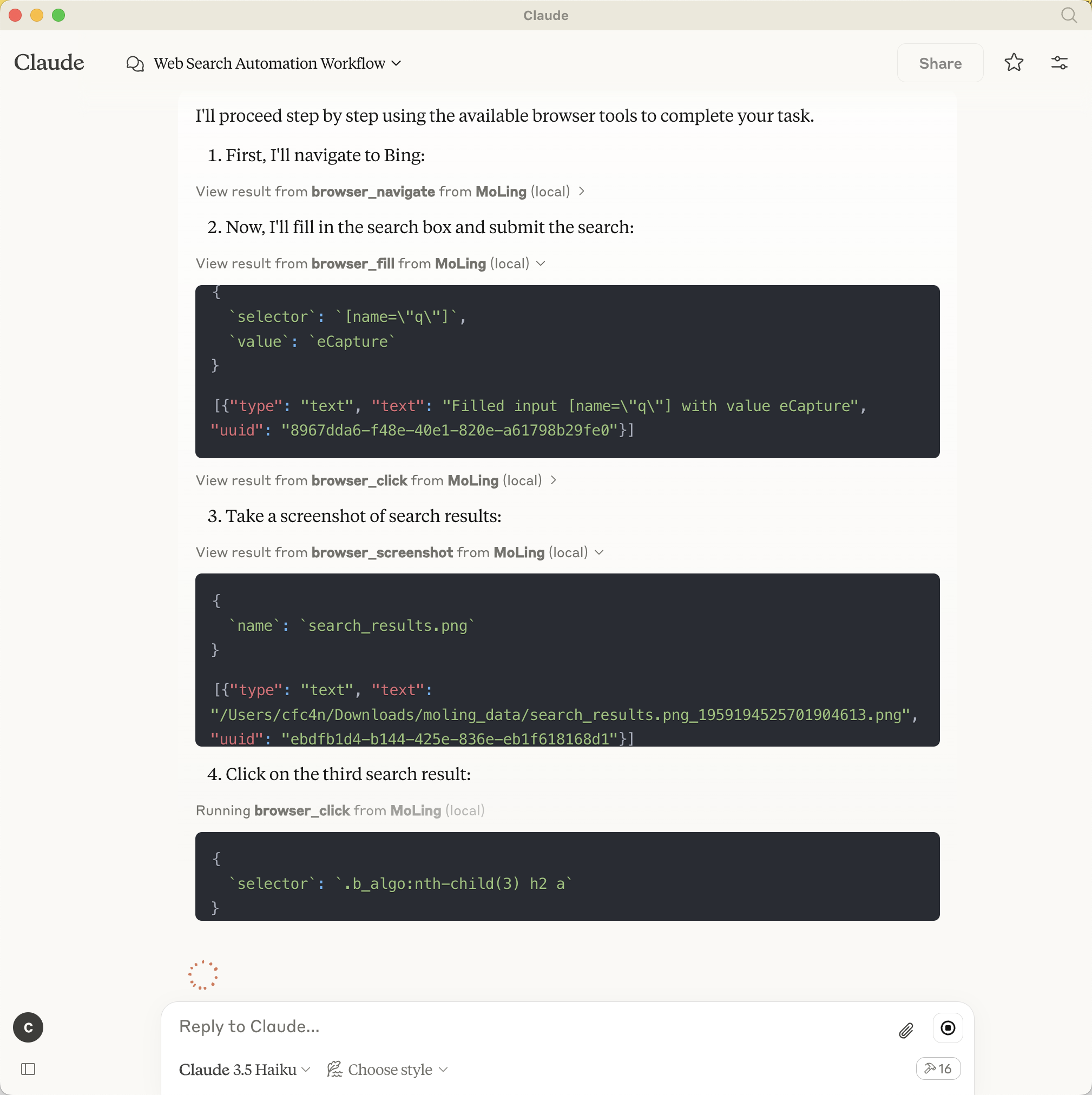
Demonstrações
https://github.com/user-attachments/assets/229c4dd5-23b4-4b53-9e25-3eba8734b5b7
MoLing no Claude
Formato de Configuração
Configuração do Servidor MCP (MoLing)
O arquivo de configuração será gerado em /Users/username/.moling/config/config.json, e você pode modificar seu
conteúdo conforme necessário.
Se o arquivo não existir, você pode criá-lo usando moling config --init.
Configuração do Cliente MCP
Por exemplo, para configurar o cliente Claude, adicione a seguinte configuração:
[!TIP]
Apenas 3-6 linhas de configuração são necessárias.
Caminho de configuração do Claude:
~/Library/Application\ Support/Claude/claude_desktop_config
{
  "mcpServers": {
    "MoLing": {
      "command": "/usr/local/bin/moling",
      "args": []
    }
  }
}
e, /usr/local/bin/moling é o caminho para o binário do servidor MoLing que você baixou.
Configuração Automática
execute moling client --install para instalar automaticamente a configuração para o cliente MCP.
O MoLing detectará automaticamente o cliente MCP e instalará a configuração para você, incluindo: Cline, Claude, Roo Code, etc.
Modos de Operação
- Modo Stdio: Modo interativo baseado em CLI para uma experiência amigável ao usuário
- Modo SSE: Modo de renderização no lado do servidor, otimizado para ambientes headless/automatizados
Instalação
Opção 1: Instalar via Script
Linux/MacOS
/bin/bash -c "$(curl -fsSL https://raw.githubusercontent.com/gojue/moling/HEAD/install/install.sh)"
Windows
[!WARNING] Não testado, não temos certeza se funciona.
powershell -ExecutionPolicy ByPass -c "irm https://raw.githubusercontent.com/gojue/moling/HEAD/install/install.ps1 | iex"
Opção 2: Download Direto
- Baixe o pacote de instalação na página de releases
- Extraia o pacote
- Execute o servidor:
./moling
Opção 3: Compilar a partir do Código-Fonte
- Clone o repositório:
git clone https://github.com/gojue/moling.git
cd moling
- Compile o projeto (requer a toolchain Golang):
make build
- Execute o binário compilado:
./bin/moling
Uso
Após iniciar o servidor, conecte-se usando qualquer cliente MCP suportado, configurando-o para apontar para o endereço do seu servidor MoLing.
Licença
Licença Apache 2.0. Consulte LICENSE para obter detalhes.