Lean KG
LeanKG: Pare de queimar tokens. Comece a codificar de forma enxuta.
Documentação

LeanKG
⚡ Implementação: 100% Go. O motor Rust foi removido na transição de paridade; todo o motor é o módulo Go raiz github.com/FreePeak/LeanKG. Consulte docs/prd.md para o registro de paridade. Build: make go-build · Teste: make go-test · Benchmark: make go-bench.
Grafo de conhecimento de código pronto para empresas, para agentes de codificação de IA
Multi-repositório · governança de ambiente · incidentes e serviços · req↔código · −65% tokens / −85% chamadas de ferramentas
Demonstração ao vivo · Documentação · pkg.go.dev · Changelog














Instalação
Pré-requisitos
Nenhum — sqlite é o mecanismo de armazenamento padrão. Sem Postgres, sem Docker.
O Postgres permanece disponível como uma opção explícita (LEANKG_DB_ENGINE=postgres + LEANKG_PG_URL) para implantações em escala de servidor, mas nada no fluxo padrão o utiliza.
Instalar
Módulo publicado — o motor é um módulo Go, então a toolchain instala ambos
os binários de pkg.go.dev diretamente em $(go env GOPATH)/bin:
go install github.com/FreePeak/LeanKG/cmd/leankg@latest         # server + CLI
go install github.com/FreePeak/LeanKG/cmd/leankg-embed@latest   # embedding pipeline
Arquivos pré-compilados — releases
contêm leankg-<os>-<arch>.tgz para linux/darwin × amd64/arm64, ambos os binários na
raiz do arquivo mais um .sha256. leankg update segue o mesmo canal.
A partir de um checkout — requer Go 1.25+ e git; instala em
~/.local/bin (passe um PREFIX para alterar):
git clone https://github.com/FreePeak/LeanKG.git && cd LeanKG
scripts/install-go.sh                # or: make install-go

# Or fetch and run the installer directly (clones over HTTPS, same behavior):
curl -fsSL https://raw.githubusercontent.com/FreePeak/LeanKG/main/scripts/install-go.sh | bash
Contêiner
Dockerfile é um build de três estágios sem CGO: binários do motor, depois um
grafo de demonstração criado a partir de uma fatia deste repositório (a linguagem examples/, o motor,
o código-fonte do dashboard), e então um runtime sem privilégios que serve esse armazenamento
somente leitura. O build do dashboard já está embutido no binário
(internal/web/embed), então não há estágio Node.
docker build -t leankg .
docker run --rm -p 8080:10000 -e PORT=10000 leankg   # dashboard + its /api on :8080
Esta é a imagem que leankg.onrender.com executa: um
contêiner, uma porta, leankg serve --read-only --ui :$PORT.
Comece Aqui
# 1. Per project: one-shot index (sqlite default — zero config, store at .leankg/leankg.db)
cd your-project
leankg index .

# 2. Wire up an AI client — one command (claude-code | cursor | codex | gemini | opencode | omp)
leankg connect claude-code           # stdio entry; --http --url http://host:9699/mcp to reuse a shared server

# 3. ...or serve MCP over HTTP yourself (endpoint /mcp; GET /health returns 200 when ready)
leankg serve --http 127.0.0.1:9699 --rest 127.0.0.1:8080
Verificação automática de qualquer implantação: leankg doctor — imprime o caminho do armazenamento, contagens de elementos e
arquivos e o watermark de escrita (saída 0 passa / 2 falha).
MCP sobre HTTP: o servidor resolve o projeto a partir do diretório de trabalho do processo — execute-o
a partir do checkout ou passe --project DIR para fixar um.
Tempos medidos
- Tempo frio Go até o primeiro valor (build → index → bind de serviço → primeira consulta REST + MCP): orçamento de CI 300s, gate Cold TTFV, números por execução no artefato
ttfv-go-cold— medição local de cache frio 17,8s (macOS arm64); substitui oquickstart_smoke.shda era Rust.
Interface Web
O dashboard embutido é servido por leankg serve --ui ADDR (um build ui-v2
compilado no binário). Os endpoints de dados /api/* do dashboard são servidos
no mesmo endereço; serve --rest expõe os endpoints de ferramentas /api/v1/*
separadamente.
Para desenvolvimento de UI, execute o servidor de desenvolvimento Vite contra um endereço REST (ele faz proxy
de /api para BACKEND_TARGET, padrão http://127.0.0.1:8080):
# Terminal A — REST API
leankg serve --rest 127.0.0.1:8080

# Terminal B — hot-reload dev server
cd ui-v2
npm install
npm run dev
# open http://127.0.0.1:5173
Detalhes: ui-v2/README.md · docs/archive/web-ui.md
Pronto para Empresas
Pares neste espaço são principalmente pessoais / de repositório único. LeanKG é a plataforma da empresa: índice compartilhado, grafo de operações e economia de agente medida.
| Pilar | Entregue como |
|---|---|
| Servidor multi-repositório | MCP HTTP :9699; LEANKG_PROJECT_DIRS serve muitos projetos com ?project= por solicitação (REST) / argumento project (MCP); sqlite padrão, PG opcional |
| Governança de ambiente | query --action env_conflicts, snapshots por ambiente, leankg obsidian |
| Operações e propriedade | query --action service_context / incidents, leankg incident / note / team-map |
| Req ↔ código | leankg prd / prd-trace, query --action prd, matriz de rastreabilidade de ontologia |
| Mega-grafo | Consultas locais de fronteira; 100k–700k+ elementos |
| Superfície de agente | 3 ferramentas MCP (import / query / status) servindo 30 ações (22 consulta + 8 importação); pares normalmente ~1–17 ferramentas brutas |
| Custo | A/B −65% tokens, −85% chamadas de ferramentas, 2,5× vs grep/cat |
| Capacidade | LeanKG | GitNexus | Graphify | Codanna | Context7 |
|---|---|---|---|---|---|
| Implantação multi-repo em equipe | Sim | Parcial | Limitada | Limitada | n/a |
| Mapa de ambiente / incidentes / equipe | Sim | Não | Não | Não | Não |
| Rastreabilidade de PRD | Sim | Não | Parcial | Não | Não |
| Mega-grafo (100k+) | Sim | Parcial | Viz limitado | Varia | n/a |
| Superfície MCP | 3 ferramentas / 30 ações | ~17 | ~10 | ~5 | apenas docs |
Mergulhos profundos (arquivados): ROI vs Graphify · One-pager competitivo · Matriz de pesquisa
Por que LeanKG?
Agentes normalmente reconstroem estrutura com grep → abrir arquivos → contexto enorme. LeanKG retorna um subgrafo direcionado (chamadores, dependentes, raio de explosão, testes, docs) mais a camada de equipe (ambiente, serviços, incidentes, requisitos) via MCP.
| Sem | Com LeanKG |
|---|---|
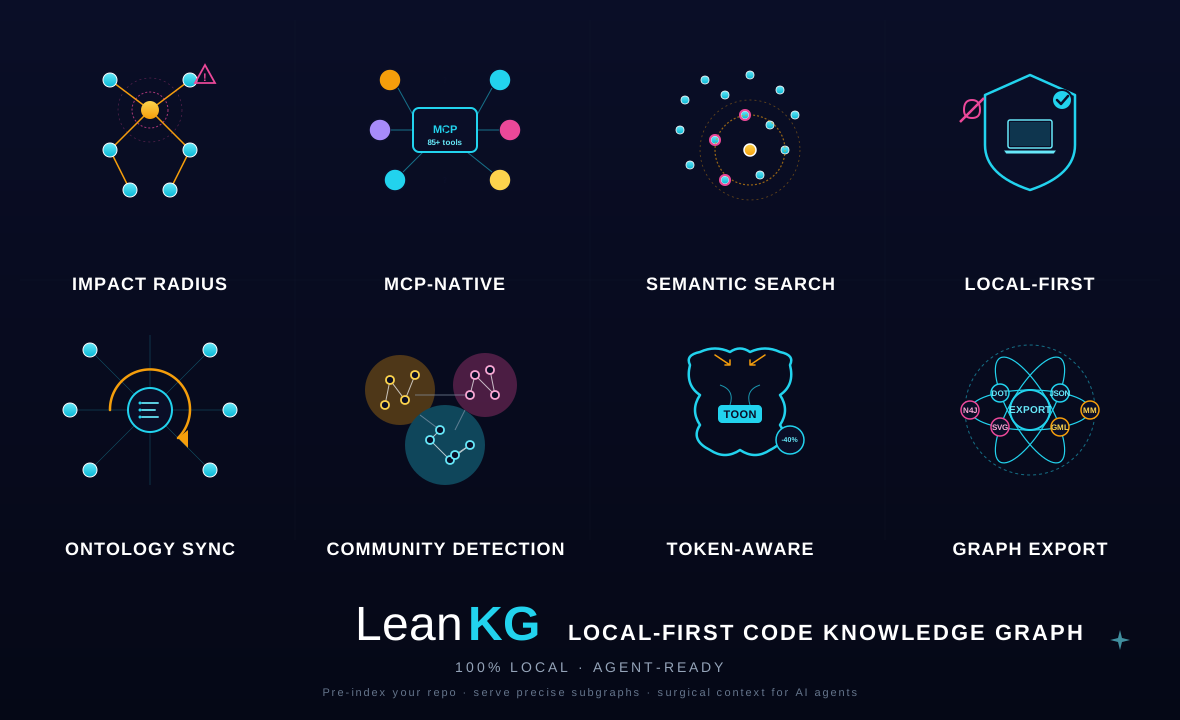
| Muitas chamadas de ferramentas, contexto grande | Subgrafo cirúrgico + TOON (~40% payloads menores) |
| Sem raio de explosão | Impacto classificado por gravidade |
| Apenas palavra-chave | Palavra-chave + semântica HNSW + ontologia |
| Adivinhação de repositório único | Índice multi-repo + ferramentas de operações |
Principais Recursos
- Nativo MCP — busca, impacto, grafos de chamada, ontologia, arquitetura, conhecimento de equipe
- SQLite padrão (zero configuração — sem Postgres, sem Docker necessário) com backend Postgres/pgvector opcional (
LEANKG_DB_ENGINE=postgres+LEANKG_PG_URL) - Ontologia — catálogo de conceitos + camada procedural (fluxos de trabalho, etapas, pontos de decisão, modos de falha),
query --action ontology,POST /api/v1/ontology/match, e rastreabilidade req↔código vialeankg prd/prd-trace - Impacto e dependências — arestas
contains,calls,imports; raio de explosão BFS (leankg impact) - Web UI v2 — explorador Force / Tree / Circles (
cd ui-v2 && npm run dev; o build embutido é servido porleankg serve --ui) - Implantação — binário único sem CGO, sem dependências de runtime: Dockerfile cria uma imagem de demonstração somente leitura para Render,
/healthresponde a probes de contêiner, e--ui/--http/--rest/--rpccada um vincula seu próprio endereço - Linguagens — 40 perfis: Go, Rust, TypeScript/TSX, JavaScript/JSX, Python, Markdown, Java, Kotlin, Swift, Objective-C, Dart, C/C++, C#, PHP, Ruby, Scala, Perl, Lua, Haskell, Elixir, Crystal, CUDA, Cypher, Elm, Erlang, F#, GLSL, HLSL, Nim, OCaml, SQL, PowerShell, Q#, Solidity, SystemVerilog, Verilog, Zig
Ordem de preferência MCP
Descubra com query — ele roteia pela escada por padrão (L1 exato → L2 difuso → L3 semântico), degrada em vez de errar, e cada resposta carrega retrieval{rung,reason} + freshness.
| Pergunta | Como |
|---|---|
| Qualquer identificador (padrão) | query "Alpha" (exato, depois fallback difuso) |
| Raio de explosão | leankg impact <file> ou query --action impact --to <qn> |
| Quem chama X? | query --action callers --to <qn> |
| Como A↔B? | query --action path --to <qn> |
| Detalhes do elemento | query --action explain --to <qn> |
| Busca de padrão | query --action pattern --pattern "func $_(...)" |
| Rastreabilidade de PRD | leankg prd-trace FR-3T-01 |
| Arquivo (comprimido) | query --action read --path src/main.go |
3 ferramentas: import (index/PRD/memória/sessão/ontologia/leitura) · query (escada + verbos de grafo + ações) · status (inventário/frescor/configuração).
CLI
leankg index .                          # one-shot index -> .leankg/leankg.db
leankg writer                           # index once, then watch + re-index
leankg query "parseConfig"              # name lookup (exact, then fuzzy) — JSON out
leankg query "parseConfig" --compress   # one line per result
leankg impact src/main.go --depth 3     # blast radius of a file or element
leankg status                           # health, inventory, freshness, embed state
leankg doctor                           # store path, element/file counts, watermark
leankg connect claude-code              # MCP entry: claude-code|cursor|codex|gemini|opencode|omp
leankg install --target cursor          # same wiring, flag form (--register-cwd: claude-code hook)
leankg serve --stdio                    # MCP over stdio (what harnesses spawn)
leankg serve --http 127.0.0.1:9699      # MCP over streamable HTTP (/mcp, /health)
leankg serve --rest 127.0.0.1:8080      # REST API (/health, /api/v1/*)
leankg serve --ui 127.0.0.1:8081        # embedded dashboard (/api/* data API served here)
leankg serve --rpc 127.0.0.1:9090       # ConnectRPC (gRPC + gRPC-Web + JSON)
leankg version
Hot-reload de UI: cd ui-v2 && npm install && npm run dev → http://127.0.0.1:5173
Uso completo: leankg help e leankg <command> --help. A referência de CLI arquivada da era Rust: docs/archive/cli-reference.md
Módulo Go
O motor é o módulo raiz github.com/FreePeak/LeanKG, versionado pelas
tags de release vX.Y.Z da raiz — então o proxy e
pkg.go.dev resolvem versões
reais e go install github.com/FreePeak/LeanKG/cmd/leankg@latest compila
o servidor + CLI diretamente do código-fonte.
| Superfície | exatamente 3 ferramentas MCP — import / query / status (fixadas por internal/mcp/server_test.go). query roteia a escada (L1 exato → L2 palavra-chave/FTS → L3 semântico) e degrada em vez de errar, então cada resposta carrega retrieval{rung,reason} + freshness |
| Armazenamento | SQLite (WAL, FTS5, vetores float32-BLOB, watermark residente em DB) por padrão; PostgreSQL + pgvector opcional (LEANKG_DB_ENGINE=postgres + LEANKG_PG_URL) com schema por projeto e HNSW por modelo — ambos atrás de store.Backend |
| Transportes | MCP stdio · MCP streamable HTTP (--http, /mcp + /health) · REST (--rest, /health + /api/v1/*) · ConnectRPC (--rpc) · dashboard embutido (--ui) |
| Indexação | 40 perfis de linguagem (internal/langs.Default), tiers de AST regex → ast-grep → tree-sitter (atrás da tag tstree), detecção de mudança de 3 sinais, papel writer com reconciliação fsnotify |
| Embeddings | binário leankg-embed + porta de provedor (compatível OpenAI / sidecar llama.cpp / determinístico). Cada escritor de vetor é protegido por ModelStamp, então uma mudança de modelo falha ruidosamente em vez de misturar espaços vetoriais |
Layout
cmd/leankg/         serve (stdio | MCP HTTP | REST | RPC | dashboard) · index · writer
                    query · impact · status · doctor · report · connect · install
                    prd · prd-trace · incident · note · obsidian · push · pull · update
cmd/leankg-embed/   run · full · export · import · status
internal/store/     Backend interface + SQLite (WAL/FTS5/watermark) + PGStore (pgvector)
internal/core/      3-tool envelope + L0–L3 ladder + memory/graph routing
internal/index/     extractors, 3-signal detection, call-edge resolution
internal/langs/     the 40 profiles, AST tiers, per-language LSP specs
internal/graph/     impact · path · callers/callees · context · explain · clusters
internal/ontology/  concept catalog + procedural workflows/traceability
internal/mcp/       modelcontextprotocol/go-sdk adapters (stdio + streamable HTTP)
internal/rest/      stdlib net/http REST surface
internal/web/       ui-v2 dashboard via //go:embed (checked-in build) + its /api/*
internal/embed/     provider port, ModelStamp guards, NDJSON export/import
internal/memory/    full-markdown memory + mnemopi bank adapter
internal/watch/     fsnotify reconcile (writer role)
internal/golden/    Rust-vs-Go parity fixtures
Build
go build ./... && go vet ./... && go test ./... -count=1   # CGO-free shape
go build -tags tstree ./...                                # tree-sitter tier (CGO)
O build do dashboard sob internal/web/embed é verificado e re-sincronizado por
make go-ui-assets; seu marcador de proveniência é embed/ui-build.json.
scripts/test-dual-engine.sh é o gate SQLite + PostgreSQL ao vivo
(LEANKG_TEST_PG_URL gateia a metade PG).
Limitações conhecidas
- Arestas de chamada são limitadas ao pacote. Sem resolução de import/tipo, então uma chamada com o mesmo nome no mesmo pacote resolve e o despacho entre pacotes é melhor esforço; o caminho de upgrade são tabelas de símbolos tree-sitter.
- Guards heurísticos, documentados em
internal/index/relations.go: arquivos ≥ 1 MiB são ignorados como bundles vendored/minificados, alvos de chamada com menos de 4 caracteres são descartados como ruído, e chamadas de saída são limitadas por elemento e por arquivo. - A unidade de escopo é um repositório. Uma raiz de portfólio (dezenas de milhares de arquivos aninhados) não é um projeto; registre seus filhos um de cada vez.
--uivincula uma API de dados não autenticada (query/read/rotas de importação). Vincule-a em loopback ou coloque um proxy na frente — o contêiner de demonstração público a serve--read-onlycontra um grafo descartável embutido.
Documentação
O conjunto de documentação vive em docs/ — um PRD unificado único (docs/prd.md) + rastreador de tarefas (docs/prd-task-tracker.md). Todos os documentos de design históricos, análises, relatórios e planos são preservados sob docs/archive/.
| Doc | |
|---|---|
| PRD | Requisitos de produto unificados + HLD (fonte única de verdade) |
| Rastreador de tarefas | Concluído / em andamento / a fazer |
| Arquitetura (arquivado) | Design e modelo de dados (histórico) |
| Ferramentas MCP (arquivado) | Catálogo de ferramentas (histórico) |
| CLI (arquivado) | Todos os comandos (histórico) |
| Benchmarks (arquivado) | Metodologia (histórico) |
| Migração Postgres (arquivado) | Notas do mecanismo (histórico) |
| AGENTS.md | Notas para agentes |
Solução de problemas
| Problema | Correção |
|---|---|
| Projeto errado servido | Inicie o servidor com --project DIR (query/impact também respeitam LEANKG_PROJECT) |
| Embeddings / embed a frio | leankg-embed status, depois leankg-embed full (env do provedor: LEANKG_EMBED_*) |
Requisitos: macOS ou Linux · Go 1.25+ apenas ao compilar a partir do código-fonte. Sem Docker, sem Postgres — sqlite é o armazenamento padrão.
Contribuindo
- Fork + branch de funcionalidade (prefira um worktree)
- Atualize a documentação quando o comportamento mudar
go build ./... && go vet ./... && go test ./...- Abra um PR com resumo + plano de teste