Floom
Implante funções Python como aplicativos web. Dicas de tipo se tornam UI, API e links compartilháveis. 32 ferramentas MCP para implantar, executar, armazenar, gerenciar segredos, agendar, versionar e compartilhar.
Documentação
Floom
A plataforma de engenharia de loops. Trabalhadores de IA que rodam em loop.
Agende-os, acione-os, exija aprovações e mantenha cada execução registrada.
Um trabalhador é uma pasta: worker.yml + SKILL.md ou run.py. Implante-o a partir do Claude Code, Codex ou da CLI. Execute-o pela interface, REST ou MCP.
Comece agora · Crie um trabalhador · Experimente a versão hospedada · Leia a documentação




A maior parte da "automação com IA" é uma janela de chat que você precisa monitorar, ou um gráfico no-code que cobra por tarefa e não pode ser auditado. Floom é a plataforma de engenharia de loops: um runtime real onde um trabalhador é um pacote legível, ele roda em loop sem que você precise ficar assistindo, e cada execução deixa logs, saídas, chamadas de ferramentas, aprovações e uma reprodução confiável. Usado nativamente a partir do Claude Code e Codex via MCP ou CLI.
Implante um Script Python Como App, API REST e Ferramenta MCP
O Floom permite que um agente ou desenvolvedor transforme um script Python em um trabalhador que não-desenvolvedores podem executar pela interface, outros sistemas podem chamar via REST, e agentes de IA podem operar via MCP.
Comece com três arquivos:
workers/my-worker/
  worker.yml
  run.py
  requirements.txt
Depois valide, implante e execute:
floom workers validate ./workers/my-worker
floom workers push ./workers/my-worker
floom run my-worker --input key=value
Leia BUILDING.md para o contrato completo de trabalhador copiar-e-colar.
O Que é o Floom: Runtime de Trabalhadores para Trabalhadores de IA em Segundo Plano
O Floom transforma automações repetíveis de trabalho do conhecimento em trabalhadores de IA em segundo plano. Um trabalhador pode rodar manualmente, em um agendamento, a partir de um webhook ou de um evento de aplicativo. O runtime mantém a definição do trabalhador, o esquema de entrada, o esquema de saída, logs, chamadas de ferramentas, aprovações e o histórico de execuções inspecionáveis.
Use o Floom quando quiser que um agente de IA faça trabalho recorrente sem transformar esse trabalho em uma thread de chat opaca, um gráfico de automação difícil de versionar ou um script isolado sem supervisão.
Crie e Implante um Trabalhador de IA a Partir de uma Pasta
Agentes de IA e desenvolvedores podem criar um trabalhador Floom a partir de uma pasta:
workers/<worker-id>/
  worker.yml        # manifest: inputs, outputs, trigger, runtime, secrets
  run.py            # script entrypoint, or SKILL.md for agent mode
  requirements.txt  # optional Python dependencies
Implante o trabalhador com:
floom workers validate ./workers/<worker-id>
floom workers push ./workers/<worker-id>
floom run <worker-id> --input key=value
Após a implantação, o Floom expõe o trabalhador na interface, por endpoints REST e pelo servidor MCP do Floom para clientes de IA. Para o contrato completo de construção copiar-e-colar, leia BUILDING.md.
Como é um Trabalhador
Um trabalhador é uma definição de trabalho baseada em pasta. Descreva o trabalho em inglês simples (SKILL.md) ou entregue um script (run.py), declare suas ferramentas, gatilho, memória e segredos em worker.yml, e o Floom o executa.
# workers/github-digest/worker.yml  (abbreviated)
name: github-digest
description: "Every morning at 9am, send a digest of unread GitHub PRs and open issues."
exec:
  entry: SKILL.md          # plain-English agent; or run.py for a script
trigger:
  type: schedule
  cron: "0 9 * * *"        # also: manual, webhook, Composio event
connections:
  - app: github            # the only tools this agent is allowed to call
    allowed_tools: [GITHUB_FIND_PULL_REQUESTS, GITHUB_LIST_ASSIGNED_ISSUES]
<!-- workers/github-digest/SKILL.md -->
You are a GitHub assistant generating a daily PR + issues digest.
Fetch the user's open PRs and assigned issues, compile a markdown digest
with Action items, and finish_with_outputs({ "digest": "<markdown>" }).
Ele roda às 9h, chama apenas as duas ferramentas do GitHub que declarou e escreve digest.md em uma execução que você pode abrir, reproduzir ou reverter:
run 7f3a · github-digest · finished 09:00:04 · 2 tool calls · output: digest.md
  ✓ GITHUB_FIND_PULL_REQUESTS    q="is:open is:pr author:@me"   → 4 PRs
  ✓ GITHUB_LIST_ASSIGNED_ISSUES  state=open                     → 2 issues
  → out/digest.md (text/markdown)   [open · replay · rollback]
O manifesto completo adiciona schema_version, title, version e outputs declarados. Veja workers/ para exemplos executáveis, BUILDING.md para um trabalhador mínimo implantável e o livro de receitas do agente.
Dois tipos de agente
| roda em | isolamento de host | ferramentas | efeitos colaterais | |
|---|---|---|---|---|
Script (run.py / .sh / .js / .ts) | microVM de sandbox E2B | sistema de arquivos, ambiente e processo isolados; segredos da plataforma retidos | sandbox + conexões declaradas | porta de aprovação quando declarado |
Agente (SKILL.md) | AgentDriver no processo da API (apenas bundles confiáveis) | não isolado por microVM por política | conexões declaradas, lista de permissões | porta de aprovação quando declarado |
Sandboxes permitem egresso de rede público por padrão e bloqueiam intervalos privados/internos; uma lista de permissões mais restrita é opcional. Modelo de confiança completo: ARCHITECTURE.md.
Runtime do Trabalhador em Resumo
| O que é | Runtime auto-hospedado para criar, executar e supervisionar agentes de IA em segundo plano |
| Melhor para | Trabalho recorrente de agentes: triagem de caixa de entrada, resumos, rascunho de divulgação, enriquecimento, monitoramento |
| Tipos de agente | Script (run.py/.sh/.js/.ts) e agente em inglês simples (SKILL.md) |
| Isolamento | Trabalhadores de script rodam em microVMs de sandbox E2B - sistema de arquivos, ambiente e processo do host isolados; segredos da plataforma retidos |
| Gatilhos | Manual, agendamento (cron), webhook, evento Composio |
| Segurança | Aprovações humano-no-loop para agentes com efeitos colaterais; ferramentas com lista de permissões por agente |
| No registro | Cada execução registra logs, saídas, chamadas de ferramentas, estado de aprovação, reprodução + reversão |
| Modelo de custo | Floom adiciona nenhuma taxa por tarefa - você paga o runtime do sandbox E2B (por segundo) mais o uso do seu provedor de modelo/API |
| Stack | Next.js + Tailwind UI · FastAPI + SQLite API · servidor MCP + CLI |
| Roda em | Linux, macOS, Windows (Python 3.11+, Node 20+) |
| Licença | MIT · versão hospedada |
Para Quem é o Floom
- Fundadores e operadores que transformam trabalho recorrente (resumos, triagem, divulgação) em agentes que rodam sozinhos.
- Engenheiros que querem um runtime real - manifestos, sandboxes, limites, aprovações - não um arquivo de prompt e um cron job.
- Equipes que precisam que cada ação seja permitida, aprovada e reproduzível para auditoria.
- Qualquer pessoa queimada por agentes que executaram um comando destrutivo, vazaram um segredo ou alegaram sucesso sem nada no registro.
Floom Comparado: Scripts Brutos vs Zapier vs MCP Feito à Mão
| scripts brutos | Zapier / Make | servidor MCP feito à mão | Floom | |
|---|---|---|---|---|
| Definição do trabalhador | prompt ou código ad-hoc | gráfico visual, difícil de versionar | código de servidor de ferramenta personalizado | uma pasta: worker.yml + SKILL.md ou run.py |
| Runtime | cron, shell ou processo local | runtime de automação do fornecedor | o que o desenvolvedor construir | runtime de agente com gatilhos, execuções, logs, saídas, aprovações, reprodução e reversão |
| Isolamento | roda no seu host | nuvem do fornecedor, opaca | depende da implementação | microVM de sandbox E2B para trabalhadores de script |
| Acesso a ferramentas | o que o script alcançar | por conector | apenas ferramentas MCP | declarado e com lista de permissões por trabalhador |
| Efeitos colaterais | disparam imediatamente | dependente do fluxo de trabalho | lógica de aprovação personalizada | porta de aprovação humana quando declarado |
| Observabilidade | histórico de rolagem, se houver | logs por etapa | logs personalizados | logs, chamadas de ferramentas, saídas, artefatos, estado de aprovação, reprodução e reversão |
| Acesso do agente | wrapper personalizado necessário | não é um alvo de build nativo de agente | agente pode chamar ferramentas, mas o runtime do app é separado | ferramentas MCP permitem que agentes criem, executem, observem e inspecionem trabalhadores |
| Modelo de custo | tokens de modelo e infraestrutura | taxas por tarefa ou por execução | tokens de modelo e infraestrutura | nenhuma taxa por tarefa; você paga runtime e uso do provedor |
| Hospedagem | seu host | apenas fornecedor | seu host | auto-hospedado, ou hospedado |
Início Rápido: Execute o Floom Localmente
Linux / macOS
git clone https://github.com/floomhq/floom.git
cd floom
./scripts/setup.sh
# edit apps/api/.env: add a model provider key and E2B_API_KEY
./scripts/dev.sh
Windows PowerShell
git clone https://github.com/floomhq/floom.git; cd floom
.\scripts\setup.ps1
# edit apps\api\.env: add a model provider key and E2B_API_KEY
.\scripts\dev.ps1
Requer Python 3.11+, Node.js 20+, Git, uma chave de provedor de modelo e uma chave E2B de e2b.dev. Abra http://localhost:3000 e faça login - sem segredo de autenticação para desenvolvimento local, e os agentes de exemplo são semeados no primeiro boot.
Configuração completa, provedores de modelo, integrações opcionais e a lista de verificação segura de auto-hospedagem: docs/GETTING-STARTED.md. Problemas comuns: docs/TROUBLESHOOTING.md.
Não está pronto para auto-hospedar? floom.dev é a versão hospedada - contrate agentes de IA sem configuração. Usuários hospedados podem começar de um cliente MCP com:
npx -y @floomhq/floom mcp install --target claude
As chaves .env, de provedor de modelo e E2B acima são para executar seu próprio runtime local ou auto-hospedado, não para usar o Floom Cloud.
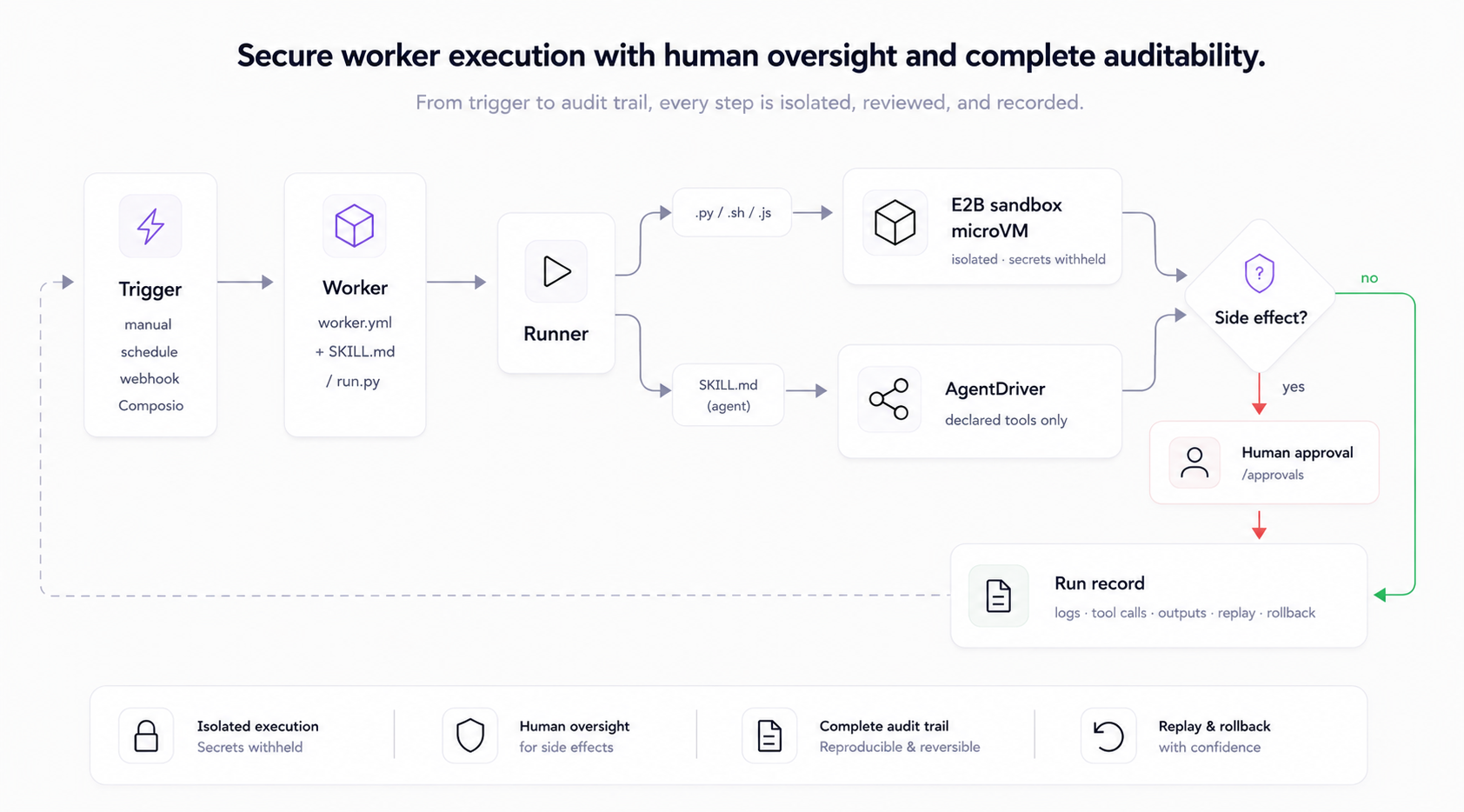
Como uma execução funciona
Conceitos principais
- Agentes - pastas sob
workers/<name>/comworker.ymlmais um entrypoint de script (run.py) ou um prompt de agente (SKILL.md). - Execuções - cada execução registra logs, saídas, chamadas de ferramentas, estado de aprovação e contexto de reprodução/reversão.
- Contextos - bundles de arquivos reutilizáveis anexados a agentes como material de referência; sensíveis por padrão.
- Aprovações - agentes com efeitos colaterais pausam para uma decisão humana antes que qualquer coisa saia.
- Histórico do workspace - agentes, contextos e configurações versionados em um workspace com suporte a git para reversão.
Escreva seu primeiro agente em docs/GETTING-STARTED.md, depois docs/AUTHORING.md para o contrato completo de manifesto e runtime.
Como os trabalhadores executam
Trabalhadores de script (.py/.sh/.js/.ts) rodam em uma microVM de sandbox E2B por padrão: dependências isoladas, sem acesso ao processo do host, recursos contidos. Trabalhadores TypeScript usam o runtime Node com tsx (npx --yes tsx run.ts) e o mesmo contrato inputs.json/result.json que trabalhadores Python. Um bundle que despeja os.environ dentro do sandbox vê apenas metadados do sandbox - FLOOM_SECRET, chaves de provedor e E2B_API_KEY estão todos ausentes. Trabalhadores de agente (SKILL.md) rodam pelo loop de ferramentas AgentDriver hospedado na API e são governados por suas conexões declaradas e pela porta de aprovação; a política atual de locatário único permite apenas bundles de agente confiáveis nesse caminho. Não há runner de script local em processo. Modelo de confiança completo: ARCHITECTURE.md.
Manuseio de dados, salvaguardas de contas conectadas, limites de retenção e superfícies legais do Cloud hospedado são resumidos em docs/DATA-RETENTION.md.
Arquitetura
apps/web      Next.js + TypeScript + Tailwind + shadcn/ui
apps/api      FastAPI + SQLite + Pydantic
apps/mcp      MCP server + CLI
workers/      Worker folders (worker.yml + run.py or SKILL.md)
data/         SQLite DB + run artifacts
FAQ: Agentes de IA, MCP e Implantação de Scripts Python
O que é o Floom em uma frase?
Floom é um runtime de código aberto para trabalhadores de IA em segundo plano que rodam a partir de pastas de trabalhador versionadas com entradas, saídas, gatilhos, ferramentas, aprovações, logs, acesso à API REST, acesso à interface e acesso MCP declarados.
O Floom é um servidor MCP?
O Floom inclui um servidor MCP, mas é mais do que um servidor MCP. O endpoint MCP permite que clientes de agente criem, executem, observem, inspecionem e gerenciem trabalhadores Floom. O runtime Floom é a parte que executa esses trabalhadores, registra execuções, gerencia aprovações e expõe a interface e a API REST.
Um agente de codificação de IA pode criar um trabalhador Floom a partir deste repositório?
Sim. Leia BUILDING.md primeiro. O contrato de construção é uma pasta workers/<id>/ com worker.yml, run.py ou SKILL.md, e requirements.txt opcional, depois floom workers validate e floom workers push.
Posso implantar um script Python como um app, API REST e trabalhador acessível via MCP?
Sim. Coloque o script em workers/<id>/run.py, declare suas entradas e saídas em worker.yml, implante com floom workers push, e o Floom o torna executável pela interface, API REST e ferramentas MCP.
Qual é a diferença entre modo script e modo agente?
O modo script executa código determinístico como Python, shell ou Node no sandbox. O modo agente executa um prompt SKILL.md pelo loop de agente com ferramentas declaradas e escritores de saída.
O Floom substitui o Zapier ou o Make?
O Floom é para equipes que querem pastas de trabalhador versionadas, execução em sandbox, portas de aprovação, logs, saídas, reprodução, reversão, acesso à API REST e acesso MCP. Zapier e Make são produtos de automação visual com seus próprios runtimes de fornecedor.
O Floom substitui ferramentas MCP escritas à mão?
Floom pode expor trabalho por meio de MCP sem que você precise construir manualmente todo o runtime do aplicativo. Um servidor MCP escrito à mão dá ferramentas a um agente; o Floom dá ao worker um runtime, UI, API, gatilhos, saídas, logs, aprovações e ferramentas MCP.
Documentação
- Começando - por que o Floom existe, primeira execução, primeiro agente, checklist de self-hosting seguro.
- Construindo workers do Floom - contrato de build legível por máquina para agentes e desenvolvedores.
- Criando agentes - esquema completo de
worker.yml, modos de execução, segredos, conexões, gatilhos, aprovações. - Dados, retenção e salvaguardas - o que o Floom armazena, como os dados de contas conectadas são escopados e quais garantias de exclusão/retenção são seguras de fazer.
- Livro de receitas de agentes - receitas de autoria assistida por agentes.
- Arquitetura - topologia do runtime e o modelo de confiança do sandbox. Leia antes de registrar descobertas de segurança.
- Visão geral da API - mapa de endpoints selecionados; referência completa em
http://localhost:8000/docs. - Solução de problemas · Roteiro · Histórico do projeto · Notas de versão v1.0.0
- Licenciamento - licença MIT do Floom e notas de licença de dependências de terceiros.
Contribuindo
Contribuições são bem-vindas. Consulte CONTRIBUTING.md para configuração local, o mapa de primeira contribuição e as diretrizes de PR. Verificações locais rápidas a partir da raiz do repositório:
npm run test:api
npm run lint:web
npm run test:web
npm run test:mcp
Segurança
Para relatar uma vulnerabilidade, siga SECURITY.md e relate-a de forma privada, em vez de abrir uma issue pública.
Licença
Licença MIT (c) 2026 contribuidores do Floom. Você pode usar, copiar, modificar, mesclar, publicar, distribuir, sublicenciar e vender cópias do Floom, sujeito ao aviso de licença MIT e à isenção de garantia.