Wokelo AI MCP Server
MCP de pesquisa para negociação para assistentes de IA - inteligência empresarial, dados de transações e entregas de pesquisa via MCP.
Documentação
Primeiros passos
O que é o Wokelo MCP?
O Wokelo MCP é um servidor Model Context Protocol que dá ao seu assistente de IA — Claude, ChatGPT ou qualquer cliente compatível com MCP — acesso direto à stack de pesquisa para negociações da Wokelo. Uma vez conectado, você pode executar enriquecimento de empresas, mapas de mercado, triagem de M&A, monitoramento de notícias e fluxos de pesquisa completos em linguagem natural, sem sair do chat.
Por baixo dos panos, o servidor é sustentado por:
- Um banco de dados proprietário com mais de 100 milhões de empresas resolvidas por entidade
- Mais de 30 fontes de dados premium para finanças, transações, registros, avaliações, notícias e PI
- LLMs ajustados por domínio e fluxos de trabalho pré-construídos que codificam a metodologia de negociações
- Um banco de dados exaustivo de transações cobrindo captações globais e M&A
URL do servidor:
https://mcp.wokelo.ai/mcpAutenticação: OAuth 2.0 Clientes suportados: Claude (Web, Desktop), ChatGPT (Business, Enterprise)
Quem deve usar
| Se você é… | O que você fará |
|---|---|
| Um analista, banqueiro ou investidor de PE/VC | Peça ao seu assistente de IA briefings de empresas, comparáveis de negócios, análises de pares e enriquecimento em massa — obtenha respostas verificadas e com fontes citadas em segundos ou minutos. |
| Um líder de pesquisa ou gestor de conhecimento | Codifique a metodologia de pesquisa da sua empresa uma vez e execute-a de forma consistente em toda a equipe. |
| Um desenvolvedor ou administrador de TI | Configure o conector para sua empresa, ajuste permissões de ferramentas e integre a Wokelo em fluxos de trabalho agênticos. |
Se você quiser exemplos de casos de uso e consultas de amostra antes de instalar, veja Casos de uso do MCP.
Pré-requisitos
Antes de conectar, certifique-se de ter:
- Uma conta Wokelo com acesso MCP habilitado (fale com seu gerente de conta se não tiver certeza)
- Um dos clientes de IA suportados:
- Claude — Web ou Desktop, em qualquer plano que suporte conectores personalizados
- ChatGPT — plano Business (Team) ou Enterprise; apenas administradores do workspace podem adicionar aplicativos personalizados
- O Skill File da Wokelo — baixe aqui
Dica
O skill file é a camada de orquestração. Ele informa ao seu assistente de IA quando usar a Wokelo, quais ferramentas encadear para cada pergunta e como formatar as saídas. Sem ele, o conector ainda funciona — mas o assistente não saberá de forma confiável usar a Wokelo em vez da busca na web, e você obterá respostas mais superficiais.
Conectar ao Claude
Claude Web
Em qualquer conversa do Claude, abra **Configurações**. Navegue até **Conectores → Adicionar Conectores**. * **Nome:** `Wokelo` * **URL do servidor MCP remoto:** `https://mcp.wokelo.ai/mcp`Clique em **Adicionar**.
Claude Desktop
O fluxo é idêntico ao do Claude Web — abra Configurações → Conectores → Adicionar Conectores, insira a mesma URL e autentique-se.
Enviar o Skill File no Claude
No painel de navegação esquerdo do Claude, clique em **Personalizar**. Na seção **Skills**, clique em **+** e envie o [Wokelo Skill File](https://wkemails.blob.core.windows.net/clients/%28%279a7adb3f-b1d2-4fe0-9062-3aea68bae540%27%2C%29/SKILL.md).<Frame>
<img src="https://mintcdn.com/wokeloai-7cd44985/Fee4JIjj58aNeGeZ/images/Screenshot-2026-04-17-at-9.43.26-AM.png?fit=max&auto=format&n=Fee4JIjj58aNeGeZ&q=85&s=3bef60c22b025c70554def443d78ebbc" alt="Upload Wokelo skill in Claude" width="1912" height="968" data-path="images/Screenshot-2026-04-17-at-9.43.26-AM.png" />
</Frame>
Conectar ao ChatGPT
Vá para **Configurações → Apps → Configurações Avançadas** e habilite o **Modo Desenvolvedor**.Nota
Os aplicativos personalizados do ChatGPT estão disponíveis apenas nos planos Business (Team) e Enterprise. Administradores do workspace são os únicos que podem registrar aplicativos personalizados.
<Frame>
  <img src="https://mintcdn.com/wokeloai-7cd44985/IkoPUpmLbZqxfUQA/images/Screenshot-2026-04-16-at-10.51.22-AM.png?fit=max&auto=format&n=IkoPUpmLbZqxfUQA&q=85&s=3c31a74289e047f36bb98b3d768e3632" alt="Enable Developer Mode in ChatGPT" width="2414" height="1332" data-path="images/Screenshot-2026-04-16-at-10.51.22-AM.png" />
</Frame>
<Frame>
  <img src="https://mintcdn.com/wokeloai-7cd44985/IkoPUpmLbZqxfUQA/images/Screenshot-2026-04-16-at-10.46.25-AM.png?fit=max&auto=format&n=IkoPUpmLbZqxfUQA&q=85&s=7353663b17d6f87e364426678018f5c1" alt="Create a new app in ChatGPT" width="2398" height="1352" data-path="images/Screenshot-2026-04-16-at-10.46.25-AM.png" />
</Frame>
Clique em **Criar**.

<Frame>
  <img src="https://mintcdn.com/wokeloai-7cd44985/Kf_mRlps3A0YeelC/images/Screenshot-2026-04-16-at-10.47.09-AM.avif?fit=max&auto=format&n=Kf_mRlps3A0YeelC&q=85&s=3f6b704c6e071c5f3778ec1552b3b597" alt="Configure Wokelo MCP in ChatGPT" width="1100" height="644" data-path="images/Screenshot-2026-04-16-at-10.47.09-AM.avif" />
</Frame>
Enviar o Skill File no ChatGPT
No painel de navegação esquerdo, clique em **Skills**.<Frame>
<img src="https://mintcdn.com/wokeloai-7cd44985/Fee4JIjj58aNeGeZ/images/Screenshot-2026-04-17-at-10.07.50-AM.png?fit=max&auto=format&n=Fee4JIjj58aNeGeZ&q=85&s=ea20d35f9d0cbfc600178afc4bb0960d" alt="Open Skills in ChatGPT" width="1916" height="998" data-path="images/Screenshot-2026-04-17-at-10.07.50-AM.png" />
</Frame>
<Frame>
  <img src="https://mintcdn.com/wokeloai-7cd44985/Fee4JIjj58aNeGeZ/images/Screenshot-2026-04-17-at-10.08.07-AM.png?fit=max&auto=format&n=Fee4JIjj58aNeGeZ&q=85&s=b68e5a6f7732d83072654b4c33de8703" alt="Upload Wokelo skill in ChatGPT" width="1915" height="990" data-path="images/Screenshot-2026-04-17-at-10.08.07-AM.png" />
</Frame>
Sua primeira consulta
Depois de conectado, tente uma destas para confirmar que a integração funciona:
| Consulta | O que ela aciona |
|---|---|
| "Fale sobre a Stripe — notícias recentes, captação, número de funcionários e principais aquisições." | search_company → get_company_news → submit_company_enrichment |
| "Quais são as 10 principais startups de observabilidade de LLM e quanto elas captaram?" | submit_market_map → submit_company_enrichment |
| "Busque avaliações de funcionários da Notion e de seus três concorrentes mais próximos." | get_employee_reviews no conjunto de pares |
| "Faça uma comparação de pares entre Stripe, Adyen e Checkout.com." | list_workflows → start_workflow (comparação de pares) |
Para um catálogo mais completo de cenários com prompts de exemplo e saídas esperadas, veja Casos de uso do MCP.
Referência de ferramentas
O Wokelo MCP expõe cerca de 20 ferramentas em quatro categorias. A maioria das perguntas casuais é respondida por ferramentas instantâneas em segundos. Ferramentas assíncronas enviam um job, retornam um request_id, e seu assistente faz polling até o resultado ficar pronto.
Ferramentas instantâneas — retornam em segundos
| Ferramenta | Finalidade | Uso típico |
|---|---|---|
search_company | Resolver o nome de uma empresa para um permalink único | Sempre execute primeiro para qualquer empresa nomeada |
get_company_news | Artigos mais recentes sobre uma empresa, com resumos e metadados do editor | "Últimas notícias sobre [empresa]" |
get_employee_reviews | Sentimento no estilo Glassdoor, pontuações de cultura, avaliações de liderança | "Como é a cultura na [empresa]?" |
get_product_reviews | Reputação de produto no estilo G2 e feedback de clientes | "Como [produto] é avaliado?" |
list_workflows | Catálogo de fluxos de trabalho disponíveis (incluindo fluxos personalizados da empresa) | Necessário antes de acionar qualquer relatório |
list_notebooks | Relatórios anteriores gerados para o usuário/empresa | Encontre um relatório existente antes de reexecutar |
list_earnings_calls | Transcrições de resultados disponíveis para uma empresa | Necessário antes da análise de resultados |
Ferramentas assíncronas — envie, faça polling, recupere
| Ferramenta | Finalidade | Tempo de execução típico |
|---|---|---|
submit_company_enrichment | Dados estruturados de 1 a 200 empresas (firmografia, captação, finanças, funcionários, aquisições) | 1–5 min (seções rápidas) / ~15 min (seções de IA) |
submit_industry_enrichment | Inteligência setorial — tamanho de mercado, tendências, M&A, regulamentações | 10–30 min |
submit_market_map | Descobrir empresas em um espaço; mapear o cenário competitivo | 10–20 min |
submit_target_screening | Encontrar alvos de aquisição para um comprador | 10–20 min |
submit_buyer_screening | Encontrar potenciais compradores para um alvo | 10–20 min |
start_workflow | Acionar um relatório estruturado ou notebook (pesquisa de empresa, memo de IC, comparação de pares, resultados, personalizado) | 20–60 min dependendo do fluxo |
Ferramentas utilitárias
| Ferramenta | Finalidade |
|---|---|
get_request_status | Fazer polling do status de um job assíncrono |
get_request_result | Recuperar resultados quando o status for COMPLETED |
wait_for_result | Wrapper de conveniência para jobs curtos (apenas enriquecimento — não para mapas de mercado, triagens ou relatórios setoriais) |
download_notebook | Baixar um relatório concluído como PDF, DOCX, PPTX ou JSON |
cancel_request | Abortar um job pendente ou em andamento |
Permissões de ferramentas
Abra a página Conectores no Claude (Web ou Desktop) e clique em Configurar ao lado do conector Wokelo. Você verá todas as ferramentas listadas com três opções de permissão:
- Sempre permitir — executa sem solicitação
- Requer aprovação — pergunta antes de cada chamada
- Bloqueado — desabilitado
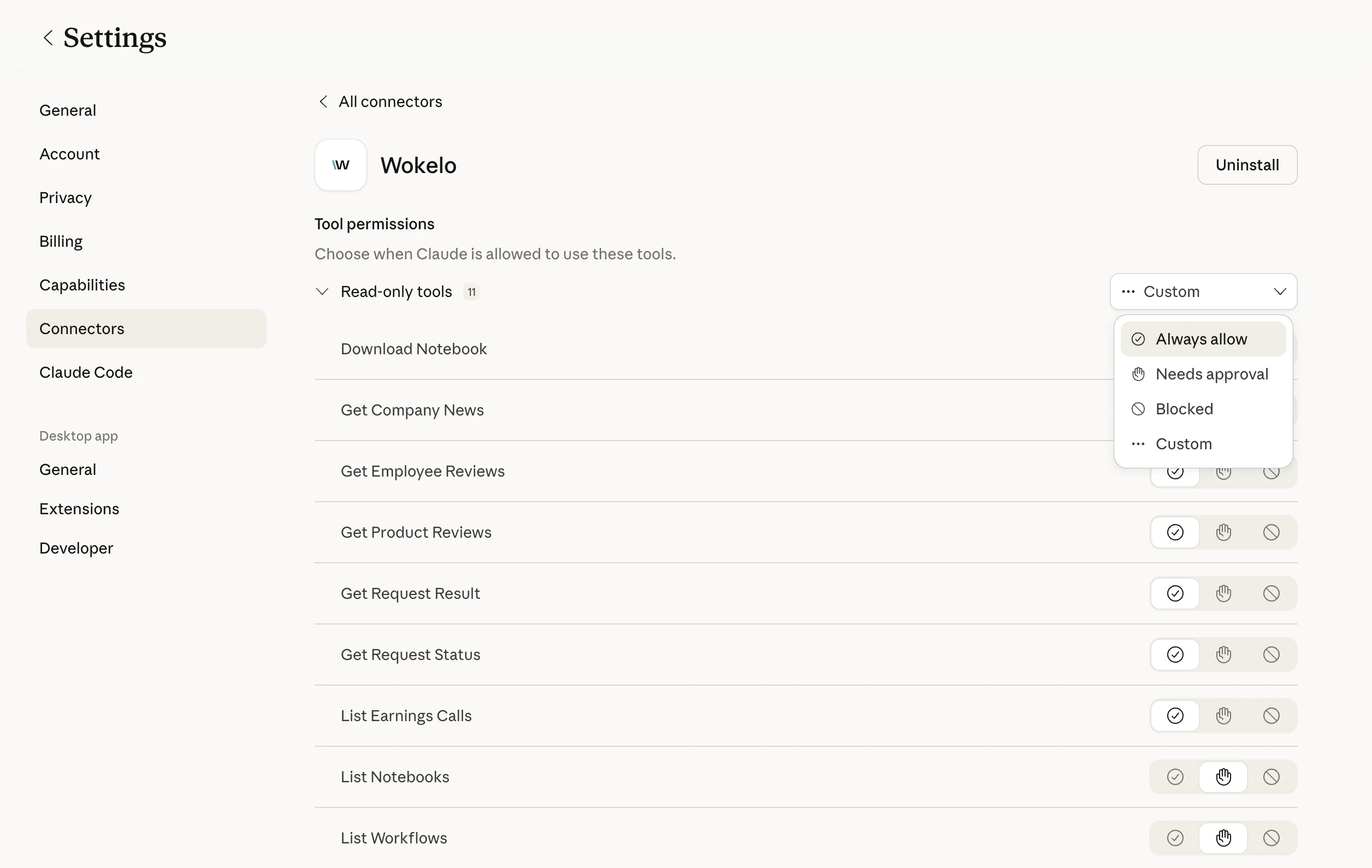
Padrões recomendados
| Permissão | Ferramentas | Por quê |
|---|---|---|
| Sempre permitir | search_company, get_company_news, get_employee_reviews, get_product_reviews, list_workflows, list_notebooks, list_earnings_calls, get_request_status, get_request_result | Rápidas, somente leitura, baixo custo de créditos |
| Requer aprovação | submit_company_enrichment, submit_industry_enrichment, submit_market_map, submit_target_screening, submit_buyer_screening, start_workflow, download_notebook | Execução longa e consomem mais créditos |
| Bloqueado | cancel_request (opcional) | Bloqueie apenas se quiser evitar cancelamento acidental de jobs de colegas |
Limites e cotas
| Limite | Valor | Observações |
|---|---|---|
| Empresas por chamada de enriquecimento (apenas seções rápidas) | 200 | Firmografia, captação, funcionários, finanças, etc. |
| Empresas por chamada de enriquecimento (com seções de IA) | 20 | Cai drasticamente quando seções lentas de IA são incluídas |
| Empresas por fluxo de comparação de pares | 5 | Limite rígido no parâmetro websites |
| Jobs assíncronos simultâneos | Depende do plano | Fale com seu gerente de conta para limites |
| Consumo de créditos | Varia por ferramenta | Fluxos de relatórios assíncronos consomem mais |
Se você atingir um limite, seu assistente retornará um erro da Wokelo. Reenvie o prompt com um lote menor ou fale com seu gerente de conta para aumentar as cotas.
Solução de problemas
Verifique se você concluiu o OAuth — se a janela de autenticação fechou cedo, o conector não será registrado. Remova e adicione novamente, e observe o redirecionamento para a página de login da Wokelo. Se estiver no ChatGPT, confirme também se o Modo Desenvolvedor está habilitado no nível do workspace. O skill file quase certamente está ausente ou desatualizado. Reenvie o [Skill File](https://wkemails.blob.core.windows.net/clients/%28%279a7adb3f-b1d2-4fe0-9062-3aea68bae540%27%2C%29/SKILL.md) mais recente. O skill instrui o assistente a preferir a Wokelo em vez da busca na web para consultas sobre empresas. Sua sessão OAuth expirou. Abra **Conectores → Configurar → Wokelo** e reautentique-se. Nenhum dado é perdido. Pesquisas setoriais e relatórios completos de empresas podem legitimamente levar de 30 a 60 minutos. Se um job exceder 90 minutos sem resultado, peça ao seu assistente para chamar `cancel_request` e reenviar, ou entre em contato com o suporte informando o `request_id`. Você está incluindo uma seção lenta de IA (ex.: `business_model`, `management_profiles`). Remova a seção de IA ou divida em lotes de 20. Pergunte ao seu assistente: *"Liste meus fluxos de trabalho Wokelo disponíveis."* Ele chamará `list_workflows` e exibirá os códigos de fluxo personalizados da sua empresa. Depois, peça para executar o que você deseja.FAQ
O servidor MCP é um wrapper que expõe as capacidades de pesquisa da Wokelo a assistentes de IA de forma nativa para chat. A [API REST](/overview) é para integração direta em seus próprios aplicativos. A maioria das ferramentas MCP mapeia 1:1 para endpoints da API, mas a camada MCP adiciona orquestração — encadeamento de ferramentas, gerenciamento de polling e formatação de saídas para chat. Suportados oficialmente: **Claude Web**, **Claude Desktop**, **ChatGPT Business** e **ChatGPT Enterprise**. Qualquer cliente compatível com MCP (Cursor, Cline, agentes personalizados) também deve funcionar, mas não é testado oficialmente. Sim — o acesso MCP requer uma conta Wokelo ativa com MCP habilitado. Fale com seu gerente de conta se não tiver certeza sobre seu plano. Todo o tráfego do MCP é autenticado via OAuth e usa HTTPS. A Wokelo não treina com suas consultas nem as compartilha com terceiros. Consulte seu contrato de cliente para obter os termos completos de tratamento de dados. Sim. As ferramentas assíncronas retornam um `request_id` que pode ser consultado por um agente ou job agendado — inclusive via [Cowork](https://www.anthropic.com/) ou camadas de orquestração semelhantes — para entregas não supervisionadas, como resumos de portfólio na segunda-feira de manhã. A ferramenta relevante retorna um resultado vazio ou parcial. Seu assistente deve recorrer à pesquisa na web para essa solicitação específica — o arquivo de skill impõe esse comportamento. Pergunte: *"Mostre-me meus notebooks recentes da Wokelo"* — o assistente chama `list_notebooks`, encontra o relatório e pode baixá-lo como PDF, DOCX ou PPTX via `download_notebook`.Próximos passos
Consultas de exemplo e fluxos de trabalho de negociação que você pode executar hoje. Acesso direto à API REST para integrações personalizadas. Conecte a Wokelo com Affinity, Salesforce, DealCloud e muito mais. Dúvidas sobre planos, limites ou integração.Esta documentação é criada e hospedada no Mintlify, uma plataforma de documentação para desenvolvedores.