Solara AI
AI agents edit a talking-head recording into a captioned short video in a style you pick, export it and ask to post it to Instagram, TikTok, Facebook, LinkedIn, YouTube or X. You approve every post.
Servidor MCP hospedado
npx add-mcp 'https://api.solaraai.com/mcp'Instala no Claude Code, Codex, Cursor e outros
Documentação
Connect an AI agent to Solara AI
Add Solara AI to your AI agent with one address, sign in, and allow what it may do.
Solara AI works with any AI agent that can use a remote MCP server. MCP is the standard way AI agents use other apps. You add Solara's address to your agent, sign in to Solara, and allow what it asks for.
How it works
sequenceDiagram
    participant You
    participant Agent as Your AI agent
    participant Solara as Solara MCP server
    participant Social as Your accounts
    You->>Agent: Make a video from my recording
    Agent->>Solara: Uploads it, makes and edits the video
    Solara-->>You: Every change shows in the editor
    You->>Agent: Looks good, post it on Tuesday
    Agent->>Solara: Exports it and asks to post
    Agent-->>You: A link to approve the post
    You->>Solara: Approve
    Solara->>Social: Posts it at its time
Your agent talks to Solara's MCP server. It can make, change and export videos, but it only asks to post: every post waits for you in Solara.
Solara AI's address
https://api.solaraai.com/mcp
Your agent lists it as Solara AI, with Solara's icon.
Pick your AI agent
[card] ChatGPT
Business, Enterprise or Edu, on the web, as a custom MCP server.
[card] Claude
On claude.ai and Claude Desktop, as a custom connector.
[card] Claude Code
In the terminal, with one command.
[card] Grok Bot
By asking your Bot in a chat.
[card] Cursor
In its MCP settings.
[card] opencode
In its config file.
[card] OpenClaw
In the terminal, with two commands.
[card] Hermes Agent
In its config file.
What happens when you connect
1. Your agent opens Solara AI
It opens a Solara page in your browser. Sign in if you aren't already.
2. You see what it asks for
The page names the agent, the account it will act for, and what it will be able to do. Check the name: Solara warns you when an app's name looks like one it knows but isn't.
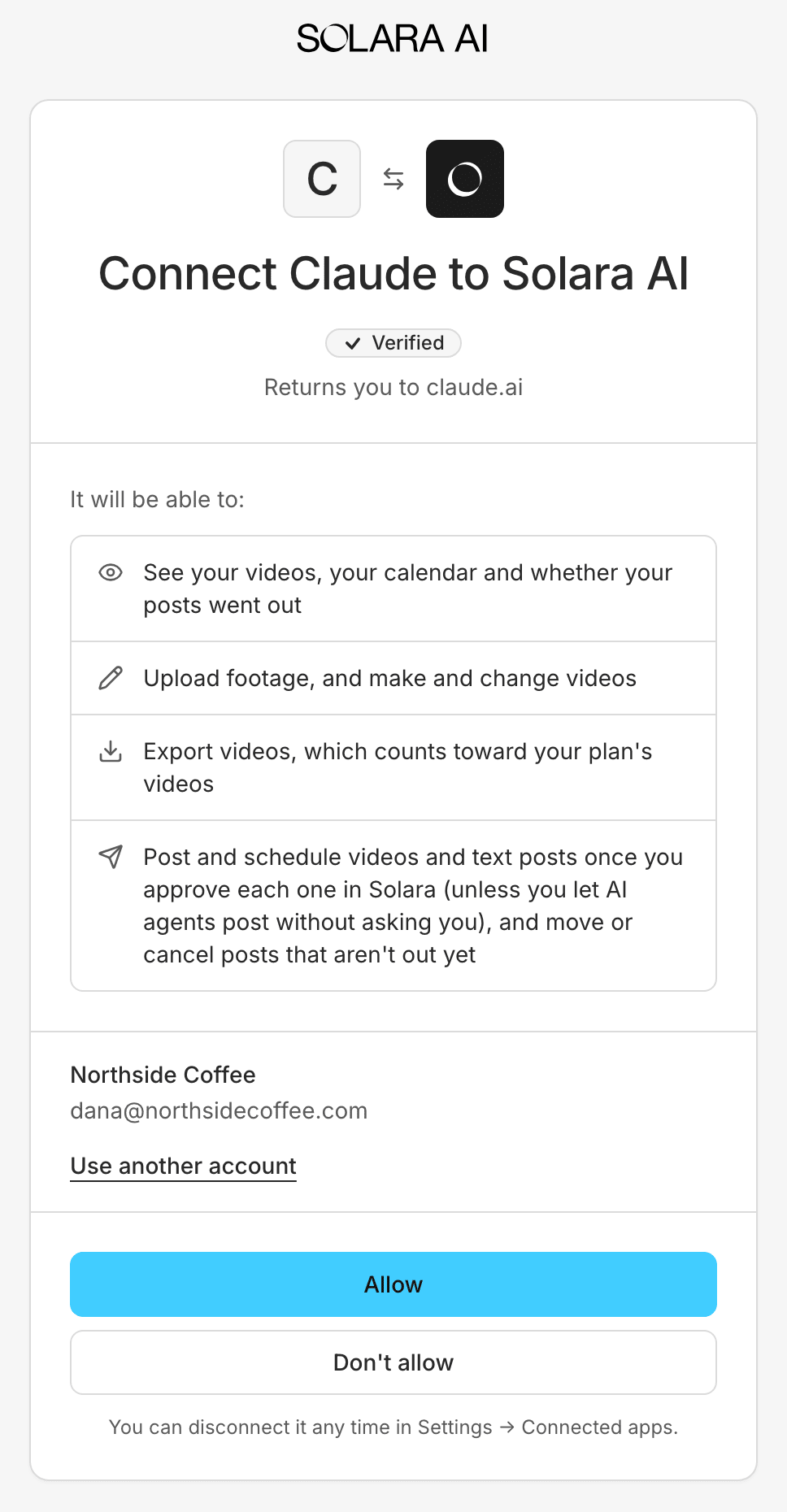
The page Claude opens.
3. You allow it, or not
Choose Allow to connect it, or Don't allow. Your agent can then use Solara's tools.
Solara asks you every time an AI agent connects. It never connects one silently.
What you can allow
| Permission | What the agent can do |
|---|---|
| Read | See your videos, your calendar and whether your posts went out |
| Edit | Upload footage and photos to post, and make and change videos |
| Export | Export videos, which counts toward your plan's videos (on the free plan, its one export) |
| Ask to post | Ask to post and schedule videos, photos and carousels, and text posts, and choose for TikTok whether a post goes to your drafts or posts directly. You approve each one in Solara, unless you let AI agents post without asking (coming soon). Soon also: move or cancel a scheduled post that hasn't gone out, when you ask |
AI agents ask for all four when they connect, so you allow them once. Asking to post never posts by itself: each post waits for you in Solara.
Check that it works
Ask your AI agent:
List the video styles I can use in Solara.
[!TIP]
It calls Solara's
list_stylestool and shows you the styles: you're connected.
Your recording
[tab] An agent on your computer
Claude Code, Cursor, opencode, OpenClaw on your computer, and Claude Desktop sessions that can open your files upload a recording from your computer when you ask. The agent sends the file with one
curlcommand, straight to Solara's storage, so its shell must reachapi.solaraai.comandamazonaws.com.
[tab] A web chat or a Bot
ChatGPT, claude.ai in your browser and Grok Bot work in the cloud and can't send Solara a file from your computer. Paste a public link to your recording instead: a Google Drive link shared as Anyone with the link, a Dropbox link, or a link to the file on a website. Solara fetches it (mp4, mov or webm, up to 2 GB and 10 minutes). Or upload it in Solara, then paste the video's link into the chat.
If export or posting is refused
An agent you connected before 3 November 2026 may have only Read and Edit, and some agents don't ask for more by themselves. Reconnecting from your agent alone can keep the old permissions, so disconnect it in Solara first:
- In Solara, open the menu under your name and choose Connected apps, then Disconnect next to the agent.
- Connect it again from your agent, and allow it. Solara asks for every permission, export and posting included.
Related
[card] Make your first video
The whole loop once: connect, make, export and post.
[card] Connect your social accounts
The accounts your agent can ask to post to.
[card] Approve a post
What the approval page shows, and what to check.
[card] Disconnect an AI agent
Stop an agent. Its next request fails.
This documentation is built and hosted on Mintlify, a developer documentation platform.