Norce Assistant
Fornece conhecimento baseado em IA e exemplos de código para o desenvolvimento Norce Commerce diretamente no seu ambiente de IA preferido.
Documentação
Usando o Servidor MCP Assistant
Visão geral: O servidor MCP (Model Context Protocol) Assistant fornece conhecimento com IA e exemplos de código para o desenvolvimento Norce Commerce diretamente no seu ambiente de IA preferido.
O que é o Norce Assistant MCP?
O servidor MCP Assistant atua como uma ponte entre assistentes de IA (como Claude Desktop, extensões do VSCode ou outras ferramentas compatíveis com MCP) e a documentação e base de conhecimento do Norce Commerce. Ele permite que você obtenha ajuda contextual, exemplos de código e orientação técnica sem sair do seu ambiente de desenvolvimento.
URL do servidor: https://norceassistant.mcp.kapa.ai e https://norceassistant2.mcp.kapa.ai
Métodos de Autenticação
O servidor MCP Assistant suporta dois métodos de autenticação, dependendo do seu caso de uso:
1. Autenticação Google (Recomendada para Uso Pessoal)
- Caso de uso: Desenvolvedores individuais usando clientes de IA para desktop
- Configuração: Redirecionamento automático para Google OAuth na primeira conexão
- Benefícios: Configuração fácil, sem necessidade de gerenciar chaves de API
- Host:
https://norceassistant2.mcp.kapa.ai
2. Autenticação por Chave de API (Para Ferramentas de Desenvolvimento, aplicações ou agentes)
- Caso de uso: Ferramentas de desenvolvimento, aplicações, agentes automatizados
- Configuração: Requer uma chave de API válida nos cabeçalhos da requisição
- Benefícios: Acesso programático, adequado para CI/CD e automação
- Host:
https://norceassistant.mcp.kapa.ai
Instruções de Configuração
Configuração no Claude Desktop (Google Auth)
- Instale o Claude Desktop se ainda não tiver
- Configure a conexão MCP nas configurações do Claude Desktop
- Adicione o servidor Norce Assistant:
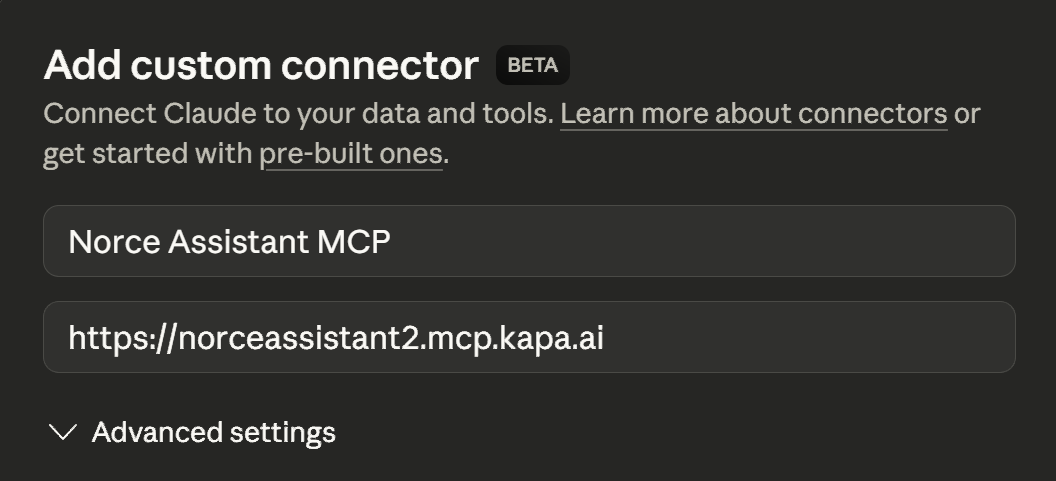
- Primeira conexão: Você será redirecionado para o Google para autenticação
- Conceda permissões para acessar o serviço Norce Assistant
Configuração no VSCode/Ferramentas de Desenvolvimento (Chave de API)
Para acesso programático ou ferramentas de desenvolvimento, use autenticação por chave de API:
{
  "servers": {
    "norceassistant_server": {
      "transport": "http",
      "url": "https://norceassistant.mcp.kapa.ai",
      "headers": {
        "Authorization": "Bearer YOUR_API_KEY_HERE"
      }
    }
  }
}
Nota: Substitua
YOUR_API_KEY_HEREpela sua chave de API real do Norce Assistant. Entre em contato com o suporte Norce para obter acesso à chave de API.
Usando o Norce Assistant
Depois de conectado, você pode:
- Fazer perguntas técnicas sobre as APIs do Norce Commerce
- Solicitar exemplos de código para cenários específicos de integração
- Obter ajuda com solução de problemas de problemas comuns de desenvolvimento
- Acessar documentação sem mudar de contexto
Exemplos de Consultas
- "Como faço para autenticar com a API do Norce Commerce?"
- "Mostre-me um exemplo de criação de produto usando a API Admin"
- "Quais são os campos obrigatórios para o registro de um cliente?"
- "Ajude-me a solucionar um erro 401 na minha chamada de API"
- "Ajude-me a criar um aplicativo que se conecta ao Norce Commerce e..."
Solução de Problemas
Problemas de Conexão
- Verifique se a URL do servidor está correta:
https://norceassistant.mcp.kapa.aiouhttps://norceassistant2.mcp.kapa.ai - Verifique sua conexão com a internet
- Certifique-se de que seu cliente MCP suporta transporte HTTP
Problemas de Autenticação
- Google Auth: Limpe o cache do navegador e tente autenticar novamente
- Chave de API: Verifique se a chave de API é válida e está formatada corretamente nos cabeçalhos
- Verifique se o formato do cabeçalho Authorization é:
Bearer YOUR_API_KEY