Plex MCP Server
Pesquise por filmes e gerencie playlists no seu Plex Media Server usando a API do Plex.
Documentação
Plex MCP Server
Este é um servidor MCP baseado em Python que se integra à API do Plex Media Server para pesquisar filmes e gerenciar playlists. Ele usa a biblioteca PlexAPI para interação perfeita com o seu servidor Plex.
Capturas de Tela
Aqui estão alguns exemplos de como o servidor MCP Plex funciona:
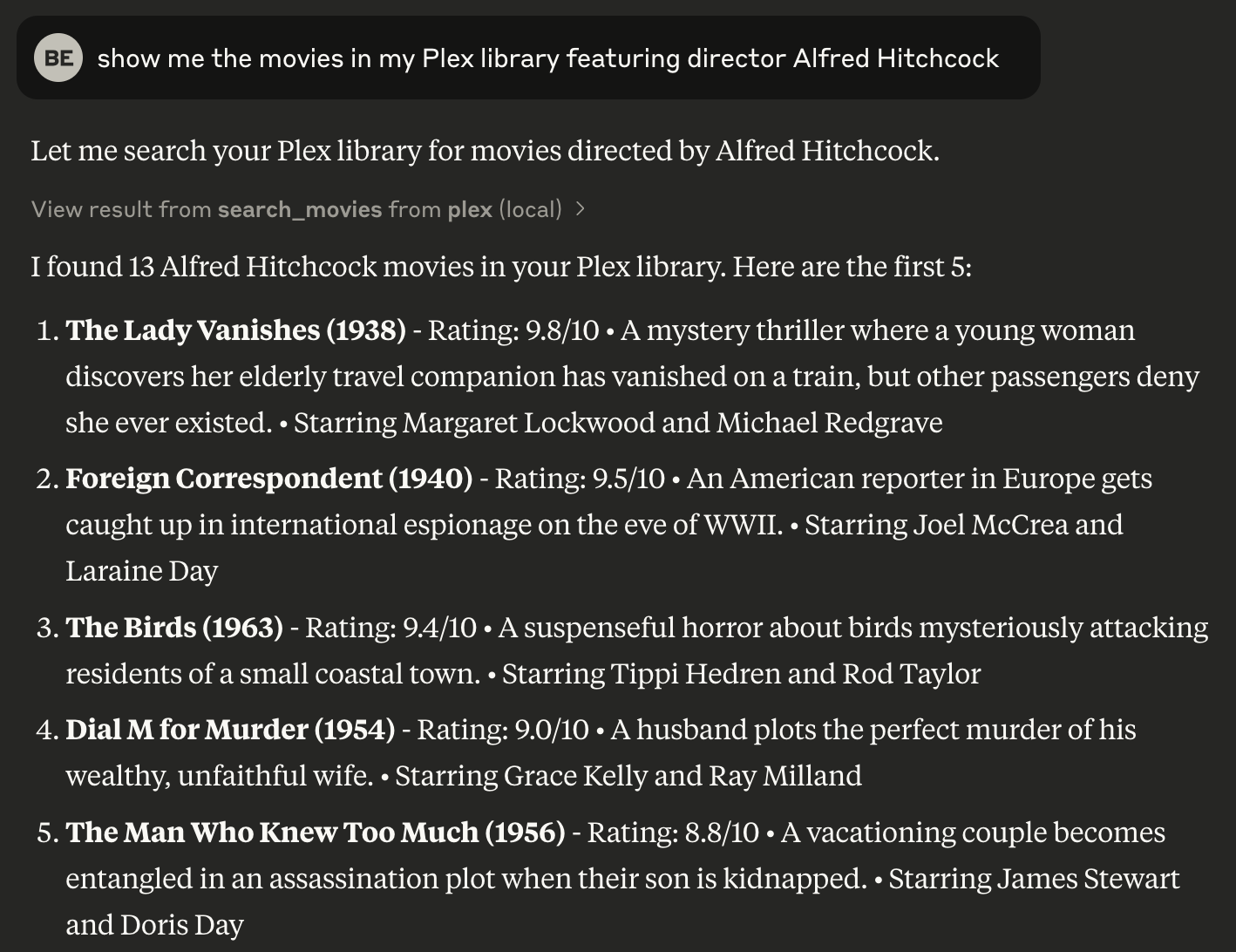
1. Encontrar Filmes na Biblioteca do Plex por Diretor
Pesquise filmes na sua biblioteca do Plex especificando o nome de um diretor. Por exemplo, pesquisar por "Alfred Hitchcock" retorna uma lista dos filmes dele na sua biblioteca.
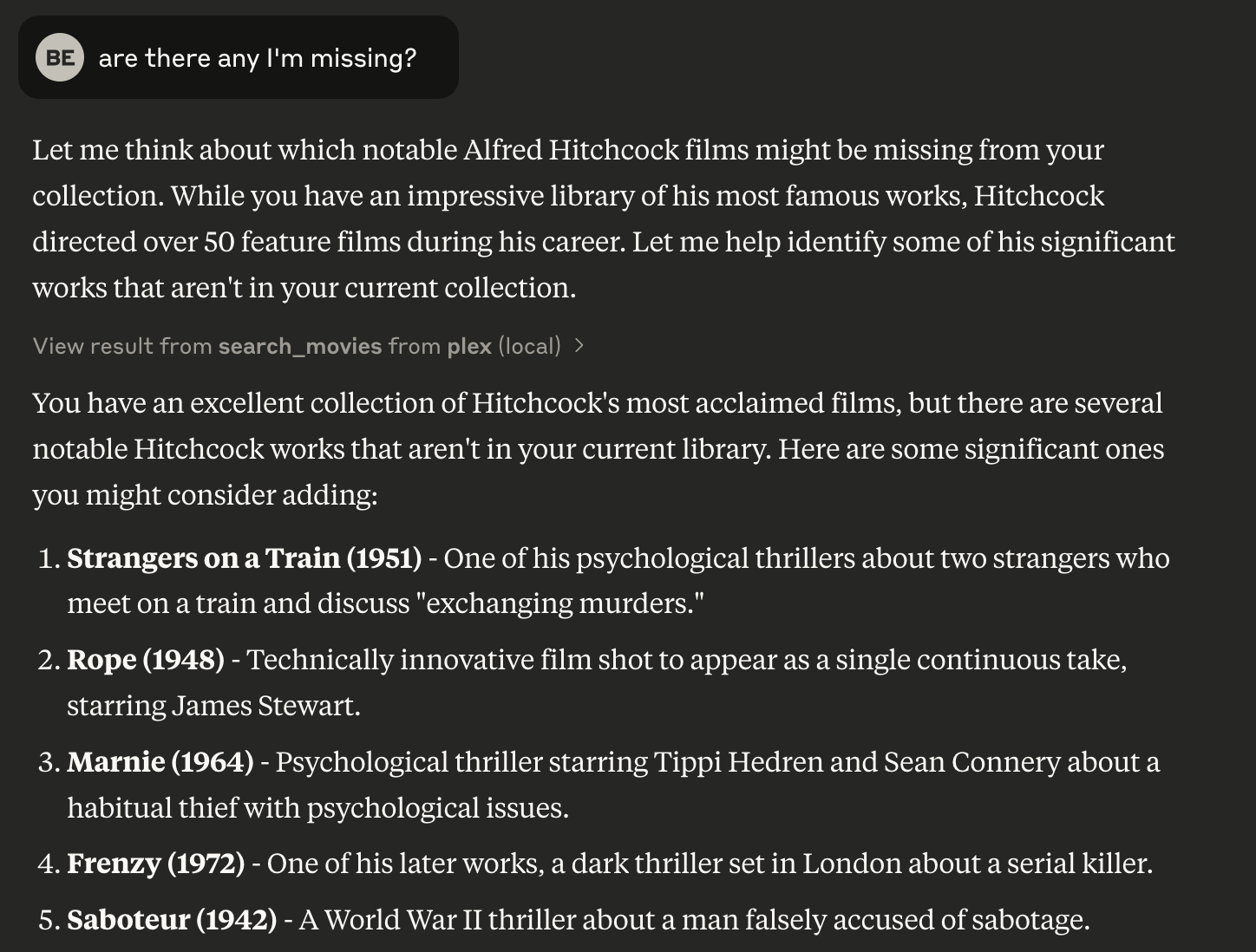
2. Encontrar Filmes Ausentes para um Diretor
Identifique filmes de um diretor específico que estão ausentes da sua biblioteca do Plex. Isso ajuda você a descobrir lacunas na sua coleção.
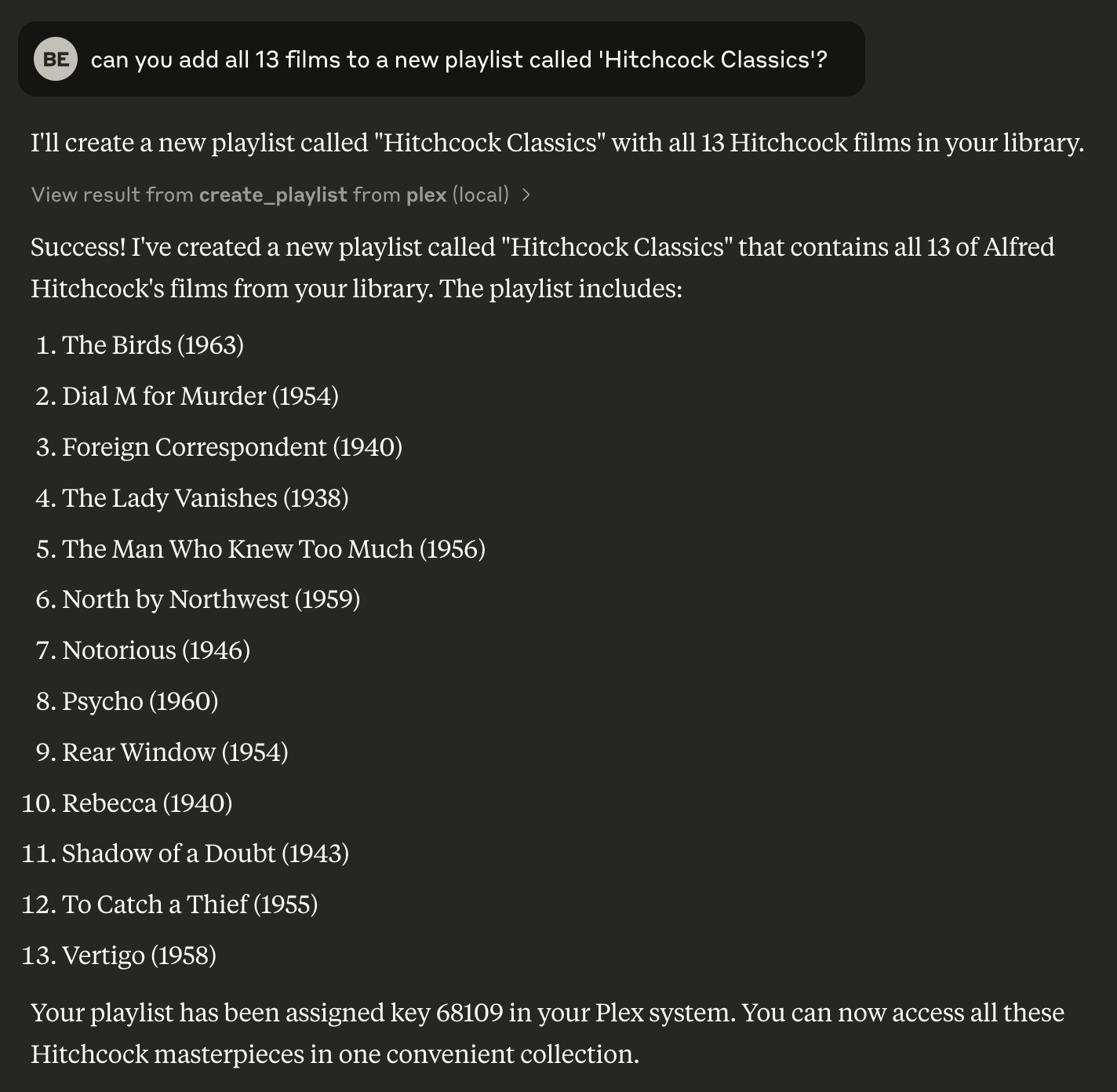
3. Criar uma Playlist na Sua Biblioteca do Plex
Crie uma nova playlist na sua biblioteca do Plex usando os filmes encontrados em uma pesquisa. Isso permite organizar sua biblioteca de forma eficiente.
Configuração
Pré-requisitos
- Python 3.8 ou superior
uvgerenciador de pacotes- Um Plex Media Server com acesso à API
Instalação
Instalando via Smithery
Para instalar a Integração do Plex Media Server para Claude Desktop automaticamente via Smithery:
npx -y @smithery/cli install @djbriane/plex-mcp --client claude
Instalando Manualmente
-
Clone este repositório:
git clone <repository-url> cd plex-mcp -
Instale as dependências com
uv:uv venv source .venv/bin/activate uv sync -
Configure as variáveis de ambiente para o seu servidor Plex:
PLEX_TOKEN: Seu token de autenticação do PlexPLEX_SERVER_URL: A URL do seu servidor Plex (por exemplo, http://192.168.1.100:32400)
Encontrando Seu Token do Plex
Você pode encontrar seu token do Plex desta forma:
- Entre no Plex Web App
- Abra as Ferramentas do Desenvolvedor
- Na aba Console, cole e execute:
window.localStorage.getItem('myPlexAccessToken')
Uso com Claude
Adicione a seguinte configuração ao seu aplicativo Claude:
{
    "mcpServers": {
        "plex": {
            "command": "uv",
            "args": [
                "--directory",
                "FULL_PATH_TO_PROJECT",
                "run",
                "src/plex_mcp/plex_mcp.py"
            ],
            "env": {
                "PLEX_TOKEN": "YOUR_PLEX_TOKEN",
                "PLEX_SERVER_URL": "YOUR_PLEX_SERVER_URL"
            }
        }
    }
}
Comandos Disponíveis
O servidor MCP Plex expõe estes comandos:
| Comando | Descrição | Referência OpenAPI |
|---|---|---|
search_movies | Pesquise filmes na sua biblioteca por vários filtros (por exemplo, título, diretor, gênero) com suporte a um parâmetro limit para controlar o número de resultados. | /library/sections/{sectionKey}/search |
get_movie_details | Obtenha informações detalhadas sobre um filme específico. | /library/metadata/{ratingKey} |
get_movie_genres | Obtenha os gêneros de um filme específico. | /library/sections/{sectionKey}/genre |
list_playlists | Liste todas as playlists no seu servidor Plex. | /playlists |
get_playlist_items | Obtenha os itens de uma playlist específica. | /playlists/{playlistID}/items |
create_playlist | Crie uma nova playlist com filmes especificados. | /playlists |
delete_playlist | Exclua uma playlist do seu servidor Plex. | /playlists/{playlistID} |
add_to_playlist | Adicione um filme a uma playlist existente. | /playlists/{playlistID}/items |
recent_movies | Obtenha filmes adicionados recentemente à sua biblioteca. | /library/recentlyAdded |
Executando Testes
Este projeto inclui testes unitários e testes de integração. Use as seguintes instruções para executar cada tipo de teste:
Testes Unitários
Os testes unitários usam dados fictícios para verificar a funcionalidade de cada módulo sem exigir um servidor Plex ativo.
Para executar todos os testes unitários:
uv run pytest
Testes de Integração
Os testes de integração são executados contra um servidor Plex ativo usando variáveis de ambiente definidas em um arquivo .env. Primeiro, crie um arquivo .env na raiz do seu projeto com sua configuração do Plex:
PLEX_SERVER_URL=https://your-plex-server-url:32400
PLEX_TOKEN=yourPlexTokenHere
Os testes de integração são marcados com o marcador de integração. Para executar apenas os testes de integração:
uv run pytest -m integration
Se você estiver enfrentando problemas de conexão com seu servidor Plex, tente executar os testes de integração para ajudar na solução de problemas.
Estilo de Código e Convenções
-
Estrutura de Módulo:
Use cabeçalhos de seção claros para imports, configuração de logging, funções utilitárias, definições de classes, helpers globais, métodos de ferramentas e execução principal (protegida porif __name__ == "__main__":). -
Nomenclatura:
Use CamelCase para classes e lower_snake_case para funções, variáveis e fixtures. Em testes, liste fixtures integradas (por exemplo,monkeypatch) antes das personalizadas. -
Documentação e Comentários:
Inclua um docstring conciso para cada módulo, classe e função, com comentários em linha para lógica complexa. -
Tratamento de Erros e Logging:
Use o módulologgingdo Python com mensagens de erro consistentes (prefixo "ERROR:") e tratamento explícito de exceções. -
Padrões Assíncronos:
Defina funções vinculadas a I/O como async e useasyncio.to_thread()para lidar com operações de bloqueio.