MCP Front
Um proxy OAuth 2.1 para servidores MCP que permite login único com Google, validação de domínio e tokens por usuário.
Documentação
mcp-front 


[!WARNING] Este projeto está em desenvolvimento e não deve ser considerado pronto para produção.
Embora eu esteja bastante confiante de que a arquitetura geral é sólida, e eu mesmo dependo da implementação — então deve funcionar :tm:. Mas definitivamente é software alfa.
Espere mudanças significativas! :)
Além disso, não confie muito na documentação, ela fica desatualizada rapidamente; nem sempre a mantenho atualizada ao fazer alterações ou adicionar/remover recursos. Ela está aqui principalmente para me ancorar e me ajudar a manter o foco na minha visão inicial.
[!TIP] Procurando a maneira mais fácil de obter um servidor MCP para sua API? Confira Stainless✨. Oferecemos geração de SDK e MCP de primeira linha. Crie um servidor MCP completo e publique-o no Cloudflare e no Docker Hub em poucos minutos!
Aviso: o autor do mcp-front é um funcionário antigo da Stainless
Um gateway de autenticação para servidores MCP (Model Context Protocol). Permita que sua equipe use o Claude com bancos de dados, APIs e ferramentas internas sem expô-los à internet.
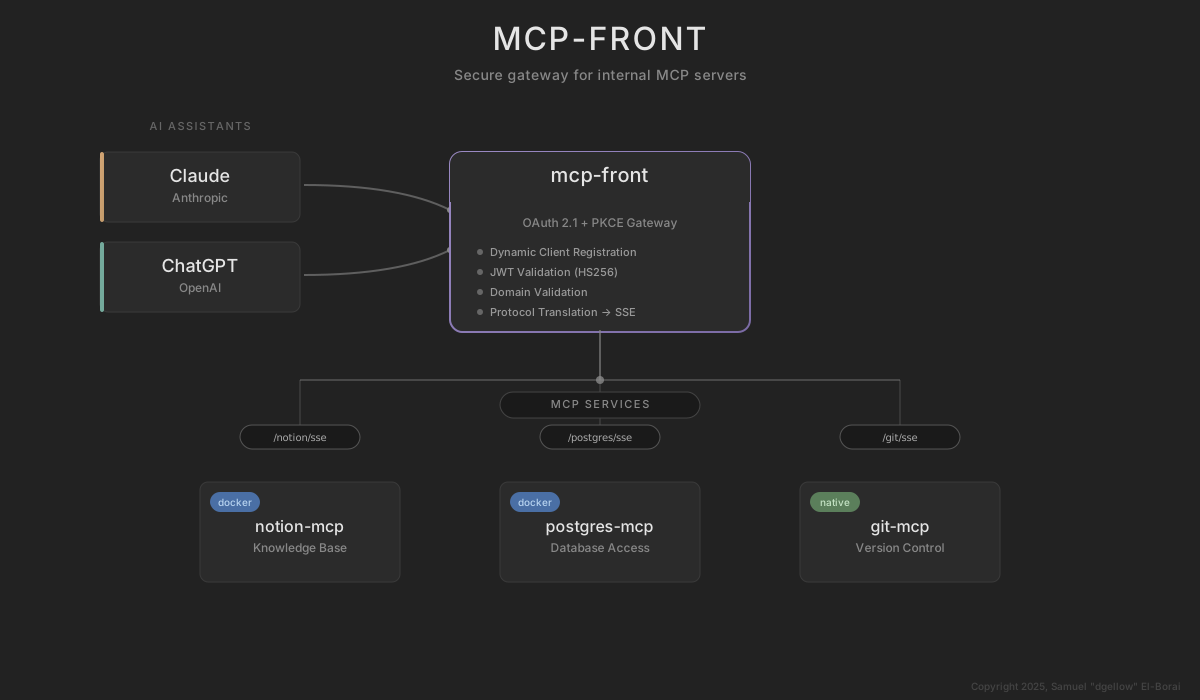
O problema
Você quer que sua equipe use o Claude com servidores MCP internos (bancos de dados, Linear, Notion, APIs internas). Mas os servidores MCP não têm autenticação multiusuário integrada. Você ou os expõe à internet pública, ou cria autenticação por conta própria, ou executa instâncias separadas por usuário. Nenhuma dessas opções é boa.
A solução
O mcp-front fica entre o Claude e seus servidores MCP como um gateway de autenticação. Sua equipe autentica via OAuth uma vez (Google, Azure AD, GitHub ou qualquer provedor OIDC). Quando o Claude se conecta, o mcp-front valida o token, verifica se o usuário pertence à sua organização e faz proxy para o servidor MCP real no seu ambiente seguro.
Para servidores stdio, cada usuário recebe um subprocesso isolado. Para serviços que precisam de chaves de API individuais (Notion, Linear), os usuários os conectam uma vez por meio de uma interface web e o mcp-front injeta os tokens automaticamente. Os tokens são limitados a serviços específicos (RFC 8707) — um token para seu servidor Postgres não funcionará para o Linear.
Controle de acesso em toda a organização com isolamento por usuário. Sem modificações nos seus servidores MCP. Nada exposto à internet.
Como funciona
- O usuário adiciona
https://your-domain.com/<service>/sseao Claude - O Claude redireciona para o provedor de identidade para login (somente na primeira vez)
- O mcp-front valida se o usuário pertence à sua organização
- Se o serviço precisar de uma chave de API do usuário (Notion, Linear), o usuário a conecta por meio de uma página web
- O mcp-front faz proxy de todas as solicitações MCP para o servidor backend
Experimente localmente
Salve isto como config.json:
{
  "version": "v0.0.1-DEV_EDITION_EXPECT_CHANGES",
  "proxy": {
    "baseURL": "http://localhost:8080",
    "addr": ":8080"
  },
  "mcpServers": {
    "filesystem": {
      "transportType": "stdio",
      "command": "npx",
      "args": ["-y", "@modelcontextprotocol/server-filesystem", "/tmp"],
      "serviceAuths": [
        {
          "type": "bearer",
          "tokens": ["dev-token-123"]
        }
      ]
    }
  }
}
# With Go
go install github.com/stainless-api/mcp-front/cmd/mcp-front@main
mcp-front -config config.json

# Or with Docker
docker run -p 8080:8080 -v $(pwd)/config.json:/app/config.json dgellow/mcp-front:latest
No Claude.ai, adicione um servidor MCP com URL http://localhost:8080/filesystem/sse, tipo de autenticação Bearer Token, token dev-token-123.
Consulte o Quickstart para um passo a passo completo.
Indo além
Provedores de Identidade — Configure Google, Azure AD, GitHub ou qualquer provedor OIDC para OAuth em produção.
Configuração — Todas as opções de configuração, incluindo persistência no Firestore, HTTPS e autenticação de serviço por usuário.
Tipos de Servidor — Stdio, SSE, HTTP transmitível, ferramentas inline e endpoints agregados.
Autenticação de Serviço — Tokens por usuário para serviços como Notion, Linear e outros serviços OAuth ou de chave de API.
Arquitetura — Validação de público por serviço, fluxo de tokens e conformidade com a especificação MCP.
Referência da API — Endpoints HTTP, descoberta OAuth e registro de clientes.
Segurança
O mcp-front usa OAuth 2.0 com PKCE para clientes públicos, controle de acesso baseado em domínio e organização, isolamento de sessão por usuário para servidores stdio, declarações de público por serviço (RFC 8707) para evitar reutilização de tokens entre serviços e criptografia AES-256-GCM para dados sensíveis em repouso.
Limite de segurança: o mcp-front lida com autenticação. Os servidores MCP lidam com autorização e validação de entrada. Use apenas servidores MCP em que você confia com seus dados.
Licença
Licenciado sob a Elastic License 2.0 com exceções comerciais para a Stainless Software Ltd e suas afiliadas, e o autor. É permitido usar o mcp-front como infraestrutura para seus próprios serviços (incluindo públicos/comerciais); oferecer o próprio mcp-front como produto hospedado não é permitido.
Copyright 2025 Samuel "dgellow" El-Borai (sam@elborai.me)