Inbox MCP
Um assistente de e-mail inteligente, alimentado por LLM, usando a API Nylas v3.
Documentação
Inbox MCP
Transforme sua caixa de entrada em um assistente inteligente com tecnologia de LLM—instantaneamente.
Gerencie, organize e otimize seus e-mails facilmente usando linguagem natural, com ferramentas robustas e otimizadas para processamento em lote, construídas sobre Nylas v3. Compatível de fábrica com Gmail, Outlook, iCloud, Yahoo e praticamente qualquer serviço IMAP (até mesmo seu e-mail corporativo!).
As ferramentas são cuidadosamente elaboradas com descrições claras e parâmetros consistentes, otimizados para integração perfeita com diversos LLMs. As respostas são fornecidas em blocos XML facilmente analisáveis, permitindo que o LLM lide com suas solicitações sem esforço.
Testado extensivamente em fluxos de trabalho reais, o Inbox MCP reduz significativamente a carga cognitiva, lidando com eficiência com tarefas que você prefere automatizar.
A Nylas inclui 5 contas conectadas gratuitas, para que você possa começar imediatamente—sem gastar nada.
✨ Exemplos da vida real (coisas que você realmente vai dizer)
| Você diz casualmente… | O Inbox MCP lida facilmente ao… |
|---|---|
| "dá uma olhada na minha caixa de entrada e me diz o que é importante e no que preciso agir" | Revisar suas mensagens, identificar rapidamente e-mails acionáveis e resumir o que precisa de atenção. |
| "Encontre os e-mails sem importância dos meus últimos 100 e mova-os para a pasta Sem importância." | Filtrar inteligentemente e-mails de baixa prioridade e organizá-los discretamente fora da vista. |
| "Arquive tudo com mais de duas semanas, exceto e-mails com estrela." | Arquivar em lote e-mails antigos enquanto preserva com segurança suas mensagens com estrela. |
| "Resuma e encaminhe os últimos alertas da AWS para minha equipe." | Compilar alertas recentes da AWS em um resumo conciso e enviá-los imediatamente. |
🎯 Por que usar o Inbox MCP?
- Caixa de entrada zero, simplificada: Automatize rapidamente o gerenciamento de e-mails usando instruções em linguagem natural.
- Triagem eficiente: Categorize, priorize e processe e-mails em lote sem esforço.
- Configuração fácil: Integração sem complicações com conexões diretas de conta. Sem tokens OAuth, proxies ou configurações complexas.
📌 Configuração rápida: Criando uma conta Nylas
- Cadastre-se em: Painel Nylas.
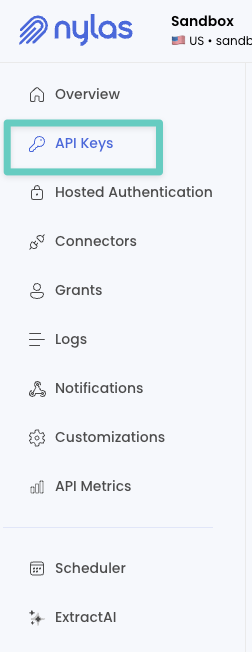
- Pegue sua chave de API na barra lateral (
API KEY).
- Navegue até
Grants, clique emAdd Test Grant(canto superior direito) e conecte sua conta de e-mail.
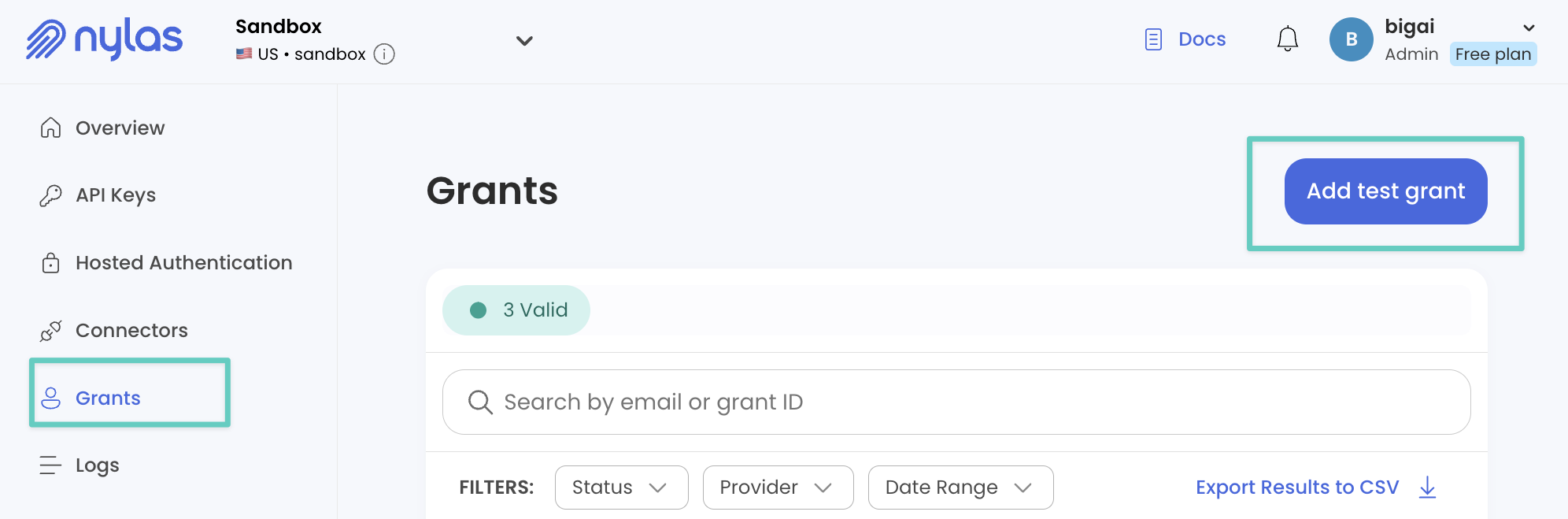
- Anote sua chave de API e o Grant ID (exibidos na tabela de grants).
🚀 Comece agora (em menos de um minuto)
Instalação fácil com Smithery (interativa)
O Inbox MCP integra-se perfeitamente com clientes MCP como Claude Desktop, Cursor, Windsurf e outros.
Instalação interativa em uma linha (recomendada):
npx -y @smithery/cli@latest install "@darinkishore/inbox-mcp" --client claude
Isso solicitará suas credenciais Nylas (nylasAccessToken e nylasGrantId). Para outros clientes MCP compatíveis, substitua claude pelo seu cliente preferido:
npx -y @smithery/cli@latest install "@darinkishore/inbox-mcp" --client cursor # or windsurf, vscode, etc.
🛠️ Configuração manual local (opcional)
Se preferir controle manual para desenvolvimento local:
git clone https://github.com/darinkishore/Inbox-MCP.git
cd Inbox-MCP
npm install && npm run build
Em seguida, no mcp-config.json do seu cliente MCP:
{
  "mcpServers": {
    "nylas-email": {
      "command": "node dist/index.js",
      "workingDirectory": "/absolute/path/to/Inbox-MCP",
      "env": {
        "NYLAS_ACCESS_TOKEN": "...",
        "NYLAS_GRANT_ID": "..."
      }
    }
  }
}
🔧 Ferramentas para o fluxo de trabalho diário (otimizadas)
| Ferramenta | O que faz (em linguagem simples) |
|---|---|
filter_emails | Encontre e-mails rapidamente por pasta, status de não lido, datas ou sinalizadores. |
triage_update_emails | Atualize e-mails em lote como lido/não lido, com estrela/sem estrela ou mova pastas. |
batch_archive_emails | Arquive grupos de e-mails com segurança e rapidez. |
search_emails | Pesquise e-mails rapidamente com consultas simples por palavras-chave. |
read_emails | Busque e-mails completos formatados em Markdown, ideais para resumos. |
send_email / draft_email | Componha e envie (ou rascunhe) novos e-mails facilmente. |
| Ferramentas de gerenciamento de pastas | (list_, create_, update_, delete_, get_or_create_) |
🗺️ Roteiro
- Pesquisa nativa aprimorada do provedor (consultas avançadas, pesquisas com múltiplos termos)
- Integração de calendário e contatos
- Conjunto expandido de ferramentas e capacidades de automação
👩💻 Amigável para desenvolvedores
- TypeScript limpo (v5.2), dependências mínimas
- Repetições robustas integradas (back-off exponencial + jitter)
- Contribuições são muito bem-vindas—vamos melhorar o gerenciamento de e-mails juntos!
📄 Licença e suporte
Licenciado sob MIT.
Se o Inbox MCP facilitar seu dia, por favor, dê uma ⭐️—sua estrela ajuda outras pessoas a descobri-lo também!